Showing posts with label Audience. Show all posts

Saturday, September 3, 2011

On-the-fly content-targetting via custom AudienceManager

In a SharePoint project, one of the requirements is to enable the end-user to set preferences, which are then immediately be applied in the portal. One of the settable preferences is the (non)interest in subjects/functions: if interested, webparts will be visible; if non-interest specified, the webpart will be invisible. Well, this kinda sounds like SharePoint audiences. As this is out-of-the-box SharePoint functionality, it is applicable for both our own custom webparts as well as standard and third-party webparts. The only problem is the sub-requirement to have the preferences immediately applied in the portal. Standard SharePoint audiencing requires to compile the Audience before it takes effect, which either occurs on scheduled basis or on request. But never immediately.
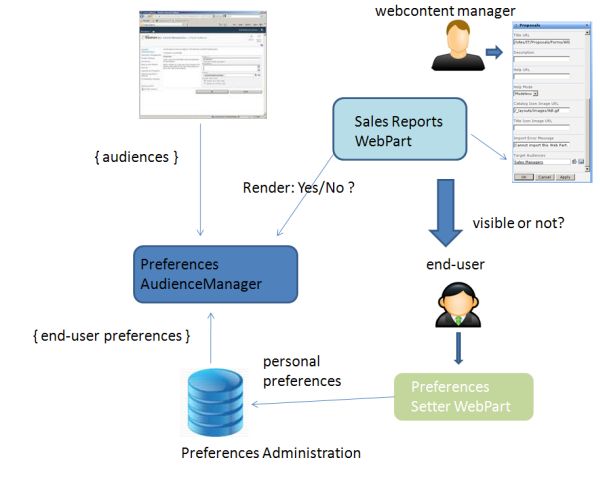
The solution for this is to utilize a custom PreferencesAudienceManager, with functionality to on-the-fly derive Audience membership on basis of the selected settings.

System architecture


PreferencesAudienceManager code-extract


public class PreferencesAudienceManager : IRuntimeFilter2
{
  ...
  public bool CheckRuntimeRender(string IsIncludedFilter)
  {
    bool render = false;
    if (SPContext.Current != null && SPContext.Current.Web.CurrentUser != null)
    {
      // Priority to OOTB SharePoint Audiencing.
      render = AudienceManager.IsCurrentUserInAudienceOf(IsIncludedFilter, true);
      if (!render)
      {
        string[] globalAudienceIDs = null;
        string[] dlDistinguishedNames = null;
        string[] sharePointGroupNames = null;
        int num = AudienceManager.GetAudienceIDsFromText(IsIncludedFilter, out globalAudienceIDs, out dlDistinguishedNames, out sharePointGroupNames);
        if (num > 0 && globalAudienceIDs != null && globalAudienceIDs.Length > 0)
        {
          string userIdent = PersonalizationUtils.GetCurrentUserIdentifier;
          UserPreferences userPreferences = PreferencesRepository.ReadUserPreferences(userIdent);

          SPServiceContext context = SPServiceContext.GetContext(SPContext.Current.Site);
          AudienceManager am = new AudienceManager(context);
          foreach (string audienceId in globalAudienceIDs)
          {
            Guid g = new Guid(audienceId);
            Audience a = am.Audiences[g];

            string preferenceAudienceName = a.AudienceName;
            UserPreferences preferenceAudience = (UserPreferences)Enum.Parse(typeof(UserPreferences), preferenceAudienceName );
          if ((preferenceAudience & userPreferences) == preferenceAudience)
          {
            render = true;
            break;
          }
        }
      }
    }
  }
  return render;
}
There is on caveat you need to be aware of; the ability to even use Audiences functionality, requires that the User Profile Service Application is installed in the farm. Microsoft namely placed the Audience functionality within the context of User Profile; even though you can thus apply Audiencing without dependency of User Profile values.

Tuesday, July 26, 2011

Personalization approach / settings administrated outside content database

Personalization is an important functional aspect in my current SharePoint 2010 project. Personalization on itself is a phrase that can have multiple meanings and appearances. Examples:
  • Customize a page for your own preferences; via personal settings of webpart properties
  • Content targeting; on basis of the visitors profile
SharePoint enables page personalization via the Provider model, inherited from ASP.net. Implication of the standard SharePoint personalization approach is that each authenticated user gets an own copy per personalized page in the content database. The personalized settings are thus administrated in the content database, similar as in case of shared webpart properties. A disadvantage of this approach is that this makes it very difficult to (web content) manage the page. A content manager can update the (template) page, but none of the content changes are automatically propagated to the individual personalization page copies in the content database.
In our application scenario, we have the additional functional requirement that it must be viable to extract management information reports of the personalized settings: what type of user (profiles) typically select personalized setting X, choose to close webpart Y etcetera. Although not impossible, it is rather impractical to extract this management information when the personalized data is stored in the content database. The schema of the SharePoint content database must be treated as internal black box, and cannot be relied on. The schema also does not support ad-hoc querying for answering varying management info requests.
We also have User Experience related requirements: the users must be able to personalize, without being aware or be directly confronted with SharePoint. It should be intuitive and natural, without explicit [noticable] personalization-setting modus. Examples of requested personalizations are tuning the webpart behavior via settings, and dynamically reposition the webparts in the page.
These combined end-user and management requirements effectively rank out the utilization of standard SharePoint personalization. So what’s a viable alternative? The one we came up consists of the following elements:
  1. [Standard] shared webpart properties for enabling the content managers to set the initial and default values for personalizable settings. The shared value is regularly stored in the SharePoint content database, and applied for each visitor which has not [yet] explicitly personalized the shared setting.
  2. Storage of personalization settings in an own SQL Server database
  3. The iGoogle-like reposition behavior via jQuery and webpart zones tagged as droppable zones
  4. An abstract base PersonalizationWebPart; that handles both the server-side aspects of personalization (retrieving + applying personalization settings, as well as saving them), as the client-side (webpart movement); and that implements virtual methods for concrete subclasses to hook into.
  5. Custom AudienceProvider to derive on-the-fly whether visitor is within a certain audience by checking setting stored in the own SQL Server database [thus no need for User Profiles, nor compiling of Audiences]
Extra and a major advantage of this personalization approach is that there no longer originates a copy of the page being personalized. If the content manager updates the page, by adding or removing a webpart, modifying content on a publishing page; these changes are automatic and immediate effective for all the visitors, whether one has personalized the page or not.
Wednesday, July 13, 2011

Make AudienceFilter webpart setting visible without User Profile Service Application started

In current project we aim to apply SharePoint's audiencing mechanisme for content targetting. As audience filters we'll use SharePoint group membership, we will not derive the audience from User Profile properties. In our current state of SharePoint farm, the User Profile service application is even not available .
One of the advantages of SharePoint audiencing is that it is out-of-the-box available for every webpart; standard SharePoint and custom webparts. However, when we intended to apply an audience filter to a standard ContentEditorWebPart in our test-environment, we were confronted with a missing Audiencing setting in the webpart toolpart. Search on the web points to prerequiste of the User Profile service application being activated. However, this is neither possible in our farm infrastructure planning, nor needed for the manner in which our application will use audiencing, that is on basis of SPGroup memberships.
Via reverse engineering SharePoint code [using .NET Reflector] I found out what directly determines the visiblity of the AudienceFilter webpart property. The responsible AdvancedToolpart class does a check on the web.config for config property "SharePoint/RuntimeFilter": if the property is not present, or the referred assembly is not valid, none of the webparts in this SharePoint webapplication will display the AudienceFilter webpart property in their toolpart. I validated this by outcommenting in web.config the property; for instance the toolpart of a ContentEditorWebPart then misses the AudienceFilter setting. After reinstating the web.config property, and reopening the toolpart; the webpart property is visible again. And thus available for usage for filters on basis of SharePoint groups, or a custom AudienceProvider.