Showing posts with label WebPart. Show all posts

Saturday, September 3, 2011

On-the-fly content-targetting via custom AudienceManager

In a SharePoint project, one of the requirements is to enable the end-user to set preferences, which are then immediately be applied in the portal. One of the settable preferences is the (non)interest in subjects/functions: if interested, webparts will be visible; if non-interest specified, the webpart will be invisible. Well, this kinda sounds like SharePoint audiences. As this is out-of-the-box SharePoint functionality, it is applicable for both our own custom webparts as well as standard and third-party webparts. The only problem is the sub-requirement to have the preferences immediately applied in the portal. Standard SharePoint audiencing requires to compile the Audience before it takes effect, which either occurs on scheduled basis or on request. But never immediately.
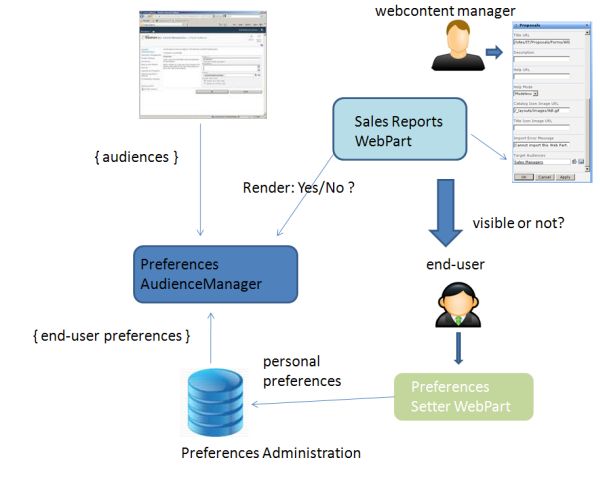
The solution for this is to utilize a custom PreferencesAudienceManager, with functionality to on-the-fly derive Audience membership on basis of the selected settings.

System architecture


PreferencesAudienceManager code-extract


public class PreferencesAudienceManager : IRuntimeFilter2
{
  ...
  public bool CheckRuntimeRender(string IsIncludedFilter)
  {
    bool render = false;
    if (SPContext.Current != null && SPContext.Current.Web.CurrentUser != null)
    {
      // Priority to OOTB SharePoint Audiencing.
      render = AudienceManager.IsCurrentUserInAudienceOf(IsIncludedFilter, true);
      if (!render)
      {
        string[] globalAudienceIDs = null;
        string[] dlDistinguishedNames = null;
        string[] sharePointGroupNames = null;
        int num = AudienceManager.GetAudienceIDsFromText(IsIncludedFilter, out globalAudienceIDs, out dlDistinguishedNames, out sharePointGroupNames);
        if (num > 0 && globalAudienceIDs != null && globalAudienceIDs.Length > 0)
        {
          string userIdent = PersonalizationUtils.GetCurrentUserIdentifier;
          UserPreferences userPreferences = PreferencesRepository.ReadUserPreferences(userIdent);

          SPServiceContext context = SPServiceContext.GetContext(SPContext.Current.Site);
          AudienceManager am = new AudienceManager(context);
          foreach (string audienceId in globalAudienceIDs)
          {
            Guid g = new Guid(audienceId);
            Audience a = am.Audiences[g];

            string preferenceAudienceName = a.AudienceName;
            UserPreferences preferenceAudience = (UserPreferences)Enum.Parse(typeof(UserPreferences), preferenceAudienceName );
          if ((preferenceAudience & userPreferences) == preferenceAudience)
          {
            render = true;
            break;
          }
        }
      }
    }
  }
  return render;
}
There is on caveat you need to be aware of; the ability to even use Audiences functionality, requires that the User Profile Service Application is installed in the farm. Microsoft namely placed the Audience functionality within the context of User Profile; even though you can thus apply Audiencing without dependency of User Profile values.

Tuesday, July 26, 2011

Personalization approach / settings administrated outside content database

Personalization is an important functional aspect in my current SharePoint 2010 project. Personalization on itself is a phrase that can have multiple meanings and appearances. Examples:
  • Customize a page for your own preferences; via personal settings of webpart properties
  • Content targeting; on basis of the visitors profile
SharePoint enables page personalization via the Provider model, inherited from ASP.net. Implication of the standard SharePoint personalization approach is that each authenticated user gets an own copy per personalized page in the content database. The personalized settings are thus administrated in the content database, similar as in case of shared webpart properties. A disadvantage of this approach is that this makes it very difficult to (web content) manage the page. A content manager can update the (template) page, but none of the content changes are automatically propagated to the individual personalization page copies in the content database.
In our application scenario, we have the additional functional requirement that it must be viable to extract management information reports of the personalized settings: what type of user (profiles) typically select personalized setting X, choose to close webpart Y etcetera. Although not impossible, it is rather impractical to extract this management information when the personalized data is stored in the content database. The schema of the SharePoint content database must be treated as internal black box, and cannot be relied on. The schema also does not support ad-hoc querying for answering varying management info requests.
We also have User Experience related requirements: the users must be able to personalize, without being aware or be directly confronted with SharePoint. It should be intuitive and natural, without explicit [noticable] personalization-setting modus. Examples of requested personalizations are tuning the webpart behavior via settings, and dynamically reposition the webparts in the page.
These combined end-user and management requirements effectively rank out the utilization of standard SharePoint personalization. So what’s a viable alternative? The one we came up consists of the following elements:
  1. [Standard] shared webpart properties for enabling the content managers to set the initial and default values for personalizable settings. The shared value is regularly stored in the SharePoint content database, and applied for each visitor which has not [yet] explicitly personalized the shared setting.
  2. Storage of personalization settings in an own SQL Server database
  3. The iGoogle-like reposition behavior via jQuery and webpart zones tagged as droppable zones
  4. An abstract base PersonalizationWebPart; that handles both the server-side aspects of personalization (retrieving + applying personalization settings, as well as saving them), as the client-side (webpart movement); and that implements virtual methods for concrete subclasses to hook into.
  5. Custom AudienceProvider to derive on-the-fly whether visitor is within a certain audience by checking setting stored in the own SQL Server database [thus no need for User Profiles, nor compiling of Audiences]
Extra and a major advantage of this personalization approach is that there no longer originates a copy of the page being personalized. If the content manager updates the page, by adding or removing a webpart, modifying content on a publishing page; these changes are automatic and immediate effective for all the visitors, whether one has personalized the page or not.

Friday, June 3, 2011

Utilizing Maps services for runtime determining nearest relations

In a former SharePoint project – an external facing public website -, a required functionality was to display the nearest X insurance advisors given the submitted postal code of user. We weighed several alternatives to realize this:
  1. Re-use the distance-calculation algorithm used by the predecessor of the website (note: the essence of the project was a technical migration from a non-strategic proprietary WCM platform to the enterprise architecture target platform: SharePoint)
  2. Utilize service of postal company: a data repository of all postal code tuple combinations, with the distance between them administrated.
  3. Utilize Geo-coordinates to runtime calculate the distance between 2 locations, via the Haversine formula.
The first would have the disadvantage to still depend on the non-strategic platform and supplier. Also it had a rather complex programming API, without documentation and support.
The second would require us to host an external database besides the SharePoint content database in which to administrate the millions of postal code / distance records. This database would have to be updated each year with the management update from the postal company. Also, security constraints would not allow to directly access from the SharePoint WFE in the DMZ, the external database hosted in the internal network. The access should be regulated from DMZ to inner network via a secure webservice interface; which of course implies extra work and additional hosting costs.
So, the third alternative appeared the best fitted. Issue here is how to translate the postal code (submitted by the website user) into geo-coordinates (required for the Haversine formula). Luckily, both GoogleMaps and BingMaps provide services for this. Rough outline of the applied approach:
    Preparation
  1. Store in a SharePoint List the relations (less than 5000) data, including their geo-coordinates

  2. Runtime
  3. Invoke Maps service to derive the geo-coordinates (Latitude + Longitude) given the postal code submitted by user
  4. Calculate the distance to each applicable relation via the Haversine formula
  5. Ascending sort on calculated distance
  6. Display the X nearest advisors
An hosting constraint for step 2 is that it is not allowed to directly invoke from the SharePoint farm, external webservices. To circumvent that restriction we decided to call the Maps service in the security context of the browser, via jQuery/JSON. The returned geo-coordinated are next via a postback with arguments transmitted to the server side; where then the distance calculations are done.
Architecture sketch:

Monday, March 29, 2010

Beware: usage of ImageButton can cause a 401 NotAuthorized in external facing site

In one of our custom webparts we are using the ASP.NET ImageButton class. Instead of setting the image-source via the ImageUrl property, we specify the image via CSS. All works fine. That is, until we "got anonymous". Suddenly when browsing to a page with our WebPart on it, the (acceptance test) end-user was confronted with the IE loginbox. Via Fiddler (how I love this http debugging tool) I quickly detected the indirect cause: IE issued an HTTP GET for the URL of the Pages document library. In an authenticated mode this will pass unnoticed. But for an anonymous user the particular HTTP GET will result in a 401 NotAuthorized on trying to directly access the Pages folder URL.
So the next question was what caused the browser to issue this request for the Pages URL? Well, this was the direct result of our on intention lack of setting the ImageUrl property, in favor of flexible CSS specification. The resulting HTML is then something like:
<input type="image" name=" ... " class="ImgClass" src="" ... />
IE (6) browsers interpretate the empty image-src attribute as referring to the relative root of the webpage. In our case with the WebPart placed on a publishing page, this translates to a request for the Pages folder URL. FireFox and Chrome do not exhibit this behavior, they simple ignore the empty source attribute as it should. The solution for preventing IE to request the NotAuthorized Pages URL is to set a non-empty value for the ImageUrl property. It’s not even required to point to an existent image file. In that case the HTTP request will silently result in a 404 NotFound HTTP response. And since the image is set via CSS, the visual effect in the UI remains unnoticed for the end-user. I dislike polluting the HTTP transfer between browser and server with requests which are known before to fail. Therefore I point to ImageUrl to the current and available image-file. Via CSS it is then still possible to later flexible modify the displayed image.

Tuesday, December 1, 2009

Cosmetic extension / modification of AdvancedSearchBox UI

A customer required several modifications wrt to the screen-behaviour of the standaard MOSS AdvancedSearchBox control:
  1. Hide the resulttype picker
  2. Initial display 3 property-filter rows, instead of the default 1
  3. Automatic pre-select in these 3 rows a specific property to filter on
  4. For properties with a limited and fixed set of allowed values, let the user select from these via a dropdown control
The changes are all cosmetic, the customer is satisfied with the query construction + evalution of the AdvancedSearchBox.
My first idea was to realize these cosmetic changes by inheriting from AdvancedSearchBox, and overload the rendering of the control. However, this approach is not possible because Microsoft made the class sealed. Effectively this prohibits to address the customer requirements via a server-side resolution. I shortly did consider to re-engineer the AdvancedSearchBox in an own dedicated webpart. However, such is non-advisable: it's no small thing to try delivering the total of the AdvancedSearchBox functionality, and make sure it's tested and robust. And moreover, why should you even build your own control when the SharePoint application platform provides you with this rich control ? Only makes you vulnerable for updates to the SharePoint platform - from service packs and patches, and next year with the upgrade to SharePoint 2010.
So I had to come up with another approach, in which still the AdvancedSearchBox is utilized, but its appearance and UI behaviour is slightly modified. Well, in essence the UI of the control runs within the browser context. Another possible approach is therefore to make the UI modifications on-the-fly clientside, applying JavaScript / JQuery to alter via the Document Object Model. The elegance of such approach is also that it preserves the out-of-the-box SharePoint platform functionality. I'm not allowed to expose the source code. But I can outline the essence:
  • attach an own method to the body.onload event
  • in this method, use client-scripting to hide the resulttype row, and initially display upto 3 property-filter rows. Pre-select in each row a specific property
  • runtime construct via the client DOM a Select object, and position it next to the standard displayed Input element used for entering the filter value
  • runtime overload the onchange callback-function of the property Select element, and extend it with logic to either display the standard property-value Input element, or the Select variant in case of fixed set of values for the active selected property
  • propagate the selection made in the property-value Select element to the standard property-value Input element
Example of the resulting modified UI + behaviour:

Thursday, July 16, 2009

Tip - jQuery setExpression and IE8

I ran today into a jQuery exception when testing a WebPart on a system with IE8 installed. In the custom WebPart I apply jQuery a.o. to round buttons and grid-headers. I'm utilizing jquery.corner.js for this. It appears that of IE8, Internet Explorer no longer supports dynamic properties. To prevent the Javascript exception, I made a small modification into 'jquery.corner.js' to check on the IE-version:


if (($.browser.msie) && ($.browser.version < 8.0))
    ds.setExpression('width', 'this.parentNode.offsetWidth');

Friday, July 10, 2009

Tip – Provision custom publishing masterpage, pagelayouts and webparts always via a Feature with Site-scope, not Web-scope

The masterpage and webpart galleries for publishing sites live at the top level site (rootWeb) in a sitecollection, not at individual sites. This can be misleading, since every subsite get its own ‘_catalog/masterpage’ and ‘_catalog/wp’ folders. The Publishing functionality however only goes to the gallery at the top level site; for the masterpages (Site and System), pagelayouts as well as for building up the list of selectable webparts.
A best practice is to provision your custom masterpage, pagelayouts and .webpart definition files via a Feature. Thereby you must specify the level at which the feature is applied. For MasterPage, PageLayouts and .webpart files the appropriate level appears thus to be ‘Scope=Site’. However, it is also allowed to set ‘Scope=Web’, as long as you’re activating the web-scoped feature in the rootweb. But when you activate such a feature in a subsite, the results are less. It appears as if the SharePoint feature mechanism simple ignores the request to provision masterpage and pagelayouts into ‘_catalog/masterpage’, and .webpart files into ‘_catalog/wp’. They are simple not added anywhere. Not at the indicated subsite level, which would also be useless given the publishing behaviour. But also not at the rootweb level. Annoying is that no signal of this is given, no error reporting but simple ignored to provision the SharePoint files at the incorrect subsite level. Ok that stsadm doesn’t signal it, but I would have expected an error indication when activating the feature via the GUI. And at the least I expected to find some information about it in the extensive SharePoint logs in the 12hive. In reality none, instead the feature framework just silently ignores the feature specifications which are logically incorrect when activated at subsite level.
So, what then to do when you what to provision content to a publishing site at subsite level ? I recommend the following 2-steps approach:
  1. Provision your masterpage, pagelayouts, and .webpart files to the catalog gallery at rootlevel; apply a Feature with scope = Site.
  2. Provision your site structure (libraries, lists) and content via a Web-scoped Feature; and activate this against your specific site, the root or a child subsite. E.g. http:<root-entry>/Intranet

Wednesday, July 1, 2009

Difficult upto impossible to derive the typename of error-causing webparts in migrated site

I migrated a SharePoint sitecollection into my local SharePoint development environment. As source material I had a backup of the sitecollection’s content database, and a couple of assemblies to go into the local webapplication bin. Missing is the web.config, and also the knowledge whether or not there is a dependency on other assemblies: be it within the local bin or within the GAC. I restored the database backup within my local SQL installation, created a new SharePoint webapplication, and attached the restored db to it. This made the site locally available and browsable.

Runtime it then appeared that I am indeed still missing some of the site resources. Browsing of several pages results in the infamous message: “Web Part Error: A Web Part or Web Form Control on this Page cannot be displayed or imported. The type could not be found or it is not registered as safe.”

The trick is now to detect the type of the error-causing webpart(s). Then I can verify whether or not I have them in the assemblies, and if so add an SafeControl entry for it in the web.config. I tried to have a look at the inner content of the webpage by opening it in SharePoint designer. This also gives the error message. Then I tried to find out the typenames by putting the page in webpart maintenance mode. If you have the appropriate rights (given my local environment, I naturally do), you can easily enter this mode by attaching ‘?Contents=1’ to the page-url. This gave the strange effect that 3 out of 5 webparts are displayed as ‘ErrorWebPart’.


This looked to me a display issue within webpart maintenance. Therefore I went explicitly self at a deeper level by inspecting the webpart info via the SharePoint Object API. However, even then the error-causing webparts have runtime the type ‘Microsoft.SharePoint.WebPartPages.ErrorWebPart’:


Surfing around I found out that this is a known SharePoint behavior. Any webpart that has gone bad, appears runtime as ‘ErrorWebPart’ instead.

So I decided to take it to yet another deeper level, and get into directly at the SQL content db. I queried the WebParts table for retrieving information of the webparts on the specific page:
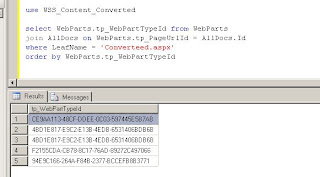

This gives the 5 entries for the contained webparts, but sadly not a readable description of their types. The displayed tp_WebPartTypeId is not a cross-reference to an entry in another table. This guid is actually a MD5 calculated hash of a string composed of <the fullname of webpart’s assembly> + ‘|’ + <full classname of webpart>. MD5 hashing is irreversible, so it is not possible to convert these guids back into a human-readable format. Apparently, SharePoint itself builds up runtime an in-memory administration of the calculated hash of all the allowed webparts in a sitecollection. When requesting a webpart page, SharePoint compares it’s tp_WebPartTypeId values against this administration to derive the concrete webpart type. In case a WebPartTypeId is not found, SharePoint reports this via the errormessage “Web Part Error: A Web Part or Web Form Control on this Page cannot be displayed or imported. The type could not be found or it is not registered as safe.” Because of the irreversibility of the MD5 algorithm, even SharePoint code itself cannot derive the typename of these error-causing webparts.

To my humble opinion, this really sucks! How are you ever able to determine the typename of an error-causing webpart in this approach? And for a best practice: document whatever non-SharePoint out-of-the-box webpart is used in your site, and document for each webpart the fullname (including version number!) of its assembly.