Showing posts with label Migration. Show all posts

Sunday, March 18, 2018

Beware: set site to readonly impacts the permission set overviews

In our execution process of migrating collaboration sites from SharePoint 2010 to SharePoint Online, on completion we apply the following go-live steps:
  1. Set the lock status of source site to ‘readonly' (Lock or Unlock site collections)
  2. Enable a redirect from the root-url of the source site to the root-url of the target migrated site (This is a real success and much appreciated by our end-users: as it is almost impossible for each to remember to update own bookmarks to the sites now migrated. Definitely a best practice I recommend to everyone doing a migration to SharePoint Online !!)
  3. Send out communication to the site owner that his/her site is migrated. Migration issues that were not identified during the User Acceptance Test (UAT) of the migration will be handled as after-care
Immediate after the go-live of a migrated site, the after-care period starts. One of the issues that may arise is that a site visitor has lost authorizations compared to the old source site. We then compare the source vs the migrated site (note: in our custom IIS Redirect HttpModule we’ve incorporated the capability to bypass the automatic redirection) to investigate the complaint. Something to be aware of when comparing the permission set, is that via our go-live actions we’ve impacted also the source site: setting the site to readonly, results that in the “check permissions” display per checked user a large list of “Deny” permissions will be enlisted.
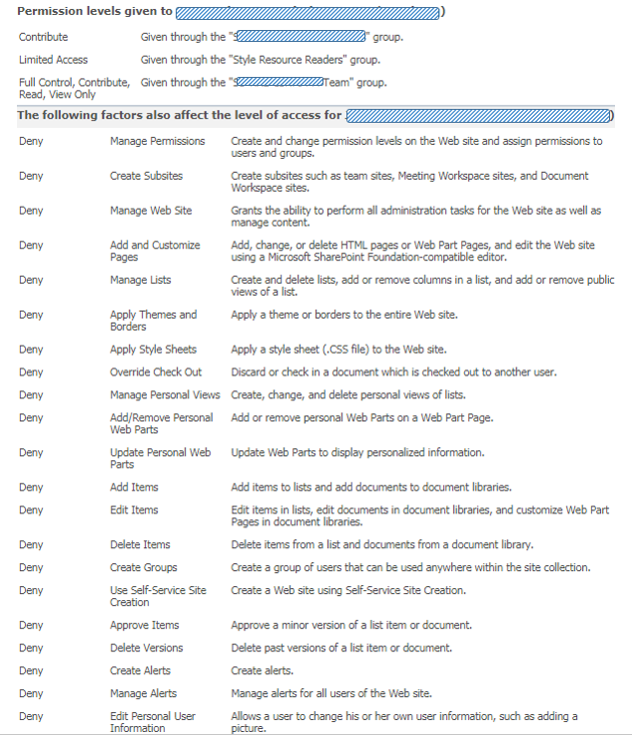
Nothing to be surprised (⇨ 'Deny' permissions are set via User Policy on webapplication level, and cannot be set on the level of individual site collections [1] [2]) or worried about, once you understand where this overwhelming list is actually coming from. And that you can safely ignore them in understanding what the actual “productive” permission set of the checked account was on the old source site.

Wednesday, July 1, 2009

Difficult upto impossible to derive the typename of error-causing webparts in migrated site

I migrated a SharePoint sitecollection into my local SharePoint development environment. As source material I had a backup of the sitecollection’s content database, and a couple of assemblies to go into the local webapplication bin. Missing is the web.config, and also the knowledge whether or not there is a dependency on other assemblies: be it within the local bin or within the GAC. I restored the database backup within my local SQL installation, created a new SharePoint webapplication, and attached the restored db to it. This made the site locally available and browsable.

Runtime it then appeared that I am indeed still missing some of the site resources. Browsing of several pages results in the infamous message: “Web Part Error: A Web Part or Web Form Control on this Page cannot be displayed or imported. The type could not be found or it is not registered as safe.”

The trick is now to detect the type of the error-causing webpart(s). Then I can verify whether or not I have them in the assemblies, and if so add an SafeControl entry for it in the web.config. I tried to have a look at the inner content of the webpage by opening it in SharePoint designer. This also gives the error message. Then I tried to find out the typenames by putting the page in webpart maintenance mode. If you have the appropriate rights (given my local environment, I naturally do), you can easily enter this mode by attaching ‘?Contents=1’ to the page-url. This gave the strange effect that 3 out of 5 webparts are displayed as ‘ErrorWebPart’.


This looked to me a display issue within webpart maintenance. Therefore I went explicitly self at a deeper level by inspecting the webpart info via the SharePoint Object API. However, even then the error-causing webparts have runtime the type ‘Microsoft.SharePoint.WebPartPages.ErrorWebPart’:


Surfing around I found out that this is a known SharePoint behavior. Any webpart that has gone bad, appears runtime as ‘ErrorWebPart’ instead.

So I decided to take it to yet another deeper level, and get into directly at the SQL content db. I queried the WebParts table for retrieving information of the webparts on the specific page:


This gives the 5 entries for the contained webparts, but sadly not a readable description of their types. The displayed tp_WebPartTypeId is not a cross-reference to an entry in another table. This guid is actually a MD5 calculated hash of a string composed of <the fullname of webpart’s assembly> + ‘|’ + <full classname of webpart>. MD5 hashing is irreversible, so it is not possible to convert these guids back into a human-readable format. Apparently, SharePoint itself builds up runtime an in-memory administration of the calculated hash of all the allowed webparts in a sitecollection. When requesting a webpart page, SharePoint compares it’s tp_WebPartTypeId values against this administration to derive the concrete webpart type. In case a WebPartTypeId is not found, SharePoint reports this via the errormessage “Web Part Error: A Web Part or Web Form Control on this Page cannot be displayed or imported. The type could not be found or it is not registered as safe.” Because of the irreversibility of the MD5 algorithm, even SharePoint code itself cannot derive the typename of these error-causing webparts.

To my humble opinion, this really sucks! How are you ever able to determine the typename of an error-causing webpart in this approach? And for a best practice: document whatever non-SharePoint out-of-the-box webpart is used in your site, and document for each webpart the fullname (including version number!) of its assembly.