Showing posts with label GWPAM. Show all posts

Monday, July 21, 2014

Connect SharePoint 2013 to SAP via Gateway for Microsoft

SAP initially developed Gateway for Microsoft [GWM] as ‘Duet Enterprise beyond SharePoint’. Allow Gateway OData service consumption in other Microsoft front-end formats, like Microsoft Office clients (Outlook, Excel, Word, PowerPoint). In essence GWM can also be regarded as a trimmed-down Duet Enterprise 2.0 variant; provides some of the same basic integration capabilities, but not all. Question that arises: can you also utilize GWM to connect SharePoint to SAP?
The answer is a firm Yes you can! Which is logical, as SharePoint itself is a .Net application. You can apply multiple approaches to consume the SAP data through a GWM generated reference proxy into SharePoint:
  1. Connect to the Gateway service proxy from a SharePoint web part context [mind you, Microsoft urges us to step away from this SharePoint server-side model; but it is still possible and supported]
  2. Build a custom BCS Connector to connect to the Gateway service proxy, and use that connector from SharePoint to render the received SAP data via standard External List, Business Data WebParts, or a custom build web part that invokes the BCS Api
  3. Build a SharePoint WCF RESTful service to connect to the Gateway service proxy, and consume that service in a browser-based front-end; using a databinding library like knockout.js, Angular.js. This is an example of SharePoint 2013 App model, and can also be applied in Office 365 / SharePoint Online.

SharePoint version

SharePoint 2010 has been build “ages ago”, and has a hard dependency on .Net framework 3.5. In the current year, the .Net framework has progressed to .Net framework 4.5, and the latest version of SharePoint [2013] has catched up with that. And the same holds for Duet Enterprise 2.0 [which is actually for SharePoint 2013, if you have SharePoint 2010 you need the Duet Enterprise 1.0 version], and also GWM: both are .Net Framework 4.x dependent. As consequence, I have to relax my firm statement a bit: Yes, GWM can be used to connect SAP and SharePoint 2013; but not for the older SharePoint versions (2003/2007/2010).

Simple example for Proofing

To demonstrate, I made up a sample scenario to retrieve SAP CRM data via GWM into SharePoint. I used the demo Gateway services as data source (see article by Martin Bachmann for instruction how to get access to the SAP Gateway demo system), and our own SharePoint 2013 environment as front-end. Further I have Visual Studio 2013, and necessarily also the latest GWM sp3 (versions preceeding sp3 will not install in Visual Studio 2013; but they do install in Visual Studio 2010/2012).
I applied the guidance provided in the GWM Developer Guide, but instead of Windows Forms project, choose SharePoint Visual Web Part template.

Next, you first need to add references to .NET WCF and GWM libraries. The easiest way to achieve that is by utilizing the GWM Visual Studio Add-In. Click on ‘Add SAP Service Reference’:
fill in as Service Url the url to GWdemo service, and press ‘Go’:
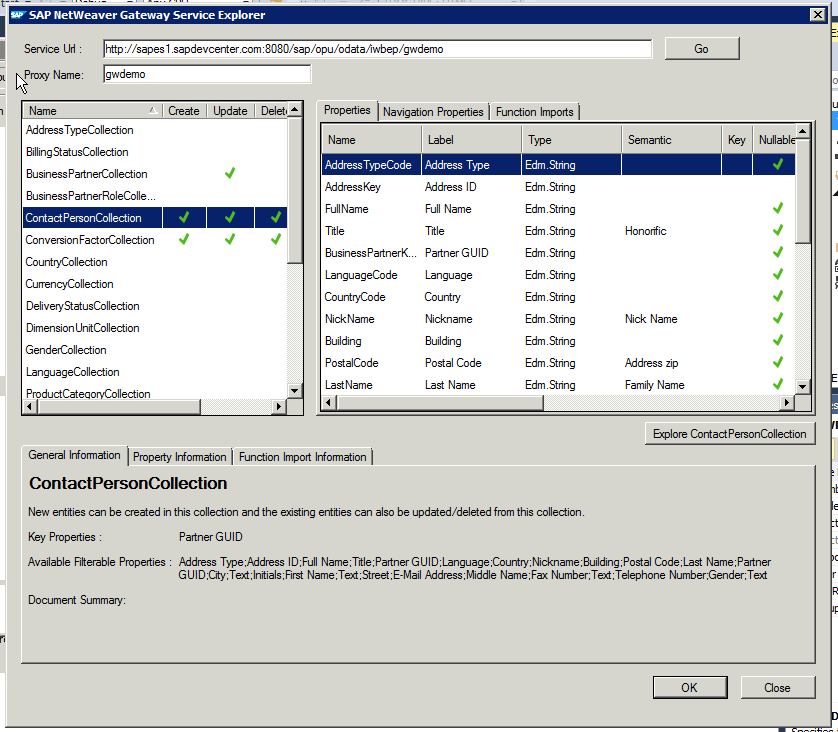
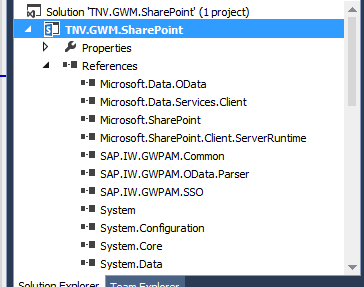
In the Service Explorer you can explore and inspect the OData entities that the GWdemo service exposes. Select one, and click 'Ok'. Direct result is the inclusion of multiple GWM assemblies (note that they are still named with the older GWPAM naming) in the Visual Studio project references:
Next, open the visual webpart and put in some code to consume the GWM created proxy reference and display received data. As this is merely a short demo to proof the connectivity, I simple display the SAP CRM BusinessPartners through a plain GridView control:

Build the Visual Studio project, and deploy the SharePoint solution. Then browse to your SharePoint site, create a new page, and add the GWM-build web part. And voila, we have SAP data in SharePoint:
All in all, building this took me less than an hour. Of course it is only a simple retrieval example; and no effort spend whatsoever on achieving a good looking and behaving UI. Also for this simple example I relied on basic authentication. For a trustworthy enterprise context, this is not usable and either OAuth, X.509 or SAML must be applied. But still, the outcome is very promising with respect to the SAP/SharePoint interoperability capability of GWM.

Fixes needed to GWM generated code

Issue 1: Microsoft.Sharp not included in references

Solution: Add the missing assembly to the Visual Studio project reference

Issue 2: Configuration Reader tries to read from windows form based path
Solution: avoid the attempt to read from windows-forms based path
Issue 3: The used GWDemo system gives error
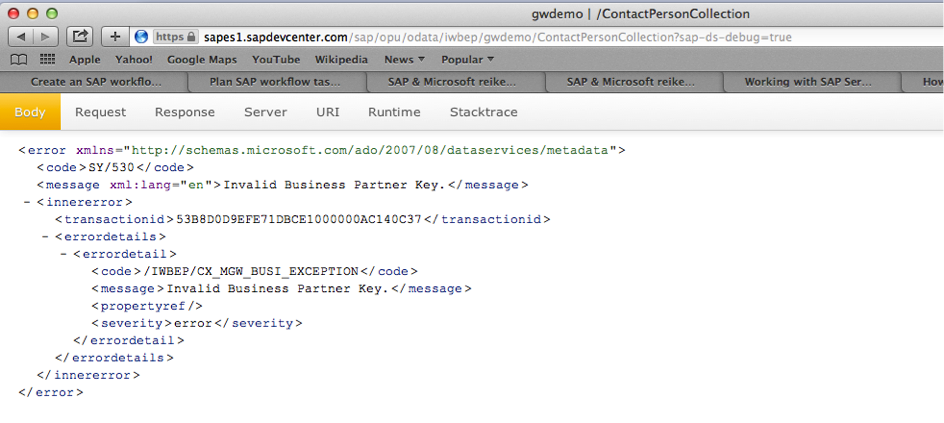
Solution: invoke another method…
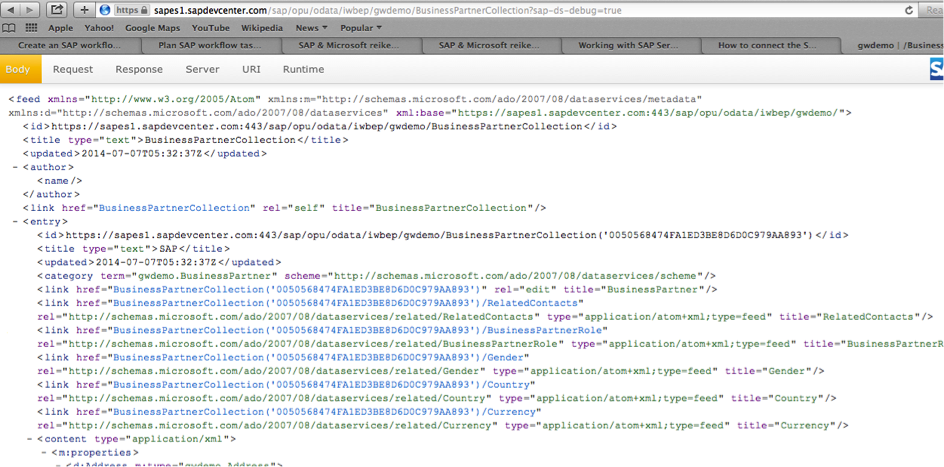
Honestly: this is an example of why in every SAP interoperability project also domain knowledge is required --> contactpersoncollection is connected to a business partner key, you cannot invoke this without one.

Does GWM replace Duet Enterprise?

The answer to this is a clear No: Duet Enterprise as framework has more capabilities as GWM: SAP workflow integration, SAP BW reports publication, roles synchronization, user profile synchronization. Also Duet Enterprise has complete self-contained support within for Single Sign-On between SharePoint and SAP, while with GWM you need additional infra to achieve this (e.g. X.509 certificates infra in your landscape).
The better question is however: in what scenario’s would GWM be sufficient? Well, it might be sufficient in scenarios where all you need is the connectivity from SharePoint to SAP for data CRUDQ actions, and you already have Single Sign-On supporting infra in your IT landscape.

Sunday, May 4, 2014

GWPAM renamed into SAP Gateway for Microsoft, short GWM

SAP NetWeaver Gateway Productivity Accelerator voor Microsoft’, that is a mouthful. This long name arose in several variations of how the product is actually being called in the market and press, resulting in confusion and making it difficult to find product information. SAP product management has acknowledged this drawback effect, and they now have a more catchy product name assigned: SAP Gateway for Microsoft, abbreviated as GWM.
Other GWM news besides this name change is the availability of GWM Service Pack 02. Key parts of SP2 are alignment with Visual Studio 2012 [modern UI] look and feel, support for Microsoft Office 2013, support of SAP Fiori services consumption, and a project template for building your own Excel Add-In. Earlier versions of GWM already include the capability to link an Excel sheet to a Gateway REST/OData service for (mass) data management. This feature is aimed for business people who arrange their own (master)data management via Excel. The new Excel Add-in template is designed specifically for the developer, to build your own innovative solutions with Excel UI platform.
See also: SAP CodeTalk: GWPAM Update / Interview with Holger Bruchelt

Sunday, March 9, 2014

GWPAM Rapid Deployment Service on SAP-Microsoft Unite site

Earlier I reported about our involvement in the new SAP product for direct availability of SAP data into Microsoft Office clients: SAP NetWeaver Gateway Productivity Accelerator for Microsoft, short GWPAM.
Based on the knowledge and experience that we have gained early on in applying GWPAM, we have worked out a Rapid Deployment Service for GWPAM. This RDS solution is recognized by the SAP Gateway product team, and published on the SAP-Microsoft Unite Partner Connection site.
In the Rapid Deployment Service, we combine our proven approach for successful implementation of SAP-Microsoft integration scenarios with GWPAM product knowledge. Central concepts in our approach are user-centric focus, UI-design via (preferable) clickable prototypes, integration architecture, and technical expertise with the Microsoft and SAP application platforms. Check out in case you're interested in easily bring SAP data into Microsoft based front-ends.

Saturday, January 4, 2014

Augment GWPAM AddIn project to consume JSON dataformat

GWPAM consumption of efficient JSON format only possible when Gateway service supports OData V3
Standard the GWPAM generated AddIns consume the Gateway REST OData service via the AtomPub dataformat, and not via the more data-efficient JSON format. The reason is that the used .Net WCF Data Services Client library is not capable of consuming JSON dataformat. Because I prefer to consume REST services via the mobile-friendly JSON dataformat, I set out to augment a default generated GWPAM Outlook AddIn project to consume via OData JSON. As the service consumption is within .Net code, this is mostly a Microsoft.Net tail. However, as it turns out that to be even able to consume JSON in the Microsoft WCF client library, an important prerequisite is imposed on the consumed REST service; it also extends to there.

JSON consumption via WCF Data Services Client Library

Initially, WCF Data Services Client library only supported consumption of REST services via AtomPub dataformat. As of release 5.1 it is also possible to consume JSON, but with the limitation that the JSON format must be OData V3. Prerequisite for the consumed service is thus that it must be able to provide its data in OData JSON V3 dataformat. For the older OData versions (V1, V2), it is not [yet] possible to consume JSON in WCF Data Services Client library.

Steps to augment to GWPAM project to consume JSON dataformat

First prepare your project to be able to handle the JSON consumption:
  1. Install the latest WCF Data Services Client Library, at present this is 5.6.0. Installation is done via NuGet Package Manager, and must be applied to each GWPAM project in which you want to consume via JSON dataformat. The effect per project is that reference ‘Microsoft.Data.Services.Client’, version 5.6.0 is added; and that the (via GWPAM project template) already existing references ‘Microsoft.Data.EDM’, ‘Microsoft.Data.OData’, ‘System.Spatial’ are also upgraded to version 5.6.0.
  2. If present, remove the reference ‘System.Data.Services.Client’ from the GWPAM project(s). Note: Visual Studio 2010 default installs with that older WCF Data Services Client library.
  3. Install WCF Data Services 5.3.0 RTM Tools Installer in Visual Studio; also via NuGet.
Next setup the consuming code to consume the REST service via OData. That is, if the service supports it
  1. Validate that the consumed service is able to return data in the required JSON dataformat, OData V3. Query for this the $metadata of the service, and validate that it contains “m:MaxDataServiceVersion='3.0'”
  2. Generate an EDMModel for the service, via ‘Add Service Reference’ (iso ‘Add SAP Service Reference’). Open the generated service proxy, and change the accessibility of ‘GeneratedEdmModel’ to public
  3. Edit the earlier generated SAP data services client code to consume the service via JSON dataformat
    1. In the constructor, set to initialize for ‘System.Data.Services.Common.DataServiceProtocolVersion.V3’
    2. Set the Format to link to the generated EDM Model: this.Format.LoadServiceModel = GeneratedEdmModel.GetInstance;
    3. Set the Format to useJson: serviceContext.Format.UseJson()
    4. Copy the implementation + usage of methods ‘ResolveTypeFromName’ and ‘ResolveNameFromType’ from the generated service proxy in step 5. Modify the code to correspond to the full name of the SAP service proxy.
    1. Query the consumed REST service for JSON format; either via querystring param ‘$format=JSON’, or via Http Request Header ‘accept
      = application/json’

That's it

And that’s it. Now the GWPAM based Office AddIn is able to consume the REST Service via the more efficient JSON dataformat. Note that for the consumption itself it does not even has to a Gateway REST Service; it is also possible to consume REST services from other webservice platforms. But the GWPAM project templates and code generated are focussed on standard SAP NetWeaver Gateway services + data models; WFService as one evident example.

Sunday, December 29, 2013

Tip: Resolve GWPAM issue with misnamed embedded Resources reference

It is a common approach applied by .NET developers to give multipart names to the individual projects in a Visual Studio solution. The name parts identify different aspects of the Visual Studio project, a typical name pattern is "<CompanyName>."<Application>."<Component>".
Example of this: "TNV.Purchase.OrderManagement".
I applied this naming approach also for a GWPAM project to build a Microsoft Outlook AddIn: TNV.TasksClustering.OutlookAddIn. However, after I installed the compiled AddIn, Outlook failed to load it. The error details were:
System.Reflection.TargetInvocationException: Exception has been thrown by the target of an invocation. ---> System.Resources.MissingManifestResourceException: Could not find any resources appropriate for the specified culture or the neutral culture. Make sure "TNV_TasksClustering_OutlookAddIn.Icons.resources" was correctly embedded or linked into assembly "TNV.TasksClustering.OutlookAddIn" at compile time’
I inspected the GWPAM generated code to analyze the problem cause. It appears that GWPAM replaces in the code that it generates, the dots ('.') in the Visual Studio project name into the underline ('_') character. Thus 'TNV.TasksClustering.OutlookAddIn' becomes 'TNV_TasksClustering_OutlookAddIn' in the generated C# code. But a side effect is that this results in a naming-inconsistency with embedded Resources: Visual Studio namely by default embeds .NET resources files in the compiled assembly with the unchanged project name, in this case thus still with the dots:
I have reported this issue to the Duet Enterprise / GWPAM product team. I expect it to be fixed in a forthcoming service pack. Until then, the pragmatic and simple workaround is to correct in the generated C# code the line that tries to load the embedded resource:

Sunday, November 17, 2013

Duet Enterprise / GWPAM interview at SAP TechEd Amsterdam

Recording of the interview I gave at SAP Tech-Ed Amsterdam, talking about my experiences with SAP NetWeaver Gateway and Duet Enterprise, SAP Customer Engagement Initiative programs, and the recent released NetWeaver Gateway Productivity Accelerator for Microsoft (GWPAM).

Monday, October 28, 2013

GWPAM - SAP data direct in Microsoft Office client-applications

Flagship of the Duet Enterprise / Gateway product team is Duet Enterprise for Microsoft SharePoint and SAP. Customers are very satisfied with the functionality and capabilities provided by this integration product, and the demonstrated product stability. A frequently asked question is to provide this level of exposing SAP data + processes also for use in Microsoft applications beyond SharePoint. The product team has responded to this market demand. Last week at SAP TechEd 2013 in Las Vegas, SAP NetWeaver Gateway Productivity Accelerator for Microsoft has been launched, shortly referred to as GWPAM.
As participant in the Duet Enterprise Customer Engagement Initiative (CEI) program, I was involved from the early development stage of GWPAM (under the internal codename BoxX). On request of the Duet Enterprise product team I performed so-called Takt-Testing, and reported my technical and functional thoughts + findings. Good to see that aspects of my feedback - predominantly influenced by my own technical background as an .Net architect/developer - have actually made it within the final product.
Like it’s big brother, GWPAM is in essence an end-product for the IT organization. It is an integration framework that internal IT departments and SAP + Microsoft partners (the ecosystem) can utilize, to build their own scenarios in which SAP / Microsoft integration is an important architectural element. GWPAM provides a Microsoft Visual Studio AddIn that .Net developers can use to directly in their familiair integrated development environment, lookup SAP Gateway OData services. And generate proxies to the Gateway OData services with standard .Net code.
The first foreseen scenarios are Microsoft Office Add-In’s, to expose and integrate the SAP business data in the everyday used Microsoft Office clients. For example, SAP CRM customer data in the form of Outlook contacts, invoice approval requests as Outlook tasks, functional data management of SAP masterdata through Excel, BW report data rendered in PowerPoint, and submit SAP CATS timetracking directly from your Outlook Calendar ...
Like Duet Enterprise for SharePoint, GWPAM provides support for the typical and recurring plumping aspects of SAP/Microsoft integration: Connectivity, Single Sign-on, End-2-End monitoring, .Net development tooling, integration with SAP Solution Manager. GWPAM offers a complete SAP / Microsoft integration package.
As with Duet Enterprise, the two suppliers have their collective strength and market presence behind this new product offering. This is also a major distinction compared to the various proprietary connectors of smaller parties.
As SAP / Microsoft interoperability expert, I am enthousiast about the addition of GWPAM to the SAP / Microsoft integration spectrum. GWPAM enables to build a new category of functional scenarios for end-customers. Now also for organizations that do not have SharePoint in their application landscape, but do have Microsoft Office installed on the desktops. And want to utilize that familiar employee environment for user intuitive operation of SAP data and business processes.