Showing posts with label ALM. Show all posts

Friday, September 5, 2014

PowerShell to repeatedly provision SharePoint master and config data

The ease of creating and maintaining SharePoint lists also makes them a good option for application configuration. As example, in one application I applied SharePoint list as the configuration storage for task types specification, in another as the configuration storage of the specifications for BCS invocations via a generic BDC model. However, as easy it is to create a list; so it is also to delete one including the configuration contents. In particular in the development phase, with repeated solution deployment and feature de- and reactivation, typically the configuration list and thus its contents get deleted.
To cope with this, I utilize PowerShell to refill the list with the desired configurations. And the same PowerShell scripts are also of use for transition of the application from development landscape to QA, and ultimate to production.
Example:
# script Clear # Fill Configuration $webApp = “<url>" $ApplicationConfigList="/Lists/ApplicationConfiguration"   # functions   function X-CheckItemNotExists($list, $itemTitle) {    $camlQuery =       "<Where>          <Eq>             <FieldRef Name='Title' />             <Value Type='Text'>" + $itemTitle + "</Value>          </Eq>        </Where>"    $spQuery = new-object Microsoft.SharePoint.SPQuery    $spQuery.Query = $camlQuery    $spQuery.RowLimit = 1    $destItemCollection = $list.GetItems($spQuery)    return $destItemCollection.Count -eq 0 }   # Initialization   $spWeb = Get-SPWeb $webApp   # (Re)fill the Application Config Settings   $ApplicationConfigSettings = @{    "0" = @("<config-item title>", "AovpGetPerson ", "{0,8:D8}{1,30: 30}", "<SAP-system-ID>");    "1" = @("< config-item title>", "CrmGetCustomer", "{0,8:D8}{1,8:D8}", "<Oracle-system-ID>") }                                $spApplicationConfigList = $spWeb.GetList($ApplicationConfigList) foreach ($array in $ ApplicationConfigSettings.values) {    if (X-CheckItemNotExists -list $spApplicationConfigList -itemTitle $array[0].ToString())    {       $spApplicationConfigItem = $spApplicationConfigList.AddItem()       $spApplicationConfigItem["JsonMethodName"] = $array[0].ToString()       $spApplicationConfigItem["GenericModuleMethodName"] = $array[1].ToString()       $spApplicationConfigItem["CallInputParamsFormat"] = $array[2].ToString()        $spApplicationConfigItem["ExternalSystemAlias"] = $array[3].ToString()          $spApplicationConfigItem.Update()    } }    # Release   $spWeb.Dispose()

Saturday, June 11, 2011

SPWebConfigModification playing tricks in farm

At customer premisses we apply a.o. the following deployment guidelines:
  1. In case of Farm-based deployment, then deploy to virtual bin (WebApplication), unless...
  2. Apply SharePoint support for all required web.config modifications; instead of manual action (which is error prone in the farm).
Both guidelines are valid from SharePoint operations AND development perspective, to ensure a consistent and controlled SharePoint farm situation.
The SharePoint platform provides multiple deployment functionalities to comply with the 2nd guideline. Via the SharePoint solution manifest, you can specify modifications that typically have effect on the runtime operation of an assembly: SafeControls, CodeAccessSecurity. And via the SPWebConfigModification class you can modify in a controlled manner the web.config for other changes; e.g. for custom application settings, navigation providers. As from SharePoint 2007, I'm a big fan of applying SPWebConfigModification - it gives you as developer full control to have the needed web.config modifications executed upon application deployment and/or provision time. And to make it even better: the same set of changes are applied to all the individual web.config files of the SharePoint webapplication in the total farm; accross zones and accross servers. Even when at a later time another server is added to the farm, the same set of web.config modifications are applied (rather, repeated) also on that new server.
However, the SPWebConfigModification functionality does have it's peculiarities. Lately we encountered one I was not yet aware of, and which caused us both some headaches as well as cost some elapsed time.
The situation is as follows: SharePoint assembly that uses EntLib 5.0 for accessing an external SQL database. Comform the guidelines, this custom assembly is deployed to the virtual bin; and it is therefore required to set custom CAS-policies for this assembly. One of the required permission is the SqlClientPermission. That permissions is not present in the default WSS_Minimal trustlevel, but it is within WSS_Medium. To have the total set of custom CAS-policies based on the Medium trustlevel, a 2-steps approach is applied:
  1. First change the trustlevel in the web.config from WSS_Minimal to WSS_Medium; a task performed via SPWebConfigModification class
  2. Next, deploy the SharePoint solution with in its manifest the CodeAccessSecurity element for the assembly. The resulting custom CAS-policy file is now based on the Medium trust level, thus inheriting a.o. the SqlClientPermission SecurityClass setting. The SharePoint solution framework takes care of the required modifications in the web.config: link to the generated custom policy file, and set the trustlevel to WSS_Custom.
The setup worked perfectly, both local as in the shared test-farm.
That is, initially. From time to time our application appeared broken. Root cause analysis exhibited that in those situations our web.config was modified; but without any deployment activity on our own webapplication (???) However, another SharePoint webapplication in the same farm had been redeployed. Each time that application was redeployed, our web.config was modified; and the trustlevel reset from WSS_Custom to WSS_Medium.
It appears that this is standard behaviour of the SPWebConfigModification class: each time that it is requested to apply administrated SPWebConfigModifications entries in the context of a single SPWebApplication, it effectively re-applies the administrated SPWebConfigModifications of ALL the SharePoint web-applications in the farm. At minimal, the result of this is that all the web.config files in the farm are touched; and have their timestamp updated. But in our case, the administrated SPWebConfigModification for setting the trustlevel to WSS_Medium was reapplied; which broke our application!
So I learned 2 things here:
  1. SPWebConfigModification is not a 'decent' SharePoint citizen; I regard it as ultimately incorrect that the intented application of SPWebConfigModification administrated entries on 1 SharePoint web-application, also effects all other SharePoint web-applications web.configs.
  2. That as result of this behaviour the considered 2-steps approach for setting the correct medium level of a.o. SQLClientPermission cannot be maintained; due the inherent risk that the administrated SPWebConfigModification can be re-applied at any moment; out of the control and knowledge of the administrators of our webapplication. So I modified this to set the CAS-policies in a single step; directly steered via the Solution manifest file.

    Thus instead of the below CodeAccessSecurity specification, which is relative and relies on the presence of a.o. SqlClientPermission SecurityClass in the base trust-level (WSS_Medium):

    <PermissionSet class="NamedPermissionSet" version="1">
    <IPermission class="SecurityPermission" version="1" Flags="Execution" />
    <IPermission class="AspNetHostingPermission" version="1" Level="Medium" />
    <IPermission class="SqlClientPermissionversion" version="1" Unrestricted="true" />
    <IPermission class="SqlClientPermission" version="1" Unrestricted="true" />
    <IPermission class="Microsoft.SharePoint.Security.SharePointPermission, Microsoft.SharePoint.Security, Version=14.0.0.0, Culture=neutral,
    PublicKeyToken=71e9bce111e9429c" version="1" ObjectModel="True" />
    <IPermission class="Microsoft.Office.SecureStoreService.Server.Security.SecureStorePermission, Microsoft.Office.SecureStoreService.Server.Security,
    Version=14.0.0.0, Culture=neutral, PublicKeyToken=71e9bce111e9429c" version="1" Unrestricted="true" />
    <IPermission class="System.Security.Permissions.ReflectionPermission, mscorlib, Version=2.0.0.0, Culture=neutral, PublicKeyToken=b77a5c561934e089" version="1"
    Unrestricted="true" />
    <IPermission class="System.Diagnostics.EventLogPermission, System, Version=2.0.0.0, Culture=neutral, PublicKeyToken=b77a5c561934e089" version="1"
    Unrestricted="true" />
    <IPermission class="WebPartPermission" version="1" Connections="True" />
    </PermissionSet>

    specify all the required permissions explicit:

    <PermissionSet class="NamedPermissionSet" version="1">
    <IPermission class="Microsoft.SharePoint.Security.SharePointPermission, Microsoft.SharePoint.Security, Version=14.0.0.0, Culture=neutral, PublicKeyToken=71e9bce111e9429c" version="1" ObjectModel="true" Unrestricted="true" />
    <IPermission class="SecurityPermission" version="1" Flags="Execution" Unrestricted="true" />
    <IPermission class="System.Web.AspNetHostingPermission, System, Version=2.0.0.0, Culture=neutral, PublicKeyToken=b77a5c561934e089" version="1" Level="Medium"/>
    <IPermission class="System.Data.SqlClient.SqlClientPermission, System.Data, Version=2.0.0.0, Culture=neutral, PublicKeyToken=b77a5c561934e089" version="1" Unrestricted="true"/>
    <IPermission class="Microsoft.Office.SecureStoreService.Server.Security.SecureStorePermission, Microsoft.Office.SecureStoreService.Server.Security, Version=14.0.0.0, Culture=neutral, PublicKeyToken=71e9bce111e9429c" version="1" Unrestricted="true" />
    <IPermission class="System.Security.Permissions.ReflectionPermission, mscorlib, Version=2.0.0.0, Culture=neutral, PublicKeyToken=b77a5c561934e089" version="1" Unrestricted="true" />
    <IPermission class="System.Diagnostics.EventLogPermission, System, Version=2.0.0.0, Culture=neutral, PublicKeyToken=b77a5c561934e089" version="1" Unrestricted="true" />
    <IPermission class="Microsoft.SharePoint.Security.WebPartPermission, Microsoft.SharePoint.Security, Version=14.0.0.0, Culture=neutral, PublicKeyToken=71e9bce111e9429c" version="1" Connections="True"/>
    </PermissionSet>

Tuesday, June 22, 2010

Test, QA and Production SharePoint infra should be comparable

In multiple SharePoint projects I have been confronted with delivered functionality succesfully validated in the test environment, does not operate the same in the QA environment. Since the application software is identical in the environments, the cause of the malfunctions must originate from differences at infrastructure level. Especially when it occurs in a later project stadium, this can be a very unpleasant surprise. Of course it's not realistic to expect nor demand that the Test, QA and Production environments are 100% comparable. However, the differences should be limited to hardware resources level; number of front-end servers, sizing of database, cpu, ... The infra architecture and configuration should be [logically] the same; load-balancing, firewall settings, proxy, Central Admin settings (e.g. Search, SSO, Policy for Web Application).
Extra complication to achieve such an ideal Test/QA/Production setup, is that typically the Test environment is much more volatile. This is the first environment to try-out your stuff, be it application functionality, infrastructure settings, or both. And in case of failure, not always the deployed trial stuff is rolled back. This is an extra argument to use virtualized Test environments per SharePoint project. When a new project start, an own Test environment is provisioned, with the current production state as its baseline. The project deploys all the project deliverables to this own Test environment. There is no overlap or conflicts with the work from other projects. And after project end (successful completion, or earlier stopped), the project Test environment can be deactivated and retired.

Tuesday, February 23, 2010

FormsService SSP in farm holds on to previous version of Feature re-deployed InfoPath Form

Earlier I blogged about the ALM manner to develop and deploy InfoPath forms. One major benefit of this approach is that the InfoPath forms are considered as first-class source artifacts in the development environment and project, just as ‘regular’ source code (C#, XML, .js, css). An even bigger benefit is upon deployment: no need for manual actions to publish the form templates to your deployed and provisioned SharePoint application, it’s all done automatic in the context of a feature activation.
SharePoint out-of-the-box provides the XsnFeatureReceiver class to provide the InfoPath Form Templates publishing support. However, the functionality of this standard class is not enough for real-life deployment scenarios. I ran into a few missing parts before, which I handled by extending and augmenting the XsnFeatureReceiver class. This week I was confronted with another issue. After a re-deployment with updated InfoPath forms, the earlier deployed forms were still active. That is, when opening them in the browser. When opening in InfoPath client, the new version was applied. Thus the deployment to SharePoint server was performed, but somehow for InfoPath Forms Services context the earlier deployed version per InfoPath form remained active. I did not experience this effect in my local single-server local development image. But when doing a re-deployment to the distributed test farm-environment, the issue manifests itself.
I inspected the managed forms templates administration of the FormsService SSP, and discovered that still the initial deployed versions were administered. And after uninstalling the InfoPathInfrastructure feature, the InfoPath form templates in FormsService were not cleared. This obstructs the activation of the new versions of the forms upon re-deployment. As solution I extended my InfoPathInfrastructure feature to also make sure the InfoPath forms that it installed, are removed from the FormsService SSP upon uninstalling the feature.
With this fix, I’m able to deploy and activate new versions of the InfoPath forms to the distributed target SharePoint farm environment (test, staging, production) for usage via InfoPath Forms Services. And still conform ALM principles.

Tuesday, January 19, 2010

PublishingWeb.IsPublishingWeb malfunctions on custom site definition

I typically apply a Feature-based approach for the provisioning of a SharePoint site into a full-functioning application . I prefer this above putting everything within a custom site definition. I'm in good company with my resistance against (overly complex) Onet.xml's [Andrew Connel, You don't need to create site definitions, Joel Oleson, Do you Really Need to Create Custom Site Definitions?]. I actually reuse the same site provisioning engine functionality within multiple SharePoint projects and applications. The reuse is made possible by specifying the provision actions via an XML feed file. Via this, the engine can be instructed to provision structure (Lists, Libraries), content (publishing pages, ListItems), and configuration (web.config via SPWebConfigModification, and PublishingWeb + SPWeb properties).
With respect to the latter, I discovered that the OOTB PublishingWeb.IsPublishingWeb sometimes plays tricks on you. Let me explain. In the provision engine I've implemented functionality to set diverse navigation settings: IncludeSubSites, NavigationShowSiblings, InheritGlobalNavigation, and so on. These properties can only be set on publishing webs, and are in the SharePoint Object API available via a PublishingWeb instance. In the engine code I first do a check whether the SPWeb on which the Feature is activated, is actually a PublishingWeb. And only then via PublishingWeb.GetPublishingWeb access a valid wrapper reference, and set the navigation properties.
This all worked fine in situations in which I applied the provision engine afterwards on an already created Publishing site collection. In my current project I do it slightly different. I've implemented a minimal site definition, and within the context of it activate per web in the created site topology the Publishing feature, and next execute the provision engine. In this setup, the navigation settings appeared to be ignored by the provision engine. When I debugged the provision execution, I discovered that PublishingWeb.IsPublishingWeb returned false for all webs in the site topology. Very strange, since I made sure to first activate the Publishing feature...
I ran into the forum-thread IsPublishingWeb() - what does it REALLY check for? posting a question on this issue. And followed up on the advice given there: implement an own SharePointHelper.IsPublishingWeb method to determine whether the SPWeb instance is valid for being wrapped into a PublishingWeb instance.
BTW: My own experiences learn that it is not due the asynchronous site creation behaviour. Also when later via site settings (de)activating the provision engine feature, PublishingWeb.IsPublishingWeb remains returning false, despite that the Publishing feature is activated on the (sub)web. It looks more as if PublishingWeb.IsPublishingWeb is somehow dependent on something that is set behind the curtains via OOTB Publishing site definitions.

Tuesday, January 5, 2010

Automatic publish InfoPath forms via Feature-based ALM deployment

Fixed the Feature-based deployment of InfoPath forms to SharePoint site while treating them as first-class source artifacts in VS + TFS environment

I’m a supporter of applying Application Lifecycle Management (ALM) principles within application development projects. This also goes for SharePoint-based custom applications. Basically this means:
  1. designing and developing the SharePoint artifacts within a team-based source repository environment (aka, Team Foundation Server);
  2. applying version control to the individual application/building blocks;
  3. daily build;
  4. and full automatic and repeatable deployments
With InfoPath development, this gives some challenges. First of all, the InfoPath forms are setup and maintained via its own designer-tool, namely the InfoPath Designer client; and not directly from within the scope of Visual Studio. However, the most significant issue is the manner of deployment: the InfoPath client contains functionality to publish the InfoPath form to the destination environment, with SharePoint site as one of the available options. Given my ALM aspirations, I want to copy this InfoPath client deployment-experience to within the regular SharePoint deployments, via the Solution framework and SharePoint Features. In essence, I want to achieve the following:
  1. Automatically provision the required Information Architecture artifacts:
    • SiteColumns
    • Masterdata for LookupFields
    • ContentTypes
    • Forms Libraries, associated with the ContentTypes, for administration of the filled in InfoPath forms
  2. Automatically provision and activate the required InfoPath infrastructure
    • InfoPath forms
    • DataConnections
The first category, the Information Architecture artifacts, is well-known SharePoint provisioning. It can be done via a Site Definition, Features, or a combination. I favor the Feature-based approach, because it is modular, and allows me to turn it off and on.
The second category gave me more challenges. On internet search, I came across some posts that mentioned the SharePoint OOTB XSNFeatureReceiver that aids in here. However, it quickly appeared to me that it only takes care of one part, namely registrating the InfoPath form templates within the target SharePoint site. To successfully achieve this, XSNFeatureReceiver has constraints on the deployable InfoPath forms. And when even a single one of them does not comply to these constraints, XSNFeatureReceiver rather silently fails to correctly install the forms. Another missing part is for the DataConnections. The upload is not the issue here, being standard SharePoint Module functionality. But rather adjusting them to the specific target environment. In my ALM principles, I want to hold on to 1 single instance per DataConnection file, and not be forced to maintain versions for each of them per target environment (development, test, staging, production).
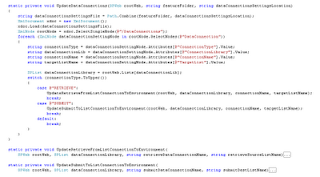
Luckily, Microsoft has not made XSNReceiverFeature sealed. So I decided to overload it to augment the standard deployment functionality with the above described aspects. Adjusting the DataConnections appeared rather simple, with thanks to this blog (Building InfoPath Form Services Solutions using Visual Studio 2008), including a link to demo provision code. I took this as basis to realize a generic approach, feeded by an XML configuration file delivered within the feature scope
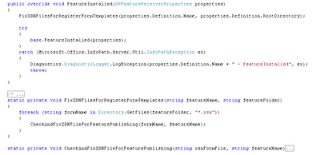
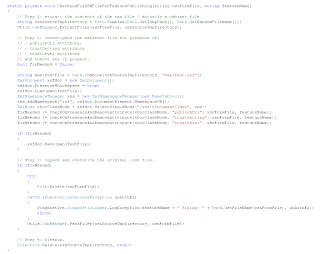
The correct deployment of the InfoPath forms appeared to be more of a challenge. Eventually, I found out that the direct cause of the failed deployment was that I earlier on published the forms during my development and testing of the forms. As soon as you publish an InfoPath form, the InfoPath client administrates this within the form itself. And this appeared to result in the malfunctioning XSNFeatureReceiver based InfoPath forms registration. This can be mitiligated by correcting the InfoPath forms. An alternative is to modify the original InfoPath form artifacts. However, this would then be a corrective action to be repeated every time you’d published an InfoPath form just for an InfoPath designer (programmer) test. I therefore went for the alternative to do the correction as part of the Feature installation procedure. This way during the development phase the team can just go one and (re)publish the forms, without worrying about the effect on deployment later on.

Another thing to take into account when doing Feature-based deployment of InfoPath forms, is that the Forms must be contained at the Feature root-directory. I like to structure Feature contents within subfolders for different deployable types. ContentTypes, SiteColumns, DataConnections, and also InfoPath forms, each within their own subfolders within the feature. However, in case of InfoPath forms deployed via XSNFeatureReceiver, this is not working. Without a concrete error message, the registrating will then just not be performed. So keep your Forms at the Feature root-level.

Deployment steps, and thus functionality of InfoPathInfrastructure feature

Upon Feature installation event:

  1. Fix the forms files, for successful automatic publishing via XSNFeatureReceiver
    • Extract the forms; this on itself presented a challenge, since .NET does not provide standard cabinet (.cab) handling
    • Inspect the manifest.xsf file on the presence of publishUrl and trustLevel; remove any of them present
    • Repack the .xsn container / file

Within the Feature Activation:

  1. upload forms files to FormsServerTemplate library
  2. Registrate the forms
  3. upload data connections to DataConnections library
  4. provision site columns
  5. provision master data lists
  6. fix the lookup references
  7. provision content types; including reference to the uploaded forms
  8. provision contents/data libraries
  9. assign content types to the contents libraries
  10. fix retrieve data connections --> associate with the master data list in the deploy environment (iso your local / development source)
  11. fix submit data connection --> associate with the content data list in the deploy environment (iso your local / development source)

Monday, December 21, 2009

Automated approach for initializing Enterprise Search experience

Whenever you want to utilize the Enterprise Search functionalities in your application, you must take into account for correct initialization: set up a content source, administer its crawling scheme, create the searchable managed properties, set up a Search Scope. Although the different steps can be done manually via the SharePoint GUI (combination of Central Admin and your own application), this is less workable within the context of an ALM based project. Your application is then multiple times (re)deployed, and to different environment (development, test, staging, production). Each time the manual installation/initialization steps would need to be repeated. This is cumbersome, and [thus] error prone. A better approach (as always) is to strive for a fully automated initialization of the enterprise search. I’ve applied this several times via the approach outlined here:
  • create a new Feature, with a FeatureReceiver codebehind
  • In the activation method of the feature, do the following steps:

    Create the content source

  1. use the Search Object Model to create the content source
  2. if applicable, administer include and exclude rules
  3. create the crawl schemes; full and incremental
  4. Create managed properties

    Important to realize here is that a managed property can only be made if the mapping crawled property is available.

  5. make sure the crawled content source contains at least one item, by either adding a dummy listitem (for regular Lists), or uploading a dummy document (for document library)
  6. Use the content type(s) definition(s) to determine the fields of the searchable content, and assign per field a non-nil value
  7. Initiate a full crawl, in order to let the crawler make up crawled properties for each of the content type(s) fields
  8. After the full crawl, loop through the collection of determined content type(s) fields, and for each field create a Managed Property of the proper type, and associate it with the automatically created crawled property
  9. Remove the dummy content(s) of step 4
  10. Create the Search Scope

  11. use the Search Object Model API to create a Search Scope
  • In the deactivation method of the feature, do the proper reversible actions of the feature activation event.
What is proper, is situation / application dependent. Normally, you would implement in the feature deactivation a full restore to the status before the feature activation. Here that means removal of the managed properties, crawled properties, search scope and content source. However, when you delete the content source, you typically undo more than strict the feature activation. In a production situation, the content source has been crawled and crawled, building up the index administration. Upon content source deletion, you also loose al this hard work content crawling and indexing. Feature deactivation would then thus not only undo the feature activation itself, but also work done later. Whether this is appropriate, depends on the application and content specifications. Every content can be recrawled. However, for a large and complex set (documents, .pdf’s, TIFF files, LOB via BDC…) this can be time consuming, and during the required full crawl the application search cannot find and return all search requests.