Showing posts with label GWM. Show all posts

Friday, October 31, 2014

Expose SAP data via Office 365 API to iOS and Android?

At Microsoft TechEd Europe, an important announcement is the new Office 365 APIs for iOS and Android (native) Apps. Through the Office 365 APIs, iOS and Android developers will be enabled to directly consume and utilize Office 365 entities in native mobile Apps. Initial this encompasses Office 365 mails, calendar, contacts and files/documents. Later on the roadmap also tasks, Yammer (social) and Office Graph will be made available via the Office 365 APIs.
In my previous posting I reported on the latest version of SAP Gateway for Microsoft ('GWM Azure'), that enables access to SAP data into the Office 365 context. With the announcement of the new Office 365 APIs, this gives an interesting lookout. Will it also be possible to disclose SAP data by the combination of GWM + Office 365 APIs, for usage in native iOS and Android Apps? If so, some strong use cases for new type of composite business Apps will be made possible; in which Office 365 (personal) productivity data is combined with the business data in SAP. Direct available on the nowadays preferred business channel, being tablets and smartphones. Will be interesting to closely watch the actions of SAP and Microsoft on this…

Thursday, October 30, 2014

Expose SAP data into Office 365 productivity clients

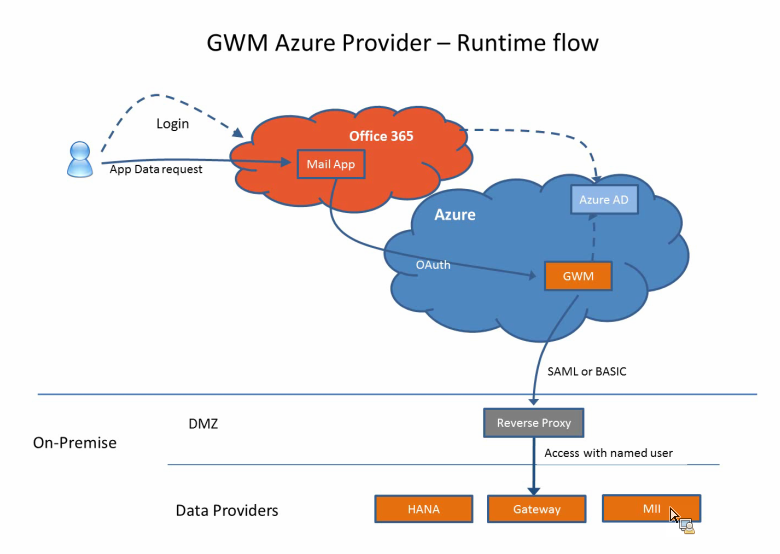
On 16 September, SAP launched an update of their product SAP Gateway for Microsoft (GWM). Code-named "GWM Azure", this update focusses on integration of SAP backend data and functionality, through SAP NetWeaver Gateway, in the Microsoft Azure cloud and Office 365 tenants.
As a member of the Customer Engagement Initiative group on SAP-Microsoft Interoperability, I was fortunate to participate in the product’s customer validation preceding the product launch. In our customer validation (CuV), I focussed on ‘enterprise-ready SSO’. With this phrase, I mean a robust, controlled and foremost enterprise-scaleable way to give employees via the Office 365 context access to the on-premise SAP data and functionality. In practice this translates for me into rely on authentication standards like SAML2, OAuth2, X.509 certificates; and not make use of username/password (weak) authentication. Mind you, the latter is fine for initially playing around and executing PoC’s. But it is not a secure and maintainable approach when addressing productive scenario’s with larger user groups.
The outcome of our CuV participation turned out very well. I could proof in ample time that the SAML2 based Single Sign-On from our Office 365 tenant via GWM Azure into our on-premise SAP landscape (Gateway + business suites), well... simple works!! The access to the SAP data in the Office 365 clients is still authorized based on the SAP authorization permissions and roles. An Office 365 user is only granted access to SAP data and functionality in compliance with his/here role in the SAP business systems.
With the release of GWM sp3 (GWM Azure), the availability of an organization’s SAP business data, can easily but still secure be extended to the Office 365 productivity clients. With Microsoft putting strong emphasis on the Office 365 proposition, and lots of organizations actually buying into this (including new customers for Microsoft, as consequence of Microsoft aggressively targetting the small and midsize business market (SMB)), this adds a powerful new business proposition; for the Office 365 ecosystem but also for individual Office 365 subscribers.

Monday, July 21, 2014

Connect SharePoint 2013 to SAP via Gateway for Microsoft

SAP initially developed Gateway for Microsoft [GWM] as ‘Duet Enterprise beyond SharePoint’. Allow Gateway OData service consumption in other Microsoft front-end formats, like Microsoft Office clients (Outlook, Excel, Word, PowerPoint). In essence GWM can also be regarded as a trimmed-down Duet Enterprise 2.0 variant; provides some of the same basic integration capabilities, but not all. Question that arises: can you also utilize GWM to connect SharePoint to SAP?
The answer is a firm Yes you can! Which is logical, as SharePoint itself is a .Net application. You can apply multiple approaches to consume the SAP data through a GWM generated reference proxy into SharePoint:
  1. Connect to the Gateway service proxy from a SharePoint web part context [mind you, Microsoft urges us to step away from this SharePoint server-side model; but it is still possible and supported]
  2. Build a custom BCS Connector to connect to the Gateway service proxy, and use that connector from SharePoint to render the received SAP data via standard External List, Business Data WebParts, or a custom build web part that invokes the BCS Api
  3. Build a SharePoint WCF RESTful service to connect to the Gateway service proxy, and consume that service in a browser-based front-end; using a databinding library like knockout.js, Angular.js. This is an example of SharePoint 2013 App model, and can also be applied in Office 365 / SharePoint Online.

SharePoint version

SharePoint 2010 has been build “ages ago”, and has a hard dependency on .Net framework 3.5. In the current year, the .Net framework has progressed to .Net framework 4.5, and the latest version of SharePoint [2013] has catched up with that. And the same holds for Duet Enterprise 2.0 [which is actually for SharePoint 2013, if you have SharePoint 2010 you need the Duet Enterprise 1.0 version], and also GWM: both are .Net Framework 4.x dependent. As consequence, I have to relax my firm statement a bit: Yes, GWM can be used to connect SAP and SharePoint 2013; but not for the older SharePoint versions (2003/2007/2010).

Simple example for Proofing

To demonstrate, I made up a sample scenario to retrieve SAP CRM data via GWM into SharePoint. I used the demo Gateway services as data source (see article by Martin Bachmann for instruction how to get access to the SAP Gateway demo system), and our own SharePoint 2013 environment as front-end. Further I have Visual Studio 2013, and necessarily also the latest GWM sp3 (versions preceeding sp3 will not install in Visual Studio 2013; but they do install in Visual Studio 2010/2012).
I applied the guidance provided in the GWM Developer Guide, but instead of Windows Forms project, choose SharePoint Visual Web Part template.
Next, you first need to add references to .NET WCF and GWM libraries. The easiest way to achieve that is by utilizing the GWM Visual Studio Add-In. Click on ‘Add SAP Service Reference’:
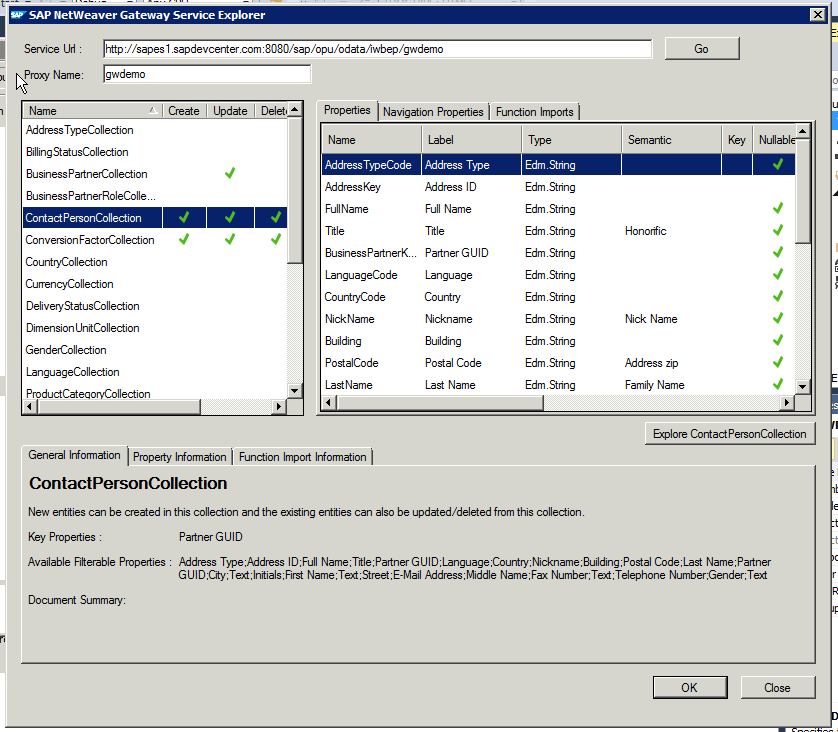
fill in as Service Url the url to GWdemo service, and press ‘Go’:
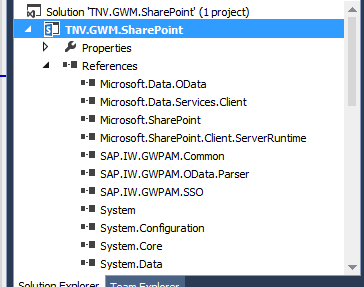
In the Service Explorer you can explore and inspect the OData entities that the GWdemo service exposes. Select one, and click 'Ok'. Direct result is the inclusion of multiple GWM assemblies (note that they are still named with the older GWPAM naming) in the Visual Studio project references:
Next, open the visual webpart and put in some code to consume the GWM created proxy reference and display received data. As this is merely a short demo to proof the connectivity, I simple display the SAP CRM BusinessPartners through a plain GridView control:
Build the Visual Studio project, and deploy the SharePoint solution. Then browse to your SharePoint site, create a new page, and add the GWM-build web part. And voila, we have SAP data in SharePoint:
All in all, building this took me less than an hour. Of course it is only a simple retrieval example; and no effort spend whatsoever on achieving a good looking and behaving UI. Also for this simple example I relied on basic authentication. For a trustworthy enterprise context, this is not usable and either OAuth, X.509 or SAML must be applied. But still, the outcome is very promising with respect to the SAP/SharePoint interoperability capability of GWM.

Fixes needed to GWM generated code

Issue 1: Microsoft.Sharp not included in references
Solution: Add the missing assembly to the Visual Studio project reference
Issue 2: Configuration Reader tries to read from windows form based path
Solution: avoid the attempt to read from windows-forms based path
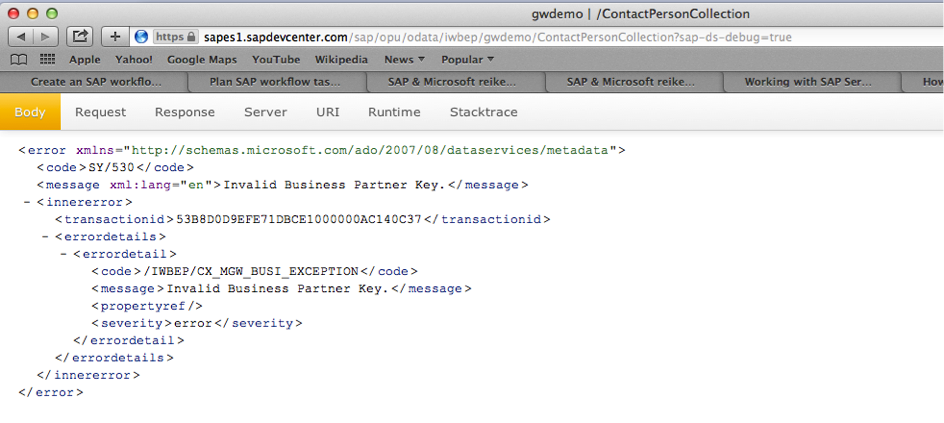
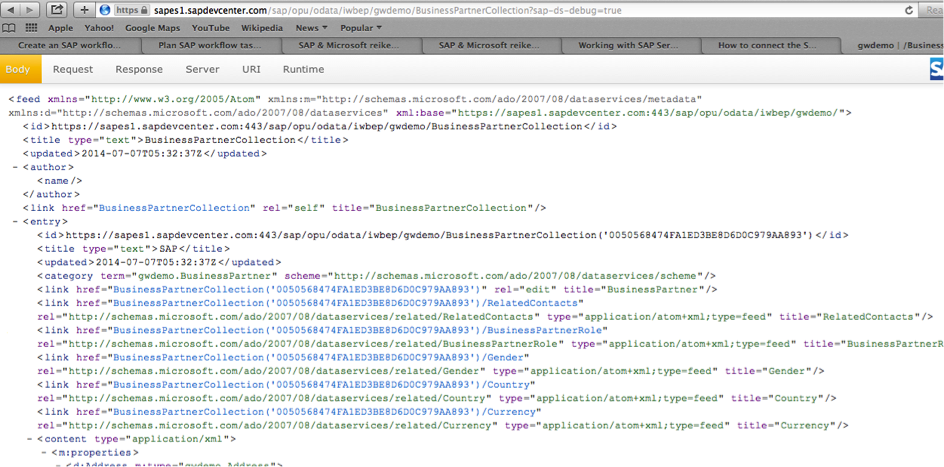
Issue 3: The used GWDemo system gives error
Solution: invoke another method…
Honestly: this is an example of why in every SAP interoperability project also domain knowledge is required --> contactpersoncollection is connected to a business partner key, you cannot invoke this without one.

Does GWM replace Duet Enterprise?

The answer to this is a clear No: Duet Enterprise as framework has more capabilities as GWM: SAP workflow integration, SAP BW reports publication, roles synchronization, user profile synchronization. Also Duet Enterprise has complete self-contained support within for Single Sign-On between SharePoint and SAP, while with GWM you need additional infra to achieve this (e.g. X.509 certificates infra in your landscape).
The better question is however: in what scenario’s would GWM be sufficient? Well, it might be sufficient in scenarios where all you need is the connectivity from SharePoint to SAP for data CRUDQ actions, and you already have Single Sign-On supporting infra in your IT landscape.

Friday, June 6, 2014

Winner of SAP Microsoft Unite Partner Connection Customer Impact and Value Award with VIEW solution

I am very proud that The Next View has won the 2014 edition of the SAP Microsoft Unite Partner Connection Award for Customer Impact and Value with our VIEW solution!!
VIEW stands for Virtual Integrated Enterprise Workplace. For us, the VIEW concept is not new, I for instance already defined and published on this blog parts of the Conceptual Solution Architecture back in 2009. But it is only up to now with the advent of the modern integration technologies SAP NetWeaver Gateway, Duet Enterprise, Gateway for Microsoft (GWM), plus the availability of standard functional products from our partner Cordis Solutions, that we are enabled to actually realize the VIEW concept in a cost-effective manner.
So, what does VIEW stand for? VIEW is a new operating concept in which the central concept is that of an employee-centric mindset. In VIEW, we strive to optimally enable organization’s employees to perform their daily work-related activities. In current reality, this work execution often means that one must operate in (and switch to) multiple applications and systems, monitor multiple tasklists in different environments (SAP, SharePoint, Oracle, Outlook, ...), remember login credentials of the diverse systems. With VIEW, we relieve the employees from all this ‘IT landscape’ hashle. Instead that the employees must explicit go to all the different applications, in VIEW we collect all the work execution in a central place: the VIEW landing page.
And this VIEW landing page has multiple appearances: desktop and mobile, to fit in with the nowadays reality that employees are [willing to be] always connected to the business systems, to at minimum monitor and act on urgent matters.
Although the VIEW concept does not mandates this, the typical platform for the desktop appearance is SharePoint; as this is in majority of the organizations the declared [by Information Management, Enterprise Architecture] business webplatform. The VIEW landing page is merely added as new employee business application within the already present SharePoint-based intranet.
Also for the mobile appearance, SharePoint can be the platform [certainly SharePoint 2013 has made some big steps on enabling us to provide a proper mobile appearance, a.o. taking into account the diversity in mobile devices]. But the mobile landing page can also be hosted outside SharePoint, e.g. via SAP Mobile Platform [SMP], an hybrid App [HTML5/CSS/PhoneGap], and other alternatives. Again, the VIEW concept does not put strict restrictions on this.
If you want to learn more about the VIEW solution, check out the SAP Microsoft Unite Partner Collection solution brief.

Sunday, May 4, 2014

GWPAM renamed into SAP Gateway for Microsoft, short GWM

SAP NetWeaver Gateway Productivity Accelerator voor Microsoft’, that is a mouthful. This long name arose in several variations of how the product is actually being called in the market and press, resulting in confusion and making it difficult to find product information. SAP product management has acknowledged this drawback effect, and they now have a more catchy product name assigned: SAP Gateway for Microsoft, abbreviated as GWM.
Other GWM news besides this name change is the availability of GWM Service Pack 02. Key parts of SP2 are alignment with Visual Studio 2012 [modern UI] look and feel, support for Microsoft Office 2013, support of SAP Fiori services consumption, and a project template for building your own Excel Add-In. Earlier versions of GWM already include the capability to link an Excel sheet to a Gateway REST/OData service for (mass) data management. This feature is aimed for business people who arrange their own (master)data management via Excel. The new Excel Add-in template is designed specifically for the developer, to build your own innovative solutions with Excel UI platform.
See also: SAP CodeTalk: GWPAM Update / Interview with Holger Bruchelt