Showing posts with label SAP. Show all posts

Saturday, December 27, 2014

Conceptual approach for exposing external SAP systems into SharePoint channel

The last 6 years I have focussed on utilizing SharePoint as additional channel to expose SAP data and operate SAP functionalities. As I am now about to start another challenge in the broad SharePoint arena, I decided to write down my advice on how-to achieve such SAP/SharePoint integration. What approach to take, architectural advice, and what steps. On intent I do not elaborate on technology products, as these by nature are only temporarily. Instead I focus my outline on concepts.

Rough outline of approach

  1. Establish the reference solution architecture for integrating SAP business process handling into SharePoint front-end / UI
  2. Establish which of the business processes to expose via SharePoint as additional channel, versus which to keep solely through SAP UI channel
  3. Establish the IST situation: Business Process definitions and supportive landscape, Enterprise IT strategy + roadmap, IT landscape.
  4. Establish the SOLL situation.
  5. Determine the IST-SOLL gap
  6. Map the solution architecture + IST-SOLL analysis onto concrete technology: Microsoft and SAP.
  7. Architect, design, develop, test and implement specific scenario(s).

Architecture guidelines

  • Apply a layered architecture
  • Loosely-connected front-end / back-office system(s) landscape through the usage of interfaces (contracts)
  • Interoperability standards based: webservices, security standards, monitoring
  • Abstract the LOBsystem business process handling as a contract-specification
  • Extend the decouped operation in alternative front-end with the concept of Operational Data Store to enable temporary administration outside the external LOB system, and allow complete preparation of administrative action before submitting into the external Lines of Business system.

Main steps for a specific scenario

Per specific scenario / use case to expose external LOB system into SharePoint
  • Identify the data and functionalities of the external LOB system that you want to expose via SharePoint as (additional) channel for user operation.
  • Identity in the platform of the external LOB system context, the building blocks (functional and technical) that can be used to operate the identified data and functions. The external LOB system, and its internal working, is a (magical) blackbox for the unknowingly. You need the aid of a knowledgable business analyst to help with identification of the proper functional building blocks, and how to utilize and invoke them.
  • Service-enable the identified building blocks. Don’t be fooled by the concept of SAP Enterprise Services. In practice, these are only usable in a (SAP) laboratory scope, not in the concrete situation of an end-organization. In reality you need to provide an own service layer to expose the identified building blocks. SAP has acknowledged this, and provides multiple supporting foundations and building blocks. In my opinion, current the most significant is SAP Gateway to expose SAP data and processes as REST services. For consumption in Microsoft clients, SAP delivers Duet Enterprise and Gateway for Microsoft that extend on the basic interoperability capabilities of SAP Gateway. In addition to SAP, frameworks of other suppliers are also available on the market to service-enable SAP. A disadvantage of them is that it may complicate your IT landscape. Trend of latest years in end-organizations is to consolidate on SAP + Microsoft IT policy

Friday, October 31, 2014

Expose SAP data via Office 365 API to iOS and Android?

At Microsoft TechEd Europe, an important announcement is the new Office 365 APIs for iOS and Android (native) Apps. Through the Office 365 APIs, iOS and Android developers will be enabled to directly consume and utilize Office 365 entities in native mobile Apps. Initial this encompasses Office 365 mails, calendar, contacts and files/documents. Later on the roadmap also tasks, Yammer (social) and Office Graph will be made available via the Office 365 APIs.
In my previous posting I reported on the latest version of SAP Gateway for Microsoft ('GWM Azure'), that enables access to SAP data into the Office 365 context. With the announcement of the new Office 365 APIs, this gives an interesting lookout. Will it also be possible to disclose SAP data by the combination of GWM + Office 365 APIs, for usage in native iOS and Android Apps? If so, some strong use cases for new type of composite business Apps will be made possible; in which Office 365 (personal) productivity data is combined with the business data in SAP. Direct available on the nowadays preferred business channel, being tablets and smartphones. Will be interesting to closely watch the actions of SAP and Microsoft on this…

Thursday, October 30, 2014

Expose SAP data into Office 365 productivity clients

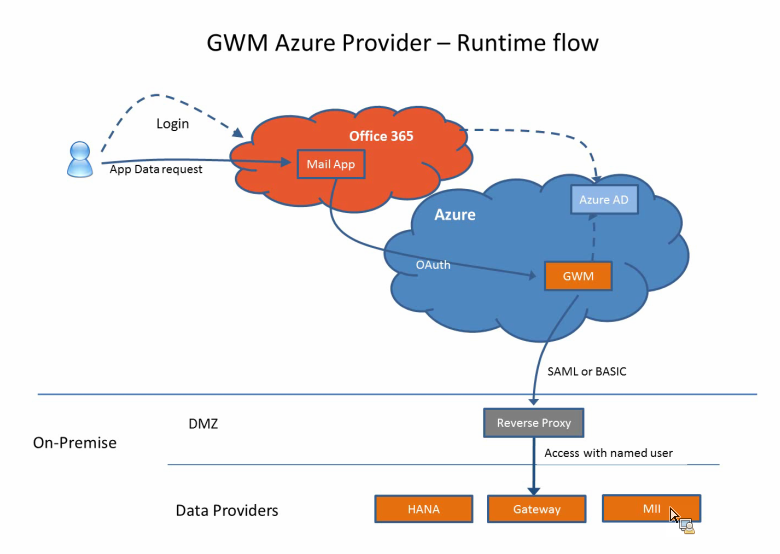
On 16 September, SAP launched an update of their product SAP Gateway for Microsoft (GWM). Code-named "GWM Azure", this update focusses on integration of SAP backend data and functionality, through SAP NetWeaver Gateway, in the Microsoft Azure cloud and Office 365 tenants.
As a member of the Customer Engagement Initiative group on SAP-Microsoft Interoperability, I was fortunate to participate in the product’s customer validation preceding the product launch. In our customer validation (CuV), I focussed on ‘enterprise-ready SSO’. With this phrase, I mean a robust, controlled and foremost enterprise-scaleable way to give employees via the Office 365 context access to the on-premise SAP data and functionality. In practice this translates for me into rely on authentication standards like SAML2, OAuth2, X.509 certificates; and not make use of username/password (weak) authentication. Mind you, the latter is fine for initially playing around and executing PoC’s. But it is not a secure and maintainable approach when addressing productive scenario’s with larger user groups.
The outcome of our CuV participation turned out very well. I could proof in ample time that the SAML2 based Single Sign-On from our Office 365 tenant via GWM Azure into our on-premise SAP landscape (Gateway + business suites), well... simple works!! The access to the SAP data in the Office 365 clients is still authorized based on the SAP authorization permissions and roles. An Office 365 user is only granted access to SAP data and functionality in compliance with his/here role in the SAP business systems.
With the release of GWM sp3 (GWM Azure), the availability of an organization’s SAP business data, can easily but still secure be extended to the Office 365 productivity clients. With Microsoft putting strong emphasis on the Office 365 proposition, and lots of organizations actually buying into this (including new customers for Microsoft, as consequence of Microsoft aggressively targetting the small and midsize business market (SMB)), this adds a powerful new business proposition; for the Office 365 ecosystem but also for individual Office 365 subscribers.

Monday, July 21, 2014

Connect SharePoint 2013 to SAP via Gateway for Microsoft

SAP initially developed Gateway for Microsoft [GWM] as ‘Duet Enterprise beyond SharePoint’. Allow Gateway OData service consumption in other Microsoft front-end formats, like Microsoft Office clients (Outlook, Excel, Word, PowerPoint). In essence GWM can also be regarded as a trimmed-down Duet Enterprise 2.0 variant; provides some of the same basic integration capabilities, but not all. Question that arises: can you also utilize GWM to connect SharePoint to SAP?
The answer is a firm Yes you can! Which is logical, as SharePoint itself is a .Net application. You can apply multiple approaches to consume the SAP data through a GWM generated reference proxy into SharePoint:
  1. Connect to the Gateway service proxy from a SharePoint web part context [mind you, Microsoft urges us to step away from this SharePoint server-side model; but it is still possible and supported]
  2. Build a custom BCS Connector to connect to the Gateway service proxy, and use that connector from SharePoint to render the received SAP data via standard External List, Business Data WebParts, or a custom build web part that invokes the BCS Api
  3. Build a SharePoint WCF RESTful service to connect to the Gateway service proxy, and consume that service in a browser-based front-end; using a databinding library like knockout.js, Angular.js. This is an example of SharePoint 2013 App model, and can also be applied in Office 365 / SharePoint Online.

SharePoint version

SharePoint 2010 has been build “ages ago”, and has a hard dependency on .Net framework 3.5. In the current year, the .Net framework has progressed to .Net framework 4.5, and the latest version of SharePoint [2013] has catched up with that. And the same holds for Duet Enterprise 2.0 [which is actually for SharePoint 2013, if you have SharePoint 2010 you need the Duet Enterprise 1.0 version], and also GWM: both are .Net Framework 4.x dependent. As consequence, I have to relax my firm statement a bit: Yes, GWM can be used to connect SAP and SharePoint 2013; but not for the older SharePoint versions (2003/2007/2010).

Simple example for Proofing

To demonstrate, I made up a sample scenario to retrieve SAP CRM data via GWM into SharePoint. I used the demo Gateway services as data source (see article by Martin Bachmann for instruction how to get access to the SAP Gateway demo system), and our own SharePoint 2013 environment as front-end. Further I have Visual Studio 2013, and necessarily also the latest GWM sp3 (versions preceeding sp3 will not install in Visual Studio 2013; but they do install in Visual Studio 2010/2012).
I applied the guidance provided in the GWM Developer Guide, but instead of Windows Forms project, choose SharePoint Visual Web Part template.
Next, you first need to add references to .NET WCF and GWM libraries. The easiest way to achieve that is by utilizing the GWM Visual Studio Add-In. Click on ‘Add SAP Service Reference’:
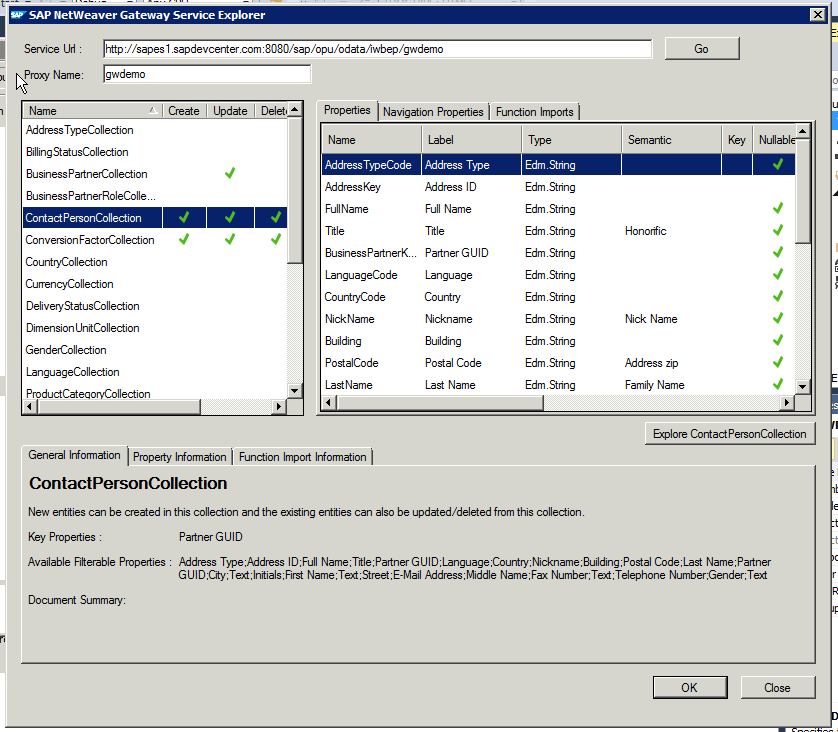
fill in as Service Url the url to GWdemo service, and press ‘Go’:
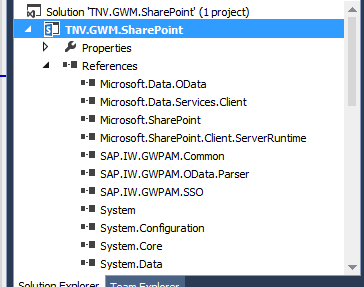
In the Service Explorer you can explore and inspect the OData entities that the GWdemo service exposes. Select one, and click 'Ok'. Direct result is the inclusion of multiple GWM assemblies (note that they are still named with the older GWPAM naming) in the Visual Studio project references:
Next, open the visual webpart and put in some code to consume the GWM created proxy reference and display received data. As this is merely a short demo to proof the connectivity, I simple display the SAP CRM BusinessPartners through a plain GridView control:
Build the Visual Studio project, and deploy the SharePoint solution. Then browse to your SharePoint site, create a new page, and add the GWM-build web part. And voila, we have SAP data in SharePoint:
All in all, building this took me less than an hour. Of course it is only a simple retrieval example; and no effort spend whatsoever on achieving a good looking and behaving UI. Also for this simple example I relied on basic authentication. For a trustworthy enterprise context, this is not usable and either OAuth, X.509 or SAML must be applied. But still, the outcome is very promising with respect to the SAP/SharePoint interoperability capability of GWM.

Fixes needed to GWM generated code

Issue 1: Microsoft.Sharp not included in references
Solution: Add the missing assembly to the Visual Studio project reference
Issue 2: Configuration Reader tries to read from windows form based path
Solution: avoid the attempt to read from windows-forms based path
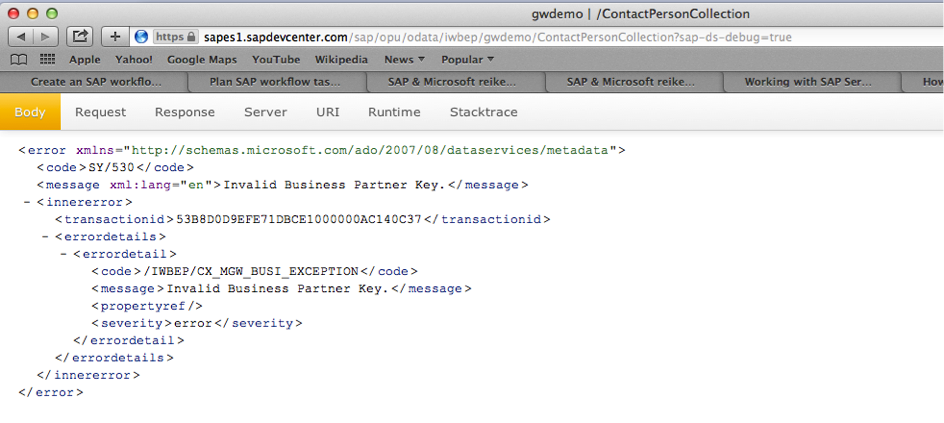
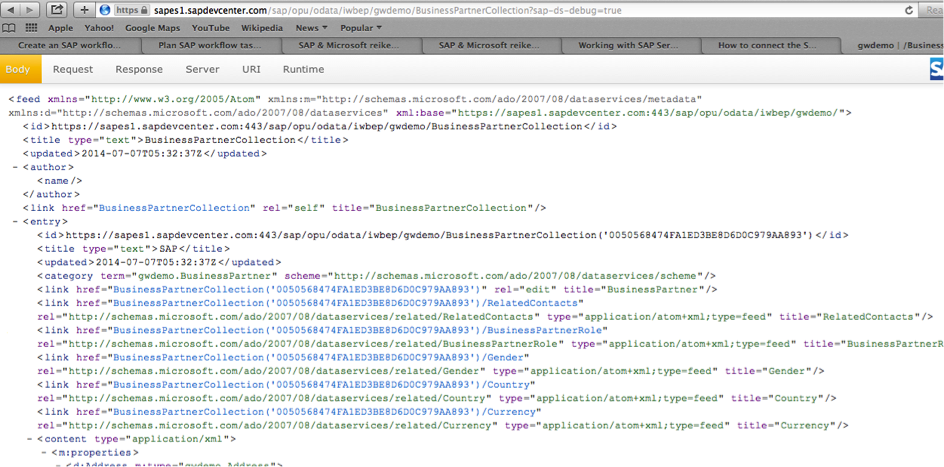
Issue 3: The used GWDemo system gives error
Solution: invoke another method…
Honestly: this is an example of why in every SAP interoperability project also domain knowledge is required --> contactpersoncollection is connected to a business partner key, you cannot invoke this without one.

Does GWM replace Duet Enterprise?

The answer to this is a clear No: Duet Enterprise as framework has more capabilities as GWM: SAP workflow integration, SAP BW reports publication, roles synchronization, user profile synchronization. Also Duet Enterprise has complete self-contained support within for Single Sign-On between SharePoint and SAP, while with GWM you need additional infra to achieve this (e.g. X.509 certificates infra in your landscape).
The better question is however: in what scenario’s would GWM be sufficient? Well, it might be sufficient in scenarios where all you need is the connectivity from SharePoint to SAP for data CRUDQ actions, and you already have Single Sign-On supporting infra in your IT landscape.

Friday, June 6, 2014

Winner of SAP Microsoft Unite Partner Connection Customer Impact and Value Award with VIEW solution

I am very proud that The Next View has won the 2014 edition of the SAP Microsoft Unite Partner Connection Award for Customer Impact and Value with our VIEW solution!!
VIEW stands for Virtual Integrated Enterprise Workplace. For us, the VIEW concept is not new, I for instance already defined and published on this blog parts of the Conceptual Solution Architecture back in 2009. But it is only up to now with the advent of the modern integration technologies SAP NetWeaver Gateway, Duet Enterprise, Gateway for Microsoft (GWM), plus the availability of standard functional products from our partner Cordis Solutions, that we are enabled to actually realize the VIEW concept in a cost-effective manner.
So, what does VIEW stand for? VIEW is a new operating concept in which the central concept is that of an employee-centric mindset. In VIEW, we strive to optimally enable organization’s employees to perform their daily work-related activities. In current reality, this work execution often means that one must operate in (and switch to) multiple applications and systems, monitor multiple tasklists in different environments (SAP, SharePoint, Oracle, Outlook, ...), remember login credentials of the diverse systems. With VIEW, we relieve the employees from all this ‘IT landscape’ hashle. Instead that the employees must explicit go to all the different applications, in VIEW we collect all the work execution in a central place: the VIEW landing page.
And this VIEW landing page has multiple appearances: desktop and mobile, to fit in with the nowadays reality that employees are [willing to be] always connected to the business systems, to at minimum monitor and act on urgent matters.
Although the VIEW concept does not mandates this, the typical platform for the desktop appearance is SharePoint; as this is in majority of the organizations the declared [by Information Management, Enterprise Architecture] business webplatform. The VIEW landing page is merely added as new employee business application within the already present SharePoint-based intranet.
Also for the mobile appearance, SharePoint can be the platform [certainly SharePoint 2013 has made some big steps on enabling us to provide a proper mobile appearance, a.o. taking into account the diversity in mobile devices]. But the mobile landing page can also be hosted outside SharePoint, e.g. via SAP Mobile Platform [SMP], an hybrid App [HTML5/CSS/PhoneGap], and other alternatives. Again, the VIEW concept does not put strict restrictions on this.
If you want to learn more about the VIEW solution, check out the SAP Microsoft Unite Partner Collection solution brief.

Sunday, May 4, 2014

GWPAM renamed into SAP Gateway for Microsoft, short GWM

SAP NetWeaver Gateway Productivity Accelerator voor Microsoft’, that is a mouthful. This long name arose in several variations of how the product is actually being called in the market and press, resulting in confusion and making it difficult to find product information. SAP product management has acknowledged this drawback effect, and they now have a more catchy product name assigned: SAP Gateway for Microsoft, abbreviated as GWM.
Other GWM news besides this name change is the availability of GWM Service Pack 02. Key parts of SP2 are alignment with Visual Studio 2012 [modern UI] look and feel, support for Microsoft Office 2013, support of SAP Fiori services consumption, and a project template for building your own Excel Add-In. Earlier versions of GWM already include the capability to link an Excel sheet to a Gateway REST/OData service for (mass) data management. This feature is aimed for business people who arrange their own (master)data management via Excel. The new Excel Add-in template is designed specifically for the developer, to build your own innovative solutions with Excel UI platform.
See also: SAP CodeTalk: GWPAM Update / Interview with Holger Bruchelt

Sunday, March 9, 2014

GWPAM Rapid Deployment Service on SAP-Microsoft Unite site

Earlier I reported about our involvement in the new SAP product for direct availability of SAP data into Microsoft Office clients: SAP NetWeaver Gateway Productivity Accelerator for Microsoft, short GWPAM.
Based on the knowledge and experience that we have gained early on in applying GWPAM, we have worked out a Rapid Deployment Service for GWPAM. This RDS solution is recognized by the SAP Gateway product team, and published on the SAP-Microsoft Unite Partner Connection site.
In the Rapid Deployment Service, we combine our proven approach for successful implementation of SAP-Microsoft integration scenarios with GWPAM product knowledge. Central concepts in our approach are user-centric focus, UI-design via (preferable) clickable prototypes, integration architecture, and technical expertise with the Microsoft and SAP application platforms. Check out in case you're interested in easily bring SAP data into Microsoft based front-ends.

Saturday, January 4, 2014

Augment GWPAM AddIn project to consume JSON dataformat

GWPAM consumption of efficient JSON format only possible when Gateway service supports OData V3
Standard the GWPAM generated AddIns consume the Gateway REST OData service via the AtomPub dataformat, and not via the more data-efficient JSON format. The reason is that the used .Net WCF Data Services Client library is not capable of consuming JSON dataformat. Because I prefer to consume REST services via the mobile-friendly JSON dataformat, I set out to augment a default generated GWPAM Outlook AddIn project to consume via OData JSON. As the service consumption is within .Net code, this is mostly a Microsoft.Net tail. However, as it turns out that to be even able to consume JSON in the Microsoft WCF client library, an important prerequisite is imposed on the consumed REST service; it also extends to there.

JSON consumption via WCF Data Services Client Library

Initially, WCF Data Services Client library only supported consumption of REST services via AtomPub dataformat. As of release 5.1 it is also possible to consume JSON, but with the limitation that the JSON format must be OData V3. Prerequisite for the consumed service is thus that it must be able to provide its data in OData JSON V3 dataformat. For the older OData versions (V1, V2), it is not [yet] possible to consume JSON in WCF Data Services Client library.

Steps to augment to GWPAM project to consume JSON dataformat

First prepare your project to be able to handle the JSON consumption:
  1. Install the latest WCF Data Services Client Library, at present this is 5.6.0. Installation is done via NuGet Package Manager, and must be applied to each GWPAM project in which you want to consume via JSON dataformat. The effect per project is that reference ‘Microsoft.Data.Services.Client’, version 5.6.0 is added; and that the (via GWPAM project template) already existing references ‘Microsoft.Data.EDM’, ‘Microsoft.Data.OData’, ‘System.Spatial’ are also upgraded to version 5.6.0.
  2. If present, remove the reference ‘System.Data.Services.Client’ from the GWPAM project(s). Note: Visual Studio 2010 default installs with that older WCF Data Services Client library.
  3. Install WCF Data Services 5.3.0 RTM Tools Installer in Visual Studio; also via NuGet.
Next setup the consuming code to consume the REST service via OData. That is, if the service supports it
  1. Validate that the consumed service is able to return data in the required JSON dataformat, OData V3. Query for this the $metadata of the service, and validate that it contains “m:MaxDataServiceVersion='3.0'”
  2. Generate an EDMModel for the service, via ‘Add Service Reference’ (iso ‘Add SAP Service Reference’). Open the generated service proxy, and change the accessibility of ‘GeneratedEdmModel’ to public
  3. Edit the earlier generated SAP data services client code to consume the service via JSON dataformat
    1. In the constructor, set to initialize for ‘System.Data.Services.Common.DataServiceProtocolVersion.V3’
    2. Set the Format to link to the generated EDM Model: this.Format.LoadServiceModel = GeneratedEdmModel.GetInstance;
    3. Set the Format to useJson: serviceContext.Format.UseJson()
    4. Copy the implementation + usage of methods ‘ResolveTypeFromName’ and ‘ResolveNameFromType’ from the generated service proxy in step 5. Modify the code to correspond to the full name of the SAP service proxy.
    1. Query the consumed REST service for JSON format; either via querystring param ‘$format=JSON’, or via Http Request Header ‘accept
      = application/json’

That's it

And that’s it. Now the GWPAM based Office AddIn is able to consume the REST Service via the more efficient JSON dataformat. Note that for the consumption itself it does not even has to a Gateway REST Service; it is also possible to consume REST services from other webservice platforms. But the GWPAM project templates and code generated are focussed on standard SAP NetWeaver Gateway services + data models; WFService as one evident example.

Sunday, December 29, 2013

Tip: Resolve GWPAM issue with misnamed embedded Resources reference

It is a common approach applied by .NET developers to give multipart names to the individual projects in a Visual Studio solution. The name parts identify different aspects of the Visual Studio project, a typical name pattern is "<CompanyName>."<Application>."<Component>".
Example of this: "TNV.Purchase.OrderManagement".
I applied this naming approach also for a GWPAM project to build a Microsoft Outlook AddIn: TNV.TasksClustering.OutlookAddIn. However, after I installed the compiled AddIn, Outlook failed to load it. The error details were:
System.Reflection.TargetInvocationException: Exception has been thrown by the target of an invocation. ---> System.Resources.MissingManifestResourceException: Could not find any resources appropriate for the specified culture or the neutral culture. Make sure "TNV_TasksClustering_OutlookAddIn.Icons.resources" was correctly embedded or linked into assembly "TNV.TasksClustering.OutlookAddIn" at compile time’
I inspected the GWPAM generated code to analyze the problem cause. It appears that GWPAM replaces in the code that it generates, the dots ('.') in the Visual Studio project name into the underline ('_') character. Thus 'TNV.TasksClustering.OutlookAddIn' becomes 'TNV_TasksClustering_OutlookAddIn' in the generated C# code. But a side effect is that this results in a naming-inconsistency with embedded Resources: Visual Studio namely by default embeds .NET resources files in the compiled assembly with the unchanged project name, in this case thus still with the dots:
I have reported this issue to the Duet Enterprise / GWPAM product team. I expect it to be fixed in a forthcoming service pack. Until then, the pragmatic and simple workaround is to correct in the generated C# code the line that tries to load the embedded resource:

Sunday, November 17, 2013

Duet Enterprise / GWPAM interview at SAP TechEd Amsterdam

Recording of the interview I gave at SAP Tech-Ed Amsterdam, talking about my experiences with SAP NetWeaver Gateway and Duet Enterprise, SAP Customer Engagement Initiative programs, and the recent released NetWeaver Gateway Productivity Accelerator for Microsoft (GWPAM).

Saturday, August 31, 2013

Applying SharePoint FAST for unlocking SAP data

An important new mantra is search-driven applications. In fact, "search" is the new way of navigating through your information. In many organizations an important part of the business data is stored in SAP business suites. A frequently asked need is to navigate through the business data stored in SAP, via a user-friendly and intuitive application context. For many organizations (78% according to Microsoft numbers), SharePoint is the basis for the integrated employee environment. Starting with SharePoint 2010, FAST Enterprise Search Platform (FAST ESP) is part of the SharePoint platform. All analyst firms assess FAST ESP as a leader in their scorecards for Enterprise Search technology. For organizations that have SAP and Microsoft SharePoint administrations in their infrastructure, the FAST search engine provides opportunities that one should not miss.

SharePoint Search

Search is one of the supporting pillars in SharePoint. And an extremely important one, for realizing the SharePoint proposition of an information hub plus collaboration workplace. It is essential that information you put into SharePoint, is easy to be found again. By yourself of course, but especially by your colleagues. However, from the context of 'central information hub', more is needed. You must also find and review via the SharePoint workplace the data that is administrated outside SharePoint. Examples are the business data stored in Lines-of-Business systems [SAP, Oracle, Microsoft Dynamics], but also data stored on network shares.
With the purchase of FAST ESP, Microsoft's search power of the SharePoint platform sharply increased. All analyst firms consider FAST, along with competitors Autonomy and Google Search Appliance as 'best in class' for enterprise search technology. For example, Gartner positioned FAST as leader in the Magic Quadrant for Enterprise Search, just above Autonomy. In SharePoint 2010 context FAST is introduced as a standalone extension to the Enterprise Edition, parallel to SharePoint Enterprise Search. In SharePoint 2013, Microsoft has simplified the architecture. FAST and Enterprise Search are merged, and FAST is integrated into the standard Enterprise edition and license.

SharePoint FAST Search architecture

The logical SharePoint FAST search architecture provides two main responsibilities:
  1. Build the search index administration: in bulk, automated index all data and information which you want to search later. Depending on environmental context, the data sources include SharePoint itself, administrative systems (SAP, Oracle, custom), file shares, ...
  2. Execute Search Queries against the accumulated index-administration, and expose the search result to the user.
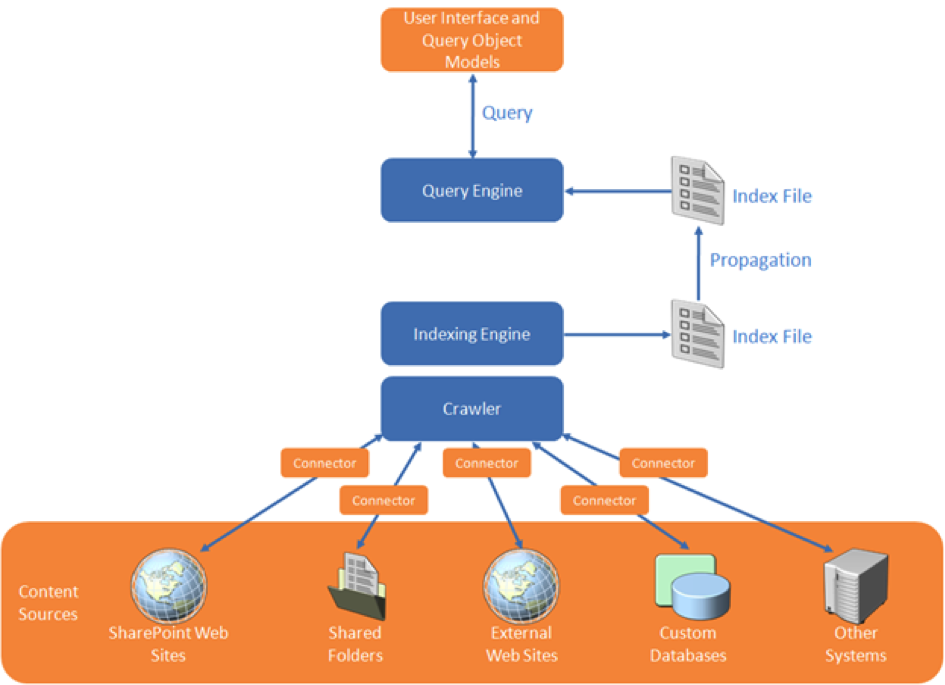
In the indexation step, SharePoint FAST must thus retrieve the data from each of the linked systems. FAST Search supports this via the connector framework. There are standard connectors for (web)service invocation and for database queries. And it is supported to custom-build a .NET connector for other ways of unlocking external system, and then ‘plug-in’ this connector in the search indexation pipeline. Examples of such are connecting to SAP via RFC, or ‘quick-and-dirty’ integration access into an own internal build system.
In this context of search (or better: find) in SAP data, SharePoint FAST supports the indexation process via Business Connectivity Services for connecting to the SAP business system from SharePoint environment and retrieve the business data. What still needs to be arranged is the runtime interoperability with the SAP landscape, authentication, authorization and monitoring. An option is to build these typical plumping aspects in a custom .NET connector. But this not an easy matter. And more significant, it is something that nowadays end-user organizations do no longer aim to do themselves, due the involved development and maintenance costs.
An alternative is to apply Duet Enterprise for the plumbing aspects listed. Combined with SharePoint FAST, Duet Enterprise plays a role in 2 manners:
(1) First upon content indexing, for the connectivity to the SAP system to retrieve the data. The SAP data is then available within the SharePoint environment (stored in the FAST index files). Search query execution next happens outside of (a link into) SAP.
(2) Optional you'll go from the SharePoint application back to SAP if the use case requires that more detail will be exposed per SAP entity selected from the search result. An example is a situation where it is absolutely necessary to show the actual status. As with a product in warehouse, how many orders have been placed?

Security trimmed: Applying the SAP permissions on the data

Duet Enterprise retrieves data under the SAP account of the individual SharePoint user. This ensures that also from the SharePoint application you can only view those SAP data entities whereto you have the rights according the SAP authorization model. The retrieval of detail data is thus only allowed if you are in the SAP system itself allowed to see that data.
Due the FAST architecture, matters are different with search query execution. I mentioned that the SAP data is then already brought into the SharePoint context, there is no runtime link necessary into SAP system to execute the query. Consequence is that the Duet Enterprise is in this context not by default applied.
In many cases this is fine (for instance in the customer example described below), in other cases it is absolutely mandatory to respect also on moment of query execution the specific SAP permissions. The FAST search architecture provides support for this by enabling you to augment the indexed SAP data with the SAP autorisations as metadata.
To do this, you extend the scope of the FAST indexing process with retrieval of SAP permissions per data entity. This meta information is used for compiling ACL lists per data entity. FAST query execution processes this ACL meta-information, and checks each item in the search result whether it allowed to expose to this SharePoint [SAP] user.
This approach of assembling the ACL information is a static timestamp of the SAP authorizations at the time of executing the FAST indexing process. In case the SAP authorizations are dynamic, this is not sufficient.
For such situation it is required that at the time of FAST query execution, it can dynamically retrieve the SAP authorizations that then apply. The FAST framework offers an option to achieve this. It does require custom code, but this is next plugged in the standard FAST processing pipeline.
SharePoint FAST combined with Duet Enterprise so provides standard support and multiple options for implementing SAP security trimming. And in the typical cases the standard support is sufficient.

Applied in customer situation

The above is not only theory, we actually applied it in real practice. The context was that of opening up of SAP Enterprise Learning functionality to operation by the employees from their familiar SharePoint-based intranet. One of the use cases is that the employee searches in the course catalog for a suitable training. This is a striking example of search-driven application. You want a classified list of available courses, through refinement zoom to relevant training, and per applied classification and refinement see how much trainings are available. And of course you also always want the ability to freely search in the complete texts of the courses.
In the solution direction we make the SAP data via Duet Enterprise available for FAST indexation. Duet Enterprise here takes care of the connectivity, Single Sign-On, and the feed into SharePoint BCS. From there FAST takes over. Indexation of the exposed SAP data is done via the standard FAST index pipeline, searching and displaying the search results found via standard FAST query execution and display functionalities.
In this application context, specific user authorization per SAP course elements does not appy. Every employee is allowed to find and review all training data. As result we could suffice with the standard application of FAST and Duet Enterprise, without the need for additional customization.

Conclusion

Microsoft SharePoint Enterprise Search and FAST both are a very powerful tool to make the SAP business data (and other Line of Business administrations) accessible. The rich feature set of FAST ESP thereby makes it possible to offer your employees an intuitive search-driven user experience to the SAP data.

Monday, June 17, 2013

Architecture of a cloud-enabled SAP/SharePoint document viewer

End 2012 IntelliDocx LLC approached us to design the global architecture for their new DocSet.ECM for SAP and SharePoint product suite, and build DocSet.ECM for Plant Maintenance (PM) as first member. The DocSet.ECM functionality is enable end-users to search, navigate and access documents linked with SAP entities, directly within SharePoint based workplaces. The SAP entities come from any of the known SAP Business Suites - PM, Sales, HCM, SRM. IntelliDocx had an ambitieus deadline, as they aimed to release the PM solution to the public and market analysts at the European SharePoint Conference in Copenhague (Februari 2013).
The base functional requirement for the product suite is that it renders a view in SharePoint on documents linked in SAP. But to make it a winning solution, they have more requirements. The products must be very user-intuitive and friendly; enabling arbitrair end-users to utilize it without requiring inside SAP knowledge. Product deployment must be fit for both on-premise as cloud. More and more organizations nowadays have decided, or are looking into, SharePoint Online utilization iso maintaining an own on-premise SharePoint farm. And of course, the product should support both SharePoint 2010 and 2013; or at least be prepared for 2013 ahead.

System Architecture

The diagram below illustrates the architecture we proposed to address the requirement set. (And which we indeed applied to successfully deliver the DocSet.ECM for PM product to market, within the tight timeframe [News release]).

Essentials

DocSet Viewer
  • Deployed via Sandboxed Solution
  • UserControl iso aspx page
    • allows to add the DocSet viewer to regular SharePoint site and content pages / intuïtieve integration within customer’s SharePoint based portals
  • Server-side only rendering the html
    • No server postback handling
    • No interactive dependency on SharePoint server (may be cloud-hosting)
  • Client-side handles communication with the DocSet webservice, and dynamic UI-rendering
    • By-pass SharePoint server
    • Use jQuery:
      • Invoke DocSet JSON webservice
      • Render tree-view of hierarchical document folders
      • Drag-and-drop of documents (for Move + Add)
  • Configuration:
    • Endpoint of DocSet webservice (may be cross-domain)
DocSet webservice
  • WCF JSON webservice
  • Enable CrossDomain invocation via JSONP
    • CORS is not yet widely supported; and in particular not within the enterprise domain
  • Utilize ERP-Link RFC Connector for SAP / Microsoft.NET interoperability with DocSet.ECM RFCs
    • The architecture allows usage of other SAP / Microsoft connectors, e.g. Duet Enterprise, but we decided to initially use the ERP-Link connector as IntelliDocx told us a lot of their customers already use the Gimmal ERP-Link Suite.
  • Configuration:
    • Connection settings to DocSet RFC
    • Address of SharePoint server hosting the DocSet viewer, to allow cross-site requests from this possible remote / other domain server

DocSetViewer App - SharePoint 2010 + 2013

The DocSet.ECM for SAP and SharePoint product suite is fit to deploy and run within both SharePoint 2010 and 2013, without any code-change; and hosting supported on-premise and within the Office365 cloud.
  
Related info: IntelliDocx

Sunday, October 28, 2012

Deploy custom Duet Enterprise scenario from Dev into SAP landscape

In the case that an organization develops custom business scenarios on top of Duet Enterprise foundation, an essential step is to implement it through to the organizations SAP production environment. Duet Enterprise relies herefore on the standard CTS+ transport mechanism.

Design time - prepare the custom business scenario

It is best practice to include all of the Duet Enterprise services for one scenario within an own isolated and recognizable namespace in the Gateway system. Each scenario will then be recognizable, and not per accident mingled with deliverables of another Duet Enterprise scenario. To achieve this, you create per business scenario an own Software Component in SLD, and use that to create in ESR an own Software Component Version and namespace.
Steps:
  1. Open SLD, and create a new Software Component
  2. Open ESR, and create a new Software Component Version via import of the newly created Software Component
  3. Create a namespace in the newly created Software Component Version
  4. Copy the Basic DataTypes from SAP IW TNG to the new Software Component Version and namespace
  5. Copy the Fault Message from SAP IW TNG to the new Software Component Version and namespace
  6. Activate the resulting changelist(s) in ESR
  7. Logon to Gateway system, transaction SE80; and create a Package
  8. Logon to Gateway system, transaction SProxy; and create + activate proxies for the Basic DataTypes, ExchangeFaultData and ExchangeLogData in the newly created Package.
With this, the preparation phase is completed. You now have an own business scenario container for all services that will be developed for the scenario.
That is, within the Dev environment. The same container must be created on the counterpart Gateway system into Test, QA and Production environments to implement the custom scenario in these environments. To facilitate this, all of the design time preparation steps performed on the Gateway system are recorded in a CTS+ Transport Workbench request: Create Package (step 7), and Create + Activate Proxies (step 8).
Note that it is not needed to also implement or repeat the SLD and ESR steps into the Test, QA and Production landscapes. For Duet Enterprise design time, the SLD and ESR only have a role in the design time phase; in the development environment. Once the service proxy objects for ESR content are generated (basic / standard ones, and the custom developed), there is no dependency on ESR content. The transport therefore only consists of the service definition(s) and the proxy objects that are part of them.

Design time - create the service definitions for the custom business scenario

Per service this consists of the 2 familiar actions: create and map a Gateway DataModel, and next generate the service definition + BDC Model for this Gateway DataModel (GSDO Type).
Steps:
  1. Logon to Gateway system, transaction SE80; and create a new Gateway DataModel; make sure not to select OData channel (Duet Enterprise 1.0 and SharePoint 2010 do not support OData consumption; this will change with Duet Enterprise 2.0 and SharePoint 2013). The system enforces you to include the creation of the Gateway DataModel in a Workbench request. The advice is to not include it in the same Workbench request from the preparation step, but instead use an own Workbench request for the design time deliverables. As result you have the implementation of the Package including the generic basic DataTypes + FaultMessage separated from the implementation of the specific scenario entities. It is typical in a custom realization project that you incremently build new versions of an own service definition, and if a previous version already transported you must be able to replace that while preserving the Package.
  2. Map 1 of more operations in the Gateway DataModel; e.g. Query and Read
  3. Generate the Gateway DataModel; the system enforces you to include the generation and creation of SAP entities within a Customizing request.
  4. Open transaction BDC Browser; if this is the first service definition for the custom business scenario, create a new Business Scenario. Otherwise you may opt to include the 2nd, 3rd and so on service definition all within the same Business scenario. I advice this as best practice, you then end up with a single Duet Enterprise Business Scenario that contains the entire set of Service Definitions developed for it. In case you create a new Business Scenario, it is again enforced by the system to include it within a customizing request. You can select the same as earlier created for the Gateway Model generation(s).
  5. Select the Business Scenario, and Create BDC Model for GSDO Type; select the Gateway Model earlier created. Also here the system enforces to include within a customizing request.
  6. [Optional] Open transaction SProxy, select the generated service interface and test its correct working for the diverse methods in the interface (e.g. Find, Read, Create, )
  7. [Optional] Open SOAMANAGER on Gateway system, browse to Business Scenario Configuration. Select your Business Scenario, and export + save into a local XML file.

Implementaton time - transport the custom business scenario

When the custom realization has progressed or is even completed in the Gateway system of the SAP Development environment, next is to propagate it within the SAP landscape.
Steps:
  1. Logon to Gateway system of SAP Dev environment, transaction SE03 or SE10; and release all the Workbench and Customizing requests that are related to the custom Duet Enterprise Business Scenario
  2. Logon to Gateway system of the transport target environment (SAP Test or QA environment), and open Transport Management System (TMS). Import the released Workbench and Customizing requests from the Development environment.
  3. Activate each of the requests. Make sure to do this in the correct logical order: first package, next the business scenario including service definitions.
  4. Logon to Gateway system of the transport target environment, transaction BDC Browser. Validate that the Business Scenario(s) is/are present. Also validate that for each of the imported service definitions, there is no end point yet.
  5. Release and activate all of the imported service definitions in SOAMANAGER. Browse to Business Scenario Configuration, and import the Business_Scenario XML file that is exported in the Development environment. If the Business Scenario already exists here from a previous import, first delete it. Or otherwise you can also explicitly associate new service definitions within a/the Business Scenario, and assign a profile. After activation of the service definitions, validate in transaction BDC Browser that for each of the service definitions now an end point is available.
  6. [Optional] Open transaction SProxy, select the imported service interface and test its correct working for the diverse methods in the interface (e.g. Find, Read, Create, )
  7. Transaction BDC Browser, select the imported Business Scenario and click on Export Business Scenario. Hand over the exported SharePoint BDC Model(s) to import within the SharePoint BCS Service Application of the implementation environment.
  8. [Optional] In SharePoint webapplication, create an ExternalList for one of the imported External Content Types. Validate that you can retrieve SAP data via Duet Enterprise and SAP Gateway using one of the transported / imported Gateway Service Definitions.

Sunday, October 7, 2012

Duet Enterprise troubleshooting pointers

SAP side

Friday, September 14, 2012

OData service support in Duet Enterprise - 2.0 and 1.0FP1 SP3

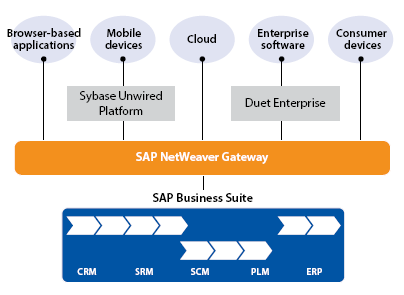
SAP NetWeaver Gateway 2.0 has within the SAP architecture the role of transparent integration layer to the SAP Business Suite:
Duet Enterprise is a consumer of the SAP Gateway layer, Sybase Unwired Platform is another consumer for Mobile devices. The access through Gateway is based on current interoperability standards: W3* (SOAP / WSDL) Web Services and OData services (REST protocol).
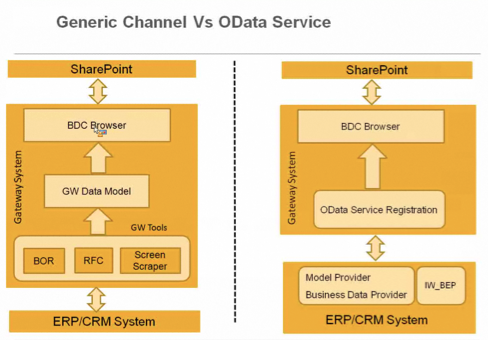
In the current Duet Enterprise 1.0 FP1 product OData support iswas missing. The direct explanation is that SharePoint 2010 BCS does not support OData consumption. For Duet Enterprise interoperability it is was therefore necessary to unlock SAP data via the SAP Gateway Generic Channel. Sybase Unwired Platform since version 2.1 does have OData consumption support.
From the market (partners, including The Next View, and customers) is urged to include OData support in Duet Enterprise. Main limitation is, however, SharePoint 2010 BCS.
In SharePoint 2013, BCS supports OData consumption. And Duet Enterprise 2.0 can therefore also support the interoperability via Gateway OData Channel. Integration via Generic Channel continues to be supported, in terms of design-time and runtime.
SAP Gateway includes generator tools for Generic and OData channel. Both are subject to the restriction that SAP hierarchical data structure is not supported (no mapping capability). In case of hierarchical data it is possible to 'handcraft' the Gateway service in ABAP code. The programming model for custom OData providers is thereby a lot simpler compared to that for Generic Channel services.
XML Funneling architectural pattern, via which we still have the opportunity to utilize the benefits of the Gateway generator tools.
SAP and Microsoft have recognized that (potential) Duet Enterprise 1.0 FP1 customers, now want to connect to the future OData option of Duet Enterprise 2.0. For example, to reuse the same Gateway service for Mobile channel and SharePoint / Duet Enterprise. To make this possible, with Duet Enterprise 1.0 SP03 (released today, September 14) an OData-SOAP Bridge is included. In short this Bridge maps OData-based output of Gateway OData services to SOAP services, which then integrate into SharePoint 2010 BCS. The OData-SOAP Bridge is restricted to 'flat' SAP data structure, data-retrieval of complex SAP structure to SharePoint is thus not possible.
In Duet Enterprise 2.0 the OData-SOAP Bridge is not included; SharePoint 2013 BCS itself can directly consume OData.
Summarized:
  • Duet Enterprise 2.0 requires SharePoint 2013
  • In Duet Enterprise 2.0 the OData + Generic channels are supported; SharePoint 2013 BCS can consume OData services
  • For Duet Enterprise 1.0 a OData-SOAP bridge is available via SP03 to bridge Gateway OData services for consumption as SOAP web service in SharePoint 2010 BCS
    • Application of the Bridge is restricted to flattened SAP structure; in reality SAP data often has a hierarchical / complex structure (e.g. SAP LSO)
  • SAP advice on the interoperability endpoint decision: OData Channel or Generic Channel?

Saturday, September 1, 2012

User-centric Development Process for Duet Enterprise projects

In essence, a ‘Duet Enterprise custom scenario’ development project is not different from other application development projects. The customer – either the real end-user, or product management for package software -, has an idea about what to achieve and functional + non-functional (quality) requirements to underline the idea. Often this idea is still vague, and the requirement set far from complete and on aspects also contradictionary. The waterfall approach to yet start with application development (specify, build, test) typically ends up with wrong or failed end-results: the application does not live up to the real customer needs and expectations, and the budget is largely overrun as consequence of responding on the requirements changes. The agile movement came up to improve on this bad practice. Central is the structural involvement of the user (representative) during the full course of the development project. Continous, the user is in the lead about the specifics and the behaviour of the application functionality to be delivered. In Scrum, this responsibility is formalized within the product owner role.

Application mockup

A proven approach to enable the product owner to validate, correct, and ultimately confirm the application functionality is by make it experiencable, ‘touchable’. Provide the product owner with a realistic impression of the application behavour + feature(s) that the project will build: a clickable prototype / mockup.
Based on multiple positive experiences (also within non-Duet Enterprise project, e.g. BI Dashboards), we strongly believe in the added value and power of application mockup. We regard the role of UX / UID expert crucial for customer involvement, and thus for delivering the correct application functionality.

Meeting of 2 worlds

Yet, a Duet Enterprise project also is very much different from ‘normal’ projects. The cause lies with the meeting of 2 very different environments: IT technology, platform concepts, and human nature. The tradional SAP environment is transaction oriented, with focus on structural business process executions. The Microsoft environment, and in particular SharePoint, is far more loose. Ad-hoc processes are the norm, the individual user decides how to perform a specific (business) action. When these 2 worlds + thinking come together in a Duet Enterprise project, the first outcomes are often dramatic. SAP versus SharePoint architects, business analysts and developers do not understand each other (concepts). Both ‘parties’ disagree on how and where (that is, on SAP or on SharePoint side) custom development should be done. The personal preference on how to achieve the SAP+SharePoint integration is influenced by one’s own technology frames and familiair concepts. This has the risk that the user is forgotten: the user interests must be central, deliver an optimal user experience.

Align through Blueprint Duet Enterprise scenario’s

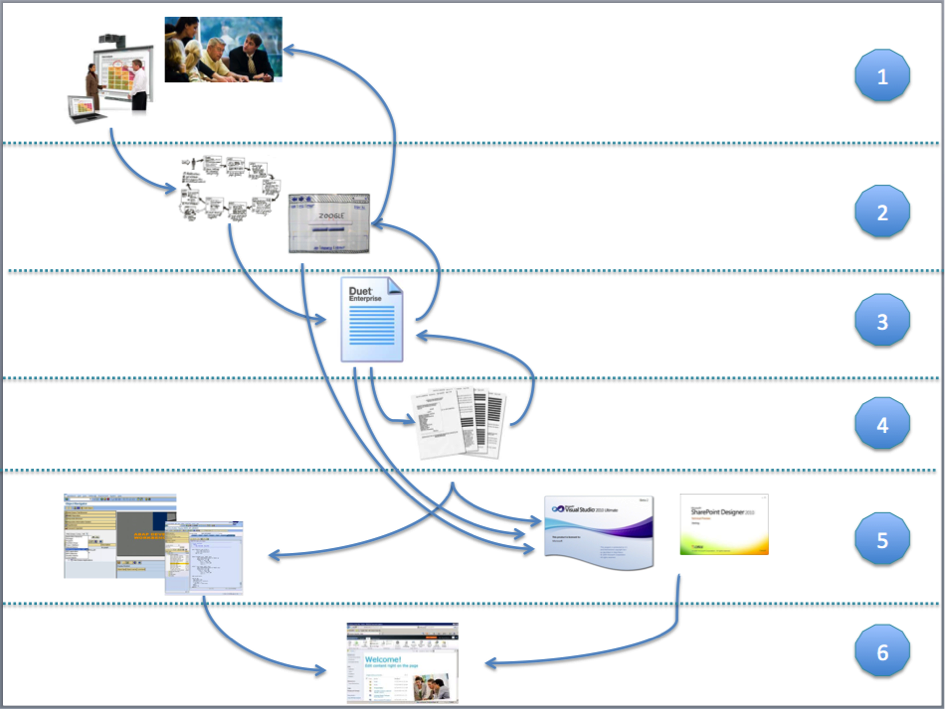
To break through this, we utilize in our Duet Enterprise development process a blueprint step with the focus exclusive on the Duet Enterprise specific scenarios. This blueprint is derived and agreed by a mixed group of SAP and SharePoint representatives. The goal of this step, and its endresult, is to come to a mutual understanding of the solution direction for each of the Duet Enterprise scenario’s. Self-employed constraints are to stick as close to the standards of both the SAP business package and SharePoint platform. Where feasible, we do allow custom development. Here we apply Duet Enterprise integration patterns that we have identified and defined: Consumer-oriented, Provider-oriented, and XML-Funneling pattern.
Of course, the discussion and preferences about where to make custom adjustments still manifest within the Duet Enterprise blueprinting step. However, as it now has the full focus of all involved, mutual agreement is earlier and more effective reached. This is the so-called ‘workshop effect’. Also, in this focussed approach, comparable application situations are easier to recognize. And where so identified, the earlier agreed solution approach can be reused. Starting point for the blueprint derivation is the User Interface Design as validated and confirmed by the product owner.
In the blueprint we derive and define per identified Duet Enterprise scenario the following pieces:
  1. Global descripion of the scenario: screenshot of the mockup screen and textual explanation. The purpose is to facilitate on high level a common understanding of the functionality in the scenario. There is no intend to compete with or replace use cases.
  2. Derivation, explanation and justification of solution direction. At minimal explanation of the proposed solution direction. But whenever applicable, also the rationale of why an alternative solution direction is dropped.
  3. SAP / SharePoint interface
  4. SAP Gateway datamodel(s)
  5. SAP building blocks: standard RFC’s, BAPIs; identification of needed custom SAP building blocks
  6. SharePoint building blocks: standard and custom webparts, SharePoint Service Applications, …

Blueprint validation by Design Authority / Authorities

Justified mantra nowadays within SAP and Microsoft IT departments is to avoid unnecessary or otherwise avoidable custom development. Instead stick close to the standard delivered functionalities of both landscapes.
It is also evident that fully excluding custom development is not feasible when you are developing company custom scenario’s.
We facilitate the consistency and continuity in the Duet Enterprise solution directions by confirming the blueprint to Duet Enterprise Rules, Conventions and Guidelines. The Design Authorities of both SAP and Microsoft IT departments validate the blueprint against these agreements. Derivation can be allowed, but requires the formal approvement of the respective Design Authority (SAP, Microsoft, and in some cases both).

SAP + SharePoint realizations based on the blueprint

With the blueprint accepted and delivered, from here on SAP and SharePoint teams in the project can start with their own development activities for the Duet Enterprise scenario’s. Since representatives of the teams were involved in deriving the blueprint, the concrete software design + development can be done relatively independent of the other party. Of course the data contract details of each SAP / Duet Enterprise interface are input for the SharePoint consumption. Regular sharing the SAP design with the SharePoint developers can achieve this.

Duet Enterprise Development Process

Step
Responsible
Consulted
Approach
Input
1
Business analysis
Business Analyst
Business representatives
Interviews
Workshops
Business vision
2
Mock-Up
UID / UX expert
Business representatives
Business Analyst
Sketching
Prototyping
Style guide
3
Blueprint
Duet Enterprise Solution Architect
SAP Business Analyst
SharePoint lead
Workshop
UID
Duet Enterprise Rules, Conventions, Guidelines
4
FoTo’s
SAP Business Analyst
SAP developer
SharePoint developer
Duet Enterprise Solution Architect
Blueprint
Duet Enterprise Rules, Conventions, Guidelines
5
Build
SAP developer
Blueprint
FoTo’s
SAP Build – Rules, Conventions, Guidelines
SharePoint developer
Duet Enterprise Solution Architect
UID
Blueprint
FoTo’s
SharePoint Build – Rules, Conventions, Guidelines
6
Integrate
SAP developer +
SharePoint developer
Operations – Rules, Conventions, Guidelines,

Monday, July 23, 2012

Influence on Duet Enterprise product development + roadmap

The Next View engages in select international comitee with SAP on development and roadmap of Duet Enterprise
The Next View is regarded in the Netherlands as the Duet Enterprise expert. SAP itself also recognizes this. We are therefore SAP Partner on SAP / Microsoft interoperability. SAP Netherlands refers customers that seek for information and guidance on this subject to us, and actively engages us in Duet Enterprise consultations. The Duet Enterprise product team in Walldorf and Bangalore [very much] appreciates the feedback we give based on our experiences with the product. As such we are also asked to participate in the Duet Enterprise Customer Engagement Initiative (CEI). This is a select international group of partners and customers that take the lead with implementations of Duet Enterprise. Participating organizations come from Germany, Australia, England, Denmark, and The Next View as sole and exclusive Dutch partner.
The CEI concept is to provide input for desired developments in the Duet Enterprise product roadmap. Also the Duet Enterprise product team demonstrates (potential) new product features, and inputs new ideas to discuss with and be assessed by the CEI participants. As the disclosed information concerns potential future product features, all CEI participants prior have signed a Non-Disclosure Agreement (NDA).
The recent Duet Enterprise 2.0 Preview announcement proves that via the CEI concept we (The Next View) indeed exert influence on the development of the product. Our main criticism on Duet Enterprise 1.0 is the missing of OData interoperability support. The underlying SAP NetWeaver Gateway integration layer includes OData provider support since version 2.0. The bottleneck here is that SharePoint 2010 Business Connectivity Services does not include OData consumption support. But now using OData sources with BCS is added in the upcoming SharePoint 2013, the next version of Duet Enterprise can utilize this to consume SAP data and processes.

Saturday, June 30, 2012

Duet Enterprise is real, effort is in it’s correct application

In the 1st week of May, The Next View participated in the second edition of the Duet Enterprise Velocity event. We already joined the first edition, and thus are familiar with the Velocity concept. As consequence, we could start immediate at the begin of the Velocity week on the realization of our customer’s scenario: Coöperative Learning.

Duet Enterprise is a given; real effort is in it's application AND understanding the business process + SAP business package

Noteworthy finding is that Duet Enterprise knowledge + experience is a necessity to successfully and productively apply this SAP-SharePoint interoperability middleware. However, this alone is not sufficient. Also required is that your customer has, or can reach, a clear vision of the application context they aim to achieve. In a normal project (with aim to deliver business value) this is of course the essential starting point. In our development approach we facilitate this by usage of mock-ups: discuss and derive in workshop(s) together with customer representatives the application functionality and behavior. The visualization format can be as simple and basic as sketches on paper, onto fully operational prototypes the customer can click through. SharePoint GUI + SharePoint Designer are very helpful for achieving the latter.
With the customer vision visualized in mock-up, the next step is to map this User Interface Design (UID) onto the combined SAP and Microsoft landscape. Here it is essential that you understand, and be aware of the behavior of the SAP business package building blocks.

An example to illustrate this

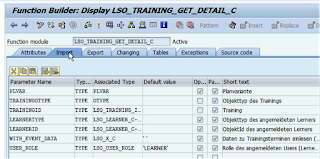
Part of Coöperative Learning scenario is to deliver Training Collaboration Workspace. Each workspace displays information about the training itself, about the participants, qualifications. SAP Enterprise Learning contains standard BAPI Function Modules to retrieve this information. It appears as simple as to identify the proper Function Module, and expose this via Duet Enterprise to SharePoint. But in reality the required insight in the SAP business package goes further. You must also be aware of the proper way of Function Module invocation, depending on the application context. For our Training Workspace, we apply the standard BAPI LSO_TRAINING_GET_DETAIL_C to retrieve training title, description and date. On day X this worked correct. Next morning, I received functional error ‘Course already passed’ from SAP LSO. It appeared as if the standard BAPI FM was not usable to retrieve data on elapsed training data, making it unusable for historical workspace context. Strange enough, a co-worker could still retrieve the training data. Our differences? He was enlisted as participant in this training, in contrary to me. And the standard Function Module responds on this current user context by only allow course participants to view the training data. That is, if you invoke the Function Module in it’s default modus ‘User_Role = Learner’.
When you overrule this for anonymous modus, you can successfully retrieve the training data also for elapsed dates, irrespective of the participation status of current user. A (proper) Duet Enterprise manner to do this is in the Gateway Model mapping.

Blueprint Duet Enterprise scenario's

The Next View recognizes the derivation and mapping from business vision via UID to the combination of SharePoint capabilities and SAP business package functionality + building blocks as essential step to deliver the correct application. We therefore incorporate this structural in our applied Duet Enterprise development process. As soon as we receive the initial business approvement on the UID translation of the business vision, next step in The Next View process is to deliver a Blueprint for the Duet Enterprise scenario’s that can be identified from the UID. Involved roles in delivering the Duet Enterprise Blueprint are a) Duet Enterprise Solution Architect as owner and facilator, b) SAP Business Analist with functional and high-level technical knowledge of the SAP Business Package, and c) SharePoint (Lead) Developer with knowledge of the SharePoint front-end capabilities. The purpose of the Duet Enterprise Blueprint is to derive and describe the high-level Solution Design; identifying the SAP and the SharePoint side. In the Solution Design, also fundamental design decisions on the SAP-SharePoint boundary are made and argumented. And when applicable, for alternative approaches explained why decided not to apply that.
In the process of derivng the Blueprint, it may also become clear that the requested UID cannot, or only with substantial development effort (= costs), by achieved by the SAP + SharePoint combination. Whenever such a consequence is identified, this is discussed with the UID expert and business. Is it feasible to alter the UID to accompany the standard SAP + SharePoint functionality? And if not from either functional or UID perspective, is the business willing to pay the extra development and also maintenance costs? Thus, the Blueprint derivation has an iterative effect and relation towards the UID and the application functionality.

Wednesday, May 30, 2012

Duet Enterprise BDC Publisher requires 'Z' prefix

Beware that when using the BDC Publisher tool to generate the SAP Gateway service (in SPROXY) and associated SharePoint BDC Model, to enter a prefix that starts with a 'Z'. Otherwise the BDC Publisher will immediately abort, with error message 'No license to edit object R3TR FUGR...'. I did not immediately link this error message to the apparent SAP obligation of starting 'Z'. It cost me some elapse time (a.o. checking our systems license, my own profile, ...) before I rather coincidently detected that starting the BDC Publisher prefix with 'Z' fixes the issue:
Apparent this Z-obligation is common in SAP development; so common that consulted SAP experts didn’t even think of this as cause. The displayed error message also doesn't immediate puts you on the right direction.
I notified the Duet Enterprise product development team of this issue, including suggestion to prevent it by auto-fill in the 'Z' in the BDC Publisher screen.