Saturday, September 22, 2018
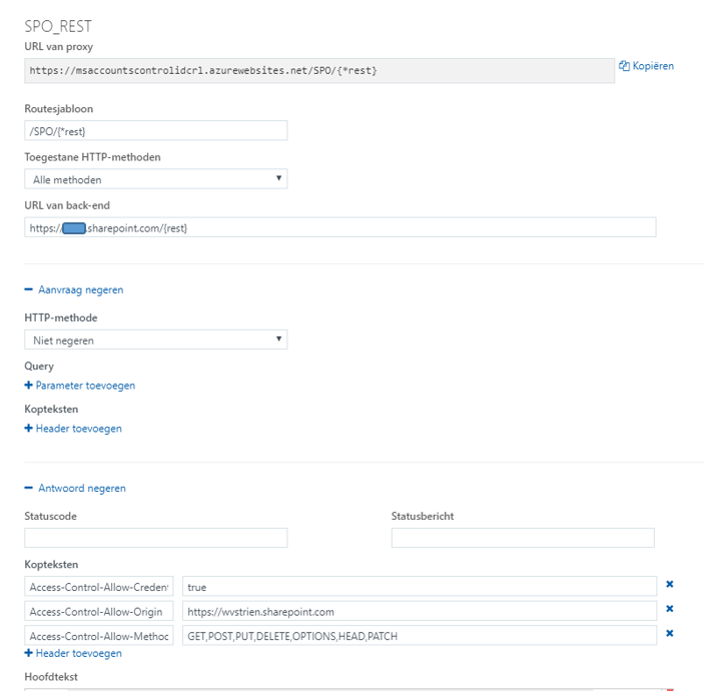
Utilize Azure Function to resolve lack of CORS aware within SharePoint Online active authentication flow
Sunday, May 20, 2018
Authenticate from Curl into SharePoint Online with Modern Authentication
#General variables
ProxyAccount="sa-curlAccount"
ProxyPassword="******************"
ProxyProtocol="http"
ProxyServer="xxx.xxx.xxx.xxx"
ProxyPort="8080"
SharePointCurlAccount="sa-curlAccount"
SharePointOnlineTenant="<URL of SharePoint Online tenant>"
UploadFile="<file to upload>"
UploadLocation="<URL of SharePoint Document Library>"
#Fixed variables
OUTPUT=${HOME}/Interop/output
TMP=${HOME}/Interop/tmp/spo
#the following steps are required to upload data from Curl context to SharePoint Online:
#
#1. Retrieve an authentication cookie to Office 365 through invocation of webservices
#1.a. (Optional) Step 0: determine the URL of the custom Security Token Service (STS) to next
# request a SAML:assertion for account identified by credentials
#1.b. Step 1: request SAML:assertion from the identified custom STS for account identified by
# credentials
#1.c. Step 2: use the SAML:assertion to request binary security token from Office 365
#1.d. Step 3: use the binary security token to retrieve the authentication cookie
#2. Step 4: Use that Office 365 authentication cookie in subsequent webservice requests to
# SharePoint Online REST API
#1.a. (Optional) Step 0: determine the URL of the custom Security Token Service (STS) to next
# request a SAML:assertion for account identified by credentials (outside datacenter, with proxy)
curl -U ${ProxyAccount}:${ProxyPassword} -k -x ${ProxyProtocol}://${ProxyServer}:${ProxyPort} -X POST -H "Content-Type: application/x-www-form-urlencoded" -d "login=${SharePointCurlAccount}&xml=1" https://login.microsoftonline.com/GetUserRealm.srf -w "\n" > ${TMP}/O365_response_step_0
#Extract requested STSAuthURL from response step 1
STSURL=`sed -n 's:.*<STSAuthURL>\(.*\)</STSAuthURL>.*:\1:p' ${TMP}/O365_response_step_0`
#Create input for step 1
File: O365_request_step_1-1
<?xml version="1.0" encoding="UTF-8"?>
<s:Envelope
xmlns:s="http://www.w3.org/2003/05/soap-envelope"
xmlns:wsse="http://docs.oasis-open.org/wss/2004/01/oasis-200401-wss-wssecurity-secext-1.0.xsd"
xmlns:saml="urn:oasis:names:tc:SAML:1.0:assertion"
xmlns:wsp="http://schemas.xmlsoap.org/ws/2004/09/policy"
xmlns:wsu="http://docs.oasis-open.org/wss/2004/01/oasis-200401-wss-wssecurity-utility-1.0.xsd"
xmlns:wsa="http://www.w3.org/2005/08/addressing"
xmlns:wssc="http://schemas.xmlsoap.org/ws/2005/02/sc"
xmlns:wst="http://schemas.xmlsoap.org/ws/2005/02/trust">
<s:Header>
<wsa:Action s:mustUnderstand="1">http://schemas.xmlsoap.org/ws/2005/02/trust/RST/Issue</wsa:Action>
<wsa:To s:mustUnderstand="1">https://sts.<tenant>.com/adfs/services/trust/2005/usernamemixed</wsa:To>
<wsa:MessageID>b07da3ec-9824-46a5-a102-2329e0c5f63f</wsa:MessageID>
<ps:AuthInfo
xmlns:ps="http://schemas.microsoft.com/Passport/SoapServices/PPCRL" Id="PPAuthInfo">
<ps:HostingApp>Managed IDCRL</ps:HostingApp>
<ps:BinaryVersion>6</ps:BinaryVersion>
<ps:UIVersion>1</ps:UIVersion>
<ps:Cookies></ps:Cookies>
<ps:RequestParams>AQAAAAIAAABsYwQAAAAxMDMz</ps:RequestParams>
</ps:AuthInfo>
<wsse:Security>
<wsse:UsernameToken wsu:Id="user">
<wsse:Username>sa-curlAccount@<tenant>.com</wsse:Username>
<wsse:Password>*************</wsse:Password>
</wsse:UsernameToken>
<wsu:Timestamp Id="Timestamp">
File: O365_request_step_1-2
</wsu:Timestamp>
</wsse:Security>
</s:Header>
<s:Body>
<wst:RequestSecurityToken Id="RST0">
<wst:RequestType>http://schemas.xmlsoap.org/ws/2005/02/trust/Issue</wst:RequestType>
<wsp:AppliesTo>
<wsa:EndpointReference>
<wsa:Address>urn:federation:MicrosoftOnline</wsa:Address>
</wsa:EndpointReference>
</wsp:AppliesTo>
<wst:KeyType>http://schemas.xmlsoap.org/ws/2005/05/identity/NoProofKey</wst:KeyType>
</wst:RequestSecurityToken>
</s:Body>
</s:Envelope>
cat ${TMP}/O365_request_step_1-1 > ${TMP}/O365_request_step_1
echo "<wsu:Created>`date -u +'%Y-%m-%dT%H:%M:%SZ'`</wsu:Created>" >> ${TMP}/O365_request_step_1
echo "<wsu:Expires>`date -u +'%Y-%m-%dT%H:%M:%SZ' --date='-15 minutes ago'`</wsu:Expires>" >> ${TMP}/O365_request_step_1
cat ${TMP}/O365_request_step_1-2 >> ${TMP}/O365_request_step_1
#1.b. Step 1: request SAML:assertion from the identified custom STS for account identified by
# credentials (internal datacenter, without webproxy to outside)
curl -X POST -H "Content-Type: application/soap+xml; charset=utf-8" -d "@${TMP}/O365_request_step_1" ${STSURL} -w "\n" > ${TMP}/O365_response_step_1
#Extract requested SAML:assertion from response step 1
sed 's/^.*\(<saml:Assertion.*saml:Assertion>\).*$/\1/' ${TMP}/O365_response_step_1 > ${TMP}/O365_response_step_1.tmp
#Create input for step 2
File: O365_request_step_2-1
<?xml version="1.0" encoding="UTF-8"?>
<S:Envelope
xmlns:S="http://www.w3.org/2003/05/soap-envelope"
xmlns:wsse="http://docs.oasis-open.org/wss/2004/01/oasis-200401-wss-wssecurity-secext-1.0.xsd"
xmlns:wsp="http://schemas.xmlsoap.org/ws/2004/09/policy"
xmlns:wsu="http://docs.oasis-open.org/wss/2004/01/oasis-200401-wss-wssecurity-utility-1.0.xsd"
xmlns:wsa="http://www.w3.org/2005/08/addressing"
xmlns:wst="http://schemas.xmlsoap.org/ws/2005/02/trust">
<S:Header>
<wsa:Action S:mustUnderstand="1">http://schemas.xmlsoap.org/ws/2005/02/trust/RST/Issue</wsa:Action>
<wsa:To S:mustUnderstand="1">https://login.microsoftonline.com/rst2.srf</wsa:To>
<ps:AuthInfo
xmlns:ps="http://schemas.microsoft.com/LiveID/SoapServices/v1" Id="PPAuthInfo">
<ps:BinaryVersion>5</ps:BinaryVersion>
<ps:HostingApp>Managed IDCRL</ps:HostingApp>
</ps:AuthInfo>
<wsse:Security>
File: O365_request_step_2-2
</wsse:Security>
</S:Header>
<S:Body>
<wst:RequestSecurityToken xmlns:wst="http://schemas.xmlsoap.org/ws/2005/02/trust" Id="RST0">
<wst:RequestType>http://schemas.xmlsoap.org/ws/2005/02/trust/Issue</wst:RequestType>
<wsp:AppliesTo>
<wsa:EndpointReference>
<wsa:Address>sharepoint.com</wsa:Address>
</wsa:EndpointReference>
</wsp:AppliesTo>
<wsp:PolicyReference URI="MBI"></wsp:PolicyReference>
</wst:RequestSecurityToken>
</S:Body>
</S:Envelope>
cat ${TMP}/O365_request_step_2-1 > ${TMP}/O365_request_step_2
cat ${TMP}/O365_response_step_1.tmp >> ${TMP}/O365_request_step_2
cat ${TMP}/O365_request_step_2-2 >> ${TMP}/O365_request_step_2
rm ${TMP}/O365_response_step_1.tmp
#1.c. Step 2: use the SAML:assertion to request binary security token from Office 365
# (outside datacenter, with proxy)
curl -U ${ProxyAccount}:${ProxyPassword} -k -x ${ProxyProtocol}://${ProxyServer}:${ProxyPort} -X POST -H "Content-Type: application/soap+xml; charset=utf-8" -d "@${TMP}/O365_request_step_2" https://login.microsoftonline.com/RST2.srf -w "\n" > ${TMP}/O365_response_step_2
#Extract requested binary security token from response step 2
sed 's/^.*\(<wsse:BinarySecurityToken.*wsse:BinarySecurityToken>\).*$/\1/' ${TMP}/O365_response_step_2 > ${TMP}/O365_response_step_2.tmp
#Create input for step 3
cat ${TMP}/O365_response_step_2.tmp | cut -d'>' -f2 | cut -d'<' -f1 > ${TMP}/O365_request_step_3
BinarySecurityToken=`cat ${TMP}/O365_request_step_3`
rm ${TMP}/O365_response_step_2.tmp
#1.d. Step 3: use the binary security token to retrieve the authentication cookie (outside
# datacenter, need to pass webproxy)
curl -v -U ${ProxyAccount}:${ProxyPassword} -k -x ${ProxyProtocol}://${ProxyServer}:${ProxyPort} -X GET -H "Authorization: BPOSIDCRL ${BinarySecurityToken}" -H "X-IDCRL_ACCEPTED: t" -H "User-Agent:" ${SharePointOnlineTenant}/_vti_bin/idcrl.svc/ > ${TMP}/O365_response_step_3 2>&1
#Remove DOS ^M from response step 3
cat ${TMP}/O365_response_step_3 | sed 's/^M//' > ${TMP}/O365_response_step_3.tmp
#Extract requested authentication cookie from response step 3 and create input for step 4
echo "Set-Cookie: SPOIDCRL=`cat ${TMP}/O365_response_step_3.tmp | grep Set-Cookie | awk -F'SPOIDCRL=' '{print $2}'`" > ${TMP}/O365_request_step_4
rm ${TMP}/O365_response_step_3.tmp
#2. Step 4: Use that Office 365 authentication cookie in subsequent webservice requests to
# SharePoint Online REST API (outside datacenter, with proxy)
curl -U ${ProxyAccount}:${ProxyPassword} -k -x ${ProxyProtocol}://${ProxyServer}:${ProxyPort} -b ${TMP}/O365_request_step_4 -T "{${OUTPUT}/${UploadFile}}" ${UploadLocation}
exit 0
curl -U ${ProxyAccount}:${ProxyPassword} -k -x ${ProxyProtocol}://${ProxyServer}:${ProxyPort} -X POST -H "Accept: application/json;odata=verbose" -d "" ${SharePointOnlineTenant}/_api/contextinfo > ${TMP}/O365_response_step_4_tmp
FormDigest=`sed -n 's:.*FormDigestvalue:\(.*\),.*:\1:p' ${TMP}/O365_response_step_4_tmp`
rm ${TMP}/O365_response_step_4.tmp
curl -U ${ProxyAccount}:${ProxyPassword} -k -x ${ProxyProtocol}://${ProxyServer}:${ProxyPort} -X POST -H "X-RequestDigest: @${FormDigest}; X-HTTP-Method: PUT” --data-binary "{${OUTPUT}/${UploadFile}}" ${SharePointOnlineTenant}/teams/siteX/_api/web/GetFileByServerRelativeUrl('Shared%20Documents/SubFolder/${UploadFile}')/Files/$value
Friday, May 11, 2018
How-to resolve peculiarity with .aspx file upload from automated client context

Friday, July 21, 2017
Enable CORS not possible on SharePoint authenticated application without HttpModule
(also given as answer on stackoverflow: Enable CORS in SharePoint 2013)<?xml version="1.0" encoding="utf-8"?> <configuration> <system.webServer> <httpProtocol> <customHeaders> <add name="Access-Control-Allow-Origin" value="*" /> </customHeaders> </httpProtocol> </system.webServer> </configuration>
- In the web.config you can only specify either the '*' or explicit client domain for the Access-Control-Allow-Origin header. To interoperate with an authenticated application, you need to pass authorization headers and set Access-Control-Allow-Credentials to true. The issue is that according to the CORS specification (see also explanation on MDN, HTTP Access Control), if Access-Control-Allow-Credentials is set to true, Access-Control-Allow-Origin cannot contain *, to disallow just any client making requests with credentials attached. Also on CORS specification level, it is documented that in case of specific domain list, it actually means 1 single specific domain (https://www.w3.org/TR/cors/#access-control-allow-origin-response-header). This limits enable CORS to a single client application.
- First call in the CORS protocol, is HTTP OPTIONS to establish whether CORS is allowed between client host domain and server host domain. A web.config enabled SharePoint application responds successful on the OPTIONS call with CORS-allow headers. However, SharePoint / IIS returns for authenticated webapplication the OPTIONS response with status code 401; and as result the preflight handling is stopped in browsers that respect the CORS specification.
Enable CORS for a SharePoint / IIS authenticated webapplication, cannot be done via configuration only. Resolving both issues strict on SharePoint level is possible, but requires a custom HttpModule. If such server-side deployment is not allowed, another option is to resolve it on infra level, via a Reverse Proxy setup.
Saturday, December 27, 2014
Conceptual approach for exposing external SAP systems into SharePoint channel
Rough outline of approach
- Establish the reference solution architecture for integrating SAP business process handling into SharePoint front-end / UI
- Establish which of the business processes to expose via SharePoint as additional channel, versus which to keep solely through SAP UI channel
- Establish the IST situation: Business Process definitions and supportive landscape, Enterprise IT strategy + roadmap, IT landscape.
- Establish the SOLL situation.
- Determine the IST-SOLL gap
- Map the solution architecture + IST-SOLL analysis onto concrete technology: Microsoft and SAP.
- Architect, design, develop, test and implement specific scenario(s).
Architecture guidelines
- Apply a layered architecture
- Loosely-connected front-end / back-office system(s) landscape through the usage of interfaces (contracts)
- Interoperability standards based: webservices, security standards, monitoring
- Abstract the LOBsystem business process handling as a contract-specification
- Extend the decouped operation in alternative front-end with the concept of Operational Data Store to enable temporary administration outside the external LOB system, and allow complete preparation of administrative action before submitting into the external Lines of Business system.
Main steps for a specific scenario
Per specific scenario / use case to expose external LOB system into SharePoint- Identify the data and functionalities of the external LOB system that you want to expose via SharePoint as (additional) channel for user operation.
- Identity in the platform of the external LOB system context, the building blocks (functional and technical) that can be used to operate the identified data and functions. The external LOB system, and its internal working, is a (magical) blackbox for the unknowingly. You need the aid of a knowledgable business analyst to help with identification of the proper functional building blocks, and how to utilize and invoke them.
- Service-enable the identified building blocks. Don’t be fooled by the concept of SAP Enterprise Services. In practice, these are only usable in a (SAP) laboratory scope, not in the concrete situation of an end-organization. In reality you need to provide an own service layer to expose the identified building blocks. SAP has acknowledged this, and provides multiple supporting foundations and building blocks. In my opinion, current the most significant is SAP Gateway to expose SAP data and processes as REST services. For consumption in Microsoft clients, SAP delivers Duet Enterprise and Gateway for Microsoft that extend on the basic interoperability capabilities of SAP Gateway. In addition to SAP, frameworks of other suppliers are also available on the market to service-enable SAP. A disadvantage of them is that it may complicate your IT landscape. Trend of latest years in end-organizations is to consolidate on SAP + Microsoft IT policy
Saturday, July 5, 2014
Programmatically set decision of Duet Enterprise task
- It bypasses the standard Duet Enterprise workflow capability to update the SAP task via the SharePoint task.
- It effectively duplicates some of the code and working of the internals of Duet Enterprise workflow update. As architect, I very much dislike any code duplication.
- Per conceptual task update, 2 tasks must be explicit updated: first the SAP task, next the SharePoint task. This makes the task handling more complex.
- There is a clear difference in the approval of SharePoint tasks that are created via Duet Enterprise workflow capability, versus regular SharePoint tasks (from any SharePoint workflow, e.g. document approval)
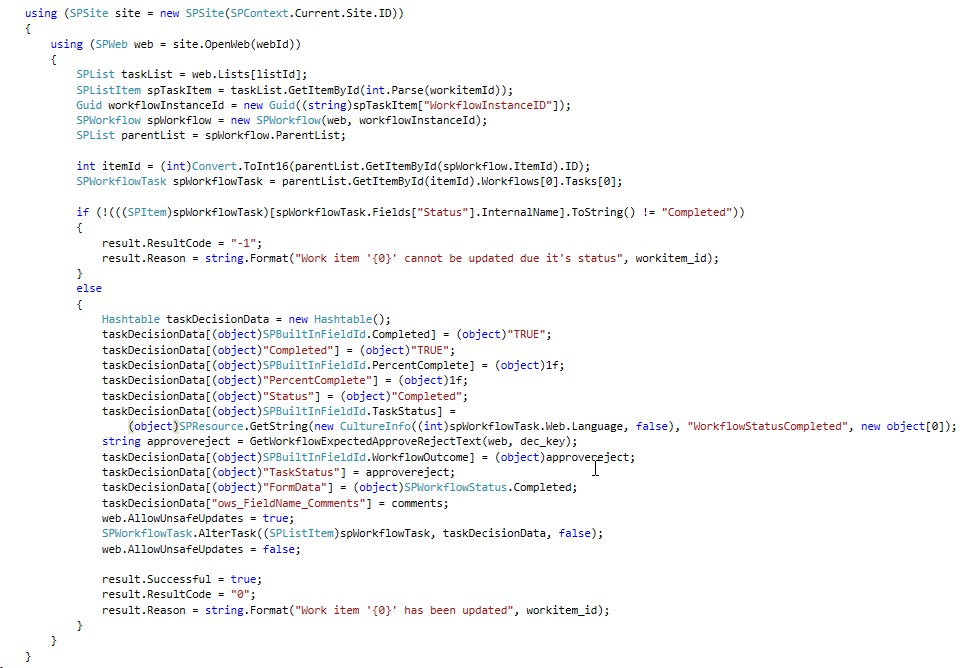
- Generic for SharePoint tasks: extendedproperties field ‘ows_taskstatus’ must have been set for the task update to be accepted. However, you cannot set this direct self, but set it indirect by this code snippet:

- Specific for Duet Enterprise tasks: In ItemUpdating eventreceiver, multiple checks are done to verify that it is indeed the intention to propagate to SAP. One of these checks is that a string-compare is done on both the set status text as status code. If this string-concattenation is not present in the Duet Enterprise task PossibleOutcomes (you specify this when you in SharePoint ‘Configure a new SAP workflow task type’), then the SharePoint task update succeeds, but the update is silently not propagated onto the connected SAP side. To make sure the programatically set status text is in sync with the configured PossibleOutcomes, I derive the status text based on that same configured PossibleOutcomes:


Sunday, June 15, 2014
Duet Enterprise 2.0 - installation troubleshooting
Issue 1: ‘Add-on IW_DUETE Release 100 can only be installed in client 000’
Import of the Duet Enterprise 2.0 SAP Add-On via transaction SAINT gives the following error:
Issue 2: ‘The remote certificate is invalid according to the validation procedure’.
This error can occur in multiple SharePoint-SAP scenarios: runtime invocation of Duet Enterprise service from SharePoint 2013 side, import of a Duet Enterprise 2.0 BDC Model: Application definition import failed. The following error occurred: The remote certificate is invalid according to the validation procedure.Issue 3: ‘The root certificate that was just selected is invalid’
Importing in SharePoint 2013 ‘Manage Trust’ the SSL certificate of SAP NetWeaver Gateway results in error:
Issue 4: ‘No service found for namespace /IWWRK/, name DUET_WORKFLOW_CORE
Manifest itself upon configuration of Duet Enterprise 2.0 Workflow solution.
Issue 5: DuetConfig: ‘The operation name is missing or invalid’
For instance occurs with the DuetConfig command to configure workflow, command with multiple operation parameters: DuetConfig.exe -importbdc -FeatureName Workflow -LsiUrl "https://tnvsrm.tnv.corp/sap/opu/odata/IWWRK/DUET_WORKFLOW_CORE;mo;c=SHAREPOINT_DE/" -BdcServiceApplication "Business Data Connectivity Service" -UserSubLsiUrl "https://tnvsrm.tnv.corp/sap/opu/odata/IWBEP/SUBSCRIPTIONMANAGEMENT; mo;v=2;c=SHAREPOINT_DE/"
Issue 6: ‘Lobsystem (External System) returned authentication error'
For instance, occurs upon trying to import a Duet Enterprise 2.0 BDC Model into SharePoint 2013 Business Connectivity Services application:


Issue 7: Import of Duet Enterprise 1.0 BDC Model fails due missing ‘WSDL’ application definition.

Issue 8: Invocation of Duet Enterprise 1.0 service fails due missing SSO
Browsing a SharePoint 2013 External List results in error ‘An unsecured or incorrectly secured fault was received from the other party’.

Epilogue
Compared to the excellent troubleshooting guide for Duet Enterprise 1.0, the above list of issues plus resolutions is much smaller. The Duet Enterprise product team of SAP plus Microsoft has clearly improved their delivery on this aspect.Saturday, February 1, 2014
Tip: bypass WebProxy for BCS service application
- Explicitly set the Proxy Credentials for the BCS application process.
It is not possible to set the proxy credentials direct in the web.config of 14hive\webservices\bdc. Instead you must use a 2-step delegation approach: refer in the web.config to a custom Proxy module implementation, and build the custom Proxy to explicitly set the proxy credentials:namespace ByPassProxyAuthentication { public class ByPassProxy : IWebProxy { public ICredentials Credentials { get { return new NetworkCredential( "username", "password", "domain"); } set { } } } }<system.net> <defaultProxy enabled="true" useDefaultCredentials="false"> <module type="ByPassProxyAuthentication.ByPassProxy, ByPassProxyAuthentication"/> </defaultProxy> </system.net> - Disable usage of (default)proxy altogether for the BCS application process.
This is a viable approach in case the consumed external systems are all within the internal company network infra.<system.net> <defaultProxy enabled="false" useDefaultCredentials="false"/> </system.net>
- Disable usage of (default)proxy for specific addresses for the BCS application process.
<system.net> <defaultProxy> <bypasslist> <add address="[a-z]+\.contoso\.com" /> <add address="192\.168\..*" /> <add address="Netbios name of server" /> </bypasslist> </defaultProxy> </system.net>The first bypasses the proxy for all servers in the contoso.com domain; the second bypasses the proxy for all servers whose IP addresses begin with 192.168. The third bypass entry is for the ServerName - Disable usage of proxy for specific address on system level.
This is in fact the most simple approach, just disable proxy usage for certain url's for all processes on system level. That is also the potential disadvantage, it can be that it is not allowed to disable proxy usage for all processes.
You disable the proxy via IE \ Internet Options \ Connections \ LAN Settings \ Advanced \ Proxy Server \ Exception <Do not use proxy server for addresses beginning with>.
Sunday, January 12, 2014
Explanation + resolution of BCS "Cannot find any matching endpoint configuration"
Explanation
SharePoint BCS operates with external systems through the connection information in BDC Models, administrated in its metadata store. BDC Models can 1. be imported via Central Admin UI, Business Connectivity Services application; 2. provisioned via features; 3. and manually be created via SharePoint Designer.Resolution
The above sketched situation originates from a mismatch in the BDC Model versus the WcfMexDocument. The fix is to make sure that the WcfEndPointAddress in the BDC Model, does have a match with one of the service endpoint addresses of the WcfMexDocument. This either means to adjust the WcfEndPointAddress value in the BDC Model to a correct and present vaue, and reimport the model. Or to modify the WcfMexDocumentUrl to include the WcfEndPointAddress value as one of the service endpoints. Note that as BDC builds up its internal administration in WcfConnectionManager on processing a BDC Model, also in the latter case the BDC Model must be re-imported despite that itself has not changed. Through reimport the situation in WcfConnectionManager will be reset and corrected.Sunday, December 29, 2013
Tip: Resolve GWPAM issue with misnamed embedded Resources reference

Tuesday, December 24, 2013
SharePoint 2010 BCS SAML Assertion too coarse-grained
Results in false positives notification at service providers of message replay
- Service Availability: overflood the service provider with same requests over and over in a Denial of Service Attack.
- Data Integrity: request same data updates multiple times (e.g. bank transfer).
SAML assertion by SharePoint BCS
SharePoint BCS in the role of service consumer supports this by unique tagging each request sent with a SAML Assertion ID added in the message header. SharePoint BCS calculates this SAML SignatureValue based on 2 values to uniquely tag the message: message issuer and message instant id. The issuer value is fixed set to “SharePoint”, the instant value is dynamic set to timestamp at moment of sending:Duet Enterprise: SAP Gateway as SAML consumer of SharePoint BCS
Duet Enterprise 1.0 applies SAML 1.1 to provide Single Sign-On from SharePoint 2010 into SAP NetWeaver Gateway 2.0. In the Duet Enterprise runtime client-service flow, SharePoint BCS is the service client, and SAP NetWeaver Gateway is the service provider. So Gateway must verify requests received from SharePoint BCS on idempotency, aka detect message replays. As result of the vulnerability in the BCS SAML assertion approach, Gateway may report false positives of message replay. This is visible in the NetWeaver WS (WebServices) errorlog via presence of error: CX_WS_ST_CACHE_ERROR / Error when writing the ST to DB.Sunday, November 17, 2013
Duet Enterprise / GWPAM interview at SAP TechEd Amsterdam
Friday, November 1, 2013
Tip: activate Gateway Metadata cache to resolve NullPointer / CX_SY_REF_IS_INITIAL error
Monday, October 28, 2013
GWPAM - SAP data direct in Microsoft Office client-applications
The first foreseen scenarios are Microsoft Office Add-In’s, to expose and integrate the SAP business data in the everyday used Microsoft Office clients. For example, SAP CRM customer data in the form of Outlook contacts, invoice approval requests as Outlook tasks, functional data management of SAP masterdata through Excel, BW report data rendered in PowerPoint, and submit SAP CATS timetracking directly from your Outlook Calendar ...
As with Duet Enterprise, the two suppliers have their collective strength and market presence behind this new product offering. This is also a major distinction compared to the various proprietary connectors of smaller parties.
Saturday, December 15, 2012
Duet Enterprise 2.0 General Available: improvements on service development and deployment options
After successful completion of Duet Enterprise 2.0 Ramp-Up and with SharePoint 2013 reaching RTM state, SAP and Microsoft have made the new version of Duet Enterprise General Available. Customers can download the software from SAP Market Place (Installations and Upgrades \ Duet Enterprise \ Duet Enterprise 2.0). Duet Enterprise 2.0 documentation can also be found on SAP Market Place, and also on MSDN.
Most significant of the new Duet Enterprise version is that it connects with the latest capabilities of the underlying platforms, respectively SAP Gateway 2.0 and Microsoft SharePoint 2013. In both these platforms a move is made to support cloud and lightweight usage scenarios - typically but not limited to mobility use cases.
- Mobility
- Duet Enterprise now fully supports OData protocol; which is THE protocol for mobility because is it light-weight and self-describing, and supported by all mobile platforms
- Cloud
- Connect to SharePoint Online
- Only support for Odata channel; not for SOAP / Generic channel
- Requires a 'light' on premisse SharePoint installation, as intermediate layer ('broker') from internal SAP Gateway to SharePoint online. Includes SSO Generator, via reverse proxy connection with SharePoint Online
- Remark: Duet Enterprise cloud stuff is not yet GA; this will follow in a few month
- Design Time improved
- 2 design time approaches supported
- Inside-Out: via the SAP NetWeaver Gateway generators
- Outside-In: start from SharePoint UI --> visually sketch / specify a screen in Visual Studio; export the .EDMX file and import into SAP Gateway (Service Builder) for constructing the Gateway data models
- Both approaches are restricted to flat SAP data entities
- Complex data structures still requires hand-crafting on SAP Gateway side
- Via OData service providers; the handcrafting work is far simpler as with Duet Enterprise 1.0 (FP1).
- Improve the development story:
- Reference architecture guidance
- Setting up local development landscape --> facilitate individual SharePoint developers to quickly start with Duet Enterprise development
- Consequence: drop SAML, as OData does not support SAML. Use oAuth instead
- Generic Channel will still be supported; OData is extra channel possibility
- Duet Enterprise 2.0 REQUIRES SharePoint 2013
- SharePoint 2013 BCS supports Odata consumption; earlier version not
- SharePoint Online.
In the philosophy of SAP and Microsoft, also Duet Enterprise 2.0 does not include end-user functionality, e.g. order-to-cash. Duet Enterprise remains a customization + development framework for SAP / Microsoft interoperability, that enables end-organizations and partners to compose concrete scenarios and build upon. Primary reason for the Duet Enterprise product team to not include end-user functionality is that partners and end-organizations know best what diverse scenarios are requested, and are therefore better suited to construct the optimal solution. Also, even SAP plus Microsoft simple do not have the development resources to realize and support a total set of end-user capabilities for which there is market demand.
It is left to the market / Duet Enterprise eco-system to deliver standard / common-of-the-shelf end-user functionalities. Well-known example is the Cordis Suite; for self-service HCM and purchase requisition solutions. More examples can be found on Duet Enterprise Unite Partner Connection. And more partners are known to be developing on additional scenarios.
With Duet Enterprise 2.0 General Availability, it is expected that more companies will find it benefial to develop end-user solutions. This is due the combination of Duet Enterprise 2.0 development improvements, out-of-the-box plus customization capabilities of SharePoint 2013 and Office 365, and deployment extended to cloud and mobile platforms resulting in a larger market. Partners will develop solutions for horizontal and vertical markets; for local to international markets, and from small/partial solutions to complete end-2-end scenarios.
Saturday, November 10, 2012
Notification + data flow in Duet Enterprise Workflow mobile App
System architecture
In such system architecture, following systems/layers are present:- SAP backend / workflow engine: the host environment of the SAP workflows
- SAP Gateway: general purpose SAP integration layer; here used to publish SAP workflows from backend to workflow notification subscribers
- SharePoint Duet Enterprise Add-On: functions here as workflow notification subscriber; host of Duet Enterprise workflow instances, and task repository for the mobile application
- Mobile view: retrieve plus display tasks, and propagate task approval decision back to the SharePoint task repository
Notification and data flow for exposing SAP task to non-SAP view
Sequence steps:- The SAP ERP workflow execution arives on a user decision task, that is configured for notification to Gateway (tx SPRO, Gateway workflow customization);
- SAP Document Publisher composes a XML Payload document with task data: workitem identification plus business data. The addition of the workflow specific business data is optional in Gateway Workflow notification. If applicable, you can achieve this by extanding the workflow customization with the plug-in of a custom OutboundHandler;
- SAP Document Publisher calls the SharePoint OBAWorkflowServer.asmx::CreateTask operation, with inputparameters the task(type) identifier, workitem identifier and XML PayLoad document;
- SharePoint OBAWorkflowServer.asmx::CreateTask method:
- Queries the TaskLocator List in the Duet Enterprise Workflow rootsite, and determines on basis of tasktype and user language the Duet Enterprise Workflow subsite to which the received SAP task must be routed;
- Instantiates a new SharePoint workflow instance in the identified Duet Enterprise Workflow subsite, and associates this instance with the SAP workitem identifier;
- And uploads the received XML PayLoad document into the Workflow Business Data DocLibrary in the Workflow subsite;
- The SharePoint Duet Enterprise Workflow contains by default only 1 step that represents the decision-making for the SAP task. It is possible to extend the SharePoint Workflow with additional steps and functionality. This will operate isolated from the SAP Workflow handling. The default approval task in the SharePoint Duet Enterprise workflow is the only connectionpoint between the SharePoint workflow and the SAP decision workflow task. Upon the Duet Enterprise Workflow arriving at the approval task, it appears in the SharePoint tasklist.
- User opens the tasklist in the mobile application;
- The tasklist App call SharePoint List.svc service (DataAccess Layer) to retrieve the open tasks for the logged-on user
- SharePoint List.svc queries the SharePoint workflow tasklist, to determine and retrieve the open task items for logged-on user
- SharePoint List.svc returns the task items in Odata format
- The Duet Enterprise Workflow Approval Task and the XML PayLoad document are in the SharePoint Workflow administration logical associated to each other. If additional business extended properties are notified for the SAP workitem via OutboundHandler, the associated Business Data document must be opened from the SharePoint document library and its contents parsed to retrieve the additional properties.
Control and data flow for handling task decision from non-SAP mobile App to SAP workflow context
- User makes a decision in the task management App;
- Task management App calls SharePoint Workflow.asmx webservice to propagate the task approval decision to SharePoint task item;
- SharePoint workflows.asmx updates the task item with approval decision;
- The update on SharePoint taskitem triggers the TaskItemEventReceiver;
- Triggered TaskItemEventReceiver::ItemUpdating method checks whether the SharePoint task item is completed; that is a approval decision is made. If completed, TaskItemEventReceiver calls [through SharePoint Business Connectivity Services] the Update method of External ContentType Duet Enterprise Workflow Task;
- SharePoint BCS calls for Duet Enterprise Workflow Task Update the wfUpdate method of SAP workflow consumer webservice; with input parameters workitem identifier, decision value and comments;
- SAP workflow consumer webservice propagates task approval decision to the associated SAP workflow instance, and executes apply decision on the SAP workitem;
- SAP workflow completes this workitem step, and proceeds to the next step in SAP workflow. If it was the last step in workflow, the SAP workflow is now completed;
- TaskItemEventReceiver updates the status of SharePoint taskitem to completed. In default (generated) Duet Enterprise Workflow is this the only step/task, and the SharePoint workflow is completed. The SharePoint taskitem is removed from the users open tasks list.
Saturday, September 1, 2012
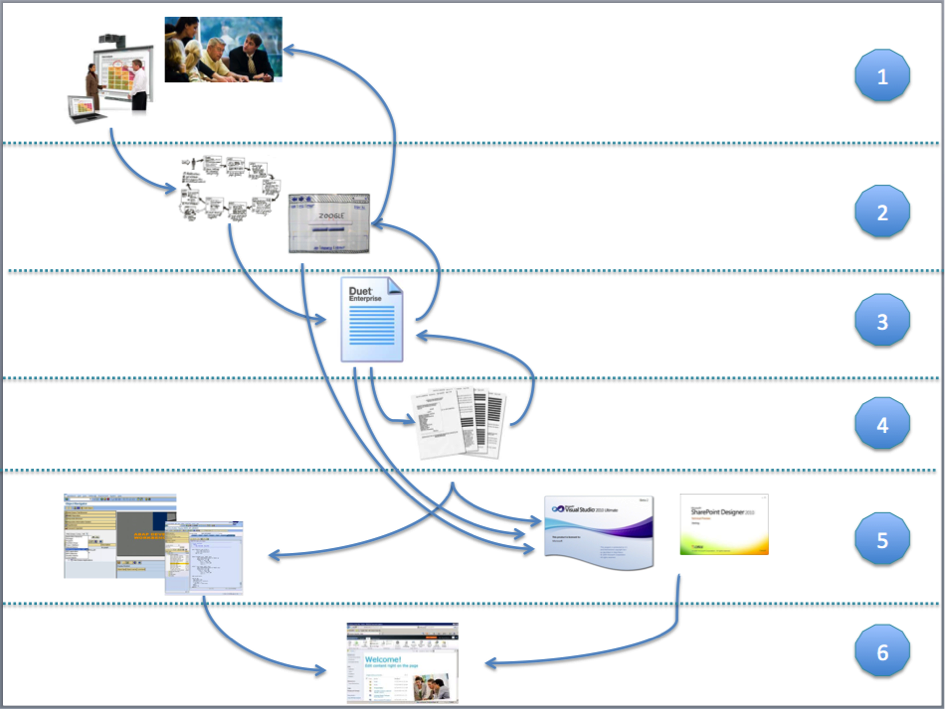
User-centric Development Process for Duet Enterprise projects
Application mockup
A proven approach to enable the product owner to validate, correct, and ultimately confirm the application functionality is by make it experiencable, ‘touchable’. Provide the product owner with a realistic impression of the application behavour + feature(s) that the project will build: a clickable prototype / mockup.Meeting of 2 worlds
Yet, a Duet Enterprise project also is very much different from ‘normal’ projects. The cause lies with the meeting of 2 very different environments: IT technology, platform concepts, and human nature. The tradional SAP environment is transaction oriented, with focus on structural business process executions. The Microsoft environment, and in particular SharePoint, is far more loose. Ad-hoc processes are the norm, the individual user decides how to perform a specific (business) action. When these 2 worlds + thinking come together in a Duet Enterprise project, the first outcomes are often dramatic. SAP versus SharePoint architects, business analysts and developers do not understand each other (concepts). Both ‘parties’ disagree on how and where (that is, on SAP or on SharePoint side) custom development should be done. The personal preference on how to achieve the SAP+SharePoint integration is influenced by one’s own technology frames and familiair concepts. This has the risk that the user is forgotten: the user interests must be central, deliver an optimal user experience.Align through Blueprint Duet Enterprise scenario’s
To break through this, we utilize in our Duet Enterprise development process a blueprint step with the focus exclusive on the Duet Enterprise specific scenarios. This blueprint is derived and agreed by a mixed group of SAP and SharePoint representatives. The goal of this step, and its endresult, is to come to a mutual understanding of the solution direction for each of the Duet Enterprise scenario’s. Self-employed constraints are to stick as close to the standards of both the SAP business package and SharePoint platform. Where feasible, we do allow custom development. Here we apply Duet Enterprise integration patterns that we have identified and defined: Consumer-oriented, Provider-oriented, and XML-Funneling pattern.- Global descripion of the scenario: screenshot of the mockup screen and textual explanation. The purpose is to facilitate on high level a common understanding of the functionality in the scenario. There is no intend to compete with or replace use cases.
- Derivation, explanation and justification of solution direction. At minimal explanation of the proposed solution direction. But whenever applicable, also the rationale of why an alternative solution direction is dropped.
- SAP / SharePoint interface
- SAP Gateway datamodel(s)
- SAP building blocks: standard RFC’s, BAPIs; identification of needed custom SAP building blocks
- SharePoint building blocks: standard and custom webparts, SharePoint Service Applications, …
Blueprint validation by Design Authority / Authorities
Justified mantra nowadays within SAP and Microsoft IT departments is to avoid unnecessary or otherwise avoidable custom development. Instead stick close to the standard delivered functionalities of both landscapes.SAP + SharePoint realizations based on the blueprint
With the blueprint accepted and delivered, from here on SAP and SharePoint teams in the project can start with their own development activities for the Duet Enterprise scenario’s. Since representatives of the teams were involved in deriving the blueprint, the concrete software design + development can be done relatively independent of the other party. Of course the data contract details of each SAP / Duet Enterprise interface are input for the SharePoint consumption. Regular sharing the SAP design with the SharePoint developers can achieve this.Duet Enterprise Development Process

|
|
Step
|
Responsible
|
Consulted
|
Approach
|
Input
|
|
1
|
Business analysis
|
Business Analyst
|
Business representatives
|
Interviews
Workshops
|
Business vision
|
|
2
|
Mock-Up
|
UID / UX expert
|
Business representatives
Business Analyst
|
Sketching
Prototyping
|
Style guide
|
|
3
|
Blueprint
|
Duet Enterprise Solution Architect
|
SAP Business Analyst
SharePoint lead
|
Workshop
|
UID
Duet Enterprise Rules, Conventions, Guidelines
|
|
4
|
FoTo’s
|
SAP Business Analyst
|
SAP developer
SharePoint developer
Duet Enterprise Solution Architect
|
|
Blueprint
Duet Enterprise Rules, Conventions, Guidelines
|
|
5
|
Build
|
SAP developer
|
|
|
Blueprint
FoTo’s
SAP Build – Rules, Conventions, Guidelines
|
|
SharePoint developer
|
Duet Enterprise Solution Architect
|
|
UID
Blueprint
FoTo’s
SharePoint Build – Rules, Conventions, Guidelines
|
||
|
6
|
Integrate
|
SAP developer +
SharePoint developer
|
|
|
Operations – Rules, Conventions, Guidelines,
|