Showing posts with label O365. Show all posts

Sunday, May 20, 2018

Authenticate from Curl into SharePoint Online with Modern Authentication

Code-snippet for interoperability from Curl context - for example, could be from a Linux or MacOS workstation / server -, to Office 365 SharePoint Online; with service-based authentication by applying Active / Modern Authentication protocol handling:
#General variables
ProxyAccount="sa-curlAccount"
ProxyPassword="******************"
ProxyProtocol="http"
ProxyServer="xxx.xxx.xxx.xxx"
ProxyPort="8080"
SharePointCurlAccount="sa-curlAccount"
SharePointOnlineTenant="<URL of SharePoint Online tenant>"
UploadFile="<file to upload>"
UploadLocation="<URL of SharePoint Document Library>"

#Fixed variables
OUTPUT=${HOME}/Interop/output
TMP=${HOME}/Interop/tmp/spo

#the following steps are required to upload data from Curl context to SharePoint Online:
#
#1. Retrieve an authentication cookie to Office 365 through invocation of webservices
#1.a. (Optional) Step 0: determine the URL of the custom Security Token Service (STS) to next
#     request a SAML:assertion for account identified by credentials
#1.b. Step 1: request SAML:assertion from the identified custom STS for account identified by
#     credentials
#1.c. Step 2: use the SAML:assertion to request binary security token from Office 365
#1.d. Step 3: use the binary security token to retrieve the authentication cookie
#2. Step 4: Use that Office 365 authentication cookie in subsequent webservice requests to
#   SharePoint Online REST API
 
#1.a. (Optional) Step 0: determine the URL of the custom Security Token Service (STS) to next
#     request a SAML:assertion for account identified by credentials (outside datacenter, with proxy)
curl -U ${ProxyAccount}:${ProxyPassword} -k -x ${ProxyProtocol}://${ProxyServer}:${ProxyPort} -X POST -H "Content-Type: application/x-www-form-urlencoded" -d "login=${SharePointCurlAccount}&xml=1" https://login.microsoftonline.com/GetUserRealm.srf -w "\n" > ${TMP}/O365_response_step_0

#Extract requested STSAuthURL from response step 1
STSURL=`sed -n 's:.*<STSAuthURL>\(.*\)</STSAuthURL>.*:\1:p' ${TMP}/O365_response_step_0`

#Create input for step 1
File: O365_request_step_1-1

<?xml version="1.0" encoding="UTF-8"?>
<s:Envelope
    xmlns:s="http://www.w3.org/2003/05/soap-envelope"
    xmlns:wsse="http://docs.oasis-open.org/wss/2004/01/oasis-200401-wss-wssecurity-secext-1.0.xsd"
    xmlns:saml="urn:oasis:names:tc:SAML:1.0:assertion"
    xmlns:wsp="http://schemas.xmlsoap.org/ws/2004/09/policy"
    xmlns:wsu="http://docs.oasis-open.org/wss/2004/01/oasis-200401-wss-wssecurity-utility-1.0.xsd"
    xmlns:wsa="http://www.w3.org/2005/08/addressing"
    xmlns:wssc="http://schemas.xmlsoap.org/ws/2005/02/sc"
    xmlns:wst="http://schemas.xmlsoap.org/ws/2005/02/trust">
    <s:Header>
        <wsa:Action s:mustUnderstand="1">http://schemas.xmlsoap.org/ws/2005/02/trust/RST/Issue</wsa:Action>
        <wsa:To s:mustUnderstand="1">https://sts.<tenant>.com/adfs/services/trust/2005/usernamemixed</wsa:To>
        <wsa:MessageID>b07da3ec-9824-46a5-a102-2329e0c5f63f</wsa:MessageID>
        <ps:AuthInfo
            xmlns:ps="http://schemas.microsoft.com/Passport/SoapServices/PPCRL" Id="PPAuthInfo">
            <ps:HostingApp>Managed IDCRL</ps:HostingApp>
            <ps:BinaryVersion>6</ps:BinaryVersion>
            <ps:UIVersion>1</ps:UIVersion>
            <ps:Cookies></ps:Cookies>
            <ps:RequestParams>AQAAAAIAAABsYwQAAAAxMDMz</ps:RequestParams>
        </ps:AuthInfo>
        <wsse:Security>
            <wsse:UsernameToken wsu:Id="user">
                <wsse:Username>sa-curlAccount@<tenant>.com</wsse:Username>
                <wsse:Password>*************</wsse:Password>
            </wsse:UsernameToken>
            <wsu:Timestamp Id="Timestamp">
File: O365_request_step_1-2

            </wsu:Timestamp>
        </wsse:Security>
    </s:Header>
    <s:Body>
        <wst:RequestSecurityToken Id="RST0">
            <wst:RequestType>http://schemas.xmlsoap.org/ws/2005/02/trust/Issue</wst:RequestType>
            <wsp:AppliesTo>
                <wsa:EndpointReference>
                    <wsa:Address>urn:federation:MicrosoftOnline</wsa:Address>
                </wsa:EndpointReference>
            </wsp:AppliesTo>
            <wst:KeyType>http://schemas.xmlsoap.org/ws/2005/05/identity/NoProofKey</wst:KeyType>
        </wst:RequestSecurityToken>
    </s:Body>
</s:Envelope>
cat ${TMP}/O365_request_step_1-1 > ${TMP}/O365_request_step_1 echo "<wsu:Created>`date -u +'%Y-%m-%dT%H:%M:%SZ'`</wsu:Created>" >> ${TMP}/O365_request_step_1 echo "<wsu:Expires>`date -u +'%Y-%m-%dT%H:%M:%SZ' --date='-15 minutes ago'`</wsu:Expires>" >> ${TMP}/O365_request_step_1 cat ${TMP}/O365_request_step_1-2 >> ${TMP}/O365_request_step_1 #1.b. Step 1: request SAML:assertion from the identified custom STS for account identified by # credentials (internal datacenter, without webproxy to outside) curl -X POST -H "Content-Type: application/soap+xml; charset=utf-8" -d "@${TMP}/O365_request_step_1" ${STSURL} -w "\n" > ${TMP}/O365_response_step_1 #Extract requested SAML:assertion from response step 1 sed 's/^.*\(<saml:Assertion.*saml:Assertion>\).*$/\1/' ${TMP}/O365_response_step_1 > ${TMP}/O365_response_step_1.tmp #Create input for step 2
File: O365_request_step_2-1

<?xml version="1.0" encoding="UTF-8"?>
<S:Envelope
    xmlns:S="http://www.w3.org/2003/05/soap-envelope"
    xmlns:wsse="http://docs.oasis-open.org/wss/2004/01/oasis-200401-wss-wssecurity-secext-1.0.xsd"
    xmlns:wsp="http://schemas.xmlsoap.org/ws/2004/09/policy"
    xmlns:wsu="http://docs.oasis-open.org/wss/2004/01/oasis-200401-wss-wssecurity-utility-1.0.xsd"
    xmlns:wsa="http://www.w3.org/2005/08/addressing"
    xmlns:wst="http://schemas.xmlsoap.org/ws/2005/02/trust">
    <S:Header>
        <wsa:Action S:mustUnderstand="1">http://schemas.xmlsoap.org/ws/2005/02/trust/RST/Issue</wsa:Action>
        <wsa:To S:mustUnderstand="1">https://login.microsoftonline.com/rst2.srf</wsa:To>
        <ps:AuthInfo
            xmlns:ps="http://schemas.microsoft.com/LiveID/SoapServices/v1" Id="PPAuthInfo">
            <ps:BinaryVersion>5</ps:BinaryVersion>
            <ps:HostingApp>Managed IDCRL</ps:HostingApp>
        </ps:AuthInfo>
        <wsse:Security>
File: O365_request_step_2-2

        </wsse:Security>
    </S:Header>
    <S:Body>
        <wst:RequestSecurityToken xmlns:wst="http://schemas.xmlsoap.org/ws/2005/02/trust" Id="RST0">
            <wst:RequestType>http://schemas.xmlsoap.org/ws/2005/02/trust/Issue</wst:RequestType>
            <wsp:AppliesTo>
                <wsa:EndpointReference>
                    <wsa:Address>sharepoint.com</wsa:Address>
                </wsa:EndpointReference>
            </wsp:AppliesTo>
            <wsp:PolicyReference URI="MBI"></wsp:PolicyReference>
        </wst:RequestSecurityToken>
    </S:Body>
</S:Envelope>
cat ${TMP}/O365_request_step_2-1 > ${TMP}/O365_request_step_2 cat ${TMP}/O365_response_step_1.tmp >> ${TMP}/O365_request_step_2 cat ${TMP}/O365_request_step_2-2 >> ${TMP}/O365_request_step_2 rm ${TMP}/O365_response_step_1.tmp #1.c. Step 2: use the SAML:assertion to request binary security token from Office 365 # (outside datacenter, with proxy) curl -U ${ProxyAccount}:${ProxyPassword} -k -x ${ProxyProtocol}://${ProxyServer}:${ProxyPort} -X POST -H "Content-Type: application/soap+xml; charset=utf-8" -d "@${TMP}/O365_request_step_2" https://login.microsoftonline.com/RST2.srf -w "\n" > ${TMP}/O365_response_step_2 #Extract requested binary security token from response step 2 sed 's/^.*\(<wsse:BinarySecurityToken.*wsse:BinarySecurityToken>\).*$/\1/' ${TMP}/O365_response_step_2 > ${TMP}/O365_response_step_2.tmp #Create input for step 3 cat ${TMP}/O365_response_step_2.tmp | cut -d'>' -f2 | cut -d'<' -f1 > ${TMP}/O365_request_step_3 BinarySecurityToken=`cat ${TMP}/O365_request_step_3` rm ${TMP}/O365_response_step_2.tmp #1.d. Step 3: use the binary security token to retrieve the authentication cookie (outside # datacenter, need to pass webproxy) curl -v -U ${ProxyAccount}:${ProxyPassword} -k -x ${ProxyProtocol}://${ProxyServer}:${ProxyPort} -X GET -H "Authorization: BPOSIDCRL ${BinarySecurityToken}" -H "X-IDCRL_ACCEPTED: t" -H "User-Agent:" ${SharePointOnlineTenant}/_vti_bin/idcrl.svc/ > ${TMP}/O365_response_step_3 2>&1 #Remove DOS ^M from response step 3 cat ${TMP}/O365_response_step_3 | sed 's/^M//' > ${TMP}/O365_response_step_3.tmp #Extract requested authentication cookie from response step 3 and create input for step 4 echo "Set-Cookie: SPOIDCRL=`cat ${TMP}/O365_response_step_3.tmp | grep Set-Cookie | awk -F'SPOIDCRL=' '{print $2}'`" > ${TMP}/O365_request_step_4 rm ${TMP}/O365_response_step_3.tmp #2. Step 4: Use that Office 365 authentication cookie in subsequent webservice requests to # SharePoint Online REST API (outside datacenter, with proxy) curl -U ${ProxyAccount}:${ProxyPassword} -k -x ${ProxyProtocol}://${ProxyServer}:${ProxyPort} -b ${TMP}/O365_request_step_4 -T "{${OUTPUT}/${UploadFile}}" ${UploadLocation} exit 0
Alternative for the upload handling; interoperation via SharePoint API / webservice:
curl -U ${ProxyAccount}:${ProxyPassword} -k -x ${ProxyProtocol}://${ProxyServer}:${ProxyPort} -X POST -H "Accept: application/json;odata=verbose" -d "" ${SharePointOnlineTenant}/_api/contextinfo > ${TMP}/O365_response_step_4_tmp

FormDigest=`sed -n 's:.*FormDigestvalue:\(.*\),.*:\1:p' ${TMP}/O365_response_step_4_tmp`
rm ${TMP}/O365_response_step_4.tmp

curl -U ${ProxyAccount}:${ProxyPassword} -k -x ${ProxyProtocol}://${ProxyServer}:${ProxyPort} -X POST -H "X-RequestDigest: @${FormDigest}; X-HTTP-Method: PUT” --data-binary  "{${OUTPUT}/${UploadFile}}"  ${SharePointOnlineTenant}/teams/siteX/_api/web/GetFileByServerRelativeUrl('Shared%20Documents/SubFolder/${UploadFile}')/Files/$value

Thursday, November 12, 2015

Tip: how-to pragmatic and quickly mitigate from malfunctioning Add-In in production

Earlier this year we brought our new SharePoint 2013 based intranet ('digital workplace') into production. Crucial functional element of the workplace-concept is that employees can customize their own homepage with 'Apps' that are relevant for them given their own role and personal interests. The majority of these functional Apps are technical provided as SharePoint Add-Ins - SharePoint-Hosted plus Provider-Hosted. In the project to deliver the new intranet, we put a lot of effort validating the correct operation of the diverse workplace Apps, in particular focus on their performance. But despite that, soon after 'Go-Live' we experienced a performance problem with one, which effectively 'killed' our intranet experience. As such is destructive for user-acceptance, we needed an approach to quickly, on-spot, mitigate the non-performance App; so that next with less pressure the rootcause could be investigated.
Since the "App" (aka, as Add-In instance) is installed on the personalized pages of the homepage, it was not really an option to remove and deinstall it: it would require automated modification of all the personalized pages to remove the App, that is if the particular employee has the App added to his/her own page. Such automoted modification of what in functional essence is under personal control of end-users, was and is unsellable. We needed an alternative approach, in which transparent to the end-users temporarily the App-execution is overruled.
Here it is important to understand how SharePoint deals with SharePoint Add-Ins. In technical sense, in the SharePoint page response an Add-In is nothing more than an 'iframe++'. The frame-src refers to the 'AppRedirect.aspx' launchpage, including information about the Add-In to launch (see Launching SharePoint Apps, launch sequence, AppRedirect.aspx for a good explanation of this). The browser first receives and renders the html-response for the SharePoint page, and next per included Add-In, resolves the resulting iframe.
<iframe src="https://.../_layouts/15/appredirect.aspx?redirect_uri=....&client_id=..." id="..." height="250px" frameborder="0" width="720px"></iframe>
The mitigation approach for non-functioning Add-In is now to on-the-fly in the browser-context, replace the 'AddRedirect.aspx' launchpage with an url to alternative 'application'. This can be as simple as an .htm content page. The direct effect is that users are abstracted from issues in the actual Add-In, and instead for now receive alternative html-snippet to replace the malfunctioning App. This approach does not require automated modification per each of the personalized pages, it is sufficient to include a ScriptEditor in shared webpartzone. It is an approach that can be executed from the SharePoint GUI, without code changes. And thus can be applied for SharePoint on-premisse as in Office 365 / SharePoint Online.
<script type="text/javascript"> var iframes = document.getElementsByTagName('iframe'); var i; for (i = 0; i < iframes .length; i++) { var src= iframes[i].src; if (src.indexOf('<AppRederict.aspx url with reference to mailfunctioning Add-In>') != -1) { iframes[i].src = 'https://.../Style%20Library/ Mitigation/CodeSnippetAsAlternativeForMalfunctioningAddIn.aspx' } } </script>

Thursday, September 24, 2015

Architecture decision: SharePoint-hosted AddIn or 'plain-old Html/JavaScript/CSS'

When does SharePoint-hosted AddIn has value above 'plain-old Html/JavaScript/CSS'?

As we developers like to jump in on anything new, design decision to deliver new functionality as a SharePoint AddIn is nowadays almost the default. I object against that. I consider the AddIn paradigm an useful addition to deploy functionality on SharePoint, but it is not the silver bullet. Beyond the advantages that the AddIn paradigm brings, using it also has its drawbacks:
  • Building functionality as AddIn results in extra build effort; code and testing for the AddIn installation, AddIn lifecycle management;
  • Deployment is more complex: add to SharePoint AppCatalog, and next add to site collection;
  • AddIn based deployment requires the presence of a SharePoint AppCatalog in the webapplication;
  • Reusing the AddIn functionality on multiple locations in the site structure, results in multiple AddIn instances that each operate in isolation. While this can be desired, it also means that an AddIn update must be repeated on multiple instances in the site structure; and may result in inconsistent behavior when not all AddIn instances are upgraded;
  • Cleanup of AddIn is more complex, and largely happens under the SharePoint covers and outside the control and visibility of site owner. I’ve seen examples of so-called Orphaned Apps (the initial name) that can only with difficulty be removed from the SharePoint content database.
For the above drawbacks, I as solution architect do not allow the decision for whether or not to build as SharePoint AddIn to be made on personal preferences of the individual developer. I apply the design principle “keep the development + deployment model as simple as feasible”. And in many cases, ‘modern Apps’ hosted in SharePoint can just as well be delivered via the ‘content-approach’: plain html5, javascript and css files, and upload these files as content to a SharePoint document library. Note that this approach also works for SharePoint 2010 (and even 2007, but I assume/hope there are very few left that actually still build new functionalities on a 2007 basis).
Of course there are cases in which the AddIn concept truly adds value. I identify the following:
  1. When the functionality must be customizable; either by content editor ico shared page, or end-user ico personalized page. For such you need AppPart properties, to customize the (individual) App Instance
  2. When the functionality will be deployed multiple times in different locations (sites, web applications), and with the flexibility to let if behave differently in different locations
  3. When you want to enable site owners, or even end-users via personalization, self to add and remove the functionality to a page (via the AppCatalog)
  4. For suppliers to package as direct installable ‘deployment unit’; either via Microsoft Store, or via local AppCatalog

Friday, October 31, 2014

Expose SAP data via Office 365 API to iOS and Android?

At Microsoft TechEd Europe, an important announcement is the new Office 365 APIs for iOS and Android (native) Apps. Through the Office 365 APIs, iOS and Android developers will be enabled to directly consume and utilize Office 365 entities in native mobile Apps. Initial this encompasses Office 365 mails, calendar, contacts and files/documents. Later on the roadmap also tasks, Yammer (social) and Office Graph will be made available via the Office 365 APIs.
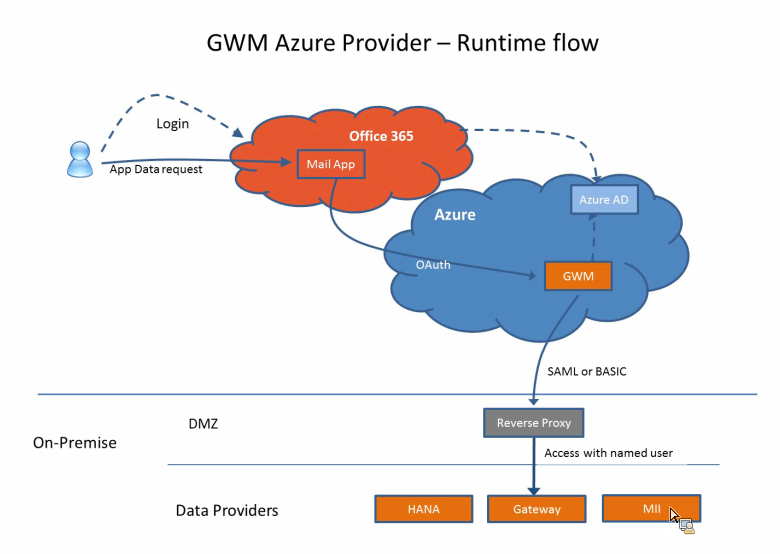
In my previous posting I reported on the latest version of SAP Gateway for Microsoft ('GWM Azure'), that enables access to SAP data into the Office 365 context. With the announcement of the new Office 365 APIs, this gives an interesting lookout. Will it also be possible to disclose SAP data by the combination of GWM + Office 365 APIs, for usage in native iOS and Android Apps? If so, some strong use cases for new type of composite business Apps will be made possible; in which Office 365 (personal) productivity data is combined with the business data in SAP. Direct available on the nowadays preferred business channel, being tablets and smartphones. Will be interesting to closely watch the actions of SAP and Microsoft on this…

Thursday, October 30, 2014

Expose SAP data into Office 365 productivity clients

On 16 September, SAP launched an update of their product SAP Gateway for Microsoft (GWM). Code-named "GWM Azure", this update focusses on integration of SAP backend data and functionality, through SAP NetWeaver Gateway, in the Microsoft Azure cloud and Office 365 tenants.
As a member of the Customer Engagement Initiative group on SAP-Microsoft Interoperability, I was fortunate to participate in the product’s customer validation preceding the product launch. In our customer validation (CuV), I focussed on ‘enterprise-ready SSO’. With this phrase, I mean a robust, controlled and foremost enterprise-scaleable way to give employees via the Office 365 context access to the on-premise SAP data and functionality. In practice this translates for me into rely on authentication standards like SAML2, OAuth2, X.509 certificates; and not make use of username/password (weak) authentication. Mind you, the latter is fine for initially playing around and executing PoC’s. But it is not a secure and maintainable approach when addressing productive scenario’s with larger user groups.
The outcome of our CuV participation turned out very well. I could proof in ample time that the SAML2 based Single Sign-On from our Office 365 tenant via GWM Azure into our on-premise SAP landscape (Gateway + business suites), well... simple works!! The access to the SAP data in the Office 365 clients is still authorized based on the SAP authorization permissions and roles. An Office 365 user is only granted access to SAP data and functionality in compliance with his/here role in the SAP business systems.
With the release of GWM sp3 (GWM Azure), the availability of an organization’s SAP business data, can easily but still secure be extended to the Office 365 productivity clients. With Microsoft putting strong emphasis on the Office 365 proposition, and lots of organizations actually buying into this (including new customers for Microsoft, as consequence of Microsoft aggressively targetting the small and midsize business market (SMB)), this adds a powerful new business proposition; for the Office 365 ecosystem but also for individual Office 365 subscribers.

Monday, June 17, 2013

Architecture of a cloud-enabled SAP/SharePoint document viewer

End 2012 IntelliDocx LLC approached us to design the global architecture for their new DocSet.ECM for SAP and SharePoint product suite, and build DocSet.ECM for Plant Maintenance (PM) as first member. The DocSet.ECM functionality is enable end-users to search, navigate and access documents linked with SAP entities, directly within SharePoint based workplaces. The SAP entities come from any of the known SAP Business Suites - PM, Sales, HCM, SRM. IntelliDocx had an ambitieus deadline, as they aimed to release the PM solution to the public and market analysts at the European SharePoint Conference in Copenhague (Februari 2013).
The base functional requirement for the product suite is that it renders a view in SharePoint on documents linked in SAP. But to make it a winning solution, they have more requirements. The products must be very user-intuitive and friendly; enabling arbitrair end-users to utilize it without requiring inside SAP knowledge. Product deployment must be fit for both on-premise as cloud. More and more organizations nowadays have decided, or are looking into, SharePoint Online utilization iso maintaining an own on-premise SharePoint farm. And of course, the product should support both SharePoint 2010 and 2013; or at least be prepared for 2013 ahead.

System Architecture

The diagram below illustrates the architecture we proposed to address the requirement set. (And which we indeed applied to successfully deliver the DocSet.ECM for PM product to market, within the tight timeframe [News release]).

Essentials

DocSet Viewer
  • Deployed via Sandboxed Solution
  • UserControl iso aspx page
    • allows to add the DocSet viewer to regular SharePoint site and content pages / intuïtieve integration within customer’s SharePoint based portals
  • Server-side only rendering the html
    • No server postback handling
    • No interactive dependency on SharePoint server (may be cloud-hosting)
  • Client-side handles communication with the DocSet webservice, and dynamic UI-rendering
    • By-pass SharePoint server
    • Use jQuery:
      • Invoke DocSet JSON webservice
      • Render tree-view of hierarchical document folders
      • Drag-and-drop of documents (for Move + Add)
  • Configuration:
    • Endpoint of DocSet webservice (may be cross-domain)
DocSet webservice
  • WCF JSON webservice
  • Enable CrossDomain invocation via JSONP
    • CORS is not yet widely supported; and in particular not within the enterprise domain
  • Utilize ERP-Link RFC Connector for SAP / Microsoft.NET interoperability with DocSet.ECM RFCs
    • The architecture allows usage of other SAP / Microsoft connectors, e.g. Duet Enterprise, but we decided to initially use the ERP-Link connector as IntelliDocx told us a lot of their customers already use the Gimmal ERP-Link Suite.
  • Configuration:
    • Connection settings to DocSet RFC
    • Address of SharePoint server hosting the DocSet viewer, to allow cross-site requests from this possible remote / other domain server

DocSetViewer App - SharePoint 2010 + 2013

The DocSet.ECM for SAP and SharePoint product suite is fit to deploy and run within both SharePoint 2010 and 2013, without any code-change; and hosting supported on-premise and within the Office365 cloud.
  
Related info: IntelliDocx