Wednesday, November 5, 2014
Recover from SharePoint 2013 Search and CryptoGraphic mismatch - 'Key does not exist'
Thursday, October 30, 2014
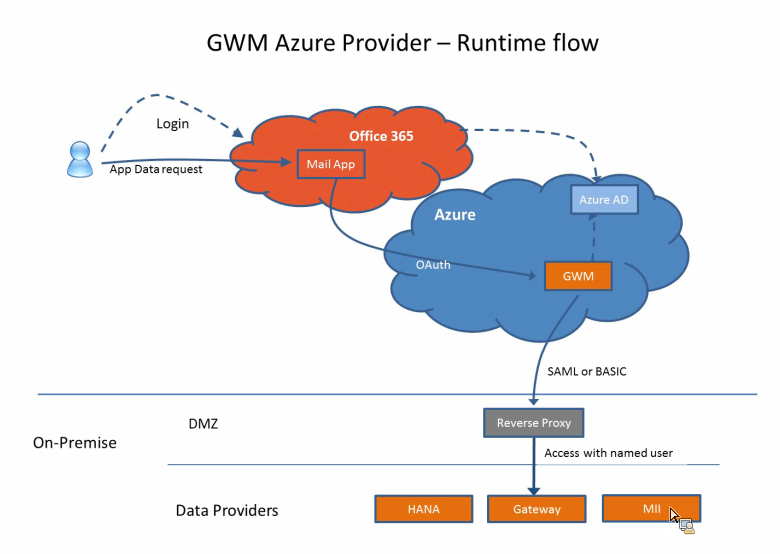
Expose SAP data into Office 365 productivity clients
Friday, August 15, 2014
Tip for ‘Secure Store Service application is not accessible’
Monday, July 21, 2014
Connect SharePoint 2013 to SAP via Gateway for Microsoft
- Connect to the Gateway service proxy from a SharePoint web part context [mind you, Microsoft urges us to step away from this SharePoint server-side model; but it is still possible and supported]
- Build a custom BCS Connector to connect to the Gateway service proxy, and use that connector from SharePoint to render the received SAP data via standard External List, Business Data WebParts, or a custom build web part that invokes the BCS Api
- Build a SharePoint WCF RESTful service to connect to the Gateway service proxy, and consume that service in a browser-based front-end; using a databinding library like knockout.js, Angular.js. This is an example of SharePoint 2013 App model, and can also be applied in Office 365 / SharePoint Online.
SharePoint version
SharePoint 2010 has been build “ages ago”, and has a hard dependency on .Net framework 3.5. In the current year, the .Net framework has progressed to .Net framework 4.5, and the latest version of SharePoint [2013] has catched up with that. And the same holds for Duet Enterprise 2.0 [which is actually for SharePoint 2013, if you have SharePoint 2010 you need the Duet Enterprise 1.0 version], and also GWM: both are .Net Framework 4.x dependent. As consequence, I have to relax my firm statement a bit: Yes, GWM can be used to connect SAP and SharePoint 2013; but not for the older SharePoint versions (2003/2007/2010).Simple example for Proofing
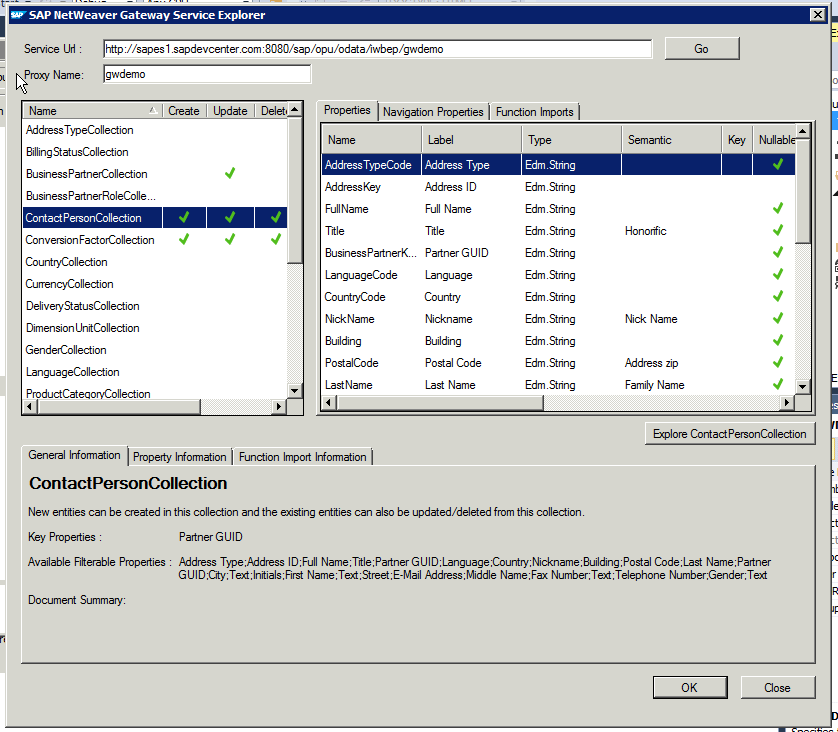
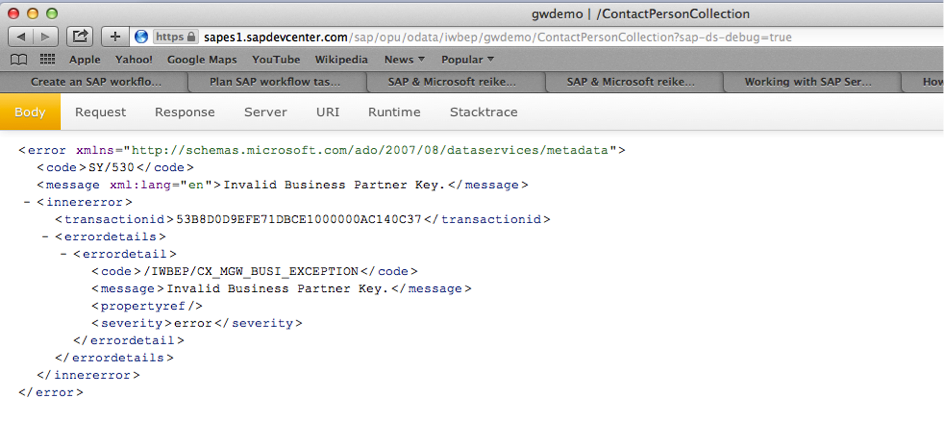
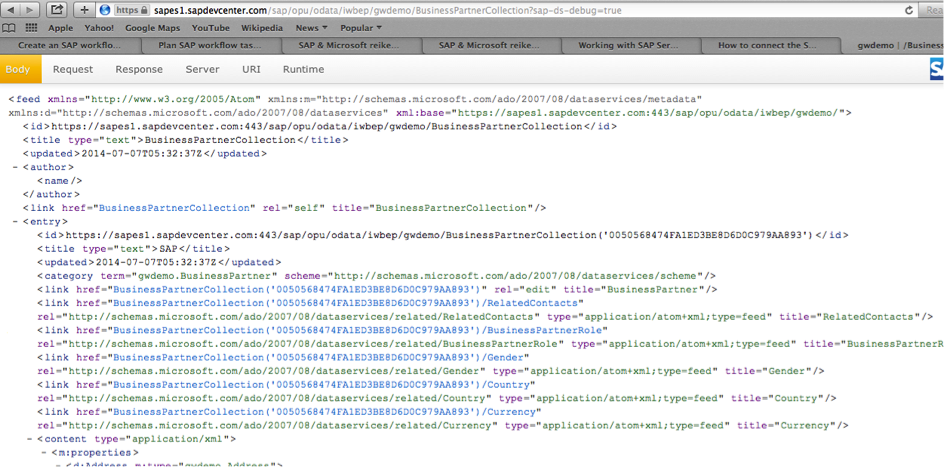
To demonstrate, I made up a sample scenario to retrieve SAP CRM data via GWM into SharePoint. I used the demo Gateway services as data source (see article by Martin Bachmann for instruction how to get access to the SAP Gateway demo system), and our own SharePoint 2013 environment as front-end. Further I have Visual Studio 2013, and necessarily also the latest GWM sp3 (versions preceeding sp3 will not install in Visual Studio 2013; but they do install in Visual Studio 2010/2012).


Fixes needed to GWM generated code
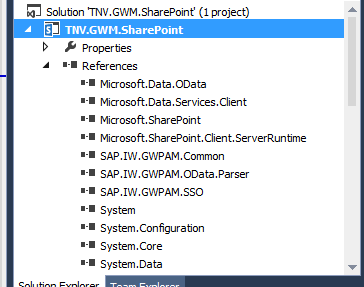
Issue 1: Microsoft.Sharp not included in references


Does GWM replace Duet Enterprise?
The answer to this is a clear No: Duet Enterprise as framework has more capabilities as GWM: SAP workflow integration, SAP BW reports publication, roles synchronization, user profile synchronization. Also Duet Enterprise has complete self-contained support within for Single Sign-On between SharePoint and SAP, while with GWM you need additional infra to achieve this (e.g. X.509 certificates infra in your landscape).Friday, June 27, 2014
Utilize Duet Enterprise 1.0 and 2.0 in parallel in enterprise architecture
Sunday, June 15, 2014
Duet Enterprise 2.0 - installation troubleshooting
Issue 1: ‘Add-on IW_DUETE Release 100 can only be installed in client 000’
Import of the Duet Enterprise 2.0 SAP Add-On via transaction SAINT gives the following error:
Issue 2: ‘The remote certificate is invalid according to the validation procedure’.
This error can occur in multiple SharePoint-SAP scenarios: runtime invocation of Duet Enterprise service from SharePoint 2013 side, import of a Duet Enterprise 2.0 BDC Model: Application definition import failed. The following error occurred: The remote certificate is invalid according to the validation procedure.Issue 3: ‘The root certificate that was just selected is invalid’
Importing in SharePoint 2013 ‘Manage Trust’ the SSL certificate of SAP NetWeaver Gateway results in error:
Issue 4: ‘No service found for namespace /IWWRK/, name DUET_WORKFLOW_CORE
Manifest itself upon configuration of Duet Enterprise 2.0 Workflow solution.
Issue 5: DuetConfig: ‘The operation name is missing or invalid’
For instance occurs with the DuetConfig command to configure workflow, command with multiple operation parameters: DuetConfig.exe -importbdc -FeatureName Workflow -LsiUrl "https://tnvsrm.tnv.corp/sap/opu/odata/IWWRK/DUET_WORKFLOW_CORE;mo;c=SHAREPOINT_DE/" -BdcServiceApplication "Business Data Connectivity Service" -UserSubLsiUrl "https://tnvsrm.tnv.corp/sap/opu/odata/IWBEP/SUBSCRIPTIONMANAGEMENT; mo;v=2;c=SHAREPOINT_DE/"
Issue 6: ‘Lobsystem (External System) returned authentication error'
For instance, occurs upon trying to import a Duet Enterprise 2.0 BDC Model into SharePoint 2013 Business Connectivity Services application:


Issue 7: Import of Duet Enterprise 1.0 BDC Model fails due missing ‘WSDL’ application definition.

Issue 8: Invocation of Duet Enterprise 1.0 service fails due missing SSO
Browsing a SharePoint 2013 External List results in error ‘An unsecured or incorrectly secured fault was received from the other party’.

Epilogue
Compared to the excellent troubleshooting guide for Duet Enterprise 1.0, the above list of issues plus resolutions is much smaller. The Duet Enterprise product team of SAP plus Microsoft has clearly improved their delivery on this aspect.Sunday, February 9, 2014
SAML2 Protocol requires SSL-enabled Duet Enterprise 1.0 endpoints
An organization that is deploying Duet Enterprise in the landscape, default has no SSL enabled in their internal network. They questioned to neither activate SSL on the Duet Enterprise SAP Add-On / SAP NetWeaver Gateway 2.0 system.
However, this request cannot be granted. Reason is the usage of SAML2 for Duet Enterprise 1.0 Single Sign-On between SharePoint 2010 and SAP NetWeaver Gateway system.
Source 1: Duet Enterprise Security Considerations
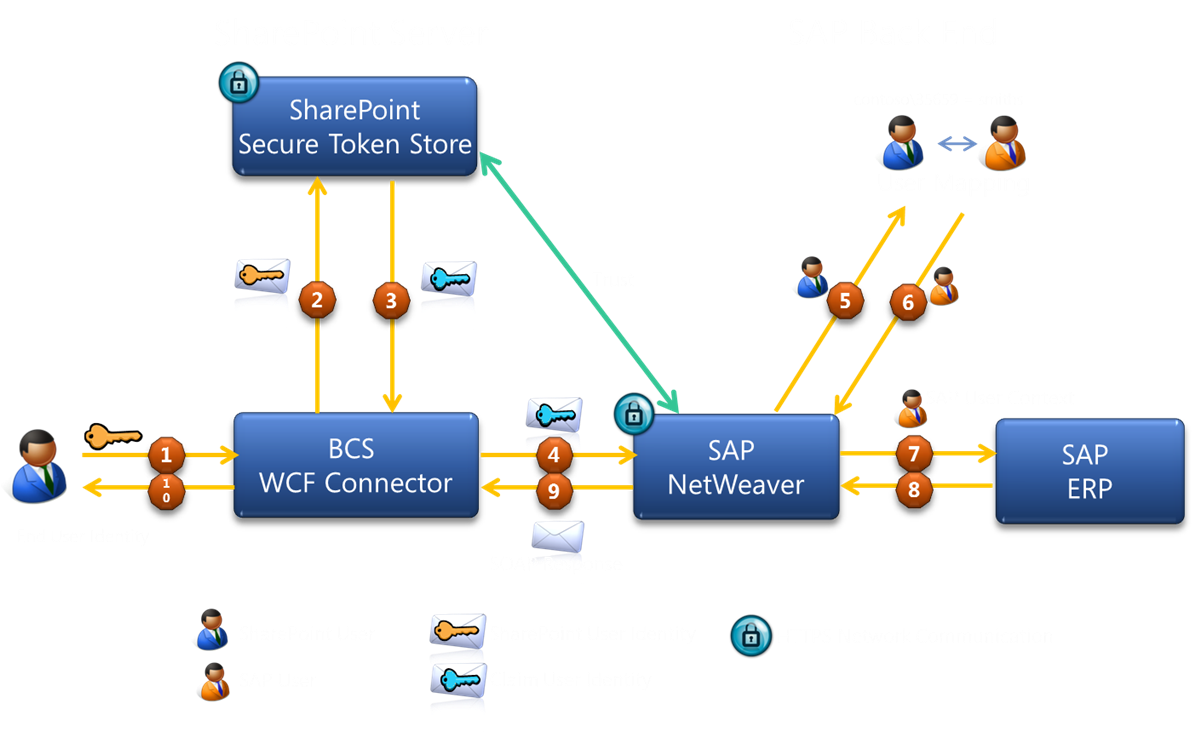
The user accounts that are used to access SharePoint Server 2010 and Microsoft Office 2010 suites clients cannot be used to access the information in SAP directly. The Duet Enterprise security architecture solves this issue by configuring the Microsoft Business Connectivity Services Windows Communications Foundation (WCF) connector that is included in SharePoint Server 2010. This WCF connector interacts with the Security Token Service in SharePoint Server 2010 and with SAP NetWeaver in the SAP system. The goal of this implementation is to map user identities in SharePoint Server 2010 to user accounts in the SAP system so that a user who logs on to the SharePoint Server 2010 Web site can have access to the external data that is stored in the SAP system without having to log on again in the SAP system.
Duet Enterprise 1.0 applies SAML2 with Symmetric Key for Endorsing Signature.
Source 2: STS Scenario with Symmetric Key for Endorsing Signature
With this scenario, the STS and the WS consumer negotiate a symmetric key. This is used for an endorsing signature for messages between the WS consumer and the WS provider. The WS consumer uses this endorsing signature to prove that it is in possession of the key that the STS signed.
In short (a.o. source 2 contains a complete outline of the SAML2 Protocol steps): in the SAML2 Protocol with Symmetric Key,
- the webservice consumer (in Duet Enterprise scenario: SharePoint BCS) authenticates the logged-on SharePoint user at the Identity Provider (in Duet Enterprise scenario: SharePoint STS),
- the Identity Provider grants a SAML security token for the SharePoint account, generates a short-lived key and signs this with the public key of the X.509 certificate of the webservice provider (in Duet Enterprise scenario: SAP NetWeaver Gateway),
- STS returns the SAML token + signed STS key as SAML assertion to SharePoint BCS as webservice consumer.
- SharePoint BCS adds the signed token as SAML assertion (Holder-of-Key, HoK assertion) to the header of the service request and sends the request to SAP NetWeaver Gateway as webservice provider.
- Gateway uses the private key of its own SSL certificate to decipher the token, and validate it as genuine coming from trusted asserting party.
- If so, the SAML:NameIdentifier in the service request is relied on, and applied via SAP NetWeaver User Mapping to automatically log on the SharePoint account as its mapped SAP named user.
The SAML2 protocol effectively prevents other message recipients, which do not posses the private key, are able to decipher and misuse the security token.
Both the SharePoint 2010 and SAP Gateway participants in the Duet Enterprise SSO handling, uphold to the SAML2 Protocol. This implies that SharePoint expects requires that Gateway as webservice provider exposes https-enabled service endpoints. In case not, on each runtime Duet Enterprise service request, SharePoint STS will throw exception from method System.ServiceModel.ClientCredentialsSecurityTokenManager.CreateServerX509TokenProvider, like: "System.InvalidOperationException: The service certificate is not provided for target 'http://<hostname>/sap/bc/srt/pm/.....' ", as it is not enabled to setup a valid SAML2 Protocol handling with the invoked Gateway relying party.
For this customer organization, as the SSL is only applied in the internal network to uphold the SAML2 Protocol handling between SAP Gateway system and SharePoint 2010 farm, there is no need for a (pricy + period-bound) signed SSL certificate from a Certificate Authority. A self-signed certificate suffices. Note that the Duet Enterprise Configuration Wizard creates and configures a self-signed SSL certificate in case the Gateway system is not yet SSL-enabled.
Tuesday, December 24, 2013
SharePoint 2010 BCS SAML Assertion too coarse-grained
Results in false positives notification at service providers of message replay
- Service Availability: overflood the service provider with same requests over and over in a Denial of Service Attack.
- Data Integrity: request same data updates multiple times (e.g. bank transfer).
SAML assertion by SharePoint BCS
SharePoint BCS in the role of service consumer supports this by unique tagging each request sent with a SAML Assertion ID added in the message header. SharePoint BCS calculates this SAML SignatureValue based on 2 values to uniquely tag the message: message issuer and message instant id. The issuer value is fixed set to “SharePoint”, the instant value is dynamic set to timestamp at moment of sending:Duet Enterprise: SAP Gateway as SAML consumer of SharePoint BCS
Duet Enterprise 1.0 applies SAML 1.1 to provide Single Sign-On from SharePoint 2010 into SAP NetWeaver Gateway 2.0. In the Duet Enterprise runtime client-service flow, SharePoint BCS is the service client, and SAP NetWeaver Gateway is the service provider. So Gateway must verify requests received from SharePoint BCS on idempotency, aka detect message replays. As result of the vulnerability in the BCS SAML assertion approach, Gateway may report false positives of message replay. This is visible in the NetWeaver WS (WebServices) errorlog via presence of error: CX_WS_ST_CACHE_ERROR / Error when writing the ST to DB.Thursday, March 7, 2013
Duet Enterprise 2.0 Authentication flow
Monday, April 30, 2012
Execution flow of Duet Enterprise single sign-on
- The SharePoint authenticated user identity is sent to Microsoft Business Connectivity Services Windows Communication Foundation connector.
- The BCS WCF connector invokes the SharePoint Security Token Service to retrieve the user token for this SharePoint user identity.
- The SharePoint Security Token Service returns a token that identifies the SharePoint user.
- Duet Enterprise SSO handling sends the received token to SAP NetWeaver Gateway, packaged within a SOAP request
- SAP NetWeaver Gateway uses the received token to identify the external user, and locate in the user mapping table (VUSREXTID) the associated SAP user with this credential
- The SAP user account that is mapped to the SharePoint user is returned to SAP NetWeaver Gateway.
- SAP NetWeaver Gateway uses the SAP user account to request access to information in the SAP backend.
- If the user is authorized to access the information, the requested information is sent to SAP NetWeaver Gateway.
- SAP NetWeaver Gateway sends the requested information to the Microsoft Business Connectivity Services WCF connector as a SOAP response.
- The Microsoft Business Connectivity Services connector passes the information to the SharePoint front-end side; e.g. to display via an External List or any of the other BCS Business Data webparts.

Sunday, October 24, 2010
Duet Enterprise Overview presentation at SAP TechEd 2010
- Duet [Enterprise] Service Consumption Layer is the first version of SAP's project "Gateway", embedded in Duet. The aim of project "Gateway" is provide simplified access to SAP:SCL, internally referred to as 'Gateway Layer'
Framework built as an NetWeaver ABAP add-on, enabling simplified access to SAP software from any device or environment using standard market protocols - Primarily, Duet Enterprise is working as an Add-On on both sides; NetWeaver stack and SharePoint stack
- [SAP service-enabling] Business entities from SAP available as Web Services; [SAP consumption] Discover SAP information as External Content Types in BCS, and connect to SharePoint/Office.
- The ready to use Duet Enterprise capabilities, are also building blocks that you can use and even build upon in your custom solutions
- SharePoint Duet Enterprise front-end development distincts 3 Solution Types:
- Simple - by end-user; within the SharePoint GUI
- Intermediate - by Power User; via SharePoint designer
- Advanced - by a .NET developer; via Visual Studio
- Study on the effort it takes to develop SAP/SharePoint integration learns that without Duet Enterprise it costs 6 times
- Create solutions very fast to address business (needs) very quickly. Not create very big applications, but small ones and do it fast
- SAP services are fairly complicated, with nested and complex structures. SAP WSDL's kinda have their own definition, slightly away from the WS*-standards
- Duet Enterprise can either map SharePoint users to SAP users through the Duet Enterprise User Mapping component, or connect to a LDAP that this mapping.
Friday, July 9, 2010
Duet® Enterprise on stage at SAPPHIRE 2010
Monday, May 17, 2010
Claims-based SSO with SAML 2.0
Thursday, April 1, 2010
A compact overview of SSO Technologies supported by SAP NetWeaver for surfacing from .NET based clients
Wednesday, October 7, 2009
Interesting sessions on SAP/MS interop at the SAP TechEd's 2009
- Duet Best Practices: Fast-Track Your Duet 1.5 Operations with Duet Admin Tools
- Customizing Alloy: Exposing SAP Workflows to Lotus Notes
- Interoperability Between SAP NetWeaver Portal and Microsoft SharePoint Technologies
- Integrating SAP with Office 2010 and SharePoint 2010
- Creating Online and Offline Form Processing Scenarios with Adobe Forms and Web Dynpro for ABAP
- Architecture Guidelines for Composite Applications
- Standards-Based Interoperability between SAP NetWeaver PI and Microsoft .NET
- SAP NetWeaver Process Integration 7.1: SAML Implementation
- Enterprise Services Repository in Complex Customer Landscapes
- SAP and Microsoft: Interoperability and Beyond
- Tactical SOA Governance in SAP Environment
- Business Process Management and Security – Inextricably Intertwined
- Service-Based Single Sign-On in an SAP and Microsoft Combined Environment


%2B-%2BHigh-Level%2BArchitecture.png)