Showing posts with label SPFx. Show all posts

Saturday, January 23, 2021

Understanding why you at least must consider to go isolated

My trigger was actually a classsic 'admin' versus 'dev' mindset: I wanted to “play” with the new Microsoft Graph Toolkit 2.0, and used Mgt-PersonCard in a custom SPFx webpart. Deployed it to a development/playground site in SharePoint production tenant, as only there is a filled User Profile store to fully experience all the capabilities delivered in the Person-Card component. Asked the Azure tenant admin to approve the API Permissions that Mgt controls typical require, and in all the Microsoft provided code examples for simplicity sake are requested org-wide. And got the door slammed back in my face: sorry, not going to grant this [are you insane for even dare to ask??]
At first surprised and disappointed on this rejection, I again looked into API Permissions for understanding. I started with questioning some Microsoft contacts on what Microsoft recommended best-pracice in this is. Not suprising, the consultancy answer is on level of “it depends” and “customers must consider and decide for themselves”. So that is what I continued with: deep-dive to understand about how org-wide can be risky, and about the balance between strict security control/mitigation, versus developer convenience.

The happy, unworried flow...

I started with reading again the Microsoft Docs on Connect to Azure AD-secured APIs in SharePoint Framework solutions. This is a typical example of Microsoft documentation in which simplicitly prevails above the more complex story. Yet some credits deserved, in the Considerations section there is some minor warning about Granted permissions apply to all solutions.

Happy indeed, for malicious code...

But what does this actually mean, how can 'any solution in tenant' (mis)use the Azure AD permissions granted to the webpart you deployed in AppCatalog? For understanding of this, another Microsoft Docs gives more insight: Connect to API secured with Azure Active Directory; in the section 'Azure AD authorization flows':
"Client-side web applications are implemented using JavaScript and run in the context of a browser. These applications are incapable of using a client secret without revealing it to users. Therefore these applications use an authorization flow named OAuth implicit flow to access resources secured with Azure AD. In this flow, the contract between the application and Azure AD is established based on the publicly known client ID and the URL where the application is hosted"
In essence this means that all what is needed for arbitrary script code to reuse Azure AD permissions granted on org-wide level, is the public client ID or name of an approved application, and the script must be loaded in the browser on the same domain as that approved application. The clientside script code can then itself setup OAuth Implicit flow for the public client ID or name. The script does not have to be SPFx code itself, in the ultimate situation it can implement OAuth Implicit flow itself on raw OAuth protocol level. The lack of MSAL.js or even ADAL.js does not scare hackers away, they have rich toolkits to help them setup attacks. And the attack can even be simpler: in case the malicious code is included in the browser DOM where also at run and render time a SPFx control is loaded, then it can read/steal in the DOM the access token returned to that SPFx control loaded in the same domain. Awareness on this in Considerations when using OAuth implict flow in client-side webparts:
"Web parts are a part of the page and, unlike SharePoint Add-ins, share DOM and resources with other elements on the page. Access tokens that grant access to resources secured with Azure AD, are retrieved through a callback to the same page where the web part is located. That callback can be processed by any element on the page. Also, after access tokens are processed from callbacks, they're stored in the browser's local storage or session storage from where they can be retrieved by any component on the page. A malicious web part could read the token and either expose the token or the data it retrieved using that token to an external service."

Is there real risk?

A typical 'dev' response is that there is no real security risk of leaking unauthorized information. After all, the client side code can only access data and functions for which the logged-on user is allowed, thus is already entitled to access. Fair point, but the fundamental difference is in the awareness of the logged-on user that data is retrieved under his/her identity. For 'safe' code, the user is aware that data is retrieved; that is exact the business purpose why (s)he is using this trusted control. But consider malicious code that was downloaded by a business user from internet to deliver that one convenient capability (e.g. draw a nice looking graph). The business user is not aware in case that convenient library underwater misuses the OAuth accesstoken granted to e.g. invoke the Graph API for reading person data from User Profiles, and leak that data to social or even dungeon endpoints where you definitely don't want this company related data to land.

Protection by isolation [social distancing]

How do SPFx isolated webparts protect against this global allowed access risk? In essence very simple: by isolating the Azure AD / API permissions approval to only the SPFx solution that requested it, and were approved / trusted by the Azure admin tenant. On browser operation level this isolation is delivered by each isolated SPFx webpart in its own unique solution-specific domain, hosted in an iframe. Other code cannot on browser nor DOM level be loaded into such iframe isolated domain, and thus cannot piggy-back on the contract of this approved SPFx solution. Loaded from different url, and the browser protects against reading the accesstoken from the iframe.
And a nice additional advantage of SPFx isolated webparts is that in API Permissions administration is logged and thus visible per SPFx solution what permissions are requested. This visibility is lacking with org-wide permissions: an admin (Azure nor SharePoint) cannot tell which SPFx solutions requested the API permissions. And more dangerous: there is no indication on which code (SPFx webparts, other libraries) is using the org-wide approved permissions.

Understanding summed up in bullets

  • Azure AD is used to for access-control to data (Microsoft 365) and applications (Microsoft 365 + other applications)
  • Azure API permissions (‘scopes’) are used to allow Azure AD authenticated clients, specific access to Azure AD protected resources
  • JavaScript code running in browser uses OAuth implicit flow to authenticate on-behalf of the logged-on user to Azure AD, and via approved Azure API permissions is permitted to do actions against the Azure AD protected resource
  • Org-Wide allowed API permissions are available for any JavaScript code that is executed in the runtime context of the ASML SharePoint domain, and that applies OAuth implicit flow against Azure AD (OAuth access token is returned within https://<tenant>.sharepoint.com global context)
  • There is no visibility in Azure AD of the usage-context for which org-wide API Permissions are required → identity of specific SPFx controls that request them at deployment time, is not administrated
  • On Classic Sites: via script injection, whatever library can be downloaded from internet by business users themselves, without IT involvement nor awareness. Malicious code is on Azure AD level enabled to misuse API permissions that are permitted on org-wide level. Without the logged-on user being aware, the downloaded JavaScript library can access the protected resource on behalf of the logged-on user, and “do malicious / bad things’ with the data that can be retrieved. E.g. send out the data to an extern location (social channels, business competitor, ...)
  • On Modern Sites: by default the business user are disallowed to insert / inject arbitrary code themselves. Code can only be uploaded as SPFx code in AppCatalog:
    • Tenant AppCatalog: managed by IT
    • Site AppCatalog: managed by business self (SCA). IT controls whether a Site AppCatalog is delivered on a site, only on good business motivation; and knowledgeable + trusted developers are involved
    • Be considerable: PnP community (*) is delivering the Modern Script Editor SPFx webpart. A convenient webpart that enables fast delivery [rapid prototyping] of SharePoint Modern customization, without the need to immediate comply to all the 'SPFx development + deployment hashhle'. But be aware that once you allow this SPFx webpart in your tenant, you are opening also in your restricted Modern SharePoint context 'the box of pandora' that from then enables the business users to inject just any arbitrary script library for runtime execution in SharePoint pages.
      • (*) Initial version of Modern Script Editor WebPart is build and delivered by Mikael Svenson, and given as a gift to the SharePoint community. He build this before joining Microsoft; and it may not in any way be regarded as a Microsoft supported + approved solution.
    • Native SharePoint (Online) API is itself without Azure AD access-control, and can be invoked without need of approved API permissions. Thus also by code that is not running in context of SharePoint page; e.g. running from another webapplication platform, local running scripting, … This is an inherent security leak / issue in SharePoint Online API, IT not in control to close / improve that
    • That the older SharePoint API does not provide the option to improve / control the usage, is not a reason to allow same freedom and flexibility on Azure AD protected APIs, of which Graph API is a significant one. Note: (exposure) scope of Graph API extends to much more then only SharePoint Online: also Mail, Teams, Groups, ….

Tuesday, December 22, 2020

Developer inconvenience: Deploy Isolated WebPart with webApiPermissionRequests fails unless permission to create new Azure AD App Registration

In real-life enterprise context, it is advised to tag any SPFx webparts that will invoke an Azure AD protected API as isolated. This to prevent that other script running in same page, can abuse the OAuth access token assigned to the SPFx webpart and invoke any tenant-wide API permissions on behalf of current user.
However, you need to be aware of some deployment implications with Isolated WebParts. The first one is that in the Microsoft design, you can only deploy Isolated WebParts via the tenant AppCatalog. It is not possible to deploy an Isolated WebPart (only) to the site App Catalog where it will actualy be used. I suspect this is due that each Isolated SPFx WebPart creates a new Azure AD App Registration on tenant level, and for consistency the SPFx WebPart must therefore also be installed on tenant level. Negative result is that every site-specific customization is visible on all others sites where it likely is unusable. Luckily this visibility is initial limited to only the site owners in "Add an App". Only after a site owner explicit adds the Isolated WebPart to the site, then it will be visible in page editing mode in the available WebParts.
An even more significant inconvenience is that to successful deploy an Isolated WebPart, you need to have the authorization to create a new Azure AD App Registration. Without that permission, the deployment in tenant AppCatalog will fail with the generic error 'Deployment failed. Correlation Id ....'. Implication is that in effect the dependency on Ops is unnecessarily increased: a developer must reach out to a Global Admin for the deployment of SPFx solution containing Isolated WebPart. But the better option is that you request that Global Admin to assign your account the Application Developer role, then you are empowered to do this 'Ops' part yourself.

Sunday, December 13, 2020

Simple pattern to ensure unique element ID inside SPFx React WebPart

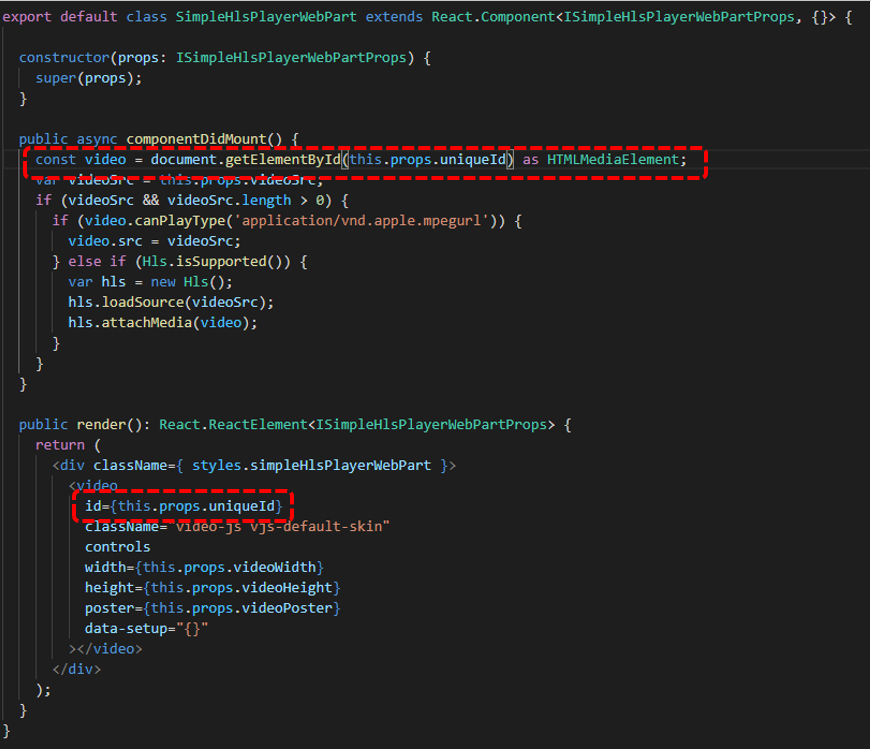
When you build a SharePoint WebPart, you must take into account that the business user can add multiple instances of that webpart on a single page. So the operational execution must be robust for that. In case your webpart relies on HTML element ID, e.g. via 'getElementbyId', then you must ensure that the element ID of each instance is unique. A simple pattern I applied is to derive the ID of the inner React Component on that of the unique ID of the parent React WebPart.
Part 1: Extend the React WebPart Properties interface with a property for unique ID
Part 2: Parent React WebPart derives unique ID from its own, and pushes to the inner React Component
Part 3: Inner React Control applies the received unique ID in its rendering + operation

Tuesday, January 28, 2020

Peculiarity with Hub sites - SPFx Header displayed state of associated site is initial preserved

Following information architecture situation:
  1. A communication site registered as hub site
  2. Another site (can be communications or modern teams site) associated with the hub site
  3. The associated site has some site info tagging; which is visualized to site visitors through a SPFx Header extension
  4. The hub site either does not have site info, or the values that it has are different from that in the associated site
Effect of this situation is that when one navigates within the hub association from associated site to hub and vice versa, it can in its (cached / preserved) header display false / incorrect information...

Site associated with Hub; in this site via SPFx Header extension, some ‘site identification’ is visualized in the site’s header

From this hub-associated site, navigate to the hub site. The header info remains visible, even though the info does not hold for the hub site

Refresh / explicit (first)visit the hub site; then the ‘false-positive’ site info is gone

From first visit of hub, navigate to the associated site. The header info remains invisible, even though this site holds identifying site information

Cause: in an hub, only on 'first-visit' the SPFx Header(s) are executed Inspecting the network traffic, it is evident that the displayed header info is not refreshed on navigating 'within hub context': the SPFx Header is not re-executed. Apparent only on explicit 'first-visit' to an Hub assocation - hub or associated site; then SPFxHeader components are executed. And on any navigation 'within' the hub; the (visual) state of the SPFxHeader is preserved; on same notice as the 'hub navigation.
For performance perspective, makes sense. But in situation where via SPFx Header extension essential site information is displayed, -- which is not per se similar throughout the entire hub association; the result in browser is functional / governance-wise incorrect.
UPDATE - problem resolved thanks to community

On friendly suggestion of Vesa Vujonen, I submitted our finding as SharePoint dev issue: Hub site on navigation preserves SPFx header display state of associated site. And the combined power of the community delivered; Andrew Connell suggested that it's related to the navigatedEvent & the page routers partial page loading, and referred to post of Elio Struijf in which similar behavior is described and solution provided: Handling navigation in a SharePoint Framework application customizer.

Thursday, June 20, 2019

Redeploy your SPFx Extension to SharePoint

One of the charms of SPFx Extensions is that they apply tenant-wide: they can be configured for immediate utilization in all modern site collections in your tenant. On SharePoint foundational level this works via the concept of good-old CustomAction that is injected into the context of each modern site collection. In the SPFx Extension package the CustomAction is configured as Feature deployment. Via the parameter 'skipFeatureDeployment' in the package-solution.json (see 'Tenant-scoped solution deployment for SharePoint Framework solutions') you can configure the SPFx Extension to be immediate available across all the sites in the tenant when the solution package is installed to the tenant app catalog, without need to explicit activate the CustomAction feature in each individual site.
This works out fine on the initial deployment of your SPFx extension: the deployed SPFx header automatically is included and active on each site.
On initial deploy, SPFx Extension included once in each modern site
However, in case of need for redeployment, you must be aware of a current glitch: the SPFx Extension gets multiplied per each re-deployment. The cause of this is in how the (semi)immediate and tenant-wide application of the CustomAction is applied. The CustomAction is not injected in the scope of each individual site (Web.UserCustomActions does not include the CustomAction of the SPFx Extension); but is injected as Tenant Wide Extensions. In case of "skipFeatureDeployment": true in the package-solution.json file, on upload / install of the .sppkg file in the tenant App Catalog the administrator is asked to set the 'Make this solution available to all sites in the organization' checkbox. If set, a row is added in the list 'Tenant Wide Extensions' in the App Catalog site. And on re-upload / redeploy, the checked setting is applied again, resulting in duplicate entries for the same SPFx Extension in the Tenant Wide Extensions list. This results that the CustomAction is applied multiple times per each site, and therefore that the SPFx Extension is included multiple times in each site...
As side-effect of re-deploy, SPFx Extension is multiplied in 'Tenant Wide Extensions' list
Result is that the SPFx Extension is included multiple times per each site
Correcting this faulty situation is simple once you know how-to (thanks to Vesa Vujonen for fast response on support question raised): just remove the duplicate entries from the Tenant Wide Extensions list. Mind you, it can take some elapse time before the effect of this is structural applied accross all the WFE's involved in serving the sites of one's tenant.
Fix by removing the duplicate rows in Tenant Wide Extensions
Then the SPFx Extension again included once, and referring to latest package version

Wednesday, May 8, 2019

Opt-In Modern List Experience on Communication Site obstructs upgrade SPFx app via UI

An approach to upgrade a deployed 'App for SharePoint' is to open the site that contains the AppCatalog (either tenant, or site collection with own app catalog) in a browser, go to 'Site Contents', and double click the App. In the 'About' dialog it will then present the option to upgrade. When the site is in Modern List experience, this approach is hampered: also the 'Site Contents' view is then within Modern View; and the available options there for any App are limited to 'Monitor' and 'Remove'. Microsoft is aware of the issue, and for now advises to apply a workaround: in the Modern 'Site Contents' view, click in the lower-left corner on 'Return to classic SharePoint'. This results that on the fly the 'Site Contents' view is rendered in classic mode, and the approach to upgrade App are available for usage. However, it turns out this workaround is only available for Modern Team sites, but not for Modern Communication Sites. Direct cause is that Communication Sites by Microsoft Design do not have the 'Left Navigation' (see Modern SharePoint Sites navigation options). And by Microsoft Design flaw this lack of left navigation is propagated into application and listview pages, including 'Site Contents' (Communication Site - Left Navigation Missing in Lists / Libraries). This leaves as only workaround for Communication Site to support upgrade of (SPFx) Apps interactive through the SharePoint UI, is “Opt out of the Modern list and library experience” for that site; at least for the moment when you need to upgrade any of the (SPFx) Apps in the (site) app catalog.
Note that the non-UI approach of upgrade via PowerShell (Update-SPAppInstance)is not hampered by the Modern List Experience.

Sunday, April 7, 2019

Options considered for extending Stream Live Events with live chat/questions capability

With the recent GA of Stream Live Events, Microsoft delivers a low-entry option to easily setup company-internal webcasts. All you need in addition are on the webcast producing side: 1) recording equipment - camera + audio, and 2) an encoder solution to transmit the recording inputs into the Live Events endpoint. The camera + audio options vary from the onboard webcam + microphone of a laptop, USB-based externals, upto high-end studio-quality equipment. For Stream Live Events handling the sophistication on the producing input side does not make a difference, the inputted RTMP(S) signal is from input endpoint processed the same. Whether an organization also needs some additionals on the consumption side depends on the audience side plus the internal network capacity. Watching a Live Event instantiates an individual / unicast stream per event viewer. Under assumption that the company network is sufficient scaled for nowaday cloud solutions usage, it is feasile to simultanuous watch a 'LIVE' Stream event per network location upto a maximum of few hundreds. In case of bigger audience, Microsoft states that it is needed to reduce the network load via a video distribution approach through a SDN/eSDN solution.
In its first released version, Stream Live Events capabilities are focussed on the core streaming + playing aspects. Business demands on a webcast typical go beyond that. The biggest additional demand is for interaction between the webcast audience and the presenter. Thus a chat window in which individual attendees can submit their questions, and that the presenter can follow + respond on. It is on the roadmap of Stream Live Events to deliver this (note: Stream recent delivered 'quizzes/ polls' capability, but this is targetted at inserting in already recorded videos for a.o. training purposes; not for dynamic interaction with live streaming), but not out-of-the-box delivered nowadays. However, with Office 365 as underlying platform you have as event developer a feature-rich toolbox at hand in which you can deliver yourself a webcast experience in which viewers have the live stream and chatbox combined, via no-code or low-code approaches. The hosting platform of such landingspage is naturally SharePoint Online....; as every created Stream Group is effectively an Office 365 Group, it has an own SharePoint Modern Team Site provisioned. The persons authorized to this site is the same audience that are permitted to join the scheduled Live Event. Create in this site a new page to function as the webcast entrance, and select the '2:1 columns' layout. In the left column embed the Stream Live Event instance - one gets this from Stream via 'Share' and then pick the 'Embed' option. With this setup, all left is to extend with chatbox / questions input control. There you have multiple options. One is to utilize the rich capabilities of Yammer, and embed a Yammer channel on the page. This gives you immediate a 'chat-like' experience, in which one can enter questions, semi-live follow the inputs / chats of others, respond on inputs of others. This immediate visibility of all the responses of ones peers may be unwanted, e.g. due potential sensitivity. In that case an alternative setup is to capture the inputs in a SharePoint list in the site, and only grant the webcast facilitators the authorization to view all received inputs. The webcast attendees submit their questions and feedback via an input form embedded on the SharePoint page. For this on sublevel again multiple alternatives are available. You can embed the out-of-the-box NewForm of the list; customize the NewForm via PowerApps; a MS Forms instance that via MS Flow sends the input to SharePoint List; or build a custom control via SPFx or even as a chatbot via Azure Bot Service. Of these options all except for the latter 2 are no/low-code 'mash-up' compositions, that deliver on the needed job. The decision-weighing between them is mostly on the user-experience and branding, see screen impressions of the various options.

Sunday, August 27, 2017

Community answerring on typical SPFx usage scenarios

Vesa Juvonen asked the community to give some typical examples of business 'applications' that are build as client-side applications, before typical by utilizing ContentEditor or ScriptEditor. And now likely candidates for SharePoint Framework (SPFx) utilization:
Naturally I'm a good community participant / citizen, and answerred with some example scenarios I build myself of behalf of internal business stakeholders...