Showing posts with label SharePoint 2013. Show all posts

Wednesday, August 10, 2016

SharePoint ignores MIMEtypes mapping unless on web server level

Earlier I reported that our business users request user-intuitive handling of non-Microsoft and non-standard file-formats that are administrated within document libraries. Enabling such in SharePoint on premise consists of 2 steps (See ‘SharePoint: Browser File Handling Deep Dive’ for an authoritative reference):
  1. Add in IIS Manager a MIMEtype mapping for the involved file-extension(s)
  2. Add the MIMEtype(s) to the AllowedInlineDownloadedMimeTypes configuration of the SharePoint webapplication(s)
These server-level configuration steps are not possible in Office 365 / SharePoint Online. I ensured that we can deliver our business users sustainable custom filetype handling on migrating to cloud deployment, via the utilization of Office 365 FileHandler Add-Ins concept.
Wrt MIMEtype mappings, IIS allows multiple levels on which you can configure these:
  • Web server
  • Site
  • Application
  • Physical and virtual directories
  • File (URL)
Note that not all these levels are applicable to SharePoint as virtual webserver.
The web server level is most easy to execute, but drawback is that it requires an IISReset to become active. And that means a temporary down of any SharePoint webapplication hosted on the WFE. Therefore I instructed our operations to add the MIMEtype mappings on the Site level. To be disappointed afterwards: on download of the files from SharePoint, the content-type was still ‘application/octet-stream’ aka the “unknown type”, instead of the configured MIMEtype e.g. ‘application/vnd.spotfire.dxp’. Only when we add the MIMEtype to web server level, SharePoint returns in the file download response the configured MIMEtype.
I conducted an internet search on whether this is intentional, or at least known SharePoint / MIMEtype (mis)behavior. Only found some discussion posts ([1], [2]) inquiring about the effect we noticed (on SharePoint 2010 and SharePoint 2013 Server farms).

Monday, August 1, 2016

Augment the Org Chart with additional information

The SharePoint Organization Browser (Org Chart) is a convenient out-of-the-box functionality to display the organogram on user basis. The information of this typically comes from the HR system, and is propagated to SharePoint User Profiles. In our company we work with a lot of externals. All of them are also administrated in our HR system, and thus also provisioned to the User Profiles. Which is what we want. Only thing that our managers miss, is that in the Org Chart no visual distinction is made between internal and external subordinates. We have this information available in the User Profile in a custom property. But the Org Chart only displays the full names of the colleagues visualized in the organogram chart.
In the ‘old days’ we simple would have built a custom Org Chart, using server-side code. But in the current times, this is strongly advised against. We have an architecture guiding principle that all application customizations and extensions must be future-proof. Modifying or rebuilding something that a platform delivers out-of-the-box does not qualify for us as future-proof. The platform vendor might replace the current component by a complete different setup in the future, of which we would then miss out. In this particular scenario there is another reason to not replace the out-of-the-box delivered by a custom developed. The Organization Browser webpart is standard included on user profile page Person.aspx. To change that we would need to replace the inclusion of the webpart by an own. Note that for Person.aspx publishing page (= SharePoint content) it is possible to do this, on premise and also online, e.g. via SharePoint Designer. However, what online is not possible is to deploy a server-side webpart. Implication is that the future-proof custom Org Chart must be redeveloped fully from scratch (no reuse / extension possible of the standard Org Chart webpart), either via 100% clientside script, or as (Azure deployable) provider-hosted Add-In.
As said, Person.aspx can be modified in both on prem as online. Better sustainable approach is therefore to extend on the out-of-the-box functionality with the requested customization. Inject a reference to an own JavaScript file, and in that file include a method to extend the displayed names of a colleague’s subordinates with information on whether internal or external. We have this information as user profile property, and this can in clientside context be retrieved via the UserProfile REST service.
Dynamic extend the Organisation Browser rendering with additional User Profile information
enrichOrgChartWithExternalOrg = function() { jQuery("#ReportingHierarchy").find("TR.ms-orgme").next().find("TD.ms-orgname > a").each(function(index) { var anchor = this; var href=jQuery(anchor).attr("href"); var accountName = unescape(href.substr(href.indexOf("accountname=") + "accountname=".length)); jQuery.ajax({ url: _spPageContextInfo.webAbsoluteUrl + "/_api/SP.UserProfiles.PeopleManager/GetUserProfilePropertyFor(accountName=@v,propertyName='ExternalOrganization')?@v='" + accountName + "'", contentType: "application/json;odata=verbose", headers: { "accept": "application/json;odata=verbose" }, success:function(data){ if (data.d.GetUserProfilePropertyFor.length != 0) { var extCompName = data.d.GetUserProfilePropertyFor.substr(0, data.d.GetUserProfilePropertyFor.indexOf(" - ")); var augmentedSubordinateName = jQuery(anchor).html() + " (" + extCompName + ")"; jQuery(anchor).html(augmentedSubordinateName); } } }); }); };
Standard Organisation Browser display extended with additional User Profile information
Note, the above code retrieves the extra user profile property per subordinate in a loop-control, each iteration includes a request-reply to the UserProfile REST service. To reduce the network latency impact from the client to SharePoint and back, one would want to avoid the loop and request all in one http request. The REST protocol supports this via $batch (Get UserProfile Properties with REST API Batching. And SharePoint Online and SharePoint 2016 are a good REST citizens, but SharePoint 2013 on premise is not: $batch is not supported. (Make batch requests with the REST APIs).

Tuesday, May 3, 2016

Tip: Steps to resolve from parallel safe-conflict on provisioning a PageLayout

We’ve constructed our SharePoint 2013 based intranet cloud-ready, utilizing the AddIn-model. This for runtime functionalities, examples are Company News, My Favorites, My Tasks, Yammer AddIn's. And conform the Office 365 best-practice also for provisioning of SharePoint branding entities: masterpage(s), PageLayouts, content types. Yesterday I needed to reactivate a (new) version of a provisioning AddIn to update a PageLayout. However, exactly the update of that PageLayout failed at the App activation, with the message: Save Conflict – Your changes conflict with those made concurrently by another user.
The origin of this can be diverse. In my case it was for sure not due an actual parallel safe conflict. I suspect that as side-effect of a previous action, the safe-administration in SharePoint is no longer in sync with the state as original provisioned by the AddIn. But as SharePoint content database is a black box, almost impossible to analyze what caused the safe conflict. However, that is even not that interesting here. What counts is how to resolve such that the updated version of the PageLayout is successful provisioned by the AddIn. Well, this comprises of multiple steps that I outline below.

Approach to resolve from the safe-conflict

In concept this is simple: avoid the occurrence of safe-conflict by removal of the existing PageLayout, and next the new version can be provisioned without errors. However, this is easier said then done as the PageLayout typically is already in-use. And SharePoint is aware of that, and blocks the deletion as long as in use. So a prerequisite is to also and first remove the ‘used-by’ occurrences.

Steps to resolve from the safe-conflicts

  1. Open ‘Content and Structure’ from ‘Site Settings’, and navigate to the ‘Master Page Gallery’
  2. Select the PageLayout that gives the SafeConflict, and click in the top menubar on ‘Show Related Resources’
  3. This will expose whether and by which publishing pages the PageLayout is ‘Used-By’
  4. For each of these pages, edit them and temporarily associate with another PageLayout
  5. After all relevant pages are deassociated from this PageLayout [you can verify this by refreshing ‘Show Related Resources’], you can delete the PageLayout from the masterpage catalog
  6. And now activation of the provisioning AddIn will no longer give a safe-conflict
  7. Afterwards, reassociate all the relevant pages with the (new version of the) PageLayout.

Tuesday, March 29, 2016

Media webpart dependent on older IE versions

When last year we brought our new SharePoint 2013 based intranet life, the company standard browser was still IE9 (the reason in some non-Microsoft webapplicaties, that exposed an hard reliance on older IE version). End 2015 we could move/upgrade to IE11. Today I received a signal from a content owner that the standard Media webpart can not be configured via the ribbon - the Media tab does not popup. I googled and tried some, to find out that this is due the IE upgrade. It appears that the standard Media webpart also has a dependency on older IE version. Pragmatic workaround for content owners is to emulate IE8 via F12 Developer Tools. This is an acceptable workaround for now, as our structural mitigation is to step away from the standard Media webpart (with a reliance on Silverlight) in favor of an html5 based setup, using Video.js library.

Wednesday, December 9, 2015

Lessons learned with Add-In update execution

In our intranet we have Add-In instances installed throughout the site hierarchy. The content owners of subsites are enabled to utilize any of the provided set to their own will. In a release, IT takes care of automatic update of all the installed instances of Add-In(s) included in the release. This is done in a 2-fold approach:
  • Add the updated Add-In(s) to the SharePoint Add-In catalog;
  • Then first manual update ('Get It') the installed Add-In on the rootweb, for immediate result visible to end-users;
  • Next, via powershell script, update all the Add-In instances in the site hierarchy: traverse through the hierarchy, and on each hostweb that has the Add-In installed, execute 'Update-SPAppInstance'. Under the SharePoint hood, this delegates the Add-In update(s) to execution via a timerjob.
We've learned 3 important lessons with this Add-In update approach:
  1. The completion of the Add-In update throughout the site hierarchy is very time-consuming. In our intranet we've experienced elapse time of over 10 hours.
  2. Until the full completion of the Add-In update, it is not possible to manual update the same Add-In. Situation in which you want / need to do that - and we encountered one - is when in the release it is observed that after the Add-In update, the updated Add-In has an issue. As Add-In rollback is then not longer possible (once a Add-In update is executed), the remedy is to deploy a fix (on the update/fix).
  3. Most surprising: until the full completion of update of Add-In 'X', also the manual update of any other Add-In 'Y' is blocked for completion.
Lessons we took from these observations is that in intranet releases, we first complete all manual Add-In updates. This includes the potential additional installation of required 'fix' on 'updated Add-In'. And only once all manual Add-In updates are completed, and we have ascertained the effect of each is as expected; then execute the long-running Add-In update(s) via powershell maintenance script throughout the entire site hierarchy.

Friday, November 20, 2015

Chrome the better performant browser for App/AddIn-model based applications

In the SharePoint App/AddIn model, each AddIn operates in it's own isolated runtime security context. The separation is achieved by app-individual DNS domains. Beyond security isolation, the individual DNS domains also has performance ramifications. Good and bad (see SharePoint App-Model + NTLM results in more 401’s). A positive effect on performance is that the individual DNS app-domains, enables the utilization of more parallel http connections by browsers. Modern browsers support parallel http connections, but limit this on host level (maximum http connections per host). In SharePoint App/AddIn context, the browser maximizes the number of http connections multiplied for the separate DNS domains.
The Chrome browser has an additional performance advantage. As only browser, it predicts the DNS destinations that will be requested in the handling of a request - DNS Prefetching & TCP Preconnect:
A unique and important optimization in Chrome is the ability to remember the set of domains used by all subresources referenced by a page. Upon the next visit to the page, Chrome can preemptively perform DNS resolution and even establish a TCP connection to these domains.
This prediction is based on previous visit(s). Upon subsequent visit, Chrome initializes http connections per dnshost, and up to the maximum of 6 per dnshost. For a SharePoint page with one or more AddIns on it, Chrome immediate sets up 1 to maximum 6 http connections for the SharePoint hostweb domain, and per AddIn app-domain also up to maximum of 6 http connections. Upon receiving and processing the SharePoint page, for the dependent urls for the contained AddIn(s), Chrome can immediate send the request(s) over the already instantiated http connections. IE, Firefox, Safari, Edge (?) all apply a more 'just-in-time' approach. Delay with opening (new) http connection only when and until needed.

Thursday, November 12, 2015

Tip: how-to pragmatic and quickly mitigate from malfunctioning Add-In in production

Earlier this year we brought our new SharePoint 2013 based intranet ('digital workplace') into production. Crucial functional element of the workplace-concept is that employees can customize their own homepage with 'Apps' that are relevant for them given their own role and personal interests. The majority of these functional Apps are technical provided as SharePoint Add-Ins - SharePoint-Hosted plus Provider-Hosted. In the project to deliver the new intranet, we put a lot of effort validating the correct operation of the diverse workplace Apps, in particular focus on their performance. But despite that, soon after 'Go-Live' we experienced a performance problem with one, which effectively 'killed' our intranet experience. As such is destructive for user-acceptance, we needed an approach to quickly, on-spot, mitigate the non-performance App; so that next with less pressure the rootcause could be investigated.
Since the "App" (aka, as Add-In instance) is installed on the personalized pages of the homepage, it was not really an option to remove and deinstall it: it would require automated modification of all the personalized pages to remove the App, that is if the particular employee has the App added to his/her own page. Such automoted modification of what in functional essence is under personal control of end-users, was and is unsellable. We needed an alternative approach, in which transparent to the end-users temporarily the App-execution is overruled.
Here it is important to understand how SharePoint deals with SharePoint Add-Ins. In technical sense, in the SharePoint page response an Add-In is nothing more than an 'iframe++'. The frame-src refers to the 'AppRedirect.aspx' launchpage, including information about the Add-In to launch (see Launching SharePoint Apps, launch sequence, AppRedirect.aspx for a good explanation of this). The browser first receives and renders the html-response for the SharePoint page, and next per included Add-In, resolves the resulting iframe.
<iframe src="https://.../_layouts/15/appredirect.aspx?redirect_uri=....&client_id=..." id="..." height="250px" frameborder="0" width="720px"></iframe>
The mitigation approach for non-functioning Add-In is now to on-the-fly in the browser-context, replace the 'AddRedirect.aspx' launchpage with an url to alternative 'application'. This can be as simple as an .htm content page. The direct effect is that users are abstracted from issues in the actual Add-In, and instead for now receive alternative html-snippet to replace the malfunctioning App. This approach does not require automated modification per each of the personalized pages, it is sufficient to include a ScriptEditor in shared webpartzone. It is an approach that can be executed from the SharePoint GUI, without code changes. And thus can be applied for SharePoint on-premisse as in Office 365 / SharePoint Online.
<script type="text/javascript"> var iframes = document.getElementsByTagName('iframe'); var i; for (i = 0; i < iframes .length; i++) { var src= iframes[i].src; if (src.indexOf('<AppRederict.aspx url with reference to mailfunctioning Add-In>') != -1) { iframes[i].src = 'https://.../Style%20Library/ Mitigation/CodeSnippetAsAlternativeForMalfunctioningAddIn.aspx' } } </script>

Thursday, August 6, 2015

Load testing SharePoint Add-in (former App) Model

Validate healthy application performance behaviour

Essential for any Enterprise Application is that it can performant and scalable handle the varying usage load by the users. Nothing as embarrasing as a new application that soon after Go-Live, breaks by the enthiousastic usage of the users. To prevent such, you must build trust in the scalability of the application, and establish before Go-Live that the application – application software + system infra - can handle the expected load. Introduce load testing.
This also holds for modern SharePoint application that is composed with the Add-in model, former SharePoint App-model. But loadtesting of AddIn model does bring some extra peculiarities to loadtesting. I enumerated below the ones I encountered.
And note: our loadtesting proofed both valuable and successful: initial the loadtest revealed some performance and scalability problems. We then made some essential changes in the application code (in particular in the applied custom Add-ins / Apps), until we achieved our usage load target goal. And at the crucial moment of Go-Live, the application did not give a blinch, and perfectly handled the usage load of > 14.000 users.

Application Performance health factors

2 health factors monitored:
  1. Responsiveness of the application for the user, measured as Page Download Time
  2. Scalability of the SharePoint infra, measured as CPU, Memory and I/O utilization on the servers

Application Performance validation approach

  1. Identify target goals for application utilization
  2. "Green zone"
  3. Proof the health factors at the target-utilization goals via load testing, to simulate the real usage
  4. Identify the ‘breaking’ point via increased load/stress testing
  5. "Red zone" - performance issues monitored
  6. Determine the rootcause of the issue; this can be non-optimal code, insufficient infra parts (CPU, memory, network throughput, database IOPS)
  7. Fix the issue(s)
  8. Repeat the validation, at step 2

Loadtest execution

loadtest preparation

  1. Identify the usage/application scenarios you will use to build trust. You should select scenarios for which you expect these will be used during typical usage. An heavy transaction that in the normal operation will only be rare executed, will have a neglectable effect on the application load.
  2. Establish the target load. This is the application load for average usage. For web applications, this is typically stated in ‘Page Visits per Second’. Note that this is different from Requests per Second / RPS. In nowadays modern apps, a single page visit encompasses multiple http requests: for the page itself, dependent resources as javascript and css, and javascript calls to execute service calls for data retrieval and application functions.
    The determination/specification of the concrete target value is a challenge on itself. One easily is tempted to overstress the target value - we have 'X' users, so the parallel application usage will be 'X * Y'... However, in reality those 'X' users do not continuously all hit the application: they log on at different times, stay on pages, use other applications, go to the coffee machine, ... In our setup we identified the target value twofold:
    1. Fact: as we were introducing a renewed intranet, we could reuse the application usage statistics of the current intranet;
    2. Prediction: determine the target value via Microsoft (Bill Baer) Capacity Management Formula, an unofficial best practice recommendation
    And in our situation, the 2 values determined via the different paths delivered about the same target value, which confirmed us that we determined a realistic value.
  3. Establish the heavy load: this is abnormal but still foreseenable application usage, in special circumstances.
  4. Determine how-to build trust: manual load testing, custom test software, or utilize a load test tool – e.g. HP LoadRunner, Visual Studio LoadTest.
  5. Get sufficient test accounts to simulate different users. This is also required to prevent cache effect during load test execution. E.g. continuous retrieving user profile values of the same user.
  6. Prepare the test context for the test accounts. E.g. if the application makes use of SharePoint user profile, then the user profile must be provisioned for the test accounts to ensure reasonable load behavior.

Specialities with setting up testscripts for Add-ins / Apps

  1. The load test scenario must join in App authentication flow. In essence, this means that SPAppToken value must be set as FORM POST parameter in submit request to appredirect.aspx. The value is runtime determined in the App launcher, and returned in the initial AppRedirect.aspx response.
    In the Visual Studio webtest recording, the reference is made to this hidden field in the response.
    We encountered that the SPAppToken value is not successful runtime retrieved. This can in some circumstances be corrected by monitoring the traffic via Fiddler, and set SPAppToken to a fixed value that you get from the Fiddler trace.
  2. FormDigest value returned in JSON response from contextinfo call instead of hidden FORM parameter in response body.
    Resolution is augment the Visual Studio loadtest: Add a Text Extraction Rule to extract the value from the /_api/contextinfo JSON response.
  3. Default, Visual Studio LoadTest execution does not mimic browser-cache, resulting that each dependent resource is requested over and over. You can change/fix this by configuring the loadtest script to ‘parseDependentRequests = false’.
  4. Visual Studio LoadTest does not include the execution of javascript in the browser. If required, the activity of the javascript code must be simulated in the test scripts.
  5. With multiple provider-hosted Apps in the load test scenario, the Visual Studio loadtest scenario can make error in the runtime construction of the load test recording and assign a wrong {app_?} value. In such case, you must manually add a '<ContextParameter Name="AppId_1" Value="<APP domain value>" />', and correct the relevant Requests in the script to send request to the correct app-domain:
  6. Visual Studio LoadTest recording misses to set header variable ‘Origin’, which hinders CORS protocol handling.
  7. You can easily overwhelm the usage load by setting the ‘concurrent user’ configuration value. The use of this configuration parameter is misleading: it does not really simulate actual users. It merely sets the threads in the loadtest execution from which to continuously execute the webtest(s) in the loadtest scenario. Per thread, after finishing the webtest, the execution halts for the thinktime value; and then repeats. If you set the thinktime to zero – which is what Microsoft advices on Technet, "Don't use think times…" -, the effect is that continuously requests are fired against your application. The load on the application is then much higher as the value configured in ‘concurrent users’.
  8. Visual Studio loadagent itself can become the limiting factor. If you want to simulate a larger concurrent usage, this results in equal large set of threads in the Visual Studio execution, all of which busy to execute and monitor a webtest instance. The cpu on the load agent grows to 100%, and the load does not linear increase with the number of ‘concurrent users’ aka threads.

Load test monitoring

  • CPU, memory and disk IO per server: WFE, SharePoint backend, AppHost
  • State of the IIS queue on WFE and AppHost
  • Page download times
  • Slowest pages

Interpretation of load test output

  1. The (average) Page Response Time is the summation of the download time for that request, AND augmented with including the download times of all dependent requests beneath that main request.
  2. The RPS / Requests per Seconds output is not fit to determine whether the application + infrastructure can handle the foreseen application usage. The application usage translates in Page Visits per Second, in which each page visit typically encompasses multiple (http) requests: the .aspx request, requests for javascript and css resources. In the App execution model, each App launch on the page is in effect an own page visit. As result, the RPS factor is of little use. You must measure the ‘Page Visits per Second’ factor. Pragmatic way to monitor this is to set the thinktime for webtest on 1 minute; so that each minute the webtest is executed. The ‘Page Visits per Second’ factor then equals the Visual Studio reported 'Test per Second'.

Sunday, May 3, 2015

Beware of script-dependencies with AMD loading

Asynchronous Module Definition is very useful to manage the loading of (larger) sets of libraries in the JavaScript runtime engine. Instead of explicit in own code take the responsibility for loading each needed javascript library one by one, it is more managable to delegate this to one of the AMD implementations. Require.js is by my knowledge most applied currently, but there are alternatives.
Our developers have implemented AMD loading in multiple of our custom build SharePoint Apps, utilizing Require.js. On inspecting (F12, Fiddler) the request/response traffic of our App-Model based intranet, we observed that sometimes a specific script file is requested twice, and the 2nd time from wrong url and not in minimized version. When I asked the App developer about it, he could not explain: from his code, he explicitly specified to load the minimized library. Also weird that the re-request does not occur always.
I decided to inspect runtime behavior plus the App code myself, and try to analyze (or rather, puzzle) what caused the behavior.

Code inspection

require(['../Scripts/AppHelpers'], function () { var spHostUrl = decodeURIComponent(getQueryStringParameter('SPHostUrl')); var hostProtocol = spHostUrl.split("//")[0]; var hostRoot = spHostUrl.split("//")[1].split("/")[0]; spHostUrl = hostProtocol + "//" + hostRoot; require([spHostUrl + '/Style%20Library/Scripts/jquery-1.11.1.min.js'], function () { require([spHostUrl + '/_layouts/15/MicrosoftAjax.js', spHostUrl + '/_layouts/15/init.js', spHostUrl + '/_layouts/15/sp.runtime.js', spHostUrl + '/_layouts/15/sp.js', spHostUrl + '/_layouts/15/sp.requestexecutor.js', spHostUrl + '/_layouts/15/sp.core.js', spHostUrl + '/_layouts/15/sp.init.js', spHostUrl + '/_layouts/15/ScriptResx.ashx?culture=en%2Dus&name=SP%2ERes', spHostUrl + '/_layouts/15/sp.ui.dialog.js', "../Scripts/jquery.rotate.js", "../Scripts/moment.min.js", "../Scripts/moment-timezone.min.js", "../Scripts/ListController.js", "../Scripts/UserSettings.js", "../Scripts/sp.communica.js", "../Scripts/App.js"], function () { jQuery(document).ready(function () { initialize(function () { }); }); }); });
Basically, the above code instructs require.js to first load the library ‘/Scripts/AppHelpers.js’, once that is loaded to load jQuery library, and once that is loaded, load a bunch of other libraries that are a.o. dependent on jQuery. And when all libraries loaded, invoke a custom initialization function (not displayed here, as not relevant for the issue).

Runtime analysis, via Fiddler and F12

In Fiddler, often however not always, the following sequence of requests is visible.
So first ‘/Scripts/moment.min.js’ is succesful requested, followed by unsuccesful (HTTP 404) request for ‘/Pages/moment.js’. The initiator of the http-request is setting the ‘src’ property of a <Script> element. Likely this is initiated from require.js handling.
I also inspected the runtime DOM. Herein it becomes clear why the browser requests the library a second time. And also it is indeed inserted in the DOM by require.js handling, as visible via the require.js properties.

Explanation: asynchronous loading + library-dependency

In the above displayed App HTML code, you see that in 3rd require.js load handling, a set of libraries are requested for load on the same level. Crucial here is that:
RequireJS uses Asynchronous Module Loading (AMD) for loading files. Each dependent module will start loading through asynchronous requests in the given order. Even though the file order is considered, we cannot guarantee that the first file is loaded before the second file due to the asynchronous nature
In the App code, moment.min.js and moment-timezone.min.js are specified required at same level:
"../Scripts/moment.min.js", "../Scripts/moment-timezone.min.js",
But AMD thus does not guarantee that moment.min.js is loaded BEFORE moment-timezone.min.js; And as moment-timezone.min.js on its turns includes “define(["moment"],b)”, require.js resolves this to load the moment.js library in case not yet loaded. This explains why it does not always occur: sometimes moment.min.js is already loaded, sometimes not…

Solution

There are 2 alternative approaches to resolve the behavior. Essence of both is to make sure that moment.min.js is loaded before the dependent library moment-timezone.min.js:
  1. Extend on the above code-pattern of explicit separating the load of libraries: still retrieve moment.min.js in the 3rd level, and move the load of moment-timezone.min.js to a 4th level:
    require(['../Scripts/AppHelpers'], function () { var spHostUrl = decodeURIComponent(getQueryStringParameter('SPHostUrl')); var hostProtocol = spHostUrl.split("//")[0]; var hostRoot = spHostUrl.split("//")[1].split("/")[0]; spHostUrl = hostProtocol + "//" + hostRoot; require([spHostUrl + '/Style%20Library/Scripts/jquery-1.11.1.min.js'], function () { require([spHostUrl + '/_layouts/15/MicrosoftAjax.js', spHostUrl + '/_layouts/15/init.js', spHostUrl + '/_layouts/15/sp.runtime.js', spHostUrl + '/_layouts/15/sp.js', spHostUrl + '/_layouts/15/sp.requestexecutor.js', spHostUrl + '/_layouts/15/sp.core.js', spHostUrl + '/_layouts/15/sp.init.js', spHostUrl + '/_layouts/15/ScriptResx.ashx?culture=en%2Dus&name=SP%2ERes', spHostUrl + '/_layouts/15/sp.ui.dialog.js', "../Scripts/jquery.rotate.js", "../Scripts/moment.min.js", function () { require(["../Scripts/moment-timezone.min.js", "../Scripts/ListController.js", "../Scripts/UserSettings.js", "../Scripts/sp.communica.js", "../Scripts/App.js"], function () { jQuery(document).ready(function () { initialize(function () { }); }); }); });
  2. Configure Require.js to be aware of the Module dependency
    requirejs.config({ shim: { 'moment-timezone.min': ['moment.min'] } });

Friday, April 10, 2015

ScriptEditor reloads script-links

On the homepage of our SharePoint 2013 intranet we allow employees to install apps. One of them is for internal company ‘fun and facts’: Did you know? The global design of this app is a SharePoint list with the ‘fun and facts’, and jQuery script to get selected listitems via listdata.svc and bind the returned JSON data to html elements. The jQuery script is deployed to the Style Library in the site collection, and the link to this script file is provisioned to the page via a ScriptEditor webpart:
<div id="DW-DYK-Container"></div> <script type="text/javascript" src="/Style Library/Scripts/DidYouKnow.js" ></script>
For performance tuning I regularly monitor via Fiddler the http requests that the browser sends for a page visit. With the modern web applications constructed partly as html+css+javascript, the number of http requests can grow to a larger set as one is aware. In the Fiddler trace, I spotted the browser request for the script file ‘/Style Library/Scripts/DidYouKnow.js’, on which SharePoint responds with ‘304 NonModified. But to my surprise I also noticed a second Http Get request for the same script file, and this url is made unique to force renewed retrieval from the server.
I analyzed what causes this second request for the script file. My finding is that it is caused by the ScriptEditor class. The above ScriptEditor content is rendered to the following html:
SharePoint 2013 includes Embed Code handling that detects ‘orphan’ client script code in the page html, and does some magic with that. Part of that magic apparently is to force the (re)loading of script-links that are within the ‘ms-rte-embedcode’ div-element, via an equivalent of jQuery’s getScript() method (that also adds an unique part to the url to force script file reload from the server). However, from performance and in particular latency perspective, I dislike this behaviour: I do not want the extra request and certainly not the everytime renewed retrieval of the script-file of which I know it remains stable. So I came up with an approach to break out of the ‘magic’ of ScriptEditor: move the ‘script’ element outside of the ‘ms-rte-embedcode’ div-elements:
<div id="DW-DYK-Container"></div> <script language='javascript' type='text/javascript'> var head = document.getElementsByTagName('head').item(0); var script = document.createElement('script'); script.setAttribute('type', 'text/javascript'); script.setAttribute('src', '/Style Library/Scripts/DidYouKnow.js'); head.appendChild(script); </script>
I admit: the code is more complex as the initial one. But the result is what I want: no more duplicate and repetitive forced retrieval of the script file.

Sunday, March 22, 2015

SharePoint App-Model + NTLM results in more 401’s

We have built our new intranet in SharePoint 2013. Concept of the renewed intranet is it’s branding as Digital Workplace. Employees are enabled to personalize the digital workplace to their own needs and likes. Business functionalities, but also utilities are all provided as SharePoint Apps.
Upon monitoring the http transfer in Fiddler, I notice a lot of 401’s.
My reasoning on what causes this is the following:
  1. We apply NTLM for SharePoint authentication. When the browser addresses the remote webserver over a new http connection, IIS responds with Http 401 to start the NTLM handshake with the browser.
  2. The browser in parallel requests resources at the webserver over multiple http connections, of which each must setup an own authenticated session with the remote webserver. IE9 is limited to maximum 6 http connections, IE10/11 can open 32 in parallel.
  3. SharePoint defaults to the HTTP Keep-Alive response header. This results that the browser can reuse an already authenticated http connection to request additional resources. The subsequent requests are directly responded with http 200 by the remote webserver.
  4. Unless..., the subsequent resources are addressable on another domain. In that case, the authenticated http connection cannot be reused. And the browser must setup a new http connection to the other domain. If the other domain is also an authorized resource, a new authentication handshake results between the remote server of this domain, and the browser.
  5. And this is exactly what occurs with the App-model. The SharePoint site is addressable on a domain, but for App isolation the Apps are addressable on one or more App-domains. Opening a SharePoint page with one or more Apps on it, results in request(s) send to the SharePoint hostweb domain, followed by request(s) send to one or more appweb domains.
Sequence, largely simplified

Monday, February 9, 2015

Pre-provision personalized page for new (first-time) users

A SharePoint customer is realizing the concept of Digital Workplace with SharePoint 2013 as platform foundation. Crucial element of this Digital Workplace is that the entry point is personalized, each employee can personalize the entry point [Dashboard] to own interests and work responsibilities. The user can select Apps from the company AppStore to place on the personalized home page.
To familiarize the employees with this new concept, at Go-Live the homepage will already be pre-provisioned for each individual user with a default set of Apps from the company AppStore.
The following aspects make this task somewhat challenging:
  1. Personalization of the home page requires to pre-provision the page impersonated as the individual users, and access the personalized page scope.
  2. The Digital Workplace is a new webapplication; the employees have not yet visited this webapplication. (SharePoint) Consequence is that the employee accounts are not yet administrated in the SharePoint user list, and thus no usertoken can be determined.
  3. It is not allowed to deploy a custom-build application in the SharePoint farm. This precludes the usage of a .Net console application for pre-provision execution.

Solution design

Construct a Powershell script that is feed with an user list, for each user access the home page impersonated as that user, and add the collection of Apps as ClientWebPart to the personalized webpartmanager scope.

Structure

Specialties

The users have not yet visited the webapplication, and thus are not administrated yet in the SharePoint sitecollection user list. Solution: use ‘ensureUser’.

Powershell script

$snapin = Get-PSSnapin | Where-Object {$_.Name -eq 'Microsoft.SharePoint.Powershell'} if ($snapin -eq $null) { Add-PSSnapin "Microsoft.SharePoint.Powershell" } # # -- Initialization -- # # Environment specific settings # $siteUrl = "<site-url>" $ADDomain = "<AD-domain>" # Environment-transparant settings # $homePagePath = "/Pages/Home.aspx" $homePageUrl = "$siteUrl$homePagePath" $errorImportingWbMsg = "Error Importing WebPart" # Pre-Provision configuration value # $loc = Get-Location $Users = Get-Content "$loc\Config\Users.txt" $WebPartDefinitions = Get-Content "$loc\Config\WebPartDefinitions.txt" $webPartCatalogRoot = "$loc\WebPartFiles\" # Access the web as administrator # $web = Get-SPWeb -identity $siteUrl # # -- Functions -- # function AddWebPartToPage($limitedWebPartManager, $WebPartDefinition, $User) { $TitleInAppCatalog = $WebPartDefinition.Split("|")[0] $WebPartFile = $WebPartDefinition.Split("|")[1] $WebPartZoneId = $WebPartDefinition.Split("|")[2] # Initialize the XmlReaderSettings Object which is required for the # XmlReader Object $xmlReaderSettings = New-Object System.Xml.XmlReaderSettings # Create the XmlReader Object by using the WebPart Definition file # and the ReaderSettings Object $WebPartUrl = "$webPartCatalogRoot$WebPartFile" $xmlReader = [System.Xml.XmlReader]::Create($WebPartUrl, $xmlReaderSettings); # Get the WebPart Definition Object based on the webpart definition xml file $oWebPartDefinition = $limitedWebPartManager.ImportWebPart( $xmlReader,[ref]$errorImportingWbMsg); # Add the WebPart to the WebPartManager by specifing the Zone and the Index. $limitedWebPartManager.AddWebPart($oWebPartDefinition,$WebPartZoneId,1); $limitedWebPartManager.SaveChanges($oWebPartDefinition) } function PreProvisionForUser($User) { $impSite = New-Object Microsoft.SharePoint.SPSite( $web.url, $web.EnsureUser("$ADDomain\$User").userToken) $impWeb = $impSite.OpenWeb(); $page = $impWeb.GetFile($homePagePath) if ($page.Exists) { # Make the Web as AllowUnSafeUpdates as true $impWeb.AllowUnsafeUpdates = $true # Get the LimitedWebPartManager $limitedWebPartManager = $page.GetLimitedWebPartManager( [System.Web.UI.WebControls.WebParts.PersonalizationScope]::User) # Reset any personalization state (e.g. in case of repeated pre-provision) $limitedWebPartManager.ResetAllPersonalizationState() # Pre-provision the page by adding all the configured webparts foreach($WebPartDefinition in $WebPartDefinitions) { AddWebPartToPage $limitedWebPartManager $WebPartDefinition $User } # Revert the AllowUnsafeUpdates to False once we are done. $impWeb.AllowUnsafeUpdates = $false Write-Host "Pre-Provision done for user:" $User } $impWeb.Dispose(); $impSite.Dispose(); } #### EXECUTE ### foreach ($User in $Users) { PreProvisionForUser($User) }

Sunday, February 1, 2015

Beware, sign-in-as-different-user insufficient with Provider-hosted Apps

When verifying the end-user behaviour of a SharePoint functionality, it is sometimes useful to simulate using the application as another (test)user. SharePoint includes a convenient native capability that enables one to sign-in as another user direct from within the browser. However, be aware that this is insufficient in case your SharePoint 2013 scenario includes the usage of Provider-hosted Apps. SharePoint’s login-as-other-user namely only applies to the SharePoint webapplication process, it does not propagate to the browser-authentication of the external app-hosting webserver(s). The consequence is that ‘login-as-other-user’ is incomplete, successful applied in the SharePoint context, but still the original logged-on user in the Provider-hosted apps. And the App(s) will then access SharePoint resources as the original user, resulting in an inconsistent user context.
Approaches to successful achieve complete login-as-other-user are either to use Firefox, and utilize explicit login – on SharePoint webapplication and all of the Provider-hosted Apps. Or you can use IE, but then you first need to administrate per domain - for the SharePoint webapplication including SharePoint-hosted Apps, and for each webserver that hosts Provider-hosted Apps -, in the Windows Credential Store the credentials of the (test)user you aim to impersonate. And replace them all before accessing the application as another user, either as yourself or another test-account; and next restart with a fresh IE instance.

Saturday, November 15, 2014

Rolling out Nov 2014 CU for SP2013 broke Enterprise Search

Against better judgement, I tried this week to install the November 2014 Cumulative Update for SharePoint 2013 almost immediately when it was announced. The installation on our single-server farm failed, I suspect due insufficient disk space (one more motivation to consider moving our demo landscape to the Azure cloud…). Besides that the November CU was thus not installed, the more problematic consequence was that parts of our SharePoint landscape appeared broken. The installation made some changes during its faulted execution, that were apparently not all rolled back:
An unhandled exception of type 'System.ServiceModel.Security.MessageSecurityException' occurred in Microsoft.Office.Server.Search.dll
Additional information: The HTTP request was forbidden with client authentication scheme 'Anonymous'.
This error occurred on trying to construct a KeywordQuery instance. Being in the SharePoint business for a longer time, I decided to not spend too much time trying to locate the problem cause; and just start with the simple first approach to reboot the server. And how surprising: this worked, and our SharePoint 2013 farm is again working correct. Yet without the Nov 2014 CU, for which in the meantime Microsoft already issued a corrective fix. But now I’ll wait with trying to roll that out until proven in the field, and/or we actually need it in our SharePoint 2013 landscape.

Wednesday, November 5, 2014

Recover from SharePoint 2013 Search and CryptoGraphic mismatch - 'Key does not exist'

SharePoint Search Application is applied to crawl external data via Duet Enterprise 2.0. In the Duet Enterprise authentication flow from SharePoint to SAP, the SSA process via Business Connectivity Services invokes Secure Token Service to runtime create an X.509 authentication user certificate for the SharePoint account under which the search crawling is executed. (See 'How authentication works in Duet Enterprise 2.0').
This worked fine, until I upgraded the SharePoint 2013 landscape to the latest released cumulative updates: Sept + Oct 2014. Part of the upgrade steps is to temporarily disable the SharePoint Search services, and restart them after the CU installations. However, afterwards it appeared that the runtime Duet Enterprise SSO behavior was broken. The crawl log on the external content source reported structurally the error Exception in invoking the ODataExtensionProvider of type 'OBA.Server.Canary.ObaOdataServerExtensionProvider'. And the ULS contains on constant basis the error 'The search connector framework caught an exception from BDC: Exception in invoking the ODataExtensionProvider of type 'OBA.Server.Canary.ObaOdataServerExtensionProvider'. (Key does not exist. )'
But this is only when the BCS OData service is invoked from Search Crawling context. Using the same SharePoint user credentials to interactively retrieve SAP data in a SharePoint site still works, and successful retrieves the external SAP data applying Duet Enterprise 2.0 Single Sign-On.
Recovery fix:
Restart the SharePoint Search service (OSearch15), to force a reset of the runtime memory in that process and resync with CryptoGraphic on Windows OS level.

Tuesday, August 26, 2014

1st lessons learned from applying Content Enrichment web service callout

In my previous post I reported how I successfully applied the new capability within SharePoint 2013 Enterprise Search to enrich the crawled content. That is immediately my first lesson: SharePoint 2013 Content Enrichment web service callout is far more easy to utilize compared to the Item Processing capability of FAST Search Server for SharePoint 2010. You can setup a working scenario in matter of hours, while FAST Item Processing typically costs you days. Moreover as it is badly documented.
However, I also do have some lessons learned to keep in mind when utilizing Content Enrichment Service callout:
  • Be aware that if you leave out a trigger in the ContentEnrichmentConfiguration object, the callout will occur for each crawled data element. In a production scenario this can seriously increase the total crawling time.
  • Be aware that the Content Processing pipeline invokes the Content Enrichment web service via anonymous service calls. This means it is not viable to deploy as web service in a SharePoint webapplication, as this typically is an authenticated web resource. Best is to deploy the Content Enrichment web service in an own anonymous IIS website.
  • You can only configure one single ContentEnrichmentConfiguration object per SharePoint Search Application (SSA). The consequence is also that you can only use one single Content Enrichment web service to enrich the crawled content in this SSA. This is a serious limitation!! I found a post with a creative solution to workaround the single endpoint limitation: Using Multiple Endpoints as a Content Enrichment Web Service in SharePoint 2013 Search. But a real solid approach has to come from Microsoft itself, by removing the limitation of only 1 ContentEnrichmentConfiguration per SSA.

Sunday, August 24, 2014

Content Enrichment callout to properly map crawled data format

In combination with SharePoint BCS, SharePoint Enterprise Search can crawl external business systems as datasources. Starting SharePoint 2013, BCS can now also consume REST/OData services. In an OData service response, the type of all data fields is by nature text. The values of SharePoint Search crawled properties are all also of raw text. In the Enterprise Search content processing pipeline this text-based value can be mapped to a managed property of specific datatype, e.g. text, integer, decimal, date and time. In order to successful and meaningful map from text dataformat to specific datatype, the text format must be parsable via current localization / culture into that specific datatype. In case not, the mapping will fail and the value of managed property will be null.
When crawling an external data source, you typically do not have control over the dataformat. In case the dataformat does not match the localization format, the mapping thus fails.
Example: OData returns date-information in format ‘YYYYMMDD’; the default localization datetime formats do not support this and the mapped managed property of type Date and Time contains null value:
In such situation, you can utilize SharePoint 2013 content enrichment capability to explicit parse the crawled non-localized dataformat.
The approach is as follows:
  1. Remove the mapping from the Managed Property of type Date and Time
  2. Create a new Managed Property of type text, and map this to crawled property
  3. Create an implementation of IcontentProcessingEnrichmentService; with the ProcessItem method set to parse ‘YYYYMMDD’ into a Property<DateTime>
  4. Configure SharePoint Search Application to map the new managed property (input) to the datetime managed property (output)
  5. Issue a full crawl on the business data content source.
The result in SharePoint index:

Friday, August 15, 2014

Tip for ‘Secure Store Service application is not accessible’

This week I was forced to restart our SharePoint 2013 single-server system. After the server had restarted, Duet Enterprise 2.0 Single Sign-On gave an error: The Secure Store Service application Secure Store Service is not accessible. The full exception text is: An error occurred while making the HTTP request... Opening Secure Store Service Application in Central Management displayed the same error. I checked IIS Manager: the applications pools of the SharePoint Web Services were all running. Retried to recycle, but problem stayed. Even after a brute IISReset.
I already was preparing myself for inspecting the full identity trail of the app pool account to detect whether comprimized, and/or potentially even repair Secure Store Service application. But in a bright moment, I thought of inspecting ‘Manage Services on Server’. Secure Store Service showed in the overview as ‘Started’. As quick trial-and-error attempt, I stopped and next (re)started the Secure Store Service. And guess what: this resolved the issue! Easy infra fix after all, when you think of it.

Monday, July 21, 2014

Connect SharePoint 2013 to SAP via Gateway for Microsoft

SAP initially developed Gateway for Microsoft [GWM] as ‘Duet Enterprise beyond SharePoint’. Allow Gateway OData service consumption in other Microsoft front-end formats, like Microsoft Office clients (Outlook, Excel, Word, PowerPoint). In essence GWM can also be regarded as a trimmed-down Duet Enterprise 2.0 variant; provides some of the same basic integration capabilities, but not all. Question that arises: can you also utilize GWM to connect SharePoint to SAP?
The answer is a firm Yes you can! Which is logical, as SharePoint itself is a .Net application. You can apply multiple approaches to consume the SAP data through a GWM generated reference proxy into SharePoint:
  1. Connect to the Gateway service proxy from a SharePoint web part context [mind you, Microsoft urges us to step away from this SharePoint server-side model; but it is still possible and supported]
  2. Build a custom BCS Connector to connect to the Gateway service proxy, and use that connector from SharePoint to render the received SAP data via standard External List, Business Data WebParts, or a custom build web part that invokes the BCS Api
  3. Build a SharePoint WCF RESTful service to connect to the Gateway service proxy, and consume that service in a browser-based front-end; using a databinding library like knockout.js, Angular.js. This is an example of SharePoint 2013 App model, and can also be applied in Office 365 / SharePoint Online.

SharePoint version

SharePoint 2010 has been build “ages ago”, and has a hard dependency on .Net framework 3.5. In the current year, the .Net framework has progressed to .Net framework 4.5, and the latest version of SharePoint [2013] has catched up with that. And the same holds for Duet Enterprise 2.0 [which is actually for SharePoint 2013, if you have SharePoint 2010 you need the Duet Enterprise 1.0 version], and also GWM: both are .Net Framework 4.x dependent. As consequence, I have to relax my firm statement a bit: Yes, GWM can be used to connect SAP and SharePoint 2013; but not for the older SharePoint versions (2003/2007/2010).

Simple example for Proofing

To demonstrate, I made up a sample scenario to retrieve SAP CRM data via GWM into SharePoint. I used the demo Gateway services as data source (see article by Martin Bachmann for instruction how to get access to the SAP Gateway demo system), and our own SharePoint 2013 environment as front-end. Further I have Visual Studio 2013, and necessarily also the latest GWM sp3 (versions preceeding sp3 will not install in Visual Studio 2013; but they do install in Visual Studio 2010/2012).
I applied the guidance provided in the GWM Developer Guide, but instead of Windows Forms project, choose SharePoint Visual Web Part template.
Next, you first need to add references to .NET WCF and GWM libraries. The easiest way to achieve that is by utilizing the GWM Visual Studio Add-In. Click on ‘Add SAP Service Reference’:
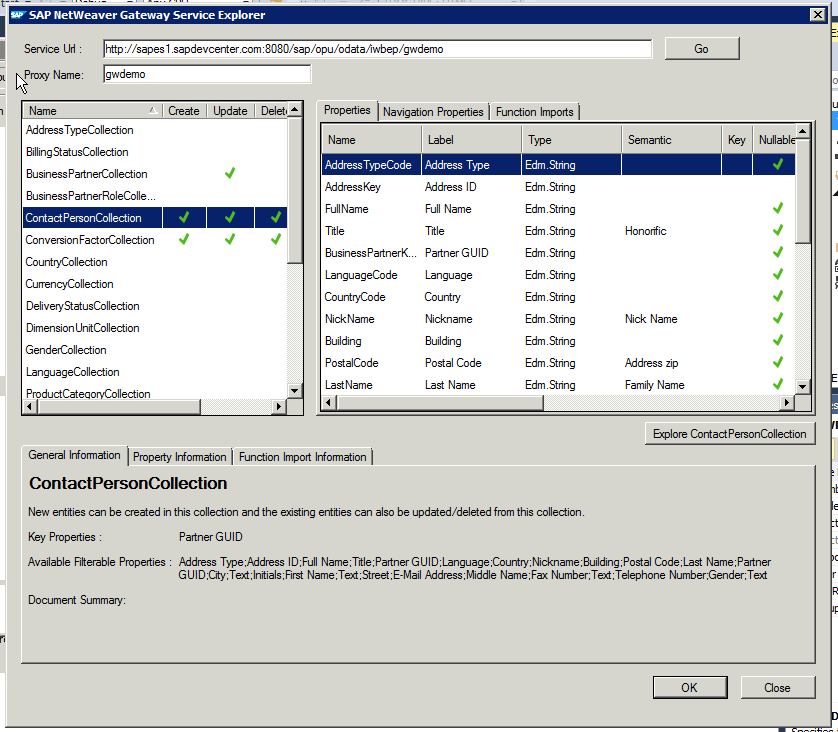
fill in as Service Url the url to GWdemo service, and press ‘Go’:
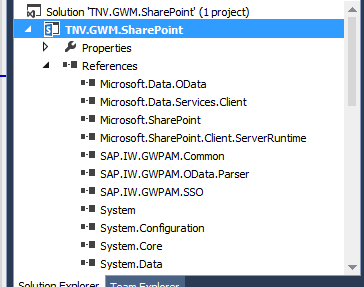
In the Service Explorer you can explore and inspect the OData entities that the GWdemo service exposes. Select one, and click 'Ok'. Direct result is the inclusion of multiple GWM assemblies (note that they are still named with the older GWPAM naming) in the Visual Studio project references:
Next, open the visual webpart and put in some code to consume the GWM created proxy reference and display received data. As this is merely a short demo to proof the connectivity, I simple display the SAP CRM BusinessPartners through a plain GridView control:
Build the Visual Studio project, and deploy the SharePoint solution. Then browse to your SharePoint site, create a new page, and add the GWM-build web part. And voila, we have SAP data in SharePoint:
All in all, building this took me less than an hour. Of course it is only a simple retrieval example; and no effort spend whatsoever on achieving a good looking and behaving UI. Also for this simple example I relied on basic authentication. For a trustworthy enterprise context, this is not usable and either OAuth, X.509 or SAML must be applied. But still, the outcome is very promising with respect to the SAP/SharePoint interoperability capability of GWM.

Fixes needed to GWM generated code

Issue 1: Microsoft.Sharp not included in references
Solution: Add the missing assembly to the Visual Studio project reference
Issue 2: Configuration Reader tries to read from windows form based path
Solution: avoid the attempt to read from windows-forms based path
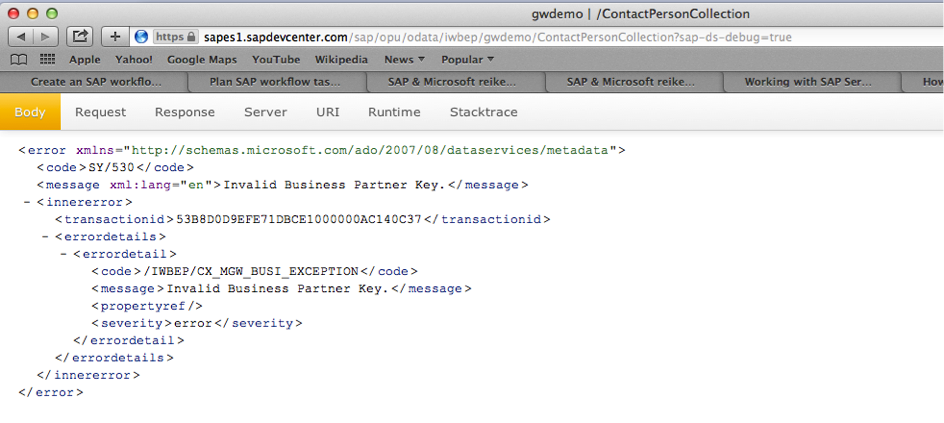
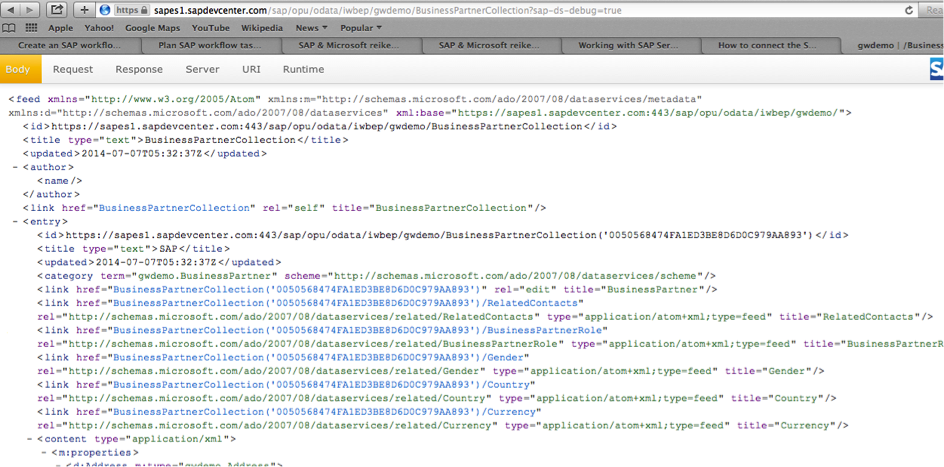
Issue 3: The used GWDemo system gives error
Solution: invoke another method…
Honestly: this is an example of why in every SAP interoperability project also domain knowledge is required --> contactpersoncollection is connected to a business partner key, you cannot invoke this without one.

Does GWM replace Duet Enterprise?

The answer to this is a clear No: Duet Enterprise as framework has more capabilities as GWM: SAP workflow integration, SAP BW reports publication, roles synchronization, user profile synchronization. Also Duet Enterprise has complete self-contained support within for Single Sign-On between SharePoint and SAP, while with GWM you need additional infra to achieve this (e.g. X.509 certificates infra in your landscape).
The better question is however: in what scenario’s would GWM be sufficient? Well, it might be sufficient in scenarios where all you need is the connectivity from SharePoint to SAP for data CRUDQ actions, and you already have Single Sign-On supporting infra in your IT landscape.

Thursday, July 10, 2014

HowTo login as different user in SharePoint 2013

A SharePoint platform feature that I use a lot during testing of SharePoint functionalities is simulate another user. However, in SharePoint 2013 the menu item 'Sign in as different user...' is no longer available. A simple trick to still get the ability is navigate the browser to:
http://<siteurl>/_layouts/closeConnection.aspx?loginasanotheruser=true
This trick works in all browsers (IE, Safari, Chrome, FireFox).