Showing posts with label Troubleshooting. Show all posts

Thursday, December 7, 2017

How-to identify faulty webpart on SharePoint (Online) page

Today business called in distress: they made a change in the start page of an important business site (solution) in SharePoint Online; and next on opening the page in browser it remained loading / spinning.
To support, I was temporary granted contributor authorization, and then applied the following steps to analyze + identify:
  • Step 1: very important, determine whether you can reproduce yourself;
  • Step 2: (answer was yes) Open the page in webpart maintenance mode, by adding "?contents=1" to query string;
  • Identify in the set of webparts on page which one could potential cause a problem; e.g. ImageViewer webpart is very unlikely; but anything that adds content can be;
  • Step 4: Close first of the potential suspect webparts;
  • Step 5: Reopen the page in normal mode, and verify whether it now can load;
  • Step 6: Continue with 4 and 5, until finally the page loads successful again;
  • Step 7: Once the faulty webpart identified, re-add the other ones: open page in edit mode, insert webpart, and select the closed webparts from webpart category 'Closed Parts'
  • Fix the faulty webpart, or delete it from the page.
In this particular situation, a Content Editor WebPart was added to the page that contained script with self-reference to reload the page; resulting in endless loop. This cannot be fixed, best option is to delete from page, and re-code the client script (but make sure to avoid the self-reloading...)

Sunday, November 27, 2016

Large time-taken value in IISlogs do not per se mean an issue on IIS / SharePoint server level

The time-taken field measures the length of time that it takes for a request to be processed. The client-request time stamp is initialized when HTTP.sys receives the first byte of the request. HTTP.sys is the kernel-mode component that is responsible for HTTP logging for IIS activity. The client-request time stamp is initialized before HTTP.sys begins parsing the request. The client-request time stamp is stopped when the last IIS response send completion occurs.
In the IIS logs of our SharePoint WFEs I observed large time-taken values for the responses of several GET requests, with times above 2500 (!!) seconds.
LogParser.exe "SELECT TOP 10 date,time,c-ip,cs-uri-stem,sc-status,sc-substatus,time-taken from u_ex*.log WHERE time-taken > 2500000 ORDER BY time-taken DESC"
We investigated whether this points to an actual performance problem on SharePoint server side, or is merely to be considered a false positive wrt the performance of the SharePoint environment. An indication of the latter is that our end-users have not reported (complained) on reoccuring long wait times for these requests. After some lengthy investigation - the observed symptom is not well documented -, we conclude to the last.
The justification for this conclusion is a) that we did not identify any performance issue due these specific requests on the SharePoint WFEs, and b) that beginning in IIS 6.0, the time-taken field typically includes “all the network time” being spent when transferring all the bytes to/from client:
HTTP.sys waits for the client to acknowledge the last response packet send operation or HTTP.sys waits for the client to reset the underlying TCP connection, before it logs the value for process duration in the time-taken field in the IIS logs.
This correlates with our observation that the longer time-taken responses were all for the download of large static files, typical powerpoint files (.pptx), that are rendered in browser via Office Web Apps (OWA). It appears that the browser on occassion takes long time before it completely processed the received file response, and acknowledges the last packet.

Friday, April 1, 2016

Corrupted blobcache hindered responsive rendering

In the branding of our SharePoint 2013 based intranet we utilize Bootstrap for responsive design. However, we noticed that the rendering for mobile user agents was not correct, e.g. the company logo was displayed twice. Remarkable was that in our acceptance environment, it did render correct. On analysis I first discovered that the requests of some resource files (javascript, css) resulted in AccessDenied, but only for mobile UserAgent in the request header:
  • User-Agent: Mozilla/5.0 (iPhone; CPU iPhone OS 8_0 like Mac OS X) ➜ Downloaded
  • User-Agent: Mozilla/5.0 (iPhone; CPU iPhone OS 8_0 like Mac OS X) AppleWebKit/600.1.3 (KHTML, like Gecko) Version/8.0 ➜ Not downloaded
Also I noticed that the response for IE as User Agent was successful serviced, but that 'max-age' setting was set to zero in the response (Cache-Control). As on SharePoint webapplication level the Cache-Control header setting is controlled by SharePoint blobcache, this put me in the direction of a blobcache corruptness issue in our production environment. To resolve from the corruptness, our SharePoint operations created a new blobcache for the intranet webapplication. And indeed this resolved both issues: max-age value is set with a positive value (so that lesser times the resource is requested by browser), and also for mobile UserAgents the resource request are now responded with the actual files.

Wednesday, July 29, 2015

Handy resource for Excel Services external data troubleshooting

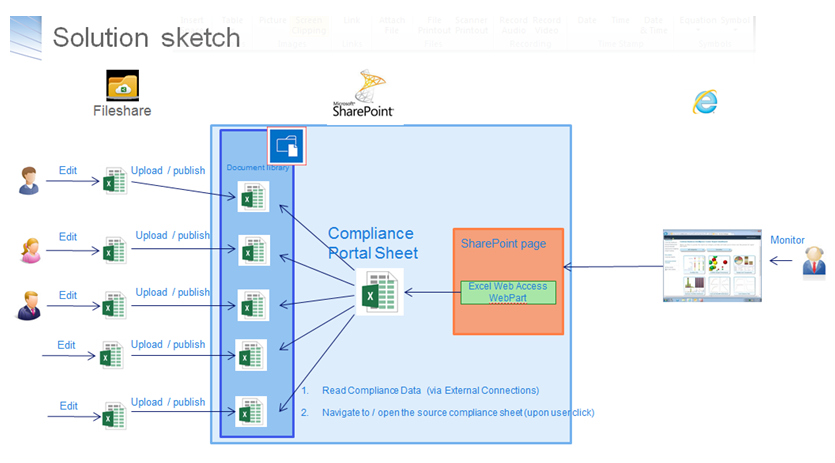
I have a 2-steps setup for a dashboard-solution provisioned via Excel-services:
  1. Functional data managers / compliance officers: maintain the data offline in Excel worksheets, and when the data maintenance effort is finished publish the worksheet as datasource to SharePoint document libary
  2. A separate 'View' dashboard connects via Excel Services to the 'datasource' Excel worksheets, and renders the dashboard - charts, KPIs and so on; This 'view' dashboard worksheet is via Excel Web Access rendered on the SharePoint dashboard page
Opening the dashboard page results in error message Unable to refresh data for a data connection in the workbook..... In the ULS log, only minimal relevant information was logged: "Refresh failed for <data connection> in the workbook....". Via internet search I found a very valuable resource, Excel Services data refresh flowchart (codename: Excel Services Troubleshooting). This helped me find and fix the problem.

Friday, April 17, 2015

CQWP, PictureLibrary and Blobcache

ContentByQueryWebPart is a very usable ‘tool’ to display all types of SharePoint data in a page. Listdata, document libraries and also picture library. But be aware that CQWP has some strange default behaviour wrt picture library. CQWP by default displays the preview images, instead of the actual images.
This also has several performance ramifications:
  1. On server side: actual images can be cached in blobcache, but preview images and also thumbnails are by SharePoint design not cached in blobcache. The reasoning is that blobcache is for content that is multiple times (often) retrieved, while preview images are typically only of interest for content manager upon functional management of the picture library contents. As result, each request for a preview image means that SharePoint needs to retrieve it from the content database.
  2. On client, network + server side: browser cache can be applied to avoid the browser over and over requesting same image. But the browser then still needs to query the server whether the cached resource is unmodified at the server (response 304). For images / static resources that do not change (often), even this request can be avoided: minimizing request/response handling between client (browser), server, and the network transfer. Browsers support this via ‘max-age’ setting. SharePoint supports this ‘max-age’ setting for SharePoint content, via… Blobcache. For SharePoint content retrieved outside blobcache, as thus preview images, the max-age value is not set in the http response. As result, the browser will query the remote SharePoint server whether the image is unmodified, and the server responds with '304 NotModified'. And this can end-up in some noticeable latency, dependent on how busy the SharePoint server is:
Solution is to modify the CQWP configuration to retrieve and display the actual image. This comprises of 2 parts:
  1. In the ItemStyle.xsl, change the rendering specification to display ‘EncodedAbsUrl’ iso ‘ImageUrl’;
  1. And you need to modify the ‘CommonViewFields’ specification of CQWP instance, to also include ‘EncodedAbsUrl’.

Friday, August 15, 2014

Tip for ‘Secure Store Service application is not accessible’

This week I was forced to restart our SharePoint 2013 single-server system. After the server had restarted, Duet Enterprise 2.0 Single Sign-On gave an error: The Secure Store Service application Secure Store Service is not accessible. The full exception text is: An error occurred while making the HTTP request... Opening Secure Store Service Application in Central Management displayed the same error. I checked IIS Manager: the applications pools of the SharePoint Web Services were all running. Retried to recycle, but problem stayed. Even after a brute IISReset.
I already was preparing myself for inspecting the full identity trail of the app pool account to detect whether comprimized, and/or potentially even repair Secure Store Service application. But in a bright moment, I thought of inspecting ‘Manage Services on Server’. Secure Store Service showed in the overview as ‘Started’. As quick trial-and-error attempt, I stopped and next (re)started the Secure Store Service. And guess what: this resolved the issue! Easy infra fix after all, when you think of it.

Sunday, October 7, 2012

Duet Enterprise troubleshooting pointers

SAP side