Showing posts with label Permissions. Show all posts

Friday, April 30, 2021

Be aware: ''Check Permissions" does not report M365 Group authorizations until first access

The new and default permission model for Modern Team Sites is via the 'owning' Office 365 Group. I discovered a functional flaw in that: on accounts authorized for site access via the Office 365 group, the SharePoint 'Check Permissions' capability reports "None" until first site visit of an authorized account (which on SharePoint level results that the account is administrated in the (hidden) site users list). I reported this to Microsoft Support, and they reproduced + confirmed the behavior in an arbitrair tenant. Their first response was "this is expected behavior", but I strongly disagree. We use and rely on 'Check Permission' to assess whether a person has access or not to a SharePoint site. And the reliability of this access-check should not be dependent that the assessed person has actually already once visited the site.
Update: in call with Microsoft Support they motivated the "this is expected behavior": it is expected from how it is technically build within SharePoint.... When I re-stated that on functional view this is not expected behavior, they agreed and asked me to submit as UserVoice suggestion; so that the development team can triage it for product fix.

Sunday, May 24, 2020

MS Teams Channels - Yet Another Inconsistency on SharePoint Permission handling

Microsoft introduced Office 365 Groups as overarching concept to bring consistency in Office 365 permission management. Each single Office 365 Group manages authorization to a multitude of diverse Office 365 services (MS Teams, SharePoint Online, Planner, Exchange Online), in theory simplifying on the model in which each tool individual applies its own permission management.
In practice, Microsoft itself struggles with the consistent application of this new permission management model. In previous post I visualized the differences in permission management of Communications Site versus Modern Teams Site. Yet another difference is visible on the level of SharePoint site collection that is associated with a MS Teams channel. In the associated site of the main channel, Microsoft utilizes the concept of Office 365 Groups as overarching permission management. However, in the associated site of any private channel, the notion of Office 365 Group is missing.
Comparision Permission Handling + Management within associated site of Main vs Private Teams channel
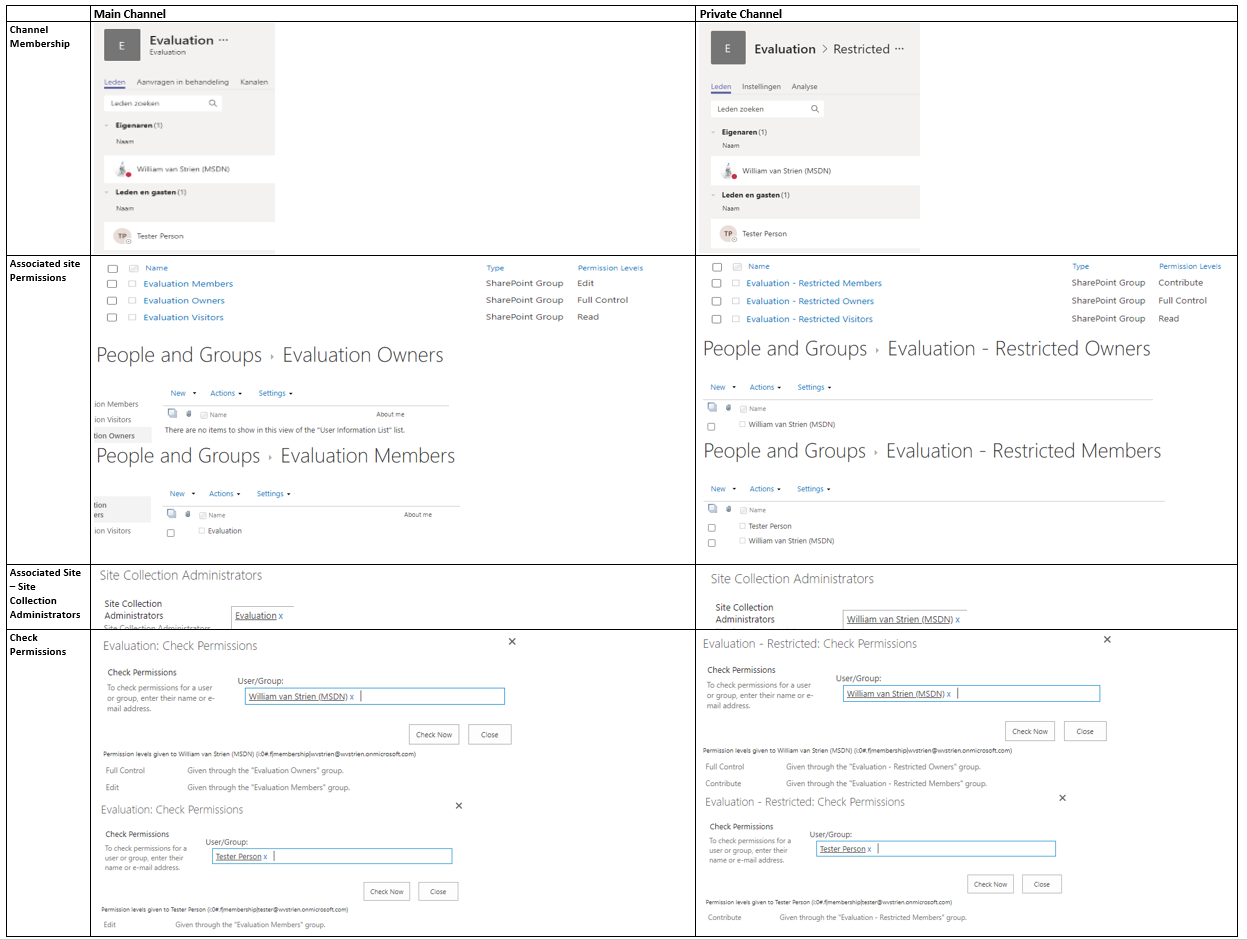
Observations:
  1. In the associated site of the Teams main channel, site authorization is delegated done via Office 365 Group.
    1. The SharePoint Members permission Group has as single member the Office 365 Group ‘Members’
    2. The SharePoint Members permission Group has as permission level 'Edit'
    3. The SharePoint Owners and Visitors permission Groups are both EMPTY
    4. Instead, the ‘Owners’ responsibility is assigned by having the full O365 Group 'Owners' as SCA
  2. In the associated site of a private channel, site authorization is still on named accounts level
    1. The SharePoint Members permission Group has as members the named accounts of everyone authorized in membership in the private channel, both the owners and members of the channel
    2. The SharePoint Members permission Group has as permission level 'Contribute'
    3. The SharePoint Owners permission Group has as members the named accounts of the persons that are owners of the Teams private channel
    4. And these same named persons that are owner of the Teams private channel, are assigned SCA
I think this deviation is driven both by the current situation that Office 365 Groups itself does not support hierachy and subsets, plus the restricted usage scope of a private channel. A private channel is meant to restrict access to certain content in the Teams instance, but it is not meant itself as a container hub consisting of multiple tools. As example, you cannot associate a Planner Plan with a private channel. There is thus in the context of private channels less need for the overarching permission management concept via Office 365 Groups.
A concern with this effectively broken permission management in private channel compared to Teams instance itself, is what happens when on the Teams instance level a membership is revoked. Turns out that on Teams level itself the effect of this cascades to any of its potential private channels: whenever an account is removed as member in Teams instance, the same account is also automatic revoked as authorized member in any of the private Teams channels.

Thursday, April 30, 2020

SharePoint Governance complicated, due deviation in permission handling within modern site templates

With the introduction of Modern Sites, Microsoft added an additional layer in the permission handling for SharePoint Online sites: via Office 365 Group (soon to be renamed/branded as 'Microsoft 365 Groups'). Below that new level, one can still authorize within the SharePoint site itself via SharePoint Permission Groups. And to make the story even more confusing: not all 'Modern' sites are equal wrt this new Permission model. In a Modern Communication Site there is no notion / connection to an Office 365 Group.
Comparision Permission Handling + Management within Modern Communication Site vs Modern Team Site
Observations:
  1. In a Modern Teams Site, site authorization is delegated done via Office 365 Group.
    1. The SharePoint Member permission Group has as single member the Office 365 Group ‘Members’
    2. The SharePoint Owners and Visitors permission Groups are both EMPTY
    3. Instead, the ‘Owners’ responsibility is assigned by having the full O365 Group Owners as SCA
  2. In a Modern Communications Site, site authorization is still on named accounts level
    1. The SharePoint Group has as members the named accounts of persons in the role
    2. And only the person that on site provision/create time was identified as ‘Site Owner’ (in SharePoint Admin portal), is assigned SCA
This deviation is intentional / by design from Microsoft, with justification: "Most often, a communication site has a small number of people with permission to author content and many people who only have permission to read content. Team sites use Office 365 Groups for permissions. Communication sites use SharePoint groups." (source: Teams Site vs. Communication Site: Which one should I choose?).
However, in concrete business usage more and more business users prefer the Communications Site for internal collaboration usage above that of Team Site. Most significant motivation being the page layout options, that make better usage of the available screen estate. And this practical usage results in a governance flaw, as the permission handling on a "team collaboration site" created via Communications Site deviates from that within a Teams site; and the typical business user has no understanding for this.
I'm not alone in my misunderstanding, a good post on this topic is How broken are Office 365 SharePoint permissions?.

Monday, November 25, 2019

Beware: unique library permissions breaks drag-and-drop capability (classic site)

Breaking permissions is advised against, unless... Main rationale for this generic rule of thumb is the complexity that unique permissions brings to permission management in a SharePoint site. However, in addition it can also have a limitating effect on the user experience: persons of which the authorization in a site is limited to only contribute in a specific document library, face issues on upload of documents. Quick investigation revealed that the problem occurs when the document upload is done via drag-and-drop; uploading a document via the explicit 'upload' UI flow does succeed.
On SharePoint platform level, these functional equivalent actions are executed via other flows. In the drag-and-drop scenario, SharePoint executes a CSOM call to read the site properties. But if a person is only authorized to the document library, the 'SelectAllProperties' processQuery action on SharePoint Site level returns 'Access Denied'. Solution is to grant the persons also a limited permission level on the site level, so they are allowed to read the site properties.
With this ‘Read Site Props’ permission level granted at site level, the respective persons are still correct blocked to access entities and content on site level; except for the library to which explicit granted via unique library permissions.
Noteworthy is that the issue does not occur in modern sites, even although also in that context with 'drag-and-drown' execution the site properties are retrieved via CSOM call.