Showing posts with label Authentication. Show all posts

Sunday, September 29, 2019

Be aware: join as MS Teams Live Events guest requires that one is pre-authenticated against the inviting tenant

With MS Teams Live Events produced via Teams (aka QuickStart) it is already supported to invite externals (MS Teams produced via External App will support it once the underlying Microsoft Stream Live Events capability supports guest access). Guest access in MS Teams Live Events by Teams is realized by utilizing the Azure AD B2B capability, similar as is done in the external sharing of a MS Teams instance itself with external guests, and also in external sharing SharePoint Online sites. Interesting is that the external does not need to be invited to any MS Teams instance of the inviting company. This makes sense, as a MS Teams Live Events instance itself is not tied to a particular MS Teams instance; it is scheduled from the MS Teams Calendar.
Guests can join the Live Event via the browser or via the MS Teams App. In case of the latter: In your joiner instruction to invited guests, please make sure to inform them that they first must authenticate themselves against your (the inviting) tenant, before trying to join the MS Teams Live Event via the distributed 'attendee link'.
No permission to join as guest in case not authenticated before
Authenticate as Azure AD guest to the MS Teams of the inviting tenant; first authentication is 'federated' against the invited guest identity administration, and next most likely second / multi-factor authentication against the inviting tenant
Once authenticated as AAD guest to the inviting MS Teams tenant, allowed to join the invited Live Events direct via the 'attendee link'

Saturday, September 21, 2019

In the dungeons of Azure AD B2B: properties of external Azure AD account might block creation of guest account

Collaboration between organizations in an ecosystem has become more and more essential to the value organizations create. But also in these Business-2-Business (B2B) collaboration scenarios, the authorization principle of 'need-to-known' must be adhered: employees from the partner organizations should only be granted access to the information on which they actually collaborate with the inviting organization. To be able to grant selective authorizations to the externals, requires that each of them must be known with identifying identities in the information system(s) of the inviting company.
In the Azure AD B2B model, Microsoft introduced the notion of 'guest accounts' for this, based on the concept of "bring-your-own-identity". An Azure AD B2B guest account is a lightweight account, that in fact acts as placeholder in the Azure AD context of the inviting organization to external identity managed outside the responsibility of the inviting organization. As such, Azure AD B2B collaboration supports cross-company relationships by enabling partners to selectively access your corporate applications and data using their self-managed identities
Azure AD B2B supports 2 modes to invite external guests via their corporate email addresses: a federation model from the Azure AD of the inviting organization to the external Azure AD of invited partner organization. And in the case that the invited company is itself not (yet) an user of Azure AD for their identity management, via just-in-time created accounts which are then administrated in a so-called 'viral' tenancy (see: Understand the B2B user).
Guest accounts are created in the inviting Azure AD with their own (external company) email address applied as their guest account / identity name. Azure AD requirement here is that the guest identity name is not yet in-usage as proxy-address within another account in the Azure AD tenant. The typical situation in which this could occur is when an external employee already has also a Member account in the Azure AD of the inviting organization, and has the own corporate email assigned to that Member account. When next you try to create a guest account for that external email, Azure AD refuses with error message: "The user you're inviting already exists in the directory. They can simply sign in into shared apps and resources."
The most pragmatic approach to fix this guest account provision error, is to 'free' the external corporate email address of the 'to-be AAD guest': disconnect it from assignment in the Member account in the Azure AD of inviting organization.
Another apparent feasible approach is to simple select another external corporate email as guest account name: e.g. instead of '<External>.<User>@>ExternalOrg<.com', provision a guest account via '<External>.<User>1@>ExternalOrg<.com'. This is certainly a creative alternative. But you need to be aware of some pitfalls with it. 1) Redemption in Azure AD B2B is an email-verified process. Meaning that the alternative corporate email address must actually exist and resolve to an email inbox in the domain of the invited organization. 2) In case of federated Azure AD tenants, the requirement that the proxyAddresses must be unique, is verified in the combination of the Azure AD tenants of both the inviting as the invited organizations. Resulting that in case to the alternative account in the Azure AD of the invited organization, the original corporate email of person is administrated in the proxyAddresses, then the provisioning of guest account in Azure AD of the inviting organization still blocks. See How can we improve Azure Active Directory? - Show the B2B-blocking proxy address in my tenant's logs where this is shortly described.
Code snippet to have run in the Azure AD tenant of the invited organization, to identify whether and which proxyAddress value is the cause of the blocking:
Connect-AzureAD

Get-AzureADUser -Filter "mail eq '<firstName>.<lastName>1@externalcompany.com'"
   -all $true |
Select-Object displayName, @{L = "ProxyAddresses"; E = { $_.ProxyAddresses -join ";"}} |
Export-Csv -Path C:\temp\ReportOutOnAADAccount.csv -NoTypeInformation

Wednesday, March 13, 2019

Peculiarity with Azure AD B2B and Modern / Active Authentication for guest accounts

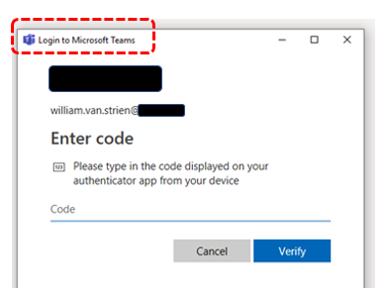
In the authentication model of Azure AD B2B, external guests are granted access on concept of 'bring-your-own-identity'. The general applied pattern in AAD B2B usage is to invite guests on their email address as the own identity. For invited guests from an organization that itself utilizes Azure AD for their cloud identity management, in AAD B2B the authentication flow delegates to the external Azure AD (see). This can result in a peculiarity, in which the invited guests after successful first authentication that is federated against the own external Azure AD, in the 2nd step cannot successful pass the MFA challenge via the Microsoft Authenticator App against the Azure AD of the inviting company. The situation arises where in the external Azure AD (of the invited organization) the UserPrincipalName (UPN) differs from the primary Office 365 email address, and the external access is via a client application that utilizes modern / active authentication. In such situation, the inviting company should invite the guest on basis of their Azure AD UPN, and not via their different Office 365 email / SMTP address. For client applications that apply passive authentication (aka: webapplications) it works fine to explicit logon with the own email as their Office 365 identity. But clients that utilize active authentication get into a conflict situation: the automated logon in active authentication flow against the external Azure AD is done on basis of the UPN, afterwards the authenticated account in the client application runtime context is equal to the UPN value of the logged-on guest. However, as the MFA enrollment is earlier done on basis of the email as guest identity, the result is an endless loop in the Authenticator App failing due mismatch in authenticated UPN logon and MFA-enrolled email.

Sunday, May 20, 2018

Authenticate from Curl into SharePoint Online with Modern Authentication

Code-snippet for interoperability from Curl context - for example, could be from a Linux or MacOS workstation / server -, to Office 365 SharePoint Online; with service-based authentication by applying Active / Modern Authentication protocol handling:
#General variables
ProxyAccount="sa-curlAccount"
ProxyPassword="******************"
ProxyProtocol="http"
ProxyServer="xxx.xxx.xxx.xxx"
ProxyPort="8080"
SharePointCurlAccount="sa-curlAccount"
SharePointOnlineTenant="<URL of SharePoint Online tenant>"
UploadFile="<file to upload>"
UploadLocation="<URL of SharePoint Document Library>"

#Fixed variables
OUTPUT=${HOME}/Interop/output
TMP=${HOME}/Interop/tmp/spo

#the following steps are required to upload data from Curl context to SharePoint Online:
#
#1. Retrieve an authentication cookie to Office 365 through invocation of webservices
#1.a. (Optional) Step 0: determine the URL of the custom Security Token Service (STS) to next
#     request a SAML:assertion for account identified by credentials
#1.b. Step 1: request SAML:assertion from the identified custom STS for account identified by
#     credentials
#1.c. Step 2: use the SAML:assertion to request binary security token from Office 365
#1.d. Step 3: use the binary security token to retrieve the authentication cookie
#2. Step 4: Use that Office 365 authentication cookie in subsequent webservice requests to
#   SharePoint Online REST API
 
#1.a. (Optional) Step 0: determine the URL of the custom Security Token Service (STS) to next
#     request a SAML:assertion for account identified by credentials (outside datacenter, with proxy)
curl -U ${ProxyAccount}:${ProxyPassword} -k -x ${ProxyProtocol}://${ProxyServer}:${ProxyPort} -X POST -H "Content-Type: application/x-www-form-urlencoded" -d "login=${SharePointCurlAccount}&xml=1" https://login.microsoftonline.com/GetUserRealm.srf -w "\n" > ${TMP}/O365_response_step_0

#Extract requested STSAuthURL from response step 1
STSURL=`sed -n 's:.*<STSAuthURL>\(.*\)</STSAuthURL>.*:\1:p' ${TMP}/O365_response_step_0`

#Create input for step 1
File: O365_request_step_1-1

<?xml version="1.0" encoding="UTF-8"?>
<s:Envelope
    xmlns:s="http://www.w3.org/2003/05/soap-envelope"
    xmlns:wsse="http://docs.oasis-open.org/wss/2004/01/oasis-200401-wss-wssecurity-secext-1.0.xsd"
    xmlns:saml="urn:oasis:names:tc:SAML:1.0:assertion"
    xmlns:wsp="http://schemas.xmlsoap.org/ws/2004/09/policy"
    xmlns:wsu="http://docs.oasis-open.org/wss/2004/01/oasis-200401-wss-wssecurity-utility-1.0.xsd"
    xmlns:wsa="http://www.w3.org/2005/08/addressing"
    xmlns:wssc="http://schemas.xmlsoap.org/ws/2005/02/sc"
    xmlns:wst="http://schemas.xmlsoap.org/ws/2005/02/trust">
    <s:Header>
        <wsa:Action s:mustUnderstand="1">http://schemas.xmlsoap.org/ws/2005/02/trust/RST/Issue</wsa:Action>
        <wsa:To s:mustUnderstand="1">https://sts.<tenant>.com/adfs/services/trust/2005/usernamemixed</wsa:To>
        <wsa:MessageID>b07da3ec-9824-46a5-a102-2329e0c5f63f</wsa:MessageID>
        <ps:AuthInfo
            xmlns:ps="http://schemas.microsoft.com/Passport/SoapServices/PPCRL" Id="PPAuthInfo">
            <ps:HostingApp>Managed IDCRL</ps:HostingApp>
            <ps:BinaryVersion>6</ps:BinaryVersion>
            <ps:UIVersion>1</ps:UIVersion>
            <ps:Cookies></ps:Cookies>
            <ps:RequestParams>AQAAAAIAAABsYwQAAAAxMDMz</ps:RequestParams>
        </ps:AuthInfo>
        <wsse:Security>
            <wsse:UsernameToken wsu:Id="user">
                <wsse:Username>sa-curlAccount@<tenant>.com</wsse:Username>
                <wsse:Password>*************</wsse:Password>
            </wsse:UsernameToken>
            <wsu:Timestamp Id="Timestamp">
File: O365_request_step_1-2

            </wsu:Timestamp>
        </wsse:Security>
    </s:Header>
    <s:Body>
        <wst:RequestSecurityToken Id="RST0">
            <wst:RequestType>http://schemas.xmlsoap.org/ws/2005/02/trust/Issue</wst:RequestType>
            <wsp:AppliesTo>
                <wsa:EndpointReference>
                    <wsa:Address>urn:federation:MicrosoftOnline</wsa:Address>
                </wsa:EndpointReference>
            </wsp:AppliesTo>
            <wst:KeyType>http://schemas.xmlsoap.org/ws/2005/05/identity/NoProofKey</wst:KeyType>
        </wst:RequestSecurityToken>
    </s:Body>
</s:Envelope>
cat ${TMP}/O365_request_step_1-1 > ${TMP}/O365_request_step_1 echo "<wsu:Created>`date -u +'%Y-%m-%dT%H:%M:%SZ'`</wsu:Created>" >> ${TMP}/O365_request_step_1 echo "<wsu:Expires>`date -u +'%Y-%m-%dT%H:%M:%SZ' --date='-15 minutes ago'`</wsu:Expires>" >> ${TMP}/O365_request_step_1 cat ${TMP}/O365_request_step_1-2 >> ${TMP}/O365_request_step_1 #1.b. Step 1: request SAML:assertion from the identified custom STS for account identified by # credentials (internal datacenter, without webproxy to outside) curl -X POST -H "Content-Type: application/soap+xml; charset=utf-8" -d "@${TMP}/O365_request_step_1" ${STSURL} -w "\n" > ${TMP}/O365_response_step_1 #Extract requested SAML:assertion from response step 1 sed 's/^.*\(<saml:Assertion.*saml:Assertion>\).*$/\1/' ${TMP}/O365_response_step_1 > ${TMP}/O365_response_step_1.tmp #Create input for step 2
File: O365_request_step_2-1

<?xml version="1.0" encoding="UTF-8"?>
<S:Envelope
    xmlns:S="http://www.w3.org/2003/05/soap-envelope"
    xmlns:wsse="http://docs.oasis-open.org/wss/2004/01/oasis-200401-wss-wssecurity-secext-1.0.xsd"
    xmlns:wsp="http://schemas.xmlsoap.org/ws/2004/09/policy"
    xmlns:wsu="http://docs.oasis-open.org/wss/2004/01/oasis-200401-wss-wssecurity-utility-1.0.xsd"
    xmlns:wsa="http://www.w3.org/2005/08/addressing"
    xmlns:wst="http://schemas.xmlsoap.org/ws/2005/02/trust">
    <S:Header>
        <wsa:Action S:mustUnderstand="1">http://schemas.xmlsoap.org/ws/2005/02/trust/RST/Issue</wsa:Action>
        <wsa:To S:mustUnderstand="1">https://login.microsoftonline.com/rst2.srf</wsa:To>
        <ps:AuthInfo
            xmlns:ps="http://schemas.microsoft.com/LiveID/SoapServices/v1" Id="PPAuthInfo">
            <ps:BinaryVersion>5</ps:BinaryVersion>
            <ps:HostingApp>Managed IDCRL</ps:HostingApp>
        </ps:AuthInfo>
        <wsse:Security>
File: O365_request_step_2-2

        </wsse:Security>
    </S:Header>
    <S:Body>
        <wst:RequestSecurityToken xmlns:wst="http://schemas.xmlsoap.org/ws/2005/02/trust" Id="RST0">
            <wst:RequestType>http://schemas.xmlsoap.org/ws/2005/02/trust/Issue</wst:RequestType>
            <wsp:AppliesTo>
                <wsa:EndpointReference>
                    <wsa:Address>sharepoint.com</wsa:Address>
                </wsa:EndpointReference>
            </wsp:AppliesTo>
            <wsp:PolicyReference URI="MBI"></wsp:PolicyReference>
        </wst:RequestSecurityToken>
    </S:Body>
</S:Envelope>
cat ${TMP}/O365_request_step_2-1 > ${TMP}/O365_request_step_2 cat ${TMP}/O365_response_step_1.tmp >> ${TMP}/O365_request_step_2 cat ${TMP}/O365_request_step_2-2 >> ${TMP}/O365_request_step_2 rm ${TMP}/O365_response_step_1.tmp #1.c. Step 2: use the SAML:assertion to request binary security token from Office 365 # (outside datacenter, with proxy) curl -U ${ProxyAccount}:${ProxyPassword} -k -x ${ProxyProtocol}://${ProxyServer}:${ProxyPort} -X POST -H "Content-Type: application/soap+xml; charset=utf-8" -d "@${TMP}/O365_request_step_2" https://login.microsoftonline.com/RST2.srf -w "\n" > ${TMP}/O365_response_step_2 #Extract requested binary security token from response step 2 sed 's/^.*\(<wsse:BinarySecurityToken.*wsse:BinarySecurityToken>\).*$/\1/' ${TMP}/O365_response_step_2 > ${TMP}/O365_response_step_2.tmp #Create input for step 3 cat ${TMP}/O365_response_step_2.tmp | cut -d'>' -f2 | cut -d'<' -f1 > ${TMP}/O365_request_step_3 BinarySecurityToken=`cat ${TMP}/O365_request_step_3` rm ${TMP}/O365_response_step_2.tmp #1.d. Step 3: use the binary security token to retrieve the authentication cookie (outside # datacenter, need to pass webproxy) curl -v -U ${ProxyAccount}:${ProxyPassword} -k -x ${ProxyProtocol}://${ProxyServer}:${ProxyPort} -X GET -H "Authorization: BPOSIDCRL ${BinarySecurityToken}" -H "X-IDCRL_ACCEPTED: t" -H "User-Agent:" ${SharePointOnlineTenant}/_vti_bin/idcrl.svc/ > ${TMP}/O365_response_step_3 2>&1 #Remove DOS ^M from response step 3 cat ${TMP}/O365_response_step_3 | sed 's/^M//' > ${TMP}/O365_response_step_3.tmp #Extract requested authentication cookie from response step 3 and create input for step 4 echo "Set-Cookie: SPOIDCRL=`cat ${TMP}/O365_response_step_3.tmp | grep Set-Cookie | awk -F'SPOIDCRL=' '{print $2}'`" > ${TMP}/O365_request_step_4 rm ${TMP}/O365_response_step_3.tmp #2. Step 4: Use that Office 365 authentication cookie in subsequent webservice requests to # SharePoint Online REST API (outside datacenter, with proxy) curl -U ${ProxyAccount}:${ProxyPassword} -k -x ${ProxyProtocol}://${ProxyServer}:${ProxyPort} -b ${TMP}/O365_request_step_4 -T "{${OUTPUT}/${UploadFile}}" ${UploadLocation} exit 0
Alternative for the upload handling; interoperation via SharePoint API / webservice:
curl -U ${ProxyAccount}:${ProxyPassword} -k -x ${ProxyProtocol}://${ProxyServer}:${ProxyPort} -X POST -H "Accept: application/json;odata=verbose" -d "" ${SharePointOnlineTenant}/_api/contextinfo > ${TMP}/O365_response_step_4_tmp

FormDigest=`sed -n 's:.*FormDigestvalue:\(.*\),.*:\1:p' ${TMP}/O365_response_step_4_tmp`
rm ${TMP}/O365_response_step_4.tmp

curl -U ${ProxyAccount}:${ProxyPassword} -k -x ${ProxyProtocol}://${ProxyServer}:${ProxyPort} -X POST -H "X-RequestDigest: @${FormDigest}; X-HTTP-Method: PUT” --data-binary  "{${OUTPUT}/${UploadFile}}"  ${SharePointOnlineTenant}/teams/siteX/_api/web/GetFileByServerRelativeUrl('Shared%20Documents/SubFolder/${UploadFile}')/Files/$value

Tuesday, April 17, 2018

Peculiarity with Active Authentication issues from VBA

Deriving code-snippets how-to connect + authenticate from SharePoint external automated clients to SharePoint Online, I ran into another peculiarity. This time not on the side of ADFS as STS, but in VBA as automation client. Translating the 'automated client' code from Javascript into Visual Basic for Applications, I quickly had the scenario of Active Authentication with given username and password operational. But next I also wanted to have a working code-snippet for Integrated Active Authentication, based on the NTLM credentials of logged-on interactive user. Only the step to determine the 'saml:Assertion' is here different compared to usernamemixed Active Authentication. However, this first step returned HTTP 401 iso HTTP 200 with the derived 'saml:Assertion'. The request body is correct, as verified via RESTClient.
Logically thinking led to my suspicion that the NTLM credentials of logged-on user are not transmitted from the Excel VBA context. Searching the internet for how-to include the NTLM current credentials in HTTP request from VBA context I found a tip (Windows authentication #15) to use "MSXML2.XMLHTTP" instead of "MSXML2.ServerXMLHTTP.6.0". Bingo, with this change in Request class also from VBA context the Integrated Active Authentication scenario works (already had it proved as working from standalone HTML/Javascript external client.
Private Declare PtrSafe Function CoCreateGuid Lib "ole32.dll" (guid As GUID_TYPE) As LongPtr
Private Declare PtrSafe Function StringFromGUID2 Lib "ole32.dll" (guid As GUID_TYPE, ByVal lpStrGuid As LongPtr, ByVal cbMax As Long) As LongPtr

Private Function GetO365SPO_SAMLAssertionIntegrated() As String
    Dim CustomStsUrl As String, CustomStsSAMLRequest, stsMessage As String
    
    CustomStsUrl = "https://sts.<tenant>.com/adfs/services/trust/2005/windowstransport"
    CustomStsSAMLRequest = "<?xml version=""1.0"" encoding=""UTF-8""?><s:Envelope xmlns:s=""http://www.w3.org/2003/05/soap-envelope"" xmlns:a=""http://www.w3.org/2005/08/addressing"">" & _
            "<s:Heade>" & _
                "<a:Action s:mustUnderstand=""1"">http://schemas.xmlsoap.org/ws/2005/02/trust/RST/Issue</a:Action>" & _
                "<a:MessageID>urn:uuid:[[messageID]]</a:MessageID>" & _
                "<a:ReplyTo><a:Address>http://www.w3.org/2005/08/addressing/anonymous;</a:Address>;</a:ReplyTo>" & _
                "<a:To s:mustUnderstand=""1"">[[mustUnderstand]];</a:To>" & _
            "</s:Header>"
    CustomStsSAMLRequest = CustomStsSAMLRequest & _
            "<s:Body>" & _
                "<t:RequestSecurityToken xmlns:t=""http://schemas.xmlsoap.org/ws/2005/02/trust"">" & _
                    "<wsp:AppliesTo xmlns:wsp=""http://schemas.xmlsoap.org/ws/2004/09/policy"">" & _
                        "<wsa:EndpointReference xmlns:wsa=""http://www.w3.org/2005/08/addressing"">" & _
                        "<wsa:Address>urn:federation:MicrosoftOnline</wsa:Address>;</wsa:EndpointReference>" & _
                    "</wsp:AppliesTo>" & _
                    "<t:KeyType>http://schemas.xmlsoap.org/ws/2005/05/identity/NoProofKey;</t:KeyType>" & _
                    "<t:RequestType>http://schemas.xmlsoap.org/ws/2005/02/trust/Issue;</t:RequestType>" & _
                "</t:RequestSecurityToken>" & _
            "</s:Body>" & _
        "</s:Envelope>"

    
    stsMessage = Replace(CustomStsSAMLRequest, "[[messageID]]", Mid(O365SPO_CreateGuidString(), 2, 36))
    stsMessage = Replace(stsMessage, "[[mustUnderstand]]", CustomStsUrl)

    ' Create HTTP Object ==> make sure to use "MSXML2.XMLHTTP" iso "MSXML2.ServerXMLHTTP.6.0"; as the latter does not send the NTLM
    ' credentials as Authorization header.
    Dim Request As Object
    Set Request = CreateObject("MSXML2.XMLHTTP")
    
    ' Get SAML:assertion
    Request.Open "POST", CustomStsUrl, False
    Request.setRequestHeader "Content-Type", "application/soap+xml; charset=utf-8"
    Request.send (stsMessage)
    
    If Request.Status = 200 Then
         GetO365SPO_SAMLAssertionIntegrated = O365SPO_ExtractXmlNode(Request.responseText, "saml:Assertion", False)
    End If
    
End Function

Private Function O365SPO_ExtractXmlNode(xml As String, name As String, valueOnly As Boolean) As String
    Dim nodeValue As String
    nodeValue = Mid(xml, InStr(xml, "<" & name))
    If valueOnly Then
        nodeValue = Mid(nodeValue, InStr(nodeValue, ">") + 1)
        O365SPO_ExtractXmlNode = Left(nodeValue, InStr(nodeValue, "</" & name) - 1)
    Else
        O365SPO_ExtractXmlNode = Left(nodeValue, InStr(nodeValue, "lt;/" & name) + Len(name) + 2)
    End If
End Function

Private Function O365SPO_CreateGuidString()
    Dim guid As GUID_TYPE
    Dim strGuid As String
    Dim retValue As LongPtr
    Const guidLength As Long = 39 'registry GUID format with null terminator {xxxxxxxx-xxxx-xxxx-xxxx-xxxxxxxxxxxx}

    retValue = CoCreateGuid(guid)
    If retValue = 0 Then
        strGuid = String$(guidLength, vbNullChar)
        retValue = StringFromGUID2(guid, StrPtr(strGuid), guidLength)
        If retValue = guidLength Then
            ' valid GUID as a string
            O365SPO_CreateGuidString = strGuid
        End If
    End If
End Function

Sunday, April 15, 2018

Peculiarity with SharePoint Online Active Authentication

To invoke SharePoint Online REST services from automated client that is running outside SharePoint context itself, you have 2 options for authentication:
  1. Via OAuth 2.0; this requires to administer an SharePoint Add-In as endpoint (see post Access SharePoint Online using Postman for an outline of this approach)
  2. Via SAML2.0; against the STS of your tenant
The steps for the SAML2.0 approach are excellent outlined in post SharePoint Online Active Authentication; no need for me to repeat that here. However, a peculiarity I observed is that the handling is not only very picky on the correct messaging formats for respectively getting the 'SAML:assertion' from your STS [step 2], and next the 'wsse:BinarySecurityToken' [step 3]; but it is also very picky on the exact url with which to request the SPOIDCRLToken cookie [step 4]. I created a code snippet in Javascript standalone 'application', and although followed all steps; I ran eventually in an HTTP 401 Unauthorized. While executing via the PowerShell from above post I did get the cookie returned; so definitely working. Comparing the code very closely I identified the troublemaker: the call to <tenant>/idcrl.svc must be with ending backslash: <tenant>/idcrl.svc/. Without that, the call returns 401; with the ending backslash, the SharePoint Online Active Authentication also successful works from a.o. external Javascript (e.g. SAPUI5) application context.

Saturday, February 3, 2018

(Risky) Approach to invoke SharePoint Online API on whatever site from external automation client

For an external automation client to access SharePoint Online via the API, same holds as for you as human visitor: it first needs to authenticate itself against the accessed SharePoint Online tenant, and next it must have the needed authorization in the specific accessed SharePoint content entity (site collection, site or list). This can be achieved by registrating an Add-In, and assign it the needed permissions. Then that Add-In can be used as authentication + authorization endpoint for the external client. Post Access SharePoint Online using Postman includes a good reference of the steps that you should automate in the external client. Drawback of the described approach is that it is on scope of individual site collection or even site. The Add-In registration is not utilizable as generic gateway to all sites in the SharePoint Online tenat.
To extend the scope to full tenant, the Add-In Only permissions must be requested on the 'tenant' level'. This can only be done by a tenant administrator; and must be done via the tenant-admin site (How to provide add-in app only tenant administrative permissions in SharePoint Online). But be very careful and considerated before going this approach: the implication is that whoever knows the client id and secret of the registrated Add-In, is now enabled to access via an external client data from whatever site in your tenant. Making site-specific permission management pretty useless / even a laughter. But your information security will certainly not consider it a good + acceptable joke...
With Add-In Only permission on 'tenant' level; external client that knows the Add-In's client id + secret can request an accesstoken; and then use that same single token to access whatever site in the SharePoint tenant:

Sunday, March 22, 2015

SharePoint App-Model + NTLM results in more 401’s

We have built our new intranet in SharePoint 2013. Concept of the renewed intranet is it’s branding as Digital Workplace. Employees are enabled to personalize the digital workplace to their own needs and likes. Business functionalities, but also utilities are all provided as SharePoint Apps.
Upon monitoring the http transfer in Fiddler, I notice a lot of 401’s.
My reasoning on what causes this is the following:
  1. We apply NTLM for SharePoint authentication. When the browser addresses the remote webserver over a new http connection, IIS responds with Http 401 to start the NTLM handshake with the browser.
  2. The browser in parallel requests resources at the webserver over multiple http connections, of which each must setup an own authenticated session with the remote webserver. IE9 is limited to maximum 6 http connections, IE10/11 can open 32 in parallel.
  3. SharePoint defaults to the HTTP Keep-Alive response header. This results that the browser can reuse an already authenticated http connection to request additional resources. The subsequent requests are directly responded with http 200 by the remote webserver.
  4. Unless..., the subsequent resources are addressable on another domain. In that case, the authenticated http connection cannot be reused. And the browser must setup a new http connection to the other domain. If the other domain is also an authorized resource, a new authentication handshake results between the remote server of this domain, and the browser.
  5. And this is exactly what occurs with the App-model. The SharePoint site is addressable on a domain, but for App isolation the Apps are addressable on one or more App-domains. Opening a SharePoint page with one or more Apps on it, results in request(s) send to the SharePoint hostweb domain, followed by request(s) send to one or more appweb domains.
Sequence, largely simplified

Sunday, February 1, 2015

Beware, sign-in-as-different-user insufficient with Provider-hosted Apps

When verifying the end-user behaviour of a SharePoint functionality, it is sometimes useful to simulate using the application as another (test)user. SharePoint includes a convenient native capability that enables one to sign-in as another user direct from within the browser. However, be aware that this is insufficient in case your SharePoint 2013 scenario includes the usage of Provider-hosted Apps. SharePoint’s login-as-other-user namely only applies to the SharePoint webapplication process, it does not propagate to the browser-authentication of the external app-hosting webserver(s). The consequence is that ‘login-as-other-user’ is incomplete, successful applied in the SharePoint context, but still the original logged-on user in the Provider-hosted apps. And the App(s) will then access SharePoint resources as the original user, resulting in an inconsistent user context.
Approaches to successful achieve complete login-as-other-user are either to use Firefox, and utilize explicit login – on SharePoint webapplication and all of the Provider-hosted Apps. Or you can use IE, but then you first need to administrate per domain - for the SharePoint webapplication including SharePoint-hosted Apps, and for each webserver that hosts Provider-hosted Apps -, in the Windows Credential Store the credentials of the (test)user you aim to impersonate. And replace them all before accessing the application as another user, either as yourself or another test-account; and next restart with a fresh IE instance.