Showing posts with label NetWeaver Gateway. Show all posts

Monday, July 21, 2014

Connect SharePoint 2013 to SAP via Gateway for Microsoft

SAP initially developed Gateway for Microsoft [GWM] as ‘Duet Enterprise beyond SharePoint’. Allow Gateway OData service consumption in other Microsoft front-end formats, like Microsoft Office clients (Outlook, Excel, Word, PowerPoint). In essence GWM can also be regarded as a trimmed-down Duet Enterprise 2.0 variant; provides some of the same basic integration capabilities, but not all. Question that arises: can you also utilize GWM to connect SharePoint to SAP?
The answer is a firm Yes you can! Which is logical, as SharePoint itself is a .Net application. You can apply multiple approaches to consume the SAP data through a GWM generated reference proxy into SharePoint:
  1. Connect to the Gateway service proxy from a SharePoint web part context [mind you, Microsoft urges us to step away from this SharePoint server-side model; but it is still possible and supported]
  2. Build a custom BCS Connector to connect to the Gateway service proxy, and use that connector from SharePoint to render the received SAP data via standard External List, Business Data WebParts, or a custom build web part that invokes the BCS Api
  3. Build a SharePoint WCF RESTful service to connect to the Gateway service proxy, and consume that service in a browser-based front-end; using a databinding library like knockout.js, Angular.js. This is an example of SharePoint 2013 App model, and can also be applied in Office 365 / SharePoint Online.

SharePoint version

SharePoint 2010 has been build “ages ago”, and has a hard dependency on .Net framework 3.5. In the current year, the .Net framework has progressed to .Net framework 4.5, and the latest version of SharePoint [2013] has catched up with that. And the same holds for Duet Enterprise 2.0 [which is actually for SharePoint 2013, if you have SharePoint 2010 you need the Duet Enterprise 1.0 version], and also GWM: both are .Net Framework 4.x dependent. As consequence, I have to relax my firm statement a bit: Yes, GWM can be used to connect SAP and SharePoint 2013; but not for the older SharePoint versions (2003/2007/2010).

Simple example for Proofing

To demonstrate, I made up a sample scenario to retrieve SAP CRM data via GWM into SharePoint. I used the demo Gateway services as data source (see article by Martin Bachmann for instruction how to get access to the SAP Gateway demo system), and our own SharePoint 2013 environment as front-end. Further I have Visual Studio 2013, and necessarily also the latest GWM sp3 (versions preceeding sp3 will not install in Visual Studio 2013; but they do install in Visual Studio 2010/2012).
I applied the guidance provided in the GWM Developer Guide, but instead of Windows Forms project, choose SharePoint Visual Web Part template.

Next, you first need to add references to .NET WCF and GWM libraries. The easiest way to achieve that is by utilizing the GWM Visual Studio Add-In. Click on ‘Add SAP Service Reference’:
fill in as Service Url the url to GWdemo service, and press ‘Go’:
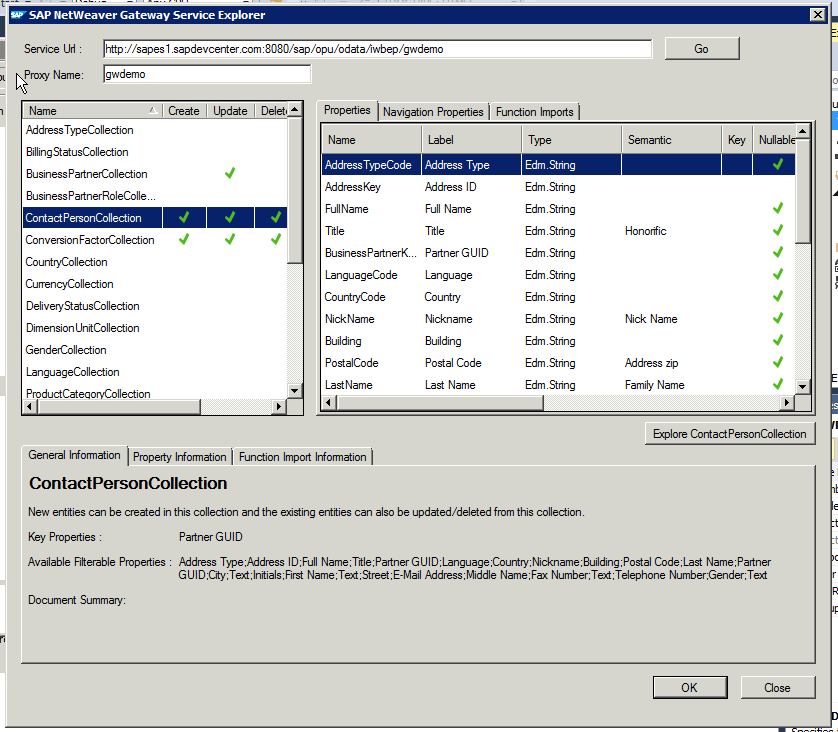
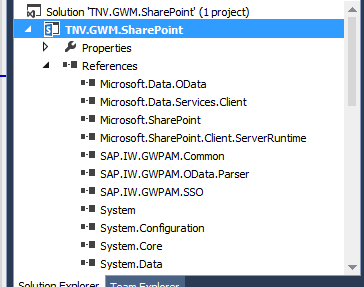
In the Service Explorer you can explore and inspect the OData entities that the GWdemo service exposes. Select one, and click 'Ok'. Direct result is the inclusion of multiple GWM assemblies (note that they are still named with the older GWPAM naming) in the Visual Studio project references:
Next, open the visual webpart and put in some code to consume the GWM created proxy reference and display received data. As this is merely a short demo to proof the connectivity, I simple display the SAP CRM BusinessPartners through a plain GridView control:

Build the Visual Studio project, and deploy the SharePoint solution. Then browse to your SharePoint site, create a new page, and add the GWM-build web part. And voila, we have SAP data in SharePoint:
All in all, building this took me less than an hour. Of course it is only a simple retrieval example; and no effort spend whatsoever on achieving a good looking and behaving UI. Also for this simple example I relied on basic authentication. For a trustworthy enterprise context, this is not usable and either OAuth, X.509 or SAML must be applied. But still, the outcome is very promising with respect to the SAP/SharePoint interoperability capability of GWM.

Fixes needed to GWM generated code

Issue 1: Microsoft.Sharp not included in references

Solution: Add the missing assembly to the Visual Studio project reference

Issue 2: Configuration Reader tries to read from windows form based path
Solution: avoid the attempt to read from windows-forms based path
Issue 3: The used GWDemo system gives error
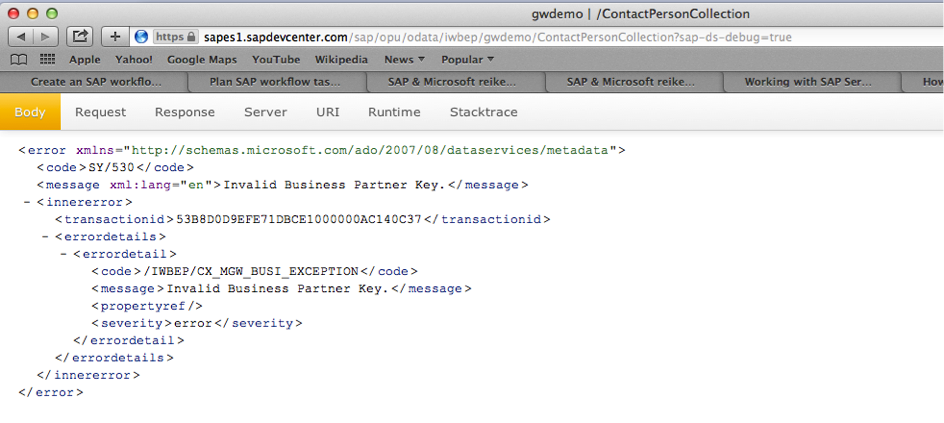
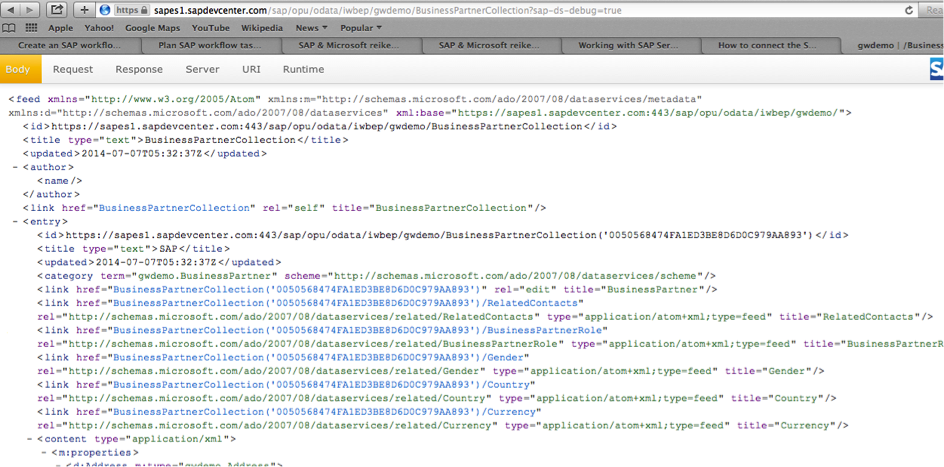
Solution: invoke another method…
Honestly: this is an example of why in every SAP interoperability project also domain knowledge is required --> contactpersoncollection is connected to a business partner key, you cannot invoke this without one.

Does GWM replace Duet Enterprise?

The answer to this is a clear No: Duet Enterprise as framework has more capabilities as GWM: SAP workflow integration, SAP BW reports publication, roles synchronization, user profile synchronization. Also Duet Enterprise has complete self-contained support within for Single Sign-On between SharePoint and SAP, while with GWM you need additional infra to achieve this (e.g. X.509 certificates infra in your landscape).
The better question is however: in what scenario’s would GWM be sufficient? Well, it might be sufficient in scenarios where all you need is the connectivity from SharePoint to SAP for data CRUDQ actions, and you already have Single Sign-On supporting infra in your IT landscape.

Sunday, February 9, 2014

SAML2 Protocol requires SSL-enabled Duet Enterprise 1.0 endpoints

An organization that is deploying Duet Enterprise in the landscape, default has no SSL enabled in their internal network. They questioned to neither activate SSL on the Duet Enterprise SAP Add-On / SAP NetWeaver Gateway 2.0 system.

However, this request cannot be granted. Reason is the usage of SAML2 for Duet Enterprise 1.0 Single Sign-On between SharePoint 2010 and SAP NetWeaver Gateway system.

Source 1: Duet Enterprise Security Considerations

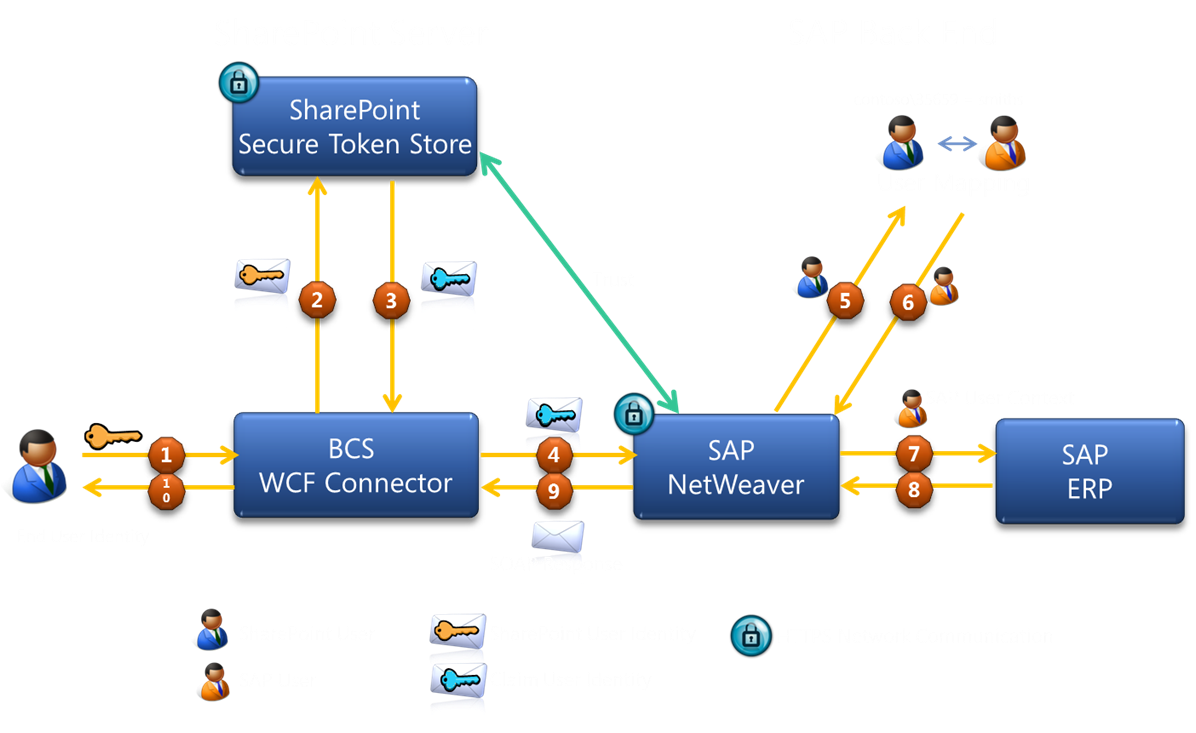
The user accounts that are used to access SharePoint Server 2010 and Microsoft Office 2010 suites clients cannot be used to access the information in SAP directly. The Duet Enterprise security architecture solves this issue by configuring the Microsoft Business Connectivity Services Windows Communications Foundation (WCF) connector that is included in SharePoint Server 2010. This WCF connector interacts with the Security Token Service in SharePoint Server 2010 and with SAP NetWeaver in the SAP system. The goal of this implementation is to map user identities in SharePoint Server 2010 to user accounts in the SAP system so that a user who logs on to the SharePoint Server 2010 Web site can have access to the external data that is stored in the SAP system without having to log on again in the SAP system.

Duet Enterprise 1.0 applies SAML2 with Symmetric Key for Endorsing Signature.

Source 2: STS Scenario with Symmetric Key for Endorsing Signature

With this scenario, the STS and the WS consumer negotiate a symmetric key. This is used for an endorsing signature for messages between the WS consumer and the WS provider. The WS consumer uses this endorsing signature to prove that it is in possession of the key that the STS signed.

In short (a.o. source 2 contains a complete outline of the SAML2 Protocol steps): in the SAML2 Protocol with Symmetric Key,

  • the webservice consumer (in Duet Enterprise scenario: SharePoint BCS) authenticates the logged-on SharePoint user at the Identity Provider (in Duet Enterprise scenario: SharePoint STS),
  • the Identity Provider grants a SAML security token for the SharePoint account, generates a short-lived key and signs this with the public key of the X.509 certificate of the webservice provider (in Duet Enterprise scenario: SAP NetWeaver Gateway),
  • STS returns the SAML token + signed STS key as SAML assertion to SharePoint BCS as webservice consumer.
  • SharePoint BCS adds the signed token as SAML assertion (Holder-of-Key, HoK assertion) to the header of the service request and sends the request to SAP NetWeaver Gateway as webservice provider.
  • Gateway uses the private key of its own SSL certificate to decipher the token, and validate it as genuine coming from trusted asserting party.
  • If so, the SAML:NameIdentifier in the service request is relied on, and applied via SAP NetWeaver User Mapping to automatically log on the SharePoint account as its mapped SAP named user.

The SAML2 protocol effectively prevents other message recipients, which do not posses the private key, are able to decipher and misuse the security token.

Both the SharePoint 2010 and SAP Gateway participants in the Duet Enterprise SSO handling, uphold to the SAML2 Protocol. This implies that SharePoint expects requires that Gateway as webservice provider exposes https-enabled service endpoints. In case not, on each runtime Duet Enterprise service request, SharePoint STS will throw exception from method System.ServiceModel.ClientCredentialsSecurityTokenManager.CreateServerX509TokenProvider, like: "System.InvalidOperationException: The service certificate is not provided for target 'http://<hostname>/sap/bc/srt/pm/.....' ", as it is not enabled to setup a valid SAML2 Protocol handling with the invoked Gateway relying party.

For this customer organization, as the SSL is only applied in the internal network to uphold the SAML2 Protocol handling between SAP Gateway system and SharePoint 2010 farm, there is no need for a (pricy + period-bound) signed SSL certificate from a Certificate Authority. A self-signed certificate suffices. Note that the Duet Enterprise Configuration Wizard creates and configures a self-signed SSL certificate in case the Gateway system is not yet SSL-enabled.

Tuesday, December 24, 2013

SharePoint 2010 BCS SAML Assertion too coarse-grained

Results in false positives notification at service providers of message replay

Security Assertion Markup Language (SAML) is an XML standard for exchanging authentication and authorization data between security domains. SAML is an XML-based protocol that uses security tokens containing assertions to pass information about a principal (usually an end user) between a SAML authority, that is an identity provider, and a SAML consumer, that is a service provider. SAML assertions contain statements that service providers use to make access control decisions. SAML enables web-based authentication and authorization scenarios including cross-domain single sign-on (SSO).
Source: http://en.wikipedia.org/wiki/SAML_1.1
SharePoint 2010 supports SAML 1.1 to authenticate as service consumer to external systems. Involved service applications are Secure Token Service as SharePoint internal identity provider, and Business Connectivity Services as service consumer to external systems. Required part of SAML support is that the identity provider must unique assert each identity token. This uniqueness is used by service provider to verify the validity of a SAML assertion: in case already ‘used’, the identity assertion should be interpretated as ‘stolen’ and potential misused in message replays.
Message replays are applied in 2 categories of security attacks:
  • Service Availability: overflood the service provider with same requests over and over in a Denial of Service Attack.
  • Data Integrity: request same data updates multiple times (e.g. bank transfer).
To protect against message replay attacks, service providers need to verify the idempotency of each received client request. Each unique message should be handled only once, also in the case it is send + received more than once to compensate for unreliable message delivery.

SAML assertion by SharePoint BCS

SharePoint BCS in the role of service consumer supports this by unique tagging each request sent with a SAML Assertion ID added in the message header. SharePoint BCS calculates this SAML SignatureValue based on 2 values to uniquely tag the message: message issuer and message instant id. The issuer value is fixed set to “SharePoint”, the instant value is dynamic set to timestamp at moment of sending:
<saml:Assertion xmlns:saml="urn:oasis:names:tc:SAML:1.0:assertion" AssertionID="_2519fc29-9577-403c-a66d-7926b55760a2" IssueInstant="2013-11-08T08:39:07.274Z" Issuer="SharePoint" MajorVersion="1" MinorVersion="1">
As it turns out this tagging is not guaranteed unique. In case more than 1 message is send by BCS in the same millisecond, the issue instant is equal for all those messages and therefore also the calculated SAML Assertion ID. And the receiving SAML consumer, aka the service provider will thus likely regard all these messages as equal, handle only the first, and refuse to handle the supposed duplicates.

Duet Enterprise: SAP Gateway as SAML consumer of SharePoint BCS

Duet Enterprise 1.0 applies SAML 1.1 to provide Single Sign-On from SharePoint 2010 into SAP NetWeaver Gateway 2.0. In the Duet Enterprise runtime client-service flow, SharePoint BCS is the service client, and SAP NetWeaver Gateway is the service provider. So Gateway must verify requests received from SharePoint BCS on idempotency, aka detect message replays. As result of the vulnerability in the BCS SAML assertion approach, Gateway may report false positives of message replay. This is visible in the NetWeaver WS (WebServices) errorlog via presence of error: CX_WS_ST_CACHE_ERROR / Error when writing the ST to DB.
I raised this issue to Duet Enterprise team for investigation. Their rightful response is that the problem cause is not within Duet Enterprise, but lies within SharePoint. So we contacted Microsoft. Microsoft Support acknowledges the problem cause, but sadly stated that “as it is not critical” no solution will be provided on short notice. Consequence is that you either have to accept the potential occurrence of false positives of message replays, or to ask SAP BASIS to disable the message replay detection mechanism at the receiving SAP side. This boils down to first answering the question whether it is likely that multiple requests are made from SharePoint BCS to SAP within same timestamp. A typical example of this is SharePoint search crawling, which issues a batch of requests into SAP. But it also may occur in a SharePoint webpart, when it uses a composition of SAP data services to render the webpart UI (e.g. customer + order headers).
See also: Explanation + resolution for CX_WS_ST_CACHE_ERROR, on the Duet Enterprise Space on SAP Community Network (SCN).

Friday, November 1, 2013

Tip: activate Gateway Metadata cache to resolve NullPointer / CX_SY_REF_IS_INITIAL error

For a customer we are installing the myHR suite from Cordis Solutions to deliver ESS/MSS functionality within SharePoint application. The myHR suite is a SAP-certified Duet Enterprise product. As part of the project we first deploy the prerequisite supporting platform elements SAP NetWeaver Gateway 2.0 and Duet Enterprise for SharePoint and SAP. And next install the myHR suite. We do this across the customer landscapes of development/test, acceptance and production environments. Each environment installation ends with technical validation of the environment: Gateway, Duet Enterprise, Cordis myHR.
Per technical validation of the environments, I encounter the issue that the first 2 to 3 invocations for each of the myHR Duet Enterprise services returns the error CX_SY_REF_IS_INITIAL. After 3 service invocation calls, each myHR service successfully returns the requested SAP data. The explanation of this behavior is a kind of ‘warm-up’ effect: the Duet Enterprise services installed in the SAP Gateway system are not yet compiled / generated until first invocation, resulting in the CX_SY_REF_IS_INITIAL error on the Gateway system, and NullPointer exception in the invoking SharePoint UI-context. After a few invocation attempts, the service components are generated and available at runtime in the SAP system, and the invocation from there on gets successful the SAP data result.
Last week upon technical validation of the acceptance environment this symptom again manifested it as I expected. However, to my surprise the warm-up effect was not effectuated. All service invocations remained in erroneous state. Via ABAP debugging, I traced the error location. The problem originated at internal SAP Gateway method 'GET_META_MODELS' to instantiate the metadata model of the invoked service. I compared the runtime behavior on the faulty system versus an environment that has successfully be ‘warmed-up’. The difference was that on the latter system, the method to create the metadata model was not even reached. Well, not anymore… It was not needed to create the metadata model, because it could be retrieved from the Gateway Metadata cache.
This appeared the problem cause why the warm-up effect was not applied: at SAP Gateway deployment, one had forgot to activate the Gateway Metadata cache in this environment. After correcting that, the myHR services do start returning data. Well, that is... from each 3rd invocation on...

Monday, October 28, 2013

GWPAM - SAP data direct in Microsoft Office client-applications

Flagship of the Duet Enterprise / Gateway product team is Duet Enterprise for Microsoft SharePoint and SAP. Customers are very satisfied with the functionality and capabilities provided by this integration product, and the demonstrated product stability. A frequently asked question is to provide this level of exposing SAP data + processes also for use in Microsoft applications beyond SharePoint. The product team has responded to this market demand. Last week at SAP TechEd 2013 in Las Vegas, SAP NetWeaver Gateway Productivity Accelerator for Microsoft has been launched, shortly referred to as GWPAM.
As participant in the Duet Enterprise Customer Engagement Initiative (CEI) program, I was involved from the early development stage of GWPAM (under the internal codename BoxX). On request of the Duet Enterprise product team I performed so-called Takt-Testing, and reported my technical and functional thoughts + findings. Good to see that aspects of my feedback - predominantly influenced by my own technical background as an .Net architect/developer - have actually made it within the final product.
Like it’s big brother, GWPAM is in essence an end-product for the IT organization. It is an integration framework that internal IT departments and SAP + Microsoft partners (the ecosystem) can utilize, to build their own scenarios in which SAP / Microsoft integration is an important architectural element. GWPAM provides a Microsoft Visual Studio AddIn that .Net developers can use to directly in their familiair integrated development environment, lookup SAP Gateway OData services. And generate proxies to the Gateway OData services with standard .Net code.
The first foreseen scenarios are Microsoft Office Add-In’s, to expose and integrate the SAP business data in the everyday used Microsoft Office clients. For example, SAP CRM customer data in the form of Outlook contacts, invoice approval requests as Outlook tasks, functional data management of SAP masterdata through Excel, BW report data rendered in PowerPoint, and submit SAP CATS timetracking directly from your Outlook Calendar ...
Like Duet Enterprise for SharePoint, GWPAM provides support for the typical and recurring plumping aspects of SAP/Microsoft integration: Connectivity, Single Sign-on, End-2-End monitoring, .Net development tooling, integration with SAP Solution Manager. GWPAM offers a complete SAP / Microsoft integration package.
As with Duet Enterprise, the two suppliers have their collective strength and market presence behind this new product offering. This is also a major distinction compared to the various proprietary connectors of smaller parties.
As SAP / Microsoft interoperability expert, I am enthousiast about the addition of GWPAM to the SAP / Microsoft integration spectrum. GWPAM enables to build a new category of functional scenarios for end-customers. Now also for organizations that do not have SharePoint in their application landscape, but do have Microsoft Office installed on the desktops. And want to utilize that familiar employee environment for user intuitive operation of SAP data and business processes.

Saturday, December 15, 2012

Duet Enterprise 2.0 General Available: improvements on service development and deployment options

After successful completion of Duet Enterprise 2.0 Ramp-Up and with SharePoint 2013 reaching RTM state, SAP and Microsoft have made the new version of Duet Enterprise General Available. Customers can download the software from SAP Market Place (Installations and Upgrades \ Duet Enterprise \ Duet Enterprise 2.0). Duet Enterprise 2.0 documentation can also be found on SAP Market Place, and also on MSDN.

Most significant of the new Duet Enterprise version is that it connects with the latest capabilities of the underlying platforms, respectively SAP Gateway 2.0 and Microsoft SharePoint 2013. In both these platforms a move is made to support cloud and lightweight usage scenarios - typically but not limited to mobility use cases.

Duet Enterprise 2.0 in overview

Key topics:
  • Mobility
    • Duet Enterprise now fully supports OData protocol; which is THE protocol for mobility because is it light-weight and self-describing, and supported by all mobile platforms
  • Cloud
    • Connect to SharePoint Online
      • Only support for Odata channel; not for SOAP / Generic channel
      • Requires a 'light' on premisse SharePoint installation, as intermediate layer ('broker') from internal SAP Gateway to SharePoint online. Includes SSO Generator, via reverse proxy connection with SharePoint Online
      • Remark: Duet Enterprise cloud stuff is not yet GA; this will follow in a few month

Facilitate custom Duet Enterprise development
  • Design Time improved
  • 2 design time approaches supported
    • Inside-Out: via the SAP NetWeaver Gateway generators
    • Outside-In: start from SharePoint UI --> visually sketch / specify a screen in Visual Studio; export the .EDMX file and import into SAP Gateway (Service Builder) for constructing the Gateway data models
    • Both approaches are restricted to flat SAP data entities
      • Complex data structures still requires hand-crafting on SAP Gateway side
      • Via OData service providers; the handcrafting work is far simpler as with Duet Enterprise 1.0 (FP1).
  • Improve the development story:
    • Reference architecture guidance
    • Setting up local development landscape --> facilitate individual SharePoint developers to quickly start with Duet Enterprise development

Consumption of OData services
  • Consequence: drop SAML, as OData does not support SAML. Use oAuth instead
  • Generic Channel will still be supported; OData is extra channel possibility

Aligned with SharePoint 2013
  • Duet Enterprise 2.0 REQUIRES SharePoint 2013
    • SharePoint 2013 BCS supports Odata consumption; earlier version not
    • SharePoint Online.

Duet Enterprise 2.0 deliberaty remains a SAP / Microsoft interoperability + development framework

In the philosophy of SAP and Microsoft, also Duet Enterprise 2.0 does not include end-user functionality, e.g. order-to-cash. Duet Enterprise remains a customization + development framework for SAP / Microsoft interoperability, that enables end-organizations and partners to compose concrete scenarios and build upon. Primary reason for the Duet Enterprise product team to not include end-user functionality is that partners and end-organizations know best what diverse scenarios are requested, and are therefore better suited to construct the optimal solution. Also, even SAP plus Microsoft simple do not have the development resources to realize and support a total set of end-user capabilities for which there is market demand.


Growing Duet Enterprise eco-system

It is left to the market / Duet Enterprise eco-system to deliver standard / common-of-the-shelf end-user functionalities. Well-known example is the Cordis Suite; for self-service HCM and purchase requisition solutions. More examples can be found on Duet Enterprise Unite Partner Connection. And more partners are known to be developing on additional scenarios.

With Duet Enterprise 2.0 General Availability, it is expected that more companies will find it benefial to develop end-user solutions. This is due the combination of Duet Enterprise 2.0 development improvements, out-of-the-box plus customization capabilities of SharePoint 2013 and Office 365, and deployment extended to cloud and mobile platforms resulting in a larger market. Partners will develop solutions for horizontal and vertical markets; for local to international markets, and from small/partial solutions to complete end-2-end scenarios.

Saturday, November 10, 2012

Notification + data flow in Duet Enterprise Workflow mobile App

The Duet Enterprise Workflow capability can be used to expose SAP workflow tasks to SharePoint context. Once in SharePoint, it can be further built upon. You can extend the associated SharePoint workflow with additional workflow steps and business processing. Another option is to use the SharePoint Duet Enterprise Workflow site as integration layer to expose and handle the SAP tasks in a mobile application.

System architecture

In such system architecture, following systems/layers are present:
  1. SAP backend / workflow engine: the host environment of the SAP workflows
  2. SAP Gateway: general purpose SAP integration layer; here used to publish SAP workflows from backend to workflow notification subscribers
  3. SharePoint Duet Enterprise Add-On: functions here as workflow notification subscriber; host of Duet Enterprise workflow instances, and task repository for the mobile application
  4. Mobile view: retrieve plus display tasks, and propagate task approval decision back to the SharePoint task repository
Note that in this system architecture, the (mobile) view and SAP landscape operate disconnected; SharePoint is the glue between the backend and frontend parts.

Notification and data flow for exposing SAP task to non-SAP view

Sequence steps:
  1. The SAP ERP workflow execution arives on a user decision task, that is configured for notification to Gateway (tx SPRO, Gateway workflow customization);
  2. SAP Document Publisher composes a XML Payload document with task data: workitem identification plus business data. The addition of the workflow specific business data is optional in Gateway Workflow notification. If applicable, you can achieve this by extanding the workflow customization with the plug-in of a custom OutboundHandler;
  3. SAP Document Publisher calls the SharePoint OBAWorkflowServer.asmx::CreateTask operation, with inputparameters the task(type) identifier, workitem identifier and XML PayLoad document;
  4. SharePoint OBAWorkflowServer.asmx::CreateTask method:
    1. Queries the TaskLocator List in the Duet Enterprise Workflow rootsite, and determines on basis of tasktype and user language the Duet Enterprise Workflow subsite to which the received SAP task must be routed;
    2. Instantiates a new SharePoint workflow instance in the identified Duet Enterprise Workflow subsite, and associates this instance with the SAP workitem identifier;
    3. And uploads the received XML PayLoad document into the Workflow Business Data DocLibrary in the Workflow subsite;
  5. The SharePoint Duet Enterprise Workflow contains by default only 1 step that represents the decision-making for the SAP task. It is possible to extend the SharePoint Workflow with additional steps and functionality. This will operate isolated from the SAP Workflow handling. The default approval task in the SharePoint Duet Enterprise workflow is the only connectionpoint between the SharePoint workflow and the SAP decision workflow task. Upon the Duet Enterprise Workflow arriving at the approval task, it appears in the SharePoint tasklist.
  6. User opens the tasklist in the mobile application;
  7. The tasklist App call SharePoint List.svc service (DataAccess Layer) to retrieve the open tasks for the logged-on user
  8. SharePoint List.svc queries the SharePoint workflow tasklist, to determine and retrieve the open task items for logged-on user
  9. SharePoint List.svc returns the task items in Odata format
  10. The Duet Enterprise Workflow Approval Task and the XML PayLoad document are in the SharePoint Workflow administration logical associated to each other. If additional business extended properties are notified for the SAP workitem via OutboundHandler, the associated Business Data document must be opened from the SharePoint document library and its contents parsed to retrieve the additional properties.

Control and data flow for handling task decision from non-SAP mobile App to SAP workflow context

Sequence steps:
  1. User makes a decision in the task management App;
  2. Task management App calls SharePoint Workflow.asmx webservice to propagate the task approval decision to SharePoint task item;
  3. SharePoint workflows.asmx updates the task item with approval decision;
  4. The update on SharePoint taskitem triggers the TaskItemEventReceiver;
  5. Triggered TaskItemEventReceiver::ItemUpdating method checks whether the SharePoint task item is completed; that is a approval decision is made. If completed, TaskItemEventReceiver calls [through SharePoint Business Connectivity Services] the Update method of External ContentType  Duet Enterprise Workflow Task;
  6. SharePoint BCS calls for Duet Enterprise Workflow Task Update the wfUpdate method of SAP workflow consumer webservice; with input parameters workitem identifier, decision value and comments;
  7. SAP workflow consumer webservice propagates task approval decision to the associated SAP workflow instance, and executes apply decision on the SAP workitem;
  8. SAP workflow completes this workitem step, and proceeds to the next step in SAP workflow. If it was the last step in workflow, the SAP workflow is now completed;
  9. TaskItemEventReceiver updates the status of SharePoint taskitem to completed. In default (generated) Duet Enterprise Workflow is this the only step/task, and the SharePoint workflow is completed. The SharePoint taskitem is removed from the users open tasks list.

Sunday, October 28, 2012

Deploy custom Duet Enterprise scenario from Dev into SAP landscape

In the case that an organization develops custom business scenarios on top of Duet Enterprise foundation, an essential step is to implement it through to the organizations SAP production environment. Duet Enterprise relies herefore on the standard CTS+ transport mechanism.

Design time - prepare the custom business scenario

It is best practice to include all of the Duet Enterprise services for one scenario within an own isolated and recognizable namespace in the Gateway system. Each scenario will then be recognizable, and not per accident mingled with deliverables of another Duet Enterprise scenario. To achieve this, you create per business scenario an own Software Component in SLD, and use that to create in ESR an own Software Component Version and namespace.
Steps:
  1. Open SLD, and create a new Software Component
  2. Open ESR, and create a new Software Component Version via import of the newly created Software Component
  3. Create a namespace in the newly created Software Component Version
  4. Copy the Basic DataTypes from SAP IW TNG to the new Software Component Version and namespace
  5. Copy the Fault Message from SAP IW TNG to the new Software Component Version and namespace
  6. Activate the resulting changelist(s) in ESR
  7. Logon to Gateway system, transaction SE80; and create a Package
  8. Logon to Gateway system, transaction SProxy; and create + activate proxies for the Basic DataTypes, ExchangeFaultData and ExchangeLogData in the newly created Package.
With this, the preparation phase is completed. You now have an own business scenario container for all services that will be developed for the scenario.
That is, within the Dev environment. The same container must be created on the counterpart Gateway system into Test, QA and Production environments to implement the custom scenario in these environments. To facilitate this, all of the design time preparation steps performed on the Gateway system are recorded in a CTS+ Transport Workbench request: Create Package (step 7), and Create + Activate Proxies (step 8).
Note that it is not needed to also implement or repeat the SLD and ESR steps into the Test, QA and Production landscapes. For Duet Enterprise design time, the SLD and ESR only have a role in the design time phase; in the development environment. Once the service proxy objects for ESR content are generated (basic / standard ones, and the custom developed), there is no dependency on ESR content. The transport therefore only consists of the service definition(s) and the proxy objects that are part of them.

Design time - create the service definitions for the custom business scenario

Per service this consists of the 2 familiar actions: create and map a Gateway DataModel, and next generate the service definition + BDC Model for this Gateway DataModel (GSDO Type).
Steps:
  1. Logon to Gateway system, transaction SE80; and create a new Gateway DataModel; make sure not to select OData channel (Duet Enterprise 1.0 and SharePoint 2010 do not support OData consumption; this will change with Duet Enterprise 2.0 and SharePoint 2013). The system enforces you to include the creation of the Gateway DataModel in a Workbench request. The advice is to not include it in the same Workbench request from the preparation step, but instead use an own Workbench request for the design time deliverables. As result you have the implementation of the Package including the generic basic DataTypes + FaultMessage separated from the implementation of the specific scenario entities. It is typical in a custom realization project that you incremently build new versions of an own service definition, and if a previous version already transported you must be able to replace that while preserving the Package.
  2. Map 1 of more operations in the Gateway DataModel; e.g. Query and Read
  3. Generate the Gateway DataModel; the system enforces you to include the generation and creation of SAP entities within a Customizing request.
  4. Open transaction BDC Browser; if this is the first service definition for the custom business scenario, create a new Business Scenario. Otherwise you may opt to include the 2nd, 3rd and so on service definition all within the same Business scenario. I advice this as best practice, you then end up with a single Duet Enterprise Business Scenario that contains the entire set of Service Definitions developed for it. In case you create a new Business Scenario, it is again enforced by the system to include it within a customizing request. You can select the same as earlier created for the Gateway Model generation(s).
  5. Select the Business Scenario, and Create BDC Model for GSDO Type; select the Gateway Model earlier created. Also here the system enforces to include within a customizing request.
  6. [Optional] Open transaction SProxy, select the generated service interface and test its correct working for the diverse methods in the interface (e.g. Find, Read, Create, )
  7. [Optional] Open SOAMANAGER on Gateway system, browse to Business Scenario Configuration. Select your Business Scenario, and export + save into a local XML file.

Implementaton time - transport the custom business scenario

When the custom realization has progressed or is even completed in the Gateway system of the SAP Development environment, next is to propagate it within the SAP landscape.
Steps:
  1. Logon to Gateway system of SAP Dev environment, transaction SE03 or SE10; and release all the Workbench and Customizing requests that are related to the custom Duet Enterprise Business Scenario
  2. Logon to Gateway system of the transport target environment (SAP Test or QA environment), and open Transport Management System (TMS). Import the released Workbench and Customizing requests from the Development environment.
  3. Activate each of the requests. Make sure to do this in the correct logical order: first package, next the business scenario including service definitions.
  4. Logon to Gateway system of the transport target environment, transaction BDC Browser. Validate that the Business Scenario(s) is/are present. Also validate that for each of the imported service definitions, there is no end point yet.
  5. Release and activate all of the imported service definitions in SOAMANAGER. Browse to Business Scenario Configuration, and import the Business_Scenario XML file that is exported in the Development environment. If the Business Scenario already exists here from a previous import, first delete it. Or otherwise you can also explicitly associate new service definitions within a/the Business Scenario, and assign a profile. After activation of the service definitions, validate in transaction BDC Browser that for each of the service definitions now an end point is available.
  6. [Optional] Open transaction SProxy, select the imported service interface and test its correct working for the diverse methods in the interface (e.g. Find, Read, Create, )
  7. Transaction BDC Browser, select the imported Business Scenario and click on Export Business Scenario. Hand over the exported SharePoint BDC Model(s) to import within the SharePoint BCS Service Application of the implementation environment.
  8. [Optional] In SharePoint webapplication, create an ExternalList for one of the imported External Content Types. Validate that you can retrieve SAP data via Duet Enterprise and SAP Gateway using one of the transported / imported Gateway Service Definitions.

Sunday, August 12, 2012

Deploy Duet Enterprise in production infra landscape

Duet Enterprise PoC in sandbox environments

Organizations that evaluate Duet Enterprise for the added value it brings typically do so via a proof of concept. Mostly, these PoC’s are executed in an isolated sandbox, a laboratory environment. Naturally also in the sandbox all the minimal prerequisites must be present in order to rightfully test the effect and operation of the SAP-SharePoint interoperability. Thus (an element of) SAP Business Suite, a server hosting SAP NetWeaver Gateway 2.0 with the Duet Enterprise SAP Add-On installed, and a server hosting SharePoint 2010 with the Duet Enterprise SharePoint Add-On installed. But for cost reasons, the sandbox infra is typical less extensive as in the regular production environment. Thus no load-balancer, SharePoint 2010 farm in the single-server setup, no proxy server, no firewall, et cetera. Infrastructure elements that are regurlarly present in nowadays mature infra architectures.
Note: to facilitate organizations that quickly want to inspect and evaluate Duet Enterprise, without spending effort in installing it within own landscape; the Duet Enterprise team has prepared a fully installed Microsoft Hyper-V image: SAP NetWeaver Duet Enterprise Trial System.

Deploy Duet Enterprise in production landscape

At a client organization we also started with a Duet Enterprise PoC, in a sandbox environment. On basis of the succesful outcome, Enterprise Architecture has mandaded the application of Duet Enterprise as the organization standard interoperability approach when it concerns SAP-SharePoint business scenarios. Next logical, and a required step, is to make Duet Enterprise available for generic utilization in the regular IT landscape. Via the Duet Enterprise wizard a lot of the Duet Enterprise deployment effort on SAP side is automated, largely transparent to the specifics of the SAP landscape. For SharePoint side, there is no wizard. But the installation effort there is far less as on the SAP side.

Duet Enterprise deploy differences sandbox versus production landscape

During deployment of Duet Enterprise in the production landscape, we experienced a number of effects resulting from differences in the production versus sandbox landscapes.

SAP side

  • Starting from NetWeaver 7.31, the consumer proxies for Duet Enterprise workflow are configured via transaction SOAMANAGER. The proxies configuration in LPCONFIG, although still present and possible, no longer has effect.
  • For design-time, the ESR Builder must be associated with the Software Component Version and namespace in the Gateway system where custom development will reside. It is not feasible in production landscape to create Gateway DataModel and business scenarios as Local Objects.

SharePoint side

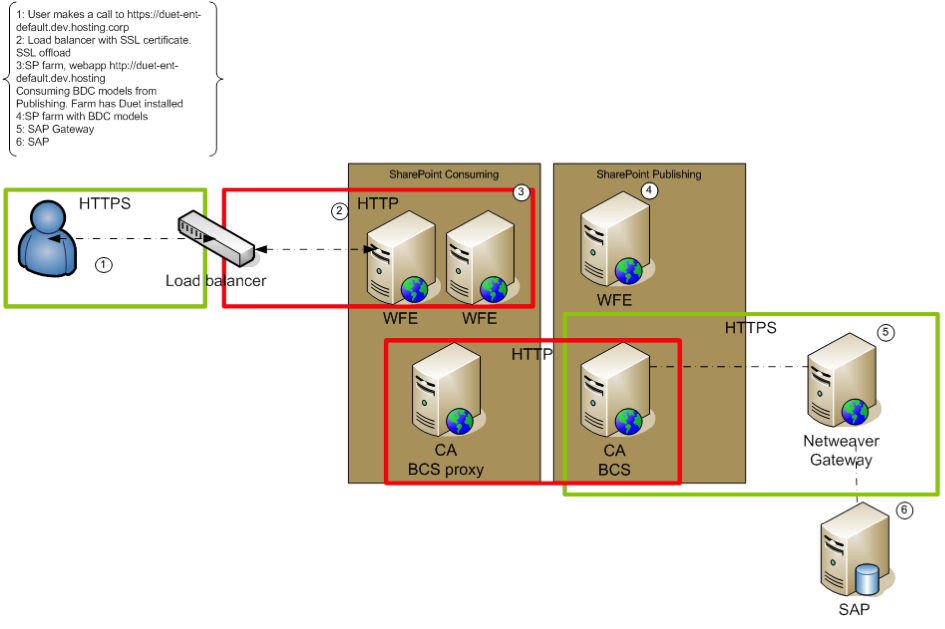
  • At the external boundary from end-user to SharePoint, the infrastructure contains a Load Balancer with SSL-offloading to the internal network. Duet Enterprise however requires SSL enabled on the SharePoint 2010 server that is in direct connection with the SAP NetWeaver Gateway server, hosting the Duet Enterprise SAP Add-on. And the SSL certificate of the SharePoint server must be imported within SAML2 transaction of SAP Gateway system.
  • For shared resource usage, and for security, the SharePoint infra is partitioned over 2 separate SharePoint farms: a SharePoint Service Applications farm with also a Central Admin webapplication; and a consuming SharePoint farm that hosts all the end-user SharePoint webapplications. Also SharePoint BCS Service Application is thus on the Service Applications farm. As BCS is the SharePoint consuming side in Duet Enterprise architecture, it seems logical to exchange the Security Token Service (STS) certificate of this farm to Gateway; to configure the SAML based Duet Enterprise Single Sign-On behaviour (see Execution flow of Duet Enterprise Single Sign-On). However, when we configured the Duet Enterprise landscape with the STS certificate of the Service Applications farm, the Single Sign-On derivation at Duet Enterprise connection time failed. In SRT_UTIL the infamous error message ”SSFW_KRN_VERIFY failed with: verification failed, see decrypted digest” was logged. Further analysis of the logged information in SRT_UTIL displayed that the REMOTE_ADDRESS in the runtime SAML connection is that of the consuming farm. After consultation with SAP Support we tried to use the STS certificate of this farm instead. And indeed this resolved the invalid certificate signature issue. The explanation for this behaviour is that the end-user that starts the Duet Enterprise request flow is authenticated within the consuming farm; thus also the secure token identifying the user must be taken from this farm.

Monday, July 23, 2012

Influence on Duet Enterprise product development + roadmap

The Next View engages in select international comitee with SAP on development and roadmap of Duet Enterprise
The Next View is regarded in the Netherlands as the Duet Enterprise expert. SAP itself also recognizes this. We are therefore SAP Partner on SAP / Microsoft interoperability. SAP Netherlands refers customers that seek for information and guidance on this subject to us, and actively engages us in Duet Enterprise consultations. The Duet Enterprise product team in Walldorf and Bangalore [very much] appreciates the feedback we give based on our experiences with the product. As such we are also asked to participate in the Duet Enterprise Customer Engagement Initiative (CEI). This is a select international group of partners and customers that take the lead with implementations of Duet Enterprise. Participating organizations come from Germany, Australia, England, Denmark, and The Next View as sole and exclusive Dutch partner.
The CEI concept is to provide input for desired developments in the Duet Enterprise product roadmap. Also the Duet Enterprise product team demonstrates (potential) new product features, and inputs new ideas to discuss with and be assessed by the CEI participants. As the disclosed information concerns potential future product features, all CEI participants prior have signed a Non-Disclosure Agreement (NDA).
The recent Duet Enterprise 2.0 Preview announcement proves that via the CEI concept we (The Next View) indeed exert influence on the development of the product. Our main criticism on Duet Enterprise 1.0 is the missing of OData interoperability support. The underlying SAP NetWeaver Gateway integration layer includes OData provider support since version 2.0. The bottleneck here is that SharePoint 2010 Business Connectivity Services does not include OData consumption support. But now using OData sources with BCS is added in the upcoming SharePoint 2013, the next version of Duet Enterprise can utilize this to consume SAP data and processes.

Saturday, June 30, 2012

Duet Enterprise is real, effort is in it’s correct application

In the 1st week of May, The Next View participated in the second edition of the Duet Enterprise Velocity event. We already joined the first edition, and thus are familiar with the Velocity concept. As consequence, we could start immediate at the begin of the Velocity week on the realization of our customer’s scenario: Coöperative Learning.

Duet Enterprise is a given; real effort is in it's application AND understanding the business process + SAP business package

Noteworthy finding is that Duet Enterprise knowledge + experience is a necessity to successfully and productively apply this SAP-SharePoint interoperability middleware. However, this alone is not sufficient. Also required is that your customer has, or can reach, a clear vision of the application context they aim to achieve. In a normal project (with aim to deliver business value) this is of course the essential starting point. In our development approach we facilitate this by usage of mock-ups: discuss and derive in workshop(s) together with customer representatives the application functionality and behavior. The visualization format can be as simple and basic as sketches on paper, onto fully operational prototypes the customer can click through. SharePoint GUI + SharePoint Designer are very helpful for achieving the latter.
With the customer vision visualized in mock-up, the next step is to map this User Interface Design (UID) onto the combined SAP and Microsoft landscape. Here it is essential that you understand, and be aware of the behavior of the SAP business package building blocks.

An example to illustrate this

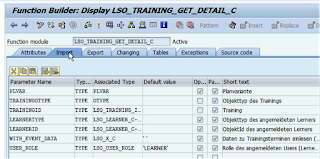
Part of Coöperative Learning scenario is to deliver Training Collaboration Workspace. Each workspace displays information about the training itself, about the participants, qualifications. SAP Enterprise Learning contains standard BAPI Function Modules to retrieve this information. It appears as simple as to identify the proper Function Module, and expose this via Duet Enterprise to SharePoint. But in reality the required insight in the SAP business package goes further. You must also be aware of the proper way of Function Module invocation, depending on the application context. For our Training Workspace, we apply the standard BAPI LSO_TRAINING_GET_DETAIL_C to retrieve training title, description and date. On day X this worked correct. Next morning, I received functional error ‘Course already passed’ from SAP LSO. It appeared as if the standard BAPI FM was not usable to retrieve data on elapsed training data, making it unusable for historical workspace context. Strange enough, a co-worker could still retrieve the training data. Our differences? He was enlisted as participant in this training, in contrary to me. And the standard Function Module responds on this current user context by only allow course participants to view the training data. That is, if you invoke the Function Module in it’s default modus ‘User_Role = Learner’.
When you overrule this for anonymous modus, you can successfully retrieve the training data also for elapsed dates, irrespective of the participation status of current user. A (proper) Duet Enterprise manner to do this is in the Gateway Model mapping.

Blueprint Duet Enterprise scenario's

The Next View recognizes the derivation and mapping from business vision via UID to the combination of SharePoint capabilities and SAP business package functionality + building blocks as essential step to deliver the correct application. We therefore incorporate this structural in our applied Duet Enterprise development process. As soon as we receive the initial business approvement on the UID translation of the business vision, next step in The Next View process is to deliver a Blueprint for the Duet Enterprise scenario’s that can be identified from the UID. Involved roles in delivering the Duet Enterprise Blueprint are a) Duet Enterprise Solution Architect as owner and facilator, b) SAP Business Analist with functional and high-level technical knowledge of the SAP Business Package, and c) SharePoint (Lead) Developer with knowledge of the SharePoint front-end capabilities. The purpose of the Duet Enterprise Blueprint is to derive and describe the high-level Solution Design; identifying the SAP and the SharePoint side. In the Solution Design, also fundamental design decisions on the SAP-SharePoint boundary are made and argumented. And when applicable, for alternative approaches explained why decided not to apply that.
In the process of derivng the Blueprint, it may also become clear that the requested UID cannot, or only with substantial development effort (= costs), by achieved by the SAP + SharePoint combination. Whenever such a consequence is identified, this is discussed with the UID expert and business. Is it feasible to alter the UID to accompany the standard SAP + SharePoint functionality? And if not from either functional or UID perspective, is the business willing to pay the extra development and also maintenance costs? Thus, the Blueprint derivation has an iterative effect and relation towards the UID and the application functionality.

Monday, April 30, 2012

Execution flow of Duet Enterprise single sign-on

One of the much appreciated Duet Enterprise "plumping" capabilities is single sign-on (SSO) from SharePoint farm into the SAP landscape. This capability is achieved by reusing available capabilities in both SharePoint 2010 and SAP NetWeaver platforms. For SharePoint this is BCS WCF Connector, Secure Token Service application and SAML2 support; at SAP side the existing table for external users 'VUSREXTID' and also SAML2 support.
How does Duet Enterprise authentication and single sign-on work out at runtime moment? The end-user starts at SharePoint front-end, thus authenticated as SharePoint user. The SharePoint authentication can be via any authentication provider. However, if you also intend to use the Duet Enterprise Roles Synchronization capability, this requires Claims-Based authentication. Upon invoking a call via SharePoint BCS through Duet Enterprise connnectivity handling to the SAP NetWeaver Gateway system, Duet Enterprise maps the authenticated SharePoint account onto a SAP accounts. The staps in this user mapping are:
  1. The SharePoint authenticated user identity is sent to Microsoft Business Connectivity Services Windows Communication Foundation connector.
  2. The BCS WCF connector invokes the SharePoint Security Token Service to retrieve the user token for this SharePoint user identity.
  3. The SharePoint Security Token Service returns a token that identifies the SharePoint user.
  4. Duet Enterprise SSO handling sends the received token to SAP NetWeaver Gateway, packaged within a SOAP request
  5. SAP NetWeaver Gateway uses the received token to identify the external user, and locate in the user mapping table (VUSREXTID) the associated SAP user with this credential
  6. The SAP user account that is mapped to the SharePoint user is returned to SAP NetWeaver Gateway.
  7. SAP NetWeaver Gateway uses the SAP user account to request access to information in the SAP backend.
  8. If the user is authorized to access the information, the requested information is sent to SAP NetWeaver Gateway.
  9. SAP NetWeaver Gateway sends the requested information to the Microsoft Business Connectivity Services WCF connector as a SOAP response.
  10. The Microsoft Business Connectivity Services connector passes the information to the SharePoint front-end side; e.g. to display via an External List or any of the other BCS Business Data webparts.
For this SSO pipeline to actually work, requires and strongly depends on correct execution of Duet Enterprise configuration of SharePoint and SAP mutual authentication. SAP Gateway must be configured for SAML2 usage, a trust relationship must be configured between SharePoint and SAP, SSL certificates have to be exchanged between SAP and SharePoint. But this is only a one-time, at configuration step. Afterwards you can rely and profit on Duet Enterprise Single Sign-On capability, without need to maintain the supporting code.

Saturday, March 31, 2012

Duet Enterprise interoperability versus native WCF service integration

Recently I was at SAP Walldorf exchanging Duet Enterprise experiences with other partners and customers. One of the Microsoft solution architects present of a Finnish IT-consultancy raised the question when you should utilize Duet Enterprise above the plain usage of Microsoft WCF. This same question has (and is from time to time again) also been asked by the Microsoft architects of the organization where I’m involved in 2 SAP / SharePoint integration projects; both utilizing Duet Enterprise.
The question boils down to understand where is the return of investments. When does it make sense to investigate in purchasing and learning Duet Enterprise, instead of connecting via webservices to earlier build custom connectivity? And to be honest, from a Microsoft developer’s perspective the latter is more appealing, because technically more challenging and also familiair approach plus technology.
The valid answer of Holger Bruchelt on this question was that it strongly depends on the size of your SAP / SharePoint interoperability case. If just for a single application context, with no more scenarios in sight on a medium term, it is very hard to make the business case for purchasing, training and implementing Duet Enterprise. Most likely you can better make a dedicated 1-on-1 integration via the known way of Microsoft WCF, and connect direct to SAP webservices (BAPI webservices, or Enterprise Services).
However, when SAP / SharePoint is a strategic issue for the organization; with multiple applications of it on the horizon; Duet Enterprise is a very valid option to consider. The execution of multiple projects makes it profitable to invest the license and implementation costs for the added value of Duet Enterprise as standards-based SAP/SharePoint interoperability foundation.
A derived question is how Duet Enterprise interoperability compares against native service integration. This question is more complex to answer.
Duet Enterprise is (a consumer of) Service Integration. On SharePoint side it relies on the strengths of SharePoint Business Connectivity Services (BCS) to interoperate with the SAP landscape. BCS supports different connectivity-models to external systems and data repositories, including via webservices / = Service Integration. Duet Enterprise is an example of this: it invokes SAP NetWeaver Gateway webservices through means of BCS. For SharePoint developers, BCS can thus be seen as an abstraction of the Service Integration layer. On top of this abstraction, the SharePoint platform includes diverse BCS capabilities to aid the developer in composing the interaction with external systems: External List, Business Data webparts. In addition, the BCS API can be programmed for custom construction.
There are noticable differences between native service orientation and service integration using Duet Enterprise:
  • Duet Enterprise enables the entire system chain from provider (SAP Business Suite) to consumer (Microsoft SharePoint); on design time and on runtime moments. At design time, Duet Enterprise can be a significant accelerator to expose SAP data into SharePoint context. This is achieved through the Duet Enterprise design tools that are integrated in both SAP and Microsoft landscape. And by using SharePoint BCS as connectivity layer, the step to develop and provision a separate middleware layer is excluded. For the runtime handling, Duet Enterprise provides out-of-the-box capabilities for interoperability aspects: data retrieval, display and management, Single Sign-On, autorisations, end-to-end monitoring.
  • Duet Enterprise is a standard SAP / SharePoint interoperability foundation, designed and maintained by SAP and Microsoft together. The 2 software vendors execute a clear roadmap to further develop their shared product. In this roadmap, the product is aligned with the new developments in SharePoint and in SAP technology landscapes. Further, via the Unite program, the Duet Enterprise ecosystem expands on the basic deliverable with additional content packages. The expectation is that the ecosystem will steadily grow, and also deliver technical and functional components that end-organizations can deploy for custom composition and build of company-specific scenario’s.
  • Duet Enterprise lifts on SAP NetWeaver Gateway; Gateway is now a central component in the SAP architecture to expose SAP data and processes to external clients: SharePoint [via Duet Enterprise], but also (and with more emphasis real soon) to Mobile [via Sybase Unwired Platform]. Relying on Gateway enables organizations to expose SAP data + processes to multiple channels, with reuse of the same Gateway services [thus reduce on development and maintenance effort + costs].

Wednesday, February 15, 2012

Architecture Pattern XML-Funneling of complex SAP structures for Duet Enterprise interoperability

This blog is earlier published on SAP Community Network Blogs
Via Duet Enterprise it is possible to expose SAP data to a SharePoint UI in short timeframes (less than an hour). This agility of SAP/SharePoint interoperability is made possible by combining existing strengths of SAP NetWeaver Gateway (Design Time + Runtime support) and SharePoint BCS. To utilize these strengths in optimum way, your scenario must obey to the following list of prerequisites:
  • Usable RFCs or BORs are available in the SAP backend
  • Flatten SAP data structure
  • SharePoint ExternalList UI metaphore is good enough / adequat for the User Experience (note that you can alter it considerable via a custom XSLT stylesheet)
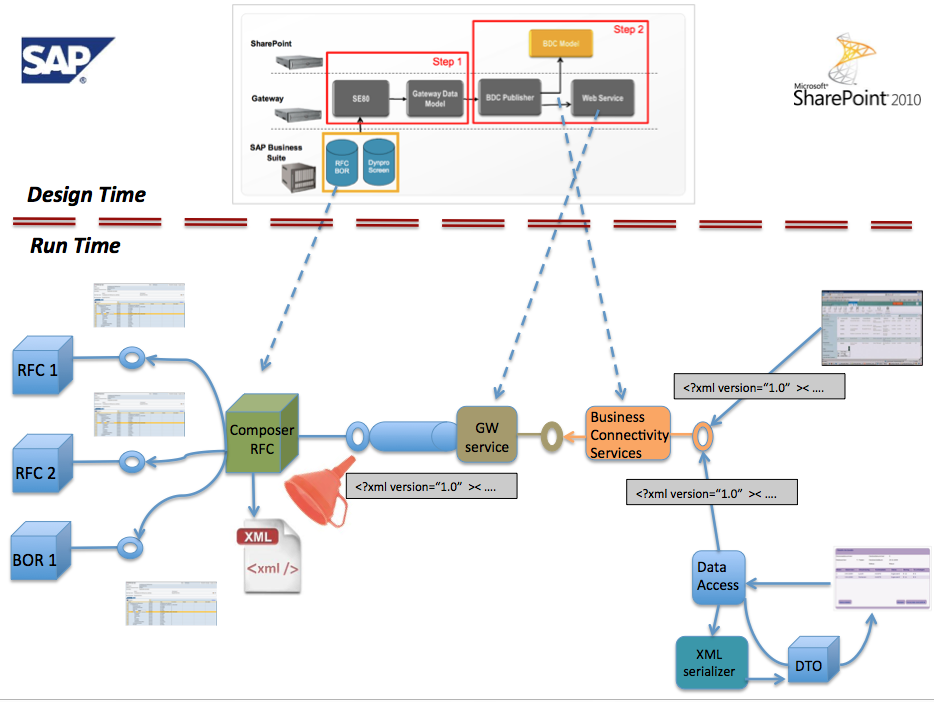
Duet Enterprise leans on the power of SAP NetWeaver Gateway 2.0 to publish SAP data from backend to external UI channels. Gateway design time tools enable you to quickly generate a Gateway DataModel, next expose this via a generated SAP webservice, and import the SAP data into SharePoint BCS.
Althought Gateway itself allows exchange of complex SAP data structures, the GW tools current do not support that. If you need to expose a complex SAP structure through Gateway, you’re on your own with handcrafting the Backend Operation Proxy, GSDO mappers, Gateway Service Proxy. This is not very attractive; it is laborsome, errorprone, and for every change in the data or service signature you must repeat some or even the whole effort.
An alternative is an approach in which you can still use and rely on the powers of the GW Design Time tools to generate the mappers. As said, the GW Design Tools demand the mapped SAP data is in a flattened structure. This conflicts when your source SAP structure is complex, with nested tables. But you can align them by introducing an intermediair component on SAP side; which semi-flattens the complex structure while maintaining in metadata the complex structure. Outline of this architecture pattern is that you build a custom RFC on the SAP backend that retrieves the complex structure by invoking the existing RFC/BOR, or even invoke that RFC/BOR in a loop or invoke multiple RFCs and/or BORs. The received SAP data is collected into a runtime XML document instance, in which you (re)build + maintain the complex data(object) structure. The custom RFC outputs as single string parameter the OuterXML of the runtime XML document. Such a single string parameter can without constraints be handled by the GW Design Tools to generate the entire Gateway + Duet Enterprise data exchange components: GW Model, GW Service, BDC Model. At runtime the complex structure is derived at SAP business side, funneled into a ‘flattened’ string-representation, and exchanged via Gateway + Duet Enterprise to and from SharePoint UI. Within SharePoint context the received string-representation is interpretated as serialized format of a complex data transfer object (DTO). Either via XSLT-transformation in the standard BCS controls, or via a custom UI-control, the complex structure is rendered on a SharePoint page.

The Xml-funneling pattern can be applied at 2 levels. You can use it to flatten the collection of child SAP entities of a parent SAP entity (returned as nested tables in the RFC output). And you can use it to flatten an entire functional SAP entity; which may be runtime composed by issuing multiple RFC calls.

Monday, January 16, 2012

Reasoning for Duet Enterprise in addition to SAP NetWeaver Gateway

With the release of Gateway 2.0 as addition to the SAP NetWeaver stack, the question is justifiable whether this on itself is sufficient for SAP / Microsoft interoperability. Stated otherwise: ‘Do you need Duet Enterprise?’ The answer on that depends on your requirements, IT strategy, plans and situation. On level of desired application(s) functionalities as well as the Enterprise Architecture strategy, policy and plans in your company.
This blog is earlier published on SAP Community Network Blogs

Is Duet Enterprise required for SAP / Microsoft interoperability?

An answer to that question is: No, Duet Enterprise is not per se required, but it might be the wise decision. To make that decision, multiple aspects must be considered.
  1. The extras Duet Enterprise brings to the table (compared to Gateway alone)
  2. Your SAP / Microsoft roadmap and plans; multiple applications and a future-robust strategy, or just now for a single project?
  3. Enterprise Architecture guidelines
  4. Functional requirements
  5. Limitations and implications of Duet Enterprise

Duet Enterprise extras to SAP Gateway for SAP / Microsoft interoperability

The extras fall into different categories.

Functional

  • Standard SharePoint rendering of the imported SAP data through SharePoint Business Data webparts
  • Standard CRUD+Q UI-process pattern on SAP data; for bidirectional data handling
  • Support / hook into SharePoint Enterprise Search
  • Collaboration workspace around SAP data entity: Customer, Product, Quote
  • Integration of SAP workflow into SharePoint context
  • Same for reporting: schedule + review SAP BW reports from SharePoint front-end

Connectivity

  • Single Sign-On from SharePoint into SAP
  • Propagation of SAP user authorizations into SharePoint roles + permissions
  • Propagation of SAP data authorizations to SharePoint Search context, via construction of ACL’s on the External Data entities
  • Transparant SharePoint (consumer) – SAP (provider) runtime connectivity via SharePoint BCS

Operations and lifecycle management

  • End-2-end monitoring; starting from SharePoint, via SCL, upto SAP backend
  • Audit trail per use case

Development

  • Design tool for generation of BCS Model on basis of Gateway Model (itself generated via Gateway generation tools)
  • Integration with SharePoint; Gateway is strict to provide standards-based access to SAP data, Duet Enterprise is also a first-class
    SharePoint-aware user.

Roadmap + ecosystem

  • SAP and Microsoft have a roadmap outlined for Duet Enterprise
  • Base functionality provided by Duet Enterprise
    product is augmented via the partner ecosystem (via Unite program)

Enterprise Architecture

The decision for Duet Enterprise implementation is not made in isolement. It must be considered and fit in the greater area of enterprise architecture. It is evident that Duet Enterprise only makes sense if your IT
landscape contains both SAP and Microsoft. But that alone is not sufficient to justify the purchase and implementation of the product Duet Enterprise. Does EA mandate usage of standards: interoperability protocols, products? And for
common-of-the-shelf products, prefer strategic suppliers Microsoft and SAP above third-party suppliers? These are just 2 examples of questions on which EA should make a thoughtful decision and statement, resulting in EA guidelines.

Functional requirements

The often required rationale for Duet Enterprise is actually a negativisme of the SAP (G)UI. So it is not so much that the decision is made for Microsoft / SharePoint, but more that it is decided against the 'detested' SAP user interface. But if the only motivation is to get rid of the SAP user interface and replace it by another, there are other possibilities. Build a custom user interface in SAP WebDynpro for instance.
Duet Enterprise starts to shine when you combine the powers of the SharePoint platform with the functionality of the SAP processing. Not merely rebuild the SAP user interface, but design and architect an improved user experience by integrating it within context of the information worker.

Limitations and implications of Duet Enterprise

Duet Enterprise is not a silver bullet for all SAP / Microsoft interoperability occassions. It has limitations, intended or as consequence of architectural desicisions. Also, implementation of Duet Enterprise has its costs.

Limitations of Duet Enterprise

  • No support of REST protocol
  • Limited to data-oriented, CRUD+Q service signatures
  • Design-time tooling support only for inside-out approach; not for outside-in
  • Full design-time tooling support only for flattened SAP data-structures
  • Standard SharePoint rendering only for flattened data structures. This is actually a limitation of the standard SharePoint BCS UI controls. Rendering of complex data structures can be done via custom build SharePoint UI-controls (example: Working with complex SAP business entities in Duet Enterprise).

Costs of Duet Enterprise

The costs fall apart in different categories:
  • Recurring license costs
  • One-time deployment and installation effort
  • Training of IT operations, architects and developers (for all: SAP and Microsoft)
  • Optional (but recommended for any except a simple SAP landscape): dedicated SAP Gateway application server
  • Duet Enterprise design time requires presence of SAP Enterprise Service Repository (ESR)

Conclusion

The decision for the implementation of Duet Enterprise must be made in perspective of the business requirements and middle-term enterprise architecture. If SAP / SharePoint policy is a fundamental part of the [future] business application and IT landscape, Duet Enterprise might very well be the sensible decision. Better as realizing + maintaining an own SAP / Microsoft interop layer (no matter how smart your IT people are, they will on longer term never win it from the sheer combination of SAP + Microsoft product team). And also better as purchasing + implementing third party products. That will result in more shattering in your IT landscape, while you must assure yourself of the continuity of the product and its supplier. Again here the combination SAP + Microsoft gives on the longer run more trust as that of smaller although dedicated suppliers.

Monday, January 9, 2012

User Experience improvement of OOTB SharePoint rendering of SAP data imported via Duet Enterprise

Duet Enterprise makes it simpler to bring SAP data into the realm of SharePoint based front-end. At the SharePoint side the SAP data integration is enabled via Business Connectivity Services. The SharePoint platform provides multiple standard controls that hook into BCS Service Application to render external SAP data. XsltListViewWebPart to render a view on ExternalList, BusinessDataDetailsWebPart to display details of a single external SAP BCS entity. These standard controls have a generic ui-process handling. In case the SAP process handling is different, the result may in fact be a lesser user experience as that ‘detested’ SAP UI.
However, within limitations it is possible to extend and adapt the standard SharePoint ui-process handling, while still using and relying on the standard controls.
This blog is earlier published on SAP Community Network Blogs
The standard ExternalList UI-process handling is to display all selected fields in a gridview; and display details of a selected external entity in a popup window.
In case of a relational or hierarchical data model (typical SAP structures), it is more natural to navigate to another portal page with a composite view: display some details of the selected external entity, accompanied with table based overview(s) of related items. This modified UI-process can be achieved with standard SharePoint controls by a number of measures:

  1. Use javascript/jQuery to overload the standard SharePoint client-side handling that is generated for (External)List. This can be done by utilizing the standard ContentEditorWebPart for injecting the jQuery in the SharePoint page, it does not require custom server control development + deployment.
  2. Modify the Xslt-rendering of the standard WebParts to beatify the rendering. Examples of this are applying conditional rendering, other display-formats of data structures, html-layout changes. Also this can be done at SharePoint configuration level, from context of the SharePoint GUI. It does not require custom server controls. Note: Xslt programming is an expertise on its own. Although you can deploy it via SharePoint GUI, it is not something that you can expect the content owner or functional administrator to do.
  3. Use CSS for consistent style of the rendered data displays. Again this can be done via SharePoint GUI; no deployment required to the SharePoint farm.
  4. Readible names for SAP datafields by defining readible names in the BCS resource file per SAP external contenttype. This is something to be done by the SharePoint administrator that has access to BCS Service Application UI.
  5. Build a custom server control to propagate value(s) of the selected SAP external entity as filter(s) to XsltListViewPart that exposes view on ExternalList of related SAP data entity. This does require some custom SharePoint development and a farm deployment. Afterwards this generic server control can be reused in multiple SharePoint pages.
  6. Build a custom server control to provide to standard BusinessDataWebPart the entity identifier of the SAP entity that was selected in XsltListViewWebPart on the referrer page. This server control implements the BCS IEntityInstanceProvider interface. This does require some custom SharePoint development and a farm deployment. Afterwards this generic server control can be reused in multiple SharePoint pages.
The effect of these measures with still usage of OOTB SharePoint controls to display SAP data imported via Duet Enterprise:
Start: browse to the SharePoint page that initiates retrieval of SAP category data (via SAP NetWeaver Gateway Model Query method) + display within XsltListViewWebpart
User clicks on one of the categories, as result the browser navigates to a second page. On that page some details of the selected category are displayed (via BusinessDataDetailsWebPart, issuing via BCS the Gateway Model Read method), and also data of 2 additional SAP entities (via Gateway Model Query method,with one or more input parameters, the value of these set as BCS filter in ReadList method.


User clicks on one the related SAP entity instance, browser navigates to a third page. On that page some details of the selected instance are displayed (via BusinessDataDetailsWebPart, issuing via BCS the Gateway Model Read method), and again also data of additional SAP entity (via Gateway Model Query method).

Conclusion

Via such SharePoint customizations the UI-process handling for external data can be largely improved. In case the User Interaction Design demands more and deeper adjustments, somewhere the line will be crossed what is sensible possible via SharePoint customization. Then it is more sensible to build custom webparts for exposing the SAP data retrieved via Duet Enterprise. For the SAP side this is transparent, as long as it can deliver the required SAP data structures to compose the SharePoint UI-handling.

Sunday, October 16, 2011

Unlocking SAP data via Duet Enterprise Feature Pack 1 in more agile approach

This blog is earlier published on SAP Community Network Blogs
A major bottleneck in applying Duet Enterprise 1.0 is the time it takes the SAP + Microsoft development team to unlock SAP data via Gateway to SharePoint. You have to define the service interface in ES Builder, create a proxy in transaction SPROXY, and next via transaction SE38 realize the GenIL model. The latter requires a lot of handcrafting ABAP code to do the mapping from Gateway runtime context and data representation to SAP backend, and vice versa. Code that follows a pattern, so a good candidate for code generation. This was a major pain point experienced by us when initially applying Duet Enterprise 1.0 within the Ramp-Up in 2010, and with emphasis reported back to the Duet Enterprise product team.
In the coming Feature Pack 1 version, the Duet Enterprise product team has evidently got the message. FP1 comes with multiple generator tools to ease and speed-up the realization of the internal Gateway Model (new name for GenIL model) for your application scenarios. Handcrafting is largely eliminated and replaced by full-automatic generation of first the mapping code to unlock the SAP data via NetWeaver Gateway 2.0, and next the required SAP Gateway service proxy, plus the SharePoint BDC model. The latter can be handed over to SharePoint side to import the External ContentType definition into Business Connectivity Services. Something that took us with version 1.0 several days to set things up at both SAP as SharePoint side, now is done in matters of minutes. Very appreciated side-effect of this is that it enables agile development: if the initial Model does not fit the requested application context, just change the mapping in the tooling and regenerate. With handcrafting approach you would loose a lot of elapse time here rearranging and testing your own mapping code.
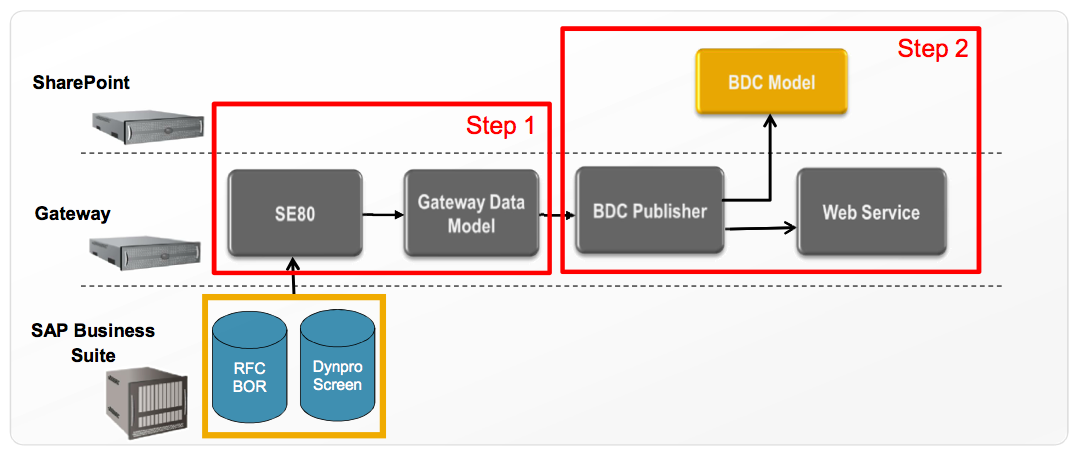
Of course not all now suddenly comes for free. Before you start the Gateway Model generation, you still first must think about the data integration architecture to achieve your application scenario. An action that involves and requires consensus of both the SharePoint and SAP backend architects plus developers. The usage of the FP1 / Gateway 2.0 generation tools itself put some constraints on the SAP backend data sources; BOR, RFC or Dynpro Screens. Basically it comes down to it that the backend data entities must provide at minimum both a ‘Query’ and ‘ReadItem’ operation, and also ‘Create/Update/Delete’ operations for update scenario via SharePoint.
What if the available SAP backend entities do not self satisfy the requested integration pattern and/or the generation constraints? Even then, it is far easier and better manageable to realize a custom wrapper RFC within the ERP level that does satisfy the pattern + constraints, than apply the manual Gateway Model code crafting. Spoken from own experiences…

Sunday, June 19, 2011

Working with complex SAP business entities in Duet Enterprise

Duet Enterprise natively only supports flattened SAP data entities. Typically however business data exhibits a complex structure. Via custom programming against the SharePoint BCS ObjectModel it is possible to integrate complex SAP business entities via Duet Enterprise in SharePoint.
This blog is earlier published on SAP Community Network Blogs
A sales talk of Duet Enterprise is that you can integrate with minimal effort SAP data and functionality in SharePoint UI. This however is only true if your SAP data complies to the following constraints: 1) the SAP data entities must at least be made accessible via a Query and ReadItem operation; 2) in case of full update context, also the Create, Update and Delete operations must be available in the SAP data entity; 3) the SAP data entity must exhibit a flat data structure.
Constraints 1 and 2 are imposed by the usage of SharePoint Business Connectivity Services (BCS) for working with SAP external data from within SharePoint context. As result of the central BCS role in the Duet Enterprise architecture, these constraints are inevitable. Constraint 3 is required to visualize the SAP data via SharePoint External List in the well-known UI List format. Aspect of the list UI metaphor is that it resembles a data table, with row-based data.
Problem however is that typically, enterprise data is non-flattened. Enterprise data often has an hierarchical structure: parent with multiple child data entities. E.g. an Order containing multiple Orderlines; an Expense form with multiple individual ExpenseDetails. As result of constraint 3, it follows that such complex data cannot be visualized in SharePoint UI via the out-of-the-box External List. Does this mean that SAP complex business entities thus cannot be integrated within SharePoint UI context via Duet Enterprise? The answer to that is negative. The applied Duet Enterprise architecture itself, with SharePoint BCS and the SAP Service Consumption Layer (SCL) in the middle, has neither restrictions nor problems with interoperating on and exchanging hierarchical SAP data. It is merely the External List concept that cannot visualize complex data (note: this limitation is generic, thus not only for SAP data structures, but also non-SAP business data structures; as Oracle, Microsoft Dynamics, SQL-based, WCF data objects, …). You can still apply Duet Enterprise as SAP / SharePoint integration foundation in case of complex SAP data structures, but it requires you to build a custom UI in SharePoint instead of the out-of-the-box External List concept. Nothing withholds you from constructing a custom SharePoint UI to display the hierarchical data, e.g. in a master-slave UI concept.
Well, not entirely true…; a noticeable problem with building a custom UI to interoperate Duet Enterprise, is that the custom UI must then program against the BCS ObjectModel API. And the BCS OM currently only provides a [very] weakly typed programming model, instead of the strong-types we are used to in a regular .NET context (e.g. WCF data objects plus WCF interfaces). The explanation for this is that BCS is a generic concept, intended to interoperate against arbitrary external data repositories and various and a priori unknown data structures. In its current stadium, the mapping at .NET client side to the concrete external data structures is enabled via a general purpose ‘BCS operation language’. The problem with that BCS language is that there is no compile-time checking nor support to prevent you from making typo or structure mistakes.

An example interoperating complex SAP data into SharePoint

Via an example I will demonstrate in overview what it takes to interoperate complex SAP data via Duet Enterprise into a SharePoint front-end.

Example

Employee Self-Service process for expense handling. The process consists of multiple steps: it starts when an employee submits an expense form for receiving a refund; next the employee’s manager will review the form, and either approve, deny, or return it for further explanation. In case of approval, the finance department will refund the made expenses. In case of return, the employee can augment the expense form with additional remarks, and then resubmit. Or the employee can decide to withdraw the returned expense form. In case of denied expense, the process directly stops. Each process execution ends with archival of the submitted form and other documentation.
Current, this process is already implemented within the SAP environment. Employees can enter a form via a WebDynpro form; which kicks of a SAP workflow process. The manager receives the review task in this workflow within the SAP Universal Work List. Payment is done via the HR business package.
Although thus the expense process is already implemented in the IT landscape, management feels the need to improve on it. Employees are complaining about the WebDynpro UI, which looks and behaves different as the SharePoint based intranet in which they are performing their primary work activities. The managers on the other hand are perfectly satisfied to perform the review task within the SAP GUI, since this is for them also for most other tasks the familiar work environment. The financial handling is mostly automatic performed in the SAP backend, near to the other financial processes; so neither any reason to change on that. The management therefore decides to bring the employee’s involvement in the process into the context of the SharePoint based intranet, while leaving the rest of the process execution untouched (phase 1).

Step 1: derive the requirements and the functional + process requirements

Since the process is already implemented; this step can largely reuse on what is already available qua system and process specifications.

Step 2: derive the integration and software architecture

The project goal is enabling employees to operate their steps in the expense handling process directly within the SharePoint intranet, with the same familiar UI look & feel as other parts in that intranet. Implication of that is to interchange the WebDynpro front-end for a SharePoint front-end. Via well-derived integration points this new front-end must hook into the existing expense process.

Step 3: define the interoperability interface of the SAP backend

With the integration and software architecture in place, including the conceptual specifications of the integration interfaces SharePoint front-end <– SAP process; the next step is to realize the process integration at SAP side. Following the Duet Enterprise Development Steps, this first means to map the conceptual interfaces onto SAP SCL Interfaces. That development activity is done in SAP Enterprise Service Builder (ES Builder). There, you specify the data types, message types, and method operations.
Screenshots of the specification at SAP side of a Query operation signature, with a complex hierarchical SAP data entity

Step 4: Implement the SCL Interfaces

Actually, this is more than one single step. It involves Mapping, connecting to relevant parts in the SAP backend, routing, potentially composition of multiple SAP data entities, et al. Although all very interesting, this has no direct relation or influence on the way complex SAP data can be handled in the SharePoint front-end. Therefore these steps are not discussed here. See the Duet Enterprise Development Guide for a proper explanation of the steps.

Step 5: Generate the interoperability interface for the SharePoint front-end

A result of step 3 is the WSDL specification of the SAP SCL interface. With this WSDL, and a runtime SAP Proxy implementation, it is possible to generate an External Content Type. The tool used for this is SharePoint Designer 2010.
Screenshots of the generation at SharePoint side of an External Content Type to SAP backend, with a complex hierarchical SAP data entity exchanged

Step 6: Program to the interoperability interface for the SharePoint front-end

In case the SAP data entity had a flat representation, we would be nearly finished. Just generate an External List in SharePoint Designer or via the SharePoint UI, and connect to the generated External Content Type. However, the expense data entity at SAP side exhibits a complex structure: form with multiple detail lines. This cannot be reasonable visualized in the table-oriented format of External List (remember that the start of this project is to improve on the user experience for the employee; so it must feel natural and intuitive). If the External List is not feasible, then it is required to build a custom UI in SharePoint context. The custom UI must interoperate against the BCS ObjectModel API, to query, retrieve, create and update the SAP expense data entities. In its current state, the BCS API can only be operated via a weakly-typed program model. The draw side is that programming at that low-level is both cumbersome as error prone. However, if done correctly and secure, it does the job. And enables you to interoperate complex SAP data entities via Duet Enterprise in a custom SharePoint / .Net context.
Example code of interoperating BCS to create a new expense entity within SAP backend

BdcService service = SPFarm.Local.Services.GetValue(String.Empty);
IMetadataCatalog catalog = service.GetDatabaseBackedMetadataCatalog(SPServiceContext.Current);
IEntity entity = catalog.GetEntity("TopForce.com", "Expense");
IView createView = entity.GetCreatorView("Create");
IFieldValueDictionary methodFields = createView.GetDefaultValues();
methodFields["EmployeeNumber"] = "1";
methodFields["Status"] = "open";
methodFields["EmployeeComment"] = "my comment";
methodFields["Date"] = DateTime.Now;

object tickets = methodFields.CreateCollectionInstance("Tickets", 2);
methodFields["Tickets"] = tickets;
methodFields["Tickets[0]"] = methodFields.CreateInstance("Tickets[0]");
methodFields["Tickets[0].Date"] = DateTime.Now;
methodFields["Tickets[0].Amount"] = "35.45";
methodFields["Tickets[0].Description"] = "Description 1";
methodFields["Tickets[1]"] = methodFields.CreateInstance("Tickets[1]");
methodFields["Tickets[1].Date"] = DateTime.Now;
...
Identity id = entity.Create(fieldValueDictionary, LobSysteminstance);

Step 7: Build an UX custom SharePoint front-end

With the integration layer SharePoint/BCS - Duet Enterprise - SAP ready, it is now rather standard ASP.NET programming to build the custom UI. In the custom UI you can utilize the full toolbox of ASP.NET webcontrols, jQuery, and even Silverlight. Another viable option in SharePoint 2010 is InfoPath based forms.
Some custom UI forms for the expense handling: overview, details and submit new expense


Final note

Thus although it requires more work – at the SharePoint side; it is possible to apply Duet Enterprise for SAP / Microsoft interoperability even when dealing with complex SAP data entities. The extra work is restricted to the SharePoint front-end part; the other parts of the Duet Enterprise pipeline are not influenced. Duet Enterprise on itself does not limit the usage of complex SAP data entities; this restriction is merely within the current out-of-the-box capabilities of SharePoint BCS and External List.