Showing posts with label Installation. Show all posts

Sunday, June 15, 2014

Duet Enterprise 2.0 - installation troubleshooting

Initial, the installation of the first version (1.0) of Duet Enterprise was cumbersome and labour-intensive, and therefore also error prone. With the Duet Enterprise 1.0 installation wizard at SAP side, the installation already was substantially improved. And this has progressed on to the installation of the new version, Duet Enterprise 2.0. However, as the landscape is inherent complex (minimal one, but typically more SAP backends, a SAP Gateway system, and SharePoint 2013 farm), you still may face issues.
In this blog I describe some of the issues that I encountered during Duet Enterprise 2.0 installations, and share my resolutions.

Issue 1: ‘Add-on IW_DUETE Release 100 can only be installed in client 000’

Import of the Duet Enterprise 2.0 SAP Add-On via transaction SAINT gives the following error:
Resolution: Use client 000 to import the add-on via transaction SAINT.

Issue 2: ‘The remote certificate is invalid according to the validation procedure’.

This error can occur in multiple SharePoint-SAP scenarios: runtime invocation of Duet Enterprise service from SharePoint 2013 side, import of a Duet Enterprise 2.0 BDC Model: Application definition import failed. The following error occurred: The remote certificate is invalid according to the validation procedure.
Resolution: Typical the above error message is caused by mismatch of the SSL certificate used on SAP Gateway side to encrypt the traffic, versus the SAP SSL certificate that has been imported in SharePoint 2013 ‘Manage trust’. To repair, import the SSL certificate again. You can either ask again the SAP BASIS administrator to export from SAP Gateway STRUST. But a more convenient, and in my experiences also one with better results (was already so for Duet Enterprise 1.0) is to open on SharePoint web frontend the SAP service url, and then from SSL certificate warning export the SAP SSL certificate to file; and next add this to ‘Manage trust’.

Issue 3: ‘The root certificate that was just selected is invalid’

Importing in SharePoint 2013 ‘Manage Trust’ the SSL certificate of SAP NetWeaver Gateway results in error:
Resolution: import the SSL certificate via Internet Explorer (11) instead of Firefox.

Issue 4: ‘No service found for namespace /IWWRK/, name DUET_WORKFLOW_CORE

Manifest itself upon configuration of Duet Enterprise 2.0 Workflow solution.
Resolution: Add and activate the Duet Enterprise 2.0 Gateway REST service in MAINT_SERVICE.

Issue 5: DuetConfig: ‘The operation name is missing or invalid’

For instance occurs with the DuetConfig command to configure workflow, command with multiple operation parameters: DuetConfig.exe -importbdc -FeatureName Workflow -LsiUrl "https://tnvsrm.tnv.corp/sap/opu/odata/IWWRK/DUET_WORKFLOW_CORE;mo;c=SHAREPOINT_DE/" -BdcServiceApplication "Business Data Connectivity Service" -UserSubLsiUrl "https://tnvsrm.tnv.corp/sap/opu/odata/IWBEP/SUBSCRIPTIONMANAGEMENT; mo;v=2;c=SHAREPOINT_DE/"
Resolution: careful check the command line that the start character for each of the operation parameter names is indeed the minus (‘-‘) character. In case you copied the command line from the deployment guide, this may be ‘invisible’ the wrong character. To be sure, in the command line explicit (replace and) type the ‘-‘ character:

Issue 6: ‘Lobsystem (External System) returned authentication error'

For instance, occurs upon trying to import a Duet Enterprise 2.0 BDC Model into SharePoint 2013 Business Connectivity Services application:
Resolution 1: Check that the Duet Enterprise 2.0 generated ‘Duet Root Certificate Authority’ is added to SSL Server Standard in STRUST on the SAP Gateway system.
Resolution 2: Check the user mapping of the SharePoint account used to invoke the SAP Gateway service / import the Duet Enterprise 2.0 BDC Model. In particular check the extid that it contains the correct pattern (account name, comma + space, and then the domain name in small capitals):

Issue 7: Import of Duet Enterprise 1.0 BDC Model fails due missing ‘WSDL’ application definition.

Resolution: Add an “Duet Enterprise 1.0 WSDL” application definition in SharePoint 2013 Secure Store.

Issue 8: Invocation of Duet Enterprise 1.0 service fails due missing SSO

Browsing a SharePoint 2013 External List results in error ‘An unsecured or incorrectly secured fault was received from the other party’.
Inspect the SRT_UTIL ErrorLog:
Resolution: Besides the Duet Enterprise 2.0 SSO approach based on X.509 certificate, also enable Duet Enterprise 1.0 SAML2 approach. Use the Duet Enterprise 1.0 Deployment Guide for information how to enable SAML2 in the Duet Enterprise 2.0 (Gateway 2.0 + SharePoint 2013) landscape.

Epilogue

Compared to the excellent troubleshooting guide for Duet Enterprise 1.0, the above list of issues plus resolutions is much smaller. The Duet Enterprise product team of SAP plus Microsoft has clearly improved their delivery on this aspect.
Others that have been deploying Duet Enterprise 2.0 may have encountered other issues as I did so far. Still a general classification of all issues seen so far is that they are caused by manual error, indirect caused by the sometimes unclear, fragmented and even incorrect Duet Enterprise deployment guides.

Sunday, August 12, 2012

Deploy Duet Enterprise in production infra landscape

Duet Enterprise PoC in sandbox environments

Organizations that evaluate Duet Enterprise for the added value it brings typically do so via a proof of concept. Mostly, these PoC’s are executed in an isolated sandbox, a laboratory environment. Naturally also in the sandbox all the minimal prerequisites must be present in order to rightfully test the effect and operation of the SAP-SharePoint interoperability. Thus (an element of) SAP Business Suite, a server hosting SAP NetWeaver Gateway 2.0 with the Duet Enterprise SAP Add-On installed, and a server hosting SharePoint 2010 with the Duet Enterprise SharePoint Add-On installed. But for cost reasons, the sandbox infra is typical less extensive as in the regular production environment. Thus no load-balancer, SharePoint 2010 farm in the single-server setup, no proxy server, no firewall, et cetera. Infrastructure elements that are regurlarly present in nowadays mature infra architectures.
Note: to facilitate organizations that quickly want to inspect and evaluate Duet Enterprise, without spending effort in installing it within own landscape; the Duet Enterprise team has prepared a fully installed Microsoft Hyper-V image: SAP NetWeaver Duet Enterprise Trial System.

Deploy Duet Enterprise in production landscape

At a client organization we also started with a Duet Enterprise PoC, in a sandbox environment. On basis of the succesful outcome, Enterprise Architecture has mandaded the application of Duet Enterprise as the organization standard interoperability approach when it concerns SAP-SharePoint business scenarios. Next logical, and a required step, is to make Duet Enterprise available for generic utilization in the regular IT landscape. Via the Duet Enterprise wizard a lot of the Duet Enterprise deployment effort on SAP side is automated, largely transparent to the specifics of the SAP landscape. For SharePoint side, there is no wizard. But the installation effort there is far less as on the SAP side.

Duet Enterprise deploy differences sandbox versus production landscape

During deployment of Duet Enterprise in the production landscape, we experienced a number of effects resulting from differences in the production versus sandbox landscapes.

SAP side

  • Starting from NetWeaver 7.31, the consumer proxies for Duet Enterprise workflow are configured via transaction SOAMANAGER. The proxies configuration in LPCONFIG, although still present and possible, no longer has effect.
  • For design-time, the ESR Builder must be associated with the Software Component Version and namespace in the Gateway system where custom development will reside. It is not feasible in production landscape to create Gateway DataModel and business scenarios as Local Objects.

SharePoint side

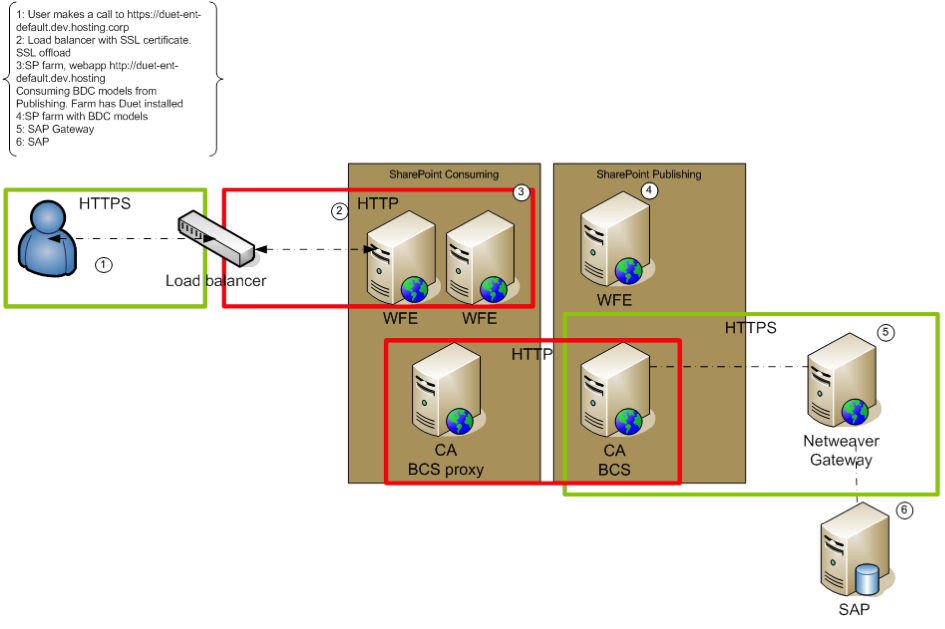
  • At the external boundary from end-user to SharePoint, the infrastructure contains a Load Balancer with SSL-offloading to the internal network. Duet Enterprise however requires SSL enabled on the SharePoint 2010 server that is in direct connection with the SAP NetWeaver Gateway server, hosting the Duet Enterprise SAP Add-on. And the SSL certificate of the SharePoint server must be imported within SAML2 transaction of SAP Gateway system.
  • For shared resource usage, and for security, the SharePoint infra is partitioned over 2 separate SharePoint farms: a SharePoint Service Applications farm with also a Central Admin webapplication; and a consuming SharePoint farm that hosts all the end-user SharePoint webapplications. Also SharePoint BCS Service Application is thus on the Service Applications farm. As BCS is the SharePoint consuming side in Duet Enterprise architecture, it seems logical to exchange the Security Token Service (STS) certificate of this farm to Gateway; to configure the SAML based Duet Enterprise Single Sign-On behaviour (see Execution flow of Duet Enterprise Single Sign-On). However, when we configured the Duet Enterprise landscape with the STS certificate of the Service Applications farm, the Single Sign-On derivation at Duet Enterprise connection time failed. In SRT_UTIL the infamous error message ”SSFW_KRN_VERIFY failed with: verification failed, see decrypted digest” was logged. Further analysis of the logged information in SRT_UTIL displayed that the REMOTE_ADDRESS in the runtime SAML connection is that of the consuming farm. After consultation with SAP Support we tried to use the STS certificate of this farm instead. And indeed this resolved the invalid certificate signature issue. The explanation for this behaviour is that the end-user that starts the Duet Enterprise request flow is authenticated within the consuming farm; thus also the secure token identifying the user must be taken from this farm.

Tuesday, January 4, 2011

Solution partitioning and dependencies with mixed scopes causes farm-deployment trouble

We probably all agree that it is wise to partition your SharePoint application deliverables and deployment into multiple packages. Typical examples are a Base assembly, deployed via a base wsp, providing a general foundation layer with diverse technical and functional building blocks. And then 1 or more functional packages, that provision the SharePoint artifacts and code for a specific application functionality; in which the functional building blocks may use and rely on parts provided via the Base assembly.
However, sometimes this architectural sane decision to partition your application deployment, can result in unforeseen effect. Let me demonstrate via a real-life example, that I encountered today:
  • Application deployment deliverable
    1. includes a Base assembly, deployed via solution package Base.wsp. In this wsp package included the Base code, some basic Features, JobDefinitions, generic webparts. In the Base code / assembly there are FeatureReceivers, WebParts. As result of this, SharePoint solution generation (WSPBuilder or VS2010) puts SafeControl settings per contained WebPart in the Solution manifest; which again results in it that the scope of the Solution package is WebApplication.
    2. and also contains a pure functional package; with some Features, SiteTemplates. This functional package does not contain an assembly itself, but instead relies on the assembly of the Base.wsp for reused FeatureReceivers. As result this solution package does not contain any artifacts with are scoped at WebApplication level, and SharePoint solution framework requires to deploy it global in the farm. (nb: the further described situation can even occur in situation were the package does contain managed code, as long as the assembly does not contain SharePoint coded artifacts which transition the scope of the Solution package to WebApplication; e.g. no WebParts, Resources).
  • The order of Solution package deployment is to first install the Base.wsp, and then the Functional.wsp. Then you would expect that the deployment dependency of Functional.wsp on Base.wsp is ascertained. However, in this scenario I discover in the SharePoint Solution store an error with the deployment of Functional.wsp. Error details:
    <server 1> : The solution was successfully deployed.
    <server 2> : The solution was successfully deployed.
    <server 3> : Feature '<GUID>' could not be installed because the loading of event receiver assembly "Base, Version=1.0.0.0, Culture=neutral, PublicKeyToken=13a12821e9f69237" failed: System.IO.FileNotFoundException: Could not load file or assembly 'Base, Version=1.0.0.0, Culture=neutral, PublicKeyToken=13a12821e9f69237' or one of its dependencies. The system cannot find the file specified.
At first, I thought this to be a timing issue. The Solution Framework uses timer jobs to deploy solutions throughout the farm, and it looked as if the Functional.wsp was tried to be already deployed on <server 3> while the deployment job for Base.wsp was not yet executed for <server 3>. However, also upon re-deployment of Functional.wsp - while making sure at forehand that the deployment of Base.wsp was now fully completed in the farm - , it resulted in the same error on <server 3>. So it must instead be directly related to the installation on <server 3> apparently the Base.dll was not installed in the GAC on that server; while the Features within Functional.wsp were to be installed on <server 3>. Why is this?
Well, the explanation is twofold. It relates to the SharePoint Farm infrastructure, as well as the scopes of the SharePoint packages. <server 1> and <server 2> have the SharePoint webapplication role in our load-balanced farm; and each contain the SharePoint webapplications. <server 3> however is dedicated as Search Index server; and does not host any SharePoint web applications. The SharePoint solution framework deploys WebApplication scoped packages only to the servers on which SharePoint web applications are hosted (Base.wsp: <server 1> + <server 2>). But it deploys Global scoped packages to ALL the servers in the farmer (Functional.wsp: <server 1>, <server 2> AND <server 3>).
Given this insight, a proper SharePoint Solution Deployment approach is to deploy the Global scoped Package with Force-flag, thus suppressing the error signalment. This worked sufficient in our case. However, it leaves you with the somewhat unwanted situation that via the Force-flag you suppress all error notifications; thus may be too brute. A better approach is to circumvent that Solution Framework deploys your Application package also to the servers on which the web application is not hosted. This can thus be achieved by making sure that each of your Application package as WebApplication scope. Either because it inherently contains such entities (e.g. WebParts), or artificially by including a dummy artifact directed at WebApplication level (e.g. an empty virtual bin file).

Wednesday, January 20, 2010

Tip: psconfig saved my local SharePoint environment

Once in a while, your local SharePoint installation may become corrupted. It happened to me today. I experienced diverse problems and symptons. Most noticable the malfunctioning of SharePoint search: crawling no longer worked, connect to the SharePoint Search service gave a "not able to access remote service". And when I inspected the eventlog, I detected several Office Server Search errors:
A seemingly total other problem was upon site collection creation via a custom site definition. This site definition applies a custom SPWebProvisioningProvider. Here I encountered a problem in loading the assembly of that provider, due to apparently missing referenced (system) assemblies.
When I next activated custom FeatureReceiver code that programmatically manages the Search content sources, SharePoint threw a Microsoft.Office.Server.Search.Administration.DeletedConcurrencyException with message Object e26da097-50ff-4386-b3f6-2b2b30f73b96 not found. This was the start to fixing my environment... I found via searching on DeletedConcurrencyException a useful advice to run the SharePoint admin tool psconfig:
psconfig -cmd upgrade -inplace b2b -wait
And indeed, after doing that magically the above described problems have vanished. That saved my day, I already feared that I had to re-install my local SharePoint environment.