Showing posts with label SharePoint Search. Show all posts

Wednesday, December 12, 2018

Unpredictable and therefore unreliable crawling of User Profiles in SharePoint Online

In many organizations that utilize SharePoint, the Human Resources (HR) administration is an (one of the) origin from which data is propagated into the User Profiles. The presence of HR data in SharePoint User Profiles then allows to retrieve that data for usage in SharePoint API based applications, e.g. JavaScript (vanilla upto SPFx), InfoPath, SharePoint Workflows, Microsoft Flow, ... An issue here is that in case of custom User Profile properties, the User Profile REST service does not support to return their value: Query SharePoint user profile by custom property. Approach to deal with that lack is to retrieve/query the custom User Profile properties via User Profile Search: Query and filter user profiles based on the value of customer property using REST.
Consequence of retrieving via Search is that the returned data may not be the actual value, but is as fresh as the latest crawling of User Profiles as search source. In case of an on-premise deployment, an organization has self-control over the crawling rate; default setting is a full crawl per 15 minutes. Implication is that typically the data cached in the SharePoint Search Index is not older / outdated than maximum of 15 minutes. This is for the most business usages acceptable, as HR data is not updated continuously. However, in case of SharePoint Online usage, matters are different. Microsoft makes no concrete statement / promise on the period it takes to have changed User Profile values become visible in SharePoint Search. On experimentation, I observed that for one User Profile instance a change in custom property was visible + retrievable via Managed Property within 30 minutes, while for another User Profile instance a change in the same custom property was not picked up yet after a period of 3 days! This unpredictability makes the utilization of User Profile Search to retrieve User Profile property values less reliable.
I've consulted Microsoft Support on this topic. In a nutshell the response is that my observations is the current way of working, and that Microsoft cannot give an hard statement on the maximum duration in which User Profile property changes will be visible in SharePoint Search. And current in SharePoint Online context, one does not have the option to explicit request for reindex of User Profiles via full crawl. Microsoft themselves refers to a SharePoint UserVoice request to give your vote: Reindex User Profiles option.
Mikael Svenson posted a workaround that allows you to get "kinda explicit" control: How to trigger re-indexing of updated user profiles in SharePoint Online. Although for multiple reasons certainly not the preferred way, until Microsoft delivers on the UserVoice raised request, this approach is likely the best available to get changes in User Profile instances at least within a delineated elapse time visible through SharePoint search.

Sunday, March 26, 2017

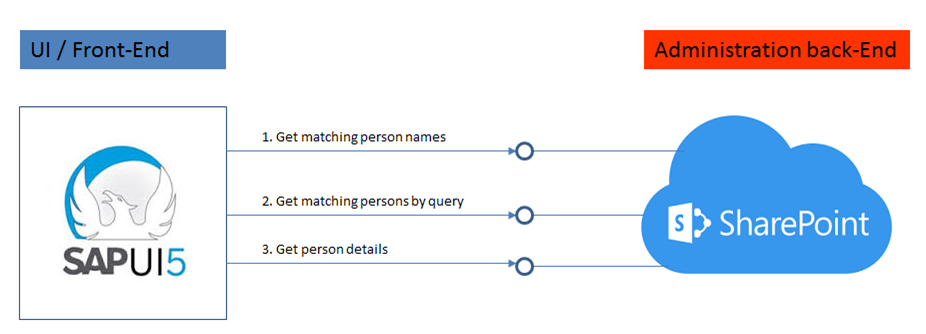
SharePoint integration endpoints for a SAPUI5-based PeopleFinder

SAPUI5 is a suitable framework to build responsive-design UIs that renders to the available screen estate of diverse device types: smartphone, tablet, and desktop. It is therefore a fit to deliver an alternative UI to SharePoint's PeopleFinder functionality, in case the out-of-the-box SharePoint UI (that is, with potentially the rendering still made company specific via customized Search Display Templates) for whatever reason does not qualify as sufficient fit. The basic requirement of a SAPUI5 mobile application is that it can consume data and functionality via OData REST services. The SharePoint platform supports such an architecture via the standard SharePoint REST services:
The integration surface for a peoplefinder functionality comprises 3 main elements:
  1. To interactive present people suggestions to user while typing in characters of the people name ==> Get names list of matched users on search input
  2. Get detailed list of matched users on search input
  3. Get details for selected user
1. Get names list of matched users on search input

Best:
SharePoint end-point 
https://<SharePoint root-url>/_api/search/query?querytext='preferredname:Jones*'''&selectproperties='PreferredName'&sourceid='B09A7990-05EA-4AF9-81EF-EDFAB16C4E31'&rowlimit=10

Alternative is to search in User Information List:
SharePoint end-point 
https://<SharePoint root-url>/_vti_bin/listdata.svc/UserInformationList?$filter=((ContentType eq 'Person') and (substringof('Jones',LastName)))&$orderby=Name

but this has some disadvantages:
  • Incomplete qua users: user is only added to UserInformationList on first visit to SharePoint site; users not visited yet, are not included
  • Overcomplete: UserInformationList is never cleaned up, former colleagues remain in the list
  • Incomplete qua search: UserInformation does not contain a full name field
2. Get detailed list of matched users on search input

Search in full content / all crawled people data fields:
SharePoint end-point https://
<SharePoint root-url>/_api/search/query?querytext='Mobile*'&selectproperties='FirstName,LastName'&sourceid='B09A7990-05EA-4AF9-81EF-EDFAB16C4E31'&rowlimit=10

Search in identified property-field(s) only:
SharePoint end-point https://
<SharePoint root-url>/_api/search/query?querytext='department:Mobile*'&selectproperties='FirstName,LastName'&sourceid='B09A7990-05EA-4AF9-81EF-EDFAB16C4E31'&rowlimit=10
3. Get details for selected user

Get all public properties:
SharePoint end-point https://
<SharePoint root-url>/_api/SP.UserProfiles.PeopleManager/GetPropertiesFor(accountName=@v)?@v='<uname of user>'

Get one single identified user profile property only:
SharePoint end-point 
https://<SharePoint root-url>/_api/SP.UserProfiles.PeopleManager/GetUserProfilePropertyFor(accountName=@v,propertyName='AboutMe')?@v='<uname of user>'

Wednesday, December 2, 2015

Peculiar but Explained: Access Denied on page in search result preview

This morning I noticed that a page present in search result, displayed 'Sorry, you don't have access to this page' in the preview pane. Peculiar as an authorization principle of SharePoint Enteprise Search is that the search result is security trimmed, and only returns results for which the logged-on user has authorization to see. Brainstorming with a colleague we came up with the explanation. The search result actually included the url of a SharePoint subweb, for which I do have read-access. The page configured as 'Welcome Page' (landing page) in this subweb is not [yet] checked in, and therefore not available for me. And as SharePoint Search previewing applies the SharePoint publishing 'Welcome Page' redirection when hovering over (sub)web url, this explains the 'Access Denied' experience in the preview pane. Above is confirmed: after that landing page has been checked in, now in preview I see that page impression instead of the 'Access Denied'.

Wednesday, November 5, 2014

Recover from SharePoint 2013 Search and CryptoGraphic mismatch - 'Key does not exist'

SharePoint Search Application is applied to crawl external data via Duet Enterprise 2.0. In the Duet Enterprise authentication flow from SharePoint to SAP, the SSA process via Business Connectivity Services invokes Secure Token Service to runtime create an X.509 authentication user certificate for the SharePoint account under which the search crawling is executed. (See 'How authentication works in Duet Enterprise 2.0').
This worked fine, until I upgraded the SharePoint 2013 landscape to the latest released cumulative updates: Sept + Oct 2014. Part of the upgrade steps is to temporarily disable the SharePoint Search services, and restart them after the CU installations. However, afterwards it appeared that the runtime Duet Enterprise SSO behavior was broken. The crawl log on the external content source reported structurally the error Exception in invoking the ODataExtensionProvider of type 'OBA.Server.Canary.ObaOdataServerExtensionProvider'. And the ULS contains on constant basis the error 'The search connector framework caught an exception from BDC: Exception in invoking the ODataExtensionProvider of type 'OBA.Server.Canary.ObaOdataServerExtensionProvider'. (Key does not exist. )'
But this is only when the BCS OData service is invoked from Search Crawling context. Using the same SharePoint user credentials to interactively retrieve SAP data in a SharePoint site still works, and successful retrieves the external SAP data applying Duet Enterprise 2.0 Single Sign-On.
Recovery fix:
Restart the SharePoint Search service (OSearch15), to force a reset of the runtime memory in that process and resync with CryptoGraphic on Windows OS level.