Showing posts with label SharePoint 2010. Show all posts

Sunday, January 20, 2019

Tip: how-to resolve in SharePoint 2016, XsltListViewWebPart displaying Calculated Fields as HTML-encoded

As of June 2017, Microsoft made a change to explicit block in XlstListViewWebPart the rendering of custom HTML markup in Calculated Fields: Handling HTML markup in SharePoint calculated fields: "Some users have added HTML markup or script elements to calculated fields. This is an undocumented use of the feature, and we will block the execution of custom markup in calculated fields in SharePoint Online from June 13, 2017 onwards. The June 2017 Public Update (PU) and later PUs will make blocking a configurable option for on-premises use in SharePoint Server 2016 and SharePoint Server 2013." In the article, Microsoft states that for SharePoint on-premises (2013 version and later) one can restore to the previous behavior through a new property on webapplication level: CustomMarkupInCalculatedFieldDisabled. For SharePoint Online there is no such configuration option provided.
A bit by coincidence (and also by mere perseverance 😉), I detected an alternative - undocumented - approach that does not require an overall webapplication setting. And as bonus, likely also works in SPO context. Default the XslLink property in XsltListViewWebPart XmlDefinition is configured via the View property: SPView.XslLink. The essence of the workaround / approach is to make use of the Xsl-behavior in the superclass of XsltListViewWebPart: DataFormWebPart. If you specify Xslt transformation at that level (either via XslLink, or via Xsl property), then you can configure for single XsltListViewWebPart instance that custom HTML markup of Calculated Field is still executed.
Although undocumented, it is an own Microsoft source that helped me discovering this => the SharePoint Escalation Service Team Blog - Guidance for XslLink property with the XsltListViewWebPart: "There exist other alternatives to let the XsltListViewWebPart use your XSL Transform. "
Note also that when you used 'Design' mode in SharePoint Designer 2010 to customize the Xslt-rendering of a list column, the customized Xslt-template is also injected in the Xsl property on webpart level.
My findings clarified through pictures:

At first the issue: custom HTML markup of Calculated Field is rendered as html-encoded

Move in the XMLDefinition the location of XslLink from 'View' to 'WebPart' level

And the rendering of custom HTML markup is restored, as we know it from before

Thing to be aware of: with using the 'XslLink' property it is a prerequisite that the applied Xslt stylesheet file is located in the layouts folder (see: Guidance for XslLink property with the XsltListViewWebPart: "however you would need to place your XSL file in the default “_layouts/xsl” folder"). In the above scenario that is guaranteed as I simply refer to the standard 'main.xsl' stylesheet that is by Microsoft itself provisioned in the layouts folder, both on-premises as online. If however you need a deviation from the standard XsltListViewWebPart rendering, then you need to provision your own custom Xsl stylesheet thus also in the layouts folder. Which in SharePoint Online context is of course not possible. If the deviation is only minimal, e.g. to override the standard rendering for only one column, then I advise to make use of the 'Xsl' property instead, and only include in it the overloading 'xsl:template'.
Example applied to scenario of above
<xsl>
   <xsl:stylesheet xmlns:x="http://www.w3.org/2001/XMLSchema" 
      xmlns:d="http://schemas.microsoft.com/sharepoint/dsp" 
      version="1.0" 
      exclude-result-prefixes="xsl msxsl ddwrt" 
      xmlns:ddwrt="http://schemas.microsoft.com/WebParts/v2/DataView/runtime" 
      xmlns:asp="http://schemas.microsoft.com/ASPNET/20" 
      xmlns:__designer="http://schemas.microsoft.com/WebParts/v2/DataView/designer" 
      xmlns:xsl="http://www.w3.org/1999/XSL/Transform" 
      xmlns:msxsl="urn:schemas-microsoft-com:xslt" 
      xmlns:SharePoint="Microsoft.SharePoint.WebControls" 
      xmlns:ddwrt2="urn:frontpage:internal" 
      xmlns:o="urn:schemas-microsoft-com:office:office">
         <xsl:include href="/_layouts/15/xsl/main.xsl"/>
         <xsl:include href="/_layouts/15/xsl/internal.xsl"/>
         <xsl:param name="AllRows" select="/dsQueryResponse/Rows/Row[$EntityName = '' or (position() >= $FirstRow and position() <= $LastRow)]"/>
         <xsl:param name="dvt_apos">'</xsl:param>                                                      
         <xsl:template match="FieldRef[@Name='Folder']" mode="Number_body">
            <xsl:param name="thisNode" select="."/>
            <b><i>
            <xsl:value-of disable-output-escaping="yes" select="$thisNode/@*[name()=current()/@Name]" />
            </i></b>
         </xsl:template>
   </xsl:stylesheet>
</xsl>

Sunday, March 18, 2018

Beware: set site to readonly impacts the permission set overviews

In our execution process of migrating collaboration sites from SharePoint 2010 to SharePoint Online, on completion we apply the following go-live steps:
  1. Set the lock status of source site to ‘readonly' (Lock or Unlock site collections)
  2. Enable a redirect from the root-url of the source site to the root-url of the target migrated site (This is a real success and much appreciated by our end-users: as it is almost impossible for each to remember to update own bookmarks to the sites now migrated. Definitely a best practice I recommend to everyone doing a migration to SharePoint Online !!)
  3. Send out communication to the site owner that his/her site is migrated. Migration issues that were not identified during the User Acceptance Test (UAT) of the migration will be handled as after-care
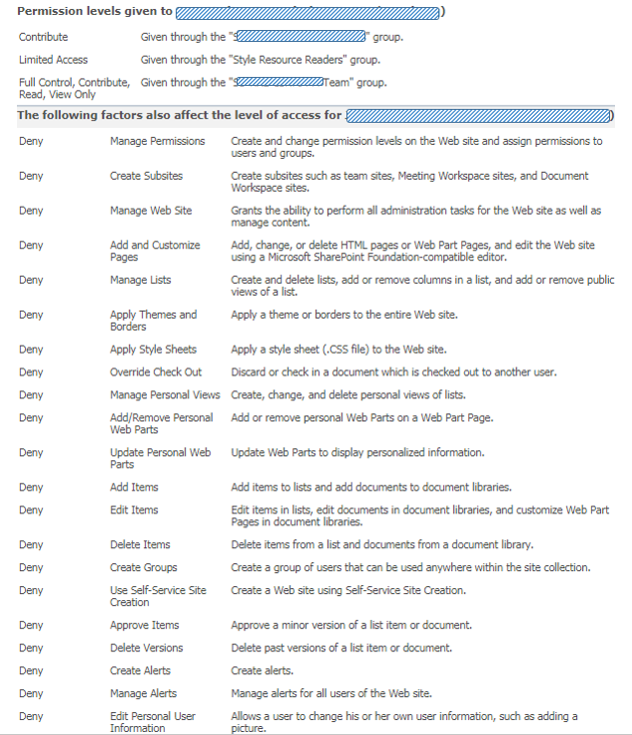
Immediate after the go-live of a migrated site, the after-care period starts. One of the issues that may arise is that a site visitor has lost authorizations compared to the old source site. We then compare the source vs the migrated site (note: in our custom IIS Redirect HttpModule we’ve incorporated the capability to bypass the automatic redirection) to investigate the complaint. Something to be aware of when comparing the permission set, is that via our go-live actions we’ve impacted also the source site: setting the site to readonly, results that in the “check permissions” display per checked user a large list of “Deny” permissions will be enlisted.
Nothing to be surprised (⇨ 'Deny' permissions are set via User Policy on webapplication level, and cannot be set on the level of individual site collections [1] [2]) or worried about, once you understand where this overwhelming list is actually coming from. And that you can safely ignore them in understanding what the actual “productive” permission set of the checked account was on the old source site.

Wednesday, February 21, 2018

Migrated SharePoint 2010 workflow cannot be opened Online in SharePoint Designer 2013

On migration of SharePoint 2010 site to SharePoint Online, it is supported that SharePoint Designer workflows are migrated also. They are classified in their new destination as 'SharePoint 2010 workflows'. There is a difference though qua maintenance tooling: one has to switch from using SharePoint Designer 2010 to SharePoint Designer 2013 edition. Such a switch may result in an issue: "SharePoint designer cannot display the item".
The root cause of this is within the cache-handling of SharePoint Designer. Both the 2010 and 2013 versions use the same local location on your workstation to store cached files. However, the structure within the cached files is not forwards-compatible from SharePoint Designer 2010 to 2013. To resolve the error, one can apply the following approaches:
  1. Disable usage of 'cache' capability in SharePoint Designer 2013: it will then no longer try to load + reuse the cached files that were initially created on your workstation by opening the workflow via SharePoint Designer 2010
  2. Cleanup the local cache to remove the SharePoint 2010 versions of the cached workflow files: delete all cached files from these local locations (Resource: SharePoint Designer cannot display the item (SharePoint 2013))
    • C:\Users\<UserName>\AppData\Roaming\Microsoft\SharePoint Designer\ProxyAssembleCache
    • C:\Users\<UserName>\AppData\Roaming\Microsoft\Web Server Extensions\Cache
    • C:\Users\<UserName>\AppData\Local\Microsoft\WebsiteCache
  3. (Get yourself a new / other laptop:) Open the workflow in SharePoint Designer on another workstation, on which the workflow was not managed previously via SharePoint Designer 2010 when still on SharePoint 2010

Tuesday, November 7, 2017

Retrieve data from a large list via REST

The infamous ´5000´ listview threshold, we all have encountered that limit at least once in utilizing SharePoint as data backend. This time I was consulted by a business user that utilized SharePoint´s data management capabilities for storage of above 135,000 listitems. Wrt storage this amount is not an issue, but for retrieving it can be due the listview threshold. The advised approach to deal with that is via indexed columns, and tabbed/indexed views. That is for retrieving + viewing the big amount of listitems in the standard SharePoint UI. But what about requesting the data via SharePoint REST service? The REST protocol promises to support a similar navigation/tabbed experience via $top and $skip parameters. However, here SharePoint (2010) demonstrates to be not a fully compliant REST citizen. The $top parameters works fine on indexed large list, but usage of $skip results in an HTTP 500; and in ULS the error "Throttled:Big list slow query. List item query elapsed time: 0 milliseconds" is logged.
Also here it turns out that the '5000 threshold' is such a common encountered SharePoint issue. Internet search within a few hits leads to the helpful Stackoverflow resource: SharePoint 2010 REST top, skip fails on large list:
$skip query option is not supported, but $top is. Workaround, use a mix of $orderby on ID, $filter on ID and $top x items, and loop
Pseudo-code to loop through the entire big SharePoint List:
var nextId = 0;
WHILE TRUE DO
    var getData = $.getJson(“<site-collection url>/_vti_bin/listdata.svc/LargeList"
          + "?$select=Id,Name&$top=1000&&orderby=id&$filter=Id gt " + nextId);
    if (getData is not empty) {
        nextId = getData(last)[id];
    } else {
        break;
    }
END DO

Wednesday, August 10, 2016

SharePoint ignores MIMEtypes mapping unless on web server level

Earlier I reported that our business users request user-intuitive handling of non-Microsoft and non-standard file-formats that are administrated within document libraries. Enabling such in SharePoint on premise consists of 2 steps (See ‘SharePoint: Browser File Handling Deep Dive’ for an authoritative reference):
  1. Add in IIS Manager a MIMEtype mapping for the involved file-extension(s)
  2. Add the MIMEtype(s) to the AllowedInlineDownloadedMimeTypes configuration of the SharePoint webapplication(s)
These server-level configuration steps are not possible in Office 365 / SharePoint Online. I ensured that we can deliver our business users sustainable custom filetype handling on migrating to cloud deployment, via the utilization of Office 365 FileHandler Add-Ins concept.
Wrt MIMEtype mappings, IIS allows multiple levels on which you can configure these:
  • Web server
  • Site
  • Application
  • Physical and virtual directories
  • File (URL)
Note that not all these levels are applicable to SharePoint as virtual webserver.
The web server level is most easy to execute, but drawback is that it requires an IISReset to become active. And that means a temporary down of any SharePoint webapplication hosted on the WFE. Therefore I instructed our operations to add the MIMEtype mappings on the Site level. To be disappointed afterwards: on download of the files from SharePoint, the content-type was still ‘application/octet-stream’ aka the “unknown type”, instead of the configured MIMEtype e.g. ‘application/vnd.spotfire.dxp’. Only when we add the MIMEtype to web server level, SharePoint returns in the file download response the configured MIMEtype.
I conducted an internet search on whether this is intentional, or at least known SharePoint / MIMEtype (mis)behavior. Only found some discussion posts ([1], [2]) inquiring about the effect we noticed (on SharePoint 2010 and SharePoint 2013 Server farms).

Tuesday, December 29, 2015

The long quest to reinstate SharePoint Explorer View performance

In our company, business end-users like SharePoint Explorer View for its usage familiarity with shared folders access. Our business end-users reported non-performance of the SharePoint Explorer View. It used to perform satisfactory, but since a while the responsiveness structural degraded. Taking 30 seconds or even minutes to open the Explorer View initial. On immediate retry, it typically opens direct. Wait a while, and the problem repeats itself.
It proofed problematic to establish the root cause of this performance degradation. SharePoint Explorer View functionality depends on a stack of IT components, local, network and SharePoint server side.
We identified – based on literature study (internet search), and own common sense – the following list of potential causes:
  1. Slow SharePoint processing (IIS, SharePoint code)
  2. Slow SharePoint content retrieval (SQL, storage)
  3. Slow or blocking network
  4. Slow authentication handling (NT Explorer as web client to SharePoint server, e.g. see Prompt for Credentials When Accessing FQDN Sites From a Windows system)
  5. Slow Web Proxy Auto Detection (see Explorer View very poor performance, Slow response working with WebDAV resources on Windows systems)
  6. SMB protocol blocked (Source: Microsoft Whitepaper "Understanding and Troubleshooting SharePoint Explorer View")
  7. Interference with IIS WebDAV Publication Service at SharePoint server (SharePoint – Open with Windows Explorer – problems, 5. WebDAV Publishing, and Explorer view does not work in some scenarios when the SharePoint farm is on Windows Server 2008 R2)
  8. Conquer with network requests from other local running programs
  9. Network requests blocked or delayed by anti-virus processing
  10. Slowness in local WebDAV client processing (Windows Explorer as WebDAV client)
  11. Outdated local Windows binaries (Explorer binaries (Shell32.dll), WebDAV binaries (Webclnt.dll, Davclnt.dll, Mrxdav.sys) & SMB binaries (Mrxsmb.sys, Mrxsmb20.sys, Rdbss.sys))
  12. Interference with Internet Explorer AddOn's
It was hard to identify whether any of the above really had the negative impact. This is in particular due that it is difficult to get the overall view on the processing of all the involved IT components: local, virus scanner, network, firewall, load-balancer, server side, SQL, storage, … In reality it boils down on inspecting the behaviour of each single component, and then try to correlate it with the behaviour of the other components to gain insight in the overall picture. We inspected IIS logs to detect whether the long times originated on SharePoint processing of the WebDAV protocol, but this did not result in rootcause identification. Then I applied Fiddler to detect what is going on over the wire. And as Fiddler is limited to http protocol, I also used Wireshark to dig deeper in on the wire level, and also including other protocols. None of these exercises did result in cause identification. If any investigation outcome, my cautious conclusion was that the delay is not on the wire nor SharePoint processing, but rather originates on the local client. To investigate that, I used ProcessMonitor; benchmarking scenarios with and without opening Explorer View. I did see some noticeable differences and thus suspects for the delay: AntiVirus processing, extensive additional operation of svchost.exe; but could not make either a final confirmation or refute of this as symptom or cause.
As the progress in problem investigation was stalled, we involved Microsoft Premier Support. The engineers started with investigating our captures on problem occurrences – Wireshark, Fiddler, Process Monitor, Netsh. Their initial analysis confirmed my own finding that it was not due network delay. Next suspect on the Microsoft list was local interference with AntiVirus filters. To conform or exclude this as cause, we uninstalled the AntiVirus on a test client. Afterwards, the problem still manifested on that test client. Via a renewed scan of the network captures, Microsoft identified a 3rd suspect: delay caused on local Webclient due provider priority handling with SMB protocol above WebDAV. I actually though of this myself a few weeks before, inspired by an old (2006!) whitepaper of Microsoft Services Support. The symptoms of our issue namely matched with what is described in that whitepaper. However, for unclear reason – lack of understanding the complexity of the WebClient handling, no trust in whitepaper given its age? – my suggestion on this as problem area was not in-depth investigated by our operations service provider. As now Microsoft suggested basically the same, I convinced our operations to conduct a pragmatic validation to determine or exclude it as the problem cause. The simple first test is to block ICMP traffic on the SharePoint farm, and then re-test the performance of SharePoint Explorer View. But also for this the results were negative: no performance improvement in Explorer View observed after blocking ICMP traffic.
We finally had a breakthrough when we noticed that the Explorer View slowness did not occur in infra scenario in which the laptop via VPN connects to our SharePoint farm. It was then a matter of identifying the differences in the IT stack of components of on-premisse access versus VPN. Also I made Wireshark captures of the 2 different infra scenarios. In the Wireshark captures we noticed that in the on-premisse scenario, the retrieval of the browser Proxy Auto Configuration (PAC) file repeatedly timed-out. In the VPN scenario, this effect did not occur. The explanation of this is the different network path to retrieve the PAC file, and that of the on-premisse situation included a blocking IT node (which actually is a cloud-hosted solution).
As it turned out, this was indeed the root cause. We resolved the blocking of the PAC file through caching it on the network perimeter, and immediate we regained the performance of SharePoint Explorer View.
Bonus: the last mile for accelerating Explorer View performance ...
With this infra correction, performance of using ‘SharePoint Explorer View’ is greatly improved: opens up almost immediately, < 1 second. That is, except for the very 1st time: that takes 4-6 seconds.
The cause of this is on Windows OS level: Windows Explorer utilizes WebClient component to connect via WebDav protocol. And the very 1st time this WebClient component must be instantiated / brought to live, what takes the additional 3-4 seconds.
If you also want to get rid of those seconds, you can set the startup mode of WebClient to ‘automatic’:

Wednesday, July 29, 2015

Handy resource for Excel Services external data troubleshooting

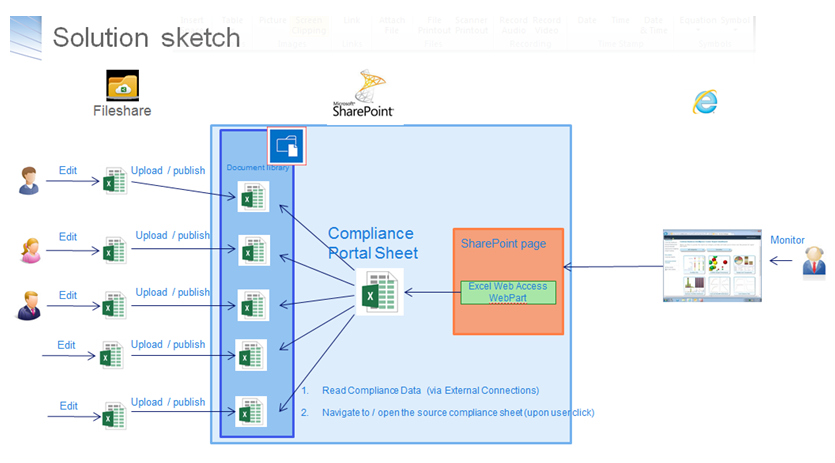
I have a 2-steps setup for a dashboard-solution provisioned via Excel-services:
  1. Functional data managers / compliance officers: maintain the data offline in Excel worksheets, and when the data maintenance effort is finished publish the worksheet as datasource to SharePoint document libary
  2. A separate 'View' dashboard connects via Excel Services to the 'datasource' Excel worksheets, and renders the dashboard - charts, KPIs and so on; This 'view' dashboard worksheet is via Excel Web Access rendered on the SharePoint dashboard page
Opening the dashboard page results in error message Unable to refresh data for a data connection in the workbook..... In the ULS log, only minimal relevant information was logged: "Refresh failed for <data connection> in the workbook....". Via internet search I found a very valuable resource, Excel Services data refresh flowchart (codename: Excel Services Troubleshooting). This helped me find and fix the problem.

Excel Services - 400 Bad Request due large cookie

Playing with Excel Services to compose a dashboard page, I suddenly encountered HTTP 400's on requesting the dashboard page. I monitored the request handling in Fiddler, it showed HTTP Error 400. The size of the request headers is too long. So I inspected the request, and noticed that the Cookie somehow had grown to a very large (string)value:
Pragmatic resolution to fix from the issue is to close all IE instances, and start a fresh IE session. That resolves the issue.

Saturday, July 5, 2014

Programmatically set decision of Duet Enterprise task

In our award-winning VIEW (Virtual Integrated Enterprise Workplace) concept we include a generic inbox. In the generic inbox tasks are aggregated from multiple sources: SAP, SharePoint, Oracle, proprietary systems, and so on. The user sees in his/her inbox all outstanding tasks from the diverse task backends. And it is also supported to direct handle the tasks from the generic inbox.
To make the generic inbox real also for Duet Enterprise tasks, it is required to programmatically approve them via the inbox instead of via the standard Duet Enterprise task forms. A good start how to achieve this is article ‘how to create Duet SharePoint webparts’ of Ravi Sharma, in which he uses programmatic Duet Enterprise task approval as an example.
The approach Ravi takes in his setup is to directly update the SAP task by invoke via SharePoint BCS Application Programming Interface (API), explict self the wfUpdate method on the DuetEnterprise WorkflowTask External ContentType. And if the SAP task update is successful, also afterwards alter the SharePoint task that functions as reference or placeholder in SharePoint context to that SAP task.
Although this approach works, it has multiple architectural disadvantages:
  • It bypasses the standard Duet Enterprise workflow capability to update the SAP task via the SharePoint task.
  • It effectively duplicates some of the code and working of the internals of Duet Enterprise workflow update. As architect, I very much dislike any code duplication.
  • Per conceptual task update, 2 tasks must be explicit updated: first the SAP task, next the SharePoint task. This makes the task handling more complex.
  • There is a clear difference in the approval of SharePoint tasks that are created via Duet Enterprise workflow capability, versus regular SharePoint tasks (from any SharePoint workflow, e.g. document approval)
I favor the approach to handle all SharePoint tasks, including the ones that are instantiated as result of Duet Enterprise workflow publication, the same. And be ignorant of what happens in the SharePoint context and possible beyond as result of the task decision update. To achieve this, my SharePoint task update code is a variant on the ‘updateSharePointTask’ method of Ravi. And in this approach, I have no need for the ‘updateSAPTask’ method, as this responsibility is handled by the standard Duet Enterprise workflow capability.
There are 2 caveats when programmatically update Duet Enterprise tasks:
  1. Generic for SharePoint tasks: extendedproperties field ‘ows_taskstatus’ must have been set for the task update to be accepted. However, you cannot set this direct self, but set it indirect by this code snippet:
  2. Specific for Duet Enterprise tasks: In ItemUpdating eventreceiver, multiple checks are done to verify that it is indeed the intention to propagate to SAP. One of these checks is that a string-compare is done on both the set status text as status code. If this string-concattenation is not present in the Duet Enterprise task PossibleOutcomes (you specify this when you in SharePoint ‘Configure a new SAP workflow task type’), then the SharePoint task update succeeds, but the update is silently not propagated onto the connected SAP side. To make sure the programatically set status text is in sync with the configured PossibleOutcomes, I derive the status text based on that same configured PossibleOutcomes:
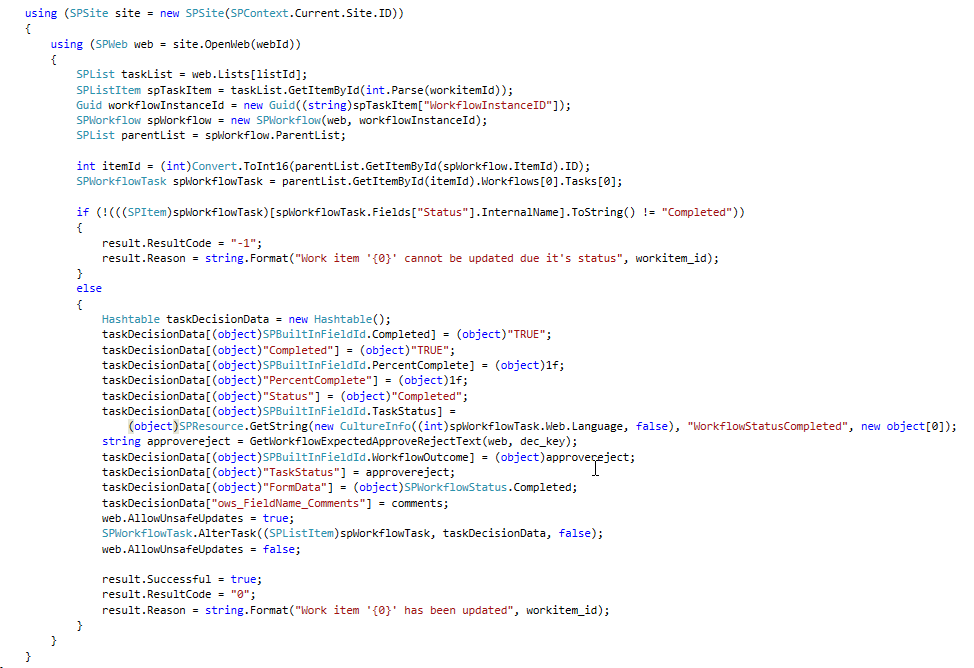
The complete code example to programmatically set the decision on SharePoint task, which via Duet Enterprise workflow capability then propagate the decision made to the connected SAP task:

Friday, June 27, 2014

Utilize Duet Enterprise 1.0 and 2.0 in parallel in enterprise architecture

Duet Enterprise supports migration scenarios in mixed SharePoint 2010 + 2013 landscape
Deployment of Duet Enterprise is a strategic addition to an organization’s existing infrastructure of SAP Business Suites and Microsoft SharePoint. One of the requirements from enterprise architecture perspective is that the investment in Duet Enterprise is future-proof. The utilization of Duet Enterprise for SAP-SharePoint interoperability must include a roadmap to follow-up on the innovations and developments in the SAP and SharePoint platforms. This is where Duet Enterprise 2.0 comes into place: the first version of Duet Enterprise supports SharePoint 2010, it’s successor supports SharePoint 2013. Duet Enterprise 2.0 is also backwards compatible, Duet Enterprise 1.0 services + BDC Models with Gateway Generic channel can be directly reused in SharePoint 2013 to interoperate via SAP NetWeaver Gateway with the SAP business suites.
In nowadays reality of many SharePoint using organizations, it is typical that for a time they have a mixed presence in their infrastructure of current SharePoint 2010 based applications, and new SharePoint 2013 developments plus migrations from SharePoint 2010. In such situations, enterprise architecture aims to utilize Duet Enterprise for SAP-SharePoint integration on both SharePoint versions, connecting to the same SAP business suites. SAP NetWeaver Gateway in its role of the central gateway to the SAP backend landscape, supports this enterprise architecture demand. The same single Gateway system can serve multiple consumers, including multiple SharePoint farms. The consequence is that investments made in Duet Enterprise 1.0 on SharePoint 2010 platform can be harvested when gradually migrating to SharePoint 2013 context with Duet Enterprise 2.0 deployed.
In our demo landscape we have this mixed landscape operational. On a SharePoint 2010 farm we have Duet Enterprise 1.0 based scenarios operational, and on a SharePoint 2013 farm the same Duet Enterprise 1.0 scenarios and also new Duet Enterprise 2.0 scenarios.
A prerequisite for this parallel SharePoint 2010 + Duet Enterprise 1.0 and SharePoint 2013 + Duet Enterprise 2.0 setup, is that the SharePoint farms must use the same SharePoint STS certificate. The reason for this is that in Duet Enterprise 1.0 scenarios, SAML is used for Single Sign-On handling. Both SharePoint 2010 as also SharePoint 2013 use the SharePoint STS certificate to sign the SAML assertion that is added to Duet Enterprise 1.0 requests originating through SharePoint Business Connectivity Service (BCS) application.
As our landscape is not a production system, I used a self-signed certificate for the SharePoint STS service applications in the 2010 plus 2013 farm. This saves us from the nuisance of having to renew the STS certificate each year. Something to be aware of is that in case of using a self-signed certificate on server A that is generated on another server B, it is also required to import on server A the internal root certificate of server B. This is required to enable server A to verify the full chain of certificates of the self-signed certificate generated on server B.

Sunday, February 9, 2014

SAML2 Protocol requires SSL-enabled Duet Enterprise 1.0 endpoints

An organization that is deploying Duet Enterprise in the landscape, default has no SSL enabled in their internal network. They questioned to neither activate SSL on the Duet Enterprise SAP Add-On / SAP NetWeaver Gateway 2.0 system.

However, this request cannot be granted. Reason is the usage of SAML2 for Duet Enterprise 1.0 Single Sign-On between SharePoint 2010 and SAP NetWeaver Gateway system.

Source 1: Duet Enterprise Security Considerations

The user accounts that are used to access SharePoint Server 2010 and Microsoft Office 2010 suites clients cannot be used to access the information in SAP directly. The Duet Enterprise security architecture solves this issue by configuring the Microsoft Business Connectivity Services Windows Communications Foundation (WCF) connector that is included in SharePoint Server 2010. This WCF connector interacts with the Security Token Service in SharePoint Server 2010 and with SAP NetWeaver in the SAP system. The goal of this implementation is to map user identities in SharePoint Server 2010 to user accounts in the SAP system so that a user who logs on to the SharePoint Server 2010 Web site can have access to the external data that is stored in the SAP system without having to log on again in the SAP system.

Duet Enterprise 1.0 applies SAML2 with Symmetric Key for Endorsing Signature.

Source 2: STS Scenario with Symmetric Key for Endorsing Signature

With this scenario, the STS and the WS consumer negotiate a symmetric key. This is used for an endorsing signature for messages between the WS consumer and the WS provider. The WS consumer uses this endorsing signature to prove that it is in possession of the key that the STS signed.

In short (a.o. source 2 contains a complete outline of the SAML2 Protocol steps): in the SAML2 Protocol with Symmetric Key,

  • the webservice consumer (in Duet Enterprise scenario: SharePoint BCS) authenticates the logged-on SharePoint user at the Identity Provider (in Duet Enterprise scenario: SharePoint STS),
  • the Identity Provider grants a SAML security token for the SharePoint account, generates a short-lived key and signs this with the public key of the X.509 certificate of the webservice provider (in Duet Enterprise scenario: SAP NetWeaver Gateway),
  • STS returns the SAML token + signed STS key as SAML assertion to SharePoint BCS as webservice consumer.
  • SharePoint BCS adds the signed token as SAML assertion (Holder-of-Key, HoK assertion) to the header of the service request and sends the request to SAP NetWeaver Gateway as webservice provider.
  • Gateway uses the private key of its own SSL certificate to decipher the token, and validate it as genuine coming from trusted asserting party.
  • If so, the SAML:NameIdentifier in the service request is relied on, and applied via SAP NetWeaver User Mapping to automatically log on the SharePoint account as its mapped SAP named user.

The SAML2 protocol effectively prevents other message recipients, which do not posses the private key, are able to decipher and misuse the security token.

Both the SharePoint 2010 and SAP Gateway participants in the Duet Enterprise SSO handling, uphold to the SAML2 Protocol. This implies that SharePoint expects requires that Gateway as webservice provider exposes https-enabled service endpoints. In case not, on each runtime Duet Enterprise service request, SharePoint STS will throw exception from method System.ServiceModel.ClientCredentialsSecurityTokenManager.CreateServerX509TokenProvider, like: "System.InvalidOperationException: The service certificate is not provided for target 'http://<hostname>/sap/bc/srt/pm/.....' ", as it is not enabled to setup a valid SAML2 Protocol handling with the invoked Gateway relying party.

For this customer organization, as the SSL is only applied in the internal network to uphold the SAML2 Protocol handling between SAP Gateway system and SharePoint 2010 farm, there is no need for a (pricy + period-bound) signed SSL certificate from a Certificate Authority. A self-signed certificate suffices. Note that the Duet Enterprise Configuration Wizard creates and configures a self-signed SSL certificate in case the Gateway system is not yet SSL-enabled.

Wednesday, January 22, 2014

Function of SharePointResourceUrl property in BDC model

Lately we had an issue with SharePoint BCS usage. In my analysis I noticed that the value of the ‘SharePointResourceUrl’ in some models was not pointing to our SharePoint farm. But as the role of ‘SharePointResourceUrl’ parameter in BDC Models is badly documented, I was not certain this was really the problem cause. Also an Internet search on ‘SharePointResourceUrl’ only returns a few (2) hits, but none useful to explain its purpose.
This week I via-via received an answer from Microsoft Support on the functionality of this BDC model parameter. And although we already found the cause of our initial problem (it was SSL + webdispatcher related, between the external system and SharePoint farm), I still consider it worthwhile to log that described functionality.
Response from Microsoft support:
The SharePointResourceUrl is used to determine where the STS (Security Token Service) is located, i.e.:
SharePointResourceUrl + "/_vti_bin/sts/spsecuritytokenservice.svc?wsdl"
I've only encountered problems with SharePointResourceUrl on client solutions with SharePoint BCS when users sync an External List offline to Outlook or SharePoint Workspace. In these situations SharePointResourceUrl is required in order for the client to locate the STS service.

Sunday, January 12, 2014

Explanation + resolution of BCS "Cannot find any matching endpoint configuration"

Explanation

SharePoint BCS operates with external systems through the connection information in BDC Models, administrated in its metadata store. BDC Models can 1. be imported via Central Admin UI, Business Connectivity Services application; 2. provisioned via features; 3. and manually be created via SharePoint Designer.
When BDC administrates a new BDC Model, the BDC administration process reads the WcfMexDocumentUrl value from the LobSystem node in the model; and uses this to runtime retrieve from the WcfMexDocument (= Service Metadata) all the service endpoints. The received service endpoins in the WcfMexDocument are administrated in the internal WcfConnectionManager class.
When the BDC service application is invoked by a BDC client to interoperate with the external system, BDC uses the WcfEndpointAddress value from the LobSystemInstance node in the model as the service endpoint url. But it does not directly invoke the (WCF) service on that endpoint address. It first uses this endpoint address to retrieve additional endpoint configuration data (e.g. what character is used as wildcard in the external system) from the WcfConnectionManager class. Information that was derived when administrating and processing the BDC Model, and stored as key-value pairs with the key equal to a service endpoint address included in the service metadata / WcfMexDocument.
Now, in case the WcfEndpointAdress value in the LobSystemInstance node is not present as one of the service endpoints in the WcfMexDocument; BDC is not able to locate the additional endpoint configuration; and all BDC client invocations of this External ContentType will fault with the error message “Cannot find any matching endpoint configuration”.

Resolution

The above sketched situation originates from a mismatch in the BDC Model versus the WcfMexDocument. The fix is to make sure that the WcfEndPointAddress in the BDC Model, does have a match with one of the service endpoint addresses of the WcfMexDocument. This either means to adjust the WcfEndPointAddress value in the BDC Model to a correct and present vaue, and reimport the model. Or to modify the WcfMexDocumentUrl to include the WcfEndPointAddress value as one of the service endpoints. Note that as BDC builds up its internal administration in WcfConnectionManager on processing a BDC Model, also in the latter case the BDC Model must be re-imported despite that itself has not changed. Through reimport the situation in WcfConnectionManager will be reset and corrected.

Tuesday, December 24, 2013

SharePoint 2010 BCS SAML Assertion too coarse-grained

Results in false positives notification at service providers of message replay

Security Assertion Markup Language (SAML) is an XML standard for exchanging authentication and authorization data between security domains. SAML is an XML-based protocol that uses security tokens containing assertions to pass information about a principal (usually an end user) between a SAML authority, that is an identity provider, and a SAML consumer, that is a service provider. SAML assertions contain statements that service providers use to make access control decisions. SAML enables web-based authentication and authorization scenarios including cross-domain single sign-on (SSO).
Source: http://en.wikipedia.org/wiki/SAML_1.1
SharePoint 2010 supports SAML 1.1 to authenticate as service consumer to external systems. Involved service applications are Secure Token Service as SharePoint internal identity provider, and Business Connectivity Services as service consumer to external systems. Required part of SAML support is that the identity provider must unique assert each identity token. This uniqueness is used by service provider to verify the validity of a SAML assertion: in case already ‘used’, the identity assertion should be interpretated as ‘stolen’ and potential misused in message replays.
Message replays are applied in 2 categories of security attacks:
  • Service Availability: overflood the service provider with same requests over and over in a Denial of Service Attack.
  • Data Integrity: request same data updates multiple times (e.g. bank transfer).
To protect against message replay attacks, service providers need to verify the idempotency of each received client request. Each unique message should be handled only once, also in the case it is send + received more than once to compensate for unreliable message delivery.

SAML assertion by SharePoint BCS

SharePoint BCS in the role of service consumer supports this by unique tagging each request sent with a SAML Assertion ID added in the message header. SharePoint BCS calculates this SAML SignatureValue based on 2 values to uniquely tag the message: message issuer and message instant id. The issuer value is fixed set to “SharePoint”, the instant value is dynamic set to timestamp at moment of sending:
<saml:Assertion xmlns:saml="urn:oasis:names:tc:SAML:1.0:assertion" AssertionID="_2519fc29-9577-403c-a66d-7926b55760a2" IssueInstant="2013-11-08T08:39:07.274Z" Issuer="SharePoint" MajorVersion="1" MinorVersion="1">
As it turns out this tagging is not guaranteed unique. In case more than 1 message is send by BCS in the same millisecond, the issue instant is equal for all those messages and therefore also the calculated SAML Assertion ID. And the receiving SAML consumer, aka the service provider will thus likely regard all these messages as equal, handle only the first, and refuse to handle the supposed duplicates.

Duet Enterprise: SAP Gateway as SAML consumer of SharePoint BCS

Duet Enterprise 1.0 applies SAML 1.1 to provide Single Sign-On from SharePoint 2010 into SAP NetWeaver Gateway 2.0. In the Duet Enterprise runtime client-service flow, SharePoint BCS is the service client, and SAP NetWeaver Gateway is the service provider. So Gateway must verify requests received from SharePoint BCS on idempotency, aka detect message replays. As result of the vulnerability in the BCS SAML assertion approach, Gateway may report false positives of message replay. This is visible in the NetWeaver WS (WebServices) errorlog via presence of error: CX_WS_ST_CACHE_ERROR / Error when writing the ST to DB.
I raised this issue to Duet Enterprise team for investigation. Their rightful response is that the problem cause is not within Duet Enterprise, but lies within SharePoint. So we contacted Microsoft. Microsoft Support acknowledges the problem cause, but sadly stated that “as it is not critical” no solution will be provided on short notice. Consequence is that you either have to accept the potential occurrence of false positives of message replays, or to ask SAP BASIS to disable the message replay detection mechanism at the receiving SAP side. This boils down to first answering the question whether it is likely that multiple requests are made from SharePoint BCS to SAP within same timestamp. A typical example of this is SharePoint search crawling, which issues a batch of requests into SAP. But it also may occur in a SharePoint webpart, when it uses a composition of SAP data services to render the webpart UI (e.g. customer + order headers).
See also: Explanation + resolution for CX_WS_ST_CACHE_ERROR, on the Duet Enterprise Space on SAP Community Network (SCN).

Saturday, August 31, 2013

Applying SharePoint FAST for unlocking SAP data

An important new mantra is search-driven applications. In fact, "search" is the new way of navigating through your information. In many organizations an important part of the business data is stored in SAP business suites. A frequently asked need is to navigate through the business data stored in SAP, via a user-friendly and intuitive application context. For many organizations (78% according to Microsoft numbers), SharePoint is the basis for the integrated employee environment. Starting with SharePoint 2010, FAST Enterprise Search Platform (FAST ESP) is part of the SharePoint platform. All analyst firms assess FAST ESP as a leader in their scorecards for Enterprise Search technology. For organizations that have SAP and Microsoft SharePoint administrations in their infrastructure, the FAST search engine provides opportunities that one should not miss.

SharePoint Search

Search is one of the supporting pillars in SharePoint. And an extremely important one, for realizing the SharePoint proposition of an information hub plus collaboration workplace. It is essential that information you put into SharePoint, is easy to be found again. By yourself of course, but especially by your colleagues. However, from the context of 'central information hub', more is needed. You must also find and review via the SharePoint workplace the data that is administrated outside SharePoint. Examples are the business data stored in Lines-of-Business systems [SAP, Oracle, Microsoft Dynamics], but also data stored on network shares.
With the purchase of FAST ESP, Microsoft's search power of the SharePoint platform sharply increased. All analyst firms consider FAST, along with competitors Autonomy and Google Search Appliance as 'best in class' for enterprise search technology. For example, Gartner positioned FAST as leader in the Magic Quadrant for Enterprise Search, just above Autonomy. In SharePoint 2010 context FAST is introduced as a standalone extension to the Enterprise Edition, parallel to SharePoint Enterprise Search. In SharePoint 2013, Microsoft has simplified the architecture. FAST and Enterprise Search are merged, and FAST is integrated into the standard Enterprise edition and license.

SharePoint FAST Search architecture

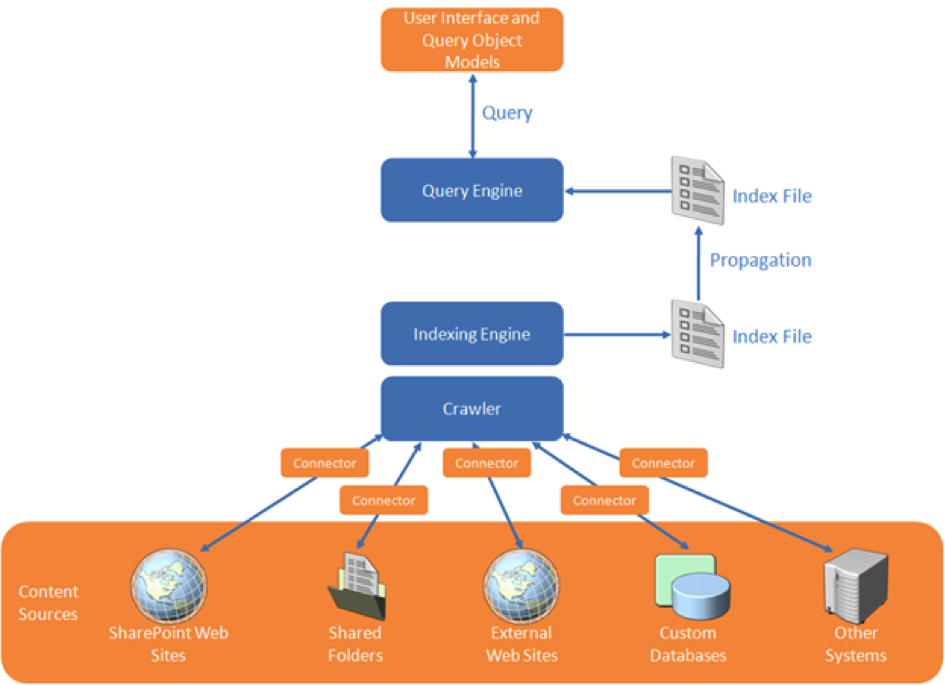
The logical SharePoint FAST search architecture provides two main responsibilities:
  1. Build the search index administration: in bulk, automated index all data and information which you want to search later. Depending on environmental context, the data sources include SharePoint itself, administrative systems (SAP, Oracle, custom), file shares, ...
  2. Execute Search Queries against the accumulated index-administration, and expose the search result to the user.
In the indexation step, SharePoint FAST must thus retrieve the data from each of the linked systems. FAST Search supports this via the connector framework. There are standard connectors for (web)service invocation and for database queries. And it is supported to custom-build a .NET connector for other ways of unlocking external system, and then ‘plug-in’ this connector in the search indexation pipeline. Examples of such are connecting to SAP via RFC, or ‘quick-and-dirty’ integration access into an own internal build system.
In this context of search (or better: find) in SAP data, SharePoint FAST supports the indexation process via Business Connectivity Services for connecting to the SAP business system from SharePoint environment and retrieve the business data. What still needs to be arranged is the runtime interoperability with the SAP landscape, authentication, authorization and monitoring. An option is to build these typical plumping aspects in a custom .NET connector. But this not an easy matter. And more significant, it is something that nowadays end-user organizations do no longer aim to do themselves, due the involved development and maintenance costs.
An alternative is to apply Duet Enterprise for the plumbing aspects listed. Combined with SharePoint FAST, Duet Enterprise plays a role in 2 manners:
(1) First upon content indexing, for the connectivity to the SAP system to retrieve the data. The SAP data is then available within the SharePoint environment (stored in the FAST index files). Search query execution next happens outside of (a link into) SAP.
(2) Optional you'll go from the SharePoint application back to SAP if the use case requires that more detail will be exposed per SAP entity selected from the search result. An example is a situation where it is absolutely necessary to show the actual status. As with a product in warehouse, how many orders have been placed?

Security trimmed: Applying the SAP permissions on the data

Duet Enterprise retrieves data under the SAP account of the individual SharePoint user. This ensures that also from the SharePoint application you can only view those SAP data entities whereto you have the rights according the SAP authorization model. The retrieval of detail data is thus only allowed if you are in the SAP system itself allowed to see that data.
Due the FAST architecture, matters are different with search query execution. I mentioned that the SAP data is then already brought into the SharePoint context, there is no runtime link necessary into SAP system to execute the query. Consequence is that the Duet Enterprise is in this context not by default applied.
In many cases this is fine (for instance in the customer example described below), in other cases it is absolutely mandatory to respect also on moment of query execution the specific SAP permissions. The FAST search architecture provides support for this by enabling you to augment the indexed SAP data with the SAP autorisations as metadata.
To do this, you extend the scope of the FAST indexing process with retrieval of SAP permissions per data entity. This meta information is used for compiling ACL lists per data entity. FAST query execution processes this ACL meta-information, and checks each item in the search result whether it allowed to expose to this SharePoint [SAP] user.
This approach of assembling the ACL information is a static timestamp of the SAP authorizations at the time of executing the FAST indexing process. In case the SAP authorizations are dynamic, this is not sufficient.
For such situation it is required that at the time of FAST query execution, it can dynamically retrieve the SAP authorizations that then apply. The FAST framework offers an option to achieve this. It does require custom code, but this is next plugged in the standard FAST processing pipeline.
SharePoint FAST combined with Duet Enterprise so provides standard support and multiple options for implementing SAP security trimming. And in the typical cases the standard support is sufficient.

Applied in customer situation

The above is not only theory, we actually applied it in real practice. The context was that of opening up of SAP Enterprise Learning functionality to operation by the employees from their familiar SharePoint-based intranet. One of the use cases is that the employee searches in the course catalog for a suitable training. This is a striking example of search-driven application. You want a classified list of available courses, through refinement zoom to relevant training, and per applied classification and refinement see how much trainings are available. And of course you also always want the ability to freely search in the complete texts of the courses.
In the solution direction we make the SAP data via Duet Enterprise available for FAST indexation. Duet Enterprise here takes care of the connectivity, Single Sign-On, and the feed into SharePoint BCS. From there FAST takes over. Indexation of the exposed SAP data is done via the standard FAST index pipeline, searching and displaying the search results found via standard FAST query execution and display functionalities.
In this application context, specific user authorization per SAP course elements does not appy. Every employee is allowed to find and review all training data. As result we could suffice with the standard application of FAST and Duet Enterprise, without the need for additional customization.

Conclusion

Microsoft SharePoint Enterprise Search and FAST both are a very powerful tool to make the SAP business data (and other Line of Business administrations) accessible. The rich feature set of FAST ESP thereby makes it possible to offer your employees an intuitive search-driven user experience to the SAP data.

Tuesday, July 2, 2013

HowTo secure enable anonymous access of SharePoint external facing website

SharePoint can be used to provision public facing websites, accessible for the anonymous audience. Naturally it is then required that the contents (publishing pages, images, stylesheets) on the SharePoint website are anonymous accessible. In SharePoint 2007 the only option was to completely open up the SharePoint site collection, including all of its contents. Starting with SharePoint 2010 you have more fine-grained options. You can still open up the entire SharePoint context, which is the easy approach. Or you can decide to explicitly determine which of the content in the SharePoint site collection is anonymous accessible.

Enable Anonymous Access on site-collection level

As said, this is the easy, and as result also the most common applied approach. Basically you have to set one switch (ok, it takes some more, you can find the steps outlined here), and you're good to go.
What you must realize is that with this approach, basically all your content is anonymous accessible. Not only the publishing pages, but all SharePoint lists and libraries in the site collection are open for data retrieval from outside your domain. The data can be retrieved via the "old" Lists.asmx service (e.g. using CodePlex SPServices.js within jQuery context; or by invoking Lists.asmx from a .NET console application), or via ListData.svc. Whether this is a concrete problem depends: if the lists and libraries do not contain any sensitive data, what's the harm? But if they do, then you do not want that data to be retrievable outside your control.
Noteworthy: This is the applied approach when you host your public facing website in SharePoint Online / Office 365.

Enable Anonymous Access explicitly only for the required SharePoint artefacts

As can be seen from the picture, you also have the option to enable anonymous access on 'Lists and Libraries' level. If you select that option, default still all your SharePoint content is prohibited for anonymous access. You have to explicitly enable per List / Library if their contents must be anonymous accessible. In practice this means that for public facing websites, you must enable Anonymous Access on the Pages library in each Publishing Site in the site collection. But also on the Style Library, so that .css and .js resources are accessible. If you display images stored in a PictureLibrary on website pages, then you must also enable that library. Same for documents. In case you need to display on a page data from a List that is deliberate not enabled, you can still do. But you will have to wrap the data retrieval in an ElevatedPrivilege context; and thus requires custom code.
So this approach implies much more work as simple enable on 'Total website'. And also you'll have an extra maintenance responsibility: when the website is augmented with another Publishing Site, you have to [remember to] enable the Pages library in that site also explicitly for Anonymous Access.
Sounds like a drag? Well, the [very] good side is that you are in explicit control of which content you allow for anonymous access. And the default mode is Not Accessible, which is a security best practice.

Lock _vti_bin usage

There is a third option. Go the easy route of enabling Anonymous Access for total website; and avoid uncontrolled data retrieval via the SharePoint webservices by disable on DNS level the usage of '_vti_bin'. This approach has however some drawbacks. You cannot use SharePoint Designer anymore to open the site. And you can no longer use the SharePoint REST services in anonymous context. In the current time of Rich HTML5 Apps, it is becoming de-facto reference architecture to connect the front-end to your data and logic via REST services. So this poses a real limitation. Which in my book should not be taken too lightly.

Monday, June 24, 2013

Inconvenient Import-SPWeb with Sandboxed Solutions

In current project we deliver an initial SharePoint site-collection as white-label site. The aim is we utilize the initial site as template for concrete label websites. Challenge is how to duplicate the white-label site collection into a concrete label site. Backup-SPSite plus Restore-SPSite is an option, but requires that you restore each copy to its own content database. Reason is that Restore-SPSite preserves the siteid from the original / backed-up site, and this conflicts with the white-label site (and any other restored site) in same content database.
Second option is to restore the site collection structure via combination of Export-SPWeb plus Import-SPWeb. Approach is to export the root web plus all its recursive sub webs; and import them in a fresh created empty site collection.
When doing this, the import job halted with error:
Inspecting the Import log revealed that it concerned a SPList based on ListTemplate provisioned via feature in a Sandboxed solution. And this results in a sequencing issue: the list is first to be created in the copy site, before the sandboxed solution is also added plus activated within the copy site.
Solution is to upload and activate the Sandboxed solution within the fresh copy site collection, before running the Import-SPWeb.
Note that default you cannot download solutions from the solution gallery of the white-label site collection. But you can fix that by adding a view to the solution gallery with includes ‘Name’ as view column.

Monday, June 17, 2013

Architecture of a cloud-enabled SAP/SharePoint document viewer

End 2012 IntelliDocx LLC approached us to design the global architecture for their new DocSet.ECM for SAP and SharePoint product suite, and build DocSet.ECM for Plant Maintenance (PM) as first member. The DocSet.ECM functionality is enable end-users to search, navigate and access documents linked with SAP entities, directly within SharePoint based workplaces. The SAP entities come from any of the known SAP Business Suites - PM, Sales, HCM, SRM. IntelliDocx had an ambitieus deadline, as they aimed to release the PM solution to the public and market analysts at the European SharePoint Conference in Copenhague (Februari 2013).
The base functional requirement for the product suite is that it renders a view in SharePoint on documents linked in SAP. But to make it a winning solution, they have more requirements. The products must be very user-intuitive and friendly; enabling arbitrair end-users to utilize it without requiring inside SAP knowledge. Product deployment must be fit for both on-premise as cloud. More and more organizations nowadays have decided, or are looking into, SharePoint Online utilization iso maintaining an own on-premise SharePoint farm. And of course, the product should support both SharePoint 2010 and 2013; or at least be prepared for 2013 ahead.

System Architecture

The diagram below illustrates the architecture we proposed to address the requirement set. (And which we indeed applied to successfully deliver the DocSet.ECM for PM product to market, within the tight timeframe [News release]).

Essentials

DocSet Viewer
  • Deployed via Sandboxed Solution
  • UserControl iso aspx page
    • allows to add the DocSet viewer to regular SharePoint site and content pages / intuïtieve integration within customer’s SharePoint based portals
  • Server-side only rendering the html
    • No server postback handling
    • No interactive dependency on SharePoint server (may be cloud-hosting)
  • Client-side handles communication with the DocSet webservice, and dynamic UI-rendering
    • By-pass SharePoint server
    • Use jQuery:
      • Invoke DocSet JSON webservice
      • Render tree-view of hierarchical document folders
      • Drag-and-drop of documents (for Move + Add)
  • Configuration:
    • Endpoint of DocSet webservice (may be cross-domain)
DocSet webservice
  • WCF JSON webservice
  • Enable CrossDomain invocation via JSONP
    • CORS is not yet widely supported; and in particular not within the enterprise domain
  • Utilize ERP-Link RFC Connector for SAP / Microsoft.NET interoperability with DocSet.ECM RFCs
    • The architecture allows usage of other SAP / Microsoft connectors, e.g. Duet Enterprise, but we decided to initially use the ERP-Link connector as IntelliDocx told us a lot of their customers already use the Gimmal ERP-Link Suite.
  • Configuration:
    • Connection settings to DocSet RFC
    • Address of SharePoint server hosting the DocSet viewer, to allow cross-site requests from this possible remote / other domain server

DocSetViewer App - SharePoint 2010 + 2013

The DocSet.ECM for SAP and SharePoint product suite is fit to deploy and run within both SharePoint 2010 and 2013, without any code-change; and hosting supported on-premise and within the Office365 cloud.
  
Related info: IntelliDocx

Saturday, March 9, 2013

DataForm and DataView WebParts cannot display data from other site when on SitePage

DataFormWebPart is a powerful webpart to query and render data from SharePoint content sources on pages in the website. In our scenario we intend to utilize it to conditionaly display reusable content on pages. For the reusable aspect we use the standard SharePoint ‘ReusableContent’ capability. For the conditional part, we aimed to utilize the DataFormWebPart, and via ParameterBinding + Query direct it to retrieve specific ‘ReusableContent’ listitem based on a querystring parameter-value.
The ‘ReusableContent’ list is located on rootweb of the sitecollection. A mature website typically consists of a hierarchy of subsites within the sitecollection. To display through DFWP ‘reusablecontent’ in a subsite it is necessary to set it’s WebUrl parameter to ‘{sitecollectionroot}’.
To check the correct behaviour (reusable + conditional) I used SharePoint Designer to create a page in the website, add the preconfigured DFWP to it, and validate the effect in browser. It turned out that it works (reusable + conditional) when the page is created in the rootweb, but for subsites the DFWP gives an error when opening the page in browser (ULS: List Not Found). Strangely in SPD the DFWP on page in subsite can connect to the list in the rootweb, and you do not experience any problem. I was rather puzzled by this, moreover because I followed the exact directions of posts that instructed this is the way to enable DFWP on pages in subsites. Just when I was about to submit a support call to Microsoft, I decided as last attempt to create a Publishing Page (thus in browser, not possible via SPD), and add the preconfigured DFWP. And guess what; then it works!
As our scenario concerns external facing and thus publishing websites, this is sufficient. Just be aware that you cannot use the DFWP on SitePage to connect to SPList in another site.

Sunday, December 30, 2012

OData Channel (ODC) development now preferred for new Duet Enterprise scenarios

As of Duet Enterprise FP1 SP3, the Duet Enterprise product team now clearly positions OData Channel as the recommended approach for new developments of custom Duet Enterprise scenarios:
Feature Pack 1 for Duet Enterprise 1.0 Development Introduction
Generic Channel remains supported, also within Duet Enterprise 2.0; but will not be enhanced with new features and capabilities. Message: OData is the way to go. Main reason is that OData has much more potential for consumption outside the SAP Business Suite boundaries, and therefore the Duet Enterprise team is focusing its resources on supporting that more prospective channel.

Consequence for Duet Enterprise custom development: learn new approach + tools

Although one thus still has the option to utilize the Generic Channel development approach, the signal send by Duet Enterprise team is clear. OData development has the momentum and the future. Consequence for custom Duet Enterprise development is that on SAP side the programmer must transition to develop Gateway OData Services instead of GSDO types. The concepts and steps of the 2 are somewhat comparable, but the tools and execution + coding are different. For GSDO the ABAP programmer uses SE80 and /IWFND/GWO_GEN; OData development is performed mainly within the new Service Builder (SEGW). Within both approaches you have the options to generate the data provider class through mapping to RFC and BOR, or to manual handcraft it. Once the data provider class is ready (OData DPC or Generic Channel GSDO), you expose it as SharePoint 2010 callable entity. For OData DPC, the BDC Browser tool is extended with the capability to convert OData Services into Gateway SOAP web service. At runtime, Gateway applies for this the Duet Enterprise FP1 SP3 OData-SOAP Bridge. The existence of the OData-SOAP Bridge is transparent for the SAP Duet Enterprise developer. One simple utilizes the BDC Browser as before for GSDO type, to now expose the OData Service for consumption within SharePoint 2010.
Noticeable is that for SharePoint 2010 development side, nothing changes. You still import the BDC model generated via BDC Browser containing one or more External Content Types that refer to Gateway SOAP webservice(s). And next utilize the out-of-the-box Business Data UI-controls, and/or the BCS API to develop a custom UI.
See also: