In earlier
post I informed about facing CORS issue when interoperate from external JavaScript client via OAuth passive authentication with SharePoint Online REST API. And on how-to easily resolve this via Azure Function Proxy. That approach works for OAuth based passive authentication, with the OAuth AccessToken exchanged via HTTP header. However, in case the external client wants to apply active authentication, the situation complicates severely. The explanation is that in this authentication flow, the SharePoint Online authentication token is exchanged as
HttpOnly cookie:

The SharePoint Developer Support Team Blog published an
article that outlines which set of requests one needs to implement for SharePoint Online active authentication. In case of non-browser clients, this is sufficient to enable SharePoint Online interoperability from an external client. For instance, I've applied this OAuth active authentication flow within an Excel VBA client context, a colleague of mine used it from Curl script, and yet another from a Java application. In a non-browser client context, the received OAuth Active Authentication HTTP response can successfully be parsed to extract the SPOIDCRL cookie.
Modern browsers utilize Cross-Origin protection themselves to mitigate risks: HttpOnly cookie cannot be read by clientside code, and the browser only include cookie for outgoing requests pointing to same domain as from which the HttpOnly cookie is earlier received within current browser session.
Modern secure browser have inherent protection that prevents access to secure HttpOnly cookies: on the wire [Fiddler] the SPOIDCRL cookie is included in the response, yet the browser [here Chrome, via Developer Tools] does not allow access it.
Implication is that the
custom CORS handling needs to be further extended to have the browser include the required SharePoint Online authentication cookie cross-domain in SharePoint Online REST API calls. Although same approach via Azure Function Proxy can successfully be utilized to cross-domain request the SharePoint Online active authentication end-point, the browser accepts the returned cross-origin response but your clientside code is not enabled to extract the SharePoint Online authentication token included as HttpOnly cookie (
SPOIDCRL). And even if that would be possible, the second blocker is that the SharePoint Authentication Token must be included as cookie for successful authentication again SharePoint Online, but browsers only include the cookie for requests going to the same domain. Meaning that all SharePoint interoperability requests coming from the external JavaScript client must be proxied to the same domain as of the proxied Active Authentication endpoint; <
your tenant>/_vti_bin/IDCRL.svc
On the webclient side the needed changes are minimal: include ‘
withCredentials:true’ in issued XMLHttpRequest requests. But on the receiving and processing Azure Function (Proxy) side, more must be changed:
• Function-Apps have out-of-the-box platform support for CORS; as utilized for the CORS handling in case of OAuth passive authentication flow. However, I experienced this is limited to only return the CORS headers Allowed-Domain + Allowed-Method. Current, Function-Apps platform CORS does not include support for cross-domain authentication handling via ‘withCredentials’. I tried alternatives to set the missing 'Access-Control-Allow-Credentials' header explicitly self in the
responseOverrides of the Azure Function Proxy; and learned that in case CORS is configured on the platform level, any Cross-Origin headers in the responseOverrides object are just silently ignored; not included in the resultant http response of the Azure Function Proxy call. Then I tried to instead
nullify the Function-App Platform CORS setting, as described in
Azure Functions Access-Control-Allow-Credentials with CORS. This works to receive the SharePoint Online authentication token cross-domain.
• But on next usage to allow the browser to send the cookie, all your SharePoint Online REST calls must go to the same domain as from which the cookie was received. This can be achieved by also proxy these calls via the Azure Function Proxy. This on itself is very simple to configure in the Azure Function Proxy via generic pattern matching in a new proxy:
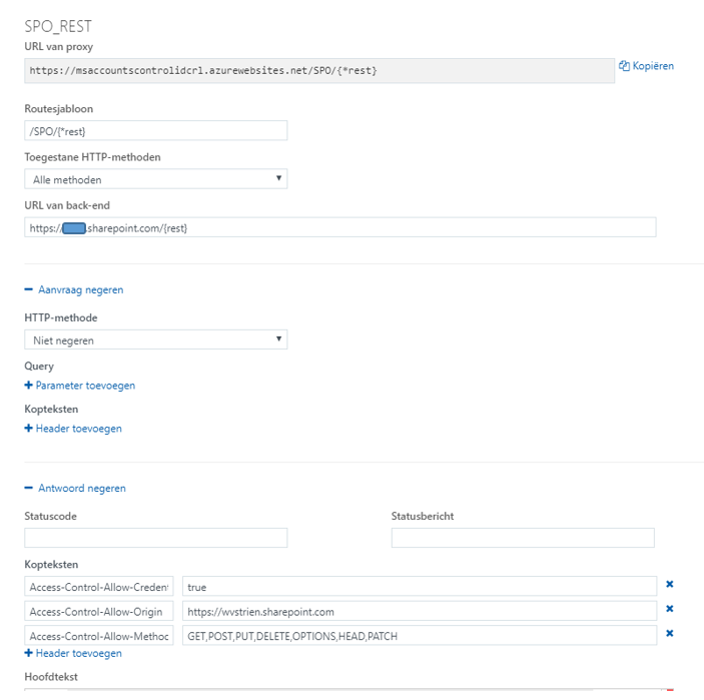
However then on invoking that proxy cross-domain from the client / browser, it is refused by Azure Function Proxy with Http 405 / Not Allowed ➔ because I removed all allowed domains at the platform CORS configuration of the Azure Function, while the browser includes in the request the CORS 'Origin' header that now no longer matches on the Azure Function-App level (a typical case of 'chicken-egg' situation).
• I then tried with '*' as allowed domain in the platform CORS configuration. But this again results that the explicit additional CORS response headers via responseOverrides object are ignored. And in addition '*' is not allowed on browser level in conjunction with 'withCredentials': Failed to load https://msdnwvstrienspocors.azurewebsites.net/IDCRL.svc: Response to preflight request doesn't pass access control check: The value of the 'Access-Control-Allow-Origin' header in the response must not be the wildcard '*' when the request's credentials mode is 'include'. Origin 'https://wvstrien.sharepoint.com' is therefore not allowed access. The credentials mode of requests initiated by the XMLHttpRequest is controlled by the withCredentials attribute.
• As implication of the above enumerated various experiences, I conclude that in their current implementation, Azure Function Proxy is unfit to resolve CORS handling in context with SharePoint Online active authentication flow. Therefore I decided for alternative approach to explicit self build the CORS-aware proxy behavior in custom Azure Functions. I minimal need to implement 2 functions; the CORS aware/allowed access to default MSO endpoint https://login.microsoftonline.com/rst2.srf and https://#ADFSHOST#/adfs/services/trust/2005/usernamemixed (username/password ADFS endpoint) can still be arranged via an Azure Function Proxy, similar as earlier configured for OAuth passive authentication endpoint. But for CORS aware access to combination of IDCRL.svc and any authenticated request to your SharePoint Online tenant the Azure Function Proxy approach thus falls short. For each of these 2, a custom proxy implementation is required.
• I observed that also in case of explicit CORS handling coded in Azure Function, still any Function-App platform CORS configuration prevales above that. Therefore it is required to completely disable platform CORS on the Function-App. As the CORS-aware Azure Function Proxies for the other / first 2 requests in the active authentication flow do depend on the platform CORS configuration, I decided to split within 2 seperate Function-Apps with own domain. I could also have resorted to custom proxy build for the first 2 requests and include in the same App container, but whereever possible I prefer a 'configuration' and out-of-the-box approach above (maintaining) custom code. So I stick with utilization of Azure Function Proxy where possible.
Complete CORS-enabled setup for all of the 4 requests involved in SharePoint Online active authentication: the first 2 can be CORS-enabled via Azure Function Proxy, the last 2 must be CORS-enabled via custom Azure Function.
Configuration of the Azure Function Proxies to CORS-enable "<your custom STS>/ adfs/services/trust/2005/usernamemixed" and "https://login.microsoftonline.com/RST2.srf"
Impression of the custom Azure Function: CORS-enable "<your SPO tenant>/_vti_bin/idcrl.svc" is simple; proxy-ing SharePoint REST API calls is more complex and challenging. Note: the custom proxy for active authentication requests in your SharePoint tenant is also fit for non-REST requests, e.g. to browse your SharePoint Online sites
Cross-Domain / CORS prepared JavaScript browser client, interoperating with SharePoint Online REST API
This is what happens in the webclient (browser) / SharePoint Online interoperability with adjustment for CORS:
First request automatic issued by secure-aware browser: OPTIONS to start with CORS Preflight
On server / client confirmed preflight, get cross-domain the SPO authentication cookie
Utilze the retrieved SPO authentication cookie within browser-issued SPO REST calls


