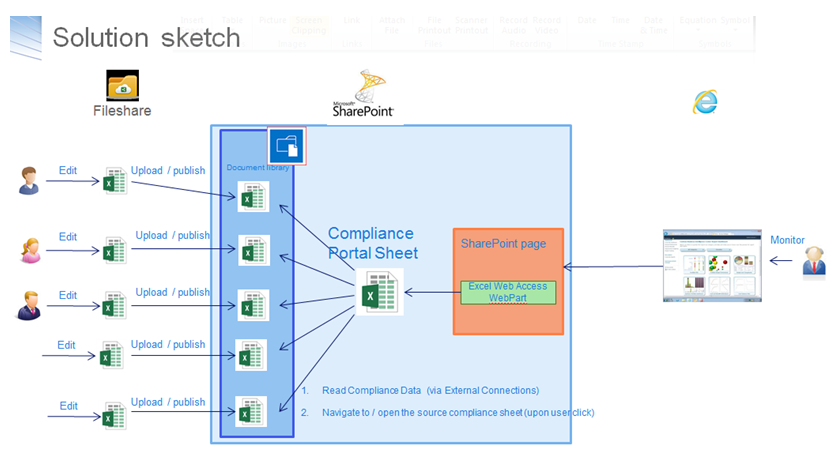
Excel Services does not support the entire Excel feature set. A.o following aspects are not supported:
- VBA code,
- Macros,
- Comments,
- Shapes,
- External Links, to external workbooks
- (Formula) Names that refer to external workbooks,
- Data validations,
- space(s) in name of worksheet connected as Range Name
(see Differences between using a workbook in Excel and Excel Services)If your 'source' Excel workbook contains any of the above, trying to use it in Excel Services - e.g. via Chart WebPart - results in the generic error 'Exception has been thrown by the target of an invocation'.
Required step before using a 'source' Excel workbook in Excel Services is to convert it to a compliant variant. Excel itself does not include such a functionality. But you can facilitate the user (typical functional data management) via a VBA macro in the excel sheet.
VBA Code
Sub SaveWorkbookAsNewFile()
    Dim ActSheet As Worksheet
    Dim ActBook As Workbook
    Dim CurrentFile As String
    Dim NewFileName As String
    Dim NewFileType As String
    Dim NewFile As String
    Dim ws As Worksheet

    Application.ScreenUpdating = False

    CurrentFile = ThisWorkbook.FullName

    ThisWorkbook.Save

    RemoveDataValidations ActBook:=ActiveWorkbook
    RemoveComments ActBook:=ActiveWorkbook
    RemoveShapes ActBook:=ActiveWorkbook
    BreakLinks ActBook:=ActiveWorkbook
    RemoveNamesToExternalReferences ActBook:=ActiveWorkbook
    RemoveConditionalFormatting ActBook:=ActiveWorkbook
    RemoveSpacesFromWorksheets ActBook:=ActiveWorkbook
    RemoveVBA ActBook:=ActiveWorkbook

    NewFileType = "Excel Workbook (*.xlsx), *.xlsx," & _
               "All files (*.*), *.*"

    NewFile = Application.GetSaveAsFilename( _
        InitialFileName:=NewFileName, _
        fileFilter:=NewFileType)

    If NewFile <> "" And NewFile <> "False" Then
        ActiveWorkbook.SaveAs Filename:=NewFile, _
            FileFormat:=xlOpenXMLWorkbook, _
            Password:="", _
            WriteResPassword:="", _
            ReadOnlyRecommended:=False, _
            CreateBackup:=False
    End If

    ThisWorkbook.Close False
    Workbooks.Open CurrentFile, False

    Application.ScreenUpdating = True
End Sub

Sub RemoveVBA(ActBook As Workbook)

On Error Resume Next
    Dim Element As Object
    With ActBook.VBProject
        For Each Element In .VBComponents
            .VBComponents.Remove Element
        Next

        For x = .VBComponents.Count To 1 Step -1
            .VBComponents(x).CodeModule.DeleteLines 1, .VBComponents(x).CodeModule.CountOfLines
        Next x
    End With
End Sub

Sub RemoveDataValidations(ActBook As Workbook)
    Dim ws As Worksheet
    For Each ws In ActBook.Worksheets
        ws.Cells.Validation.Delete
    Next ws
End Sub

Sub RemoveComments(ActBook As Workbook)
    Dim ws As Worksheet
    Dim xComment As Comment
    For Each ws In ActBook.Worksheets
        For Each xComment In ws.Comments
            xComment.Delete
        Next
    Next ws
End Sub

Sub RemoveShapes(ActBook As Workbook)
    Dim ws As Worksheet
    Dim sh As Shape
    For Each ws In ActBook.Worksheets
        For Each sh In ws.Shapes
            sh.Delete
        Next sh
    Next ws
End Sub

Sub BreakLinks(ActBook As Workbook)
    Dim Links As Variant
    Links = ActBook.LinkSources(Type:=xlLinkTypeExcelLinks)
    For i = 1 To UBound(Links)
        ActBook.BreakLink _
            Name:=Links(i), _
            Type:=xlLinkTypeExcelLinks
    Next i
End Sub

Sub RemoveNamesToExternalReferences(ActBook As Workbook)
    Dim nm As Name
    For Each nm In ActBook.Names
        If InStr(nm.RefersTo, "[") <> 0 Then
            nm.Delete
        End If
   Next
End Sub

Sub RemoveConditionalFormatting(ActBook As Workbook)
    Dim ws As Worksheet
    For Each ws In ActBook.Worksheets
        ws.Cells.FormatConditions.Delete
    Next ws
End Sub

Sub RemoveSpacesFromWorksheets(ActBook As Workbook)
    Dim ws As Worksheet
    For Each ws In ActBook.Worksheets
        ws.Name = Replace(ws.Name, " ", "_")
    Next ws
End Sub