Wednesday, November 5, 2014
Recover from SharePoint 2013 Search and CryptoGraphic mismatch - 'Key does not exist'
Monday, July 21, 2014
Connect SharePoint 2013 to SAP via Gateway for Microsoft
- Connect to the Gateway service proxy from a SharePoint web part context [mind you, Microsoft urges us to step away from this SharePoint server-side model; but it is still possible and supported]
- Build a custom BCS Connector to connect to the Gateway service proxy, and use that connector from SharePoint to render the received SAP data via standard External List, Business Data WebParts, or a custom build web part that invokes the BCS Api
- Build a SharePoint WCF RESTful service to connect to the Gateway service proxy, and consume that service in a browser-based front-end; using a databinding library like knockout.js, Angular.js. This is an example of SharePoint 2013 App model, and can also be applied in Office 365 / SharePoint Online.
SharePoint version
SharePoint 2010 has been build “ages ago”, and has a hard dependency on .Net framework 3.5. In the current year, the .Net framework has progressed to .Net framework 4.5, and the latest version of SharePoint [2013] has catched up with that. And the same holds for Duet Enterprise 2.0 [which is actually for SharePoint 2013, if you have SharePoint 2010 you need the Duet Enterprise 1.0 version], and also GWM: both are .Net Framework 4.x dependent. As consequence, I have to relax my firm statement a bit: Yes, GWM can be used to connect SAP and SharePoint 2013; but not for the older SharePoint versions (2003/2007/2010).Simple example for Proofing
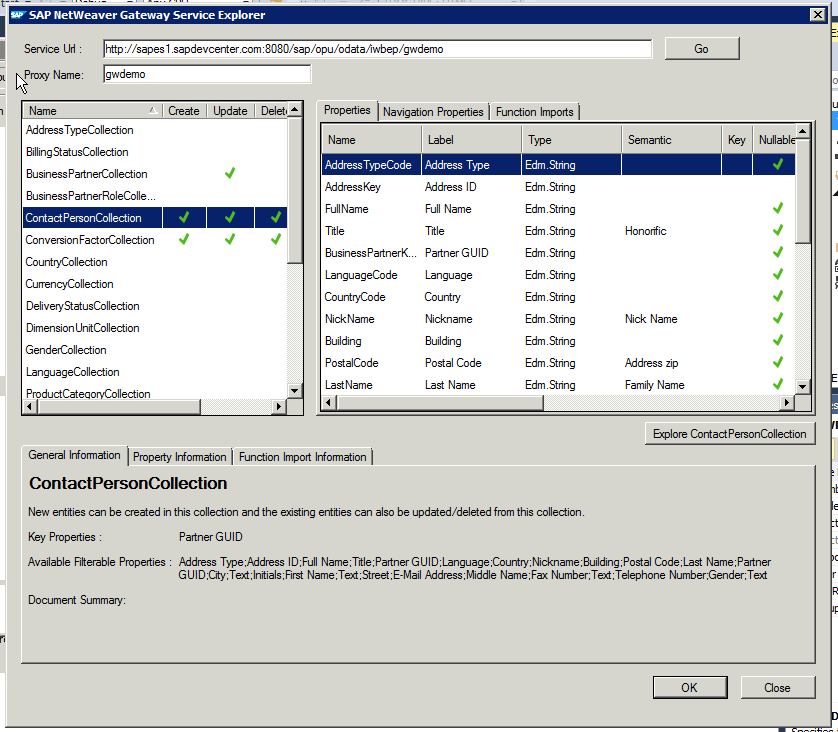
To demonstrate, I made up a sample scenario to retrieve SAP CRM data via GWM into SharePoint. I used the demo Gateway services as data source (see article by Martin Bachmann for instruction how to get access to the SAP Gateway demo system), and our own SharePoint 2013 environment as front-end. Further I have Visual Studio 2013, and necessarily also the latest GWM sp3 (versions preceeding sp3 will not install in Visual Studio 2013; but they do install in Visual Studio 2010/2012).


Fixes needed to GWM generated code
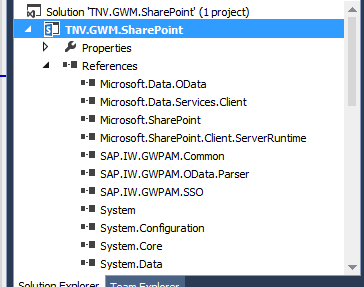
Issue 1: Microsoft.Sharp not included in references


Does GWM replace Duet Enterprise?
The answer to this is a clear No: Duet Enterprise as framework has more capabilities as GWM: SAP workflow integration, SAP BW reports publication, roles synchronization, user profile synchronization. Also Duet Enterprise has complete self-contained support within for Single Sign-On between SharePoint and SAP, while with GWM you need additional infra to achieve this (e.g. X.509 certificates infra in your landscape).Saturday, July 5, 2014
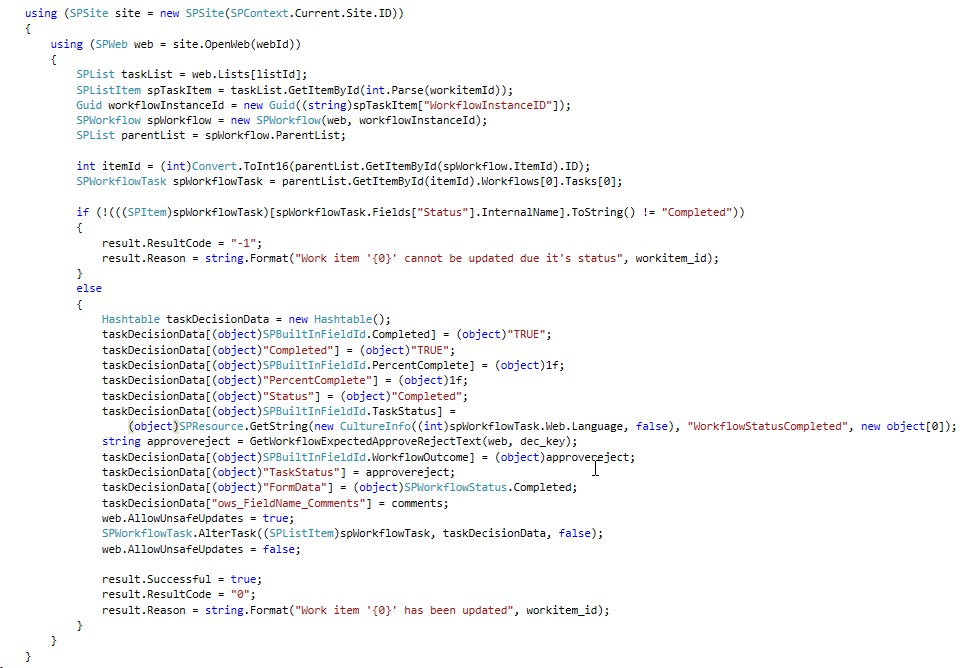
Programmatically set decision of Duet Enterprise task
- It bypasses the standard Duet Enterprise workflow capability to update the SAP task via the SharePoint task.
- It effectively duplicates some of the code and working of the internals of Duet Enterprise workflow update. As architect, I very much dislike any code duplication.
- Per conceptual task update, 2 tasks must be explicit updated: first the SAP task, next the SharePoint task. This makes the task handling more complex.
- There is a clear difference in the approval of SharePoint tasks that are created via Duet Enterprise workflow capability, versus regular SharePoint tasks (from any SharePoint workflow, e.g. document approval)
- Generic for SharePoint tasks: extendedproperties field ‘ows_taskstatus’ must have been set for the task update to be accepted. However, you cannot set this direct self, but set it indirect by this code snippet:

- Specific for Duet Enterprise tasks: In ItemUpdating eventreceiver, multiple checks are done to verify that it is indeed the intention to propagate to SAP. One of these checks is that a string-compare is done on both the set status text as status code. If this string-concattenation is not present in the Duet Enterprise task PossibleOutcomes (you specify this when you in SharePoint ‘Configure a new SAP workflow task type’), then the SharePoint task update succeeds, but the update is silently not propagated onto the connected SAP side. To make sure the programatically set status text is in sync with the configured PossibleOutcomes, I derive the status text based on that same configured PossibleOutcomes:


Friday, June 27, 2014
Utilize Duet Enterprise 1.0 and 2.0 in parallel in enterprise architecture
Sunday, June 15, 2014
Duet Enterprise 2.0 - installation troubleshooting
Issue 1: ‘Add-on IW_DUETE Release 100 can only be installed in client 000’
Import of the Duet Enterprise 2.0 SAP Add-On via transaction SAINT gives the following error:
Issue 2: ‘The remote certificate is invalid according to the validation procedure’.
This error can occur in multiple SharePoint-SAP scenarios: runtime invocation of Duet Enterprise service from SharePoint 2013 side, import of a Duet Enterprise 2.0 BDC Model: Application definition import failed. The following error occurred: The remote certificate is invalid according to the validation procedure.Issue 3: ‘The root certificate that was just selected is invalid’
Importing in SharePoint 2013 ‘Manage Trust’ the SSL certificate of SAP NetWeaver Gateway results in error:
Issue 4: ‘No service found for namespace /IWWRK/, name DUET_WORKFLOW_CORE
Manifest itself upon configuration of Duet Enterprise 2.0 Workflow solution.
Issue 5: DuetConfig: ‘The operation name is missing or invalid’
For instance occurs with the DuetConfig command to configure workflow, command with multiple operation parameters: DuetConfig.exe -importbdc -FeatureName Workflow -LsiUrl "https://tnvsrm.tnv.corp/sap/opu/odata/IWWRK/DUET_WORKFLOW_CORE;mo;c=SHAREPOINT_DE/" -BdcServiceApplication "Business Data Connectivity Service" -UserSubLsiUrl "https://tnvsrm.tnv.corp/sap/opu/odata/IWBEP/SUBSCRIPTIONMANAGEMENT; mo;v=2;c=SHAREPOINT_DE/"
Issue 6: ‘Lobsystem (External System) returned authentication error'
For instance, occurs upon trying to import a Duet Enterprise 2.0 BDC Model into SharePoint 2013 Business Connectivity Services application:


Issue 7: Import of Duet Enterprise 1.0 BDC Model fails due missing ‘WSDL’ application definition.

Issue 8: Invocation of Duet Enterprise 1.0 service fails due missing SSO
Browsing a SharePoint 2013 External List results in error ‘An unsecured or incorrectly secured fault was received from the other party’.

Epilogue
Compared to the excellent troubleshooting guide for Duet Enterprise 1.0, the above list of issues plus resolutions is much smaller. The Duet Enterprise product team of SAP plus Microsoft has clearly improved their delivery on this aspect.Friday, June 6, 2014
Winner of SAP Microsoft Unite Partner Connection Customer Impact and Value Award with VIEW solution


Saturday, May 3, 2014
Corrupt SharePoint account breaks Duet Enterprise workflow publishing

Sunday, February 9, 2014
SAML2 Protocol requires SSL-enabled Duet Enterprise 1.0 endpoints
An organization that is deploying Duet Enterprise in the landscape, default has no SSL enabled in their internal network. They questioned to neither activate SSL on the Duet Enterprise SAP Add-On / SAP NetWeaver Gateway 2.0 system.
However, this request cannot be granted. Reason is the usage of SAML2 for Duet Enterprise 1.0 Single Sign-On between SharePoint 2010 and SAP NetWeaver Gateway system.
Source 1: Duet Enterprise Security Considerations
The user accounts that are used to access SharePoint Server 2010 and Microsoft Office 2010 suites clients cannot be used to access the information in SAP directly. The Duet Enterprise security architecture solves this issue by configuring the Microsoft Business Connectivity Services Windows Communications Foundation (WCF) connector that is included in SharePoint Server 2010. This WCF connector interacts with the Security Token Service in SharePoint Server 2010 and with SAP NetWeaver in the SAP system. The goal of this implementation is to map user identities in SharePoint Server 2010 to user accounts in the SAP system so that a user who logs on to the SharePoint Server 2010 Web site can have access to the external data that is stored in the SAP system without having to log on again in the SAP system.
Duet Enterprise 1.0 applies SAML2 with Symmetric Key for Endorsing Signature.
Source 2: STS Scenario with Symmetric Key for Endorsing Signature
With this scenario, the STS and the WS consumer negotiate a symmetric key. This is used for an endorsing signature for messages between the WS consumer and the WS provider. The WS consumer uses this endorsing signature to prove that it is in possession of the key that the STS signed.
In short (a.o. source 2 contains a complete outline of the SAML2 Protocol steps): in the SAML2 Protocol with Symmetric Key,
- the webservice consumer (in Duet Enterprise scenario: SharePoint BCS) authenticates the logged-on SharePoint user at the Identity Provider (in Duet Enterprise scenario: SharePoint STS),
- the Identity Provider grants a SAML security token for the SharePoint account, generates a short-lived key and signs this with the public key of the X.509 certificate of the webservice provider (in Duet Enterprise scenario: SAP NetWeaver Gateway),
- STS returns the SAML token + signed STS key as SAML assertion to SharePoint BCS as webservice consumer.
- SharePoint BCS adds the signed token as SAML assertion (Holder-of-Key, HoK assertion) to the header of the service request and sends the request to SAP NetWeaver Gateway as webservice provider.
- Gateway uses the private key of its own SSL certificate to decipher the token, and validate it as genuine coming from trusted asserting party.
- If so, the SAML:NameIdentifier in the service request is relied on, and applied via SAP NetWeaver User Mapping to automatically log on the SharePoint account as its mapped SAP named user.
The SAML2 protocol effectively prevents other message recipients, which do not posses the private key, are able to decipher and misuse the security token.
Both the SharePoint 2010 and SAP Gateway participants in the Duet Enterprise SSO handling, uphold to the SAML2 Protocol. This implies that SharePoint expects requires that Gateway as webservice provider exposes https-enabled service endpoints. In case not, on each runtime Duet Enterprise service request, SharePoint STS will throw exception from method System.ServiceModel.ClientCredentialsSecurityTokenManager.CreateServerX509TokenProvider, like: "System.InvalidOperationException: The service certificate is not provided for target 'http://<hostname>/sap/bc/srt/pm/.....' ", as it is not enabled to setup a valid SAML2 Protocol handling with the invoked Gateway relying party.
For this customer organization, as the SSL is only applied in the internal network to uphold the SAML2 Protocol handling between SAP Gateway system and SharePoint 2010 farm, there is no need for a (pricy + period-bound) signed SSL certificate from a Certificate Authority. A self-signed certificate suffices. Note that the Duet Enterprise Configuration Wizard creates and configures a self-signed SSL certificate in case the Gateway system is not yet SSL-enabled.
Tuesday, December 24, 2013
SharePoint 2010 BCS SAML Assertion too coarse-grained
Results in false positives notification at service providers of message replay
- Service Availability: overflood the service provider with same requests over and over in a Denial of Service Attack.
- Data Integrity: request same data updates multiple times (e.g. bank transfer).
SAML assertion by SharePoint BCS
SharePoint BCS in the role of service consumer supports this by unique tagging each request sent with a SAML Assertion ID added in the message header. SharePoint BCS calculates this SAML SignatureValue based on 2 values to uniquely tag the message: message issuer and message instant id. The issuer value is fixed set to “SharePoint”, the instant value is dynamic set to timestamp at moment of sending:Duet Enterprise: SAP Gateway as SAML consumer of SharePoint BCS
Duet Enterprise 1.0 applies SAML 1.1 to provide Single Sign-On from SharePoint 2010 into SAP NetWeaver Gateway 2.0. In the Duet Enterprise runtime client-service flow, SharePoint BCS is the service client, and SAP NetWeaver Gateway is the service provider. So Gateway must verify requests received from SharePoint BCS on idempotency, aka detect message replays. As result of the vulnerability in the BCS SAML assertion approach, Gateway may report false positives of message replay. This is visible in the NetWeaver WS (WebServices) errorlog via presence of error: CX_WS_ST_CACHE_ERROR / Error when writing the ST to DB.Sunday, November 17, 2013
Duet Enterprise / GWPAM interview at SAP TechEd Amsterdam
Friday, November 1, 2013
Tip: activate Gateway Metadata cache to resolve NullPointer / CX_SY_REF_IS_INITIAL error
Monday, October 28, 2013
GWPAM - SAP data direct in Microsoft Office client-applications
The first foreseen scenarios are Microsoft Office Add-In’s, to expose and integrate the SAP business data in the everyday used Microsoft Office clients. For example, SAP CRM customer data in the form of Outlook contacts, invoice approval requests as Outlook tasks, functional data management of SAP masterdata through Excel, BW report data rendered in PowerPoint, and submit SAP CATS timetracking directly from your Outlook Calendar ...
As with Duet Enterprise, the two suppliers have their collective strength and market presence behind this new product offering. This is also a major distinction compared to the various proprietary connectors of smaller parties.
Saturday, August 31, 2013
Applying SharePoint FAST for unlocking SAP data
SharePoint Search
Search is one of the supporting pillars in SharePoint. And an extremely important one, for realizing the SharePoint proposition of an information hub plus collaboration workplace. It is essential that information you put into SharePoint, is easy to be found again. By yourself of course, but especially by your colleagues. However, from the context of 'central information hub', more is needed. You must also find and review via the SharePoint workplace the data that is administrated outside SharePoint. Examples are the business data stored in Lines-of-Business systems [SAP, Oracle, Microsoft Dynamics], but also data stored on network shares.SharePoint FAST Search architecture
The logical SharePoint FAST search architecture provides two main responsibilities:- Build the search index administration: in bulk, automated index all data and information which you want to search later. Depending on environmental context, the data sources include SharePoint itself, administrative systems (SAP, Oracle, custom), file shares, ...
- Execute Search Queries against the accumulated index-administration, and expose the search result to the user.
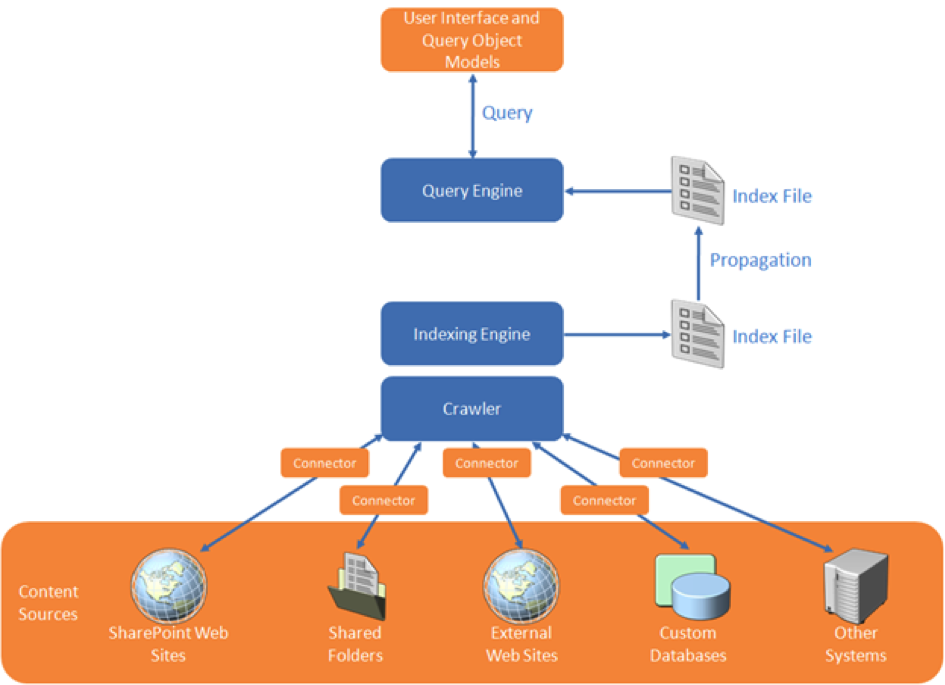
(1) First upon content indexing, for the connectivity to the SAP system to retrieve the data. The SAP data is then available within the SharePoint environment (stored in the FAST index files). Search query execution next happens outside of (a link into) SAP.
(2) Optional you'll go from the SharePoint application back to SAP if the use case requires that more detail will be exposed per SAP entity selected from the search result. An example is a situation where it is absolutely necessary to show the actual status. As with a product in warehouse, how many orders have been placed?
Security trimmed: Applying the SAP permissions on the data
Duet Enterprise retrieves data under the SAP account of the individual SharePoint user. This ensures that also from the SharePoint application you can only view those SAP data entities whereto you have the rights according the SAP authorization model. The retrieval of detail data is thus only allowed if you are in the SAP system itself allowed to see that data.Due the FAST architecture, matters are different with search query execution. I mentioned that the SAP data is then already brought into the SharePoint context, there is no runtime link necessary into SAP system to execute the query. Consequence is that the Duet Enterprise is in this context not by default applied.
Applied in customer situation
The above is not only theory, we actually applied it in real practice. The context was that of opening up of SAP Enterprise Learning functionality to operation by the employees from their familiar SharePoint-based intranet. One of the use cases is that the employee searches in the course catalog for a suitable training. This is a striking example of search-driven application. You want a classified list of available courses, through refinement zoom to relevant training, and per applied classification and refinement see how much trainings are available. And of course you also always want the ability to freely search in the complete texts of the courses.Conclusion
Microsoft SharePoint Enterprise Search and FAST both are a very powerful tool to make the SAP business data (and other Line of Business administrations) accessible. The rich feature set of FAST ESP thereby makes it possible to offer your employees an intuitive search-driven user experience to the SAP data.Thursday, March 7, 2013
Duet Enterprise 2.0 Authentication flow
Saturday, February 23, 2013
Duet Enterprise 2.0 Online / Extends reach of SAP data into Microsoft Cloud
SharePoint Online
Most significant in SharePoint 2013 is that it is ‘built for the cloud [1] [2]’. The motiviation for Microsoft to focus on cloud-enablement is market-demand: a considerable subset of its SharePoint customer-base struggles with hosting and operating SharePoint themselves on premise. And because of this struggle, a lot of SharePoint-using organizations are reluctant to upgrade their SharePoint deployment. Via the Cloud / on demand offering, Microsoft aims to reach 2 goals: relieve organizations from the burden of SharePoint operations, and enable those same organizations to stay on par with the feature progress in the SharePoint and Office platform. Microsoft plans an upgrade release cycle of every 90 days for SharePoint 2013 Online.Duet Enterprise 2.0 Online
The SharePoint 2013 cloud offering also has positive implication for Duet Enterprise deployment options. In addition to the existing on premise installation option, Duet Enterprise 2.0 offers a cloud / on demand alternative. Extend the reach of your SAP data into the Microsoft cloud. In such infra architecture, the SAP landscape is on premise, but Microsoft SharePoint 2013 is serviced in the cloud.- Each customer organization must [still] deploy the Duet Enterprise 2.0 SAP Add-On in own on premise SAP landscape; installed on the SAP NetWeaver Gateway 2.0 system
- SharePoint 2013 Online must include the Duet Enterprise 2.0 SharePoint Add-On
- The connectivity between on premise SAP Add-On and cloud hosted SharePoint Add-On requires a ‘light’ local SharePoint 2013 node. This node functions as intermediate layer ('broker') from internal SAP Gateway to SharePoint online and vice versa.
- Mutual trust-relationship between the on premise SAP Add-On and the on premise or cloud hosted SharePoint Add-On is based on X.509 certificates; no longer on SAML. The X.509 certificates are provisioned by the Duet Enterprise SSO Generator on the ('light') SharePoint 2013 node on premise.

Availability
Duet Enterprise 2.0 is already General Available for on premise deployments, but not yet for the cloud. It necessary follows upon the public availability of SharePoint 2013 Online, with the inclusion of Duet Enterprise 2.0 SharePoint Add-On. Microsoft has not yet announced the release date, but realistic expectation is ‘somewhere’ Q1/Q2 2013. Then also more details will be communicated on how to configure and operate Duet Enterprise 2.0 in a potential multi-tenancy SharePoint Online context.Sunday, December 30, 2012
OData Channel (ODC) development now preferred for new Duet Enterprise scenarios
Consequence for Duet Enterprise custom development: learn new approach + tools
Saturday, December 15, 2012
Duet Enterprise 2.0 General Available: improvements on service development and deployment options
After successful completion of Duet Enterprise 2.0 Ramp-Up and with SharePoint 2013 reaching RTM state, SAP and Microsoft have made the new version of Duet Enterprise General Available. Customers can download the software from SAP Market Place (Installations and Upgrades \ Duet Enterprise \ Duet Enterprise 2.0). Duet Enterprise 2.0 documentation can also be found on SAP Market Place, and also on MSDN.
Most significant of the new Duet Enterprise version is that it connects with the latest capabilities of the underlying platforms, respectively SAP Gateway 2.0 and Microsoft SharePoint 2013. In both these platforms a move is made to support cloud and lightweight usage scenarios - typically but not limited to mobility use cases.
- Mobility
- Duet Enterprise now fully supports OData protocol; which is THE protocol for mobility because is it light-weight and self-describing, and supported by all mobile platforms
- Cloud
- Connect to SharePoint Online
- Only support for Odata channel; not for SOAP / Generic channel
- Requires a 'light' on premisse SharePoint installation, as intermediate layer ('broker') from internal SAP Gateway to SharePoint online. Includes SSO Generator, via reverse proxy connection with SharePoint Online
- Remark: Duet Enterprise cloud stuff is not yet GA; this will follow in a few month
- Design Time improved
- 2 design time approaches supported
- Inside-Out: via the SAP NetWeaver Gateway generators
- Outside-In: start from SharePoint UI --> visually sketch / specify a screen in Visual Studio; export the .EDMX file and import into SAP Gateway (Service Builder) for constructing the Gateway data models
- Both approaches are restricted to flat SAP data entities
- Complex data structures still requires hand-crafting on SAP Gateway side
- Via OData service providers; the handcrafting work is far simpler as with Duet Enterprise 1.0 (FP1).
- Improve the development story:
- Reference architecture guidance
- Setting up local development landscape --> facilitate individual SharePoint developers to quickly start with Duet Enterprise development
- Consequence: drop SAML, as OData does not support SAML. Use oAuth instead
- Generic Channel will still be supported; OData is extra channel possibility
- Duet Enterprise 2.0 REQUIRES SharePoint 2013
- SharePoint 2013 BCS supports Odata consumption; earlier version not
- SharePoint Online.
In the philosophy of SAP and Microsoft, also Duet Enterprise 2.0 does not include end-user functionality, e.g. order-to-cash. Duet Enterprise remains a customization + development framework for SAP / Microsoft interoperability, that enables end-organizations and partners to compose concrete scenarios and build upon. Primary reason for the Duet Enterprise product team to not include end-user functionality is that partners and end-organizations know best what diverse scenarios are requested, and are therefore better suited to construct the optimal solution. Also, even SAP plus Microsoft simple do not have the development resources to realize and support a total set of end-user capabilities for which there is market demand.
It is left to the market / Duet Enterprise eco-system to deliver standard / common-of-the-shelf end-user functionalities. Well-known example is the Cordis Suite; for self-service HCM and purchase requisition solutions. More examples can be found on Duet Enterprise Unite Partner Connection. And more partners are known to be developing on additional scenarios.
With Duet Enterprise 2.0 General Availability, it is expected that more companies will find it benefial to develop end-user solutions. This is due the combination of Duet Enterprise 2.0 development improvements, out-of-the-box plus customization capabilities of SharePoint 2013 and Office 365, and deployment extended to cloud and mobile platforms resulting in a larger market. Partners will develop solutions for horizontal and vertical markets; for local to international markets, and from small/partial solutions to complete end-2-end scenarios.
Saturday, November 10, 2012
Notification + data flow in Duet Enterprise Workflow mobile App
System architecture
In such system architecture, following systems/layers are present:- SAP backend / workflow engine: the host environment of the SAP workflows
- SAP Gateway: general purpose SAP integration layer; here used to publish SAP workflows from backend to workflow notification subscribers
- SharePoint Duet Enterprise Add-On: functions here as workflow notification subscriber; host of Duet Enterprise workflow instances, and task repository for the mobile application
- Mobile view: retrieve plus display tasks, and propagate task approval decision back to the SharePoint task repository
Notification and data flow for exposing SAP task to non-SAP view
Sequence steps:- The SAP ERP workflow execution arives on a user decision task, that is configured for notification to Gateway (tx SPRO, Gateway workflow customization);
- SAP Document Publisher composes a XML Payload document with task data: workitem identification plus business data. The addition of the workflow specific business data is optional in Gateway Workflow notification. If applicable, you can achieve this by extanding the workflow customization with the plug-in of a custom OutboundHandler;
- SAP Document Publisher calls the SharePoint OBAWorkflowServer.asmx::CreateTask operation, with inputparameters the task(type) identifier, workitem identifier and XML PayLoad document;
- SharePoint OBAWorkflowServer.asmx::CreateTask method:
- Queries the TaskLocator List in the Duet Enterprise Workflow rootsite, and determines on basis of tasktype and user language the Duet Enterprise Workflow subsite to which the received SAP task must be routed;
- Instantiates a new SharePoint workflow instance in the identified Duet Enterprise Workflow subsite, and associates this instance with the SAP workitem identifier;
- And uploads the received XML PayLoad document into the Workflow Business Data DocLibrary in the Workflow subsite;
- The SharePoint Duet Enterprise Workflow contains by default only 1 step that represents the decision-making for the SAP task. It is possible to extend the SharePoint Workflow with additional steps and functionality. This will operate isolated from the SAP Workflow handling. The default approval task in the SharePoint Duet Enterprise workflow is the only connectionpoint between the SharePoint workflow and the SAP decision workflow task. Upon the Duet Enterprise Workflow arriving at the approval task, it appears in the SharePoint tasklist.
- User opens the tasklist in the mobile application;
- The tasklist App call SharePoint List.svc service (DataAccess Layer) to retrieve the open tasks for the logged-on user
- SharePoint List.svc queries the SharePoint workflow tasklist, to determine and retrieve the open task items for logged-on user
- SharePoint List.svc returns the task items in Odata format
- The Duet Enterprise Workflow Approval Task and the XML PayLoad document are in the SharePoint Workflow administration logical associated to each other. If additional business extended properties are notified for the SAP workitem via OutboundHandler, the associated Business Data document must be opened from the SharePoint document library and its contents parsed to retrieve the additional properties.
Control and data flow for handling task decision from non-SAP mobile App to SAP workflow context
- User makes a decision in the task management App;
- Task management App calls SharePoint Workflow.asmx webservice to propagate the task approval decision to SharePoint task item;
- SharePoint workflows.asmx updates the task item with approval decision;
- The update on SharePoint taskitem triggers the TaskItemEventReceiver;
- Triggered TaskItemEventReceiver::ItemUpdating method checks whether the SharePoint task item is completed; that is a approval decision is made. If completed, TaskItemEventReceiver calls [through SharePoint Business Connectivity Services] the Update method of External ContentType Duet Enterprise Workflow Task;
- SharePoint BCS calls for Duet Enterprise Workflow Task Update the wfUpdate method of SAP workflow consumer webservice; with input parameters workitem identifier, decision value and comments;
- SAP workflow consumer webservice propagates task approval decision to the associated SAP workflow instance, and executes apply decision on the SAP workitem;
- SAP workflow completes this workitem step, and proceeds to the next step in SAP workflow. If it was the last step in workflow, the SAP workflow is now completed;
- TaskItemEventReceiver updates the status of SharePoint taskitem to completed. In default (generated) Duet Enterprise Workflow is this the only step/task, and the SharePoint workflow is completed. The SharePoint taskitem is removed from the users open tasks list.
Sunday, October 28, 2012
Deploy custom Duet Enterprise scenario from Dev into SAP landscape
Design time - prepare the custom business scenario
It is best practice to include all of the Duet Enterprise services for one scenario within an own isolated and recognizable namespace in the Gateway system. Each scenario will then be recognizable, and not per accident mingled with deliverables of another Duet Enterprise scenario. To achieve this, you create per business scenario an own Software Component in SLD, and use that to create in ESR an own Software Component Version and namespace.- Open SLD, and create a new Software Component
- Open ESR, and create a new Software Component Version via import of the newly created Software Component
- Create a namespace in the newly created Software Component Version
- Copy the Basic DataTypes from SAP IW TNG to the new Software Component Version and namespace
- Copy the Fault Message from SAP IW TNG to the new Software Component Version and namespace
- Activate the resulting changelist(s) in ESR
- Logon to Gateway system, transaction SE80; and create a Package
- Logon to Gateway system, transaction SProxy; and create + activate proxies for the Basic DataTypes, ExchangeFaultData and ExchangeLogData in the newly created Package.
Design time - create the service definitions for the custom business scenario
Per service this consists of the 2 familiar actions: create and map a Gateway DataModel, and next generate the service definition + BDC Model for this Gateway DataModel (GSDO Type).- Logon to Gateway system, transaction SE80; and create a new Gateway DataModel; make sure not to select OData channel (Duet Enterprise 1.0 and SharePoint 2010 do not support OData consumption; this will change with Duet Enterprise 2.0 and SharePoint 2013). The system enforces you to include the creation of the Gateway DataModel in a Workbench request. The advice is to not include it in the same Workbench request from the preparation step, but instead use an own Workbench request for the design time deliverables. As result you have the implementation of the Package including the generic basic DataTypes + FaultMessage separated from the implementation of the specific scenario entities. It is typical in a custom realization project that you incremently build new versions of an own service definition, and if a previous version already transported you must be able to replace that while preserving the Package.
- Map 1 of more operations in the Gateway DataModel; e.g. Query and Read
- Generate the Gateway DataModel; the system enforces you to include the generation and creation of SAP entities within a Customizing request.
- Open transaction BDC Browser; if this is the first service definition for the custom business scenario, create a new Business Scenario. Otherwise you may opt to include the 2nd, 3rd and so on service definition all within the same Business scenario. I advice this as best practice, you then end up with a single Duet Enterprise Business Scenario that contains the entire set of Service Definitions developed for it. In case you create a new Business Scenario, it is again enforced by the system to include it within a customizing request. You can select the same as earlier created for the Gateway Model generation(s).
- Select the Business Scenario, and Create BDC Model for GSDO Type; select the Gateway Model earlier created. Also here the system enforces to include within a customizing request.
- [Optional] Open transaction SProxy, select the generated service interface and test its correct working for the diverse methods in the interface (e.g. Find, Read, Create, )
- [Optional] Open SOAMANAGER on Gateway system, browse to Business Scenario Configuration. Select your Business Scenario, and export + save into a local XML file.
Implementaton time - transport the custom business scenario
When the custom realization has progressed or is even completed in the Gateway system of the SAP Development environment, next is to propagate it within the SAP landscape.- Logon to Gateway system of SAP Dev environment, transaction SE03 or SE10; and release all the Workbench and Customizing requests that are related to the custom Duet Enterprise Business Scenario
- Logon to Gateway system of the transport target environment (SAP Test or QA environment), and open Transport Management System (TMS). Import the released Workbench and Customizing requests from the Development environment.
- Activate each of the requests. Make sure to do this in the correct logical order: first package, next the business scenario including service definitions.
- Logon to Gateway system of the transport target environment, transaction BDC Browser. Validate that the Business Scenario(s) is/are present. Also validate that for each of the imported service definitions, there is no end point yet.
- Release and activate all of the imported service definitions in SOAMANAGER. Browse to Business Scenario Configuration, and import the Business_Scenario XML file that is exported in the Development environment. If the Business Scenario already exists here from a previous import, first delete it. Or otherwise you can also explicitly associate new service definitions within a/the Business Scenario, and assign a profile. After activation of the service definitions, validate in transaction BDC Browser that for each of the service definitions now an end point is available.
- [Optional] Open transaction SProxy, select the imported service interface and test its correct working for the diverse methods in the interface (e.g. Find, Read, Create, )
- Transaction BDC Browser, select the imported Business Scenario and click on Export Business Scenario. Hand over the exported SharePoint BDC Model(s) to import within the SharePoint BCS Service Application of the implementation environment.
- [Optional] In SharePoint webapplication, create an ExternalList for one of the imported External Content Types. Validate that you can retrieve SAP data via Duet Enterprise and SAP Gateway using one of the transported / imported Gateway Service Definitions.
Sunday, October 7, 2012
Duet Enterprise troubleshooting pointers
Generic
SAP side
- BDC Browser - Troubleshooting pointers
- BDC Browser Configuration - Software Component SAP IW TNG missing
- Workflow tasks not delivered?
- txn SLG1 on backend
- txn SRT_UTIL on Gateway
- txn SBGRFCMON: retry queue contains wf-items failed to deliver to SharePoint
- use 'Unit Analysis \ Run Unit with Trace' to execute again/debug
- ABAP runtime errors / dumps: txn ST22
- ABAP system log: txn SM21
- Duet Enterprise 1 - Troubleshooting Report Delivery
- GW 2.0 SP5: Which Tools Can Be Used for Troubleshooting
- For Payload tracing:
- txn SRT_UTIL
- txn SMICM (ICF trace tools)
- ABAP Function Modules and services: External Debugging, Set External Breakpoints for ABAP Debugging
- Troubleshooting Gateway Development
- SAP system HTTP Logging
- Using Starter Services without EhP4