Showing posts with label SharePoint WebServices. Show all posts

Friday, July 21, 2017

Enable CORS not possible on SharePoint authenticated application without HttpModule

On 1st research, enabling CORS on SharePoint (on-premisse) web applications seems to be easy: just configure it in the web.config.
Source: enable Cross-Origin Resource Sharing - CORS on IIS7:
<?xml version="1.0" encoding="utf-8"?>
<configuration>
 <system.webServer>
   <httpProtocol>
     <customHeaders>
       <add name="Access-Control-Allow-Origin" value="*" />
     </customHeaders>
   </httpProtocol>
 </system.webServer>
</configuration>
(also given as answer on stackoverflow: Enable CORS in SharePoint 2013)
However, on validating the effect of the config change, it turns out that the web.config based approach is insufficient in case of authenticated SharePoint application. You encounter 2 issues with only the configuration based approach:
  1. In the web.config you can only specify either the '*' or explicit client domain for the Access-Control-Allow-Origin header. To interoperate with an authenticated application, you need to pass authorization headers and set Access-Control-Allow-Credentials to true. The issue is that according to the CORS specification (see also explanation on MDN, HTTP Access Control), if Access-Control-Allow-Credentials is set to true, Access-Control-Allow-Origin cannot contain *, to disallow just any client making requests with credentials attached. Also on CORS specification level, it is documented that in case of specific domain list, it actually means 1 single specific domain (https://www.w3.org/TR/cors/#access-control-allow-origin-response-header). This limits enable CORS to a single client application.
  2. First call in the CORS protocol, is HTTP OPTIONS to establish whether CORS is allowed between client host domain and server host domain. A web.config enabled SharePoint application responds successful on the OPTIONS call with CORS-allow headers. However, SharePoint / IIS returns for authenticated webapplication the OPTIONS response with status code 401; and as result the preflight handling is stopped in browsers that respect the CORS specification.
Conclusion:
Enable CORS for a SharePoint / IIS authenticated webapplication, cannot be done via configuration only. Resolving both issues strict on SharePoint level is possible, but requires a custom HttpModule. If such server-side deployment is not allowed, another option is to resolve it on infra level, via a Reverse Proxy setup.

Sunday, March 26, 2017

SharePoint integration endpoints for a SAPUI5-based PeopleFinder

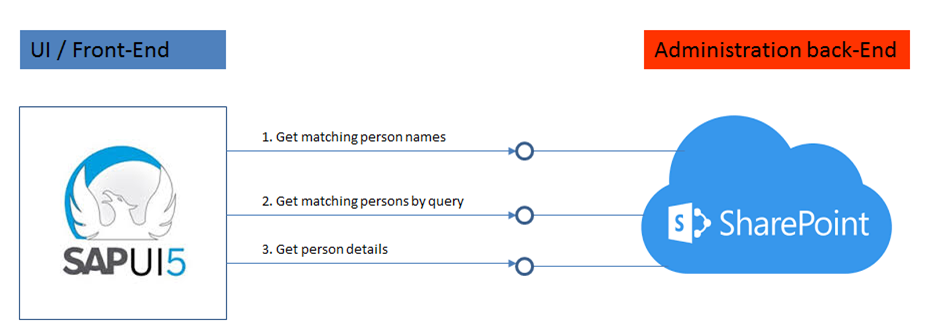
SAPUI5 is a suitable framework to build responsive-design UIs that renders to the available screen estate of diverse device types: smartphone, tablet, and desktop. It is therefore a fit to deliver an alternative UI to SharePoint's PeopleFinder functionality, in case the out-of-the-box SharePoint UI (that is, with potentially the rendering still made company specific via customized Search Display Templates) for whatever reason does not qualify as sufficient fit. The basic requirement of a SAPUI5 mobile application is that it can consume data and functionality via OData REST services. The SharePoint platform supports such an architecture via the standard SharePoint REST services:
The integration surface for a peoplefinder functionality comprises 3 main elements:
  1. To interactive present people suggestions to user while typing in characters of the people name ==> Get names list of matched users on search input
  2. Get detailed list of matched users on search input
  3. Get details for selected user
1. Get names list of matched users on search input

Best:
SharePoint end-point 
https://<SharePoint root-url>/_api/search/query?querytext='preferredname:Jones*'''&selectproperties='PreferredName'&sourceid='B09A7990-05EA-4AF9-81EF-EDFAB16C4E31'&rowlimit=10

Alternative is to search in User Information List:
SharePoint end-point 
https://<SharePoint root-url>/_vti_bin/listdata.svc/UserInformationList?$filter=((ContentType eq 'Person') and (substringof('Jones',LastName)))&$orderby=Name

but this has some disadvantages:
  • Incomplete qua users: user is only added to UserInformationList on first visit to SharePoint site; users not visited yet, are not included
  • Overcomplete: UserInformationList is never cleaned up, former colleagues remain in the list
  • Incomplete qua search: UserInformation does not contain a full name field
2. Get detailed list of matched users on search input

Search in full content / all crawled people data fields:
SharePoint end-point https://
<SharePoint root-url>/_api/search/query?querytext='Mobile*'&selectproperties='FirstName,LastName'&sourceid='B09A7990-05EA-4AF9-81EF-EDFAB16C4E31'&rowlimit=10

Search in identified property-field(s) only:
SharePoint end-point https://
<SharePoint root-url>/_api/search/query?querytext='department:Mobile*'&selectproperties='FirstName,LastName'&sourceid='B09A7990-05EA-4AF9-81EF-EDFAB16C4E31'&rowlimit=10
3. Get details for selected user

Get all public properties:
SharePoint end-point https://
<SharePoint root-url>/_api/SP.UserProfiles.PeopleManager/GetPropertiesFor(accountName=@v)?@v='<uname of user>'

Get one single identified user profile property only:
SharePoint end-point 
https://<SharePoint root-url>/_api/SP.UserProfiles.PeopleManager/GetUserProfilePropertyFor(accountName=@v,propertyName='AboutMe')?@v='<uname of user>'

Sunday, April 6, 2014

Asynchronous invocation of BCS

Return early from an elapse-time-expense BCS handling

Functional scenario: from UI context, check the user input via serverside business validation, and if functional correct propagate the same user input for processing in the business backend.
In this scenario, the user needs only to wait for the period of the validation step; if the outcome reports functional errors these must be reported to the user so (s)he is able to correct. In case of no errors, the subsequent business processing can be performed transparent to the user, no need to explicitly wait / block until this (potential time-expensive) processing is completed in the backend.
Technical context: HTML5/JavaScript client, that interopates with SAP business backend via a SharePoint RESTful services, which internally utilizes SharePoint BCS to invoke Duet Enterprise / Gateway services.

Inconvenient operating BCS from background thread

Initially, I thought it would be simple to realize the sketched execution context: handle the first step on the main thread of the SharePoint WCF REST service; if errors detected report these back; if no errors noticed, delegate the elapse-time expense propagation step to a background thread, and directly return from the main thread to unlock the client.
However, SharePoint / BCS reality proofed less trivial…
In my first attempt, I directly interoperate against BCS on the background thread:
main thread:
PerformCreation job = new PerformCreation() { _createMethod = createMethod, _jsonBody = jsonBody, _siteId = SPContext.Current.Site.ID, _userToken = SPContext.Current.Site.UserToken }; Thread backgroundThread = new Thread(new ThreadStart(job.PerformCreate)); backgroundThread.Start();  
background thread:
public void PerformCreate() { using (SPSite site = new SPSite(_siteId, _userToken)) { BCSModuleCall.Create(site, _createMethod, _jsonBody); } }  
When I executed this, the BCS Create invocation faults with a ‘Cannot complete this action’ exception. This orginates from the BCS internal method call ‘CalculatePermissionsForCurrentThread’, that checks whether in the context of the executing thread, the user has the rights to perform the BCS operation. Via code reverse engineering, I detected that the 'Microsoft.SharePoint.BusinessData.Infrastructure. BdcAccessControlList.AccessCheck(BdcRights rights)' method requires an active SPRequest context. And that only lives on the main / SharePoint thread.
To arrange that the BCS Create method is executed within the context of an active SPRequest, in my second attempt I changed the code to serverside issue from the background thread a webrequest to the SharePoint REST service. Although this technically works (that is, the ‘CalculatePermissionsForCurrentThread’ succeeds and the BCS Create operation is successful performed), a drawback is that you loose the credentials of the logged-on SharePoint user. It is not possible to propagate the claims-authenticated identity of the logged-on user to the webrequest invoked via WebClient class. It always authenticates and thus executes with the Application Pool identity.
public void PerformCreate() { var claimIdentity = (Microsoft.IdentityModel.Claims.ClaimsIdentity) Thread.CurrentPrincipal.Identity; var upnClaim = claimIdentity.Claims.FirstOrDefault( c => c.ClaimType.Equals(Microsoft.IdentityModel.Claims.ClaimTypes.Upn, StringComparison.InvariantCultureIgnoreCase)); if (upnClaim != null) { string upn = upnClaim.Value; WindowsIdentity windowsIdentity = Microsoft.IdentityModel.WindowsTokenService.S4UClient.UpnLogon(upn); var wic = windowsIdentity.Impersonate(); try { // SharePoint BCS API requires a current SPContext. In this thread, // there is no SPContext. To make sure the create is executed within // a current SPContext, create the entities by issuing REST request. WebClient webClient = new WebClient() { UseDefaultCredentials = true, BaseAddress = _baseAddress }; webClient.Headers.Add(HttpRequestHeader.ContentType, "application/json;charset=utf-8"); webClient.UploadDataAsync( (new Uri(String.Format("{0}/CreateItems", _baseAddress))), "POST", Encoding.UTF8.GetBytes(_jsonBody)); } finally { wic.Undo(); } } }  
In our scenario, it is a necessity that all data updates are authorized and audited for the issueing user. So although technical it is possible to delegate in this manner the BCS data update to a serverside background thread, from the perspective of data governance it is not allowed.

Solution: client-side operate BCS in asynchronous mode

Ultimately, I skipped the approach of serverside splitting up the BCS invocation in a synchronous blocking part, and an asynchronous non-blocking part, and instead decided to manage this from client-side. At first, issue a REST JSON request for the data validation; and let the user wait (block) on the response. If no validation errors detected, issue from the browser with the same JSON object the second update request in a fire-and-forget behaviour.
var checkUrl = bindingContext.$root.siteUrl + "/_vti_bin/WebApi/BCSAccessService.svc/CheckItems"; var checkCall = jQuery.ajax({ url: checkUrl, type: "POST", data: JSON.stringify(json), success: function (data) { if (Utilities.CheckNoErrorInResponse(data.BODY.ET_MESSAGES)) { var submitUrl = bindingContext.$root.siteUrl + "/_vti_bin/WebApi/BCSAccessService.svc/CreateItems"; // Data is already validated: //Fire-and-forget ajax async request and ignore response. var submitCall = jQuery.ajax({ url: submitUrl, type: "POST", data:JSON.stringify(json)}); alert("User input is validated and submitted."); window.parent.jQuery('#dialogForm').dialog('close'); } else { Utilities.DisplayResponseMessages(data.BODY.ET_MESSAGES); } } }).fail(Utilities.ErrorHandler);  
And this works out fine: the end-user earlier regains the input-control and responsiveness in the front-end application, while the update in the back-end is still processed in the background with the credentials of the logged-on user.

Tuesday, July 2, 2013

HowTo secure enable anonymous access of SharePoint external facing website

SharePoint can be used to provision public facing websites, accessible for the anonymous audience. Naturally it is then required that the contents (publishing pages, images, stylesheets) on the SharePoint website are anonymous accessible. In SharePoint 2007 the only option was to completely open up the SharePoint site collection, including all of its contents. Starting with SharePoint 2010 you have more fine-grained options. You can still open up the entire SharePoint context, which is the easy approach. Or you can decide to explicitly determine which of the content in the SharePoint site collection is anonymous accessible.

Enable Anonymous Access on site-collection level

As said, this is the easy, and as result also the most common applied approach. Basically you have to set one switch (ok, it takes some more, you can find the steps outlined here), and you're good to go.
What you must realize is that with this approach, basically all your content is anonymous accessible. Not only the publishing pages, but all SharePoint lists and libraries in the site collection are open for data retrieval from outside your domain. The data can be retrieved via the "old" Lists.asmx service (e.g. using CodePlex SPServices.js within jQuery context; or by invoking Lists.asmx from a .NET console application), or via ListData.svc. Whether this is a concrete problem depends: if the lists and libraries do not contain any sensitive data, what's the harm? But if they do, then you do not want that data to be retrievable outside your control.
Noteworthy: This is the applied approach when you host your public facing website in SharePoint Online / Office 365.

Enable Anonymous Access explicitly only for the required SharePoint artefacts

As can be seen from the picture, you also have the option to enable anonymous access on 'Lists and Libraries' level. If you select that option, default still all your SharePoint content is prohibited for anonymous access. You have to explicitly enable per List / Library if their contents must be anonymous accessible. In practice this means that for public facing websites, you must enable Anonymous Access on the Pages library in each Publishing Site in the site collection. But also on the Style Library, so that .css and .js resources are accessible. If you display images stored in a PictureLibrary on website pages, then you must also enable that library. Same for documents. In case you need to display on a page data from a List that is deliberate not enabled, you can still do. But you will have to wrap the data retrieval in an ElevatedPrivilege context; and thus requires custom code.
So this approach implies much more work as simple enable on 'Total website'. And also you'll have an extra maintenance responsibility: when the website is augmented with another Publishing Site, you have to [remember to] enable the Pages library in that site also explicitly for Anonymous Access.
Sounds like a drag? Well, the [very] good side is that you are in explicit control of which content you allow for anonymous access. And the default mode is Not Accessible, which is a security best practice.

Lock _vti_bin usage

There is a third option. Go the easy route of enabling Anonymous Access for total website; and avoid uncontrolled data retrieval via the SharePoint webservices by disable on DNS level the usage of '_vti_bin'. This approach has however some drawbacks. You cannot use SharePoint Designer anymore to open the site. And you can no longer use the SharePoint REST services in anonymous context. In the current time of Rich HTML5 Apps, it is becoming de-facto reference architecture to connect the front-end to your data and logic via REST services. So this poses a real limitation. Which in my book should not be taken too lightly.