Showing posts with label governance. Show all posts

Sunday, May 30, 2021

Prevent that Azure AD B2B guests are blocked due expired MFA

Azure AD B2B can also be used to authorized identified externals to digital events that your organization hosts, via Teams Live Event or via any streaming platform that is access-control protected via Azure AD. To increase security, enterprise organizations typical employ Multi-Factor Authentication via MS Authenticator App. A problem can be that re-visiting guests have their MFA status expired, but are unaware of that. And then face issue at the moment they want to join the digital event.
To prevent this, better to explicit reset the MFA status before the event. But you should not do this blind for all invited guests, as there are likely also guests that still have and use an active MFA status; e.g. for regular external collaboration with your organization. The trick here is to inspect the latest logon of the guest, and in case this was longer ago then you can safely assume the person is not an heavy guest-user, and for safety sake reset the MFA.
Azure AD does not direct reveal 'last logon' information, but you can utilize that access is granted via OAuth2.0 tokens: Azure AD stores per account 'RefreshTokensValidFromDateTime'; and this value can be interpreted as the datetime of 'last logon' (source: How to find Stale(ish) Azure B2B Guest Accounts)

Sunday, May 24, 2020

MS Teams Channels - Yet Another Inconsistency on SharePoint Permission handling

Microsoft introduced Office 365 Groups as overarching concept to bring consistency in Office 365 permission management. Each single Office 365 Group manages authorization to a multitude of diverse Office 365 services (MS Teams, SharePoint Online, Planner, Exchange Online), in theory simplifying on the model in which each tool individual applies its own permission management.
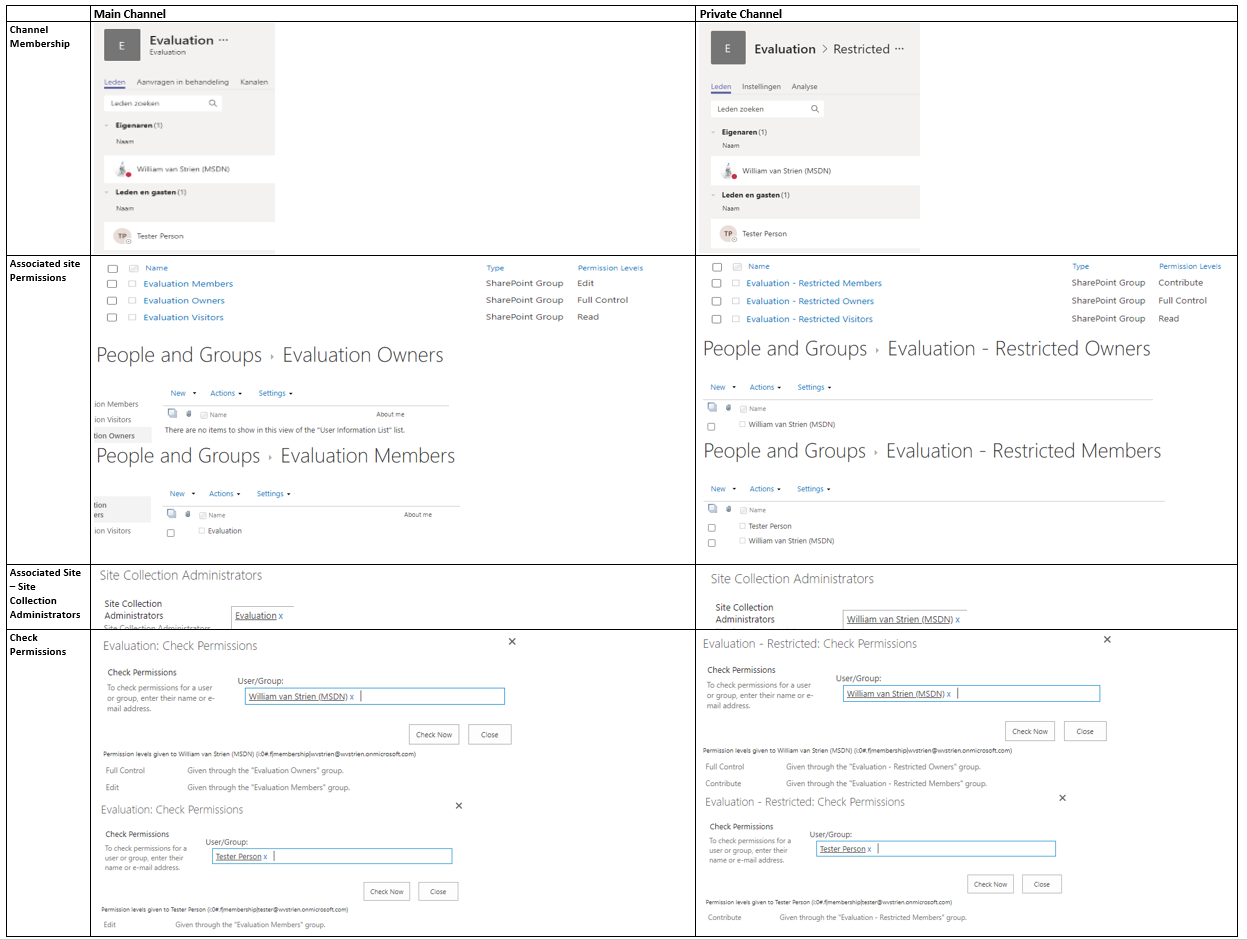
In practice, Microsoft itself struggles with the consistent application of this new permission management model. In previous post I visualized the differences in permission management of Communications Site versus Modern Teams Site. Yet another difference is visible on the level of SharePoint site collection that is associated with a MS Teams channel. In the associated site of the main channel, Microsoft utilizes the concept of Office 365 Groups as overarching permission management. However, in the associated site of any private channel, the notion of Office 365 Group is missing.
Comparision Permission Handling + Management within associated site of Main vs Private Teams channel
Observations:
  1. In the associated site of the Teams main channel, site authorization is delegated done via Office 365 Group.
    1. The SharePoint Members permission Group has as single member the Office 365 Group ‘Members’
    2. The SharePoint Members permission Group has as permission level 'Edit'
    3. The SharePoint Owners and Visitors permission Groups are both EMPTY
    4. Instead, the ‘Owners’ responsibility is assigned by having the full O365 Group 'Owners' as SCA
  2. In the associated site of a private channel, site authorization is still on named accounts level
    1. The SharePoint Members permission Group has as members the named accounts of everyone authorized in membership in the private channel, both the owners and members of the channel
    2. The SharePoint Members permission Group has as permission level 'Contribute'
    3. The SharePoint Owners permission Group has as members the named accounts of the persons that are owners of the Teams private channel
    4. And these same named persons that are owner of the Teams private channel, are assigned SCA
I think this deviation is driven both by the current situation that Office 365 Groups itself does not support hierachy and subsets, plus the restricted usage scope of a private channel. A private channel is meant to restrict access to certain content in the Teams instance, but it is not meant itself as a container hub consisting of multiple tools. As example, you cannot associate a Planner Plan with a private channel. There is thus in the context of private channels less need for the overarching permission management concept via Office 365 Groups.
A concern with this effectively broken permission management in private channel compared to Teams instance itself, is what happens when on the Teams instance level a membership is revoked. Turns out that on Teams level itself the effect of this cascades to any of its potential private channels: whenever an account is removed as member in Teams instance, the same account is also automatic revoked as authorized member in any of the private Teams channels.

Thursday, April 30, 2020

SharePoint Governance complicated, due deviation in permission handling within modern site templates

With the introduction of Modern Sites, Microsoft added an additional layer in the permission handling for SharePoint Online sites: via Office 365 Group (soon to be renamed/branded as 'Microsoft 365 Groups'). Below that new level, one can still authorize within the SharePoint site itself via SharePoint Permission Groups. And to make the story even more confusing: not all 'Modern' sites are equal wrt this new Permission model. In a Modern Communication Site there is no notion / connection to an Office 365 Group.
Comparision Permission Handling + Management within Modern Communication Site vs Modern Team Site
Observations:
  1. In a Modern Teams Site, site authorization is delegated done via Office 365 Group.
    1. The SharePoint Member permission Group has as single member the Office 365 Group ‘Members’
    2. The SharePoint Owners and Visitors permission Groups are both EMPTY
    3. Instead, the ‘Owners’ responsibility is assigned by having the full O365 Group Owners as SCA
  2. In a Modern Communications Site, site authorization is still on named accounts level
    1. The SharePoint Group has as members the named accounts of persons in the role
    2. And only the person that on site provision/create time was identified as ‘Site Owner’ (in SharePoint Admin portal), is assigned SCA
This deviation is intentional / by design from Microsoft, with justification: "Most often, a communication site has a small number of people with permission to author content and many people who only have permission to read content. Team sites use Office 365 Groups for permissions. Communication sites use SharePoint groups." (source: Teams Site vs. Communication Site: Which one should I choose?).
However, in concrete business usage more and more business users prefer the Communications Site for internal collaboration usage above that of Team Site. Most significant motivation being the page layout options, that make better usage of the available screen estate. And this practical usage results in a governance flaw, as the permission handling on a "team collaboration site" created via Communications Site deviates from that within a Teams site; and the typical business user has no understanding for this.
I'm not alone in my misunderstanding, a good post on this topic is How broken are Office 365 SharePoint permissions?.

Sunday, February 23, 2020

Replicate B2B governance of SharePoint to Teams

In nowadays enterprises, being able to seamless collaborate with one’s ecosystem is gaining more and more importance. The Office 365 platform supports Business-2-Business collaboration in multiple of its services. However, there are significant differences in the governance supported.
In SharePoint, their is finegrained governance possible, which convinced our critical information security risk management to allow its usage. On tenant level you configure to allow sharing, however without per se enable it on each individual site collection. Plus you can white- and blacklist allowed + never allowed domains, again without this automatic propagated to the individual site collection level. On site collection level you can by default turn off sharing and only explicit enable for targetted site collections, including then white- and blacklisting of domain(s) under condition that these are configured [(dis)allowed] on tenant level. Protection effect is that invited guest is only actually authorized to access a B2B shared site collection if the external domain of guest is allowed for particular site collection. Finally, the customization / extensibility options of SharePoint allow to make visitors of the site via an across site banner aware that the information in this particular site collection is also accessible by persons outside the company.
The out-of-the-box B2B governance of Microsoft Teams is much more limited. Ok, the visual indication of guest(s) presence in the Teams membership is standard. But the guest allowed-mode is on tenant level only: if turned on, all Teams instances by default are allowed / opened for guest access. Including all the Teams instances for which not explicit requested, or even should not be allowed given the internal purpose + audience of that Teams instance. Another miss is that of the check on domain per Teams instance. The resulting risk is that a business user can per accident invite a guest of company Y while intended to invite guest with almost same name from company X.
The lack of the B2B governance with MS Teams results that it is insufficient business secure for our information / security risk management. To get approval, we need to bring the same level of controls to Teams guest access as there is with SharePoint. We do this by extending / customizing on the invite experience in MS Teams. Business users are allowed to invite guests, however not from Teams direct itself due its lack of domain check. Instead we provide via SharePoint a B2B process request page where business user can:
  1. Request whitelisting of allowed partner on tenant level; usable for all SharePoint sites and Teams instances
  2. Request sharing of individual SharePoint site or Teams instance (including the associated site underneath) for one or more domains; that must be whitelisted on tenant level
  3. Request provision of one or more guests, of companies that are allowed on tenant level; usable across entire tenant
  4. Specific for Microsoft Teams: invite guest account to a Teams instance
In the automated handling of 4 (via Azure Automation) we verify that the domain of requested guest account is within the “whitelisting” of the identified Teams. If so, the guest is automated added; if not then the request is rejected and business error is prevented.

Thursday, August 1, 2019

Beware: with B2B sharing enabled on SharePoint tenant level, all new provisioned Modern sites are by default open for non-constrained sharing

The governance of B2B sharing of SharePoint Online is setup on 2 levels: at first, on tenant level the SharingCapability must be configured in an enabled state (SharingCapabilities enumeration), otherwise all sharing in the full collection of sites in the tenant will be disallowed / blocked. Also on tenant level, SharePoint admin can configure allowed (whitelisted) and disallowed (blacklisted) domains of invited organizations. On the 2nd level, the SharingCapability of individual site collection must also be configured to same enabled state, to enable sharing of that particular site. Plus also on this level, SharePoint admin can specify both allowed and disallowed domains.
With this 2-step configuration, the inviting organization is enabled with explicit (IT) control on which of the site collections, their business owner(s) can invite (authorize for access) guests of targeted invited partner organizations.
Something to be aware of in this SharePoint Online B2B governance is that on site collection level of Modern / Group-enabled sites, the default setting of the SharingCapability property follows the tenant-configured value. This means that in the situation where sharing is enabled on tenant level, all new provisioned Modern sites by default are also direct configured to allow sharing.
In the 2-step B2B governance process this is not compliant; individual site collections may only be configured for sharing on explicit business request and approval, and potential for identified domain(s) only.
To get back into compliant state, each new provisioned site collection must be configured via an after-step to reset the SharingCapability into ‘Disabled’. This after-step can be executed via Site Designs, or in case a site provisioning solution is used (e.g. PnP provisioning) as post-processing provision step. Another approach is via a scheduled automation job (e.g. Azure Automation, or remote PowerShell).
Note: remarkable is the difference with classic sites: these are by default always provisioned with disabled 'SharingCapability', independent of the setting on tenant level.

Inconsistency within MS Teams External Sharing activation

A special case is with the SharePoint sites that are created underneath MS Teams instances (for the ‘Files’ capability). Also on the tenant level of MS Teams, the external / guest capability is configured. However, there is an inconsistency in the context of the MS Teams B2B configuration when external sharing is enabled on SharePoint tenant level, but not on MS Teams tenant level: the underlying SharePoint sites follow the SharePoint tenant setting, not that of their ‘owning’ MS Teams. The effect is that external guests may be authorized for access to the SharePoint site underneath a MS Teams instance, despite that on MS Teams tenant level external sharing is explicit disabled.
To correct this inconsistency, any of the above sketched set of ‘compliance’ approaches can be applied on the SharePoint sites that are created 'underneath' MS Teams instances.

Wednesday, October 31, 2018

Beware: governance of SharePoint site underneath MS Teams largely gone

In most organizations that employ SharePoint for collaboration and content handling, governance is (tried to be) applied to give some structure and consistency in the SharePoint usage. Some typical elements of such SharePoint governance are:
  • The powerful authorizations via Site Collection Administrator (SCA) role is reserved to IT support only; and business users are authorized via SharePoint Groups + Permission Levels (see e.g. Site Owner vs Site Collection Administrator)
  • Pre-defined site structures (in the old days via Site Definitions; nowadays via Site Templates, provisioning code (e.g. PnP provisioning))
  • Organization consistent branding of the sites: logo, site classification, layout, ...
  • Naming conventions for site titles and URLs
  • Version Control + Content Approval policies
  • Metadata (Managed + Folksonomy)
  • Controlled availability of SharePoint Designer, enabling the business power-users to self-create workflows, customize views, create structure, ...
  • Prerequisites imposed on the site requestor, checked upon by the helpdesk handling site provision process
  • Lifecycle model
  • ...
Microsoft itself acknowledges the importance of SharePoint Governance, and delivers support to its customers on this topic via guidance, trainings and templates (e.g. Overview: best practices for managing how people use your team site).
And then there was the new concept of MS Teams....; highly promoted by Microsoft and moreover highly appreciated and valued by the business users. A.o. the business values the concept of self-service creation of MS Teams, in particular when comparing it with in some organizations the (perceived) cumbersome governance process on SharePoint site provisioning. And some of the business users are even more pleasant surprised when they detect that as part of the MS Teams instance creation, also a.o. a SharePoint Site Collection is created 'underneath'. In the MS Teams concept, Microsoft makes pragmatic reuse of the availability of SharePoint Online as part of Office 365 suite for the Files handling capability. It is even a generic applied pattern by Microsoft to position and use SharePoint more and more as 'backend' underneath other of its products and services. Pre-online this already is done with MS Dynamics, MS Project; and now thus with MS Teams, Office 365 Groups, ...
But although Microsoft intended within MS Teams context the created SharePoint Site to deliver the Files capability, knowledgable and curious business users quickly discover that the connected SharePoint Site is, well a full-blown SharePoint site. Including all the SharePoint capabilities that they are familiar with when working with a standalone provisioned Site Collection. Plus the (default) governance on SharePoint site collections created underneath MS Teams instance is much less restrictive. One of the most significant is that all the MS Teams owners, automatically and outside IT control get assigned in the Site Collection Admin role! Other on permission handling are that the MS Teams owner(s), by deriviation thus also the SCA's of the MS Teams SharePoint site, can share access on the SharePoint level; deviating from the permission management executed on the level of the enclosing MS Teams. Yet another to configure on the SharePoint level sharing with externals, while that might not be configured (even allowed) at the MS Teams level.
How should any Office 365 customer deal with this differences in the governance and support on SharePoint sites created standalone, versus the ones created as element of other Office 365 services? I have not a conclusive view on this yet, but moreover I also have not yet identified such view brought to us by Microsoft. The impression is that Microsoft just kinda 'let it go', and have their customers themselves come to a positioning and best-practice(s). In my opinion this is a shortcoming from Microsoft in support and guidance perspectives: we know that one of the biggest hurdles with IT and Collaboration Tools is the user adoption and confusion about what tool to use when. Delivering the same SharePoint collaboration tool via different creation processes, and with different governance + support models as result, does not help bring a clear collaboration story. I understand and applaud the pragmatic decision by Microsoft to utilize the SharePoint capabilities within other products, but I fail to understand their considerations to make that same SharePoint site on itself accessible; outside the simplified interface via MS Teams.

Tuesday, January 19, 2016

Approach for inability to rollback an AddIn update

Our SharePoint governance prescribes to include in the runbook of any change to our SharePoint environment, the steps to roll back the change in case of unexpected issues. However, as we experienced, technical rollback to previous state is not possible for AddIn (former: SharePoint Apps) update. The AddIn framework does not support to remove/downgrade the AddIn update, and return to the previous version of installed AddIn as active version. The only option is to re-deploy the version previous to the update; but for this to succeed that previous version must be changed to receive a version number later than that of the failed AddIn update. This approach is only possible for company-build AddIns, but not feasible for purchased AddIns. And from purist perspective it is undesired, as it is not a removal but a compensating rollback to return to previous state of working AddIn. While technical still a change is executed in the environment: the updated AddIn remains deployed, and the previous AddIn version is installed twice, last time with increased version number to force the AddIn update to be executed.

Mitigation approach

To cope with the unavailability of a pure rollback for AddIn update, we instead apply a procedural approach to minimize the likelihood of failed AddIn update. In an isolated subsite, that is non-accessible for regular end-users, we prepare the same installation status of the AddIn we intend to upgrade. In the change runbook, we start with upgrading the AddIn in the isolated subsite, and validate the functionality there for the production environment. Only in case the validation succeeds, we continue with deployment of the AddIn upgrade in the production hostweb(s) to which end-users have access. And in the undesired situation that the validation fails, we stop the deployment, and only need to cleanup by removal of the isolated validation subsite.