Tuesday, July 26, 2011

Personalization approach / settings administrated outside content database

Personalization is an important functional aspect in my current SharePoint 2010 project. Personalization on itself is a phrase that can have multiple meanings and appearances. Examples:
  • Customize a page for your own preferences; via personal settings of webpart properties
  • Content targeting; on basis of the visitors profile
SharePoint enables page personalization via the Provider model, inherited from ASP.net. Implication of the standard SharePoint personalization approach is that each authenticated user gets an own copy per personalized page in the content database. The personalized settings are thus administrated in the content database, similar as in case of shared webpart properties. A disadvantage of this approach is that this makes it very difficult to (web content) manage the page. A content manager can update the (template) page, but none of the content changes are automatically propagated to the individual personalization page copies in the content database.
In our application scenario, we have the additional functional requirement that it must be viable to extract management information reports of the personalized settings: what type of user (profiles) typically select personalized setting X, choose to close webpart Y etcetera. Although not impossible, it is rather impractical to extract this management information when the personalized data is stored in the content database. The schema of the SharePoint content database must be treated as internal black box, and cannot be relied on. The schema also does not support ad-hoc querying for answering varying management info requests.
We also have User Experience related requirements: the users must be able to personalize, without being aware or be directly confronted with SharePoint. It should be intuitive and natural, without explicit [noticable] personalization-setting modus. Examples of requested personalizations are tuning the webpart behavior via settings, and dynamically reposition the webparts in the page.
These combined end-user and management requirements effectively rank out the utilization of standard SharePoint personalization. So what’s a viable alternative? The one we came up consists of the following elements:
  1. [Standard] shared webpart properties for enabling the content managers to set the initial and default values for personalizable settings. The shared value is regularly stored in the SharePoint content database, and applied for each visitor which has not [yet] explicitly personalized the shared setting.
  2. Storage of personalization settings in an own SQL Server database
  3. The iGoogle-like reposition behavior via jQuery and webpart zones tagged as droppable zones
  4. An abstract base PersonalizationWebPart; that handles both the server-side aspects of personalization (retrieving + applying personalization settings, as well as saving them), as the client-side (webpart movement); and that implements virtual methods for concrete subclasses to hook into.
  5. Custom AudienceProvider to derive on-the-fly whether visitor is within a certain audience by checking setting stored in the own SQL Server database [thus no need for User Profiles, nor compiling of Audiences]
Extra and a major advantage of this personalization approach is that there no longer originates a copy of the page being personalized. If the content manager updates the page, by adding or removing a webpart, modifying content on a publishing page; these changes are automatic and immediate effective for all the visitors, whether one has personalized the page or not.

Wednesday, July 13, 2011

Make AudienceFilter webpart setting visible without User Profile Service Application started

In current project we aim to apply SharePoint's audiencing mechanisme for content targetting. As audience filters we'll use SharePoint group membership, we will not derive the audience from User Profile properties. In our current state of SharePoint farm, the User Profile service application is even not available .
One of the advantages of SharePoint audiencing is that it is out-of-the-box available for every webpart; standard SharePoint and custom webparts. However, when we intended to apply an audience filter to a standard ContentEditorWebPart in our test-environment, we were confronted with a missing Audiencing setting in the webpart toolpart. Search on the web points to prerequiste of the User Profile service application being activated. However, this is neither possible in our farm infrastructure planning, nor needed for the manner in which our application will use audiencing, that is on basis of SPGroup memberships.
Via reverse engineering SharePoint code [using .NET Reflector] I found out what directly determines the visiblity of the AudienceFilter webpart property. The responsible AdvancedToolpart class does a check on the web.config for config property "SharePoint/RuntimeFilter": if the property is not present, or the referred assembly is not valid, none of the webparts in this SharePoint webapplication will display the AudienceFilter webpart property in their toolpart. I validated this by outcommenting in web.config the property; for instance the toolpart of a ContentEditorWebPart then misses the AudienceFilter setting. After reinstating the web.config property, and reopening the toolpart; the webpart property is visible again. And thus available for usage for filters on basis of SharePoint groups, or a custom AudienceProvider.

Friday, July 8, 2011

IBM WebSphere MQ WCF Channel has problem with clustered Queues

The Enterprise Architecture roadmap of customer aims at a SAP-unless policy, and SharePoint for all web-applications/front-ends. Currently there are still multiple applications in their IT landscape which do not obey do this future direction. For some of them, e.g. J2EE based service application, the enterprise architecture integration guidelines prescribes that the client-services communication occurs via IBM WebSphere MQ (WMQ). From the .NET client perspective, WCF based communication is nowadays preferred and proven technology, and must be applied for any new web-applications that invoke other applications.
For .NET client context there are in reality 2 viable WCF Channel options for putting requests as messages on an IBM WebSphere Queue (WCF WMQ). One is part of Microsoft Host Integration Server, the other one is provided by IBM.
For reasons explained else, the.NET and Integration architects decided to apply the IBM WebSphere MQ Channel for WCF. It is successful applied in several .NET applications to put messages on WMQ. In my current application project we also need to invoke services of a ‘legacy’ system, callable over WMQ. However, when this application puts a message on the assigned Queue via Request-Reply, we ran into the following exception:
System.ServiceModel.EndpointNotFoundException was unhandled by user code
Message=WCFCH0309E: An error occurred while attempting to open the channel for endpoint 'jms:/queue?destination=APPL.REQ.QUEUE@XXXX01&connectionFactory=connectQueueManager(XXXX01)clientChannel(WMQ.Channel.TST)clientConnection(dev-xx.xxx.com(7201))&initialContextFactory=com.ibm.mq.jms.Nojndi&persistence=1&replyDestination=APPL.RPL.QUEUE' The operation could not be completed. The endpoint may be down, unavailable, or unreachable, review the linked exception for further details.
Source=mscorlib
StackTrace:
Server stack trace:
at IBM.XMS.WCF.XmsChannelHelper.ThrowCommsException(OperationType op, Exception innerException, String endpointURI)
at IBM.XMS.WCF.XmsChannelHelper.CheckExceptionAndTimeout(OperationType op, Exception e, String timeout, String endpointURI)
at IBM.XMS.WCF.XmsRequestChannel.OnEndOpen(IAsyncResult result)
at IBM.XMS.WCF.XmsRequestChannel.OnOpen(TimeSpan timeout)
at System.ServiceModel.Channels.CommunicationObject.Open(TimeSpan timeout)
at System.ServiceModel.Channels.ServiceChannel.OnOpen(TimeSpan timeout)
at System.ServiceModel.Channels.CommunicationObject.Open(TimeSpan timeout)
at System.ServiceModel.Channels.ServiceChannel.CallOnceManager.CallOnce(TimeSpan timeout, CallOnceManager cascade)
at System.ServiceModel.Channels.ServiceChannel.EnsureOpened(TimeSpan timeout)
at System.ServiceModel.Channels.ServiceChannel.Call(String action, Boolean oneway, ProxyOperationRuntime operation, Object[] ins, Object[] outs, TimeSpan timeout)
at System.ServiceModel.Channels.ServiceChannel.Request(Message message, TimeSpan timeout)
Exception rethrown at [0]:
at System.Runtime.Remoting.Proxies.RealProxy.HandleReturnMessage(IMessage reqMsg, IMessage retMsg)
at System.Runtime.Remoting.Proxies.RealProxy.PrivateInvoke(MessageData& msgData, Int32 type)
at System.ServiceModel.Channels.IRequestChannel.Request(Message message)
at Application.<CustomCode>.Client.<InvocateAMethod>(MethodRequest_1_0 request)
at System.Web.UI.WebControls.Button.OnClick(EventArgs e)
at System.Web.UI.WebControls.Button.RaisePostBackEvent(String eventArgument)
at System.Web.UI.Page.RaisePostBackEvent(IPostBackEventHandler sourceControl, String eventArgument)
at System.Web.UI.Page.ProcessRequestMain(Boolean includeStagesBeforeAsyncPoint, Boolean includeStagesAfterAsyncPoint)
InnerException: IBM.XMS.IllegalStateException
Message=Failed to open MQ queue APPL.REQ.QUEUE. XMS attempted to perform an MQOPEN, but WebSphere MQ reported an error. Use the linked exception to determine the cause of this error. Check that the specified queue and queue manager are defined correctly.
Source=IBM.XMS.Client.WMQ
ErrorCode=XMSWMQ2008
It took me several hours and diverse try-outs together with an MQ developer at the receiving WebSphere MQ side, to ultimately find out the following. The IBM WCF transport channel for WMQ (WebSphere MQ 7.0.1 installation) has a problem with clustered queues, and errors when attempting to open the queue. In case of putting messages to a non-clustered queue – the WMQ infrastructure of the other .NET applications -, the channel opens successfully and messages request + replies are delivered. The problem is reproduced outside the context of our SharePoint application, via a simple testprogram; thus appears to be structural. We are currently addressing IBM to analyze it, and come up with a structural solution. For now, the pragmatic solution appears to communicate via non-clustered Queue.

Tuesday, July 5, 2011

Using ServiceLocator in Sandbox requires pre-generated xml-serialization

The SharePoint Guidance [SPG] ServiceLocator provides you with a ready-to-use implementation of a Dependency Injection container. However, be aware of the following restriction when applying the SPG ServiceLocator in a constrained Sandbox context: it is not possible to compile on-the-fly generated xml-serialization classes, which are required for administrating the service interface and implementation within the servicelocator typemappings.
The execution of code statement:
typeMappings.RegisterTypeMapping<IServiceContract, ServiceImplementation>();
resulted in the following exception inside ServiceLocator code:
Microsoft.Practices.SharePoint.Common.Configuration.
ConfigurationException: Error on serializing configuration data ---> Microsoft.SharePoint.UserCode.SPUserCodeSolutionProxiedException: Error on serializing configuration data ---> Microsoft.SharePoint.UserCode.SPUserCodeSolutionProxiedException: Cannot execute a program. The command being executed was "C:\Windows\Microsoft.NET\Framework64\v2.0.50727\csc.exe" /noconfig /fullpaths @"C:\Users\SPadministrator\AppData\Local\Temp\OICE_925B8D58-F6D1-4BB3-9E01-FCBB9D816D0B.0\wkdrltlt.cmdline".

Explanation of this behavior:

SPG ServiceLocator applies XML serialization to administer the typemappings for the service interface and service implementation class. .NET XML serialization approach supports JIT compilation of the required xml-serialization classes. The benefit is that you do not need to generate and deploy these xml-serialization classes, the XmlSerializer framework generates them on spot. However, to be able to do this assembly generation; the .NET compiler is needed. And when within the Sandboxed constraints, you are not allowed to use filesystem resources.
By doing a little ‘digging’ in the SPG runtime pipeline, I discovered that not even my own custom classes caused the runtime serialization error; it actually could be derived back to the following serialization:
new System.Xml.Serialization.XmlSerializer(typeof(
Microsoft.Practices.SharePoint.Common.ServiceLocation.ServiceLocationConfigData))
The solution is to make sure that the required xml-serialization classes are already available: either in the GAC for generic use, or also deployed in the sandbox. I opted in this particular case to deploy Microsoft.Practices.SharePoint.Common.XmlSerialization.dll in the Sandbox.

Sunday, June 19, 2011

Working with complex SAP business entities in Duet Enterprise

Duet Enterprise natively only supports flattened SAP data entities. Typically however business data exhibits a complex structure. Via custom programming against the SharePoint BCS ObjectModel it is possible to integrate complex SAP business entities via Duet Enterprise in SharePoint.
This blog is earlier published on SAP Community Network Blogs
A sales talk of Duet Enterprise is that you can integrate with minimal effort SAP data and functionality in SharePoint UI. This however is only true if your SAP data complies to the following constraints: 1) the SAP data entities must at least be made accessible via a Query and ReadItem operation; 2) in case of full update context, also the Create, Update and Delete operations must be available in the SAP data entity; 3) the SAP data entity must exhibit a flat data structure.
Constraints 1 and 2 are imposed by the usage of SharePoint Business Connectivity Services (BCS) for working with SAP external data from within SharePoint context. As result of the central BCS role in the Duet Enterprise architecture, these constraints are inevitable. Constraint 3 is required to visualize the SAP data via SharePoint External List in the well-known UI List format. Aspect of the list UI metaphor is that it resembles a data table, with row-based data.
Problem however is that typically, enterprise data is non-flattened. Enterprise data often has an hierarchical structure: parent with multiple child data entities. E.g. an Order containing multiple Orderlines; an Expense form with multiple individual ExpenseDetails. As result of constraint 3, it follows that such complex data cannot be visualized in SharePoint UI via the out-of-the-box External List. Does this mean that SAP complex business entities thus cannot be integrated within SharePoint UI context via Duet Enterprise? The answer to that is negative. The applied Duet Enterprise architecture itself, with SharePoint BCS and the SAP Service Consumption Layer (SCL) in the middle, has neither restrictions nor problems with interoperating on and exchanging hierarchical SAP data. It is merely the External List concept that cannot visualize complex data (note: this limitation is generic, thus not only for SAP data structures, but also non-SAP business data structures; as Oracle, Microsoft Dynamics, SQL-based, WCF data objects, …). You can still apply Duet Enterprise as SAP / SharePoint integration foundation in case of complex SAP data structures, but it requires you to build a custom UI in SharePoint instead of the out-of-the-box External List concept. Nothing withholds you from constructing a custom SharePoint UI to display the hierarchical data, e.g. in a master-slave UI concept.
Well, not entirely true…; a noticeable problem with building a custom UI to interoperate Duet Enterprise, is that the custom UI must then program against the BCS ObjectModel API. And the BCS OM currently only provides a [very] weakly typed programming model, instead of the strong-types we are used to in a regular .NET context (e.g. WCF data objects plus WCF interfaces). The explanation for this is that BCS is a generic concept, intended to interoperate against arbitrary external data repositories and various and a priori unknown data structures. In its current stadium, the mapping at .NET client side to the concrete external data structures is enabled via a general purpose ‘BCS operation language’. The problem with that BCS language is that there is no compile-time checking nor support to prevent you from making typo or structure mistakes.

An example interoperating complex SAP data into SharePoint

Via an example I will demonstrate in overview what it takes to interoperate complex SAP data via Duet Enterprise into a SharePoint front-end.

Example

Employee Self-Service process for expense handling. The process consists of multiple steps: it starts when an employee submits an expense form for receiving a refund; next the employee’s manager will review the form, and either approve, deny, or return it for further explanation. In case of approval, the finance department will refund the made expenses. In case of return, the employee can augment the expense form with additional remarks, and then resubmit. Or the employee can decide to withdraw the returned expense form. In case of denied expense, the process directly stops. Each process execution ends with archival of the submitted form and other documentation.
Current, this process is already implemented within the SAP environment. Employees can enter a form via a WebDynpro form; which kicks of a SAP workflow process. The manager receives the review task in this workflow within the SAP Universal Work List. Payment is done via the HR business package.
Although thus the expense process is already implemented in the IT landscape, management feels the need to improve on it. Employees are complaining about the WebDynpro UI, which looks and behaves different as the SharePoint based intranet in which they are performing their primary work activities. The managers on the other hand are perfectly satisfied to perform the review task within the SAP GUI, since this is for them also for most other tasks the familiar work environment. The financial handling is mostly automatic performed in the SAP backend, near to the other financial processes; so neither any reason to change on that. The management therefore decides to bring the employee’s involvement in the process into the context of the SharePoint based intranet, while leaving the rest of the process execution untouched (phase 1).

Step 1: derive the requirements and the functional + process requirements

Since the process is already implemented; this step can largely reuse on what is already available qua system and process specifications.

Step 2: derive the integration and software architecture

The project goal is enabling employees to operate their steps in the expense handling process directly within the SharePoint intranet, with the same familiar UI look & feel as other parts in that intranet. Implication of that is to interchange the WebDynpro front-end for a SharePoint front-end. Via well-derived integration points this new front-end must hook into the existing expense process.

Step 3: define the interoperability interface of the SAP backend

With the integration and software architecture in place, including the conceptual specifications of the integration interfaces SharePoint front-end <– SAP process; the next step is to realize the process integration at SAP side. Following the Duet Enterprise Development Steps, this first means to map the conceptual interfaces onto SAP SCL Interfaces. That development activity is done in SAP Enterprise Service Builder (ES Builder). There, you specify the data types, message types, and method operations.
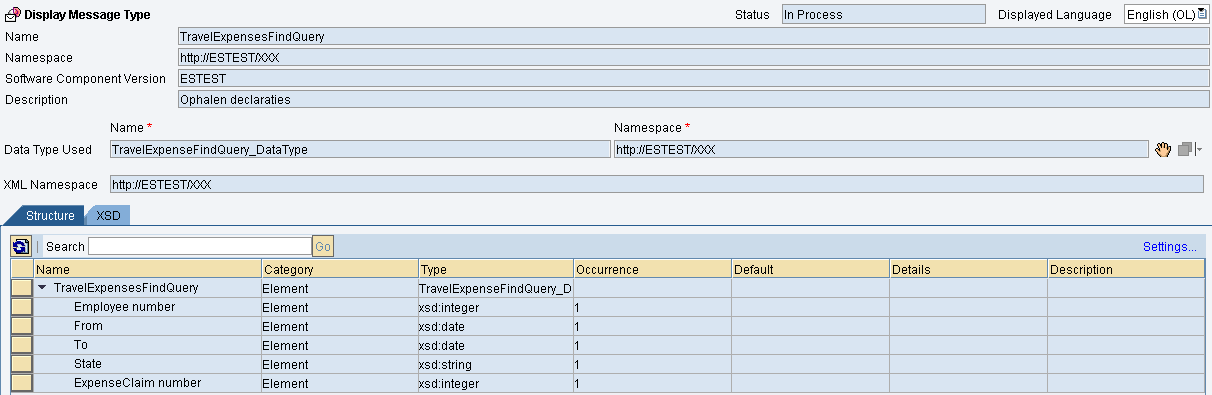
Screenshots of the specification at SAP side of a Query operation signature, with a complex hierarchical SAP data entity
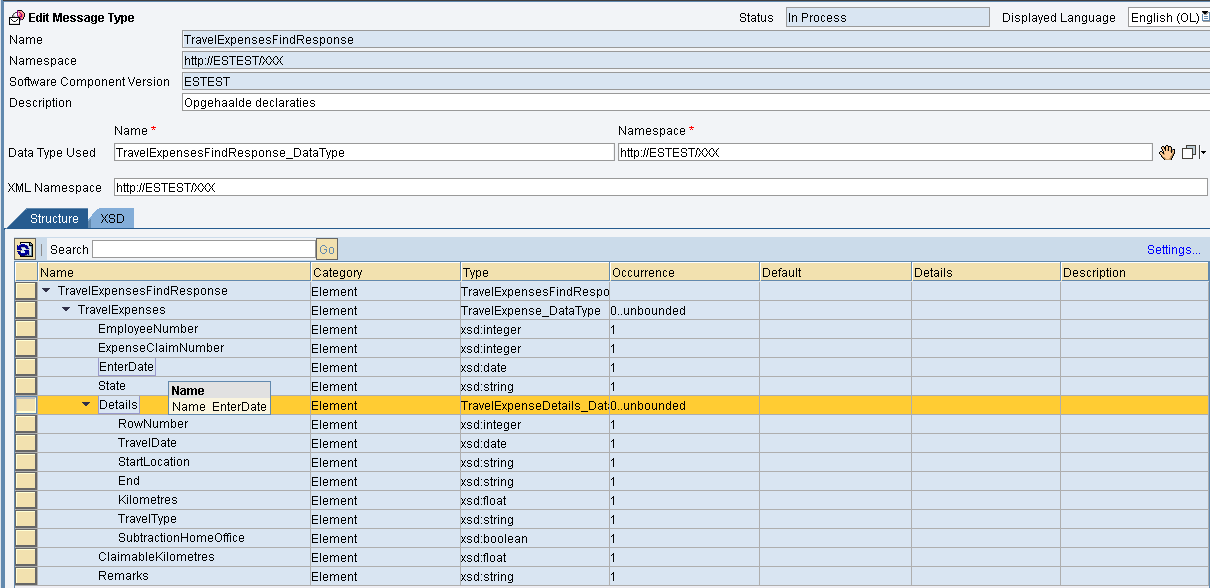
Step 4: Implement the SCL Interfaces

Actually, this is more than one single step. It involves Mapping, connecting to relevant parts in the SAP backend, routing, potentially composition of multiple SAP data entities, et al. Although all very interesting, this has no direct relation or influence on the way complex SAP data can be handled in the SharePoint front-end. Therefore these steps are not discussed here. See the Duet Enterprise Development Guide for a proper explanation of the steps.

Step 5: Generate the interoperability interface for the SharePoint front-end

A result of step 3 is the WSDL specification of the SAP SCL interface. With this WSDL, and a runtime SAP Proxy implementation, it is possible to generate an External Content Type. The tool used for this is SharePoint Designer 2010.
Screenshots of the generation at SharePoint side of an External Content Type to SAP backend, with a complex hierarchical SAP data entity exchanged
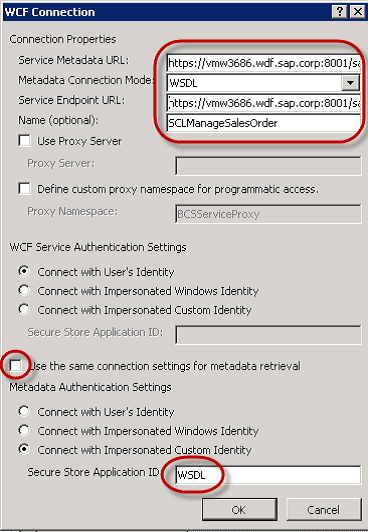
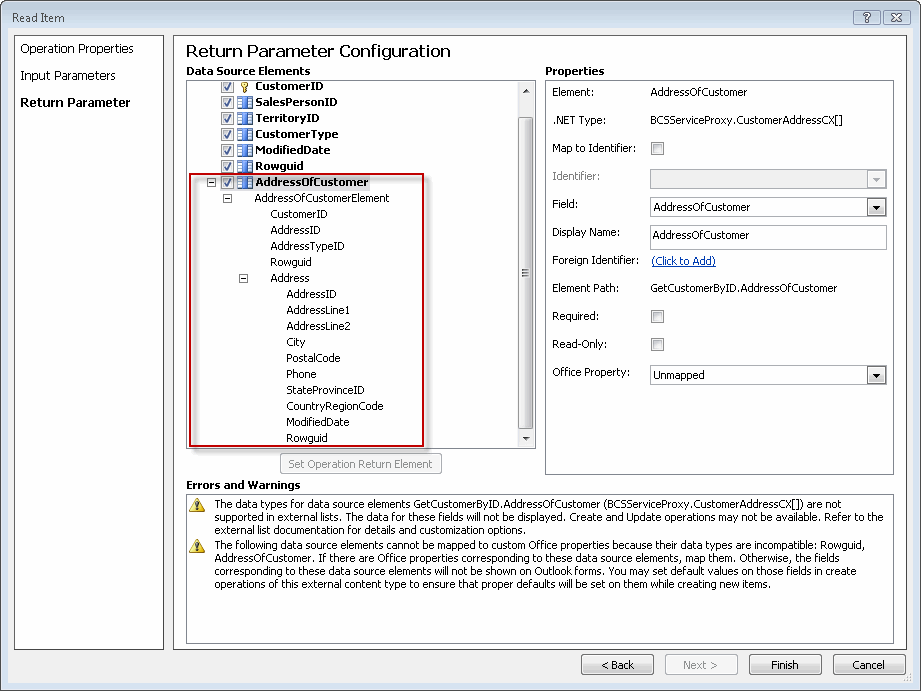
Step 6: Program to the interoperability interface for the SharePoint front-end

In case the SAP data entity had a flat representation, we would be nearly finished. Just generate an External List in SharePoint Designer or via the SharePoint UI, and connect to the generated External Content Type. However, the expense data entity at SAP side exhibits a complex structure: form with multiple detail lines. This cannot be reasonable visualized in the table-oriented format of External List (remember that the start of this project is to improve on the user experience for the employee; so it must feel natural and intuitive). If the External List is not feasible, then it is required to build a custom UI in SharePoint context. The custom UI must interoperate against the BCS ObjectModel API, to query, retrieve, create and update the SAP expense data entities. In its current state, the BCS API can only be operated via a weakly-typed program model. The draw side is that programming at that low-level is both cumbersome as error prone. However, if done correctly and secure, it does the job. And enables you to interoperate complex SAP data entities via Duet Enterprise in a custom SharePoint / .Net context.
Example code of interoperating BCS to create a new expense entity within SAP backend

BdcService service = SPFarm.Local.Services.GetValue(String.Empty);
IMetadataCatalog catalog = service.GetDatabaseBackedMetadataCatalog(SPServiceContext.Current);
IEntity entity = catalog.GetEntity("TopForce.com", "Expense");
IView createView = entity.GetCreatorView("Create");
IFieldValueDictionary methodFields = createView.GetDefaultValues();
methodFields["EmployeeNumber"] = "1";
methodFields["Status"] = "open";
methodFields["EmployeeComment"] = "my comment";
methodFields["Date"] = DateTime.Now;

object tickets = methodFields.CreateCollectionInstance("Tickets", 2);
methodFields["Tickets"] = tickets;
methodFields["Tickets[0]"] = methodFields.CreateInstance("Tickets[0]");
methodFields["Tickets[0].Date"] = DateTime.Now;
methodFields["Tickets[0].Amount"] = "35.45";
methodFields["Tickets[0].Description"] = "Description 1";
methodFields["Tickets[1]"] = methodFields.CreateInstance("Tickets[1]");
methodFields["Tickets[1].Date"] = DateTime.Now;
...
Identity id = entity.Create(fieldValueDictionary, LobSysteminstance);

Step 7: Build an UX custom SharePoint front-end

With the integration layer SharePoint/BCS - Duet Enterprise - SAP ready, it is now rather standard ASP.NET programming to build the custom UI. In the custom UI you can utilize the full toolbox of ASP.NET webcontrols, jQuery, and even Silverlight. Another viable option in SharePoint 2010 is InfoPath based forms.
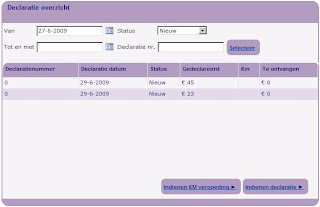
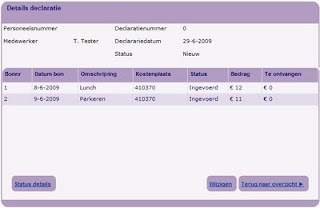
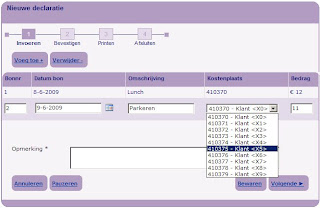
Some custom UI forms for the expense handling: overview, details and submit new expense


Final note

Thus although it requires more work – at the SharePoint side; it is possible to apply Duet Enterprise for SAP / Microsoft interoperability even when dealing with complex SAP data entities. The extra work is restricted to the SharePoint front-end part; the other parts of the Duet Enterprise pipeline are not influenced. Duet Enterprise on itself does not limit the usage of complex SAP data entities; this restriction is merely within the current out-of-the-box capabilities of SharePoint BCS and External List.

Saturday, June 11, 2011

SPWebConfigModification playing tricks in farm

At customer premisses we apply a.o. the following deployment guidelines:
  1. In case of Farm-based deployment, then deploy to virtual bin (WebApplication), unless...
  2. Apply SharePoint support for all required web.config modifications; instead of manual action (which is error prone in the farm).
Both guidelines are valid from SharePoint operations AND development perspective, to ensure a consistent and controlled SharePoint farm situation.
The SharePoint platform provides multiple deployment functionalities to comply with the 2nd guideline. Via the SharePoint solution manifest, you can specify modifications that typically have effect on the runtime operation of an assembly: SafeControls, CodeAccessSecurity. And via the SPWebConfigModification class you can modify in a controlled manner the web.config for other changes; e.g. for custom application settings, navigation providers. As from SharePoint 2007, I'm a big fan of applying SPWebConfigModification - it gives you as developer full control to have the needed web.config modifications executed upon application deployment and/or provision time. And to make it even better: the same set of changes are applied to all the individual web.config files of the SharePoint webapplication in the total farm; accross zones and accross servers. Even when at a later time another server is added to the farm, the same set of web.config modifications are applied (rather, repeated) also on that new server.
However, the SPWebConfigModification functionality does have it's peculiarities. Lately we encountered one I was not yet aware of, and which caused us both some headaches as well as cost some elapsed time.
The situation is as follows: SharePoint assembly that uses EntLib 5.0 for accessing an external SQL database. Comform the guidelines, this custom assembly is deployed to the virtual bin; and it is therefore required to set custom CAS-policies for this assembly. One of the required permission is the SqlClientPermission. That permissions is not present in the default WSS_Minimal trustlevel, but it is within WSS_Medium. To have the total set of custom CAS-policies based on the Medium trustlevel, a 2-steps approach is applied:
  1. First change the trustlevel in the web.config from WSS_Minimal to WSS_Medium; a task performed via SPWebConfigModification class
  2. Next, deploy the SharePoint solution with in its manifest the CodeAccessSecurity element for the assembly. The resulting custom CAS-policy file is now based on the Medium trust level, thus inheriting a.o. the SqlClientPermission SecurityClass setting. The SharePoint solution framework takes care of the required modifications in the web.config: link to the generated custom policy file, and set the trustlevel to WSS_Custom.
The setup worked perfectly, both local as in the shared test-farm.
That is, initially. From time to time our application appeared broken. Root cause analysis exhibited that in those situations our web.config was modified; but without any deployment activity on our own webapplication (???) However, another SharePoint webapplication in the same farm had been redeployed. Each time that application was redeployed, our web.config was modified; and the trustlevel reset from WSS_Custom to WSS_Medium.
It appears that this is standard behaviour of the SPWebConfigModification class: each time that it is requested to apply administrated SPWebConfigModifications entries in the context of a single SPWebApplication, it effectively re-applies the administrated SPWebConfigModifications of ALL the SharePoint web-applications in the farm. At minimal, the result of this is that all the web.config files in the farm are touched; and have their timestamp updated. But in our case, the administrated SPWebConfigModification for setting the trustlevel to WSS_Medium was reapplied; which broke our application!
So I learned 2 things here:
  1. SPWebConfigModification is not a 'decent' SharePoint citizen; I regard it as ultimately incorrect that the intented application of SPWebConfigModification administrated entries on 1 SharePoint web-application, also effects all other SharePoint web-applications web.configs.
  2. That as result of this behaviour the considered 2-steps approach for setting the correct medium level of a.o. SQLClientPermission cannot be maintained; due the inherent risk that the administrated SPWebConfigModification can be re-applied at any moment; out of the control and knowledge of the administrators of our webapplication. So I modified this to set the CAS-policies in a single step; directly steered via the Solution manifest file.

    Thus instead of the below CodeAccessSecurity specification, which is relative and relies on the presence of a.o. SqlClientPermission SecurityClass in the base trust-level (WSS_Medium):

    <PermissionSet class="NamedPermissionSet" version="1">
    <IPermission class="SecurityPermission" version="1" Flags="Execution" />
    <IPermission class="AspNetHostingPermission" version="1" Level="Medium" />
    <IPermission class="SqlClientPermissionversion" version="1" Unrestricted="true" />
    <IPermission class="SqlClientPermission" version="1" Unrestricted="true" />
    <IPermission class="Microsoft.SharePoint.Security.SharePointPermission, Microsoft.SharePoint.Security, Version=14.0.0.0, Culture=neutral,
    PublicKeyToken=71e9bce111e9429c" version="1" ObjectModel="True" />
    <IPermission class="Microsoft.Office.SecureStoreService.Server.Security.SecureStorePermission, Microsoft.Office.SecureStoreService.Server.Security,
    Version=14.0.0.0, Culture=neutral, PublicKeyToken=71e9bce111e9429c" version="1" Unrestricted="true" />
    <IPermission class="System.Security.Permissions.ReflectionPermission, mscorlib, Version=2.0.0.0, Culture=neutral, PublicKeyToken=b77a5c561934e089" version="1"
    Unrestricted="true" />
    <IPermission class="System.Diagnostics.EventLogPermission, System, Version=2.0.0.0, Culture=neutral, PublicKeyToken=b77a5c561934e089" version="1"
    Unrestricted="true" />
    <IPermission class="WebPartPermission" version="1" Connections="True" />
    </PermissionSet>

    specify all the required permissions explicit:

    <PermissionSet class="NamedPermissionSet" version="1">
    <IPermission class="Microsoft.SharePoint.Security.SharePointPermission, Microsoft.SharePoint.Security, Version=14.0.0.0, Culture=neutral, PublicKeyToken=71e9bce111e9429c" version="1" ObjectModel="true" Unrestricted="true" />
    <IPermission class="SecurityPermission" version="1" Flags="Execution" Unrestricted="true" />
    <IPermission class="System.Web.AspNetHostingPermission, System, Version=2.0.0.0, Culture=neutral, PublicKeyToken=b77a5c561934e089" version="1" Level="Medium"/>
    <IPermission class="System.Data.SqlClient.SqlClientPermission, System.Data, Version=2.0.0.0, Culture=neutral, PublicKeyToken=b77a5c561934e089" version="1" Unrestricted="true"/>
    <IPermission class="Microsoft.Office.SecureStoreService.Server.Security.SecureStorePermission, Microsoft.Office.SecureStoreService.Server.Security, Version=14.0.0.0, Culture=neutral, PublicKeyToken=71e9bce111e9429c" version="1" Unrestricted="true" />
    <IPermission class="System.Security.Permissions.ReflectionPermission, mscorlib, Version=2.0.0.0, Culture=neutral, PublicKeyToken=b77a5c561934e089" version="1" Unrestricted="true" />
    <IPermission class="System.Diagnostics.EventLogPermission, System, Version=2.0.0.0, Culture=neutral, PublicKeyToken=b77a5c561934e089" version="1" Unrestricted="true" />
    <IPermission class="Microsoft.SharePoint.Security.WebPartPermission, Microsoft.SharePoint.Security, Version=14.0.0.0, Culture=neutral, PublicKeyToken=71e9bce111e9429c" version="1" Connections="True"/>
    </PermissionSet>

Friday, June 3, 2011

Utilizing Maps services for runtime determining nearest relations

In a former SharePoint project – an external facing public website -, a required functionality was to display the nearest X insurance advisors given the submitted postal code of user. We weighed several alternatives to realize this:
  1. Re-use the distance-calculation algorithm used by the predecessor of the website (note: the essence of the project was a technical migration from a non-strategic proprietary WCM platform to the enterprise architecture target platform: SharePoint)
  2. Utilize service of postal company: a data repository of all postal code tuple combinations, with the distance between them administrated.
  3. Utilize Geo-coordinates to runtime calculate the distance between 2 locations, via the Haversine formula.
The first would have the disadvantage to still depend on the non-strategic platform and supplier. Also it had a rather complex programming API, without documentation and support.
The second would require us to host an external database besides the SharePoint content database in which to administrate the millions of postal code / distance records. This database would have to be updated each year with the management update from the postal company. Also, security constraints would not allow to directly access from the SharePoint WFE in the DMZ, the external database hosted in the internal network. The access should be regulated from DMZ to inner network via a secure webservice interface; which of course implies extra work and additional hosting costs.
So, the third alternative appeared the best fitted. Issue here is how to translate the postal code (submitted by the website user) into geo-coordinates (required for the Haversine formula). Luckily, both GoogleMaps and BingMaps provide services for this. Rough outline of the applied approach:
    Preparation
  1. Store in a SharePoint List the relations (less than 5000) data, including their geo-coordinates

  2. Runtime
  3. Invoke Maps service to derive the geo-coordinates (Latitude + Longitude) given the postal code submitted by user
  4. Calculate the distance to each applicable relation via the Haversine formula
  5. Ascending sort on calculated distance
  6. Display the X nearest advisors
An hosting constraint for step 2 is that it is not allowed to directly invoke from the SharePoint farm, external webservices. To circumvent that restriction we decided to call the Maps service in the security context of the browser, via jQuery/JSON. The returned geo-coordinated are next via a postback with arguments transmitted to the server side; where then the distance calculations are done.
Architecture sketch: