Monday, October 24, 2011

Data architecture considerations and guidelines for retrieving SAP data via Duet Enterprise into SharePoint

In Duet Enterprise FP1 it is relatively easy to generate a Gateway Model, as long as your SAP data sources live up to the required constraints. The challenge and intellectual work transfers to the data architecture, for deciding on and defining the proper data service interfaces given the application context.
This blog is earlier published on SAP Community Network Blogs

Real-time retrieval versus Search indexing

Bringing SAP data into SharePoint based front-ends can take different forms. You can unlock the SAP data real-time via ExternalList, to display and even edit the SAP data via the familiar SharePoint List UI metaphor. If the row-based List format doesn’t fit, you can develop a custom SharePoint webpart. You can also access the SAP data via the extensive SharePoint Search architecture and capabilities. With the improved Enterprise Search in SharePoint 2010 [or FAST if also purchased by customer organization], more and more new applications will be architected as search-driven. In context of SAP data think of searching from SharePoint context for a certain Supplier administrated in PLM, a Customer in CRM, et cetera.
Duet Enterprise can facilitate all of the above scenarios, in combination with the strengths of the SAP and SharePoint landscapes. However, the different nature of these scenarios may well result into different approaches for the data integration architecture. In the case of real-time retrieval of SAP data to render into SharePoint, it is advisable to limit the amount of data retrieved per SharePoint - Gateway - SAP backend interoperability flow. Don’t put unnecessary SAP data on the line that is not being used in the front-end: only include the fields of the SAP data that will be displayed in the UI and are relevant in this application context for the end-user. Search however has a different context. It is feasible to search on any of the field data of the SAP entity. This requires that all that SAP field data must be indexed upon SharePoint Search crawling time. So here it is advisable to not limit the amount of SAP data retrieved, but instead retrieve as much of the SAP data that expresses some functional value.
What if the same SAP data is to be unlocked both via SharePoint ExternalList, as via SharePoint Enterprise Search? The data integration architectures of these are thus contra dictionary: reduce the retrieved SAP data versus give me all. Well, nothing prohibits you from constructing multiple data integration pipelines, tuned for the different scenarios. For Search, it’s Gateway Model returns in the Query method all fields that contain functional value. And for the real-time ExternalList, that Gateway Model returns in the Query method only those fields that will be rendered as list columns.
In Duet Enterprise 1.0, constructing the Gateway Model takes considerable time. This is an obstacle for constructing multiple Gateway Models with different data representation / signature, as it can easily double your Gateway mapping effort and time. Luckily in Duet Enterprise FP1 it is relatively easy to generate a Gateway Model, as long as your SAP landscape data sources live up to the required constraints.

Complex SAP data source structure

If the SAP data is conceptually a flat structure, it is sufficient to have a single Gateway Model to retrieve the data into SharePoint context. However, we all know that SAP (or, business) data is typically of a more complex structure: hierarchical with multiple child entities. When you want to retrieve such a structure into SharePoint, you basically have 2 options.
The first is to flatten the structure. This approach suffers from some disadvantages. In case of multiple occurrences of the same child type (e.g. Ordered Item); how many of them should you include in the flattened representation? All, or an arbitrary limited number? Also, for the end-user a flattened structure can be conceptually wrong and counter-intuitive: Ordered Item information is of different functional level as the Purchase Order information.
The second option is to maintain the hierarchical SAP structure within the Gateway Model architecture. For this you need to generate a Gateway Model for the parent SAP data entity, as for each type of its child data entities. At SharePoint client-side you associate the 2 resulting External ContentTypes, to establish the parent-child relation. SharePoint BCS respects the association between the External ContentTypes when it operates on the data. In case of SharePoint search, the child-associations are crawled in the context of the parent data, and either the parent or child SAP data entity will appear in search results. The BCS Profile page of a parent data entity renders also the data of its child entities.
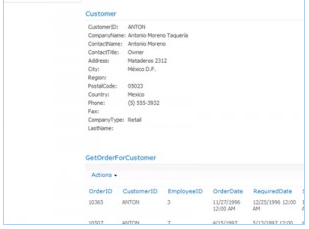
In case of real-time retrieval, you can apply the BCS Business Data webparts: add to the SharePoint page both a Business Data WebPart for the parent entity and a Business Data Related List WebPart for the child data entities. The latter will display the child SAP data entities of the parent SAP data entity that is selected in the Business Data List web part.
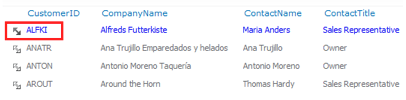
Mind you, the user experience of this setup is not always intuitive. In such case, it can prove better to build an own custom presentation. An example of this is outlined in Working with complex SAP business entities in Duet Enterprise.

Sunday, October 16, 2011

Unlocking SAP data via Duet Enterprise Feature Pack 1 in more agile approach

This blog is earlier published on SAP Community Network Blogs
A major bottleneck in applying Duet Enterprise 1.0 is the time it takes the SAP + Microsoft development team to unlock SAP data via Gateway to SharePoint. You have to define the service interface in ES Builder, create a proxy in transaction SPROXY, and next via transaction SE38 realize the GenIL model. The latter requires a lot of handcrafting ABAP code to do the mapping from Gateway runtime context and data representation to SAP backend, and vice versa. Code that follows a pattern, so a good candidate for code generation. This was a major pain point experienced by us when initially applying Duet Enterprise 1.0 within the Ramp-Up in 2010, and with emphasis reported back to the Duet Enterprise product team.
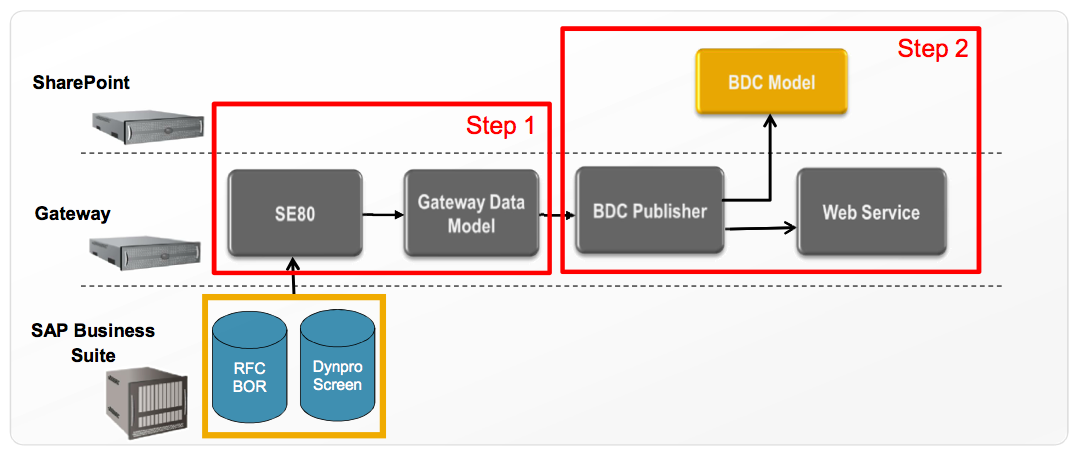
In the coming Feature Pack 1 version, the Duet Enterprise product team has evidently got the message. FP1 comes with multiple generator tools to ease and speed-up the realization of the internal Gateway Model (new name for GenIL model) for your application scenarios. Handcrafting is largely eliminated and replaced by full-automatic generation of first the mapping code to unlock the SAP data via NetWeaver Gateway 2.0, and next the required SAP Gateway service proxy, plus the SharePoint BDC model. The latter can be handed over to SharePoint side to import the External ContentType definition into Business Connectivity Services. Something that took us with version 1.0 several days to set things up at both SAP as SharePoint side, now is done in matters of minutes. Very appreciated side-effect of this is that it enables agile development: if the initial Model does not fit the requested application context, just change the mapping in the tooling and regenerate. With handcrafting approach you would loose a lot of elapse time here rearranging and testing your own mapping code.
Of course not all now suddenly comes for free. Before you start the Gateway Model generation, you still first must think about the data integration architecture to achieve your application scenario. An action that involves and requires consensus of both the SharePoint and SAP backend architects plus developers. The usage of the FP1 / Gateway 2.0 generation tools itself put some constraints on the SAP backend data sources; BOR, RFC or Dynpro Screens. Basically it comes down to it that the backend data entities must provide at minimum both a ‘Query’ and ‘ReadItem’ operation, and also ‘Create/Update/Delete’ operations for update scenario via SharePoint.
What if the available SAP backend entities do not self satisfy the requested integration pattern and/or the generation constraints? Even then, it is far easier and better manageable to realize a custom wrapper RFC within the ERP level that does satisfy the pattern + constraints, than apply the manual Gateway Model code crafting. Spoken from own experiences…

Friday, October 7, 2011

Read content of uploaded file within ItemAdding method

In an application it is required to validate the file content before allowing the upload into a document library. SharePoint 2010 enables this via the ItemAdding synchronous SPItemEventReceiver method. Problem is however that you cannot access the uploaded file through the SPItemEventProperties.ListItem object. The item is at runtime of ItemAdding not yet created in and thus not available via the list. Via blogpost Getting file content from the ItemAdding method of SPItemEventReceiver I found a code-snippet how to access the file. Last remaining issue was that I received empty result upon reading from the filestream. Debugging I discovered that the Stream position was set to the end of file. Which is logical since the file has been read in order to save it to the content database. By resetting the position I can read the file contents, validate it, and cancel the upload in case of invalid content
public override void ItemAdding(SPItemEventProperties properties)
{
  string searchForFileName = Path.GetFileName(properties.BeforeUrl);
  HttpFileCollection collection = _context.Request.Files;
  for (int i = 0; i < collection.Count; i++)
  {
    HttpPostedFile postedFile = collection[i];
    if (searchForFileName.Equals(
      Path.GetFileName(postedFile.FileName), StringComparison.OrdinalIgnoreCase))
    {
      Stream fileStream = postedFile.InputStream;
      fileStream.Position = 0;
      byte[] fileContents = new byte[postedFile.ContentLength];
      fileStream.Read(fileContents, 0, postedFile.ContentLength);
      ...

Thursday, September 29, 2011

VNSG event 'SAP en Microsoft - het beste van 2 werelden'

De VNSG focusgroep User Experience organiseert op 13 oktober een bijeenkomst met als onderwerp SAP - Microsoft integratie/samenwerking. Bij veel bedrijven zijn zowel Microsoft als SAP belangrijke leveranciers van (bedrijfskritische) software en wordt er continue gezocht naar mogelijkheden om het beste uit beide werelden te halen. Waar SAP vooral bekend staat om haar solide bedrijfsproces ondersteuning, is Microsoft vooral sterk in de User Experience.
De aard van het evenement is om SAP en Microsoft solution architecten van eindorganisaties met elkaar in gesprek te brengen, en te leren van elkaar. De sessies zijn hierop geselecteerd. Klantorganisaties die bereid zijn gevonden te vertellen over hun ervaringen, best practices en huidige status op SAP / Microsoft integratie vlak.
De volgende klantorganisaties geven een presentatie:
  • Achmea - Remco Jorna: Enterprise Architectuur aanpak
  • Tata Steel - Hans Brouwer en Tamas Szirtes: An Enterprise Portal Journey...
  • Eneco - Kees Voeten: HR futureproof bij Eneco
  • Ziut - Frank Voortman: Duet Enterprise voor SAP/Microsoft integratielaag in aannemersportaal
Volledige agenda.

Event details

Datum: 13 oktober 2011
Locatie: Microsoft, Schiphol-Rijk
Eventduur: middag
Doelgroep: Solution architecten van eindklanten (profit en non-profit)

Organisatie:
Marcel Rabe, secretaris VNSG Focusgroep User Experience
Pim de Wit, kernteam lid
William van Strien, kernteam lid
Gijs Leurs, kernteam lid

Aanmelden voor dit event is ook open voor niet-VNSG leden: aanmeldingsformulier.

Saturday, September 3, 2011

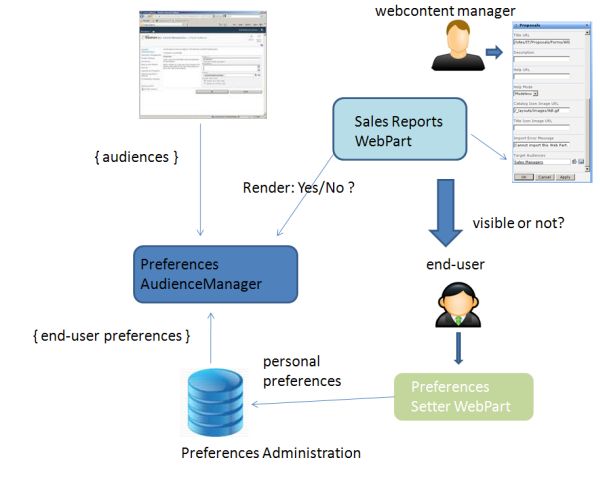
On-the-fly content-targetting via custom AudienceManager

In a SharePoint project, one of the requirements is to enable the end-user to set preferences, which are then immediately be applied in the portal. One of the settable preferences is the (non)interest in subjects/functions: if interested, webparts will be visible; if non-interest specified, the webpart will be invisible. Well, this kinda sounds like SharePoint audiences. As this is out-of-the-box SharePoint functionality, it is applicable for both our own custom webparts as well as standard and third-party webparts. The only problem is the sub-requirement to have the preferences immediately applied in the portal. Standard SharePoint audiencing requires to compile the Audience before it takes effect, which either occurs on scheduled basis or on request. But never immediately.
The solution for this is to utilize a custom PreferencesAudienceManager, with functionality to on-the-fly derive Audience membership on basis of the selected settings.

System architecture


PreferencesAudienceManager code-extract


public class PreferencesAudienceManager : IRuntimeFilter2
{
  ...
  public bool CheckRuntimeRender(string IsIncludedFilter)
  {
    bool render = false;
    if (SPContext.Current != null && SPContext.Current.Web.CurrentUser != null)
    {
      // Priority to OOTB SharePoint Audiencing.
      render = AudienceManager.IsCurrentUserInAudienceOf(IsIncludedFilter, true);
      if (!render)
      {
        string[] globalAudienceIDs = null;
        string[] dlDistinguishedNames = null;
        string[] sharePointGroupNames = null;
        int num = AudienceManager.GetAudienceIDsFromText(IsIncludedFilter, out globalAudienceIDs, out dlDistinguishedNames, out sharePointGroupNames);
        if (num > 0 && globalAudienceIDs != null && globalAudienceIDs.Length > 0)
        {
          string userIdent = PersonalizationUtils.GetCurrentUserIdentifier;
          UserPreferences userPreferences = PreferencesRepository.ReadUserPreferences(userIdent);

          SPServiceContext context = SPServiceContext.GetContext(SPContext.Current.Site);
          AudienceManager am = new AudienceManager(context);
          foreach (string audienceId in globalAudienceIDs)
          {
            Guid g = new Guid(audienceId);
            Audience a = am.Audiences[g];

            string preferenceAudienceName = a.AudienceName;
            UserPreferences preferenceAudience = (UserPreferences)Enum.Parse(typeof(UserPreferences), preferenceAudienceName );
          if ((preferenceAudience & userPreferences) == preferenceAudience)
          {
            render = true;
            break;
          }
        }
      }
    }
  }
  return render;
}
There is on caveat you need to be aware of; the ability to even use Audiences functionality, requires that the User Profile Service Application is installed in the farm. Microsoft namely placed the Audience functionality within the context of User Profile; even though you can thus apply Audiencing without dependency of User Profile values.

Tuesday, August 23, 2011

ListTemplate cached in Sandboxed process

Sandboxed solution are a great addition to SharePoint 2010 capabilities whenever it is required to deploy own customizations. However, be aware of the restrictions, and some oddities. Today I encountered such an unexpected behaviour. ListTemplates are one of the SharePoint artefacts that allow themselves to be deployed via a Sandboxed solution. In the initial version of a custom ListTemplate, some errors and omissions were made with respect to schema.xml and some forms. I corrected these, and deployed (= uploaded + activated) the Sandboxed solution. To discover next that my changes were not present; not within the Feature-provisioned ListInstance based on the ListTemplate, nor within a manually created FormsLibrary instance based on the custom ListTemplate. It took an AppPool recycle to have the latest deployed ListTemplate definition become effective in the sitecollection. Tip: always recycle the AppPool before re-deploying a Sandboxed solution.

Wednesday, August 17, 2011

HowTo omit the standard xml-namespaces in WCF MQ requests

Earlier I reported that we encountered an issue with communication via IBM MQ WCF Channel over a clustered IBM WebSphere MQ-queue. The problem was already known within IBM and the fixed software ready on the shelves, and naturally we were very willing to be a first beta-tester. With this IBM fix, the EndPointNotFound problem was indeed solved. Sadly, we next ran into another issue. This time it manifested itself in our own service implementation at the receiving side. Upon receiving a MQ-request, the service responded with a technical error. Due the holiday season it took some elapse time before the right people were available and able to investigate the cause. The problem analyse led to the suspicion that the presence of xml-namespaces in the webrequest was unexpected, and therefore the service refused the request:

<ServiceRequestName xmlns:xsi=\"http://www.w3.org/2001/XMLSchema-instance\" xmlns:xsd=\"http://www.w3.org/2001/XMLSchema\"> ... </ServiceRequestName>
Both namespaces are default included when serializing a System.ServiceModel.Channels.Message instance from inside WCF client processing. You can however prevent this by implementing an subclass of System.ServiceModel.Channel.Body.Writer, and override the OnWriteBodyContents method. Next inject this method within the WCF Channel:

    System.ServiceModel.Channels.Message message =
        Message.CreateMessage(
            MessageVersion.None,
            string.Empty,
            new XmlBodyWriter<TRrequest>(request));

    var responseMessage = webmqclient.Request(message);

...

public class XmlBodyWriter<TBody> : BodyWriter
{
    private readonly TBody request;

    public XmlBodyWriter(TBody request) : base(true)
    {
        this.request = request;
    }

    protected override void OnWriteBodyContents(XmlDictionaryWriter writer)
    {
        WriteBodyContents(SerializeRequest(), writer);
    }

    private static void WriteBodyContents(StringBuilder output, XmlWriter writer)
    {
        using (var reader = new StringReader(output.ToString()))
        {
           using (XmlReader xmlReader = XmlReader.Create(reader))
            {
                writer.WriteNode(xmlReader, true);
            }
        }
     }

    private StringBuilder SerializeRequest()
    {
        var output = new StringBuilder();

        using (var xmlWriter = XmlWriter.Create(output,
            new XmlWriterSettings { OmitXmlDeclaration = true, Encoding = Encoding.UTF8 }))
        {

            var serializer = new XmlSerializer(typeof(TBody));

            // Service does not expect xml-namespacing; including the standard
            // xmlns:xsi="http://www.w3.org/2001/XMLSchema-instance"
            // xmlns:xsd="http://www.w3.org/2001/XMLSchema"
            // Omit these from the serialized request
            XmlSerializerNamespaces ns = new XmlSerializerNamespaces();
            ns.Add("", "");
            serializer.Serialize(xmlWriter, request, ns);
        }

        return output;
    }
}
With this modification to the serialization processing of the WCF MQ request, the service at the receiving WebSphere MQ side now replies with a correct functional response.