Saturday, May 30, 2020

How-To include an external as presenter in Teams Live Event

When it comes to organizing a webcast, Microsoft 365 offers multiple options: Teams Meeting, Stream Live Event, Teams Live Event, Yammer Live Event. Each with their own differentiating characteristics, and you can select which best fits the specifics of your planned event. A significant differentiator of Teams Live Event is that you can extend beyond internal audience only. Either full public open, or still restricted audience by inviting externals as authorized via Azure AD B2B in your tenant. In the B2B guest model, the external access into the Live Event can then be secured by multi-factor authentication (MFA), to protect the company information shared for external access only in trusted context.
A pleasant discovery I did this week is that the authorized external involvement also extends to the Presenter role: you can include in the set of event presenters also identified people from outside your own organization.
The enabling conditions:
  1. The Live Event must be produced via Teams itself, not produced by External app or device. Reason is that the latter delegates to MS Stream for processing and delivery, and that Microsoft 365 service up today sadly still does not support external access;
  2. The external person must be known in your tenant, either as Azure AD B2B guest or via Teams Federation;
  3. The Live Event organizer / producer must invite the external person via his/her external guest identity in the Presenter role;
  4. The external person must be authorized as member to a Teams instance in your tenant
  5. And as first crucial: to be allowed in the Live Event as presenter, the external person must at the presentation time switch in Teams to your tenant. Without this step, the external person sees in own Teams calendar the Live Event as meeting; but when trying to join that from own tenant will be blocked with notification
    "This event is in <external-tenant>. To join, you'll need to be in that org,too."
    If the organizing tenant has enabled MFA as conditional access rule, the external person will be challenged for that before secure and governed allowed access in the organizing tenant.
  6. And second crucial: to actively join the live event the external person cannot go from Teams calendar once switched to the organizing tenant as it is not administrated there for the external person. Workaround is to join the 'external live event' via the invitation mail that the external person received in the own mail inbox when the Live Event organizer identified the external as an event presenter. Click on 'Join Live Event' seamless opens the Teams App of the external person in the internal producer/presenter meeting of the Teams Live Event within the organizing tenant. As result of the tenant-switch (previous step), the external person is now namely already authenticated and known in the organizing tenant.
After following the above steps, the external person is from perspective of the Teams Live Event organization just another presenter, who is authorized and enabled to share video and content in the event. And can communicate with the producer + other presenters in the chat of the internal Teams meeting to align on the event production.
From the perspective of the organizing producer, (s)he remains in control to determine which content of the presenters included in the Teams Live Event production to actual put live for the audience. The final control remains thus within the organization hosting the live event to its invited audience - internals, potential authorized guests, or full public-open.

Sunday, May 24, 2020

MS Teams Channels - Yet Another Inconsistency on SharePoint Permission handling

Microsoft introduced Office 365 Groups as overarching concept to bring consistency in Office 365 permission management. Each single Office 365 Group manages authorization to a multitude of diverse Office 365 services (MS Teams, SharePoint Online, Planner, Exchange Online), in theory simplifying on the model in which each tool individual applies its own permission management.
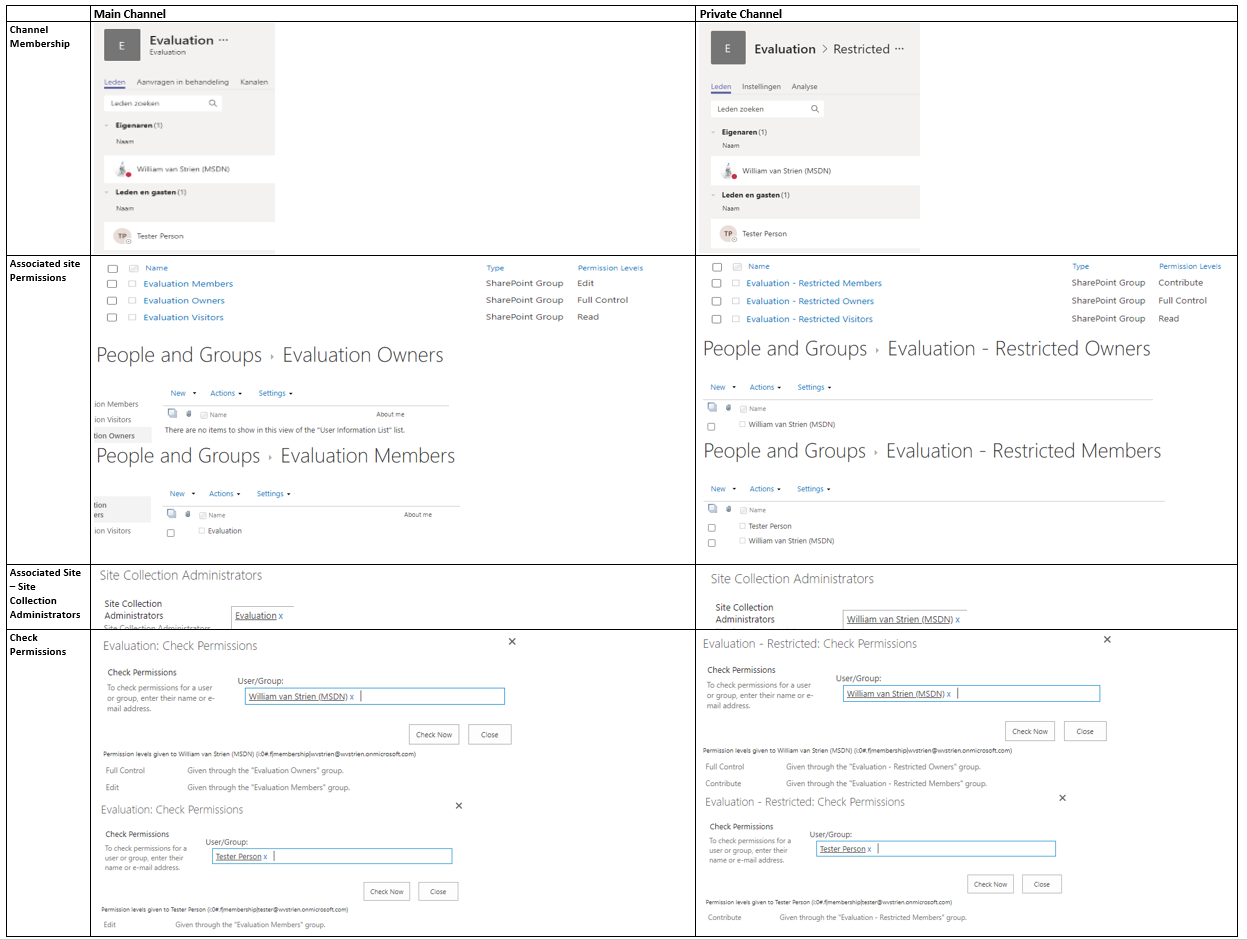
In practice, Microsoft itself struggles with the consistent application of this new permission management model. In previous post I visualized the differences in permission management of Communications Site versus Modern Teams Site. Yet another difference is visible on the level of SharePoint site collection that is associated with a MS Teams channel. In the associated site of the main channel, Microsoft utilizes the concept of Office 365 Groups as overarching permission management. However, in the associated site of any private channel, the notion of Office 365 Group is missing.
Comparision Permission Handling + Management within associated site of Main vs Private Teams channel
Observations:
  1. In the associated site of the Teams main channel, site authorization is delegated done via Office 365 Group.
    1. The SharePoint Members permission Group has as single member the Office 365 Group ‘Members’
    2. The SharePoint Members permission Group has as permission level 'Edit'
    3. The SharePoint Owners and Visitors permission Groups are both EMPTY
    4. Instead, the ‘Owners’ responsibility is assigned by having the full O365 Group 'Owners' as SCA
  2. In the associated site of a private channel, site authorization is still on named accounts level
    1. The SharePoint Members permission Group has as members the named accounts of everyone authorized in membership in the private channel, both the owners and members of the channel
    2. The SharePoint Members permission Group has as permission level 'Contribute'
    3. The SharePoint Owners permission Group has as members the named accounts of the persons that are owners of the Teams private channel
    4. And these same named persons that are owner of the Teams private channel, are assigned SCA
I think this deviation is driven both by the current situation that Office 365 Groups itself does not support hierachy and subsets, plus the restricted usage scope of a private channel. A private channel is meant to restrict access to certain content in the Teams instance, but it is not meant itself as a container hub consisting of multiple tools. As example, you cannot associate a Planner Plan with a private channel. There is thus in the context of private channels less need for the overarching permission management concept via Office 365 Groups.
A concern with this effectively broken permission management in private channel compared to Teams instance itself, is what happens when on the Teams instance level a membership is revoked. Turns out that on Teams level itself the effect of this cascades to any of its potential private channels: whenever an account is removed as member in Teams instance, the same account is also automatic revoked as authorized member in any of the private Teams channels.

Thursday, April 30, 2020

SharePoint Governance complicated, due deviation in permission handling within modern site templates

With the introduction of Modern Sites, Microsoft added an additional layer in the permission handling for SharePoint Online sites: via Office 365 Group (soon to be renamed/branded as 'Microsoft 365 Groups'). Below that new level, one can still authorize within the SharePoint site itself via SharePoint Permission Groups. And to make the story even more confusing: not all 'Modern' sites are equal wrt this new Permission model. In a Modern Communication Site there is no notion / connection to an Office 365 Group.
Comparision Permission Handling + Management within Modern Communication Site vs Modern Team Site
Observations:
  1. In a Modern Teams Site, site authorization is delegated done via Office 365 Group.
    1. The SharePoint Member permission Group has as single member the Office 365 Group ‘Members’
    2. The SharePoint Owners and Visitors permission Groups are both EMPTY
    3. Instead, the ‘Owners’ responsibility is assigned by having the full O365 Group Owners as SCA
  2. In a Modern Communications Site, site authorization is still on named accounts level
    1. The SharePoint Group has as members the named accounts of persons in the role
    2. And only the person that on site provision/create time was identified as ‘Site Owner’ (in SharePoint Admin portal), is assigned SCA
This deviation is intentional / by design from Microsoft, with justification: "Most often, a communication site has a small number of people with permission to author content and many people who only have permission to read content. Team sites use Office 365 Groups for permissions. Communication sites use SharePoint groups." (source: Teams Site vs. Communication Site: Which one should I choose?).
However, in concrete business usage more and more business users prefer the Communications Site for internal collaboration usage above that of Team Site. Most significant motivation being the page layout options, that make better usage of the available screen estate. And this practical usage results in a governance flaw, as the permission handling on a "team collaboration site" created via Communications Site deviates from that within a Teams site; and the typical business user has no understanding for this.
I'm not alone in my misunderstanding, a good post on this topic is How broken are Office 365 SharePoint permissions?.

Friday, April 10, 2020

Tip: How-To determine whether guest email already in-usage in your Azure AD tenant

Invitation of a new Azure AD B2B guest is blocked in case the identifying guest email is already present in the inviting Azure AD. A typical situation in which this occurs is that the intended guest is already present as regular Member account, and has to that the external email associated. To avoid the error on invoking Invite Api and instead send an informed response to the requestor, the B2B invitation automation can check first on any occurence of the external email.
The codeline for that is:
Get-AzureADUser -Filter "proxyAddresses/any(c:c eq 'smtp:external.user@externalComp.com')" | Select UserType, UserState

Needed Api Permission for Service Principal to invoke Get-AzureADUser

This week I extended our custom B2B invitation handling build as Azure Automation Runbook to check upfront whether guest account is not present yet. The way to check is by quering for potential presence of requested Guest account via the UPN:
if ($guestAccRequests.length -gt 0) {
    # Get the Service Principal connection details for the Connection name
    $servicePrincipalConnection = Get-AutomationConnection -Name $servicePrincipalConnName   

    # Logging in to Azure AD with Service Principal
    Connect-AzureAD -TenantId $servicePrincipalConnection.TenantId -ApplicationId $servicePrincipalConnection.ApplicationId -CertificateThumbprint $servicePrincipalConnection.CertificateThumbprint

    ...

            # 1. Check whether already present as guest account
            $guestUpn = ConvertExternalEmailToUpn -guestEmail $guestEmail
            $existingAccount =  Get-AzureADUser -Filter "userPrincipalName eq '$guestUpn'" | Select UserType, UserState
            if ($existingAccount) {
                ... 
            if ($continueToInvite) {
                try {
                    $inviteResult = New-AzureADMSInvitation -InvitedUserEmailAddress $guestEmail -InvitedUserDisplayName $guestDisplayNameWithOrg -InvitedUserMessageInfo $messageInfo -SendInvitationMessage $False -InviteRedirectUrl "http://www.wvstrien.com" -ErrorAction Stop
                    $inviteurl = $inviteResult.InviteRedeemUrl

The PowerShell coding part was quickly up-and-running. More time-consuming was identifying the proper Api Permission to grant to the Service Connection that connects into Azure AD. We already assigned the 'User.Invite.All' Api Permission from the Microsoft Graph Api, and one would expect that also permission for Get-AzureADUser is within the Graph Api permissions. However, granting the likely permissions 'User.Read.All', 'Directory.Read.All', 'Domain.Read.All'; none of these authorizes the Service Connection.
The information provided by Microsoft in identifying the needed Api Permission is not very good, or at least not easy to find. The StackOverflow post Graph API - Insufficient privileges to complete the operation put me on the right track. Turns out that for this cmdlet you still need to assign permission from the deprecated Azure Active Directory Api.

Sunday, February 23, 2020

Replicate B2B governance of SharePoint to Teams

In nowadays enterprises, being able to seamless collaborate with one’s ecosystem is gaining more and more importance. The Office 365 platform supports Business-2-Business collaboration in multiple of its services. However, there are significant differences in the governance supported.
In SharePoint, their is finegrained governance possible, which convinced our critical information security risk management to allow its usage. On tenant level you configure to allow sharing, however without per se enable it on each individual site collection. Plus you can white- and blacklist allowed + never allowed domains, again without this automatic propagated to the individual site collection level. On site collection level you can by default turn off sharing and only explicit enable for targetted site collections, including then white- and blacklisting of domain(s) under condition that these are configured [(dis)allowed] on tenant level. Protection effect is that invited guest is only actually authorized to access a B2B shared site collection if the external domain of guest is allowed for particular site collection. Finally, the customization / extensibility options of SharePoint allow to make visitors of the site via an across site banner aware that the information in this particular site collection is also accessible by persons outside the company.
The out-of-the-box B2B governance of Microsoft Teams is much more limited. Ok, the visual indication of guest(s) presence in the Teams membership is standard. But the guest allowed-mode is on tenant level only: if turned on, all Teams instances by default are allowed / opened for guest access. Including all the Teams instances for which not explicit requested, or even should not be allowed given the internal purpose + audience of that Teams instance. Another miss is that of the check on domain per Teams instance. The resulting risk is that a business user can per accident invite a guest of company Y while intended to invite guest with almost same name from company X.
The lack of the B2B governance with MS Teams results that it is insufficient business secure for our information / security risk management. To get approval, we need to bring the same level of controls to Teams guest access as there is with SharePoint. We do this by extending / customizing on the invite experience in MS Teams. Business users are allowed to invite guests, however not from Teams direct itself due its lack of domain check. Instead we provide via SharePoint a B2B process request page where business user can:
  1. Request whitelisting of allowed partner on tenant level; usable for all SharePoint sites and Teams instances
  2. Request sharing of individual SharePoint site or Teams instance (including the associated site underneath) for one or more domains; that must be whitelisted on tenant level
  3. Request provision of one or more guests, of companies that are allowed on tenant level; usable across entire tenant
  4. Specific for Microsoft Teams: invite guest account to a Teams instance
In the automated handling of 4 (via Azure Automation) we verify that the domain of requested guest account is within the “whitelisting” of the identified Teams. If so, the guest is automated added; if not then the request is rejected and business error is prevented.

Tuesday, January 28, 2020

Peculiarity with Hub sites - SPFx Header displayed state of associated site is initial preserved

Following information architecture situation:
  1. A communication site registered as hub site
  2. Another site (can be communications or modern teams site) associated with the hub site
  3. The associated site has some site info tagging; which is visualized to site visitors through a SPFx Header extension
  4. The hub site either does not have site info, or the values that it has are different from that in the associated site
Effect of this situation is that when one navigates within the hub association from associated site to hub and vice versa, it can in its (cached / preserved) header display false / incorrect information...

Site associated with Hub; in this site via SPFx Header extension, some ‘site identification’ is visualized in the site’s header

From this hub-associated site, navigate to the hub site. The header info remains visible, even though the info does not hold for the hub site

Refresh / explicit (first)visit the hub site; then the ‘false-positive’ site info is gone

From first visit of hub, navigate to the associated site. The header info remains invisible, even though this site holds identifying site information

Cause: in an hub, only on 'first-visit' the SPFx Header(s) are executed Inspecting the network traffic, it is evident that the displayed header info is not refreshed on navigating 'within hub context': the SPFx Header is not re-executed. Apparent only on explicit 'first-visit' to an Hub assocation - hub or associated site; then SPFxHeader components are executed. And on any navigation 'within' the hub; the (visual) state of the SPFxHeader is preserved; on same notice as the 'hub navigation.
For performance perspective, makes sense. But in situation where via SPFx Header extension essential site information is displayed, -- which is not per se similar throughout the entire hub association; the result in browser is functional / governance-wise incorrect.
UPDATE - problem resolved thanks to community

On friendly suggestion of Vesa Vujonen, I submitted our finding as SharePoint dev issue: Hub site on navigation preserves SPFx header display state of associated site. And the combined power of the community delivered; Andrew Connell suggested that it's related to the navigatedEvent & the page routers partial page loading, and referred to post of Elio Struijf in which similar behavior is described and solution provided: Handling navigation in a SharePoint Framework application customizer.