When running my deployed Silverlight application on a remote test server, I ran into a runtime problem. Debugging (since I deployed to a remote test server without Visual Studio support, I needed to resort using 'System.Windows.Browser.HtmlPage.Window.Alert'...), I discovered that the cause was a missing column in the returned XElement result of the GetListItemsAsync List webservice call. The missing column is a lookup to information in another list, and non-required. And moreover, this column is not included in the default view (it is in my local development environment, therefore I did not experience the problem earlier). So there's the explanation why it is not included. The solution is to explicitly specify via the ViewFields parameter to include this field in the result. However, even then I did not get the column included (?) The cause of this is that not all items in the list have a value for this non-required field. And for that you have to cope by specifying that the viewfield may be nullable:
Tuesday, July 14, 2009
Friday, July 10, 2009
Proud - Top 1 Contributor on SAP / .NET Interoperability Expert Forum
I really don't like to brag on my achievements. When however you receive as a 'Microsoftie' the positive acknowledgement from the SAP community on your contributions, this simple deserves to be proud of. So with humble modesty, I include a screenshot of today's status on the SAP Community Network Expert Forum on SAP NetWeaver .NET Technologies:
Labels:
Consulting,
Interoperability,
SAP
Tip – Provision custom publishing masterpage, pagelayouts and webparts always via a Feature with Site-scope, not Web-scope
The masterpage and webpart galleries for publishing sites live at the top level site (rootWeb) in a sitecollection, not at individual sites. This can be misleading, since every subsite get its own ‘_catalog/masterpage’ and ‘_catalog/wp’ folders. The Publishing functionality however only goes to the gallery at the top level site; for the masterpages (Site and System), pagelayouts as well as for building up the list of selectable webparts.
A best practice is to provision your custom masterpage, pagelayouts and .webpart definition files via a Feature. Thereby you must specify the level at which the feature is applied. For MasterPage, PageLayouts and .webpart files the appropriate level appears thus to be ‘Scope=Site’. However, it is also allowed to set ‘Scope=Web’, as long as you’re activating the web-scoped feature in the rootweb. But when you activate such a feature in a subsite, the results are less. It appears as if the SharePoint feature mechanism simple ignores the request to provision masterpage and pagelayouts into ‘_catalog/masterpage’, and .webpart files into ‘_catalog/wp’. They are simple not added anywhere. Not at the indicated subsite level, which would also be useless given the publishing behaviour. But also not at the rootweb level. Annoying is that no signal of this is given, no error reporting but simple ignored to provision the SharePoint files at the incorrect subsite level. Ok that stsadm doesn’t signal it, but I would have expected an error indication when activating the feature via the GUI. And at the least I expected to find some information about it in the extensive SharePoint logs in the 12hive. In reality none, instead the feature framework just silently ignores the feature specifications which are logically incorrect when activated at subsite level.
So, what then to do when you what to provision content to a publishing site at subsite level ? I recommend the following 2-steps approach:
- Provision your masterpage, pagelayouts, and .webpart files to the catalog gallery at rootlevel; apply a Feature with scope = Site.
- Provision your site structure (libraries, lists) and content via a Web-scoped Feature; and activate this against your specific site, the root or a child subsite. E.g. http:<root-entry>/Intranet
Labels:
Feature,
MasterPage,
PageLayout,
Publishing,
Tip,
WebPart
Tuesday, July 7, 2009
Workaround shortcoming of SPWebConfigModification behavior wrt explicit positioning childNode
I structurally apply the SPWebConfigModification class upon all my SharePoint deployments to propagate the needed web.config modifications to the target environment (be it my local VM or in test/staging/production environments, typically in a farm). Benefits of using this functionality are:
- All web.config modifications are done automatically. No need to have someone (yourself or in production, IT operations) do this manually by editing the web.config file(s);
- Addition of the modifications becomes part of your ALM process; they can be tested and validated before going to production, and repeatedly fully automatic executed;
- The same web.config modifications are propagated throughout the entire farm; and even when later on a new WFE or a new extension is added;
- Added modifications can also be neatly removed upon uninstalling your SharePoint application.
Although I’m a big fan of this functionality, I’m also aware of some of its shortcomings. One of this is that upon adding a new childNode, it will always be appended as the last childNode in its parent webconfig node. Sometimes this is not good enough, and you need to be able to have it inserted at a specific position. In my case it was needed for enabling an ExceptionHandler HttpModule. To have this correctly operating, it must be the first active httpModule in the pipeline. Typically however the httpModules section in the web.config already has multiple httpModule nodes added:
The standard behavior of SPWebConfigModification places my ExceptionHandler behind them, effectively making it non-function. I could resort to manually correct my / all the web.configs; yeah right, you gotta be kidding…
Instead I decided to devote some time to investigate how to make a full-automatic correction for this. Via Reflector I inspected the runtime operation of the SharePoint ApplyWebConfigModifications method. Then I did an attempt to ‘break in’ on this functionality by a combination of first removing the already present httpModule childnodes, next add my exceptionHandler so it be the first, and then add the original httpModule nodes again. However, this was unsuccessful; and the outcome unpredictable. I suspect that an explanation for this is that my application is not the ‘owner’ of the (re)moved nodes. But that is hard to determine, since that requires a deep insight in the inner internals of this SharePoint behavior. After this I came up with a solution to correct the sequence in the httpModules afterwards the invocation of SharePoint’s ApplyWebConfigModifications. And this works satisfactory!! I must admit it has one weakness in that this afterwards correction will not be applied when later the farm is extended with new servers or web app zones. But honestly, seeing the SPWebConfigModification code I do not have a clue to make that happen. Another issue to watch out for is that SharePoint administrates in its config database all commanded web.config modifications, and reapplies them all upon each ApplyWebConfigModifications. I solved that by administrating in SharePoint’s PropertyBag the name of the ExceptionHandler, and then after each invocation of ApplyWebConfigModifications invoke the correct positioning of this HttpModule.
Code extracts:
And ultimately, this gives me the desired system/debug-enabling functionality in the deployed application:
Oops, apparently I've forgotten to enable an implementation for the IExpensesHandling interface...
Labels:
Deployment,
Feature,
ObjectModel,
web.config
Thursday, July 2, 2009
I've earned my first SAP SDN forum points for providing a Solution..
The integration and interoperability of SAP and .NET environments is a subject which receives attention both from the SAP as from the .NET developer's community. It's for example interesting to see that both the Microsoft (MSDN) as SAP Developer Network (SDN) have a forum dedicated to this subject. Since the subject is all about integration, I as a .NET developer also like to keep up with the SAP SDN forum. And even contribute my bit when I'm able to help out someone in the SAP/.NET community who is struggling with questions or problems. It's gets even beter when your response is appreciated. So I've earned as a .NET developer my very first 'Forum Points' on the SAP NetWeaver .NET Technologies forum; on answering the question Calling a function module using C#. Especially motivating when you consider that this was my first contribution to this forum; I hope that more will follow, and also to learn myself from solutions of others on this forum.
Labels:
Integration,
Interoperability,
Microsoft,
NetWeaver,
SAP
Wednesday, July 1, 2009
Difficult upto impossible to derive the typename of error-causing webparts in migrated site
I migrated a SharePoint sitecollection into my local SharePoint development environment. As source material I had a backup of the sitecollection’s content database, and a couple of assemblies to go into the local webapplication bin. Missing is the web.config, and also the knowledge whether or not there is a dependency on other assemblies: be it within the local bin or within the GAC. I restored the database backup within my local SQL installation, created a new SharePoint webapplication, and attached the restored db to it. This made the site locally available and browsable.
Runtime it then appeared that I am indeed still missing some of the site resources. Browsing of several pages results in the infamous message: “Web Part Error: A Web Part or Web Form Control on this Page cannot be displayed or imported. The type could not be found or it is not registered as safe.”
The trick is now to detect the type of the error-causing webpart(s). Then I can verify whether or not I have them in the assemblies, and if so add an SafeControl entry for it in the web.config. I tried to have a look at the inner content of the webpage by opening it in SharePoint designer. This also gives the error message. Then I tried to find out the typenames by putting the page in webpart maintenance mode. If you have the appropriate rights (given my local environment, I naturally do), you can easily enter this mode by attaching ‘?Contents=1’ to the page-url. This gave the strange effect that 3 out of 5 webparts are displayed as ‘ErrorWebPart’.
This looked to me a display issue within webpart maintenance. Therefore I went explicitly self at a deeper level by inspecting the webpart info via the SharePoint Object API. However, even then the error-causing webparts have runtime the type ‘Microsoft.SharePoint.WebPartPages.ErrorWebPart’:
Surfing around I found out that this is a known SharePoint behavior. Any webpart that has gone bad, appears runtime as ‘ErrorWebPart’ instead.
So I decided to take it to yet another deeper level, and get into directly at the SQL content db. I queried the WebParts table for retrieving information of the webparts on the specific page:
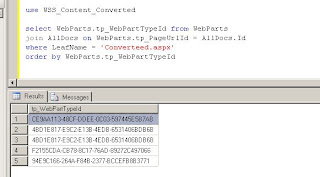
This gives the 5 entries for the contained webparts, but sadly not a readable description of their types. The displayed tp_WebPartTypeId is not a cross-reference to an entry in another table. This guid is actually a MD5 calculated hash of a string composed of <the fullname of webpart’s assembly> + ‘|’ + <full classname of webpart>. MD5 hashing is irreversible, so it is not possible to convert these guids back into a human-readable format. Apparently, SharePoint itself builds up runtime an in-memory administration of the calculated hash of all the allowed webparts in a sitecollection. When requesting a webpart page, SharePoint compares it’s tp_WebPartTypeId values against this administration to derive the concrete webpart type. In case a WebPartTypeId is not found, SharePoint reports this via the errormessage “Web Part Error: A Web Part or Web Form Control on this Page cannot be displayed or imported. The type could not be found or it is not registered as safe.” Because of the irreversibility of the MD5 algorithm, even SharePoint code itself cannot derive the typename of these error-causing webparts.
To my humble opinion, this really sucks! How are you ever able to determine the typename of an error-causing webpart in this approach? And for a best practice: document whatever non-SharePoint out-of-the-box webpart is used in your site, and document for each webpart the fullname (including version number!) of its assembly.
Labels:
Content Database,
Migration,
WebPart
Tuesday, June 30, 2009
Microsoft Services has no concrete advice or guidelines on when to apply SharePoint versus SAP Enterprise Portal within a customer situation
At the last Microsoft Application Platform congress, Harry Tolsma gave a presentation on 'Optimizing your SAP-based business processes with the Microsoft Application Platform' (audio, slides). At the end of his talk, a question popped up from the audience on whether Microsoft has a decision matrix when to utilize MOSS, and when to hold on to SAP Enterprise Portal. At that moment, Harry could not give a conclusive answer on whether such a matrix is available at Microsoft Services. A time later I asked him whether he had more news on this.
The answer is that Microsoft Services does not have a concrete generic decision matrix and guidelines. The rationale is that each customer situation is specific, and requires a custom analysis and tuned advice. I intend to agree with this idea. With an important addition: for larger enterprises their specific customized advice and guidelines ought to be applicable across the entire enterprise, and should therefore be integrated within the enterprise referential architecture.
Reuse and application of the architectural guidelines and decisions is possible within the enterprise for unlocking and integrating of various SAP business functionalities and processes. My advice is to mandate this.
The blog of Kristian Kalsing contains 2 interesting posts related to the subject: ‘SharePoint versus NetWeaver Portal‘ and ‘EP/MOSS portal technology strategies’.
Tags: SAP NetWeaver Microsoft SharePoint integration interoperability architecture guidelines roadmap
Labels:
Consulting,
Integration,
Portal,
SAP,
SharePoint
Subscribe to:
Posts (Atom)


