Saturday, March 31, 2012

Duet Enterprise interoperability versus native WCF service integration

Recently I was at SAP Walldorf exchanging Duet Enterprise experiences with other partners and customers. One of the Microsoft solution architects present of a Finnish IT-consultancy raised the question when you should utilize Duet Enterprise above the plain usage of Microsoft WCF. This same question has (and is from time to time again) also been asked by the Microsoft architects of the organization where I’m involved in 2 SAP / SharePoint integration projects; both utilizing Duet Enterprise.
The question boils down to understand where is the return of investments. When does it make sense to investigate in purchasing and learning Duet Enterprise, instead of connecting via webservices to earlier build custom connectivity? And to be honest, from a Microsoft developer’s perspective the latter is more appealing, because technically more challenging and also familiair approach plus technology.
The valid answer of Holger Bruchelt on this question was that it strongly depends on the size of your SAP / SharePoint interoperability case. If just for a single application context, with no more scenarios in sight on a medium term, it is very hard to make the business case for purchasing, training and implementing Duet Enterprise. Most likely you can better make a dedicated 1-on-1 integration via the known way of Microsoft WCF, and connect direct to SAP webservices (BAPI webservices, or Enterprise Services).
However, when SAP / SharePoint is a strategic issue for the organization; with multiple applications of it on the horizon; Duet Enterprise is a very valid option to consider. The execution of multiple projects makes it profitable to invest the license and implementation costs for the added value of Duet Enterprise as standards-based SAP/SharePoint interoperability foundation.
A derived question is how Duet Enterprise interoperability compares against native service integration. This question is more complex to answer.
Duet Enterprise is (a consumer of) Service Integration. On SharePoint side it relies on the strengths of SharePoint Business Connectivity Services (BCS) to interoperate with the SAP landscape. BCS supports different connectivity-models to external systems and data repositories, including via webservices / = Service Integration. Duet Enterprise is an example of this: it invokes SAP NetWeaver Gateway webservices through means of BCS. For SharePoint developers, BCS can thus be seen as an abstraction of the Service Integration layer. On top of this abstraction, the SharePoint platform includes diverse BCS capabilities to aid the developer in composing the interaction with external systems: External List, Business Data webparts. In addition, the BCS API can be programmed for custom construction.
There are noticable differences between native service orientation and service integration using Duet Enterprise:
  • Duet Enterprise enables the entire system chain from provider (SAP Business Suite) to consumer (Microsoft SharePoint); on design time and on runtime moments. At design time, Duet Enterprise can be a significant accelerator to expose SAP data into SharePoint context. This is achieved through the Duet Enterprise design tools that are integrated in both SAP and Microsoft landscape. And by using SharePoint BCS as connectivity layer, the step to develop and provision a separate middleware layer is excluded. For the runtime handling, Duet Enterprise provides out-of-the-box capabilities for interoperability aspects: data retrieval, display and management, Single Sign-On, autorisations, end-to-end monitoring.
  • Duet Enterprise is a standard SAP / SharePoint interoperability foundation, designed and maintained by SAP and Microsoft together. The 2 software vendors execute a clear roadmap to further develop their shared product. In this roadmap, the product is aligned with the new developments in SharePoint and in SAP technology landscapes. Further, via the Unite program, the Duet Enterprise ecosystem expands on the basic deliverable with additional content packages. The expectation is that the ecosystem will steadily grow, and also deliver technical and functional components that end-organizations can deploy for custom composition and build of company-specific scenario’s.
  • Duet Enterprise lifts on SAP NetWeaver Gateway; Gateway is now a central component in the SAP architecture to expose SAP data and processes to external clients: SharePoint [via Duet Enterprise], but also (and with more emphasis real soon) to Mobile [via Sybase Unwired Platform]. Relying on Gateway enables organizations to expose SAP data + processes to multiple channels, with reuse of the same Gateway services [thus reduce on development and maintenance effort + costs].

Thursday, March 1, 2012

Skillset + Toolbox for a SAP / Microsoft interoperability architect

In the role of SAP /Microsoft interoperability Solution Architect, you are typically also the middleman between the SAP and Microsoft counterparts. You work with the Microsoft architect and developers, also with the SAP solution architect, SAP Business Suite business analyst and ABAP developers, as well in the combination. In my experience it is necessary to have a deep enough insight in the architecture and technology of both landscapes, for the optimal and valuable SAP / Microsoft advice in a given customer context. So although not required to program ABAP and/or C# yourself, you need to understand their role and positioning. And that of BizTalk, SAP PI, Microsoft WCF, Enterprise Services Repository (ESR), ABAP Workbench, SharePoint Designer, to name a few.
Personally I also prefer an own workspace in which I can analyse, inspect and work on both sides of the SAP and Microsoft interoperability stacks. My SAP/MS toolbox therefore contains a.o. the following items:
SAP side
  • SAP GUI (and thus the whole ABAP development + configuration stack)
  • SAP authorizations for backend; inspect BOR, RFC, workflow, application and error logs
  • SAP authorizations for Gateway; analyse Logs, SIMGH, …
  • S-userid
  • (SAP developer key)
Microsoft / SharePoint
  • SharePoint UI operated in browser
  • SharePoint Designer
  • Visual Studio >= 2008
  • InfoPath
  • SiteAdministrator role on the SharePoint site collection
  • Authorizations on the SharePoint farm for BCS, Secure Store
  • ULS Log Viewer
SAP / Microsoft interoperability; knowledge of…
  • Duet Enterprise
  • .NET Connector (NCo)
  • Sitrion
  • Winshuttle
  • BizTalk WCF LOB Adapter
  • ES Explorer
Useful others...
  • Fiddler
  • IE Developer tools
  • FireFox + FireBug
  • Wireshark
  • .NET Reflector
  • soapUI
  • HttpWatch
  • WinDiff
Typical content of my daily workplace; blended SAP and Microsoft tools – Visual Studio, SharePoint Designer, SharePoint UI opened in browser, SAP GUI, ULS LogViewer, ...

Wednesday, February 15, 2012

Architecture Pattern XML-Funneling of complex SAP structures for Duet Enterprise interoperability

This blog is earlier published on SAP Community Network Blogs
Via Duet Enterprise it is possible to expose SAP data to a SharePoint UI in short timeframes (less than an hour). This agility of SAP/SharePoint interoperability is made possible by combining existing strengths of SAP NetWeaver Gateway (Design Time + Runtime support) and SharePoint BCS. To utilize these strengths in optimum way, your scenario must obey to the following list of prerequisites:
  • Usable RFCs or BORs are available in the SAP backend
  • Flatten SAP data structure
  • SharePoint ExternalList UI metaphore is good enough / adequat for the User Experience (note that you can alter it considerable via a custom XSLT stylesheet)
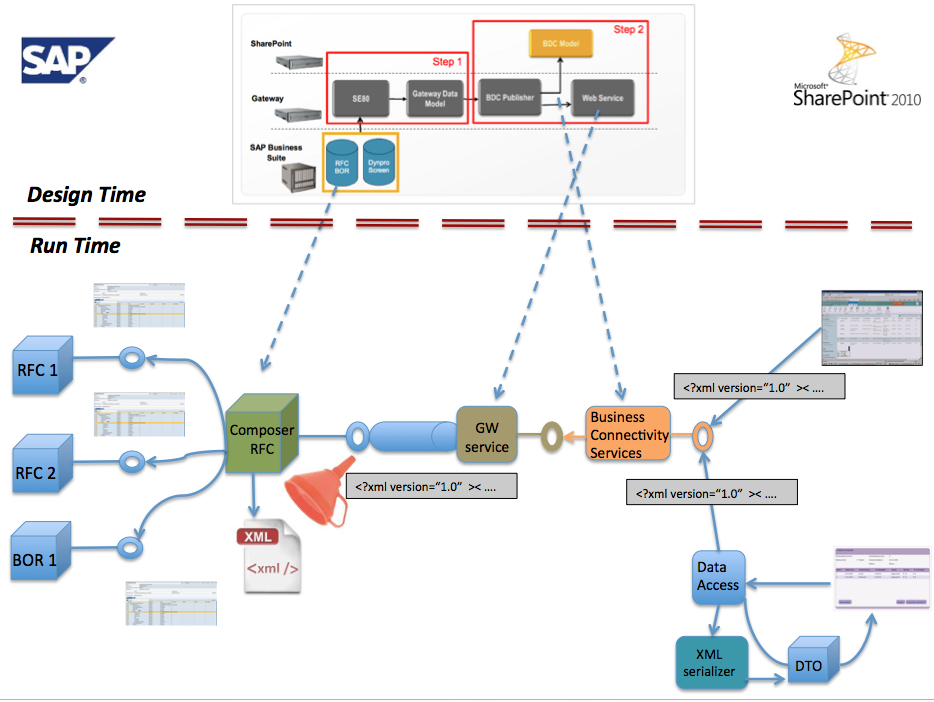
Duet Enterprise leans on the power of SAP NetWeaver Gateway 2.0 to publish SAP data from backend to external UI channels. Gateway design time tools enable you to quickly generate a Gateway DataModel, next expose this via a generated SAP webservice, and import the SAP data into SharePoint BCS.
Althought Gateway itself allows exchange of complex SAP data structures, the GW tools current do not support that. If you need to expose a complex SAP structure through Gateway, you’re on your own with handcrafting the Backend Operation Proxy, GSDO mappers, Gateway Service Proxy. This is not very attractive; it is laborsome, errorprone, and for every change in the data or service signature you must repeat some or even the whole effort.
An alternative is an approach in which you can still use and rely on the powers of the GW Design Time tools to generate the mappers. As said, the GW Design Tools demand the mapped SAP data is in a flattened structure. This conflicts when your source SAP structure is complex, with nested tables. But you can align them by introducing an intermediair component on SAP side; which semi-flattens the complex structure while maintaining in metadata the complex structure. Outline of this architecture pattern is that you build a custom RFC on the SAP backend that retrieves the complex structure by invoking the existing RFC/BOR, or even invoke that RFC/BOR in a loop or invoke multiple RFCs and/or BORs. The received SAP data is collected into a runtime XML document instance, in which you (re)build + maintain the complex data(object) structure. The custom RFC outputs as single string parameter the OuterXML of the runtime XML document. Such a single string parameter can without constraints be handled by the GW Design Tools to generate the entire Gateway + Duet Enterprise data exchange components: GW Model, GW Service, BDC Model. At runtime the complex structure is derived at SAP business side, funneled into a ‘flattened’ string-representation, and exchanged via Gateway + Duet Enterprise to and from SharePoint UI. Within SharePoint context the received string-representation is interpretated as serialized format of a complex data transfer object (DTO). Either via XSLT-transformation in the standard BCS controls, or via a custom UI-control, the complex structure is rendered on a SharePoint page.

The Xml-funneling pattern can be applied at 2 levels. You can use it to flatten the collection of child SAP entities of a parent SAP entity (returned as nested tables in the RFC output). And you can use it to flatten an entire functional SAP entity; which may be runtime composed by issuing multiple RFC calls.

Saturday, February 4, 2012

Impossible to use custom implementation of public BCS interface IEntityInstanceProvider

SharePoint Business Connectivity Services contains out-of-the-box webparts to visualize external business data. All the standard BCS business data renderers utilize the pattern that data selection is delegated to a data provider control. The 2 controls are associated via consumer/provider connectionpoints. BusinessDataDetailsWebPart is one of them. Its standard usage is for BCS profile pages. However, usage of this webpart on itself is not necessarily limited to that context alone. The webpart is selectable in the webpart gallery, and can be added to arbitrair SharePoint webpart page. The challenge is how to connect it to an external BCS entity. The trivial approach is to do it similar as on profile pages; feed it via the provider BusinessDataItemBuilder. The working of BusinessDataItemBuilder depends on an ‘ID’ querystring parameter. However, when that parameter is included in the url of a page with the 2 BCS webparts on it, SharePoint faults with an error message:
System.NullReferenceException: Object reference not set to an instance of an object.
  at Microsoft.SharePoint.Publishing.Navigation.PortalSiteMapDataSource.OnInit(EventArgs e)

This occurs because PortalSiteMapDataSource also reacts on the presence of ‘ID’ querystring parameter, but assigns another and in this context incorrect meaning to the value. When the ‘ID’ querystring parameter is renamed, the error is prevented. However, then the standard BusinessDataItemBuilder no longer reacts on it.
A proper solution seemed to build a custom provider that relies on another named querystring parameter to retrieve the BCS entity item. The BCS architecture has the promise to support this: it heavily decouples via interfaces from the specific BCS implementation classes. But this appears to be a false promise. Microsoft already points you to that via the warning accompanying the public (!!) interface IEntityInstanceProvider
This class and its members are reserved for internal use and are not intended to be used in your code.
Still, since the interface is public; and also the connectionpoints are public; it sounded safe to expect it must work. But when I added both my own IEntityInstanceProvider implemenation class and a BusinessDataDetailsWebPart on a page; it was not possible to connect them; not in the GUI, and also not explicit in custom code. Via Reflector I reverse engineered the cause, to ultimately end up with the following:
Microsoft.SharePoint.WebPartPages.WebPartPageUserException was unhandled
Message=The connectionpoint BDWP Item on g_1e1e7d15_652d_44cd_bc7d_9026382ff33b is disabled.
Source=Microsoft.SharePoint
StackTrace:
at Microsoft.SharePoint.WebPartPages.SPWebPartManager.CanSPConnectWebPartsCore(WebPart provider, ProviderConnectionPoint providerConnectionPoint, WebPart consumer, ConsumerConnectionPoint consumerConnectionPoint, WebPartTransformer transformer, Boolean throwOnError)

and digging deeper:
if (!providerConnectionPoint.GetEnabled(connectionAgentByInterfaceName))
{
    if (throwOnError)
    {
        throw new WebPartPageUserException(WebPartPageResource.GetString("SPWebPartConnection_DisabledConnectionPoint", new object[] { providerConnectionPoint.ID, provider.ID }));
    }
    return false;
}
public override bool GetEnabled(Control control)
{
    bool flag = false;
    BusinessDataWebPart part = control as BusinessDataWebPart;
    if (part != null)
    {
        try
        {
            return part.CanConnect(true);
        }
        catch
        {
            return false;
        }
    }
    if (control is BusinessDataItemBuilder)
    {
        flag = true;
    }
    return flag;
}

Thus: although at the external front decoupled via interface IEntityInstanceProvider, internally BusinessDataDetailsWebPart demands it's provider to be either a BusinessDataWebPart or BusinessDataItemBuilder webpart!! So much for interface decoupling.
Confine to this internal constraint by inheriting either of these classes is also not possible: BusinessDataItemBuilder is sealed, and BusinessDataWebPart is public abstract, but with 4 internal abstract methods.
BusinessDataDetailsWebPart also allows to explicit connect it in code with a BCS entity. Less elegant as via the connectionpoint, but workable. The standard BusinessDataDetailsWebPart can then still be used to render the external data item; no need to custom build an own one (or ‘copy’).
BusinessDataDetailsWebPart busDetailsWp = wp as BusinessDataDetailsWebPart;
if (busDetailsWp.BdcEntity != null && busDetailsWp.BdcEntity.Equals(entity))
{
    string entityInstanceId = ((IEntityInstanceProvider)this).GetEntityInstanceId();
    busDetailsWp.ItemID = entityInstanceId;
}

Monday, January 16, 2012

Reasoning for Duet Enterprise in addition to SAP NetWeaver Gateway

With the release of Gateway 2.0 as addition to the SAP NetWeaver stack, the question is justifiable whether this on itself is sufficient for SAP / Microsoft interoperability. Stated otherwise: ‘Do you need Duet Enterprise?’ The answer on that depends on your requirements, IT strategy, plans and situation. On level of desired application(s) functionalities as well as the Enterprise Architecture strategy, policy and plans in your company.
This blog is earlier published on SAP Community Network Blogs

Is Duet Enterprise required for SAP / Microsoft interoperability?

An answer to that question is: No, Duet Enterprise is not per se required, but it might be the wise decision. To make that decision, multiple aspects must be considered.
  1. The extras Duet Enterprise brings to the table (compared to Gateway alone)
  2. Your SAP / Microsoft roadmap and plans; multiple applications and a future-robust strategy, or just now for a single project?
  3. Enterprise Architecture guidelines
  4. Functional requirements
  5. Limitations and implications of Duet Enterprise

Duet Enterprise extras to SAP Gateway for SAP / Microsoft interoperability

The extras fall into different categories.

Functional

  • Standard SharePoint rendering of the imported SAP data through SharePoint Business Data webparts
  • Standard CRUD+Q UI-process pattern on SAP data; for bidirectional data handling
  • Support / hook into SharePoint Enterprise Search
  • Collaboration workspace around SAP data entity: Customer, Product, Quote
  • Integration of SAP workflow into SharePoint context
  • Same for reporting: schedule + review SAP BW reports from SharePoint front-end

Connectivity

  • Single Sign-On from SharePoint into SAP
  • Propagation of SAP user authorizations into SharePoint roles + permissions
  • Propagation of SAP data authorizations to SharePoint Search context, via construction of ACL’s on the External Data entities
  • Transparant SharePoint (consumer) – SAP (provider) runtime connectivity via SharePoint BCS

Operations and lifecycle management

  • End-2-end monitoring; starting from SharePoint, via SCL, upto SAP backend
  • Audit trail per use case

Development

  • Design tool for generation of BCS Model on basis of Gateway Model (itself generated via Gateway generation tools)
  • Integration with SharePoint; Gateway is strict to provide standards-based access to SAP data, Duet Enterprise is also a first-class
    SharePoint-aware user.

Roadmap + ecosystem

  • SAP and Microsoft have a roadmap outlined for Duet Enterprise
  • Base functionality provided by Duet Enterprise
    product is augmented via the partner ecosystem (via Unite program)

Enterprise Architecture

The decision for Duet Enterprise implementation is not made in isolement. It must be considered and fit in the greater area of enterprise architecture. It is evident that Duet Enterprise only makes sense if your IT
landscape contains both SAP and Microsoft. But that alone is not sufficient to justify the purchase and implementation of the product Duet Enterprise. Does EA mandate usage of standards: interoperability protocols, products? And for
common-of-the-shelf products, prefer strategic suppliers Microsoft and SAP above third-party suppliers? These are just 2 examples of questions on which EA should make a thoughtful decision and statement, resulting in EA guidelines.

Functional requirements

The often required rationale for Duet Enterprise is actually a negativisme of the SAP (G)UI. So it is not so much that the decision is made for Microsoft / SharePoint, but more that it is decided against the 'detested' SAP user interface. But if the only motivation is to get rid of the SAP user interface and replace it by another, there are other possibilities. Build a custom user interface in SAP WebDynpro for instance.
Duet Enterprise starts to shine when you combine the powers of the SharePoint platform with the functionality of the SAP processing. Not merely rebuild the SAP user interface, but design and architect an improved user experience by integrating it within context of the information worker.

Limitations and implications of Duet Enterprise

Duet Enterprise is not a silver bullet for all SAP / Microsoft interoperability occassions. It has limitations, intended or as consequence of architectural desicisions. Also, implementation of Duet Enterprise has its costs.

Limitations of Duet Enterprise

  • No support of REST protocol
  • Limited to data-oriented, CRUD+Q service signatures
  • Design-time tooling support only for inside-out approach; not for outside-in
  • Full design-time tooling support only for flattened SAP data-structures
  • Standard SharePoint rendering only for flattened data structures. This is actually a limitation of the standard SharePoint BCS UI controls. Rendering of complex data structures can be done via custom build SharePoint UI-controls (example: Working with complex SAP business entities in Duet Enterprise).

Costs of Duet Enterprise

The costs fall apart in different categories:
  • Recurring license costs
  • One-time deployment and installation effort
  • Training of IT operations, architects and developers (for all: SAP and Microsoft)
  • Optional (but recommended for any except a simple SAP landscape): dedicated SAP Gateway application server
  • Duet Enterprise design time requires presence of SAP Enterprise Service Repository (ESR)

Conclusion

The decision for the implementation of Duet Enterprise must be made in perspective of the business requirements and middle-term enterprise architecture. If SAP / SharePoint policy is a fundamental part of the [future] business application and IT landscape, Duet Enterprise might very well be the sensible decision. Better as realizing + maintaining an own SAP / Microsoft interop layer (no matter how smart your IT people are, they will on longer term never win it from the sheer combination of SAP + Microsoft product team). And also better as purchasing + implementing third party products. That will result in more shattering in your IT landscape, while you must assure yourself of the continuity of the product and its supplier. Again here the combination SAP + Microsoft gives on the longer run more trust as that of smaller although dedicated suppliers.

Friday, January 13, 2012

Dynamic browser redirect with preserving UrlReferrer

The standard way for a dynamic redirect executed from the browser context is via 'window.location = "<runtime derived url>";'. A side effect of this approach is that you have lost the UrlReferrer information after navigation to the second page. The browser namely treats this approach the same as if the user has explicitly entered the url in the location bar. There is no referrer since referrers are about one page directly referring to another (eg. via a link), not the browser just navigating to another page. If you need the UrlReferrer setting - a typical example is for (re)directing the browser to the first page after action performed on the second page -, a simple javascript trick can be used.
<script type="text/javascript">

EditLink2 = function(a,b)
{
    var redirectLink = document.createElement('A');
    redirectLink.setAttribute("href", "<runtime derived url>");
    document.body.appendChild(redirectLink);
    redirectLink.click();
}
</script>

With this code setup, the dynamic derived redirect is added to the context of first page. As result, the UrlReferrer state is repaired and available for inquiry in the (webclient + webserver) context of second page.

Monday, January 9, 2012

User Experience improvement of OOTB SharePoint rendering of SAP data imported via Duet Enterprise

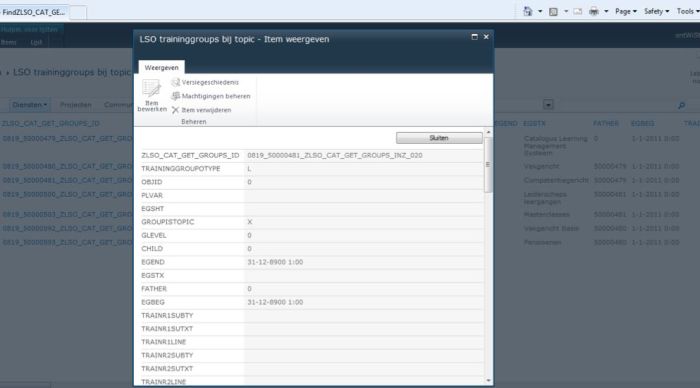
Duet Enterprise makes it simpler to bring SAP data into the realm of SharePoint based front-end. At the SharePoint side the SAP data integration is enabled via Business Connectivity Services. The SharePoint platform provides multiple standard controls that hook into BCS Service Application to render external SAP data. XsltListViewWebPart to render a view on ExternalList, BusinessDataDetailsWebPart to display details of a single external SAP BCS entity. These standard controls have a generic ui-process handling. In case the SAP process handling is different, the result may in fact be a lesser user experience as that ‘detested’ SAP UI.
However, within limitations it is possible to extend and adapt the standard SharePoint ui-process handling, while still using and relying on the standard controls.
This blog is earlier published on SAP Community Network Blogs
The standard ExternalList UI-process handling is to display all selected fields in a gridview; and display details of a selected external entity in a popup window.
In case of a relational or hierarchical data model (typical SAP structures), it is more natural to navigate to another portal page with a composite view: display some details of the selected external entity, accompanied with table based overview(s) of related items. This modified UI-process can be achieved with standard SharePoint controls by a number of measures:

  1. Use javascript/jQuery to overload the standard SharePoint client-side handling that is generated for (External)List. This can be done by utilizing the standard ContentEditorWebPart for injecting the jQuery in the SharePoint page, it does not require custom server control development + deployment.
  2. Modify the Xslt-rendering of the standard WebParts to beatify the rendering. Examples of this are applying conditional rendering, other display-formats of data structures, html-layout changes. Also this can be done at SharePoint configuration level, from context of the SharePoint GUI. It does not require custom server controls. Note: Xslt programming is an expertise on its own. Although you can deploy it via SharePoint GUI, it is not something that you can expect the content owner or functional administrator to do.
  3. Use CSS for consistent style of the rendered data displays. Again this can be done via SharePoint GUI; no deployment required to the SharePoint farm.
  4. Readible names for SAP datafields by defining readible names in the BCS resource file per SAP external contenttype. This is something to be done by the SharePoint administrator that has access to BCS Service Application UI.
  5. Build a custom server control to propagate value(s) of the selected SAP external entity as filter(s) to XsltListViewPart that exposes view on ExternalList of related SAP data entity. This does require some custom SharePoint development and a farm deployment. Afterwards this generic server control can be reused in multiple SharePoint pages.
  6. Build a custom server control to provide to standard BusinessDataWebPart the entity identifier of the SAP entity that was selected in XsltListViewWebPart on the referrer page. This server control implements the BCS IEntityInstanceProvider interface. This does require some custom SharePoint development and a farm deployment. Afterwards this generic server control can be reused in multiple SharePoint pages.
The effect of these measures with still usage of OOTB SharePoint controls to display SAP data imported via Duet Enterprise:
Start: browse to the SharePoint page that initiates retrieval of SAP category data (via SAP NetWeaver Gateway Model Query method) + display within XsltListViewWebpart
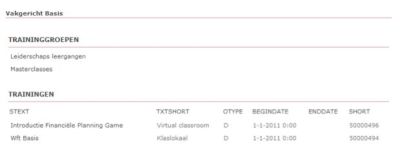
User clicks on one of the categories, as result the browser navigates to a second page. On that page some details of the selected category are displayed (via BusinessDataDetailsWebPart, issuing via BCS the Gateway Model Read method), and also data of 2 additional SAP entities (via Gateway Model Query method,with one or more input parameters, the value of these set as BCS filter in ReadList method.


User clicks on one the related SAP entity instance, browser navigates to a third page. On that page some details of the selected instance are displayed (via BusinessDataDetailsWebPart, issuing via BCS the Gateway Model Read method), and again also data of additional SAP entity (via Gateway Model Query method).

Conclusion

Via such SharePoint customizations the UI-process handling for external data can be largely improved. In case the User Interaction Design demands more and deeper adjustments, somewhere the line will be crossed what is sensible possible via SharePoint customization. Then it is more sensible to build custom webparts for exposing the SAP data retrieved via Duet Enterprise. For the SAP side this is transparent, as long as it can deliver the required SAP data structures to compose the SharePoint UI-handling.