Saturday, July 5, 2014

Programmatically set decision of Duet Enterprise task

In our award-winning VIEW (Virtual Integrated Enterprise Workplace) concept we include a generic inbox. In the generic inbox tasks are aggregated from multiple sources: SAP, SharePoint, Oracle, proprietary systems, and so on. The user sees in his/her inbox all outstanding tasks from the diverse task backends. And it is also supported to direct handle the tasks from the generic inbox.
To make the generic inbox real also for Duet Enterprise tasks, it is required to programmatically approve them via the inbox instead of via the standard Duet Enterprise task forms. A good start how to achieve this is article ‘how to create Duet SharePoint webparts’ of Ravi Sharma, in which he uses programmatic Duet Enterprise task approval as an example.
The approach Ravi takes in his setup is to directly update the SAP task by invoke via SharePoint BCS Application Programming Interface (API), explict self the wfUpdate method on the DuetEnterprise WorkflowTask External ContentType. And if the SAP task update is successful, also afterwards alter the SharePoint task that functions as reference or placeholder in SharePoint context to that SAP task.
Although this approach works, it has multiple architectural disadvantages:
  • It bypasses the standard Duet Enterprise workflow capability to update the SAP task via the SharePoint task.
  • It effectively duplicates some of the code and working of the internals of Duet Enterprise workflow update. As architect, I very much dislike any code duplication.
  • Per conceptual task update, 2 tasks must be explicit updated: first the SAP task, next the SharePoint task. This makes the task handling more complex.
  • There is a clear difference in the approval of SharePoint tasks that are created via Duet Enterprise workflow capability, versus regular SharePoint tasks (from any SharePoint workflow, e.g. document approval)
I favor the approach to handle all SharePoint tasks, including the ones that are instantiated as result of Duet Enterprise workflow publication, the same. And be ignorant of what happens in the SharePoint context and possible beyond as result of the task decision update. To achieve this, my SharePoint task update code is a variant on the ‘updateSharePointTask’ method of Ravi. And in this approach, I have no need for the ‘updateSAPTask’ method, as this responsibility is handled by the standard Duet Enterprise workflow capability.
There are 2 caveats when programmatically update Duet Enterprise tasks:
  1. Generic for SharePoint tasks: extendedproperties field ‘ows_taskstatus’ must have been set for the task update to be accepted. However, you cannot set this direct self, but set it indirect by this code snippet:
  2. Specific for Duet Enterprise tasks: In ItemUpdating eventreceiver, multiple checks are done to verify that it is indeed the intention to propagate to SAP. One of these checks is that a string-compare is done on both the set status text as status code. If this string-concattenation is not present in the Duet Enterprise task PossibleOutcomes (you specify this when you in SharePoint ‘Configure a new SAP workflow task type’), then the SharePoint task update succeeds, but the update is silently not propagated onto the connected SAP side. To make sure the programatically set status text is in sync with the configured PossibleOutcomes, I derive the status text based on that same configured PossibleOutcomes:
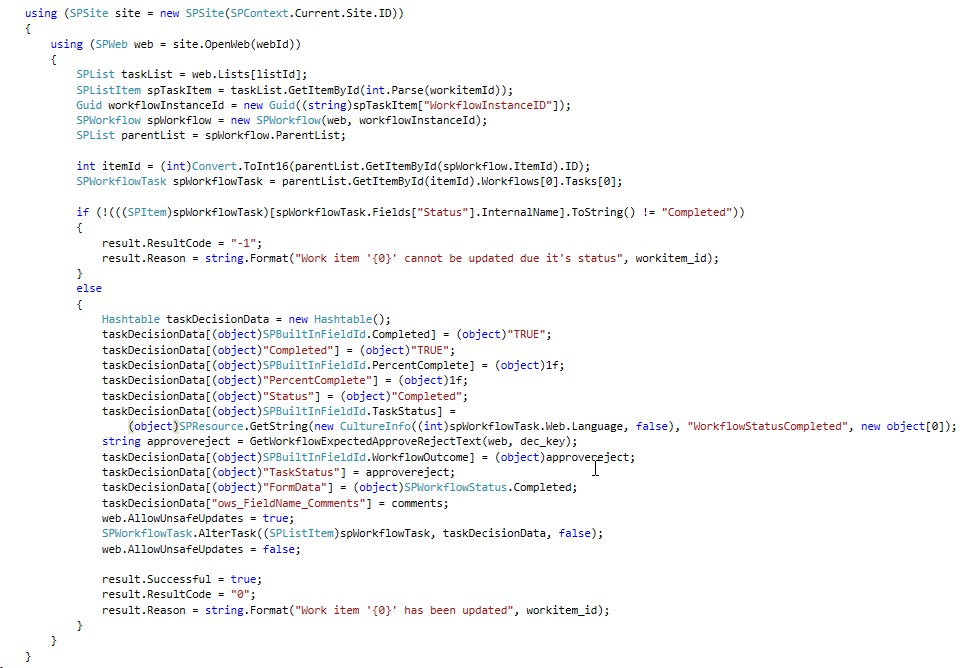
The complete code example to programmatically set the decision on SharePoint task, which via Duet Enterprise workflow capability then propagate the decision made to the connected SAP task:
Thursday, July 3, 2014

Tip - HowTo restore usage of SharePoint tokens in Visual Studio 2013 for webservice entities

I recently setup a new SharePoint 2013 development + demo environment, and a.o. installed the latest and greatest :-) Visual Studio 2013 edition. In a SharePoint 2013 project, I included some RESTful SharePoint services: WCF services, but also (due reuse) the older ASMX webservice version. Within both service variants I aim to use the convenient Visual Studio support for SharePoint design-time replaceable parameters, aka tokens, that will be replaced by Visual Studio at Solution packaging time with their concrete values.
Example of usage in a WCF service:
Service="TNV.VIEW2.Services.ISAPI.TasksWebProxy.TasksRemoteProxy, $SharePoint.Project.AssemblyFullName$"
Example of usage in an ASMX web service:
<%@ WebService Language="C#" Class="TNV.VIEW2.Dashboard.Services.VIEWProcessService, $SharePoint.Project.AssemblyFullName$" %>
However I noticed that after SharePoint solution deployment, the deployed .svc and .asmx files still contain the token instead of the actual assembly fullname.
The explanation is that Visual Studio applies configuration to determine in which Visual Studio project filetypes it must search for and replace the SharePoint tokens. And in its default configuration, Visual Studio 2013 does not include the .svc and .asmx filetypes (but only for the filetypes: xml, aspx, ascx, webpart, dwp, and bdcm). Akward decision if you ask me: WCF REST services are a valid SharePoint architecture option. And although you must doubt the same for .asmx web services, as Visual Studio users we may assume backwards compatibility on the support we receive from this tool.
The disrupted SharePoint development support can easily be restored by augmenting the Visual Studio configuration. You have 2 options here: do it on development system level, so that it applies at build time for all projects that are packaged on the system. Or include the configuration in the individual Visual Studio project(s).
I favor the last: a) this way, it will be effective on EVERY system that opens the Visual Studio project: on the development systems of your peer project members, and more important: on the (e.g. TFS) build server; and b) as for .asmx it is a valid default assumption that this is obsolete technology, it is justifiable that you must explicit and deliberate restore it for that filetype in only those Visual Studio projects in which you still utilize that older technology.
The steps to also include other than the default filetypes for Token replacement are:
  • Open the .csproj file in an editor (in Visual Studio, Notepad(+), …)
  • Locate the line: <SandboxedSolution>False</SandboxedSolution>
    Note that since the project deployes web services, it cannot be a Sandbox solution
  • And after that line, insert the following line: <TokenReplacementFileExtensions>asmx;svc</TokenReplacementFileExtensions>

Wednesday, July 2, 2014

Beware - malicious ScriptLink usage will hang up your SharePoint 2010/2013

SharePoint's ScriptLink is an useful class to include javascript resources within the HTML rendering. ScriptLink can be used declarative - in a masterpage, Visual WebPart, ... - and programmatically - code behind, webpart. But be aware, in case of incorrect usage, ScriptLink will effectively hang up your SharePoint site, both 2010 and 2013 versions!!.
An example of malicious usage is the following code, to include a javascript resource that is provisioned in (subfolder of) Style Library:
protected override void OnPreRender(EventArgs e) { base.OnPreRender(e); ScriptLink.Register(this.Page, "/Style Library/styles/view-core.js", false); }
The issue here is that ScriptLink assumes all relative links to be within the SharePoint layouts folder. The url in the example is runtime by ScriptLink converted into "C:\Program Files\Common Files\Microsoft Shared\Web Server Extensions\14\TEMPLATE\LAYOUTS\Style Library\styles\view-core.js".
On itself, this incorrect derived url reference will not directly break your SharePoint site; merely disrupt the expected behavior in browser as the javascript would not be found and loaded. However, ScriptLink also server-side validates the calculated script url as a cache safe url, and in case it cannot be validated will end the complete SharePoint Page rendering, not only that of the erroneous SharePoint artifact. The result in browser is an empty/white page:
<script type="text/javascript"> var gearPage = document.getElementById('GearPage'); if(null != gearPage) { gearPage.parentNode.removeChild(gearPage); document.title = "Error"; } </script>
The correct way to include through ScriptLink a javascript resource administrated in (subfolder of) Style Library, is to use the '~sitecollection' keyword:
protected override void OnPreRender(EventArgs e) { base.OnPreRender(e); ScriptLink.Register( this.Page, "~sitecollection/Style Library/styles/view-core.js", false); }

Friday, June 27, 2014

Utilize Duet Enterprise 1.0 and 2.0 in parallel in enterprise architecture

Duet Enterprise supports migration scenarios in mixed SharePoint 2010 + 2013 landscape
Deployment of Duet Enterprise is a strategic addition to an organization’s existing infrastructure of SAP Business Suites and Microsoft SharePoint. One of the requirements from enterprise architecture perspective is that the investment in Duet Enterprise is future-proof. The utilization of Duet Enterprise for SAP-SharePoint interoperability must include a roadmap to follow-up on the innovations and developments in the SAP and SharePoint platforms. This is where Duet Enterprise 2.0 comes into place: the first version of Duet Enterprise supports SharePoint 2010, it’s successor supports SharePoint 2013. Duet Enterprise 2.0 is also backwards compatible, Duet Enterprise 1.0 services + BDC Models with Gateway Generic channel can be directly reused in SharePoint 2013 to interoperate via SAP NetWeaver Gateway with the SAP business suites.
In nowadays reality of many SharePoint using organizations, it is typical that for a time they have a mixed presence in their infrastructure of current SharePoint 2010 based applications, and new SharePoint 2013 developments plus migrations from SharePoint 2010. In such situations, enterprise architecture aims to utilize Duet Enterprise for SAP-SharePoint integration on both SharePoint versions, connecting to the same SAP business suites. SAP NetWeaver Gateway in its role of the central gateway to the SAP backend landscape, supports this enterprise architecture demand. The same single Gateway system can serve multiple consumers, including multiple SharePoint farms. The consequence is that investments made in Duet Enterprise 1.0 on SharePoint 2010 platform can be harvested when gradually migrating to SharePoint 2013 context with Duet Enterprise 2.0 deployed.
In our demo landscape we have this mixed landscape operational. On a SharePoint 2010 farm we have Duet Enterprise 1.0 based scenarios operational, and on a SharePoint 2013 farm the same Duet Enterprise 1.0 scenarios and also new Duet Enterprise 2.0 scenarios.
A prerequisite for this parallel SharePoint 2010 + Duet Enterprise 1.0 and SharePoint 2013 + Duet Enterprise 2.0 setup, is that the SharePoint farms must use the same SharePoint STS certificate. The reason for this is that in Duet Enterprise 1.0 scenarios, SAML is used for Single Sign-On handling. Both SharePoint 2010 as also SharePoint 2013 use the SharePoint STS certificate to sign the SAML assertion that is added to Duet Enterprise 1.0 requests originating through SharePoint Business Connectivity Service (BCS) application.
As our landscape is not a production system, I used a self-signed certificate for the SharePoint STS service applications in the 2010 plus 2013 farm. This saves us from the nuisance of having to renew the STS certificate each year. Something to be aware of is that in case of using a self-signed certificate on server A that is generated on another server B, it is also required to import on server A the internal root certificate of server B. This is required to enable server A to verify the full chain of certificates of the self-signed certificate generated on server B.

Thursday, June 19, 2014

SharePoint 2013 Search ‘InternalQueryErrorException’ in case of sorting on non-sorted property

After deployment plus configuration of an out-of-the-box component in our SharePoint 2013 farm, that component reported a fatal error when used on a SharePoint page:
Microsoft.Office.Server.Search.Query.InternalQueryErrorException: Search has encountered a problem that prevents results from being returned. If the issue persists, please contact your administrator...
As the logged information is very limited / useless, I analyzed the problem by executing the same code in an own Console Application, and via trail-and-error find out what exactly causes the problem.
The problem cause was this:
  • In a KeywordQuery, a managed property is added to the SortList parameter collection
  • However, that same managed property was not configured as Sortable in SharePoint Search administration
Executing the keywordquery via SearchExecutor.ExecuteQuery() results in the Search Service Application (SSA) throwing the 'InternalQueryException' due the mismatch in Search administration versus Search query/usage.
With this inner knowledge, the quick fix then is to set the managed property as ‘Sortable’ in SharePoint 2013 Search Administration.

Sunday, June 15, 2014

Tip: run 'New-SPODataConnectionSetting' as administrator

SharePoint 2013 Business Connectivity Service application also includes support for consumption of external REST OData services. The connectivity requires a ODataConnection. This can be created via the new PowerShell CmdLet New-SPODataConnectionSetting.
If you invoke this CmdLet under an 'ordinary' SharePoint account, you may encounter the error: The Web application at <ServiceContext URI> could not be found. Verify that you have typed the URL correctly. Typical cause is that the SharePoint account has insufficient rights to access the Central Admin web application. The simple resolution is then to run PowerShell via "Run as administrator".

Duet Enterprise 2.0 - installation troubleshooting

Initial, the installation of the first version (1.0) of Duet Enterprise was cumbersome and labour-intensive, and therefore also error prone. With the Duet Enterprise 1.0 installation wizard at SAP side, the installation already was substantially improved. And this has progressed on to the installation of the new version, Duet Enterprise 2.0. However, as the landscape is inherent complex (minimal one, but typically more SAP backends, a SAP Gateway system, and SharePoint 2013 farm), you still may face issues.
In this blog I describe some of the issues that I encountered during Duet Enterprise 2.0 installations, and share my resolutions.

Issue 1: ‘Add-on IW_DUETE Release 100 can only be installed in client 000’

Import of the Duet Enterprise 2.0 SAP Add-On via transaction SAINT gives the following error:
Resolution: Use client 000 to import the add-on via transaction SAINT.

Issue 2: ‘The remote certificate is invalid according to the validation procedure’.

This error can occur in multiple SharePoint-SAP scenarios: runtime invocation of Duet Enterprise service from SharePoint 2013 side, import of a Duet Enterprise 2.0 BDC Model: Application definition import failed. The following error occurred: The remote certificate is invalid according to the validation procedure.
Resolution: Typical the above error message is caused by mismatch of the SSL certificate used on SAP Gateway side to encrypt the traffic, versus the SAP SSL certificate that has been imported in SharePoint 2013 ‘Manage trust’. To repair, import the SSL certificate again. You can either ask again the SAP BASIS administrator to export from SAP Gateway STRUST. But a more convenient, and in my experiences also one with better results (was already so for Duet Enterprise 1.0) is to open on SharePoint web frontend the SAP service url, and then from SSL certificate warning export the SAP SSL certificate to file; and next add this to ‘Manage trust’.

Issue 3: ‘The root certificate that was just selected is invalid’

Importing in SharePoint 2013 ‘Manage Trust’ the SSL certificate of SAP NetWeaver Gateway results in error:
Resolution: import the SSL certificate via Internet Explorer (11) instead of Firefox.

Issue 4: ‘No service found for namespace /IWWRK/, name DUET_WORKFLOW_CORE

Manifest itself upon configuration of Duet Enterprise 2.0 Workflow solution.
Resolution: Add and activate the Duet Enterprise 2.0 Gateway REST service in MAINT_SERVICE.

Issue 5: DuetConfig: ‘The operation name is missing or invalid’

For instance occurs with the DuetConfig command to configure workflow, command with multiple operation parameters: DuetConfig.exe -importbdc -FeatureName Workflow -LsiUrl "https://tnvsrm.tnv.corp/sap/opu/odata/IWWRK/DUET_WORKFLOW_CORE;mo;c=SHAREPOINT_DE/" -BdcServiceApplication "Business Data Connectivity Service" -UserSubLsiUrl "https://tnvsrm.tnv.corp/sap/opu/odata/IWBEP/SUBSCRIPTIONMANAGEMENT; mo;v=2;c=SHAREPOINT_DE/"
Resolution: careful check the command line that the start character for each of the operation parameter names is indeed the minus (‘-‘) character. In case you copied the command line from the deployment guide, this may be ‘invisible’ the wrong character. To be sure, in the command line explicit (replace and) type the ‘-‘ character:

Issue 6: ‘Lobsystem (External System) returned authentication error'

For instance, occurs upon trying to import a Duet Enterprise 2.0 BDC Model into SharePoint 2013 Business Connectivity Services application:
Resolution 1: Check that the Duet Enterprise 2.0 generated ‘Duet Root Certificate Authority’ is added to SSL Server Standard in STRUST on the SAP Gateway system.
Resolution 2: Check the user mapping of the SharePoint account used to invoke the SAP Gateway service / import the Duet Enterprise 2.0 BDC Model. In particular check the extid that it contains the correct pattern (account name, comma + space, and then the domain name in small capitals):

Issue 7: Import of Duet Enterprise 1.0 BDC Model fails due missing ‘WSDL’ application definition.

Resolution: Add an “Duet Enterprise 1.0 WSDL” application definition in SharePoint 2013 Secure Store.

Issue 8: Invocation of Duet Enterprise 1.0 service fails due missing SSO

Browsing a SharePoint 2013 External List results in error ‘An unsecured or incorrectly secured fault was received from the other party’.
Inspect the SRT_UTIL ErrorLog:
Resolution: Besides the Duet Enterprise 2.0 SSO approach based on X.509 certificate, also enable Duet Enterprise 1.0 SAML2 approach. Use the Duet Enterprise 1.0 Deployment Guide for information how to enable SAML2 in the Duet Enterprise 2.0 (Gateway 2.0 + SharePoint 2013) landscape.

Epilogue

Compared to the excellent troubleshooting guide for Duet Enterprise 1.0, the above list of issues plus resolutions is much smaller. The Duet Enterprise product team of SAP plus Microsoft has clearly improved their delivery on this aspect.
Others that have been deploying Duet Enterprise 2.0 may have encountered other issues as I did so far. Still a general classification of all issues seen so far is that they are caused by manual error, indirect caused by the sometimes unclear, fragmented and even incorrect Duet Enterprise deployment guides.