Saturday, November 15, 2014

Rolling out Nov 2014 CU for SP2013 broke Enterprise Search

Against better judgement, I tried this week to install the November 2014 Cumulative Update for SharePoint 2013 almost immediately when it was announced. The installation on our single-server farm failed, I suspect due insufficient disk space (one more motivation to consider moving our demo landscape to the Azure cloud…). Besides that the November CU was thus not installed, the more problematic consequence was that parts of our SharePoint landscape appeared broken. The installation made some changes during its faulted execution, that were apparently not all rolled back:
An unhandled exception of type 'System.ServiceModel.Security.MessageSecurityException' occurred in Microsoft.Office.Server.Search.dll
Additional information: The HTTP request was forbidden with client authentication scheme 'Anonymous'.
This error occurred on trying to construct a KeywordQuery instance. Being in the SharePoint business for a longer time, I decided to not spend too much time trying to locate the problem cause; and just start with the simple first approach to reboot the server. And how surprising: this worked, and our SharePoint 2013 farm is again working correct. Yet without the Nov 2014 CU, for which in the meantime Microsoft already issued a corrective fix. But now I’ll wait with trying to roll that out until proven in the field, and/or we actually need it in our SharePoint 2013 landscape.

Wednesday, November 5, 2014

Recover from SharePoint 2013 Search and CryptoGraphic mismatch - 'Key does not exist'

SharePoint Search Application is applied to crawl external data via Duet Enterprise 2.0. In the Duet Enterprise authentication flow from SharePoint to SAP, the SSA process via Business Connectivity Services invokes Secure Token Service to runtime create an X.509 authentication user certificate for the SharePoint account under which the search crawling is executed. (See 'How authentication works in Duet Enterprise 2.0').
This worked fine, until I upgraded the SharePoint 2013 landscape to the latest released cumulative updates: Sept + Oct 2014. Part of the upgrade steps is to temporarily disable the SharePoint Search services, and restart them after the CU installations. However, afterwards it appeared that the runtime Duet Enterprise SSO behavior was broken. The crawl log on the external content source reported structurally the error Exception in invoking the ODataExtensionProvider of type 'OBA.Server.Canary.ObaOdataServerExtensionProvider'. And the ULS contains on constant basis the error 'The search connector framework caught an exception from BDC: Exception in invoking the ODataExtensionProvider of type 'OBA.Server.Canary.ObaOdataServerExtensionProvider'. (Key does not exist. )'
But this is only when the BCS OData service is invoked from Search Crawling context. Using the same SharePoint user credentials to interactively retrieve SAP data in a SharePoint site still works, and successful retrieves the external SAP data applying Duet Enterprise 2.0 Single Sign-On.
Recovery fix:
Restart the SharePoint Search service (OSearch15), to force a reset of the runtime memory in that process and resync with CryptoGraphic on Windows OS level.

Monday, November 3, 2014

On-the-fly add client-side filtering and sorting to GridView

ASP.Net GridView is a powerful UI-control to visualize an overview of (business) data entities. Also standard / COTS products (e.g. for SharePoint) make heavily usage of the GridView control and it's capabilities.
In case of using a COTS product, it can be challenging to address requests from endusers wrt the grid behavior. You do not have the option to change the server-side behaviour yourself, but are dependent on the supplier. Ok, so server-side falls off; but in these days we prefer client-side anyhow. As it gives a faster interactive ui-responsiveness and thus a better user-experience.
In our scenario, the customer requested to add filtering and sorting ui-behaviour to an overview grid. As the output of GridView in the browser is simple an HTML Table element, I searched on the internet for any javascript library to sort and filter on tables. There are several of these available. I picked the combination of List.js and jQuery.TableSorter.js.
Next step is to activate their clientside behaviour in the rendered GridView output. This requires some straightforward jQuery-coding: select the Table element, enrich it which new child elements that are needed by the sorting and filtering libraries, runtime import the javascript libraries, and activate the sorting respectively filtering clientside behaviour.
/* Add client-side filtering and sorting to the requests overview. */ $.getScript( "/.../scripts/list.js", function( data, textStatus, jqxhr ) { $("#RequestsOverview tbody").addClass("list"); var filters = '<tr > \ <td><div id="filterPH1"> </div></td> \ <td><div id="filterPH2"> </div></td> \ <td><input type="text" id="date" class="search" placeholder="Filter"</td> \ <td><input type="text" id="description" class="search" placeholder="Filter"</td> \ <td><input type="text" id="state" class="search" placeholder="Filter"</td> \ </tr>'; $("#RequestsOverview thead tr").after(filters); $("#RequestsOverview").parent().attr('id', 'RequestsOverviewDiv'); $("#RequestsOverview .wf-id-event").each(function(i) { $(this).parent().children().each(function(i) { switch(i) { case 2: $(this).addClass("date"); break; case 3: $(this).addClass("description"); break; case 4: $(this).addClass("state"); break; } }); }); var userList = new (List)('RequestsOverviewDiv', { valueNames: ['date', 'description', 'state'] } ); }); $.getScript( "/.../scripts/jquery.tablesorter.js", function( data, textStatus, jqxhr ) { $("#RequestsOverview").tablesorter( { cssHeader: "headerSort", headers: { 0: { sorter: false}, 1: {sorter: false} }, dateFormat: 'pt' }); });

Result:

Without clientside plug-in of sorting and filtering:
Grid ui-behaviour enriched with sorting and filtering:
Limitation:
As the plugged-in sorting and filtering works on the client-side available data, it cannot be used in case of server-side GridView paging. For that it is required to also sort and filter server-side, or replace the server-side paging by a clientside approach. The latter is typically not desirable, as this requires that all the data is immediately send to the client; while the user may be interested in only the first page.

Friday, October 31, 2014

Expose SAP data via Office 365 API to iOS and Android?

At Microsoft TechEd Europe, an important announcement is the new Office 365 APIs for iOS and Android (native) Apps. Through the Office 365 APIs, iOS and Android developers will be enabled to directly consume and utilize Office 365 entities in native mobile Apps. Initial this encompasses Office 365 mails, calendar, contacts and files/documents. Later on the roadmap also tasks, Yammer (social) and Office Graph will be made available via the Office 365 APIs.
In my previous posting I reported on the latest version of SAP Gateway for Microsoft ('GWM Azure'), that enables access to SAP data into the Office 365 context. With the announcement of the new Office 365 APIs, this gives an interesting lookout. Will it also be possible to disclose SAP data by the combination of GWM + Office 365 APIs, for usage in native iOS and Android Apps? If so, some strong use cases for new type of composite business Apps will be made possible; in which Office 365 (personal) productivity data is combined with the business data in SAP. Direct available on the nowadays preferred business channel, being tablets and smartphones. Will be interesting to closely watch the actions of SAP and Microsoft on this…

Thursday, October 30, 2014

Expose SAP data into Office 365 productivity clients

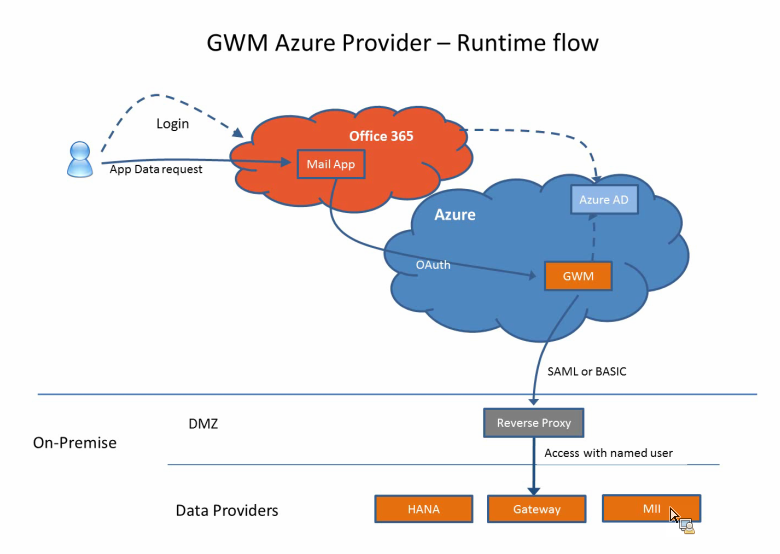
On 16 September, SAP launched an update of their product SAP Gateway for Microsoft (GWM). Code-named "GWM Azure", this update focusses on integration of SAP backend data and functionality, through SAP NetWeaver Gateway, in the Microsoft Azure cloud and Office 365 tenants.
As a member of the Customer Engagement Initiative group on SAP-Microsoft Interoperability, I was fortunate to participate in the product’s customer validation preceding the product launch. In our customer validation (CuV), I focussed on ‘enterprise-ready SSO’. With this phrase, I mean a robust, controlled and foremost enterprise-scaleable way to give employees via the Office 365 context access to the on-premise SAP data and functionality. In practice this translates for me into rely on authentication standards like SAML2, OAuth2, X.509 certificates; and not make use of username/password (weak) authentication. Mind you, the latter is fine for initially playing around and executing PoC’s. But it is not a secure and maintainable approach when addressing productive scenario’s with larger user groups.
The outcome of our CuV participation turned out very well. I could proof in ample time that the SAML2 based Single Sign-On from our Office 365 tenant via GWM Azure into our on-premise SAP landscape (Gateway + business suites), well... simple works!! The access to the SAP data in the Office 365 clients is still authorized based on the SAP authorization permissions and roles. An Office 365 user is only granted access to SAP data and functionality in compliance with his/here role in the SAP business systems.
With the release of GWM sp3 (GWM Azure), the availability of an organization’s SAP business data, can easily but still secure be extended to the Office 365 productivity clients. With Microsoft putting strong emphasis on the Office 365 proposition, and lots of organizations actually buying into this (including new customers for Microsoft, as consequence of Microsoft aggressively targetting the small and midsize business market (SMB)), this adds a powerful new business proposition; for the Office 365 ecosystem but also for individual Office 365 subscribers.

Wednesday, September 17, 2014

Tip: HowTo mitigate impact of IE8/IE9 style-tag limit

Many organizations still have IE8 or IE9 as standard browser installed on their employee workstations. Internet Explorer versions before IE10 have an hard boundary on the maximum number of stylelink imports that are applied, namely 31 (see Microsoft Support: 'A webpage that uses CSS styles does not render correctly in Internet Explorer'). Imported link-entries beyond that maximum are effectively ignored in the IE8/IE9 output rendering. This results in missing a part of the applied CSS-styling, and different rendering in IE8/IE9 compared to other browsers (FireFox, Chrome, Safara, IE10/11). The limit of 31 seems large enough, or stated differently: that you would need more than 31 seems ridiculous and unmanageable. But be aware that in the concept of SharePoint, content editors compose functional experiences by placing multiple and mutual independent webparts on SharePoint content pages. These webparts - common-of-the-shelf (Microsoft, any from the large SharePoint community), or custom build - are self-contained, also for their CSS styling. Also the standard SharePoint:CssLink already adds (consumes) 4 css-link imports to the generated page html. So when multiple webparts added to a page, the limit of 31 link-entries in the total page html can certainly be exceeded.
The IE8/IE9 link-limit is an hard number, not possible to increase that. If it is not yet possible or not planned for an organization to migrate to a later IE version (or another browser), you must apply an approach to mitigate the impact of the link-limit. For a part this can be achieved by collapsing multiple link-references within one 'style' island in the outputted html. IE8/IE9 regards plus applies that as only one single style element, and this way you can have multiple link-imports that together only consume 1 of the 31 available stylelink-slots.
Example:
Replace:
<SharePoint:CssRegistration Name="<%$SPUrl:~SiteCollection/Style Library/css/cssfile1.css%>" runat="server"/> <SharePoint:CssRegistration Name="<%$SPUrl:~SiteCollection/Style Library/css/cssfile2.css%>" runat="server"/> ...
Into:
<style type="text/css"> <!-- @import url("../../cssfile1.css"); @import url("../../cssfile2.css"); ... --> </style>
This approach is not the silver bullet to 100% circumvent the hard-imposed IE8/IE9 style-tag limit, but it might save you just sufficiently on occupied stylelink slots to leave sufficient slots for the COTS webparts placed on a page. This was so for myself in a customer project with a COTS SharePoint-based product implementation.
Note:
It is also good to realize that IE8/IE9 emulation modus in IE10 and later, does not impose the link limit. And therefore on this aspect the IE8/IE9 emulation will be different than browsing from real IE8/IE9 browsers.

Friday, September 5, 2014

PowerShell to repeatedly provision SharePoint master and config data

The ease of creating and maintaining SharePoint lists also makes them a good option for application configuration. As example, in one application I applied SharePoint list as the configuration storage for task types specification, in another as the configuration storage of the specifications for BCS invocations via a generic BDC model. However, as easy it is to create a list; so it is also to delete one including the configuration contents. In particular in the development phase, with repeated solution deployment and feature de- and reactivation, typically the configuration list and thus its contents get deleted.
To cope with this, I utilize PowerShell to refill the list with the desired configurations. And the same PowerShell scripts are also of use for transition of the application from development landscape to QA, and ultimate to production.
Example:
# script Clear # Fill Configuration $webApp = “<url>" $ApplicationConfigList="/Lists/ApplicationConfiguration"   # functions   function X-CheckItemNotExists($list, $itemTitle) {    $camlQuery =       "<Where>          <Eq>             <FieldRef Name='Title' />             <Value Type='Text'>" + $itemTitle + "</Value>          </Eq>        </Where>"    $spQuery = new-object Microsoft.SharePoint.SPQuery    $spQuery.Query = $camlQuery    $spQuery.RowLimit = 1    $destItemCollection = $list.GetItems($spQuery)    return $destItemCollection.Count -eq 0 }   # Initialization   $spWeb = Get-SPWeb $webApp   # (Re)fill the Application Config Settings   $ApplicationConfigSettings = @{    "0" = @("<config-item title>", "AovpGetPerson ", "{0,8:D8}{1,30: 30}", "<SAP-system-ID>");    "1" = @("< config-item title>", "CrmGetCustomer", "{0,8:D8}{1,8:D8}", "<Oracle-system-ID>") }                                $spApplicationConfigList = $spWeb.GetList($ApplicationConfigList) foreach ($array in $ ApplicationConfigSettings.values) {    if (X-CheckItemNotExists -list $spApplicationConfigList -itemTitle $array[0].ToString())    {       $spApplicationConfigItem = $spApplicationConfigList.AddItem()       $spApplicationConfigItem["JsonMethodName"] = $array[0].ToString()       $spApplicationConfigItem["GenericModuleMethodName"] = $array[1].ToString()       $spApplicationConfigItem["CallInputParamsFormat"] = $array[2].ToString()        $spApplicationConfigItem["ExternalSystemAlias"] = $array[3].ToString()          $spApplicationConfigItem.Update()    } }    # Release   $spWeb.Dispose()