Saturday, August 31, 2013

Applying SharePoint FAST for unlocking SAP data

An important new mantra is search-driven applications. In fact, "search" is the new way of navigating through your information. In many organizations an important part of the business data is stored in SAP business suites. A frequently asked need is to navigate through the business data stored in SAP, via a user-friendly and intuitive application context. For many organizations (78% according to Microsoft numbers), SharePoint is the basis for the integrated employee environment. Starting with SharePoint 2010, FAST Enterprise Search Platform (FAST ESP) is part of the SharePoint platform. All analyst firms assess FAST ESP as a leader in their scorecards for Enterprise Search technology. For organizations that have SAP and Microsoft SharePoint administrations in their infrastructure, the FAST search engine provides opportunities that one should not miss.

SharePoint Search

Search is one of the supporting pillars in SharePoint. And an extremely important one, for realizing the SharePoint proposition of an information hub plus collaboration workplace. It is essential that information you put into SharePoint, is easy to be found again. By yourself of course, but especially by your colleagues. However, from the context of 'central information hub', more is needed. You must also find and review via the SharePoint workplace the data that is administrated outside SharePoint. Examples are the business data stored in Lines-of-Business systems [SAP, Oracle, Microsoft Dynamics], but also data stored on network shares.
With the purchase of FAST ESP, Microsoft's search power of the SharePoint platform sharply increased. All analyst firms consider FAST, along with competitors Autonomy and Google Search Appliance as 'best in class' for enterprise search technology. For example, Gartner positioned FAST as leader in the Magic Quadrant for Enterprise Search, just above Autonomy. In SharePoint 2010 context FAST is introduced as a standalone extension to the Enterprise Edition, parallel to SharePoint Enterprise Search. In SharePoint 2013, Microsoft has simplified the architecture. FAST and Enterprise Search are merged, and FAST is integrated into the standard Enterprise edition and license.

SharePoint FAST Search architecture

The logical SharePoint FAST search architecture provides two main responsibilities:
  1. Build the search index administration: in bulk, automated index all data and information which you want to search later. Depending on environmental context, the data sources include SharePoint itself, administrative systems (SAP, Oracle, custom), file shares, ...
  2. Execute Search Queries against the accumulated index-administration, and expose the search result to the user.
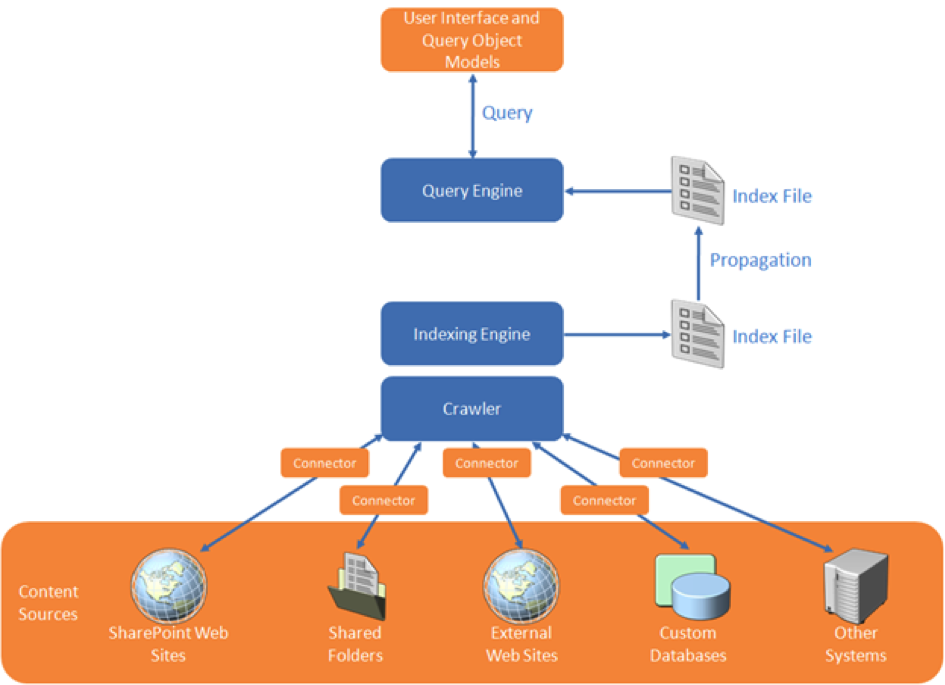
In the indexation step, SharePoint FAST must thus retrieve the data from each of the linked systems. FAST Search supports this via the connector framework. There are standard connectors for (web)service invocation and for database queries. And it is supported to custom-build a .NET connector for other ways of unlocking external system, and then ‘plug-in’ this connector in the search indexation pipeline. Examples of such are connecting to SAP via RFC, or ‘quick-and-dirty’ integration access into an own internal build system.
In this context of search (or better: find) in SAP data, SharePoint FAST supports the indexation process via Business Connectivity Services for connecting to the SAP business system from SharePoint environment and retrieve the business data. What still needs to be arranged is the runtime interoperability with the SAP landscape, authentication, authorization and monitoring. An option is to build these typical plumping aspects in a custom .NET connector. But this not an easy matter. And more significant, it is something that nowadays end-user organizations do no longer aim to do themselves, due the involved development and maintenance costs.
An alternative is to apply Duet Enterprise for the plumbing aspects listed. Combined with SharePoint FAST, Duet Enterprise plays a role in 2 manners:
(1) First upon content indexing, for the connectivity to the SAP system to retrieve the data. The SAP data is then available within the SharePoint environment (stored in the FAST index files). Search query execution next happens outside of (a link into) SAP.
(2) Optional you'll go from the SharePoint application back to SAP if the use case requires that more detail will be exposed per SAP entity selected from the search result. An example is a situation where it is absolutely necessary to show the actual status. As with a product in warehouse, how many orders have been placed?

Security trimmed: Applying the SAP permissions on the data

Duet Enterprise retrieves data under the SAP account of the individual SharePoint user. This ensures that also from the SharePoint application you can only view those SAP data entities whereto you have the rights according the SAP authorization model. The retrieval of detail data is thus only allowed if you are in the SAP system itself allowed to see that data.
Due the FAST architecture, matters are different with search query execution. I mentioned that the SAP data is then already brought into the SharePoint context, there is no runtime link necessary into SAP system to execute the query. Consequence is that the Duet Enterprise is in this context not by default applied.
In many cases this is fine (for instance in the customer example described below), in other cases it is absolutely mandatory to respect also on moment of query execution the specific SAP permissions. The FAST search architecture provides support for this by enabling you to augment the indexed SAP data with the SAP autorisations as metadata.
To do this, you extend the scope of the FAST indexing process with retrieval of SAP permissions per data entity. This meta information is used for compiling ACL lists per data entity. FAST query execution processes this ACL meta-information, and checks each item in the search result whether it allowed to expose to this SharePoint [SAP] user.
This approach of assembling the ACL information is a static timestamp of the SAP authorizations at the time of executing the FAST indexing process. In case the SAP authorizations are dynamic, this is not sufficient.
For such situation it is required that at the time of FAST query execution, it can dynamically retrieve the SAP authorizations that then apply. The FAST framework offers an option to achieve this. It does require custom code, but this is next plugged in the standard FAST processing pipeline.
SharePoint FAST combined with Duet Enterprise so provides standard support and multiple options for implementing SAP security trimming. And in the typical cases the standard support is sufficient.

Applied in customer situation

The above is not only theory, we actually applied it in real practice. The context was that of opening up of SAP Enterprise Learning functionality to operation by the employees from their familiar SharePoint-based intranet. One of the use cases is that the employee searches in the course catalog for a suitable training. This is a striking example of search-driven application. You want a classified list of available courses, through refinement zoom to relevant training, and per applied classification and refinement see how much trainings are available. And of course you also always want the ability to freely search in the complete texts of the courses.
In the solution direction we make the SAP data via Duet Enterprise available for FAST indexation. Duet Enterprise here takes care of the connectivity, Single Sign-On, and the feed into SharePoint BCS. From there FAST takes over. Indexation of the exposed SAP data is done via the standard FAST index pipeline, searching and displaying the search results found via standard FAST query execution and display functionalities.
In this application context, specific user authorization per SAP course elements does not appy. Every employee is allowed to find and review all training data. As result we could suffice with the standard application of FAST and Duet Enterprise, without the need for additional customization.

Conclusion

Microsoft SharePoint Enterprise Search and FAST both are a very powerful tool to make the SAP business data (and other Line of Business administrations) accessible. The rich feature set of FAST ESP thereby makes it possible to offer your employees an intuitive search-driven user experience to the SAP data.

Thursday, August 22, 2013

Powershell to list all site collections in farm with feature activated from ‘Farm’ definition scope

In SharePoint 2010, a Feature can be installed from a farm solution and from a sandbox solution. In case of farm solution, the Feature is installed on farm-level, and dependent on the feature scope, visible (unless hidden) for all webapplications, site-collections or webs to activate (by GUI, Powershell and yes, even stsadm). In case of sandboxed solution, only possible for scope = Site or Web, the feature is only visible within the site-collection, and can also only be activated in the site-collections to which added and activated.
Today we encoutered a situation in which a sandboxed solution was per accident also deployed on the farm. The result was that features within the solution were installed and visible twice in each site collection to which it also was added as sandbox. The remedy is to retract the per-accident farm deployment. But we must take into account that features from the SharePoint solution may have been activated from the farm-deployed version.
Powershell enables us to easily determine in which site collections in the farm the feature is activated from the farm-deployed solution:
$snapin = Get-PSSnapin | Where-Object {$_.Name -eq 'Microsoft.SharePoint.Powershell'}
if ($snapin -eq $null) {
    Add-PSSnapin "Microsoft.SharePoint.PowerShell"
}

$featureId = ".......-....-....-....-............";
$contentWebAppServices = (Get-SPFarm).services | ? {$_.typename -eq "Microsoft SharePoint Foundation Web Application"}
foreach($webApp in $contentWebAppServices.WebApplications) {
  foreach($site in $webapp.Sites) {
    Get-SPFeature -Site $site| where{$_.Id -eq $featureId}|%{
    if ($($site.QueryFeatures($featureId)).FeatureDefinitionScope -match "Farm"); {
        Write-Host $_.DisplayName " is Activated from Farm deployment on site : " $site.url
      }
    }
  }
}

Sunday, August 18, 2013

Evaluating SharePoint Forum products

At one of the organizations I consult, there is a business demand for forum functionality in their external facing websites. The organization has selected SharePoint as target architecture for webapplications, including public websites. SharePoint as platform itself contains DiscussionBoard as a (kind of) forum functionality, but this is not qualified for usage on external facing websites. Among its criticisms are the look & feel which is very ‘SharePoint-like', and not what endusers expect and typically are familiar with on public websites. Also DiscussionBoard lacks forum functionalities of moderation, sticky posts, avatars, lock a post, rich text editing, tagging, rating, vote as answer. And an important restriction for the usability on public websites: a SharePoint DiscussionBoard in practice requires authenticated users (ok, you can allow anonymous access, but as posting topics and answers occurs via SharePoint forms you then will have to give anonymous users access to layouts folder. Not a wise decision to make from security perspective).
One option would be to custom develop forum functionality that satisfies the extended business requirements. But because we regard forum as commoditiy functionality, this is not something we want to develop and maintain ourselves. Therefore instead I did a market analysis and evaluation for available SharePoint forum products. It appears a very tiny market, with only 5 market products found:
  • TOZIT SharePoint Discussion Forum
  • Bamboo Solutions Discussion Board Plus for SharePoint
  • KWizCom Discussion Board feature
  • LightningTools Storm Forums
  • LightningTools Social Squared
In each product evaluation I addressed the following aspects:
  1. Product positioning by supplier (wide-scale internet usage, scaleability?)
  2. Installation of the product
  3. Effect of the installation on the SharePoint farm (assemblies, features, application pages, databases, …)
  4. Product documentation: installation manual, user / usage manual
  5. Functional Management: actions involved how-to provision a new forum
  6. Functional Usage: using a forum, in the roles of moderator and forum user
  7. User Experience and internet-ready
  8. Branding capabilities (CSS, clean HTML)
  9. Product support
For the requirement set of this customer, Social Squared turned out as the best fit. It has a rich forum feature set, on the same level as what you see in other (non-SharePoint) established internet forums. Also considered a strong point is that the forum administration is done in own SQL database(s), outside the SharePoint (content database). This allows to easily sharing a forum between multiple brands of the customer, each with their public presence in an own host-named site collection. And LightningTools is an well-known software products supplier, which gives the customer (IT) trust that the product will be adequatly and timely supported. As a demonstration of this: during my evaluation I already had extensive contact with their product support, answerring on questions and issues that I encountered, and also give me insight on the Social Squared roadmap.

Tuesday, July 2, 2013

HowTo secure enable anonymous access of SharePoint external facing website

SharePoint can be used to provision public facing websites, accessible for the anonymous audience. Naturally it is then required that the contents (publishing pages, images, stylesheets) on the SharePoint website are anonymous accessible. In SharePoint 2007 the only option was to completely open up the SharePoint site collection, including all of its contents. Starting with SharePoint 2010 you have more fine-grained options. You can still open up the entire SharePoint context, which is the easy approach. Or you can decide to explicitly determine which of the content in the SharePoint site collection is anonymous accessible.

Enable Anonymous Access on site-collection level

As said, this is the easy, and as result also the most common applied approach. Basically you have to set one switch (ok, it takes some more, you can find the steps outlined here), and you're good to go.
What you must realize is that with this approach, basically all your content is anonymous accessible. Not only the publishing pages, but all SharePoint lists and libraries in the site collection are open for data retrieval from outside your domain. The data can be retrieved via the "old" Lists.asmx service (e.g. using CodePlex SPServices.js within jQuery context; or by invoking Lists.asmx from a .NET console application), or via ListData.svc. Whether this is a concrete problem depends: if the lists and libraries do not contain any sensitive data, what's the harm? But if they do, then you do not want that data to be retrievable outside your control.
Noteworthy: This is the applied approach when you host your public facing website in SharePoint Online / Office 365.

Enable Anonymous Access explicitly only for the required SharePoint artefacts

As can be seen from the picture, you also have the option to enable anonymous access on 'Lists and Libraries' level. If you select that option, default still all your SharePoint content is prohibited for anonymous access. You have to explicitly enable per List / Library if their contents must be anonymous accessible. In practice this means that for public facing websites, you must enable Anonymous Access on the Pages library in each Publishing Site in the site collection. But also on the Style Library, so that .css and .js resources are accessible. If you display images stored in a PictureLibrary on website pages, then you must also enable that library. Same for documents. In case you need to display on a page data from a List that is deliberate not enabled, you can still do. But you will have to wrap the data retrieval in an ElevatedPrivilege context; and thus requires custom code.
So this approach implies much more work as simple enable on 'Total website'. And also you'll have an extra maintenance responsibility: when the website is augmented with another Publishing Site, you have to [remember to] enable the Pages library in that site also explicitly for Anonymous Access.
Sounds like a drag? Well, the [very] good side is that you are in explicit control of which content you allow for anonymous access. And the default mode is Not Accessible, which is a security best practice.

Lock _vti_bin usage

There is a third option. Go the easy route of enabling Anonymous Access for total website; and avoid uncontrolled data retrieval via the SharePoint webservices by disable on DNS level the usage of '_vti_bin'. This approach has however some drawbacks. You cannot use SharePoint Designer anymore to open the site. And you can no longer use the SharePoint REST services in anonymous context. In the current time of Rich HTML5 Apps, it is becoming de-facto reference architecture to connect the front-end to your data and logic via REST services. So this poses a real limitation. Which in my book should not be taken too lightly.

Monday, June 24, 2013

Inconvenient Import-SPWeb with Sandboxed Solutions

In current project we deliver an initial SharePoint site-collection as white-label site. The aim is we utilize the initial site as template for concrete label websites. Challenge is how to duplicate the white-label site collection into a concrete label site. Backup-SPSite plus Restore-SPSite is an option, but requires that you restore each copy to its own content database. Reason is that Restore-SPSite preserves the siteid from the original / backed-up site, and this conflicts with the white-label site (and any other restored site) in same content database.
Second option is to restore the site collection structure via combination of Export-SPWeb plus Import-SPWeb. Approach is to export the root web plus all its recursive sub webs; and import them in a fresh created empty site collection.
When doing this, the import job halted with error:
Inspecting the Import log revealed that it concerned a SPList based on ListTemplate provisioned via feature in a Sandboxed solution. And this results in a sequencing issue: the list is first to be created in the copy site, before the sandboxed solution is also added plus activated within the copy site.
Solution is to upload and activate the Sandboxed solution within the fresh copy site collection, before running the Import-SPWeb.
Note that default you cannot download solutions from the solution gallery of the white-label site collection. But you can fix that by adding a view to the solution gallery with includes ‘Name’ as view column.

Friday, June 21, 2013

SharePoint - best all-rounder for the employee workplace

This posting is a translation from earlier Dutch publication on The Next Thought blog.
In this era in which our (work)life is more and more influenced by the capability to access the enterprise knowledge and functionalities, optimum support in the execution of our work is of essential importance. We need to focus on the aspects that really matter and not be bothered with the administrative burdens that the business proccesses and IT can bring. We all know it. Handling the daily and the ad hoc tasks often takes too much time. Our work productivity is killed by the diversity in how to access the various sources of information, and by the diversity in how to perform and complete our tasks.
This is a challenge that was promised to be resolved by portal technology. One shell around your processes and applications, that improves the access and uniformity in all its facets. For a decade we hear that portal technology makes this possible, but the reality appears more stubborn.
Granted, it is also a difficult problem to solve. On the one hand, once ultimately a portal technology is choosen, the organization must conform to the utilization of that technology and how it is deployed onto the employees. And that [governance] is no small thing.

Sufficient functionality?

Another issue is whether the selected portal technology is rich enough to support the various aspects of the integrated employee workplace: information sharing, locate information and people, work collaboration, process, task management, integration with other systems, information dashboards, and more. A multitude of functional requirements, supplemented with the Enterprise Architecture requirement that it is simply to align all the different systems already included in the enterprise architecture.
In the last decade SharePoint has established a prominent position in the market of portal technology. Gartner consistently grades SharePoint as [the] leader in the field of Horizontal Portals.
And rightly so. The integration of SharePoint with Microsoft Office products, plus the broad functionality and integration capabilities that SharePoint provides, makes it a very good all-rounder. A platform that provides virtually every need of the information worker.
As of release 2010, the SharePoint platform complemented by the ecosystem, includes adequate support for all recurring aspects for the integrated employee workplace. The key word here is 'sufficient': SharePoint provides certainly not for every single aspect the most advanced and complete solution, but for most scenarios the platform offers sufficient support.
An example is the field of Business Process Management: SharePoint workflow is not a world-class BPM suite, when we compare it with SAP or Tibco BPM; it does not intend that to be. But through SharePoint workflow, possibly supplemented with Nintex Workflow or K2, it is possible to achieve a "lightweight BPM" solution. For the average desired application often a much more cost-effective solution, that can immediately be deployed from the available SharePoint platform within [a] company.
The same applies to the 'social' components of SharePoint. The platform itself out-of-the-box delivers the minimal expected 'social' support: microblogging / status updates, follow, like, tagging etc. Whenever the 'social' needs of an organization go beyond these, then there are additional products in the SharePoint ecosystem (eg NewsGator) to go a step further on ‘social’ front.
And that applies to all SharePoint features: document handling, archiving, BI dashboards, enterprise search, collaboration: the product itself includes direct deployable enterprise functionality. And as a portal platform it is functionally expandable through standard products available on the market.

Monday, June 17, 2013

Architecture of a cloud-enabled SAP/SharePoint document viewer

End 2012 IntelliDocx LLC approached us to design the global architecture for their new DocSet.ECM for SAP and SharePoint product suite, and build DocSet.ECM for Plant Maintenance (PM) as first member. The DocSet.ECM functionality is enable end-users to search, navigate and access documents linked with SAP entities, directly within SharePoint based workplaces. The SAP entities come from any of the known SAP Business Suites - PM, Sales, HCM, SRM. IntelliDocx had an ambitieus deadline, as they aimed to release the PM solution to the public and market analysts at the European SharePoint Conference in Copenhague (Februari 2013).
The base functional requirement for the product suite is that it renders a view in SharePoint on documents linked in SAP. But to make it a winning solution, they have more requirements. The products must be very user-intuitive and friendly; enabling arbitrair end-users to utilize it without requiring inside SAP knowledge. Product deployment must be fit for both on-premise as cloud. More and more organizations nowadays have decided, or are looking into, SharePoint Online utilization iso maintaining an own on-premise SharePoint farm. And of course, the product should support both SharePoint 2010 and 2013; or at least be prepared for 2013 ahead.

System Architecture

The diagram below illustrates the architecture we proposed to address the requirement set. (And which we indeed applied to successfully deliver the DocSet.ECM for PM product to market, within the tight timeframe [News release]).

Essentials

DocSet Viewer
  • Deployed via Sandboxed Solution
  • UserControl iso aspx page
    • allows to add the DocSet viewer to regular SharePoint site and content pages / intuïtieve integration within customer’s SharePoint based portals
  • Server-side only rendering the html
    • No server postback handling
    • No interactive dependency on SharePoint server (may be cloud-hosting)
  • Client-side handles communication with the DocSet webservice, and dynamic UI-rendering
    • By-pass SharePoint server
    • Use jQuery:
      • Invoke DocSet JSON webservice
      • Render tree-view of hierarchical document folders
      • Drag-and-drop of documents (for Move + Add)
  • Configuration:
    • Endpoint of DocSet webservice (may be cross-domain)
DocSet webservice
  • WCF JSON webservice
  • Enable CrossDomain invocation via JSONP
    • CORS is not yet widely supported; and in particular not within the enterprise domain
  • Utilize ERP-Link RFC Connector for SAP / Microsoft.NET interoperability with DocSet.ECM RFCs
    • The architecture allows usage of other SAP / Microsoft connectors, e.g. Duet Enterprise, but we decided to initially use the ERP-Link connector as IntelliDocx told us a lot of their customers already use the Gimmal ERP-Link Suite.
  • Configuration:
    • Connection settings to DocSet RFC
    • Address of SharePoint server hosting the DocSet viewer, to allow cross-site requests from this possible remote / other domain server

DocSetViewer App - SharePoint 2010 + 2013

The DocSet.ECM for SAP and SharePoint product suite is fit to deploy and run within both SharePoint 2010 and 2013, without any code-change; and hosting supported on-premise and within the Office365 cloud.
  
Related info: IntelliDocx