Wednesday, July 29, 2015

Handy resource for Excel Services external data troubleshooting

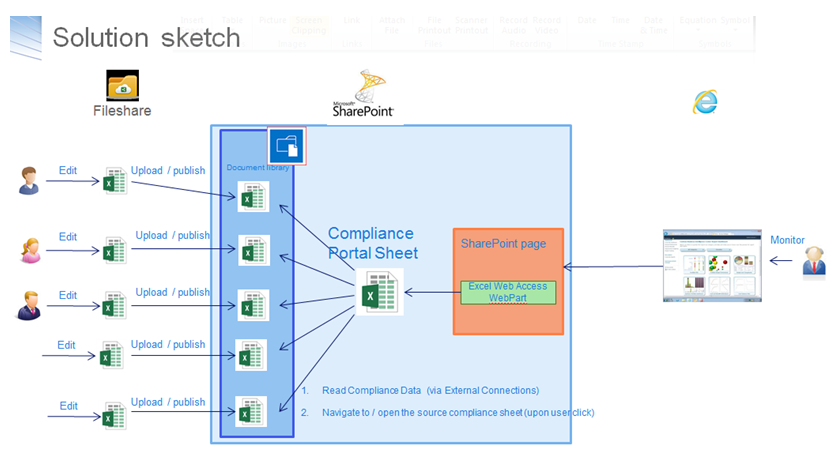
I have a 2-steps setup for a dashboard-solution provisioned via Excel-services:
  1. Functional data managers / compliance officers: maintain the data offline in Excel worksheets, and when the data maintenance effort is finished publish the worksheet as datasource to SharePoint document libary
  2. A separate 'View' dashboard connects via Excel Services to the 'datasource' Excel worksheets, and renders the dashboard - charts, KPIs and so on; This 'view' dashboard worksheet is via Excel Web Access rendered on the SharePoint dashboard page
Opening the dashboard page results in error message Unable to refresh data for a data connection in the workbook..... In the ULS log, only minimal relevant information was logged: "Refresh failed for <data connection> in the workbook....". Via internet search I found a very valuable resource, Excel Services data refresh flowchart (codename: Excel Services Troubleshooting). This helped me find and fix the problem.

Excel Services - 400 Bad Request due large cookie

Playing with Excel Services to compose a dashboard page, I suddenly encountered HTTP 400's on requesting the dashboard page. I monitored the request handling in Fiddler, it showed HTTP Error 400. The size of the request headers is too long. So I inspected the request, and noticed that the Cookie somehow had grown to a very large (string)value:
Pragmatic resolution to fix from the issue is to close all IE instances, and start a fresh IE session. That resolves the issue.

Friday, July 24, 2015

Excel SaveAs to SharePoint failing due required document library properties

In a business process we publish a snapshot from Excel workbook to SharePoint. The VBA code for this is simple: ActiveWorkbook.SaveAs "<url of document library>' & ActiveWorkbook.Name, FileFormat:=xlOpenXMLWorkbookMacroEnabled.
However, execution of this code results in error Run time error '1004': Index refers beyond end of list. The direct cause is that the document library includes a mandatory metadata field, and as this is not set in the Excel workbook, SharePoint refuses the upload. Sadly it appears not possible to pre-set Office 'Document Properties - Server' from VBA code.
2 pragmatic alternatives to workaround the issue:
  1. make the field / document library property non-required,
  2. or modify the field / document library property to have a default value
.

Wednesday, July 22, 2015

Convert Excel file into Excel Services compliant variant

Excel Services does not support the entire Excel feature set. A.o following aspects are not supported:
  • VBA code,
  • Macros,
  • Comments,
  • Shapes,
  • External Links, to external workbooks
  • (Formula) Names that refer to external workbooks,
  • Data validations,
  • space(s) in name of worksheet connected as Range Name
(see Differences between using a workbook in Excel and Excel Services)
If your 'source' Excel workbook contains any of the above, trying to use it in Excel Services - e.g. via Chart WebPart - results in the generic error 'Exception has been thrown by the target of an invocation'. Required step before using a 'source' Excel workbook in Excel Services is to convert it to a compliant variant. Excel itself does not include such a functionality. But you can facilitate the user (typical functional data management) via a VBA macro in the excel sheet.

VBA Code

Sub SaveWorkbookAsNewFile() Dim ActSheet As Worksheet Dim ActBook As Workbook Dim CurrentFile As String Dim NewFileName As String Dim NewFileType As String Dim NewFile As String Dim ws As Worksheet Application.ScreenUpdating = False CurrentFile = ThisWorkbook.FullName ThisWorkbook.Save RemoveDataValidations ActBook:=ActiveWorkbook RemoveComments ActBook:=ActiveWorkbook RemoveShapes ActBook:=ActiveWorkbook BreakLinks ActBook:=ActiveWorkbook RemoveNamesToExternalReferences ActBook:=ActiveWorkbook RemoveConditionalFormatting ActBook:=ActiveWorkbook RemoveSpacesFromWorksheets ActBook:=ActiveWorkbook RemoveVBA ActBook:=ActiveWorkbook NewFileType = "Excel Workbook (*.xlsx), *.xlsx," & _ "All files (*.*), *.*" NewFile = Application.GetSaveAsFilename( _ InitialFileName:=NewFileName, _ fileFilter:=NewFileType) If NewFile <> "" And NewFile <> "False" Then ActiveWorkbook.SaveAs Filename:=NewFile, _ FileFormat:=xlOpenXMLWorkbook, _ Password:="", _ WriteResPassword:="", _ ReadOnlyRecommended:=False, _ CreateBackup:=False End If ThisWorkbook.Close False Workbooks.Open CurrentFile, False Application.ScreenUpdating = True End Sub Sub RemoveVBA(ActBook As Workbook) On Error Resume Next Dim Element As Object With ActBook.VBProject For Each Element In .VBComponents .VBComponents.Remove Element Next For x = .VBComponents.Count To 1 Step -1 .VBComponents(x).CodeModule.DeleteLines 1, .VBComponents(x).CodeModule.CountOfLines Next x End With End Sub Sub RemoveDataValidations(ActBook As Workbook) Dim ws As Worksheet For Each ws In ActBook.Worksheets ws.Cells.Validation.Delete Next ws End Sub Sub RemoveComments(ActBook As Workbook) Dim ws As Worksheet Dim xComment As Comment For Each ws In ActBook.Worksheets For Each xComment In ws.Comments xComment.Delete Next Next ws End Sub Sub RemoveShapes(ActBook As Workbook) Dim ws As Worksheet Dim sh As Shape For Each ws In ActBook.Worksheets For Each sh In ws.Shapes sh.Delete Next sh Next ws End Sub Sub BreakLinks(ActBook As Workbook) Dim Links As Variant Links = ActBook.LinkSources(Type:=xlLinkTypeExcelLinks) For i = 1 To UBound(Links) ActBook.BreakLink _ Name:=Links(i), _ Type:=xlLinkTypeExcelLinks Next i End Sub Sub RemoveNamesToExternalReferences(ActBook As Workbook) Dim nm As Name For Each nm In ActBook.Names If InStr(nm.RefersTo, "[") <> 0 Then nm.Delete End If Next End Sub Sub RemoveConditionalFormatting(ActBook As Workbook) Dim ws As Worksheet For Each ws In ActBook.Worksheets ws.Cells.FormatConditions.Delete Next ws End Sub Sub RemoveSpacesFromWorksheets(ActBook As Workbook) Dim ws As Worksheet For Each ws In ActBook.Worksheets ws.Name = Replace(ws.Name, " ", "_") Next ws End Sub

Sunday, July 12, 2015

Tabbed view on document library

The ‘group by’ native functionality of XsltListViewWebPart is convenient to present a classified view on the contents of a SharePoint List / Library. Requirement of one of our departments is to go beyond that, and provide a tabbed view on the document library: a tab per month per year.
To achieve this, one basically has the following options:
  1. Build a custom webpart. However, this is so old-school SharePoint platform utilization; and in our company by default disallowed.
  2. Build a custom HTML / javascript UI (App), and connect via SharePoint webservices. Although this setup nicely fits in ‘modern SharePoint App-development’, for this specific scenario the drawback is that you then also need to develop yourself all of the Office integration that SharePoint standard delivers for a rendered document library (via ECB menu).
  3. Reuse XsltListViewWebPart, but specify an own Xslt-styling. This approach suffers from the same approach as the ‘modern App’ alternative: you’re then required to include in the custom Xstl all the code to render Office-integration friendly.
  4. Reuse XsltListViewWebPart, and dynamically modify the standard grouped-by layout into a tabbed view. Beyond reuse of the native Office-integration, this approach also reuses the lazy loading per group that is native in the XsltListViewWebPart group-by handling. Especially with a larger document library, this makes it much more performant as to retrieve the entire contents at once.

Client-side transfrom group-by layout into tabbed view

The transformation of the standard group-by layout into a tabbed view can be achieved as full client-side code only. To achieve the effect, I inspected the standard delivered html; and next coded the transformation logic in jQuery.

Particulars

  • The native 'group-by' functionality renders the header(s) of the groups. In a tabbed-view layout, the selected tab however already visualizes which group selected; and the group-headers are undesirable in the rendering.
  • The native 'group-by' functionality opens new group in addition to the one(s) already open. For a tab-view experience, the views must be exclusive, act as toggles. Select one tab, automatically closes the tab selected before.
  • The native 'group-by' functionality also includes a 'remember' function: by default a grouped-by layout opens with the group(s) opened as when the visitor was last on the page. For a consistent user-experience, it is then required to pre-select the associated tab-button.

The 'App' code

<style type="text/css"> .et-tab { <ommitted…> } .et-tab-active { <ommitted…> } .et-tab-inactive { <ommitted…> } .et-separator { height: 5px; background-color: rgb(134, 206, 244); } </style> <script> var TabbedListView = window.TabbedListView || {}; TabbedListView.UI = function () { function MonthToInt(month) { <ommitted…> } function getCookieValue(cookieName) { if (document.cookie.indexOf(cookieName) != -1) { var cookies = document.cookie.split("; "); for (var cookieSeq in cookies) { var cookieSpec = cookies[cookieSeq]; if (cookieSpec.indexOf(cookieName) != -1 && cookieSpec.indexOf("=") != -1 ) { return unescape(cookieSpec.split("=")[1]); } } } return undefined; } function TabbedView() { var tabrow = $("<div class='et-tabrow'></div>"); $(".ms-listviewtable") .before($(tabrow)) .before("<div class='et-separator'></div>"); $(".ms-listviewtable").children().each(function(i) { // Grouping-row: level 0 or level 1 if ($(this).attr("groupString") !== undefined) { // Month - lowest group level. if ($(this).children("[id='group1']").length > 0) { var action = $("<a></a>"); // Set the buttonlabel := '<month> <year>' by extracting // the values from the original headings. var monthValue = $(this).find("a").parent().clone() .children().remove().end().text().split(" : ")[1]; var parentId = $(this).attr('id') .substring(0, $(this).attr('id').length - 2); var group0 = $(this).parent().children("[id='" + parentId + "']"); var yearValue = $(group0).find("a").parent().clone() .children().remove().end().text().split(" : ")[1]; $(action).text(monthValue + " " + yearValue); $(action).click(function() { var parentId = $(this).parent().attr('id'); var parentTBodyId = "titl" + parentId.substring(0, parentId.length -2; var actualAA = $(".ms-listviewtable") .find("tbody[id='" + parentTBodyId + "']").find("a"); if ($(actualAA).find('img').attr('src') .endsWith("plus.gif") ) { $(actualAA).trigger('click'); } var actualA = $(".ms-listviewtable") .find("tbody[id='titl" + parentId + "']").find("a"); $(actualA).trigger('click'); if ($(this).parent().hasClass("et-tab-inactive")) { $(".ms-listviewtable").children().each(function(i) { if ($(this).attr("groupString") !== undefined) { $(this).hide(); } }); $(".et-tabrow").children().each(function(i) { if ($(this).hasClass("et-tab-active")) { $(this).find("a").click(); } }); $(this).parent().removeClass("et-tab-inactive"); $(this).parent().addClass("et-tab-active"); } else { $(this).parent().removeClass("et-tab-active"); $(this).parent().addClass("et-tab-inactive"); } }); // Add 'tab-button' to tab-row; in chronological sorted order. var button = $("<span class='et-tab'></span>"); $(button).attr('id', $(this).attr('id').substring(4, $(this).attr('id').length)); $(button).append($(action)); var totalMonths = parseInt(yearValue) * 12 + MonthToInt(monthValue); $(button).data('TotalMonths',totalMonths); var added = false; $(".et-tabrow").children().each(function(i) { if (!added && parseInt($(this).data("TotalMonths")) > totalMonths) { $(this).before($(button)); added = true; } }); if (!added) $(tabrow).append($(button)); $(button).addClass("et-tab-inactive"); } $(this).hide(); } }); ExecuteOrDelayUntilScriptLoaded(function() { var cookieValue = getCookieValue("WSS_ExpGroup_"); var group1Opened = false; if (cookieValue !== undefined) { var expGroupParts = unescape(cookieValue).split(";#"); for (var i = 1; i < expGroupParts.length - 2; i++) { if (expGroupParts[i+1] !== "&") { group1Opened = true; break; } else { i++; } } } if (group1Opened) { // XsltListViewWebPart standard behaviour includes a 'remember' // functionality: open the group(s) that was/were open before // refreshing the page with the grouped-view. Overload that behaviour // to make sure the 'tab-row' state is consistent with that. $.prototype.base_ExpColGroupScripts = ExpColGroupScripts; ExpColGroupScripts = function(c) { var result = $.prototype.base_ExpColGroupScripts(c); $(".ms-listviewtable").find("tbody[isLoaded]").each(function(i) { if ($(this).find("td").text() === 'Loading....') { var bodyId = $(this).attr('id') .substring(4, $(this).attr('id').length-1); var tabButton = $(".et-tabrow") .children("[id='" + bodyId + "']"); if ($(tabButton).hasClass("et-tab-inactive")) { $(tabButton).removeClass("et-tab-inactive"); $(tabButton).addClass("et-tab-active"); } } }); // Reset function ExpColGroupScripts = $.prototype.base_ExpColGroupScripts; return $(result); }; } else { $(".et-tabrow span:first-child").find("a").trigger('click'); } }, "inplview.js"); $(".ms-listviewtable").show(); } var ModuleInit = (function() { $(".ms-listviewtable").hide(); _spBodyOnLoadFunctionNames.push("TabbedListView.UI.TabbedView"); })(); // Public interface return { TabbedView: TabbedView } }(); </script>

Update: support for multiple XsltListViewWebParts on page

The above 'App' code works fine in case of a single XsltListViewWebPart on page. However, in our company we also have document dashboards that give entrance to 'archived' and 'active' documents. The above code requires some update to be usable for 1 or more XsltListViewWebPart instances on a single page.
<style type="text/css"> <ommitted…> </style> <script> var TabbedListView = window.TabbedListView || {}; TabbedListView.UI = function () { function MonthToInt(month) { <ommitted…> } function getCookieValue(cookieName) { var cookieNameLC = cookieName.toLowerCase(); if (document.cookie.toLowerCase().indexOf(cookieNameLC) != -1) { var cookies = document.cookie.split("; "); for (var cookieSeq in cookies) { var cookieSpec = cookies[cookieSeq]; if (cookieSpec.toLowerCase().indexOf( cookieNameLC) != -1 && cookieSpec.indexOf("=") != -1) { return unescape(cookieSpec.split("=")[1]); } } } return undefined; } var triggerCtxIsInit = false; function initTabSelection(webpartId) { var lstVw = $('div[WebPartID^="' + webpartId + '"]'); var cookieValue = getCookieValue("WSS_ExpGroup_{" + webpartId + "}"); var group1Opened = false; if (cookieValue !== undefined) { var expGroupParts = unescape(cookieValue).split(";#"); for (var i = 1; i < expGroupParts.length - 2; i++) { if (expGroupParts[i+1] !== "&") { group1Opened = true; break; } else { i++; } } } if (group1Opened) { // XsltListViewWebPart standard behaviour includes a 'remember' // functionality: open the group(s) that was/were open before // refreshing the page with the grouped-view. Overload that // behaviour to make sure the 'tab-row' state is consistent with that. if ($.prototype.base_ExpColGroupScripts === undefined) { $.prototype.base_ExpColGroupScripts = ExpColGroupScripts; ExpColGroupScripts = function(c) { var result = $.prototype.base_ExpColGroupScripts(c); $(".ms-listviewtable").find("tbody[isLoaded]").each(function(i) { if ($(this).find("td").text() === 'Loading....') { var bodyId = $(this).attr('id') .substring(4, $(this).attr('id').length-1); var tabButton = $(".et-tabrow").children("[id='" + bodyId + "']"); if ($(tabButton).hasClass("et-tab-inactive")) { $(tabButton).removeClass("et-tab-inactive"); $(tabButton).addClass("et-tab-active"); } } }); return $(result); }; } } else { triggerCtxIsInit = true; $(lstVw).parent().find(".et-tabrow span:first-child") .find("a").trigger('click'); triggerCtxIsInit = false; } } function TabbedView() { $(".ms-listviewtable").each(function(i) { ExecTabbedView($(this)); }); } function ExecTabbedView(lstVw) { var tabrow = $("<div class='et-tabrow'></div>"); $(lstVw).before($(tabrow)).before("<div class='et-separator'></div>"); $(lstVw).children().each(function(i) { // Grouping-row: level 0 or level 1 if ($(this).attr("groupString") !== undefined) { // Month - lowest group level. if ($(this).children("[id='group1']").length > 0) { var action = $("<a></a>"); // Set the buttonlabel := '<month> <year>' by extracting // the values from the original headings. var monthValue = $(this).find("a").parent().clone().children() .remove().end().text().split(" : ")[1]; var parentId = $(this).attr('id') .substring(0, $(this).attr('id').length - 2); var group0 = $(this).parent().children("[id='" + parentId + "']"); var yearValue = $(group0).find("a").parent().clone().children() .remove().end().text().split(" : ")[1]; $(action).text(monthValue + " " + yearValue); // Add clickhandler to: // - check the 'parent-group-header in the table whether already // opened; if not trigger it to open. This is required to reuse // the standard XsltListViewWebPart behaviour wrt remember // state upon refresh. // - invoke the 'original' one of the group-header A in the // table; to trigger the default behaviour // - if 'selected': // - hide the headings that are visualized by the default // clickhandler // - deselect the 'tab' that is current active // - visualize the 'tab' to display as active // - if 'deselected' // - visualize the 'tab' to display as inactive $(action).click(function() { // On first user-initiated click; reset the overload of // ExpColGroupScripts as only applicable on initialization. if (!triggerCtxIsInit && $.prototype.base_ExpColGroupScripts !== undefined ) { ExpColGroupScripts = $.prototype.base_ExpColGroupScripts; $.prototype.base_ExpColGroupScripts = undefined; } var parentId = $(this).parent().attr('id'); var tabrow = $(this).parents('div[class^="et-tabrow"]'); var lstVw = $(tabrow).parent() .find('table[class^="ms-listviewtable"]'); var actualAA = $(lstVw).find("tbody[id='titl" + parentId.substring(0, parentId.length -2) + "']") .find("a"); if ($(actualAA).find('img').attr('src') .endsWith("plus.gif") ) { $(actualAA).trigger('click'); } var actualA = $(lstVw).find("tbody[id='titl" + parentId + "']").find("a"); $(actualA).trigger('click'); if ($(this).parent().hasClass("et-tab-inactive")) { $(lstVw).children().each(function(i) { if ($(this).attr("groupString") !== undefined) { $(this).hide(); } }); $(tabrow).children().each(function(i) { if ($(this).hasClass("et-tab-active")) { $(this).find("a").click(); } }); $(this).parent().removeClass("et-tab-inactive"); $(this).parent().addClass("et-tab-active"); } else { $(this).parent().removeClass("et-tab-active"); $(this).parent().addClass("et-tab-inactive"); } }); // Add 'tab-button' to tab-row; in chronological sorted order. var button = $("<span class='et-tab'></span>"); $(button).attr('id', $(this).attr('id') .substring(4, $(this).attr('id').length)); $(button).append($(action)); var totalMonths = parseInt(yearValue) * 12 + MonthToInt(monthValue); $(button).data('TotalMonths',totalMonths); var added = false; $(tabrow).children().each(function(i) { if (!added && parseInt($(this).data("TotalMonths")) > totalMonths) { $(this).before($(button)); added = true; } }); if (!added) $(tabrow).append($(button)); $(button).addClass("et-tab-inactive"); } $(this).hide(); } }); var webpartId = $(lstVw).parents('div[WebPartID^!=""]').attr('WebPartID'); ExecuteOrDelayUntilScriptLoaded( function () { initTabSelection(webpartId) }, "inplview.js"); $(lstVw).show(); } var ModuleInit = (function() { $(".ms-listviewtable").each(function(i) { $(this).hide(); }); _spBodyOnLoadFunctionNames.push("TabbedListView.UI.TabbedView"); })(); // Public interface return { TabbedView: TabbedView } }(); </script>

Tuesday, May 19, 2015

Beware: BLOB cache may miss modifications via SPD

There are 2 alternative approaches to manually (not via a SharePoint solution) update content resources (.css, .js, page layouts, masterpage) that are provisioned in a SharePoint library. Via the browser: you can download the content resource/file, make the changes in the downloaded file, and upload, checkin and publish the modified file into the SharePoint library. Alternative approach is to open the SharePoint site in SharePoint Designer, open + edit the content resource direct from within SPD, and afterwards checkin + publish the modified file from SPD.
Although both approaches work to modify the content file administrated in a SharePoint library, the SPD alternative has a caveat. This week we noticed that the SharePoint BLOB cache may miss the modification trigger when the modification is done through SPD. One of our developers changed a CSS file via SPD, but when browsing the site did not see the effect of his modifications. I immediately had my suspicion towards the BLOB cache. To verify, I inspected the BLOB cache folder on the WFEs, and noticed that on all 3 of the WFEs the date of the file in cache was earlier as the published date of the file with modifications. All other files in the cache appeared up-to-date, so it was not a situation of complete BLOB cache corruption. Merely the file changed via SPD was outdated in the cache. Pragmatic resolution here is to delete the outdated file from the BLOB cache folder on all WFEs.

Wednesday, May 13, 2015

Takeaways from SharePoint YamJam

The SharePoint productteam augmented with some MVPs, hosted a SharePoint YamJam tonight. A.o. Bill Baer and Benjamin Niaulin were present to answer questions and share additional insights on what has been presented previous week at MS Ignite. Below I've summarized my main takeaways from the interesting YamJam.
[Bill Baer]
For NextGen Portal experiences such as Delve, Video, etc. we're investing in bringing them to our on-premises customers via hybrid scenarios as many take dependencies on technologies we cannot package on a DVD, I.e. WAMS, Office Graph, etc.
[Benjamin Niaulin]
You'll want to start using Groups for Office 365 as much as possible for Team Collaboration as a lot of things will tie in to it, including the new portal. Get familiar with Delve right away.
[Bill Baer]
SharePoint Designer will not be shipped with SharePoint 2016; however, SharePoint Designer 2013 can be used with SharePoint 2016.
[Bill Baer]
SharePoint social capabilities as designed and delivered in SharePoint 2013 will be carried forward into SharePoint 2016 in addition to new integrated Yammer experiences thru hybrid to include Post to Yammer, etc. from SharePoint Document Libraries.
[Bill Baer]
In SharePoint Server 2016 updates are orchestrated differently mitigating the offline upgraders as experienced in earlier versions of SharePoint, we're moving to a B2B online upgrade model that alleviates the need for post-patch experiences.
We'll share more details soon, at a high level patching remains thru MSPs (w/ significant reduction), but now with 0 downtime, removing dependencies between FE and BE components and now upgraders are all done online.
[Benjamin Niaulin]
Important: InfoPath Forms Services will be in SP2016 but not InfoPath client.
My experience, though it may change: When I installed Office 2016 it removed my InfoPath 2013 on my computer. May have been a bug or something still being worked on.
. . . That’s not a bug. It’s a feature (or rather a “known issue”). Microsoft explains it at bullet No. 4 here: Known issues for Office 2016 Preview
[Bill Baer]
We'll continue to invest in broader availability of endpoints to support search scenarios, particularly connectors, and deliver on the connectors we already ship. In addition we're shipping some new APIs to support surfacing external sources in Delve (as demonstrated at \\build) and have a number of partners in our search TAP program that are actively building connectors using some of our new search experiences and endpoints.
[Mike Holste]
Regarding question: how to decide when to use Yammer and SharePoint and Office 365 Groups; Check out this Channel9 recording of Ignite session for additional guidance on what to use and when: How to Decide When to Use SharePoint and Yammer and Office 365 Groups and Outlook and Skype
[Benjamin Niaulin]

I think it'll be hard to give as it'll vary based on each organizations needs. The SharePoint Team Site is still the "big" collaboration solution with many libraries, workflows, metadata, term store, etc... It's like the ECM.

Groups is more about Team Collaboration. It pulls things from different products and provides an easy to consume solution that works well from anywhere and on any device with the updates coming.

I have a Group for:

- Blogs

- A Specific project I am doing with others (O365 Guide)

- Sharegate Marketing (especially for Calendar and OneNote)

and anyone can create a new group and get started.

The Team Site is a little bigger and requires heavier thinking, Content Types, how to place everything so that it makes sense etc.

It'll come down to knowing SharePoint vs knowing O365 Experiences and compare to see which fits best for your customers individual needs.

The reality is the users in the organizations are already using other things all over the internet for free or low cost $ per user per month. Bypassing IT altogether.

Groups provides an alternative they can consume without having to go to IT to request a heavy duty Site that requires SharePoint Training (even though it's SharePoint behind it)

[Bill Baer]
On the development side, we'll continue to support FTC, invest more in hybrid apps via CAM, in addition to bringing much of the cloud experience to on-premises to draw parity between developing for the service and on-premises. Namely subscription apps, common consent, and Office 365 APIs as initial investment areas.