Wednesday, October 31, 2018

Beware: governance of SharePoint site underneath MS Teams largely gone

In most organizations that employ SharePoint for collaboration and content handling, governance is (tried to be) applied to give some structure and consistency in the SharePoint usage. Some typical elements of such SharePoint governance are:
  • The powerful authorizations via Site Collection Administrator (SCA) role is reserved to IT support only; and business users are authorized via SharePoint Groups + Permission Levels (see e.g. Site Owner vs Site Collection Administrator)
  • Pre-defined site structures (in the old days via Site Definitions; nowadays via Site Templates, provisioning code (e.g. PnP provisioning))
  • Organization consistent branding of the sites: logo, site classification, layout, ...
  • Naming conventions for site titles and URLs
  • Version Control + Content Approval policies
  • Metadata (Managed + Folksonomy)
  • Controlled availability of SharePoint Designer, enabling the business power-users to self-create workflows, customize views, create structure, ...
  • Prerequisites imposed on the site requestor, checked upon by the helpdesk handling site provision process
  • Lifecycle model
  • ...
Microsoft itself acknowledges the importance of SharePoint Governance, and delivers support to its customers on this topic via guidance, trainings and templates (e.g. Overview: best practices for managing how people use your team site).
And then there was the new concept of MS Teams....; highly promoted by Microsoft and moreover highly appreciated and valued by the business users. A.o. the business values the concept of self-service creation of MS Teams, in particular when comparing it with in some organizations the (perceived) cumbersome governance process on SharePoint site provisioning. And some of the business users are even more pleasant surprised when they detect that as part of the MS Teams instance creation, also a.o. a SharePoint Site Collection is created 'underneath'. In the MS Teams concept, Microsoft makes pragmatic reuse of the availability of SharePoint Online as part of Office 365 suite for the Files handling capability. It is even a generic applied pattern by Microsoft to position and use SharePoint more and more as 'backend' underneath other of its products and services. Pre-online this already is done with MS Dynamics, MS Project; and now thus with MS Teams, Office 365 Groups, ...
But although Microsoft intended within MS Teams context the created SharePoint Site to deliver the Files capability, knowledgable and curious business users quickly discover that the connected SharePoint Site is, well a full-blown SharePoint site. Including all the SharePoint capabilities that they are familiar with when working with a standalone provisioned Site Collection. Plus the (default) governance on SharePoint site collections created underneath MS Teams instance is much less restrictive. One of the most significant is that all the MS Teams owners, automatically and outside IT control get assigned in the Site Collection Admin role! Other on permission handling are that the MS Teams owner(s), by deriviation thus also the SCA's of the MS Teams SharePoint site, can share access on the SharePoint level; deviating from the permission management executed on the level of the enclosing MS Teams. Yet another to configure on the SharePoint level sharing with externals, while that might not be configured (even allowed) at the MS Teams level.
How should any Office 365 customer deal with this differences in the governance and support on SharePoint sites created standalone, versus the ones created as element of other Office 365 services? I have not a conclusive view on this yet, but moreover I also have not yet identified such view brought to us by Microsoft. The impression is that Microsoft just kinda 'let it go', and have their customers themselves come to a positioning and best-practice(s). In my opinion this is a shortcoming from Microsoft in support and guidance perspectives: we know that one of the biggest hurdles with IT and Collaboration Tools is the user adoption and confusion about what tool to use when. Delivering the same SharePoint collaboration tool via different creation processes, and with different governance + support models as result, does not help bring a clear collaboration story. I understand and applaud the pragmatic decision by Microsoft to utilize the SharePoint capabilities within other products, but I fail to understand their considerations to make that same SharePoint site on itself accessible; outside the simplified interface via MS Teams.

Saturday, September 22, 2018

Utilize Azure Function to resolve lack of CORS aware within SharePoint Online active authentication flow

In earlier post I informed about facing CORS issue when interoperate from external JavaScript client via OAuth passive authentication with SharePoint Online REST API. And on how-to easily resolve this via Azure Function Proxy. That approach works for OAuth based passive authentication, with the OAuth AccessToken exchanged via HTTP header. However, in case the external client wants to apply active authentication, the situation complicates severely. The explanation is that in this authentication flow, the SharePoint Online authentication token is exchanged as HttpOnly cookie:
The SharePoint Developer Support Team Blog published an article that outlines which set of requests one needs to implement for SharePoint Online active authentication. In case of non-browser clients, this is sufficient to enable SharePoint Online interoperability from an external client. For instance, I've applied this OAuth active authentication flow within an Excel VBA client context, a colleague of mine used it from Curl script, and yet another from a Java application. In a non-browser client context, the received OAuth Active Authentication HTTP response can successfully be parsed to extract the SPOIDCRL cookie.
Modern browsers utilize Cross-Origin protection themselves to mitigate risks: HttpOnly cookie cannot be read by clientside code, and the browser only include cookie for outgoing requests pointing to same domain as from which the HttpOnly cookie is earlier received within current browser session.
Modern secure browser have inherent protection that prevents access to secure HttpOnly cookies: on the wire [Fiddler] the SPOIDCRL cookie is included in the response, yet the browser [here Chrome, via Developer Tools] does not allow access it.
Implication is that the custom CORS handling needs to be further extended to have the browser include the required SharePoint Online authentication cookie cross-domain in SharePoint Online REST API calls. Although same approach via Azure Function Proxy can successfully be utilized to cross-domain request the SharePoint Online active authentication end-point, the browser accepts the returned cross-origin response but your clientside code is not enabled to extract the SharePoint Online authentication token included as HttpOnly cookie (SPOIDCRL). And even if that would be possible, the second blocker is that the SharePoint Authentication Token must be included as cookie for successful authentication again SharePoint Online, but browsers only include the cookie for requests going to the same domain. Meaning that all SharePoint interoperability requests coming from the external JavaScript client must be proxied to the same domain as of the proxied Active Authentication endpoint; <your tenant>/_vti_bin/IDCRL.svc
On the webclient side the needed changes are minimal: include ‘withCredentials:true’ in issued XMLHttpRequest requests. But on the receiving and processing Azure Function (Proxy) side, more must be changed:
 •   Function-Apps have out-of-the-box platform support for CORS; as utilized for the CORS handling in case of OAuth passive authentication flow. However, I experienced this is limited to only return the CORS headers Allowed-Domain + Allowed-Method. Current, Function-Apps platform CORS does not include support for cross-domain authentication handling via ‘withCredentials’. I tried alternatives to set the missing 'Access-Control-Allow-Credentials' header explicitly self in the responseOverrides of the Azure Function Proxy; and learned that in case CORS is configured on the platform level, any Cross-Origin headers in the responseOverrides object are just silently ignored; not included in the resultant http response of the Azure Function Proxy call. Then I tried to instead nullify the Function-App Platform CORS setting, as described in Azure Functions Access-Control-Allow-Credentials with CORS. This works to receive the SharePoint Online authentication token cross-domain.
 •   But on next usage to allow the browser to send the cookie, all your SharePoint Online REST calls must go to the same domain as from which the cookie was received. This can be achieved by also proxy these calls via the Azure Function Proxy. This on itself is very simple to configure in the Azure Function Proxy via generic pattern matching in a new proxy:
However then on invoking that proxy cross-domain from the client / browser, it is refused by Azure Function Proxy with Http 405 / Not Allowed ➔ because I removed all allowed domains at the platform CORS configuration of the Azure Function, while the browser includes in the request the CORS 'Origin' header that now no longer matches on the Azure Function-App level (a typical case of 'chicken-egg' situation).
 •   I then tried with '*' as allowed domain in the platform CORS configuration. But this again results that the explicit additional CORS response headers via responseOverrides object are ignored. And in addition '*' is not allowed on browser level in conjunction with 'withCredentials': Failed to load https://msdnwvstrienspocors.azurewebsites.net/IDCRL.svc: Response to preflight request doesn't pass access control check: The value of the 'Access-Control-Allow-Origin' header in the response must not be the wildcard '*' when the request's credentials mode is 'include'. Origin 'https://wvstrien.sharepoint.com' is therefore not allowed access. The credentials mode of requests initiated by the XMLHttpRequest is controlled by the withCredentials attribute.
 •   As implication of the above enumerated various experiences, I conclude that in their current implementation, Azure Function Proxy is unfit to resolve CORS handling in context with SharePoint Online active authentication flow. Therefore I decided for alternative approach to explicit self build the CORS-aware proxy behavior in custom Azure Functions. I minimal need to implement 2 functions; the CORS aware/allowed access to default MSO endpoint https://login.microsoftonline.com/rst2.srf and https://#ADFSHOST#/adfs/services/trust/2005/usernamemixed (username/password ADFS endpoint) can still be arranged via an Azure Function Proxy, similar as earlier configured for OAuth passive authentication endpoint. But for CORS aware access to combination of IDCRL.svc and any authenticated request to your SharePoint Online tenant the Azure Function Proxy approach thus falls short. For each of these 2, a custom proxy implementation is required.
 •   I observed that also in case of explicit CORS handling coded in Azure Function, still any Function-App platform CORS configuration prevales above that. Therefore it is required to completely disable platform CORS on the Function-App. As the CORS-aware Azure Function Proxies for the other / first 2 requests in the active authentication flow do depend on the platform CORS configuration, I decided to split within 2 seperate Function-Apps with own domain. I could also have resorted to custom proxy build for the first 2 requests and include in the same App container, but whereever possible I prefer a 'configuration' and out-of-the-box approach above (maintaining) custom code. So I stick with utilization of Azure Function Proxy where possible.
Complete CORS-enabled setup for all of the 4 requests involved in SharePoint Online active authentication: the first 2 can be CORS-enabled via Azure Function Proxy, the last 2 must be CORS-enabled via custom Azure Function.
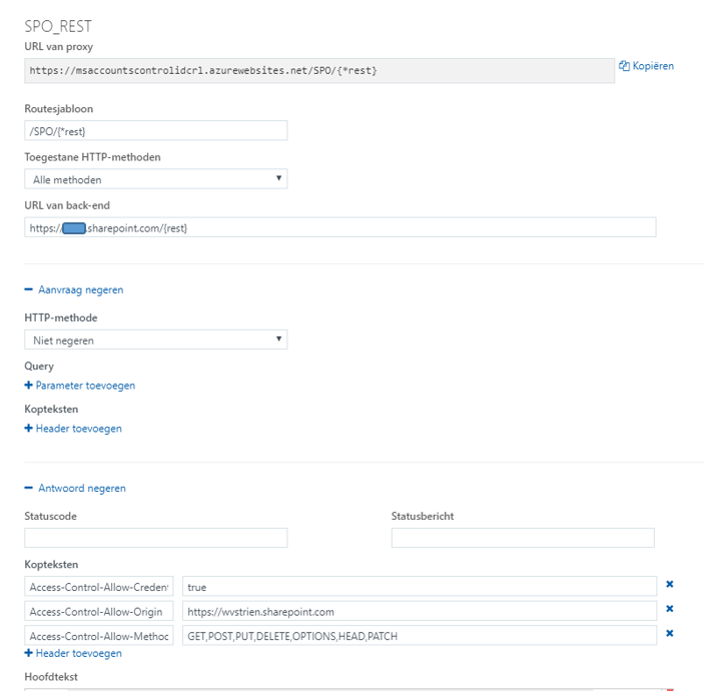
Configuration of the Azure Function Proxies to CORS-enable "<your custom STS>/ adfs/services/trust/2005/usernamemixed" and "https://login.microsoftonline.com/RST2.srf"
Impression of the custom Azure Function: CORS-enable "<your SPO tenant>/_vti_bin/idcrl.svc" is simple; proxy-ing SharePoint REST API calls is more complex and challenging. Note: the custom proxy for active authentication requests in your SharePoint tenant is also fit for non-REST requests, e.g. to browse your SharePoint Online sites
Cross-Domain / CORS prepared JavaScript browser client, interoperating with SharePoint Online REST API


This is what happens in the webclient (browser) / SharePoint Online interoperability with adjustment for CORS:
First request automatic issued by secure-aware browser: OPTIONS to start with CORS Preflight
On server / client confirmed preflight, get cross-domain the SPO authentication cookie
Utilze the retrieved SPO authentication cookie within browser-issued SPO REST calls

Sunday, September 16, 2018

Digest Authenticated API should obey to CORS

On securing access to a service API, Digest Authentication delivers stronger security as Basic Authentication. In case the service API is invoked from JavaScript code via XMLHttpRequest, that client application must explicitly self obey to the Digest Authentication handschake. A convenient library to use for that is digestAuthRequest.js (although I had to tweak it a bit to get it working, for availability of CryptoJS within the library, and to apply only the 'path' part of the URL in generating the digest token). But also the API itself must obey to standards: thus the Digest Authentication protocol, but in addition also to the CORS protocol in case of cross domain usage. Otherwise modern browsers will refuse to read the authentication challenge returned by the API in the first step of the authentication handshake:
The rootcause is that XMLHttpRequest::getResponseHeader() method in its default mode can only access simple response headers, any of: Cache-Control, Content-Language, Content-Type, Expires, Last-Modified, and Pragma (see Using CORS). In this set, the WWW-Authenticate header is missing. So if you want to enable JavaScript clients of your API to successful Digest Authentication and use your API, you have to include that response header name in the value of 'Access-Control-Expose-Headers' response header.
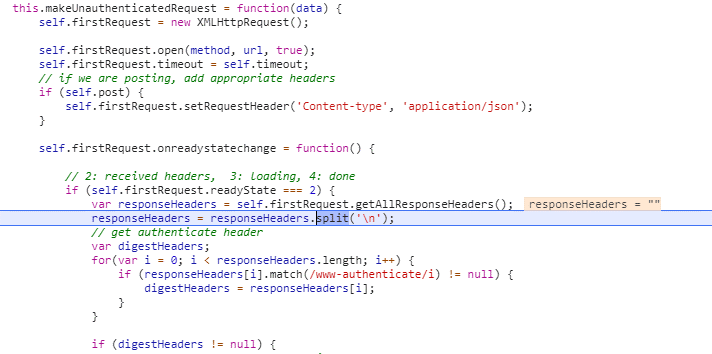
Without properly returned 'Access-Control-Expose-Headers by API, digestAuthRequest fails to access the required WWW-Authenticate header in case invoked from cross-domain JavaScript based client:
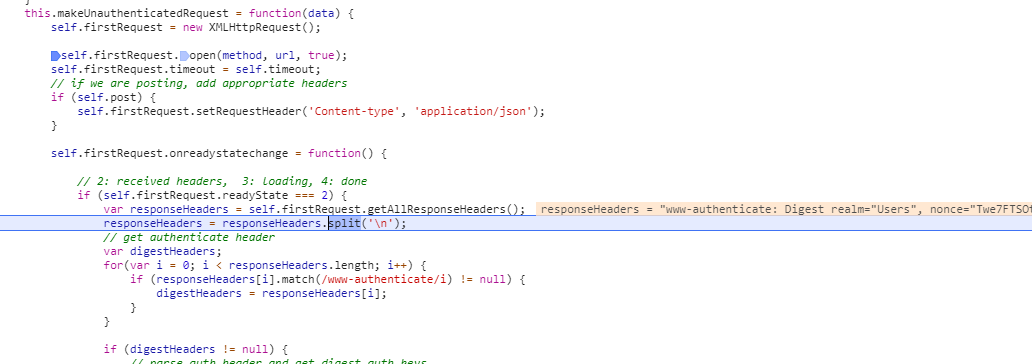
With properly returned 'Access-Control-Expose-Headers by API, digestAuthRequest succeeds to access the required WWW-Authentication header in case invoked from cross-domain JavaScript based client:

Wednesday, August 22, 2018

Resolve from conflict between 'Content-Approval' and SharePoint Workflow

Business usage scenario: content management capability to work on draft of data items first, and on peer approval publish copy of the data item into another list.
The business power user recognized self the richness of SharePoint building blocks to realize the scenario:
  1. Generic list with 'Content Approval' and 'Versioning' configured;
  2. SharePoint Designer Workflow on ItemChange; in which the approval status of item is checked, and on condition of 'Approved' create a copy of the item in the 'publish' location.
In theory this setup should function correct. However in (akward) SharePoint practice it does not:
  • The execution of the workflow triggered on ItemChange, results itself that the reached workflow stage is administrated as 'metadata' in the item on which the workflow is triggered.
  • And although the actual content of the item remains unchanged, the standard 'Content Approval' handling treats this as change towards the stage in which the data item was approved; and automatically resets the approval state to 'Pending';
  • When in the workflow the 'Approval Status' field is retrieved, it is therefore already reset to 'Pending'.
Thus not only the publication process fails due this reset of the condition value, but also the data item itself is reset; as if no 'Approval/Reject' decision was made by the peer reviewer. This is beyond confusing, also frustrating; and does not help in adoption of SharePoint as underlying business platform.
The business user consulted me for help. I quickly learned that the experienced behavior is a known issue in the combination of 'Content Approval' and SharePoint Designer Workflow. A functional error which cannot be prevented, that is when utilizing the out-of-the-box building blocks 'Content Approval' plus Workflow. A possible way-out is then to 'build' a custom 'Content Approval'. But that I consider a non-desired and weak approach. The OOTB Content Approval is available to use - for business users via configuration -, so that should be respected and acknowledged.
As prevention upfront is thus not possible, I switched to an approach in which to mitigate afterwards. In the triggered workflow, retrieve the 'approval status' of the previous version of the current item, and use that for the condition evaluation. If 'approved', then publish the item; and in addition also from the workflow execution restore the approved state in the item. The beauty here is that also in this mitigation the richness of the SharePoint platform can be utilized: SharePoint REST Api to retrieve previous version of data item, and standard SPD workflow actions to call Http Web Service plus set the approval status of data item.

Thursday, July 12, 2018

Utilize Azure Function Proxy to resolve lack of CORS aware within passive OAuth authentication flow

The steps to issue OAuth based authenticated SharePoint Online REST API calls from a SharePoint-external client context are well-documented elsewhere, e.g. within Access SharePoint Online using Postman. What is missing in these outlines is the notification that in case the external client is a Javascript based webapplication, the setup will fail due Cross-Origin aka Cross-Domain security protection by modern browsers; unless put in unsafe mode (not recommended!). The problem is here not within the modern browsers, as these are all CORS prepared / supporting. The real cause is that the REST call to 'https://accounts.accesscontrol.windows.net/<tenantid>/tokens/OAuth/2' does not return a CORS aware response; and a browser running in safe mode will refuse to accept the response coming from this different domain.

Browser / Cross-Domain issue

Augment the response to be CORS-aware

For browsers to accept the cross-domain OAuth authentication flow, solution is to modify the received response such that it is augmented with the needed CORS headers. In a first attempt, I tried to augment the response via overriding the (methods of the) XMLHttpRequest object in JavaScript. But not surprisingly this fails: the browser built-in Cross-Origin protection inspects the HTTP response on native level, and cannot be deceived by manipulating the received HTTP response within JavaScript runtime context. From security perspective this makes sense, otherwise the Cross-Origin protection could easily be avoided (seduced) in malicious code.
The valid approach is that the HTTP response as received on HTTP protocol level will itself include the missing CORS headers, before reaching the calling browser. Of course it is not possible to modify as Office 365 customer organization the behavior of the external hosted Microsoft SaaS service. So we need to 'proxy' the external service endpoint, and include the missing CORS headers in the proxy response. Previously this would require to either utilize the capabilities of a reverse proxy in the organization's landscape, or custom code an own endpoint that acts as proxy between the client and the invoked (external) service. But last year Microsoft released the concept of Azure Function Proxy, and this can out-of-the-box be used in a no-code / configuration-only manner to proxy the call to 'https://accounts.accesscontrol.windows.net/<tenantid>/tokens/OAuth/2'.

Configure the Azure Function Proxy

Browser / Cross-Domain allowed via Azure Function Proxy

Tuesday, June 12, 2018

Inject dynamic-filtering into classic-mode ListView

Earlier in my SharePoint "life", I delivered a capability in which a COTS application UI with an ASP.NET GridView, was on-the-fly augmented with dynamic filtering by utilizing list.js library: On-the-fly add client-side filtering and sorting to GridView. On occasion I refer to this as an showcase of how with simple means, a richer user experience can be delivered in SharePoint context. Last week I showed this again, and also this business user was charmed by it. But he asked to have it applied to a standard SharePoint ListView, in particular one in datasheet/quick-edit layout. I took on this challenge, and with successful result.
Screenshots to visualize the effect:
The capability itself is delivered as generic utility and deployed via private CDN. To activate on a list-view page, one merely needs to include reference to the EnrichListView.js library via a ScriptEditor webpart.

High level architecture Microsoft Stream

For reference: