Sunday, February 7, 2021

Migrating away from SPD workflows: Power Automate is NOT the right direction for system processing

Like more O365 customers, we were in begin Q3 2020 unpleasant surprised by the Microsoft announcement that runtime execution of SharePoint Designer 2010 workflows would in few months time come to its end. In our tenant, business users are self-empowered for automation customizations, and in a significant number of site collections they have designed custom workflows. But as it quickly became clear that the stop-message of Microsoft this time was a final one (note: on concrete stop-moment of InfoPath, the other 'old/classic' power-user customization tool is no Microsoft statement yet on), we knew we had to act. We bought ourselves some time with Microsoft, as the initial message of stop in few months was both unrealistics as ridiculous / not consumer-friendly from Microsoft. And then together with business, as in our model they own their self-build customizations, started up a migration plan away from SharePoint 2010 workflows (and later on to include SPD 2013). The destination to be Power Automate, as that is what Microsoft itself is advising:

If you’re using SharePoint 2010 workflows, we recommend migrating to Power Automate or other supported solutions.

Source: SharePoint 2010 workflow retirement

While ongoing, this generic Microsoft advise turns out viable for the majority of the custom-build processing, as these are mostly on level of 'user-productivity'. But the Power Automate approach gets in a squeeze to migrate unattended system processing, with a bulk of actions. Power Automate on itself can handle that, but the license model restricts the flow owner from using it for bulk / large automated operation. You either are forced to buy a more extensive Power Automate license, but mind you: this buys additional capacity, but still with a defined limit. Or you must migrate to another 'supported solution'. In the Microsoft 365 domain this means to migrate to Logic Apps iso Power Automate. The design model of the both are similar, the operation model however very different: Power Automate runs under identity and license of Power Automate owner with a licensed capacity on level of flow actions; Logic Apps runs under system identity and with pricing model of 'pay what you use'. If you need more capacity, you will pay more; but Microsoft will not stop the system processing because you passed a capacity thresshold.
Business users dislike the Logic Apps approach, as this reduces their self-empowerment. They are not capable to define + deploy Logic Apps flows themselves into the productive landscape, but must involve IT / administrators. But one must question on whether this loss of flexibility / business-agility is really a recurring problem: you do not expect critical system automation /processing to require the capability for business to continuously be able to change on the spot. A bit of control on such business critical processing is not per se a bad thing, neither for the owner business themselves...
Pointers:
  1. Power Automate pricing
  2. Power Platform: Requests limits and allocations
    For personal-productivity automation, licensed capacity of max 5000 actions per day is well beyond expected usage. But this does not apply ico automated system processing: max of only 5000 is not enough when bulkprocessing eg an HR process for all employees of a > 20.000 FTE organization.
  3. Why you should use Logic Apps instead of Power Automate
    Power Automate is meant to automate certain workflows for productivity, Logic Apps are meant to automate certain tasks within your organization.
  4. Why you need Power Automate and Azure Logic App for your enterprise
    If you create a custom workflow on Power Automate, it can be exported to a JSON file which can then be imported into Azure Logic App. This is a great way to migrate a custom workflow created by a Business user; for example, to be evolved into a more elaborate process and then shared with the team.
    Power Automate workflow is suitable for individual users who need their own custom processes. Azure Logic App is for workflow shared by multiple users or complex processes maintained by IT. This decision is also driven by their specific pricing model.
    Power Automate license by user: $15 USD per user per month. Azure Logic App is charged by execution: $0.000025 USD per action, and $0.000125 USD per Standard Connector.
  5. Azure logic apps vs Power automate – A detailed comparison

Wednesday, February 3, 2021

Leverage MS Stream eCDN investment with THEOplayer

Last year we selected Ramp eCDN as Microsoft-certified eCDN solution for Microsoft Stream, and successful applied Ramp Multicast+ in multiple internal webcasts for control on the internal video delivery. For diverse reasons on another webcast Microsoft Stream is insufficient (lack of customization options to provide a rich virtual event attendee experience, lack of guest access). Business selected a product company with their own cloud-based streaming platform. The player used in that platform is THEOplayer, consuming HLS video traffic.
An aspect that remained is that at IT / connectivity level, we must prevent network saturation on the internal network. So we explored whether possible to leverage Ramp Multicast+ also with this HLS-based THEOplayer. According to a promotional this should be possible, but it turned out that neither of the 2 involved vendors actually had it working. In a DevOps way of working with the 3 involved external parties (production company, Ramp, THEOplayer), we identified the code-pieces that are required to make the combination THEOplayer + Ramp an actual reality. With the required result: the global audience that was watching this webcast direct connected to the company LAN, all consumed the video traffic flawless as one shared multicast stream. Without negative effect of public internet connections at specific locations + countries.
Proof of Concept code in plain JavaScript: THEOPlayerAndRampPoC.js. Based on successful PoC validation, this code-snippet was reused by vendor to include the Ramp Multicast+ optimized video consumption in their THEOplayer usage, via typescript THEOplayer hooks module.

Saturday, January 23, 2021

Understanding why you at least must consider to go isolated

My trigger was actually a classsic 'admin' versus 'dev' mindset: I wanted to “play” with the new Microsoft Graph Toolkit 2.0, and used Mgt-PersonCard in a custom SPFx webpart. Deployed it to a development/playground site in SharePoint production tenant, as only there is a filled User Profile store to fully experience all the capabilities delivered in the Person-Card component. Asked the Azure tenant admin to approve the API Permissions that Mgt controls typical require, and in all the Microsoft provided code examples for simplicity sake are requested org-wide. And got the door slammed back in my face: sorry, not going to grant this [are you insane for even dare to ask??]
At first surprised and disappointed on this rejection, I again looked into API Permissions for understanding. I started with questioning some Microsoft contacts on what Microsoft recommended best-pracice in this is. Not suprising, the consultancy answer is on level of “it depends” and “customers must consider and decide for themselves”. So that is what I continued with: deep-dive to understand about how org-wide can be risky, and about the balance between strict security control/mitigation, versus developer convenience.

The happy, unworried flow...

I started with reading again the Microsoft Docs on Connect to Azure AD-secured APIs in SharePoint Framework solutions. This is a typical example of Microsoft documentation in which simplicitly prevails above the more complex story. Yet some credits deserved, in the Considerations section there is some minor warning about Granted permissions apply to all solutions.

Happy indeed, for malicious code...

But what does this actually mean, how can 'any solution in tenant' (mis)use the Azure AD permissions granted to the webpart you deployed in AppCatalog? For understanding of this, another Microsoft Docs gives more insight: Connect to API secured with Azure Active Directory; in the section 'Azure AD authorization flows':
"Client-side web applications are implemented using JavaScript and run in the context of a browser. These applications are incapable of using a client secret without revealing it to users. Therefore these applications use an authorization flow named OAuth implicit flow to access resources secured with Azure AD. In this flow, the contract between the application and Azure AD is established based on the publicly known client ID and the URL where the application is hosted"
In essence this means that all what is needed for arbitrary script code to reuse Azure AD permissions granted on org-wide level, is the public client ID or name of an approved application, and the script must be loaded in the browser on the same domain as that approved application. The clientside script code can then itself setup OAuth Implicit flow for the public client ID or name. The script does not have to be SPFx code itself, in the ultimate situation it can implement OAuth Implicit flow itself on raw OAuth protocol level. The lack of MSAL.js or even ADAL.js does not scare hackers away, they have rich toolkits to help them setup attacks. And the attack can even be simpler: in case the malicious code is included in the browser DOM where also at run and render time a SPFx control is loaded, then it can read/steal in the DOM the access token returned to that SPFx control loaded in the same domain. Awareness on this in Considerations when using OAuth implict flow in client-side webparts:
"Web parts are a part of the page and, unlike SharePoint Add-ins, share DOM and resources with other elements on the page. Access tokens that grant access to resources secured with Azure AD, are retrieved through a callback to the same page where the web part is located. That callback can be processed by any element on the page. Also, after access tokens are processed from callbacks, they're stored in the browser's local storage or session storage from where they can be retrieved by any component on the page. A malicious web part could read the token and either expose the token or the data it retrieved using that token to an external service."

Is there real risk?

A typical 'dev' response is that there is no real security risk of leaking unauthorized information. After all, the client side code can only access data and functions for which the logged-on user is allowed, thus is already entitled to access. Fair point, but the fundamental difference is in the awareness of the logged-on user that data is retrieved under his/her identity. For 'safe' code, the user is aware that data is retrieved; that is exact the business purpose why (s)he is using this trusted control. But consider malicious code that was downloaded by a business user from internet to deliver that one convenient capability (e.g. draw a nice looking graph). The business user is not aware in case that convenient library underwater misuses the OAuth accesstoken granted to e.g. invoke the Graph API for reading person data from User Profiles, and leak that data to social or even dungeon endpoints where you definitely don't want this company related data to land.

Protection by isolation [social distancing]

How do SPFx isolated webparts protect against this global allowed access risk? In essence very simple: by isolating the Azure AD / API permissions approval to only the SPFx solution that requested it, and were approved / trusted by the Azure admin tenant. On browser operation level this isolation is delivered by each isolated SPFx webpart in its own unique solution-specific domain, hosted in an iframe. Other code cannot on browser nor DOM level be loaded into such iframe isolated domain, and thus cannot piggy-back on the contract of this approved SPFx solution. Loaded from different url, and the browser protects against reading the accesstoken from the iframe.
And a nice additional advantage of SPFx isolated webparts is that in API Permissions administration is logged and thus visible per SPFx solution what permissions are requested. This visibility is lacking with org-wide permissions: an admin (Azure nor SharePoint) cannot tell which SPFx solutions requested the API permissions. And more dangerous: there is no indication on which code (SPFx webparts, other libraries) is using the org-wide approved permissions.

Understanding summed up in bullets

  • Azure AD is used to for access-control to data (Microsoft 365) and applications (Microsoft 365 + other applications)
  • Azure API permissions (‘scopes’) are used to allow Azure AD authenticated clients, specific access to Azure AD protected resources
  • JavaScript code running in browser uses OAuth implicit flow to authenticate on-behalf of the logged-on user to Azure AD, and via approved Azure API permissions is permitted to do actions against the Azure AD protected resource
  • Org-Wide allowed API permissions are available for any JavaScript code that is executed in the runtime context of the ASML SharePoint domain, and that applies OAuth implicit flow against Azure AD (OAuth access token is returned within https://<tenant>.sharepoint.com global context)
  • There is no visibility in Azure AD of the usage-context for which org-wide API Permissions are required → identity of specific SPFx controls that request them at deployment time, is not administrated
  • On Classic Sites: via script injection, whatever library can be downloaded from internet by business users themselves, without IT involvement nor awareness. Malicious code is on Azure AD level enabled to misuse API permissions that are permitted on org-wide level. Without the logged-on user being aware, the downloaded JavaScript library can access the protected resource on behalf of the logged-on user, and “do malicious / bad things’ with the data that can be retrieved. E.g. send out the data to an extern location (social channels, business competitor, ...)
  • On Modern Sites: by default the business user are disallowed to insert / inject arbitrary code themselves. Code can only be uploaded as SPFx code in AppCatalog:
    • Tenant AppCatalog: managed by IT
    • Site AppCatalog: managed by business self (SCA). IT controls whether a Site AppCatalog is delivered on a site, only on good business motivation; and knowledgeable + trusted developers are involved
    • Be considerable: PnP community (*) is delivering the Modern Script Editor SPFx webpart. A convenient webpart that enables fast delivery [rapid prototyping] of SharePoint Modern customization, without the need to immediate comply to all the 'SPFx development + deployment hashhle'. But be aware that once you allow this SPFx webpart in your tenant, you are opening also in your restricted Modern SharePoint context 'the box of pandora' that from then enables the business users to inject just any arbitrary script library for runtime execution in SharePoint pages.
      • (*) Initial version of Modern Script Editor WebPart is build and delivered by Mikael Svenson, and given as a gift to the SharePoint community. He build this before joining Microsoft; and it may not in any way be regarded as a Microsoft supported + approved solution.
    • Native SharePoint (Online) API is itself without Azure AD access-control, and can be invoked without need of approved API permissions. Thus also by code that is not running in context of SharePoint page; e.g. running from another webapplication platform, local running scripting, … This is an inherent security leak / issue in SharePoint Online API, IT not in control to close / improve that
    • That the older SharePoint API does not provide the option to improve / control the usage, is not a reason to allow same freedom and flexibility on Azure AD protected APIs, of which Graph API is a significant one. Note: (exposure) scope of Graph API extends to much more then only SharePoint Online: also Mail, Teams, Groups, ….

Monday, December 28, 2020

In the dungeons of Azure AD B2B: prevented that external can have multiple active guest accounts on alternative email addresses

A charm of Azure AD B2B is that the responsibility for guests account management is federated to the external context of invited person. But with this charm inevitable also comes lesser direct control, as within the inviting tenant you have no insight on the federated account in the external Azure Active Directory. I wrote already on a negative effect that can result from this: properties of external Azure AD account might block creation of guest account.
Recent I experienced a peculiar variant of this issue. An external was successful invited, and able to redeem the provisioned guest account and use that to access resources in the inviting tenant. At a later moment, the same external was reinvited via New-AzureADMSInvitation cmdlet on an alternative email address as identity. This was also successful and resulted in a second guest account provisioned in the inviting tenant. But when trying to resend the redeem invitation from Azure Portal, this failed as the new guest account on deeper level is referring to the same federated external identity as the original provisioned guest account. Thus although it looked in the inviting tenant that the 2 guest accounts were isolated from each other, in the reality of the actual identity source of the invited external the 2 alternative emails are administrated as proxy addresses within the same external Azure AD account.
I consider it as correct behavior by Azure AD B2B to recognize this, and prevent that multiple guest accounts can federate to the same single external Azure AD account.
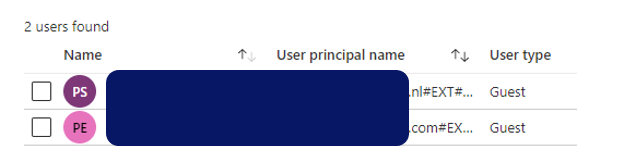
Same external invited with 2 separate guest accounts in inviting tenant
Initial guest account successful accepted and activated
Later provisioned guest account cannot be accepted
Reinvite via Azure Portal blocked as guest account is referring to same external Azure AD account

Tuesday, December 22, 2020

Developer inconvenience: Deploy Isolated WebPart with webApiPermissionRequests fails unless permission to create new Azure AD App Registration

In real-life enterprise context, it is advised to tag any SPFx webparts that will invoke an Azure AD protected API as isolated. This to prevent that other script running in same page, can abuse the OAuth access token assigned to the SPFx webpart and invoke any tenant-wide API permissions on behalf of current user.
However, you need to be aware of some deployment implications with Isolated WebParts. The first one is that in the Microsoft design, you can only deploy Isolated WebParts via the tenant AppCatalog. It is not possible to deploy an Isolated WebPart (only) to the site App Catalog where it will actualy be used. I suspect this is due that each Isolated SPFx WebPart creates a new Azure AD App Registration on tenant level, and for consistency the SPFx WebPart must therefore also be installed on tenant level. Negative result is that every site-specific customization is visible on all others sites where it likely is unusable. Luckily this visibility is initial limited to only the site owners in "Add an App". Only after a site owner explicit adds the Isolated WebPart to the site, then it will be visible in page editing mode in the available WebParts.
An even more significant inconvenience is that to successful deploy an Isolated WebPart, you need to have the authorization to create a new Azure AD App Registration. Without that permission, the deployment in tenant AppCatalog will fail with the generic error 'Deployment failed. Correlation Id ....'. Implication is that in effect the dependency on Ops is unnecessarily increased: a developer must reach out to a Global Admin for the deployment of SPFx solution containing Isolated WebPart. But the better option is that you request that Global Admin to assign your account the Application Developer role, then you are empowered to do this 'Ops' part yourself.

Sunday, December 13, 2020

Simple pattern to ensure unique element ID inside SPFx React WebPart

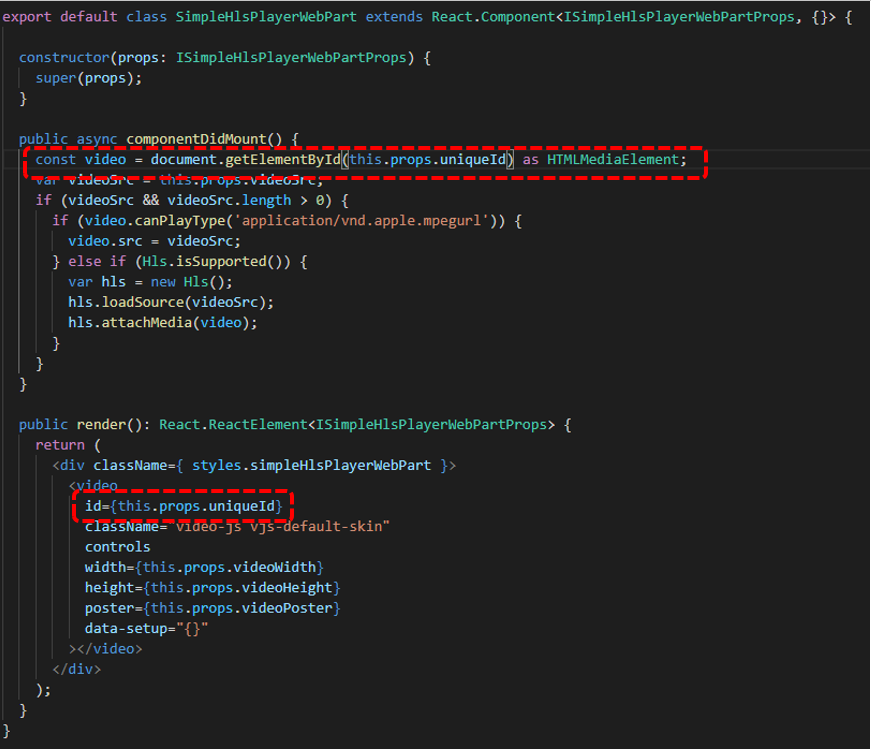
When you build a SharePoint WebPart, you must take into account that the business user can add multiple instances of that webpart on a single page. So the operational execution must be robust for that. In case your webpart relies on HTML element ID, e.g. via 'getElementbyId', then you must ensure that the element ID of each instance is unique. A simple pattern I applied is to derive the ID of the inner React Component on that of the unique ID of the parent React WebPart.
Part 1: Extend the React WebPart Properties interface with a property for unique ID
Part 2: Parent React WebPart derives unique ID from its own, and pushes to the inner React Component
Part 3: Inner React Control applies the received unique ID in its rendering + operation

Sunday, November 8, 2020

Office Graph and Microsoft Graph

Clear and consistent product naming remains a challenge, certain also in the Microsoft domain. An example is the reuse of phrase 'Graph' in Office Graph and Microsoft Graph aka Graph API. What do these names entail, and what if any is the relation?

Office Graph

Office Graph is the oldest name, and originates in 2014 as the foundation underlying Delve. "The brains behind Delve is the Office Graph. The Office Graph continuously collects and analyses signals that you and your colleagues send when you work in Microsoft 365. For example, when you and a colleague modify or view the same document, it’s a signal that you’re likely to be working together. Other signals are who you communicate with through e-mail, and who you’ve shared documents with, who your manager is, and who has the same manager as you."

Microsoft Graph aka Graph API

Microsoft Graph is a giant proxy, it takes requests in, validates authentication token, optional does validation and transformation, and then passes / forwards to the specific inner layer in Microsoft 365 landscape; and returns the inner responses, optional after transformation to the Graph API caller. Graph API provides consistency over all the different inner services, on level of authentication, property naming and casing, exception handling, singular shared object types (eg consolidate on one definition of ErrorDetails object type). Important to understand is that Microsoft Graph itself does not provide services, it simple delegates to the actual services in the Microsoft 365 landscape.

Actual the same?

Microsoft: "The Microsoft Graph models activity in Microsoft 365 services, including Exchange Online, SharePoint Online, Yammer, Skype for Business, Azure Active Directory, and more, and in external services, such as other Microsoft services or third-party services. Microsoft Graph components are used throughout Microsoft 365. The Microsoft Graph represents a collection of content and activity, and the relationships between them that happen across the entire Office suite. It uses sophisticated machine learning techniques to connect people to the relevant content, conversations and people around them. The Microsoft Graph contains information about enterprise objects, such as people and documents, as well as the relationships and interactions among these objects. The relationships and interactions are represented as edges."

Office Graph renamed into Microsoft Graph

The Office Graph has evolved to become exposible via the Microsoft Graph. Thus they have conceptual morphed into same offering, Office Graph as backend collects and analyses signals that you and your colleagues send when you work in Microsoft 365; and the Graph Api provides central gateway access to this collected information. And also to all other services within Microsoft 365 landscape.
Graph API on top of Microsoft Graph administration of collected signals in Microsoft 365 landscape and services
The Microsoft Graph Insight APIs expose relationships generated by Office Graph services (source: Microsoft Search 101 - What’s the relationship between the Microsoft Graph and Office Graph?, Bill Baer)